1. Overview
This section provides a high-level overview of the URDAD Modeling Tool (URDAD-MT).
1.1. Why URDAD
In most organisations, what a business does is written down three times: requirements in documents, designs in diagrams, and behaviour in code. Each is written by different people, in a different language, and kept in step with the others by hand. They drift apart, and once they have, nobody can say with confidence which one is right — usually only the code is, and the business cannot read it.
URDAD replaces the three copies with one model: a technology-neutral description of what the organisation’s services must achieve and how they achieve it. Everything else — diagrams, documentation, tests, running processes, exports to other tools — is generated from that model, so it cannot drift from it.
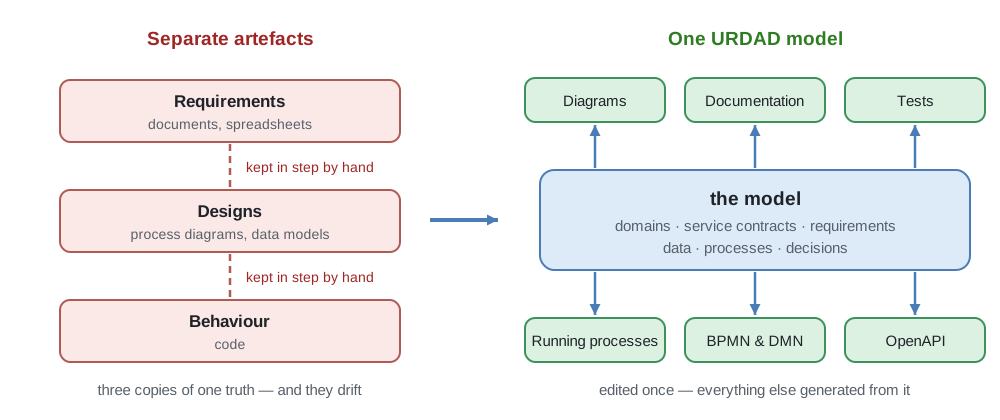
In short, URDAD offers:
-
a systematic, repeatable design process that guides people and AI alike (Section 1.1.5), with AI that proposes while people decide (Section 1.1.6), in one technology-neutral language for requirements, data, responsibilities and processes (Section 1.1.7);
-
the business model as the core asset, grown unit by unit, from which everything else is generated, so model, views and running processes do not drift apart (Section 1.1.1, Section 1.1.2, Section 1.1.3, Section 1.1.4);
-
requirements-driven services: contracts that make providers pluggable by configuration and requirements testable (Section 1.1.8, Section 1.1.10), formalised as far as each service warrants (Section 1.1.11);
-
cross-functional teams across the organisation sharing one ubiquitous language, with an information architecture that grows with their processes (Section 1.1.13, Section 1.1.14, Section 1.1.15);
-
freedom of technology, auditable change and comprehensive tool support (Section 1.1.16, Section 1.1.17, Section 1.1.18, Section 1.1.19).
The sections below take these one at a time. Each is brief and points to where the subject is treated in full. How URDAD compares with BPMN, the most widely used process notation, is in Appendix A; that comparison is also candid about where URDAD is not the better choice (Section A.8).
1.1.1. The business model as a core asset
The model is the only artefact that is kept. Diagrams, documents, generated tests and deployed processes are all derived from it and can be produced again at any time. What an organisation invests in is therefore the model itself: a description of its services, their requirements and their realizations that is independent of the technologies used to run them today.
The asset need not be built all at once. A model typically starts with one business unit’s services and grows, unit by unit and project by project, until it may span the whole organisation; each unit’s contracts are what the next one builds on.
That independence is what makes the asset last. Applications, platforms and vendors are replaced every few years; the services a bank or an insurer offers, and the rules they are bound by, change far more slowly. A model that names no technology outlives several generations of implementation, and each new one starts from an accurate, current specification rather than from code that must be read back into requirements.
1.1.2. Everything in sync
Nothing in the tool is drawn by hand. A user who seems to edit a diagram is in fact changing the model; the change is stored, and every view of it — in the model tree, in every diagram and form, for every user looking at it — is regenerated from the model (Section 4.1.2). Two diagrams can therefore never disagree, and no diagram can be out of date.
The same holds beyond the tool. The documentation for people who never open it (Section 4.12), the tests a project is checked with, the processes that run, and exports to BPMN and DMN are all produced from the same model. Every change is recorded as a revision, so what the model said at any earlier point, and who changed it, can always be recovered.
1.1.3. What is specified is what is executed
The usual route from a specification to a running system passes through a developer, who reads the specification and writes code meant to do the same. Every such translation is a chance for the two to differ, and after a few changes they usually do.
The optional execution environment removes that step for processes: it runs the approved model’s processes as they are modelled, rather than code re-written from them (Chapter 8). It also checks every answer a service gives against its contract — the pre-conditions on the request and the post-conditions on the response — and names the party at fault when one is broken (Section 8.9.4). The question "does the system do what the specification says?" thus has an answer for every request, not only for the cases someone thought to test.
1.1.4. Business ownership of business processes
It is not uncommon for business processes modelled in BPMN to exist twice: a business diagram that people agree on, and an executable diagram, enriched with scripts, variable mappings and job types, that actually runs. The executable one is changed by developers, the business one falls behind, and the business ends up no longer owning — or even being able to read — the process it is accountable for (Section A.5).
URDAD keeps one model, written in business terms, and makes that model precise enough to verify and to run. The people responsible for a service review and sign off the very specification that is executed, and a change to the business process is a change to the model, made, reviewed and approved like any other (Section 6.2.2). Technical detail — which system answers a request, how it is reached — is configured where the model is deployed, not drawn into the process.
1.1.5. A systematic, repeatable design process
Business process design is often a craft: its quality depends on who did it, and two analysts given the same brief produce two different designs. URDAD aims to make it an engineering process instead. The URDAD method defines its steps, and what each step takes as input and produces as output (Section 4.2).
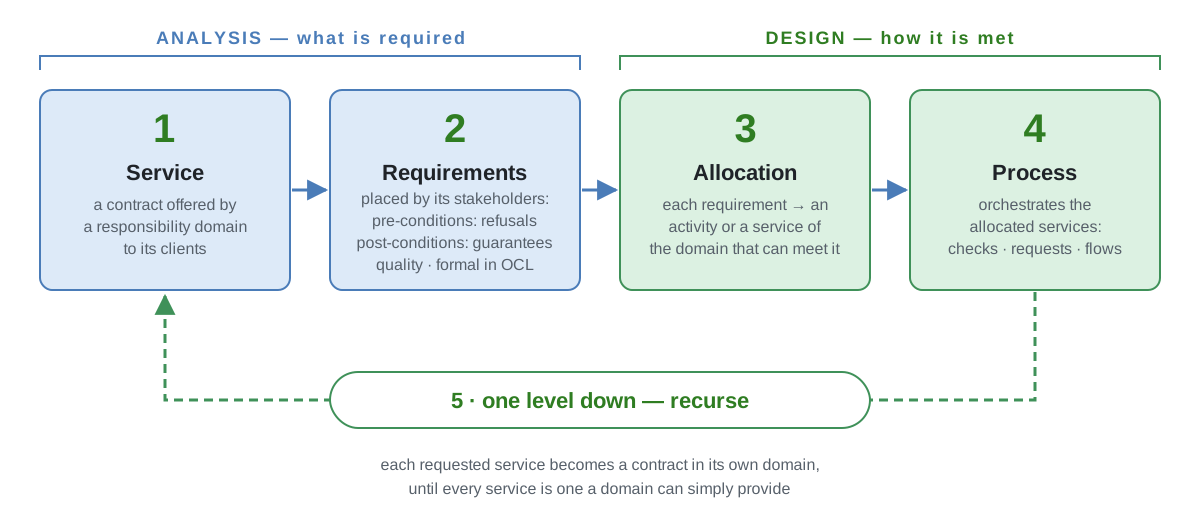
Every service is analysed and designed the same way:
-
Service. Analysis starts from a service contract: the service a responsibility domain offers to its clients.
-
Requirements. Its stakeholders — every party with an interest in the service: the business, a regulator, legislation, even a provider the service relies on — place requirements on it. They are captured as pre-conditions — the grounds on which the service may refuse a request — and post-conditions — what it guarantees when it does not — together with its quality requirements. The request and response data structures are also populated during this phase.
-
Allocation. Design begins by allocating each requirement to an activity or a service used to address the requirement (verify a pre-condition or realize a post-condition). If new services are required, these are allocated to appropriate responsibility domains.
-
Process. A process then orchestrates the allocated services: the checks, the service requests and the flow between them.
-
One level down. Each service the process requests becomes a contract in its own domain and is analysed and designed in exactly the same way, until every service is one a domain can simply provide.
Analysis — steps 1 and 2 — says what is required, without committing to how; design — steps 3 and 4 — says how it is met. Because the same steps repeat at every level, a large design is not a different kind of problem from a small one, only more of the same.
The steps are designed to apply sound design principles at every level: each responsibility is placed in one domain, levels of granularity are kept apart, and domains are coupled only through contracts. A design produced this way therefore tends to meet the same quality requirements whoever produced it, and because every step’s output is part of the model, it can be verified rather than merely reviewed. Formality is incremental: a requirement can start as text and become a checkable OCL expression later (Section 1.1.11). Defined steps with defined inputs and outputs guide people new to the method — and equally an AI assistant, whose proposals are checked like anyone else’s work.
1.1.6. Controlled AI
Generative AI can draft a design in seconds, and that is exactly what makes it hard to use where designs matter. Its output is plausible whether or not it is right; it is written in whatever vocabulary the assistant chose, not the organisation’s; nobody can say afterwards which requirement a given line was meant to satisfy; and once it has been pasted into a document or a code base, it is indistinguishable from work a person checked. An organisation that answers to a regulator cannot accept a design on those terms.
In URDAD the AI works inside the method rather than beside it, and its work is controlled the way anyone else’s is: AI proposes, a person decides.
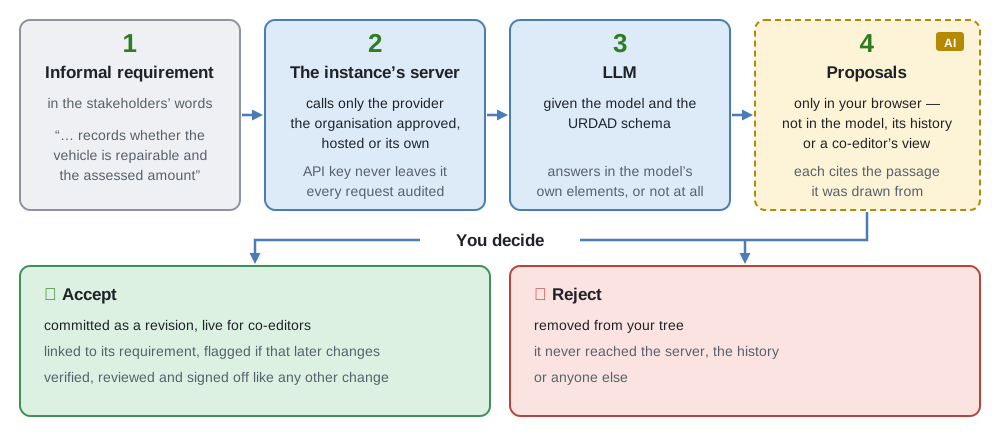
The control is in five places:
-
Grounded in the model. The assistant is asked to formalise an element’s informal requirements into model elements, and is given the model itself and the URDAD schema to do it with (Actions). What it can propose is therefore a responsibility domain, a service contract, a data structure or a process, in the model’s own vocabulary, following the same method a person would (Section 1.1.5) — not free text to be interpreted.
-
Held back until accepted. Its answer is placed in the model tree and on the diagram as proposals, flagged as AI work, where they can be inspected and drawn. They stay in the requesting user’s browser: no co-editor sees them, and nothing of them is in the model’s history. Each is accepted or rejected individually; rejecting one removes it without trace.
-
Traceable to what was asked for. Each proposal records the passage of the requirement it was drawn from, so the reviewer judges it against what was actually asked for. Accepting it records that link permanently, and the element is flagged if the requirement is later edited, or the cited passage removed (Section 4.1.3.11, Section 1.1.12).
-
Checked like anyone else’s work. An accepted proposal is an ordinary change, committed as a revision just as that person’s own edits are. It is subject to the same model verification (Section 1.1.9) and the same review and sign-off at each phase gate as work written by hand.
-
Under the organisation’s control. Which LLM may be used is decided once, by an administrator, for the whole instance — a hosted provider or one the organisation runs itself — and only the server calls it, with a key no browser ever holds (Section 7.6). Every request is recorded in the audit log; what is sent, and what that means for data protection, is set out in Section 5.8.5.6. Configuring no provider at all switches the assistance off.
The result is that AI speeds up the first draft without becoming an author of record. Everything that ends up in the model was accepted by a named person, can be traced to the requirement it serves, and has passed the same checks as the rest of the design — which is what lets an organisation use the assistance and still stand behind the model (Section 1.1.17).
1.1.7. One complete language
Process notations start from the flow: what happens, in which order, and who does it. Everything else a business needs to state — its rules, its data, its requirements, who is responsible for what — is left to other notations, or to prose, and linked to the flow by hand.
URDAD starts from the service contract: what service is required, when it may be refused, what must be true once it has been provided, and who is responsible for providing it. Refusals are stated as pre-conditions and guarantees as post-conditions. A process comes afterwards, as one way of realizing the contract, and it is checked against it. Responsibilities, contracts, requirements, data, processes and decisions all live in the same model and refer to each other directly.
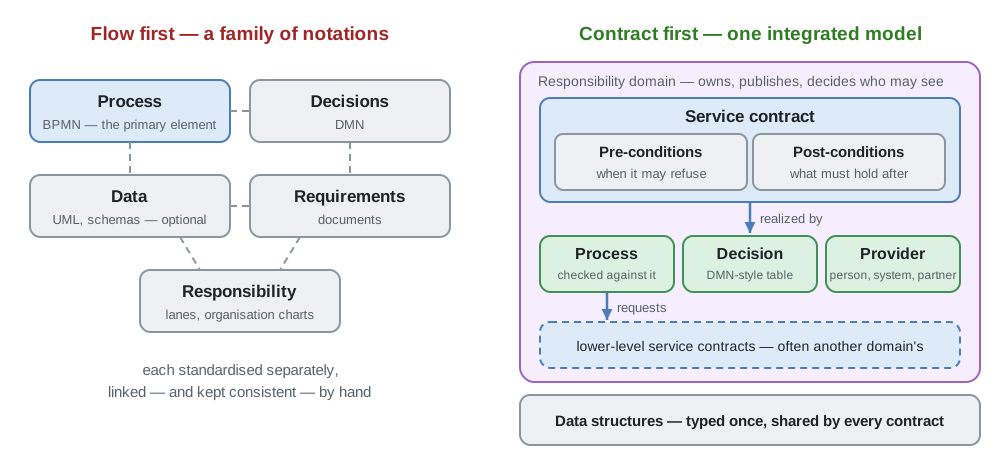
Because a process requests other contracts, never other processes, the same analysis repeats one level down until every service is one a responsibility domain can simply provide (Section 4.2). The difference in starting question is explained in Section A.1.
1.1.8. Pluggable service providers
A process requests a service contract, never a particular provider. Who answers it — another process, a decision, a person through a human task, an internal or external system, or a stub during testing — is decided where the model is deployed (Human tasks, External systems).
Changing provider is therefore a configuration change, not a process change. A service performed by hand today can be automated tomorrow, a department’s in-house service can be outsourced to a partner, or a process can be replaced by a decision, without any of the processes requesting it being touched. Since every provider’s answers are checked against the same contract, an outsourced provider is held to exactly the requirements an in-house one would be.
1.1.9. Verifiability
A design is usually judged by review: someone experienced reads it and decides whether it looks right. Review is valuable, but it is an opinion, it depends on who does it, and it misses what nobody thought to look for. The usual alternative is to find out by building and testing — after the cost of building has been paid.
Because a URDAD model states both what each service must achieve (its contract) and how it achieves it (its process), much of a design can be checked against its requirements before anything is built. Model verification answers whether the model is internally consistent: whether every reference resolves, whether each process refuses the requests its pre-conditions say it must refuse (Section 4.18.51), raises only the exceptions its contract allows (Section 4.18.50) and says what it answers with (Section 4.18.43). The check is deterministic: it gives the same findings whoever runs it, and they are facts about the model, not opinions (Section 4.18).
Verification happens at several points, each catching what the earlier ones cannot:
-
As you write. Each formal specification is checked for well-formedness, names and types in the editor itself (Section 4.18.4), and can be tried on an example to see whether it says what was meant (Section 4.18.5).
-
On demand. The whole model is verified at the level it is meant for: functional, whether each process addresses its contract’s requirements, or executable, whether it is formal enough to run (Section 4.18.2).
-
At a phase gate. A model that contains a dangling reference or an unreadable specification cannot be submitted for review or approved (Section 4.18.57).
-
Before deployment. The execution environment verifies each candidate model again, with its libraries and configuration present, and blocks one that could not run (Section 8.6).
-
While running. Every response is checked against its contract, and the party at fault is named when one is broken (Section 8.9.4).
How much can be verified depends on how formal the model is: a requirement in prose can be reviewed but not checked, so verification grows as requirements are formalised (Section 1.1.11). Verification shows that a design is consistent with its requirements; whether the requirements are the right ones remains a question for the people who hold them — and generated tests show that the running processes behave as specified (Section 1.1.10).
1.1.10. Testable requirements
A service contract is a test specification. Its pre-conditions say which requests must be refused, and with which exception; its post-conditions say what must hold of every response. Nothing more is needed to decide whether an answer is right.
URDAD uses that twice. Before a change is approved, test cases are generated from the contracts — including the boundaries of each pre-condition — and run against the project’s processes, with each process’s own requests stubbed; nobody writes a test, a stub or a data set (Unit test runs). The resulting test report is part of what is signed off (Test reports). And while processes run, the same contracts are checked on every request (Section 8.9.4). Requirements that are testable from the start also tend to be clearer: a condition nobody can test is usually one nobody has fully understood.
1.1.11. Formality where and when it pays
Formal specifications buy precision, checking and executability, but they cost effort and need someone able to write them. Demanding them up front would keep many people out of the model; never having them would leave it a picture. URDAD lets formality be added gradually, requirement by requirement, as the model matures.
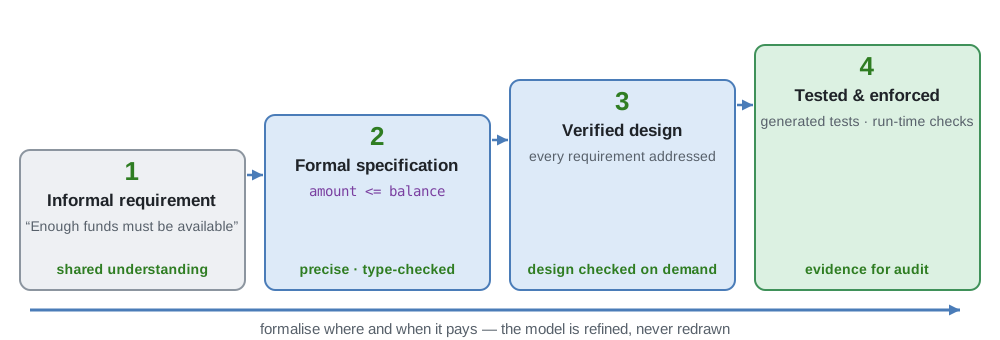
-
A requirement can start as an informal requirement: prose that anyone can write and read, recorded in the model and linked to what is written from it (Section 4.1.3.11).
-
It can then be formalised as a formal specification, in URDAD-OCL (Section 4.6) or in the business-friendlier URDAD-FEEL (Section 4.7), and type-checked as it is written.
-
Once requirements are formal, model verification checks that each process addresses its contract’s requirements (Section 4.18).
-
Formal contracts can then be tested against generated cases and enforced while processes run — the subject of the next section.
The model is never redrawn along the way: the same model serves a business reader in a workshop and an executing process in production. An organisation can stop at whatever level a service warrants — prose for a process nobody intends to automate, full formality for one that is regulated or executed.
1.1.12. Traceability
Traceability means being able to follow a requirement in both directions: down to whatever addresses it, and up to whoever asked for it. It is what lets you answer questions such as:
-
How is a requirement refined into more detailed requirements, level by level?
-
Is a requirement addressed at all, and if so, how?
-
Why does a process perform a particular activity — which requirement does it address?
-
Which higher-level requirement is a lower-level requirement part of, and which stakeholder asked for it?
-
Which business processes are affected if a service is changed or is no longer available?
The last is the same question asked the other way round: not why something exists, but what depends on it. An architecture description that conforms to ISO/IEC/IEEE 42010 must be able to answer questions like these.
1.1.13. A ubiquitous language
Departments, and business and IT, often use the same word for different things and different words for the same thing. A ubiquitous language — one vocabulary shared by everyone working on a domain — removes that source of misunderstanding.
In URDAD the vocabulary is the model. Every term — a responsibility domain, a service, an entity, a data structure and its fields — is a model element with its definition attached, defined once and referred to everywhere else. A reference is to the element, not to a word, so renaming a term renames it everywhere, and a reference to something that no longer exists is reported by verification. Every request, response, exception and message is described by such a data structure, so two processes cannot disagree about what a "claim" or an "account" is.
1.1.14. Cross-functional teams on one model
Business analysts, enterprise architects, process owners, developers, reviewers and compliance officers usually work on different artefacts and hand them over to each other. In URDAD they work in the same model, each reading it through the views that suit their role.
Work is organised in projects. A project’s team edits its own branch of the model concurrently, each change reaching the other members as it is made; the organisation’s main branch changes only when a project has been reviewed, signed off and merged (Section 6.2.2). Responsibility domains decide who may see and change which part of the model (Security policies), so many teams across an organisation can work on one model without stepping on each other. A service allocated to one domain is designed by that domain’s team; the lower-level services it needs are allocated to other domains, whose teams take them up.
Not every unit has to adopt URDAD for one to benefit. A unit that does describes, as service contracts, both the services it provides — to other units and to external clients — and the services it sources from other units and external providers. Those contracts state the requirements on the other side whether or not it models in URDAD, so a unit can adopt the method on its own and others can follow when they choose.
1.1.15. An information architecture that grows with the processes
Organisations often try to design their data model up front, in one large effort that is out of date by the time it is finished. URDAD does not ask for one. Each process states what it is asked, what it answers, and what it reads, creates and updates; an entity's structure is aggregated from the data the processes using it feed into it.
The information architecture is therefore a consequence of the business processes rather than a separate design. A new or changed process extends it, project by project, and the Entity View and Entity Map View show it as it currently stands (Section 4.1.2). Verification checks it as it grows — that an entity’s identifying field identifies it, for example — and every field can be classified as personal data where it is (Section 4.3.2.5).
1.1.16. Technology flexibility
An URDAD model names services, requirements, data and responsibilities — never a programming language, a database or a product. Technology is chosen where the model is realized, and can be chosen differently for different services, or changed later, without changing the model.
Today the same model can be run by the URDAD execution environment, built on Temporal (Chapter 8); exported as BPMN and DMN to run on Camunda 8 (Section 4.14); and described as OpenAPI and AsyncAPI documents for the systems that answer its requests (Interfaces for external systems). A new technology needs a new way of realizing the model, not a new model — which is also what makes it practical to adopt technical advances as they come.
1.1.17. Certifiability
Certification and audit ask the same questions again and again: what was required, how is each requirement met, how was that shown, and who approved it? Assembled after the fact, the answers are costly and incomplete. URDAD aims to make them a by-product of the work.
-
Requirements are kept separate from design. A contract’s requirements say what; the process realizing it says how. Requirements lead to tests, design to the running process, and the two are checked against each other.
-
Every step is traceable. Each activity of a process is allocated the requirement it addresses, and a formal requirement can cite the informal one it was written from, so an auditor asking why a step exists gets an answer from the model.
-
Changes are governed. Every change is made in a project, passes the phase gates of its life cycle, is reviewed and signed off — with the test report and, for a regulated project, the checklists of its regulatory regimes (Section 6.4.1.2) — and is recorded in the audit log (Section 6.8).
The tool does not certify anything itself. It keeps the evidence an organisation needs to make that claim, current and in one place.
1.1.18. Tool support
A rigorous method is only practical if a tool carries the routine part of it. The URDAD Modeling Tool:
-
guides the method — its views follow the steps of the URDAD method, from a service’s contract to its requirements, the allocation of each requirement, and the process (Section 4.2);
-
draws every diagram — all views are generated and laid out from the model, following ISO/IEC/IEEE 42010 viewpoints (Section 4.1.2);
-
checks the model — verification reports, on demand and at every phase gate, what is incomplete or inconsistent (Section 4.18);
-
governs change — project-based modelling, comparison of revisions, review, sign-off and an audit log (Section 6.2.2);
-
controls access finely — security policies on responsibility domains decide who may see and change which part of the model (Security policies);
-
assists with AI — a language model can propose model elements from informal requirements, each accepted or rejected by a person (Section 7.6);
-
publishes the model — as generated documentation for those who never open the tool (Section 4.12).
It runs in a browser, signs people in through the organisation’s identity provider, and is self-hosted (Chapter 7).
1.1.19. Integrability
An organisation adopting URDAD already runs tools for planning work, building and releasing software, approving changes (ITSM) and recording compliance evidence (GRC), and it will not replace them. The tool therefore integrates with responsibilities rather than products: for each responsibility — gating a delivery pipeline, publishing documentation for review — there is one vendor-neutral way of working, and each product is reached through an adapter for it (Chapter 9). Moving from one vendor to another changes the adapter and nothing else.
The model itself is also open to other tools: processes and decisions export to and import from Camunda 8 BPMN and DMN (Section 4.14, Section 4.15), so an organisation can start from the BPMN it already has, and run URDAD processes on a BPMN engine it already operates.
1.2. Core Concepts
1.2.1. Overview
This section provides an overview of some of the core concepts which are important to understand in order to effectively use the URDAD-MT.
1.2.2. Models
Models are the only persistent business artifact. Creating a model — or an element library — is an administrator action, requiring the URDAD-Admin role. Its content is then authored through projects, and creating a project requires manage rights on the domain that will own it: a responsibility domain within the model, or the model itself. A model that has no responsibility domains yet is owned by the model, which is what allows the first project on a new model to be created at all.
The user may have, at times, the impression that they are modifying a diagram, but a diagram is actually never modified by the user. The diagram action is mapped onto an action which modifies the model, that model change is persisted and distributed across all users of the system and the various views (model tree, diagrams and forms) update themselves to show the model changes.
Organization-wide business model
The tool is designed to be used concurrently by cross-functional teams across the organization, reusing services sourced from within the organization and from external service providers. All changes made to the model are committed and distributed in real-time
include::./requirementsAsServiceContracts
include::./entitiesDeterminedByBusinessProcessRequirements
1.2.3. Projects
All model modifications must be made within a project, which, once signed off and activated, is merged into the main/active branch.
includeprojectTeams/}{projectTeams_sec}
\subimport{concurrentEditing/}{concurrentEditing_sec}
\subimport{projectLifeCycle/}{projectLifeCycle_sec}
1.3. The systems and who uses them
URDAD is supported by two software systems:
-
the URDAD Modeling Tool, in which teams build, review, approve and activate URDAD models; and
-
the URDAD Execution Environment, an optional, separately installed system that runs the processes of an activated model for real (see Chapter 8).
The execution environment reads models from the modelling tool; nothing in the modelling tool depends on it. An organisation that only models never installs it.
In the diagrams below, red elements belong to the modelling tool and its users, blue ones are execution-environment users, and grey ones are systems outside URDAD that an installation relies on.
1.3.1. The landscape
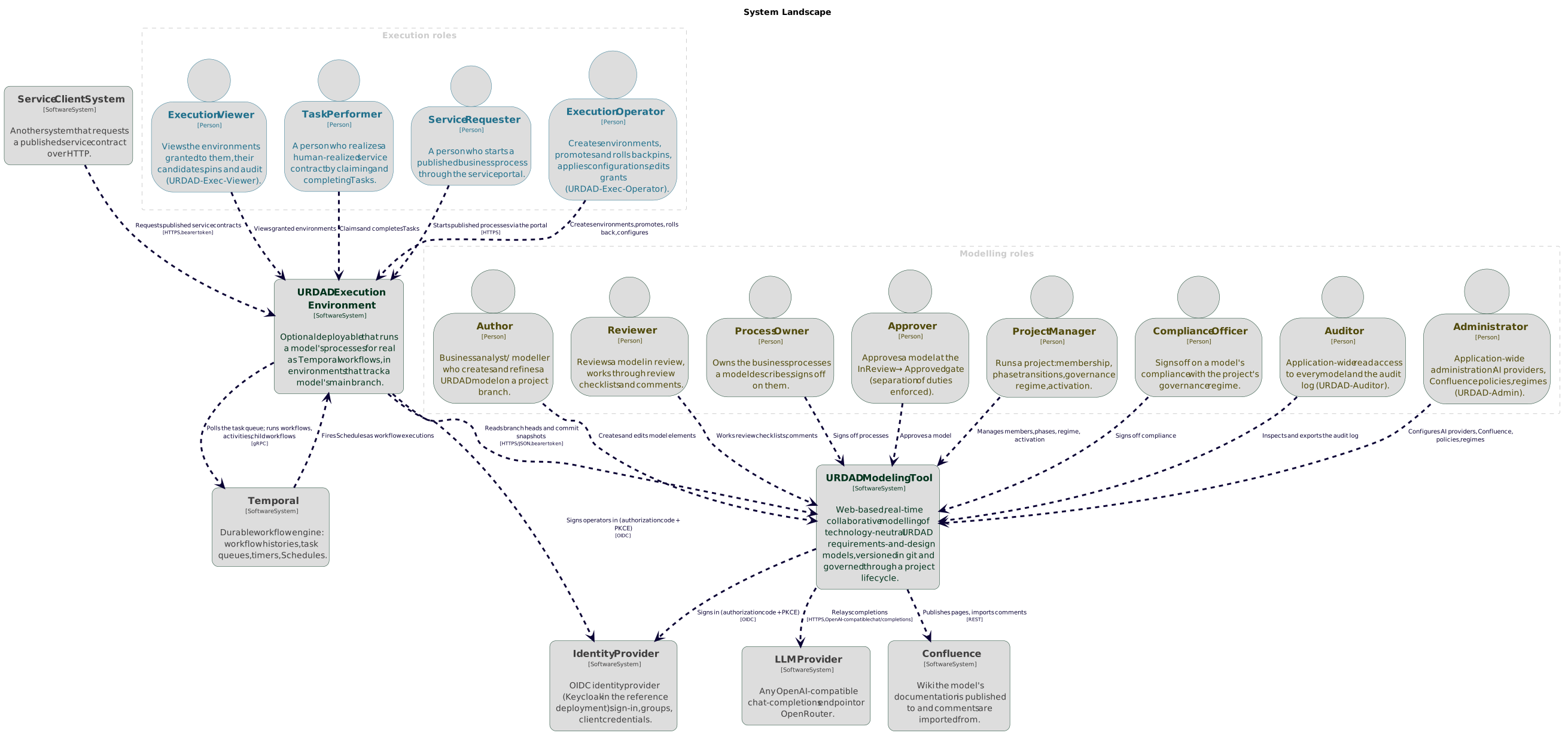
Both systems sign people in through the organisation’s own identity provider, and the groups it holds decide what each person may do. The roles shown are:
| Role | What they do |
|---|---|
Author, Reviewer, Process Owner, Approver, Project Manager, Compliance Officer |
The project-scoped roles held on a project in the modelling tool (see Section 6.3). |
Auditor, Administrator |
The organisation-scoped roles |
Execution Operator, Execution Viewer |
The environment roles of the execution environment's console (see Section 8.12.1). |
Task Performer |
A person who answers a service request a process makes of a human, by claiming and completing a Task. |
Service Requester |
A person who starts a published process through the service portal. |
1.3.2. The modelling tool in context
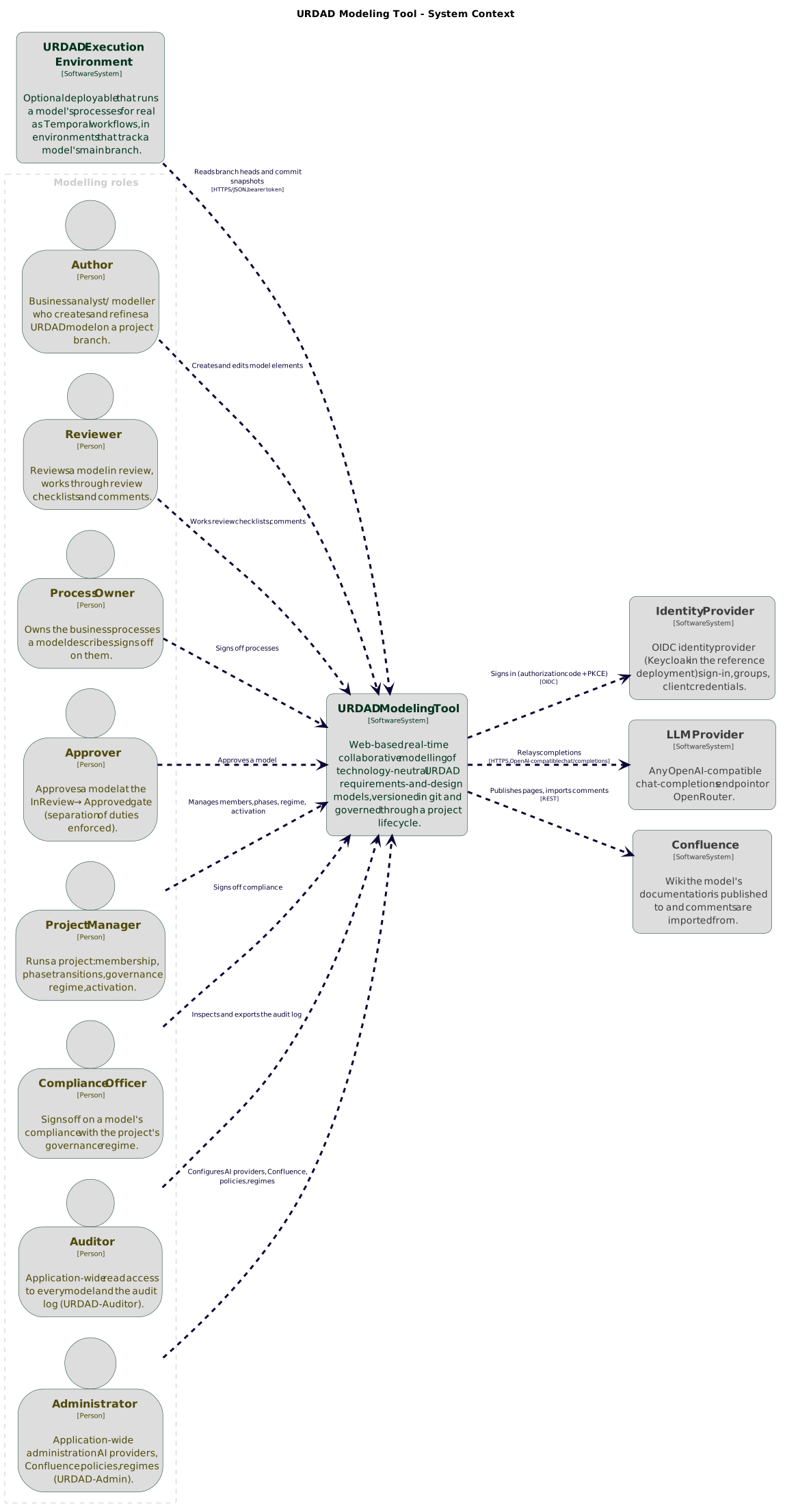
Besides the identity provider, the modelling tool can use an LLM provider for AI assistance (see Section 7.6) and Confluence for publishing a model’s documentation (see Section 9.2). Both are optional, and both are reached only by the server, never by a user’s browser.
Feature overview
What the modelling tool offers, grouped by what it is used for. Each entry links to the section that describes it.
- Three synchronised views
-
The Section 4.1.1 for navigating and reorganising the model, the Section 4.1.2 for working on it graphically, and the Section 4.1.3 for every field of the selected element. Selecting an element in one selects it in the others. Diagrams are never drawn by hand: an edit on a diagram lands in the model, and every diagram is regenerated from it.
- Real-time co-editing
-
There is no save button. Every change is committed as a git revision of the project’s branch as it is made, and everyone working on that branch sees it at once (Chapter 4).
- Reading a journey end to end
-
A requested service can be expanded in place in the Process View to show the process that realizes it, so a journey is read either level by level or end to end (Section 4.1.2.17).
- Formal specifications
-
Constraints are written in URDAD-OCL (Section 4.6) or read and written as URDAD-FEEL (Section 4.7), each checked where it is written and tried on an example before it is relied on (Section 4.18.5). Business rules are Section 4.8 with decision tables, in the same model.
- AI assistance
-
An element’s informal requirements can be formalised into proposed model elements, the formal model checked against those requirements, or an element augmented (Actions). Proposals are reviewed one by one before they reach the model, and each accepted element records the requirement it was formalised from (Section 4.1.3.11). The LLM provider, hosted or the organisation’s own, is configured by an administrator and reached only by the server (Section 7.6).
- Model verification
-
Each process is checked against its contract’s requirements, continuously as the model changes and on demand, at a functional or an executable level (Section 4.18, Section 4.18.2).
- Annotations and libraries
-
Section 4.10 carry the informal requirements and descriptions a model grows from. Element libraries supply reusable data types and services (Section 4.11.2), and one model may depend on another (Section 5.4).
- Generated documentation
-
HTML, PDF or AsciiDoc, from the whole model or any part of it, every diagram followed by what it shows in words (Section 4.12), and published to Confluence with review comments flowing back (Section 9.2).
- Import and export
-
A model as a file (Section 4.13, Section 4.16), and its processes and decisions to and from BPMN and DMN for Camunda 8 (Section 4.14, Section 4.15).
- Projects and their life cycle
-
Every change is made in a project: a branch of the model with its own team, taken through phases and phase gates to activation (Section 6.2.2). The life cycle is itself an URDAD model (Section 6.2.1), with a Testing phase for projects that target execution (Testing).
- Roles, governance and sign-off
-
Section 6.3 say who drives which transition and who signs what; a project’s governance profile adds the checklists that the Section 6.4.1.2 applying to it require (Section 6.4); and a project is approved by sign-off (Section 6.6), on test reports where it was tested, each signed by the execution environment that produced it (Test reports, Trusted test report keys).
- Working alongside other projects
-
Projects on the same model run concurrently and are realigned with
mainas others are activated, automatically or by a manual rebase (Section 6.7). A project no longer worked on is archived, and can be restored (Section 6.9). - Audit log
-
A permanent record of who changed, reviewed and approved what, in git history and the audit log, which can be exported (Section 6.8).
- Access control
-
Security policies per responsibility domain decide who may see and change which part of the model (Security policies), on top of team membership (Section 5.2), with separation of duties on checklist signatures (Separation of duties on checklist signatures) and read access to a project before it is approved (Section 5.6).
- Data protection
-
Personal data is pseudonymised and erasable (Section 5.8).
Each integration is reached through one contract per responsibility, with the products named here as adapters behind it (Chapter 9):
-
delivery pipelines gated on the approved model, on GitLab CI and Azure Pipelines, with contract tests generated from it (Section 9.1);
-
sign-in through any OIDC provider (Section 7.5) and leavers from a SCIM or Keycloak directory (Section 7.5.4);
-
secrets from HashiCorp Vault or Azure Key Vault (Section 7.4.5);
-
language models through any OpenAI-compatible endpoint, a self-hosted one included, or OpenRouter (Section 7.6);
-
the audit log and sign-ins streamed to the organisation’s SIEM (Section 7.4.6).
The same software runs on the organisation’s own infrastructure, hosted for a single tenant, or as a public playground (Section 7.2): two container images, with all state in one data directory (Section 7.3, Section 7.4, Section 7.10). Each evaluator can be given a complete instance of their own (Section 7.9).
1.3.3. The execution environment in context
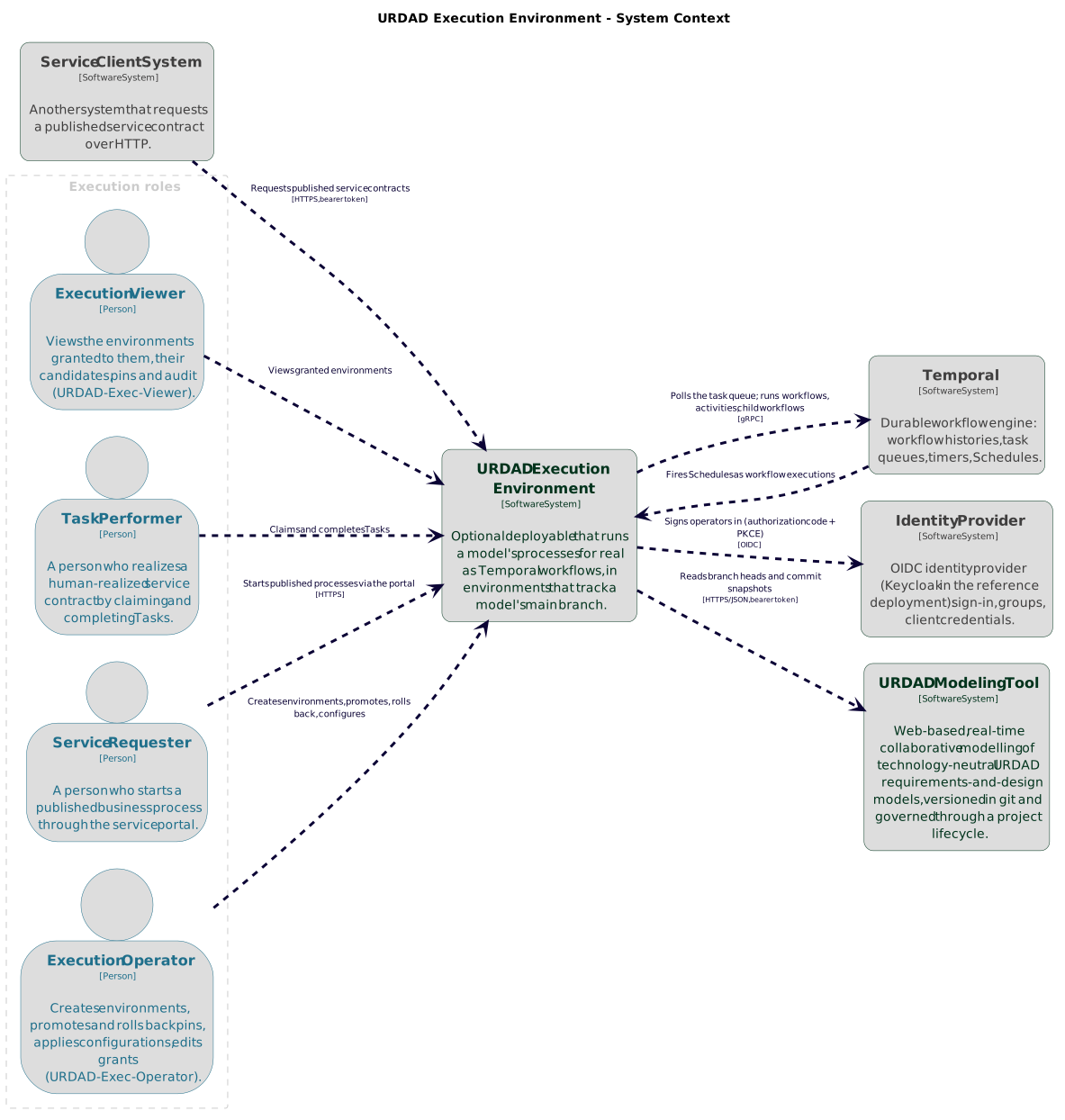
The execution environment runs processes on Temporal, a durable workflow engine. Processes are started by people through the service portal, by other systems over HTTP, or on a schedule; where a process asks a person for something, that person answers through the human-task interface.
How each system is built inside is described in the developer manual.
Feature overview
What the execution environment offers, grouped by what it is used for. Each entry links to the section that describes it; Known limitations lists what it does not do yet.
- Environments
-
Each environment runs one model’s
mainbranch, so it runs only what a project team approved, and is adevelopment,testorproductionenvironment, each with its own task and data store (Section 8.1). A preview environment runs a project’s branch before approval, for a project that consents to it (Preview environments). - The model as the program
-
The model’s processes are run as the model states them, on Temporal: a new revision needs no build and no redeploy, and executions already running finish on the revision they started on (Section 8.9).
- Promotion gate
-
Every new revision of the model or its configuration is first a candidate, and what cannot run is refused before anything starts, never half-way through an execution (Section 8.6, Findings reference). Promotion is automatic, manual or frozen per environment, and can be rolled back (Section 8.8).
- Who answers each contract
-
An environment’s configuration says, for each service contract, whether a process or a decision of the model answers it, a person, an external system, a coded implementation, a fixed stub, or the contract’s own post-conditions (Section 8.7).
- Starting a process
-
People start the services published to them in the task portal; other systems over HTTP through the gateway (Section 8.9) or through a Kafka or AMQP broker (The inbound bridge); and the calendar, by a contract’s scheduled trigger (Scheduled triggers).
- Contracts checked as it runs
-
Every answer, a person’s or an external provider’s included, is checked against its contract (Section 8.9.4), each pre-condition is enforced by the contract’s provider (Who enforces a pre-condition), and every request is answered where it was made (How every request is answered).
- Undoing and retrying
-
A refusal undoes what was already committed through the model’s compensations (How a refusal undoes what was committed), and a request retried by Temporal does not act twice (Retries and idempotency).
- Watching work in progress
-
Monitored activities remind, escalate or withdraw work that is taking too long (How monitored activities run).
- Domain-owned data
-
Each environment’s entity store holds the model’s entities in their modelled shape and refuses a write that does not conform (What the entity store refuses); every change records who made it through which service, in a history that is hash-chained (Each instance’s history is chained).
- Human tasks
-
Where a process asks a person for something, that person claims and answers a human task in the task portal, on forms generated from the model, and the answer is checked against the contract (Human tasks, Section 8.10.1).
- External systems
-
Systems the organisation already runs answer requests over HTTP, Kafka and AMQP, through an adapter host that does the URDAD part of the work (External systems).
- Unit test runs
-
Each process is run on its own against cases generated wholly from the model, what it requests stubbed, and then all of them together; the contracts' own conditions are the oracle, so nobody writes a test, a stub or a data set (Unit test runs). The signed report is what a project’s Testing phase is signed off on (Testing).
- The console
-
In the browser or as the
consolecommand, operators see what an environment runs and how, change its configuration, promote and roll back, and follow each execution (Section 8.12, The console command), with viewer, operator, auditor and administrator roles from the identity provider (Section 8.12.1, Section 5.5). - Audit and event logs
-
What happened is recorded for auditors (Section 8.13), and streamed as events to monitoring, analytics and SIEM tools, with logging requirements stated per responsibility domain (Event logs).
- Installing and keeping it running
-
Its own image and compose profile, installed separately from the modelling tool (Section 8.2), with a choice of database (Section 8.2.1), backups (Section 8.2.2) and the components that keep an environment running (Section 8.2.3).
An organisation that runs its processes on a BPMN engine instead exports them to Camunda 8 (Section 4.14).
2. Getting started
This manual is always a click away. In the modelling tool, User manual in the settings menu opens it, and a dialog this manual explains — verifying a model, a blocked phase gate, signing off, a project’s members, its governance profile, the checklist templates, the URDAD-OCL cheat sheet — carries a ? in its title that opens the manual at that explanation. The execution environment’s console links to it from its header, and from a candidate’s findings (Section 8.12).
Each opens in a tab of its own. Which copy opens is the deployment’s choice:
by default the modelling tool’s is the one of the version it runs
(MANUAL_URL, Section 7.4.7).
3. The URDAD method
3.1. Overview
Take ownership of business processes - - verify business process designs collaboratively designed by by cross functional teams of BAs, EAs, developers assited AI agents, distrivbuted across responsibility domains of your organization
In many organizations
systematic A&D method generating good design, i.e. design meeting quality requirements for good design
Consistent ISO/IEEE-42010 compliant views of business onto business model simplifies information access and verification
Effective communication across organization
Questions to be answered - How does URDAD prevent model and implementation diverging
3.1.1. What is URDAD
A tool-assisted systematic domain-oriented URDAD
3.1.2. What can i do with an urdad model
3.2. Analysis and design principles
3.2.1. A domain keeps its own data
A responsibility domain is responsible for its entities: it is their owning domain, the only one that changes them, and the only one that reads its records. Another domain that needs to know something about them asks, through one of the owner’s services, as it asks for anything else. That keeps each domain free to change how it keeps its data without breaking the domains that use it, and makes every use of the data a request the owner has agreed to answer.
For the common question — this instance, by its key or another unique field — the owner offers query services, which the tool generates (Section 4.4.5). A condition then states what it needs in the owner’s terms:
-- Customer Services: the paying account is open, as Accounts says
let a = getAccount(Tuple{accountNumber = request.fromAccount}) in
  a <> null and a.status = AccountStatus::open
Three consequences are worth knowing.
A refusal comes from the owner’s answer. A service of another domain no longer states a pre-condition over the owner’s records; it applies the owner’s function, and is refused where the owner’s answer refuses it.
An association across domains is a link, not a window. It holds the target’s identity. Comparing that identity reads nothing of the other domain’s; following it to any other field does, and is asked for instead. The owner may delete an instance another domain still refers to.
What was read may have changed by the time it is used. A question asked of another domain and a change requested after it are two requests, each consistent on its own; between them, the owner’s record can change. A process that must not act on a stale answer has the owner check again as part of the change, as its own pre-condition — on the record’s version, where nothing narrower says what must not have changed (Section 3.2.2).
An owner may also let named domains read an entity directly, its published read model (Section 4.3.2.6). Verification lists every other read of another domain’s records for a model meant to run (Section 4.18.13).
3.2.2. A change is decided on what was read
A process usually reads a record before it changes it: a claims manager looks at a claim and notes what to do about it; a clerk sees an account is empty and closes it. The reading and the change are two requests, and between them someone else may change the record. A change made regardless overwrites what they did, and nothing says so.
So a change to a stored entity instance names the version it was decided on. The entity’s view declares a version field (Section 4.3.2.3), which the store fills every time the instance is read; the requester passes what it read on; and the contract making the change states, as a pre-condition with its own exception, that the instance is still at that version:
-- Note claim review: the claim is still as the manager reviewed it
Claim.allInstances()->exists(c | c.claimNumber = request.claimNumber
                                  and c.version = request.claimVersion)
The pre-condition is checked in the same transaction as the change, so nothing can change the record in between. A stale request is refused by the model’s own exception, which the requester handles as it handles any other: read again and decide again, or give up.
Not every change needs this, and a contract that does not says so. It declares that its change applies to the current state, and why:
-
it is computed from what is stored, in its own transaction — a deposit adds to the balance as it is, and loses no other deposit;
-
its own pre-conditions re-check everything it depends on, in the same transaction — an account is closed only while it is open and empty, however long ago the requester looked;
-
it is meant to win — a status the process decides from its own course, not from anything it read.
The declaration and its reason are part of the contract, shown at every promotion. Verification reports a change that neither names a version nor declares (Section 4.18.14).
DDAD for cross-functional teams across organization to collaboratively specify and evolve their organization’s business model.
Model is primary artifact - from which other artifacts like documentation, code, tests, service provider contracts, … are generated - ubiquitous language concepts directly specified and annotated as model elements - responsibility assignment and collaboration between responsibility domains - service contracts and processes - value objects and entities
3.3. A worked example: a simple bank
The method is easiest to see on something small. The source repository
ships a minimal bank, modelled in URDAD as a reference and teaching model,
under models/simpleBank/. Import its .urdad.json file through Model
actions → Import model to follow along in the tool. Its README.md maps
each URDAD concept to where the model uses it.
This section takes one use case — a customer transferring money — through the steps of the method (Section 4.2). The diagrams are views of the model, drawn by the tool’s own layout engine.
3.3.1. The bank, and who answers for what
Customers are a party outside the bank; every service a customer may use is published to them. The bank divides its responsibilities into four departments, by what each can guarantee:
-
Customer Services offers the use cases — and only orchestrates them;
-
Customer Register knows who the customers are;
-
Accounts keeps the accounts;
-
Ledger is the only thing that moves money.

3.3.2. Step 1 — the service
A customer wants to pay money from their account into another. That is a service the bank offers, so it is a service contract, Transfer funds, in the responsibility domain that offers customer services.
3.3.3. Step 2 — its requirements
The contract states what the service needs and what it achieves. Its pre-conditions are the grounds on which it is refused: the amount is positive and within the transfer limit, the two accounts differ, both are open, the client holds the paying account, and there are sufficient funds. Its post-conditions are what it guarantees: the funds moved, the bank holds as much money as before, the new balance is reported, and both the payer and the payee are advised.
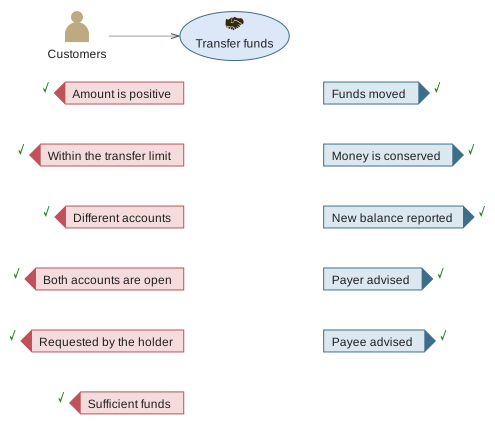
Almost every one is a formal URDAD-OCL specification (Section 4.6), so it can be checked rather than only read:
-- Requested by the holder: `caller` is the login identity that asked
let a = getAccount(Tuple{accountNumber = request.fromAccount}) in a <> null and
    (let c = findCustomerByLogin(Tuple{login = caller}) in
        c <> null and a.holder = c.customerNumber)

-- Money is conserved: `@pre` reads the state before the service
Account.allInstances()->collect(a | a.balance)->sum() =
    Account.allInstances@pre()->collect(a | a.balance)->sum()
The first states a security requirement as an ordinary pre-condition (see
Section 4.6.15). Transfer funds belongs to Customer
Services, which keeps neither accounts nor customers, so it asks the domains
that do: getAccount of Accounts and findCustomerByLogin of the Customer
Register (Section 3.2.1). The second states how the service
changes the bank’s state, by comparing it with the state before
(Section 4.6.13).
3.3.4. Step 3 — who meets each requirement
Each requirement is now allocated to the activity that addresses it. A pre-condition is met by a check. Each advice is met by sending a message. The money movement is the interesting one.
A transfer must happen entirely or not at all: if the paying account were debited and the bank then failed before crediting the other, money would vanish. The process therefore does not debit and credit itself. It requests one service, Post transfer, of the department that can guarantee indivisibility — the Ledger — and that one request meets both Funds moved and Money is conserved.
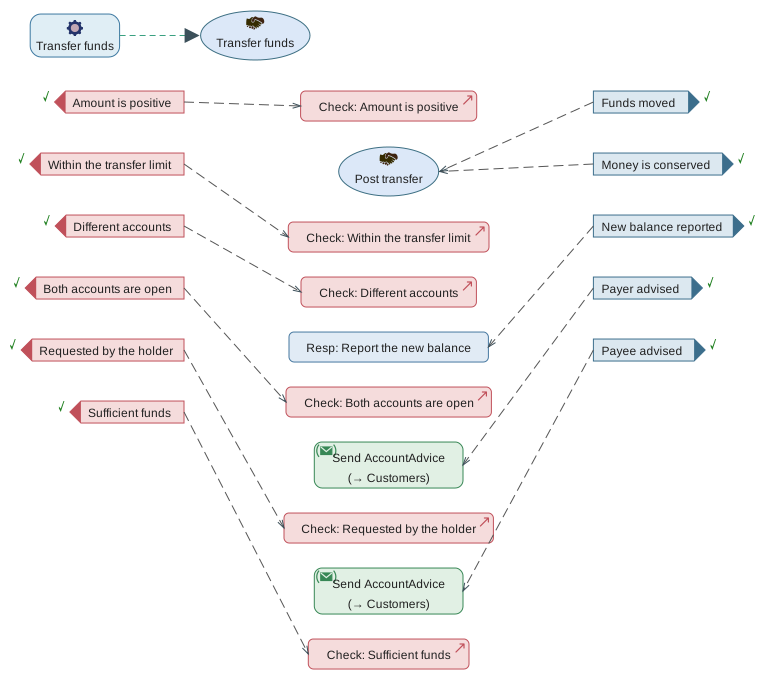
Across all its use cases, Customer Services relies on services of the three other departments, and changes no account itself:

3.3.5. Step 4 — the process
The process orders what was allocated: a check for each pre-condition, then the posting, then the two advices, then the response. The advices do not depend on each other, so they are sent concurrently — a fork starts both, and the join waits for both before the response. Each request states how the request it sends is built from the one it received, and the response step says how the answer is populated.
Post transfer can itself refuse, for five reasons of its own, and the process has to say what happens for each — every exception a requested service may raise must be handled (Section 4.18.49). Here each is a reason Transfer funds names too, so each arm raises the transfer’s own exception: the ledger’s Within the posting limit not met becomes the transfer’s Within the transfer limit not met. The checks at the top make these refusals rare, but between a check and the posting another transfer may have drawn the account down. Since every arm ends in a raise, the advices and the response — which read the posting’s answer — sit on its default path, where that answer certainly exists.
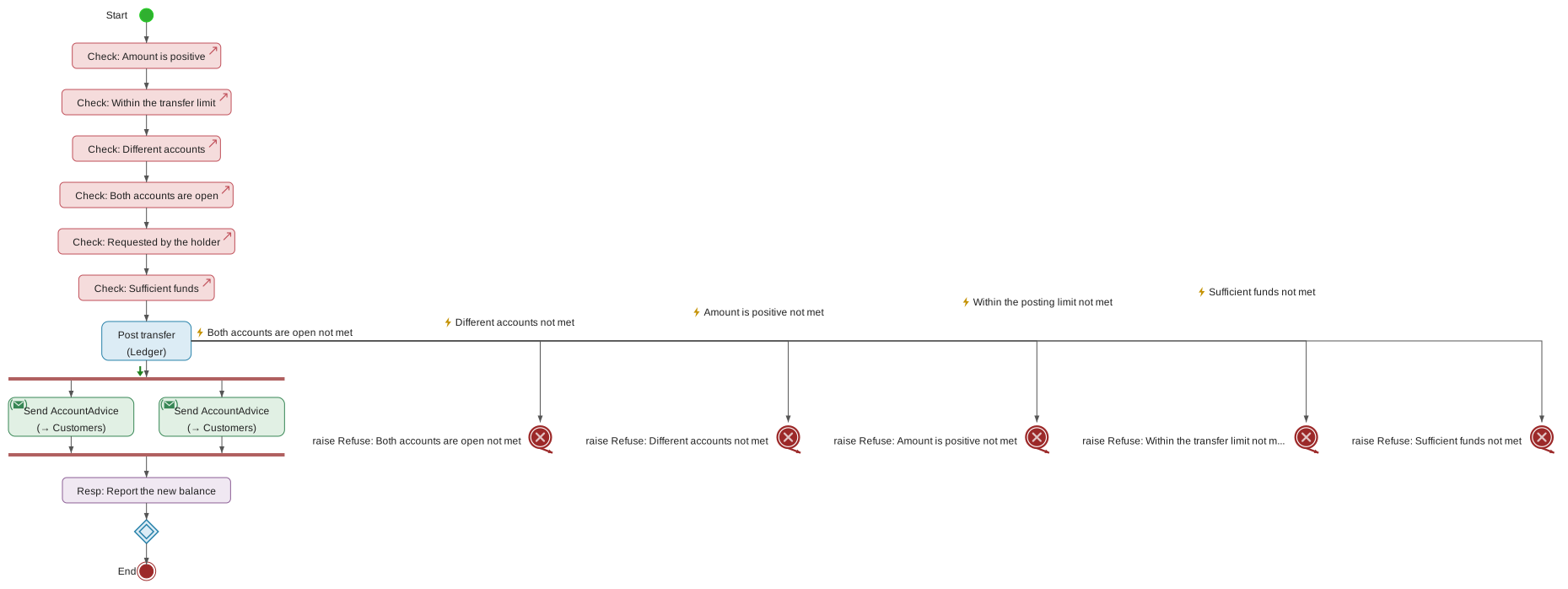
3.3.6. Step 5 — one level down
Post transfer is a service in its own right, with its own contract in the Ledger, and the method applies to it in turn. It carries the guarantees that only the ledger can make — No other account changed, Entries recorded — and the transfer process is shown as the one requesting it. It is published to Customer Services, the domain whose processes request it: a service of one department used by another records who depends on it (Section 4.18.25).
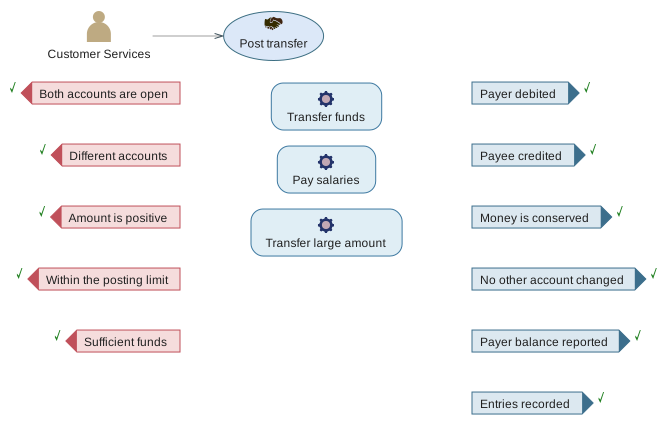
In the bank model the departments' services are where the decomposition stops: they are specified, and not broken down further. A real model would go on until each service is one a department can simply provide.
3.3.7. What the example shows
Verification reports nothing to fix in the bank model at either level — no error and no warning (Section 4.18). That is what a complete model looks like: every requirement stated, every requirement met by something, every step saying what it does.
The rest of the model follows the same pattern, and between them its processes use every construct the Process View offers:
| Construct | Where, and why |
|---|---|
Alternate flows, raising an exception |
Withdraw cash looks the account up and branches: with enough money it debits it, otherwise it raises Sufficient funds not met. |
An exception that carries a value |
Sufficient funds not met has a |
Catching and handling an exception |
Deposit cash lets the ledger refuse a closed account, handles that refusal, and raises its own Account is open not met instead. Every request in the model handles every exception its service may raise, most of them this way; Pay salaries first decides which of its two accounts was closed, and names that one. |
Transfer funds advises the payer and the payee at the same time. |
|
For-each |
Pay salaries posts each payment of a batch in turn. |
While |
Transfer large amount posts tranches of at most the posting limit while anything remains to be paid — a loop whose iteration count depends on the amount, with a stated bound. |
And Get balance is a service that is a function (Section 4.4): it may only be orchestrated across other functions, and cannot ask who is asking.
3.4. A second example: a motor insurer, run as well as read
The simple bank (Section 3.3) is for reading. The source
repository ships a second model meant to be run: a motor insurer,
under models/motorClaim/, with the configuration an execution environment
runs it with (environment.json). Its README.md maps each concept to where
the model uses it and walks through running it.
A client onboards, insures a vehicle, claims against the policy and asks for a claims report — four use cases, published to the insurer’s Clients. There is no client-facing department to hold them: each use case is in the department whose records its post-conditions are about — Onboard client in Client Register, Purchase motor insurance in Underwriting, Process claim and Provide claims report in Claims — because that is the department that answers for its outcome. That clients may request them is what publishing them to Clients says (Section 4.3.1). Each morning, claims open too long are put before a claims manager by a fifth, which runs on a schedule.

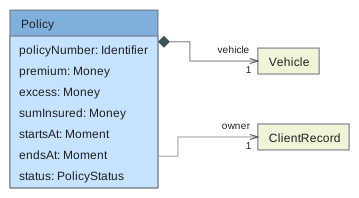
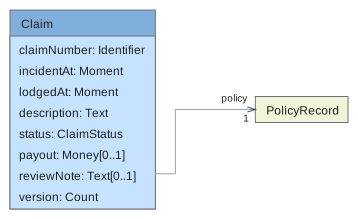
3.4.1. Three entities, and the associations between them
The use cases create the model’s three entities: a Client; a Policy
whose owner is a client; and a Claim made against a policy. An
association to another entity’s view is stored as that entity’s identity,
and a condition navigates it as the record it denotes:
Requested by the policy owner reads p.owner.login = caller, and a claim
reaches its owner through two associations, c.policy.owner.login.
3.4.2. What it adds to the simple bank
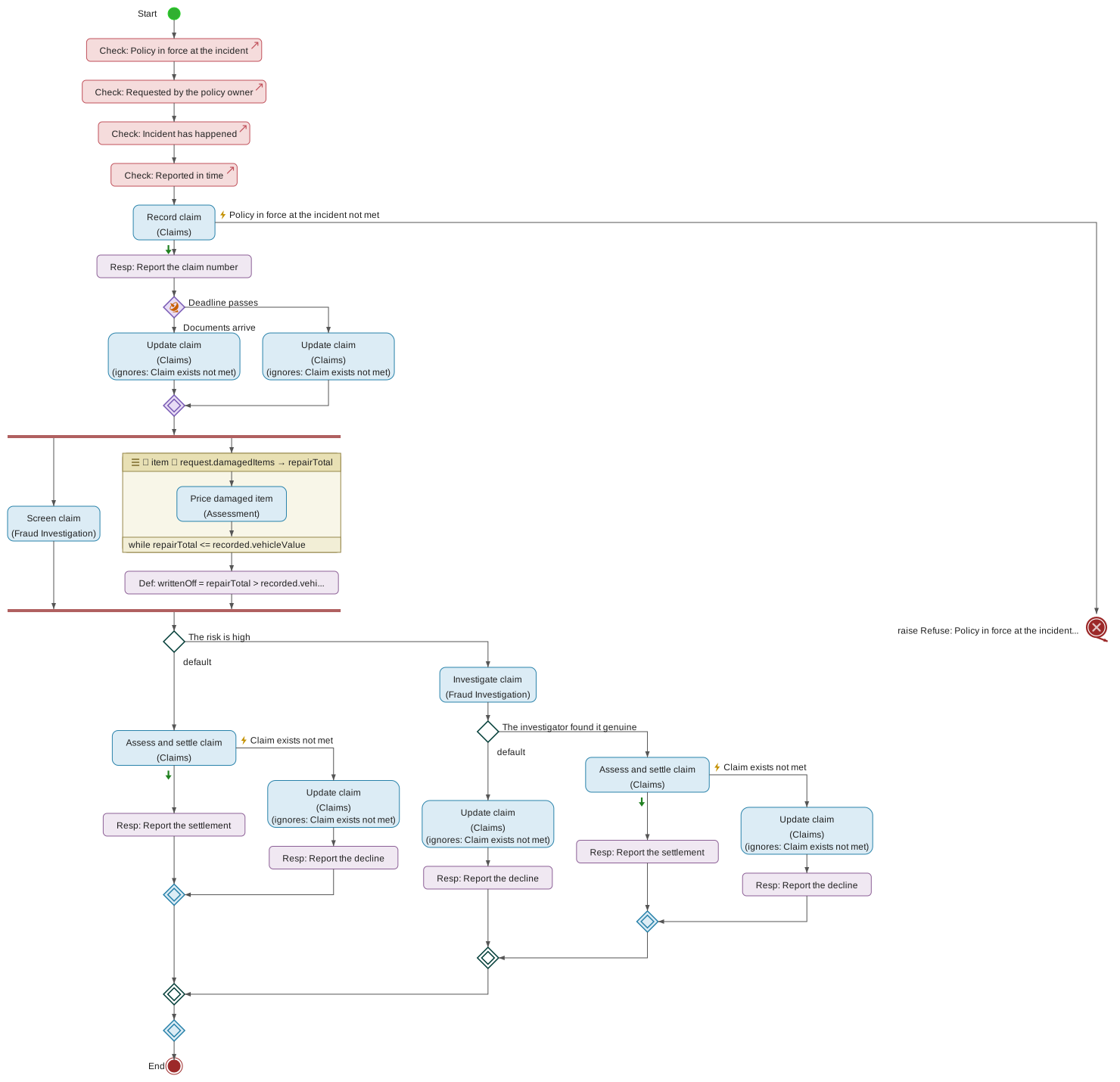
Process claim is long-running: it waits on the client and on people in the insurer, and may take weeks.
-
A message racing a deadline. The client’s supporting documents are a message sent to the claim being processed; a fourteen-day deadline, which a deployment may shorten, races it.
-
A fold with an early exit. Pricing the damaged items totals them as it goes and stops once the total passes the vehicle’s value — a write-off. The total is a carried variable, so a step after the loop reads it (Section 4.5).
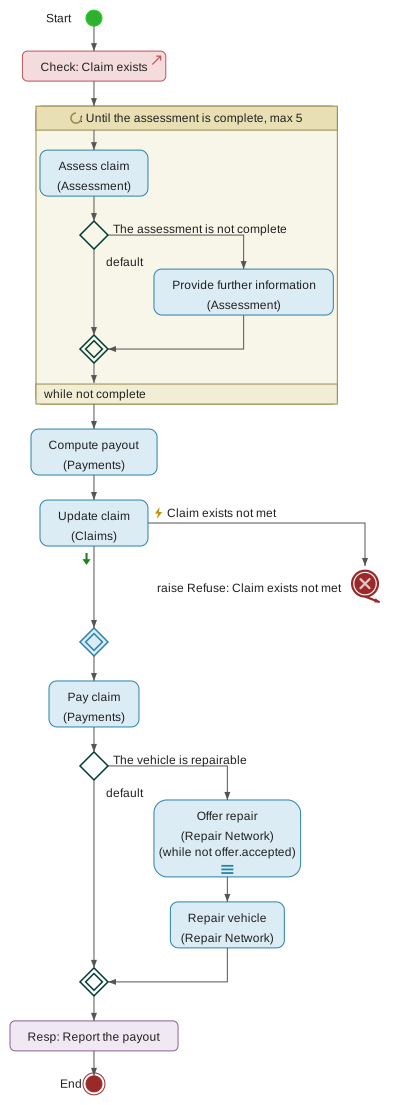
-
A service realized by a process of its own. Assess and settle claim is asked for like any service and runs as a child of the claim. Its loop carries whether the assessment is complete, and asks the client, as a task of their own, when the assessor needs more.
-
A request asked of several providers in turn. Before a repairable vehicle is repaired, Offer repair is asked of each panel repairer, one after another, until one answers that it takes the repair on: a sequential multi-instance request whose continuation condition,
not offer.accepted, reads each answer as it comes. Each repairer is a provider of its own, named in the deployment’s configuration; the model says only that there is at least one (1..). Camunda has no "every provider", so exporting *Assess and settle claim to Camunda refuses it (Section 4.14). -
Every refusal answered, three ways. Each request handles every exception its service may raise (Section 4.18.49). Record claim refusing because the policy no longer covers the incident is passed on as the claim’s own refusal, telling the client which policy and moment. A claim that Assess and settle claim cannot settle is declined, because the contract promises the claim ends settled or declined. And a status update refused because the claim does not exist is ignored on purpose: the claim is the one this process recorded, and no service deletes a claim. Because Record claim now handles an exception, everything that reads the claim it recorded runs on its default path.
-
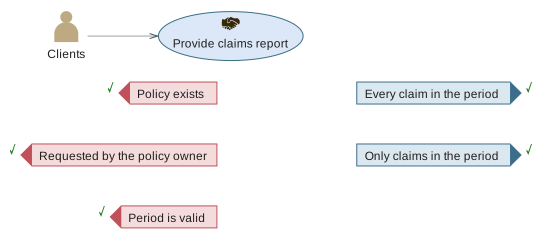
A post-condition about the records themselves. Provide claims report promises that the claims it lists are exactly those made against the policy in the period; an execution environment checks that against the claims it holds, each time the report is asked for.
-
Writes the post-conditions determine. Record client, Issue policy and Record claim each state that a new record exists with every stored field it holds, and that its number is new; Update claim states the status and payout it gives a claim that must already exist. Nothing more is needed to know what each writes (Section 4.18.33). A policy names its owner by the client’s number; Purchase motor insurance first asks the Client Register for the client signed in, with
findClientByLogin, which is whyClientRecord.loginis marked Unique (Section 4.3.2.4). Each record’s number has its format stated as an invariance (CL-0001,PO-0001,CM-0001). -
A change decided on what was read. A claims manager reviews each stale claim, and Note claim review records their note only while the claim is still at the version they reviewed:
ClaimRecord.versionis a version field, and Claim unchanged since review compares it with the request’s. A claim that moved on meanwhile keeps no note about how it used to stand. Update claim instead declares that its change applies to the current state: the status it sets is what the claim’s own process decides (Section 3.2.2). -
Reads the post-conditions determine. Find claims states its answer as one recipe: the claims against the policy in the period, sorted by when the incident happened, each as a
ClaimSummarytuple. Because it sorts, the order is part of what it promises. Find stale claims states its answer the same way, unsorted, so any order of the same claims answers it. Record claim belongs to Claims, so it asks Underwriting for the policy’s cover by applyinggetPolicy, one of Underwriting’s generated query services (Section 4.4.5), and Policy in force at the incident asks the same of it (Section 3.2.1). Provide claims report keeps its own two clauses: they are what its client is promised, and the service it is allocated to states how the claims are found.
3.4.3. The same model, different deployments
Who answers each lower-level service is the deployment’s choice, not the model’s (Section 8.7). The demonstration configuration uses every kind there is:
-
specified — Quote premium, Screen claim, Price damaged item and Compute payout need no code: their post-conditions determine the answer;
-
automated — the six services that write and read the insurer’s records. Their post-conditions determine every write and every answer, so each could equally be specified, answered with no code;
-
human — the investigator, the assessor, the repairer, the claims manager, and the client when asked for more;
-
stub — Pay claim, in development only.
Rebind Screen claim to a person and a fraud analyst scores every claim instead; the process asking for it does not change.
The assessor and the repairer can equally be other organisations' systems,
which the worker calls (Systems the worker calls):
code/demos/motorInsurer runs a dummy of each. Its assessor answers Assess
claim over HTTP at 80% of the priced repair, and its repairer answers
Repair vehicle through AMQP queues on an ActiveMQ Artemis broker. Its
README.md rebinds the two services to them.
3.4.4. A defect it keeps on purpose
The model holds one defect on purpose, to show what a test run’s integration run finds that nothing else does (Unit test runs). Compute payout pays the assessed amount, capped at the sum insured, less the excess:
if assessedAmount <= excess then 0
else (if assessedAmount > sumInsured then sumInsured else assessedAmount endif) - excess
Nothing in the model says a policy’s excess cannot be negative. With a negative excess and an assessment above the cover, the payout comes to more than the sum insured, so Assess and settle claim breaks its own post-condition Payout within cover.
The model verifies cleanly, and every unit case passes: on its own, Assess and settle claim asks a generated stub for its payout, which answers within Compute payout's contract and its own. Only when the processes run together, with Compute payout computing the payout for real from what the assessor answers, does the contract check catch the breach. The motor insurer’s test run therefore fails three integrated cases of Process claim, each naming the clause. The remedy, in a real model, is an invariance on the policy — its excess is never negative — or a payout capped again after the excess.
4. Modeling
The URDAD Modeling Tool provides a structured environment for collaboratively creating and maintaining URDAD business domain models. All views work on the same underlying model — changes made in any view are immediately reflected in all other views and distributed to all collaborating users in real time.
4.1. Views
The UMT enables users to explore and modify the business model via three categories of views.
4.1.1. Model Tree View
The Model Tree View provides a hierarchical overview of the entire model. It allows users to:
-
Navigate the model by expanding and collapsing responsibility domains, with the mouse or the keyboard
-
Find elements by name or type
-
Select any model element to make it the current context for the diagrammatic views and the Element Details View
-
Move model elements between responsibility domains
-
Create new child elements
-
Delete elements, with the mouse or the keyboard
-
Create contectualized projects
-
Generate artifacts (documentation, code, …) for that component
-
Verify the model’s structural consistency, from the model node’s context menu — see "Verifying a model"
Finding elements
The search field above the tree filters it to the elements that match what is typed, together with the elements containing them, so a result is always shown in its place in the model. The part of a name that matched is highlighted.
The search covers the mounted element libraries as well as the model — they are trees in the same panel, and an element is as worth finding in a library as in the model. A library in which nothing matches keeps its own row, so it is visibly searched rather than absent.
While the filter is in force the tree is not the model, and it says so in two places. A strip under the search field reads Filtered, gives the number of matching elements — a query that matches nothing says so, rather than leaving the model root on its own without explanation — and offers Show all, which restores the whole tree. The end of the filtered tree is closed by a line counting the elements the filter is holding back, so a tree cut short is not mistaken for a model that ends there.
A word matches an element’s name or its type. Two refinements are available:
| Query | Matches |
|---|---|
|
Elements whose name or type contains "policy". |
|
Elements whose name contains "policy". |
|
Elements whose type contains "service". |
|
Both conditions — several words must all match. |
Matching is case-insensitive. The search is cleared with Show all, with the × button in the field, or by pressing kbd:[Esc] — either while the field has the focus or while the tree itself does, so it is not necessary to return to the field to leave a filter behind.
While a search is active the matching elements are shown expanded so the results are visible without further clicks. Individual elements can still be collapsed; doing so affects that search only, and the tree returns to the shape it had before the search when the search is cleared.
Following the current element
Whenever an element becomes the current element — whether it was selected in the tree, in a diagram, in the Element Details View, from the verification report, or with the back and forward navigation buttons above the tree — the tree reveals it: every containing element is expanded and the element’s row is scrolled into view. Rows that are already visible are not scrolled.
To go the other way — from an element you can see in a diagram to its row here — use Select in model tree on the diagram element’s context menu; see Section 4.1.2.14.
Navigating with the keyboard
The tree is a single stop in the tab order. Once it has the focus, the current element is moved with the keyboard:
| Key | Effect |
|---|---|
Down / Up |
Move to the next or previous row shown, stepping into and out of expanded subtrees. |
Right |
Expand the current element, or — if it is already expanded — move to its first child. |
Left |
Collapse the current element, or — if it is already collapsed — move to the element containing it. |
Home / End |
Move to the first or the last row shown. |
Enter |
Expand or collapse the current element. |
Delete / Backspace |
Delete the current element, after confirming — see Section 4.1.1.8. Both keys are accepted because the key labelled delete on a Mac keyboard is Backspace. |
Esc |
Clear the search, restoring the whole tree. Has no effect when no search is active. |
The keys move through the rows the tree is showing, so a collapsed subtree is skipped, and while a search is active only matching results are traversed.
Copying an element’s name
Text in the tree cannot be selected with the pointer — dragging across a row moves the element rather than highlighting its name. To take a name out of the tool, the row’s context menu offers:
- Copy name
-
the element’s own name, for example
insurePolicy. - Copy qualified name
-
the name preceded by its containing elements, for example
Insurer:Policies:insurePolicy. This is usually what is wanted when quoting an element elsewhere, since a bare name may occur in more than one responsibility domain.
Both are available to anyone who can see the element; neither changes the model. The element’s identifier can likewise be copied by clicking the path badge at the top of the Element Details View.
Finding what references an element
Before renaming, re-typing, moving or deleting an element it is worth knowing what depends on it. Find references, on any row’s context menu, lists every reference to that element, one row per reference, grouped by what the reference means. Each group is headed by the relationship, read from the side of the element asked about, and the number of references in it — for example Is the type of (2) for a data type two fields are typed by, or, for a responsibility domain, May request for the services published to it, Stakeholder of for the contracts it has a say in, and Receives messages sent by for the sends addressed to it. All three of those are held by service contracts or their steps, which is why they are told apart by meaning rather than by the kind of element holding them. A group can be folded away by its heading. A reference of a kind the tool has no wording for is listed under Other references, with the field that holds it.
- Reference
-
the element holding the reference. A single element may reference the same target in more than one way, and each is listed separately, under its own group — they are separate places to change.
- Path
-
where that element sits, for example
Policies:Policy:inception. A reference held in a dependency is prefixed with the dependency’s name. - Type
-
the kind of element holding the reference.
- Held in
-
the model itself, or the element library or model the holder belongs to.
Selecting a row makes that element the current element, and the tree reveals and selects it. The dialog stays open beside the work and marks the row, so a group can be worked through one row at a time; Close dismisses it.
The search covers this model and every dependency mounted beside it, which
is what makes the question answerable for an element that is not the model’s own.
Asking what references a primitive type in the standard library lists the fields
in this model that are typed by it, and asking it of an element in one library
also finds the references another library holds — a finance library’s
AccrualPeriod referencing the standard library’s Date. What is searched, and
how many dependencies were included, is stated above the list.
What cannot be shown is a reference held by a model that depends on this one. A model holds the revisions it is pinned to and knows nothing of its consumers, so an empty result means "nothing here references it", not "nothing anywhere does". The dialog says as much rather than leaving it to be assumed.
Find references is available on every row, including the rows of a mounted library, and it is available to anyone who can see the row: it reads the model and never changes it. A reference that points at something no longer in the model is a different matter and is reported — and repaired — by model verification instead.
Listing published services
A service contract states which responsibility domains may request it — its Published to list (Section 4.3.1). Published services…, on the context menu of a responsibility domain or of the model root, lists every service contract of that domain and of every domain within it, with whom each is published to:
- Service
-
the service contract. Selecting it makes it the current element; the dialog stays open and marks the row, as Find references does.
- Provided by
-
the domain that owns the contract, named below the domain the listing was opened on —
Claims, notInsurer:Claims, when it was opened on Insurer. - Published to
-
the roles the service is published to, or Not published for an internal service. A service that runs on a schedule says so here, so that one published to nobody does not read as one nothing can start. A role that names a domain no longer in the model is shown as Unresolved domain; model verification reports and repairs it.
- Held in
-
shown only when the listing includes services of a mounted dependency — the model itself, or the dependency’s name.
Above the table is a row of filters: All, one per role the listed services name, and Not published, each with the number of services it selects. Pressing several shows the services matching any of them; All clears them. A role also selects the services published to the domains within it — a service published to Clients › Corporate is one Clients may request — which is how access is granted once the model is deployed: a caller holding a domain reaches what is published to the domains inside it.
On the model root the listing covers the whole model and every dependency mounted beside it, since a library may publish services as well; on a domain, or on a dependency’s own root, it covers that tree alone.
The same listing answers the question from the other side: what may this role request? On a responsibility domain that some service is published to, the context menu also offers Services published to <domain> (n), which opens the listing over the whole model with that role’s filter already pressed. A model therefore does not need a domain that gathers the services offered to a role in one place — each service can sit in the domain that answers for it and still be found by the role it is offered to.
Moving elements
An element is moved by dragging its row onto the element that is to contain it. Only elements that can host the dragged element accept the drop: a valid target is outlined while the pointer is over it, and every other row shows a "no drop" cursor, so an impossible move cannot be attempted. Dropping onto a responsibility domain the user is not authorised to modify is refused with a notification, and the model is left unchanged.
The same move is available as Cut on the source element followed by Paste on the new parent, from the context menu. Paste is offered only where the move would be accepted.
Moving a service publishes it
A service contract moved to another domain, alone or inside a domain that is moved, is published to every domain whose processes request it and which it is not already published to, and which would otherwise be reported for requesting a service not published to it (Section 4.18.25). Before the move, those processes requested a service of their own domain; afterwards they request another domain’s, and the move records that relationship rather than leaving it to be found. A notification names the domains each moved contract was published to. Moving a contract into a domain inside the one requesting it publishes nothing, since that is delegation down the domain tree.
Deleting elements
An element is deleted either by pressing kbd:[Delete] (or kbd:[Backspace]) while the tree has the focus, or with Delete on the row’s context menu. Both ask before anything is removed, and both ask the same question: nothing in the tree is deleted without a confirmation.
The confirmation comes in two lengths, according to what the element holds:
- An element with nothing under it
-
one sentence naming the element, and the number of places elsewhere in the model that reference it — the fact worth knowing before answering. A service contract is never in this case: it is created holding a request and a response data structure.
- An element that contains other elements
-
a longer warning, because everything beneath the element goes with it, however deep — and so does every reference to any of it.
In both cases the deletion also removes the references that pointed at what was deleted, which is the same repair model verification performs; and in both cases it can be undone only by reverting to an earlier revision in the change history. There is no undo.
The confirmation is answered from the keyboard as well as with the pointer: it opens with Cancel focused, so kbd:[Enter] and kbd:[Esc] both leave the model alone, and deleting is kbd:[Tab] then kbd:[Enter]. Whichever answer is given, the focus returns to the tree, so the arrow keys continue from where they were. When the deleted element was the current one, the element that contained it takes its place, and navigation carries on from there.
Some rows cannot be deleted, and pressing kbd:[Delete] on one says why rather than doing nothing:
-
the model root — a model is deleted as a model, from the model actions menu, not as an element of itself;
-
an element of a mounted element library — it is owned by that library and is changed by editing the library and publishing a new revision;
-
an element in a responsibility domain you are not authorised to modify, or on a branch whose project phase is closed to changes. The notification names the domain.
In each of those cases the Delete item is likewise absent from the row’s context menu.
4.1.2. Diagrammatic Views
Diagrammtic views provide an intuitive and efficient mechanism to extract information from the business model and an effective method for feeding information into the business model. The diagrammaticc views specified by URDAD conform to ISO 42010 URDAD viewpoint specifications.
Some diagrams provide tools enabling the user to feed information into the underlying model whilst other diagrams are purely informational. When the underlying model is modified by that user or any other user who is working on the same project, the views (including diagrams) for all users are updated.
|
Note
|
Important
The user modifies the model, not the diagram through the tools. Once the model is updated by changes requested by this or any other user working ont he same project, all views (including all diagrams) of all users who are viewing views which show the modified component are updated automatically. |
View |
Model Context |
Purpose |
Primary Views through which the Model can be modified |
||
Scope View |
|
Shows the scope of a responsibility domain in terms of its sub-domains and the services it provides, or — on the model root — the scope of the model in terms of its top-level responsibility domains |
|
Shows the stakeholders (see Section 4.1.2.5), pre-conditions and post-conditions of a service contract — including those it inherits from the contract it specializes; see Section 4.1.2.7 — and the domains it is published to, see Section 4.1.2.6 |
|
Responsibility Allocation View |
|
Shows what addresses each pre-condition and post-condition of the realized contract, inherited ones included — one activity per requirement: a request of a lower-level service, or a step of the process itself such as sending or awaiting a message. A post-condition the contract meets by itself is drawn with a heavy outline and needs no activity. |
Process View |
|
Shows the orchestrated process realizing the service, including all control flow constructs. A requested service can be expanded in place into the process realizing it, read-only, to follow the process across levels of granularity; see Section 4.1.2.17 |
Data Structure View |
|
Shows data structure composition, association, aggregation and specialization relationships — including the structures that specialize this one; see Section 4.1.2.4 |
Secondary Views providing perspectives of the business model |
||
Dependencies View |
|
Shows the external responsibility domains from which this responsibility domain sources services — every contract a process of the domain requests, including requests still waiting to be placed. |
Usage View |
|
Shows the different business processes which request the service, placed in their flow or waiting to be placed. |
Entity View |
|
Shows the aggregated entity structure as populated across the services which feed information into the entity. |
Entity Map View |
|
Shows the different data structures which feed the entities maintained for a domain. |
Hovering a widget
Hover any widget on any diagram and it tells you which model element it stands for: its type, then its full path through the model.
Service contract: Actuary:Rate
A diagram draws an element’s bare name, which is all that fits and all that
needs to be read at a glance. That name is not unique — two responsibility
domains may each offer a service called Validate, and a diagram routinely
draws elements belonging to domains other than the one you opened it on. The
hover text is where you find out which one you are looking at, without leaving
the diagram.
The type is named in the interface language, and the path is the same one the
element details view and the search lists use: the owning responsibility domains
from the top down, separated by colons. The model’s own name is left off, since
every element in the diagram shares it. An element that comes from a mounted
element library is prefixed with the library’s name and a double colon, so a
library’s Shared::Party is never mistaken for your own.
The start and end of a process are the exception: they stand for the process rather than for an element of their own, so they hover as Process start and Process end.
A name longer than a widget carries is shortened in the drawing and ends in
…, so you can see that there is more of it; the widget is drawn to the size
of what it shows. Pre- and post-conditions are where this is met most often,
since a condition is usually named as a sentence: the pentagon holds the opening
of the name and the hover text gives you all of it.
The Data Structure View and the Entity View are the exception, and shorten nothing. A data type’s name and its attributes are what those two views are of, rather than a caption on something drawn for another reason, so the box grows to hold the whole of them however long they run. The same goes for the role name and multiplicity written at the end of a relationship: the space between a structure and the structures it relates to widens to hold the longest of them, so a long role name never runs over the widget it starts from.
Every diagram exports exactly what it draws, so a name shortened on screen is shortened the same way in a published document.
Which steps are ready to run
In a project whose processes will run on the execution environment (Section 6.4.1.3), the Process View marks every step that has to be stated formally before the process can run. The mark is a small page with a folded corner:
-
filled — the step is formalized enough to run;
-
outlined — it is not yet. Hover over the mark to read why.
The steps that carry a mark are those whose execution reads something you write in URDAD-OCL, or an event you configure:
| Step | Where the mark is, and what it needs |
|---|---|
Request service |
Top-left of the box. A contract to request, and request constraints that assign every mandatory field of the request it sends. |
Conditional flow |
|
Check pre-condition |
Top-left of the box. A pre-condition that resolves and states its own OCL condition. |
Define variable |
Top-left of the box. An initialiser, in OCL that parses. |
For each |
At the end of the loop’s header. A source collection, in OCL that parses. |
While |
At the end of the loop’s header. A condition, in OCL that parses. |
Reaction |
After the lane’s label. A trigger the execution environment can wait for: a duration, a schedule with its time zone, or a message. |
A step that carries no mark needs nothing stated formally, so an absent mark never means a missing one. A Populate response step is the exception worth knowing: it carries no mark because whether the response is fully populated depends on every path through the process, not on any one step. Verification reports it (Section 4.18.44).
The mark answers exactly the question the execution environment asks when it plans a process, so an outlined mark can also mean that the step is formal but uses something the execution environment does not run yet, such as carried variables on a loop. The hover text says which.
The marks appear only in projects that target execution. They are not drawn
in other projects, on main, or in documentation the tool generates. An
exported diagram includes them, because it exports what is drawn.
The tool palette, and moving around a diagram
A diagram that can be modified carries a column of tools down its left-hand side, grouped and labelled — the element types you may drag onto the diagram, an activities group in the Process View, and the zoom controls at the bottom. Drag a tool onto the diagram to add the element it stands for. Some tools are collections: click one and a small list opens beside the palette, holding the several kinds of that element you can choose between.
Every tool and group heading is named in the interface language, and a tool that creates an element type is named as that type is named in the model tree, so the palette and the tree use one vocabulary. The exception is a tool standing for something that is already in the model — an activity waiting to be placed, or a service a further request may be made of — which carries that element’s own name: a name is model content, and it reads the same whatever language you work in.
Zooming in past the size of the window gives the drawing area a scrollbar, and the palette has one of its own for the same reason. The Process View’s palette is the long one, and on a short window its lower groups — the zoom controls among them — would otherwise sit below the bottom edge with no way to reach them. The two scroll independently: the palette stays in place while you move around the diagram beside it.
If you scroll the palette while a collection is open, the list closes rather than drifting away from the tool it belongs to. Click the tool again to reopen it.
Specialization in the Data Structure View
Specialization is recorded on the specialising structure — it names the structure it specialises as its base — so a structure knows what it is built on but not what has been built on it. The Data Structure View shows both ends:
-
the base is drawn above, with a specialization arrow running up to it from the structure the view is of; and
-
every structure that specialises it is drawn below, name only, with a specialization arrow running up from each. Several of them share the elbow into the structure above, as a class hierarchy is conventionally drawn.
Only the immediate specialisations appear — the level directly below. A subclass is a structure with a view of its own, and drawing its subclasses too would turn a diagram of one structure into a map of the whole hierarchy. The subclasses of a structure the diagram merely reaches — one at the end of a composition, say — are not drawn either, for the same reason.
A subclass box carries no expand handle, because it shows a name and nothing else by design. Click it to open that structure’s own Data Structure View, where its attributes, its relationships and its own specialisations are shown in full.
Adding a specialization
Two tools, for the two ends of the one relationship. Which one you reach for depends on which structure you are looking at:
| Add specialization |
the structure you are looking at specialises another. The base you choose is drawn above it. |
| Add specialized data structure |
another structure specialises the one you are looking at. It is drawn below. |
Drag either tool onto the structure, or right-click the structure and choose Add specialized data structure. Both open the same dialog: name an existing structure to use it, or type a name that does not exist yet and choose Create relationship and DataStructure to create it in the responsibility domain the structure being looked at belongs to.
A structure that would make the hierarchy circular is not offered — the base a structure already specialises, however far up the chain, cannot also be made to specialise it. Neither is a structure defined in an element library offered as the specialising end: a library is pinned, read-only content, and the base would have to be written into it. A library structure may of course still be used as a base, and as a component, aggregate or association target.
Stakeholders in the Functional Requirements View
A contract’s stakeholders — the responsibility domains with an interest in its functional requirements (see Section 4.3.1) — are drawn in the Functional Requirements View’s middle column, each as a stakeholder widget.
Drag a responsibility domain from the model tree, or the Add actor tool,
onto the functional requirements panel to add it as a stakeholder. Dropped on
open panel space, or on a domain the Add actor tool creates and you then
pick from its dialog, the widget draws gray: a provisional stakeholder,
one added to the view without yet requiring anything. It stays gray until a
functional requirement names it — drag a drag-line from the stakeholder’s
widget to the pre- or post-condition it requires, or drop the domain directly
onto an existing requirement instead of onto open panel space, and the
requirement’s requiredBy list picks it up there and then, without a
provisional step. Nothing in the diagram distinguishes how a stakeholder came
to require what it does, only whether it currently requires anything.
This is the panel’s own gesture, distinct from a drop in the header row above it — see the next section — which states a different relationship, Published to, on the contract itself rather than on any of its functional requirements.
Published clients in the Functional Requirements View
A contract’s Published to domains — those that may be its clients (see Section 4.3.1) — are drawn in the Functional Requirements View’s header, alongside the contract itself. Each published domain is drawn as a stakeholder widget — the same widget the middle column uses, since being published to a contract and being one of its stakeholders are different questions a domain can answer either way, both ways, or neither (see Section 4.3.1); an association line, solid with an open arrowhead, runs from each one to the service contract.
The header splits into two side-by-side boxes to make room: the published domains, stacked one above the other, at left; the contract — with its base above it, when it specializes one, exactly as before — at right. A contract publishing to nobody draws exactly as it always did, a single box with no change to its position.
A domain that is both a stakeholder and a published client of the same contract is drawn twice — once in the header, once in the middle column — because the two relationships are independent (see Section 4.3.1) and one widget standing for both would silently conflate them. Where each copy is drawn is what tells them apart, not a different colour.
Drag a responsibility domain from the model tree, or the Add actor tool, onto the service contract’s own widget to publish the service to that domain — the same Published to list the element details panel edits (see Section 4.3.1), written from the diagram instead. Dropping either one elsewhere in the header — on an already-published domain, or on the base contract above the service contract when it specializes one — does nothing: only the contract’s own widget is offered for a new Published to entry. Dropped anywhere in the functional requirements panel below the header, both tools keep their ordinary meaning instead — see Section 4.1.2.5.
Specialization in the Functional Requirements View
A service contract may specialize another. The specializing contract then
imposes every functional requirement of the contract it specializes, and adds
whatever further post-conditions refine it — a PriorityQuote service is a
Quote service that also guarantees a priority, and everything a client of
Quote may rely on, a client of PriorityQuote may rely on too.
Pre-conditions are the one thing that does not work that way; see Section 4.1.2.7.1 below. A contract’s function declaration travels down the chain too, and in one direction only — see Section 4.1.2.7.2.
As with data structures, the relationship is recorded on the specializing contract — it names the contract it specializes as its base — so a contract knows what it is built on and nothing lists what has been built on it.
The Functional Requirements View of the specializing contract shows the whole of what it requires:
-
the base contract is drawn above, with a specialization arrow running up to it from the contract the view is of;
-
every requirement the base contributes is drawn in the pre- and post-condition columns with a dashed outline, beside the contract’s own; and
-
a stakeholder named only by an inherited requirement appears in the middle column like any other, with its requiredBy line drawn to the requirement that names it.
An inherited requirement is drawn here but declared elsewhere, so it cannot be edited or deleted from this view — right-clicking one offers no requirement actions. Select in model tree takes you to it; opening the base contract’s own Functional Requirements View is where it is changed, and a change there is a change for every contract specializing it.
Pre-conditions go the other way: waived, never added
A specializing contract may add post-conditions and may never add a pre-condition. It inherits its base’s pre-conditions whole, and the only thing it may say about them is that it no longer requires one — it waives it.
The two rules are calibrated against each other to answer one question: can
something that expected the base always be handed the specialization instead,
with nothing breaking? Adding a post-condition only ever promises more, so
anything the base guaranteed the specialization still guarantees. Waiving a
pre-condition only ever admits more calls, so anything the base accepted the
specialization still accepts. Adding a pre-condition would do the opposite — it
would let PriorityQuote refuse a request Quote would have taken, which is
exactly what specializing a contract must not be able to do.
So nothing in the tool offers to write one. The Pre-conditions section of a contract with a base has no Add pre-condition button, and the Functional Requirements View of such a contract has no pre-condition tool in its palette and no Add pre-condition on any of its context menus — the background’s, a stakeholder's or a dependent service’s. Only the post-condition half of each pair is offered. An existing pre-condition dragged onto the view from the model tree is refused, and says why. The base contract’s own form and view are where a new one is written, and it is then in force for every contract built on it. In its place the details panel shows a Waived pre-conditions section: a checklist of exactly what this contract inherits, each one named with the contract that declared it. Tick one and this service no longer requires it — it disappears from the contract’s pre-condition column in the Functional Requirements View, from what a realizing process must address, and from the exceptions the service can raise. Untick it and it is back.
Three things are reported by Section 4.18:
-
a pre-condition declared by a contract that has a base — an error, since a specialization may not add one at all, and nothing in the tool reads it;
-
a waiver naming something the direct base does not impose — another chain’s condition, or a waiver on a contract with no base — also an error: the model states that it gives up a requirement it never had;
-
a waiver of something already waived further up the chain — a warning, not an error. Nothing is wrong; the model simply states something already true, and whether to keep it (as a record of intent, should the base ever reinstate the condition) is a judgement call.
A waiver of a pre-condition that is then deleted from the base is cleared along with it, the same way every other reference to a deleted element is.
Purity goes the way a post-condition goes: gained, never dropped
A contract may declare its service a function — pure, so that rendering it yields an answer and changes nothing (see Section 4.4). Under specialization that claim behaves like a post-condition rather than like a pre-condition: a contract specializing a function is a function, and may never take the claim back.
It is the same substitutability question answered a third time. A client of a
pure Quote relies on the call being safe to repeat, safe to reorder, safe to
name in a constraint and safe to generate as a GET. Hand it a PriorityQuote
that is not pure and every one of those is silently wrong. The opposite
direction breaks nothing, so it is allowed without ceremony: a specialization of
an ordinary service may declare itself a function on its own merits, because an
impure service never promised purity for anything to rely on.
So on a contract whose base is a function, This service is a function is ticked and cannot be cleared, and a note beneath it names the contract in the chain that made the claim. The way to model an impure specialization is to stop specializing a function — not to untick a box.
Inheriting the claim is not inheriting the check. The specializing contract has its own realizing process, and that process is walked against the purity rule exactly as the base’s is: no send, no await, no reaction, no request to an impure service. A contract does not become exempt by having inherited what it promises.
A contract that specializes a function while its own box is clear — written before this rule existed, or arriving through an import — is reported by Section 4.18 as an error naming the contract the claim came from. See Section 4.18.18.
Choosing the contract a service specializes
Two ways of saying the same thing:
-
Drag the more generic service contract from the model tree onto the Functional Requirements View of the contract that specializes it; or
-
right-click the diagram — its background or the contract’s own widget — and choose Select base service contract…, which opens a picker over the contracts in the model and in any mounted element library.
Either way, Remove base service contract gives the relationship up again; it is offered on that same menu, on the base contract’s widget, and on the specialization arrow connecting the two. Right-clicking the base widget also offers Open base service contract, which selects it so its own views and its details form are the ones on screen.
A contract that would make the hierarchy circular is not offered and, if dragged, is refused with a message: a contract cannot specialize itself, nor a contract that already specializes it, however far up the chain.
What else follows
Setting a base is one statement with several consequences, all of which follow from the same rule — the specializing contract imposes what the base imposes.
-
The request and response data structures of the specializing contract are pointed at the base contract’s, so its request specializes the request a client of the base would send. If you have already given either structure a base of your own, that choice is kept and never overwritten.
-
The base contract keeps a realization of its own. A contract is a specification and a process is one way of meeting it, so a base may be realized whether or not its specializations already are — and a process realizing the base is the one the specializations' own processes are measured against. The tool used to allow each contract exactly one realization and to withdraw Specify process once it existed, which took the base’s realization away with nothing said.
-
The Responsibility Allocation View of a process realizing the specializing contract lists the inherited requirements — dashed, again — alongside its own, and each may be allocated to a step in the usual way.
-
Model verification expects the realizing process to address the inherited requirements, and to raise the exceptions the inherited pre-conditions carry, exactly as if the contract had declared them — less whatever pre-conditions the contract waives, which it is no longer answerable for.
-
The Process View offers the base’s exceptions in its Raise Exception palette, and a request made against the specializing contract offers exception and message handlers for the base’s declarations as well as its own.
-
A generated document states which contract a service specializes and marks each inherited requirement with the contract it comes from; a generated OpenAPI description does the same in the operation’s description. A waived pre-condition is absent from what the document says the service requires, and is listed separately under Waived preconditions — otherwise a reader comparing the two services would find a condition simply missing, with nothing to say it was a decision.
What an unnamed activity’s box says
An activity allocated in the Responsibility Allocation View arrives without a name — allocating says what the process must do, and the tool does not guess what the step should be called — so an unnamed box is the ordinary first state of a step, not an oversight.
An activity of the plain kind carrying a formal specification is therefore labelled with that specification for as long as it has no name. A step whose specification says exactly what it does needs no other name to be read, and the alternative is an empty box, which says neither what the step does nor that anything is missing. Give the activity a name and the name is what it reads as from then on: a name you chose is never displaced.
The label is one line. Whatever indentation and line breaks the specification is written with are collapsed to single spaces, and a specification too long for the box is cut with an ellipsis like any other long label — the whole of it is a hover away in the details view.
Only the plain activity does this, because it is the only kind with nothing else to say. A request draws the service it requests, a send and an await the message they carry, and a raise-exception the exception it raises, whether or not anybody has named the step.
A define variable is the one kind whose own content is drawn in preference to
a name you gave it: where it has an initialiser its box reads
Def: premium = request.sumInsured * rate, because that binding is the whole of
what the step does and a name there would only be a label for it. The binding is
drawn even where the variable has no name yet — Def: = request.k + 3 — since
that is the state the model is in. See Section 4.5.
The Process View and the Responsibility Allocation View show the same label, so a step reads the same in the view that says what the process does as in the view that says when it does it.
Rearranging activities in the Process View
An activity that is in the wrong place is moved rather than re-created: press it, drag to the transition it should sit on, and release. A line follows the pointer while you drag, from the activity to wherever it currently is. The activity leaves the position it held and is inserted where the transition points — after the activity the transition leaves, or at the head of the flow when the transition leaves the thing that starts it.
This is one change to the model, not a deletion and an addition. The activity keeps its name, its description, its annotations and everything referring to it, and the change history records it as a single entry.
A whole control-flow construct — a set of alternate flows, a set of concurrent flows, a for-each, a while, a set of event-triggered flows — is dragged the same way, by its diamond, its fork bar or its frame header, and its flows travel with it. The flows themselves do not move: a conditional flow, an exception handler, a message handler and a loop’s body belong to the construct that owns them and have no meaning anywhere else.
A handler’s lane — of either kind — is started by the request-service box rather than by a diamond, so a transition running from that box into a handler puts what you drop on it at the head of the handler. The same holds for the middle lane, the request’s default path. Dropping Raise Exception on an empty handler’s transition is how a handler says it cannot recover: it passes the refusal on as one of this process’s own exceptions — the palette offers exactly those. Throwing on the exception it caught is reported as an error, because the process would then refuse with an exception its own contract never declared (Section 4.18.50). Nothing else in the construct is affected, because the path on which no exception is raised runs to the merge whatever the handlers do.
Dropping an activity anywhere other than on a transition does nothing, and so does dropping it back where it already was. Two drops are refused, and say why:
-
a construct dropped onto a transition inside itself, which would make the process contain itself; and
-
a raise-exception dropped anywhere but at the end of a flow, or into a concurrent lane, or where it would leave a set of alternate flows with no path that reaches the merge. Raising an exception aborts the process, so nothing can follow it and the other lanes of a fork would be left running.
The same rules govern an activity dragged onto a transition from the model tree, and the tools dragged off the palette.
Placing what a process has committed to, and requesting a service again
The Process View’s Activities to place menu holds what this process may put into the flow and has not. It offers two things, and the difference is what dragging one does.
An activity waiting to be placed is one particular step: every activity allocated to a functional requirement in the Responsibility Allocation View, service calls included. Dragging it onto a transition moves it into the flow, and the entry leaves the menu — it is that step and no other, and the model now says where it runs.
A service this process uses is a kind of step. Dragging it adds a further request of that service, and the entry stays in the menu: it is there for as long as the process uses the service, whether that is because a call of it is already in the flow or because the process declares it as a requirement.
A service is requested more than once in the ordinary case. A recursive process calls its own service; two alternate flows may each call the same service, on either side of a decision. The menu used to drop a service the moment the first call of it was placed, so a second call could only be written from the process’s own details form — the one place a modeller laying out a flow is not looking.
Two consequences worth knowing.
While a call of a service is still waiting to be placed, the menu offers that call and not the service. One commitment is never offered twice: the entry you see is the allocated call, so dragging it discharges the commitment rather than adding a second, unallocated one beside it.
A request made from a service entry addresses no functional requirement. The menu knows that the process uses the service, not why this particular call exists. Say so in the Responsibility Allocation View — drag the request onto the requirement, or draw the line from the requirement to it — if that call is what discharges it. A requirement nothing addresses is reported by Verify process specification, so the omission is not silent.
Steps the palette makes on the spot
Activities to place offers what the process has already committed to. The rest of the Activities group offers steps nothing allocates, and dragging one of those makes a new step every time.
Raw activity is work this process does itself, specified in place rather than delegated to a service.
Define variable introduces a value the process names for itself — see Section 4.5. It discharges no functional requirement, so nothing ever puts one in Activities to place; you add it where the value becomes available, and then give it its name, its data type, its multiplicity and its initialiser in the element details view. Naming the step names the variable — the two are one thing — until you type a different name into the variable itself.
It is drawn in the shape of an ordinary step and in the plum a raw activity
also takes: those two are the things in a flow that do no work, and reading a
process means being able to skip over them to find the steps that do something.
What tells the two apart is the caption — a define variable’s is prefixed
Def:, where a raw activity’s is not.
Populate response states part of what this process answers with, from
whatever is in scope where you drop it — see Section 4.5.5. It is
the third step drawn in plum, since it binds rather than performs. Its caption
is prefixed Resp:, followed by its name or, while it has none, its first
constraint. One minted here addresses nothing. When the step is how a
post-condition about the response is met, create it in the Responsibility
Allocation View instead, by dropping its tool on that post-condition: it is
then allocated, and its first constraint is a copy of the post-condition’s
body — a draft to rewrite in terms of the data the process holds where you
place the step. The copy is made once; later edits to either do not reach the
other, because the two are written over different data. A post-condition the
contract meets by itself needs no such step, and the tool declines it.
Raise exception answers a different question again — what this process may do when a pre-condition of the service it realizes is not met. It offers one entry per pre-condition of that contract, and adds a step each time.
Check pre-condition is the usual way to say where a pre-condition is
enforced. It is created in the Responsibility Allocation View by dropping its
tool on a pre-condition, and arrives under Activities to place. Placed in the
flow, it evaluates that pre-condition exactly as the contract states it and, if
it does not hold, raises the pre-condition’s own exception; otherwise the
process carries on. Nothing is copied: editing the pre-condition changes what
is checked, and its form shows the condition and the exception read-only. The
step is named after the pre-condition and drawn in the pre-condition’s red,
captioned Check:, with a small open arrow pointing up and to the right in its
top-right corner — in the same red, and in both views that draw the step, so
a check reads as one at a glance even before its caption does — and it is itself what addresses the pre-condition, so it
needs no separate allocation. It counts as raising the exception, so the
pre-condition is not reported as one whose exception nothing raises.
It checks the pre-condition against the request and the state of the world at that point, never against a value the process computed. Where the check reads entity state that a later step changes, prefer requesting the entity’s own service and handling its exception: the service’s pre-condition is the authoritative check, made at the moment of change.
A pre-condition can instead be discharged by asking a lower-level service. In the Responsibility Allocation View, drop a service contract on the pre-condition, or right-click the pre-condition and choose Assign service. When that service can itself refuse — it has pre-conditions of its own — you are asked one more thing: whether your pre-condition holds when the service is provided or when it refuses.
-
Is provided — tick the service’s exceptions that mean your pre-condition is not met. The request gets an exception handler for each, raising your pre-condition’s exception; any exception left unticked gets an empty handler of its own, as every request does, for you to decide about (Section 4.18.49).
-
Refuses with the exception chosen — pick the one exception whose occurrence means your pre-condition holds. The request’s default path raises your pre-condition’s exception, and a handler for the chosen exception, marked as ignoring it, lets the process carry on. The service’s other exceptions get an empty handler each.
Either way the process continues after the request, and the request counts as raising your pre-condition’s exception. A service that cannot refuse is simply requested. Where the service is a query, a check pre-condition step whose pre-condition applies the service as a function is usually the clearer statement of "must not be provided".
Taking an activity out of the flow
Right-click an activity and choose Remove to take it out of the process. What happens next depends on whether anything still needs it.
An activity that addresses a functional requirement is not deleted. The allocation is a commitment the process made in the Responsibility Allocation View — this step discharges that requirement — and where the step sits in the flow is a separate decision. So the activity goes back to Activities to place on the toolbar, keeping its name, its description, its annotations, its body if it is a control-flow construct, and the arrow drawn to it in the Responsibility Allocation View. The tool says so when it happens, since an activity that leaves the drawing but stays in the model is not something the drawing can show. Drop it on a transition again to put it back into the flow.
An activity nothing has allocated is deleted, as it always was. Nothing else refers to it, and an activity waiting in Activities to place means "allocated, not yet placed" — an unallocated activity parked there would make that half of the menu say something it does not. A request you made from a service entry and never allocated is therefore deleted when you remove it; the service itself stays in the menu, since the process still uses it.
Removing a control-flow construct removes the construct and its flows. Any activity inside it that addresses a requirement is kept, and moves to Activities to place on its own, for the same reason as above: losing it would quietly leave the requirement addressed by nothing, with no arrow left to notice.
To delete an allocated activity outright, remove its allocation first — from Addresses in its details form, or by right-clicking its arrow in the Responsibility Allocation View and choosing Delete allocation. An unplaced activity is removed along with the last allocation naming it.
Reading a diagram’s context menu
Right-clicking anything in a diagram opens a menu of what can be done to it. Three conventions hold across all of them.
The first line names what you clicked — the element’s type and its name, or, on an edge, what the edge says. Diagram widgets sit inside one another: an attribute inside a data structure, a lane inside a request inside a sequence. The menu that opens belongs to the innermost thing under the pointer, which is not always the thing you meant, and most of the items name only a kind of act (Add attribute) rather than their subject. The line at the top is how you check before acting: if it does not name what you meant, dismiss the menu with Esc and click again, a little further out.
Items that delete are set apart and coloured. They sit below a rule, after the items that add or open, and they are the only ones drawn in the warning colour. There is no undo: what recovers a deleted element is the model’s revision history — see the change history and tags in the left-hand panel — so the menu marks the difference rather than asking you to confirm each time. Two of them do ask: deleting a responsibility domain or a service contract that still holds anything opens a dialog naming what would go with it.
A menu with nothing to offer says so, with a greyed No actions for this element. That happens on parts of a diagram the view has no acts for, such as an edge that only records what the model already states elsewhere.
Right-clicking the background of a diagram is not nothing: it offers the acts of the element the view is drawn of. Background in the Scope View adds a responsibility domain or a service contract, in the Data Structure View adds an attribute or a relationship to the structure on show, in the Process View verifies the process specification, and in the Responsibility Allocation View opens the process specification.
Finding a diagram element in the model tree
Every element drawn in a diagram stands for an element of the model, and its context menu ends with Select in model tree. Choosing it makes that element the current element and shows it in the tree: the model tree tab is brought to the front if another tab was showing, the containing elements are expanded and the element’s row is scrolled into view.
This is offered on every element of every diagram, including those whose context menu has nothing else to offer, and it changes nothing in the model. It is the way across from a diagram — where an element is easy to recognise but hard to locate — to the tree, where it can be renamed, moved, described or deleted.
If a search filter is in force and it is withholding the element’s row, the filter is cleared, since the row could not otherwise be shown. A filter that already shows the row is left alone.
The menu item appears for the elements of a diagram, not for the links between them and not for the diagram’s empty background: a link stands for a relationship rather than for a row in the tree.
The Scope View of the model root
Selecting the model itself in the model tree opens a Scope View of the model — the same view a responsibility domain gets, because a model decomposes into top-level responsibility domains in exactly the way a domain decomposes into sub-domains. This is where that first decomposition is made.
The model is drawn on the left in a colour of its own, so it is not mistaken for a domain, with its top-level responsibility domains stacked on the right and a containment link to each. Drag the ResponsibilityDomain tool onto the diagram — or right-click the model and choose Add responsibility domain — to add one.
A model provides no services of its own; it is the domains within it that do. So the model’s Scope View offers no service tool and shows no services, and it is the only view the model root has.
For-each in the Process View
A for-each is drawn as a framed band around its body, with a header that states in one line what the loop does. The header reads as set-builder notation rather than as a sentence, so that it stays one line as the parameters accumulate:
∀ item
|
the element variable — what each element is called while the body
runs. A for-each with no element variable declared reads |
∈ request.items
|
the source collection, present only when one is declared. |
→ assessments
|
what the loop accumulates — the names of its carried variables, present only when it carries any. See Section 4.5. |
To the left of the caption is a multi-instance marker, the same one BPMN uses: three horizontal bars when the elements are worked through in order, and three vertical bars when they may be processed concurrently. A for-each always has a processing mode, so the marker is always drawn — there is no state in which the diagram is silent about it.
A for-each that declares nothing but its body therefore reads ∀ element with
the sequential marker beside it, and everything else appears only as the model
comes to say it. See Section 4.1.3.6 for what each parameter means and
how it is edited.
A continuation condition is not part of the caption. When one is declared, the
for-each gains a compartment along the bottom of its frame reading while and
then the condition — a constraint on the loop, set apart from the statement of
what the loop ranges over. A for-each with no condition has no compartment at
all, so the band’s presence is itself the statement that the loop can stop
early.
The condition is drawn in continuation polarity, which is why the word is
while rather than until: the loop runs while what follows holds.
The word while follows the interface language, so the compartment reads
solange, solank or så længe for a colleague working in German, Afrikaans
or Danish. A condition too long for its compartment is cut with an ellipsis
rather than being allowed to stretch the whole process diagram; hover the frame
to read it in full, or open the for-each in the Element Details View.
A while in the Process View
A while draws the same frame as a for-each — same shape, same colours, same header band along the top and same condition compartment along the bottom. Both are loops, and a reader should not have to learn two frames.
Two things tell them apart. The marker at the left of the header is a circular
arrow rather than the three multi-instance bars: the bars mean "many instances
of this", which is exactly what a while is not, since its iterations are
sequential by construction. And the header carries no ∀ caption, because a
while ranges over nothing — there is no collection and no element variable to
state. A while may carry variables across its iterations like a for-each, but
they are not drawn in its header: the arrow reads as "accumulates into", which
is a for-each notion, and what a while carries is state rather than results.
The guard is in the condition compartment, reading while and then the
guard, in the same place and the same words a for-each’s condition appears in.
That is deliberate: whichever loop you are reading, its condition is in the
same band.
The header carries the loop’s name, after the marker and a colon: a while
called Poll reads ↻: Poll. That is what tells two whiles in one process
apart where a reader meets them, rather than by opening each in turn. The colon
is drawn hard against the marker, since punctuation belongs to what precedes
it. A while the model does not name draws neither name nor colon.
Beyond the name the header says only what the compartment cannot. A do-until —
one whose guard is tested after the body rather than before — adds do,
because the body running first is not otherwise visible; a bounded loop adds
max 5; one that is both adds do, max 5. These follow the name in a comma
list, so ↻: Poll, do, max 5 reads as the loop’s name and then how it
iterates. An unnamed, unbounded plain while carries no caption at all.
An unguarded while draws no compartment, exactly as a for-each with no early exit draws none: the band’s absence is the statement that nothing was said.
A multi-instance request in the Process View
A request service set to Multi-instance carries the same three bars a for-each’s header does, in a strip along the bottom of its box — BPMN's multi-instance marker, in the place BPMN draws it on a task. They are vertical when the instances run in parallel and horizontal when they run in sequence, which is the same reading the bars have on a for-each.
The strip is the box’s own, so the two rows a request already draws — the service’s name and the domain providing it — stay exactly where they were, and the box simply grows a little taller. A single-instance request draws no marker at all, so the ordinary case is unchanged.
A request that states a Provider selector gains a row reading
(→ <the path>), using the same arrow a send uses for its recipient: in both
it means addressed to. The path is drawn as written, because that is what the
model says — it is a route through the process’s own data rather than a name
the diagram could look up. A request stating none draws no such row — unlike an
unaddressed send, which draws → requester. The two defaults are not alike:
a send’s is one identifiable party a reader can be told about, while a
request’s is "whoever provides this contract", which names nobody, so the
row’s absence is the statement. Whether the path can be followed is a question
for verification rather than for the drawing, which shows what was written
either way.
The row beneath the request’s name is a different fact and keeps saying what it always said: the domain that owns the contract, which is where the service is specified rather than who renders it.
A request that states a Continue while condition gains a row for it, beneath
the provider, reading (while <condition>). It is the
same word a loop’s compartment uses, in the same polarity — the request carries
on to further providers while the condition holds — so a reader meets one
phrasing for one idea wherever a continuation condition is drawn. A request
stating none draws no such row, and looks exactly as it did before.
Nothing else on the box says it. How many providers are addressed is in the Number of providers field rather than on the diagram: a count beside every such box would crowd the flow for something read once while writing the model and rarely afterwards. Hover the box, or open it in the Element Details View.
Expanding a requested service in the Process View
A Process View shows one level of granularity: each service request is a box naming the service the process asks for, and how that service is provided is the business of another process. That is what keeps each process small, and what lets it be read, verified and changed on its own. When a reader wants to follow a journey end to end instead, any request whose service a process in the model realizes can be drawn as that process, in place — an expanded service request.
- Expanding and collapsing
-
A request that can be expanded carries a + on its top-right corner. Clicking it replaces the box with a frame in the request’s colours, named after the requested service contract, holding the realizing process exactly as its own Process View draws it — its start, its steps and its end. The frame carries a − in the same corner, which folds it back into the box. The request’s context menu offers the same two actions, Expand into the process providing it… and Collapse into the request.
- Choosing among realizations
-
A contract may be realized by more than one process. Which one answers a request at run time is decided where the model is deployed, so the diagram does not guess: expanding such a request asks which process to show, listing each with the domain it belongs to. A request whose service no process realizes — one met by a decision, by an external system, or not yet specified — has no +.
- Expanding further
-
A request inside an expanded process can be expanded in turn, to any depth, so a customer journey that descends through several levels of services can be read on one page. Each expansion is kept where it was made: the same service requested twice may be expanded at one request and collapsed at the other, and collapsing a frame also collapses everything expanded inside it.
- Read-only
-
What an expanded request shows belongs to the process it was expanded into, not to the process the view is of, so it cannot be edited there. Nothing can be dropped onto its transitions and none of its steps can be dragged; a drop is refused with a message saying so. Right-clicking inside the frame offers only to Open process specification for that process — which makes it the current element, where it can be changed — or to collapse it. The request itself, the frame’s own widget, is still a step of the process being viewed and keeps its own context menu.
- Not part of the model
-
Expansion changes only what this reader sees. Nothing is committed, no other user’s diagrams change, and the model’s own Process Views and generated documentation still show each process at its own level. The expansions are kept for the rest of the session, across model updates, and are dropped when the browser tab is closed.
If an expanded process stops realizing the requested service — the model is changed so that it realizes another, or it is deleted — the request is simply drawn collapsed again.
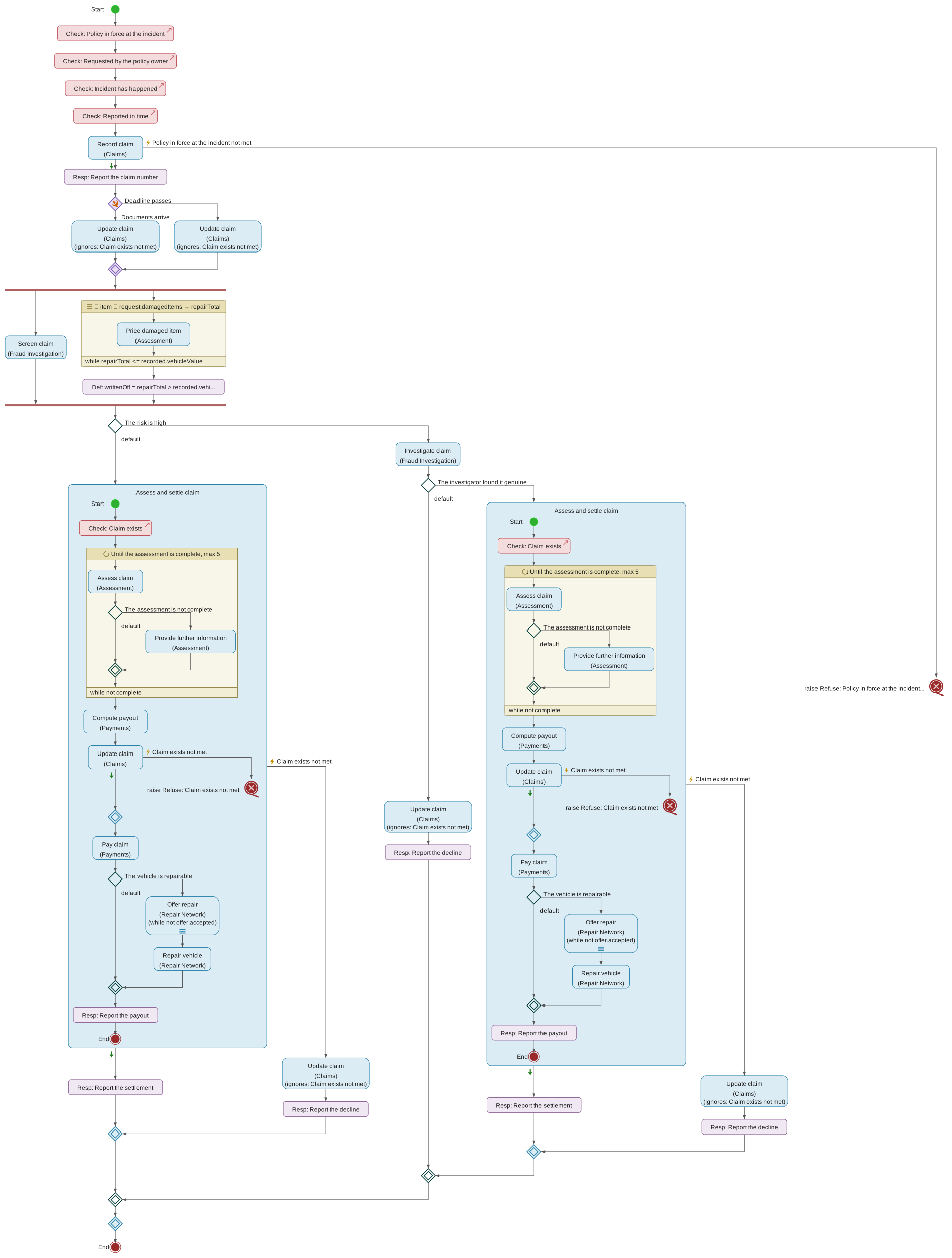
Concurrent flows in the Process View
Drop the Concurrent Flows tool onto a transition and the Process View draws a fork bar, a lane below it and a join bar: the process splits at the fork, the lanes run at the same time, and the join waits for them before the process goes on. Right-clicking the element offers three kinds of lane to add.
Add concurrent flow adds an unconditional lane. It always runs, and it always arrives at the join. This is the plain case: two things that must both be done before the process continues.
Add background flow adds a lane that starts at the fork and then goes its own way. It ends in a flow end rather than at the join, so the process does not wait for it, and it may outlive the process that started it — a notification to send, a file to archive.
Add conditional flow adds a lane governed by a condition, the same
ConditionalFlow an alternate-flows element uses. It runs only when its
condition holds, and when it runs it arrives at the join like any other
concurrent lane. Its condition is drawn beside the lane where it leaves the fork.
Give the flow the condition as its name, and state it formally in the flow’s
Formal specification in the Element Details View.
Conditional lanes are what make this more than a plain fork. Where an alternate-flows element takes exactly one of its flows, a set of concurrent flows takes every lane whose condition holds — none of them, some of them or all of them — and joins whichever ran.
|
Note
|
At least one lane must be unconditional
If every lane were conditional, a run in which no condition holds would arrive at the join along no path at all, and the process would stop there. So a set of concurrent flows always keeps at least one unconditional lane. The tool holds you to it: adding the first conditional flow to a set that has none creates an unconditional flow alongside it, and Remove is disabled on the last unconditional flow, saying why. The unconditional lane may be left empty — an empty lane is drawn as a bare line from the fork to the join, which reads as "and otherwise, simply carry on". A model that arrives from elsewhere without one — imported, or produced by an accepted AI proposal — is reported by model verification; see Section 4.18.56. |
A requested service that may refuse or send, in the Process View
A service refuses when one of its pre-conditions is not met, and it refuses by raising the exception that pre-condition names. It may also send a message while meeting a post-condition, which one of that post-condition’s messages sent declares. A step that requests such a service therefore has more than one way out, and the Process View draws each of them as an arm leaving the request-service box:
-
the success path leaves the bottom of the box and runs down the middle — the service was provided, no pre-condition was violated, and the process carries on, taking any steps the request’s default path holds;
-
one exception arm to the right for each exception the step handles, running out sideways into that handler’s own lane and back to the merge below; and
-
one message lane to the left for each declared message the step handles.
A lane’s kind therefore decides its side, and the two kinds never share one. That is what keeps an arm on its way back to the merge from crossing a lane that runs past it, and it leaves the success path in the middle of the construct whatever mix of handlers the step carries — the box, the success path and the merge stand in one column, and the arms fan off it in the direction that says what they are.
The last of those is the one that behaves differently, and the drawing is what says so. An exception arm comes back: whatever went wrong, the process carries on from the merge. A message lane does not — it runs down its own column and ends in a flow end level with the merge, because the request carried on the moment the service answered and nothing after it waits for the message to be processed. That is why a message handler is a background flow rather than a second kind of arm.
The arms are otherwise identical, so each one carries a marker saying what it is, where it leaves the box:
| A yellow bolt |
on an exception arm, followed by the name of the exception raised on it. This is the exception itself, not the handler that catches it — rename the handler and the arm still reads the exception it is for. |
| A green arrow |
at the top left of the success path. It carries no caption: "nothing was raised" has no name of its own, and the absence of a bolt is the statement. The marker stands for the request, not for the lane’s own steps — what it says is that the service answered. |
| A green envelope |
on a message lane, followed by the name of the declaration the lane processes — not of the handler, so renaming the handler still leaves the lane reading the message it is for, exactly as an exception arm still reads its exception. The envelope is drawn outlined rather than filled, which is what an outlined envelope means everywhere in these diagrams and in BPMN: a message being received. That is what the lane does — the service sent it, and this process is what takes delivery. It is drawn in the green a send and an await box are outlined in, so the marker and the steps that handle the message read as belonging together. |
Without these, an arm could only be read by following it — and an exception you have added a handler for but not yet filled in leads to an empty lane, so following it told you nothing at all.
A request arrives with an arm for every exception its service can raise: dropping it onto a transition gives it an empty handler for each one it does not yet handle, because every exception must be handled (Section 4.18.49). An empty arm is drawn as the bare loop back to the merge — a decision still to take, which is why it is drawn. Fill it with what happens — recovery steps, or a Raise exception step passing the refusal on as one of this process’s own exceptions, after which the arm ends there and never reaches the merge — or open the handler and mark it as ignoring the exception.
An arm marked as ignoring its exception has nothing to draw, so it is not drawn: the request’s box names it instead, in a row reading (ignores: …) below the domain, the exceptions listed in the order the handlers are named and cut short when the row grows long — the request’s form lists them all. A request whose every arm is ignored is drawn as a plain box. The handler is still in the model; select it from the request’s form or the model tree.
Message arms are added by hand: open the request service in the Element Details View and use the add buttons beside Message handlers, which offer the messages its post-conditions declare it may send. The same buttons beside Exception handlers offer any exception still without a handler — after the request was re-pointed, say. Both offers also appear on the request’s context menu in this view. The lanes are drawn in the order the handlers are named, so the diagram does not rearrange itself as handlers are added.
Steps taken when the service answered
The middle lane is the request’s default path, and it takes activities like any other lane: drop one on its transition, or add one under Default path on the request’s form in the Element Details View.
A step there is not the same as a step after the construct. An exception arm that recovers rejoins the main flow on the merge, so anything placed after the request runs whether or not an exception was raised and handled; a step on the default path runs only where none was. For the same reason, a step that reads the request’s answer belongs on the default path: past the merge the service may not have answered. Recording an authorisation belongs on the default path — there is nothing to record when the payment was declined — while writing to the customer about the outcome, whichever it was, belongs after the merge.
The default path is usually empty, and that is what an ordinary request says: the service answered and the process carries straight on. An empty one is drawn as the bare transition it has always been.
Monitored activities in the Process View
Monitored activities (monitored activities) are drawn as a request that may refuse or send is, with a frame in place of the request’s box. The frame is a loop’s — same shape, same colours — around the activities it monitors, and its header names the block beside a double ring, BPMN's sign of an event being watched for. Below it is a row of lanes:
-
down the middle, the path taken when nothing interrupted the activities, from the frame to a merge;
-
to the right, one lane per interrupting monitor, marked where it leaves the frame with a solid ring and the monitor’s name. It rejoins the flow on the merge, as an exception arm does: the process continues after the block either way;
-
to the left, one lane per non-interrupting monitor, marked with a dashed ring. It ends in a flow end of its own, as a message lane does, because the activities it runs beside carried on.
The solid and dashed rings are BPMN’s for an interrupting and a non-interrupting boundary event, so a reader who knows BPMN reads them without a key.
Monitored activities are on the toolbar’s controls group, beside the event-triggered flows. A new block has no monitor; right-click it and choose Add interrupting monitor or Add non-interrupting monitor, then give the monitor its trigger and its activities in the Element Details View. Activities are dropped into the frame, or on a monitor’s lane, as into any other sequence.
Where a lane’s label sits when a branch is wide
A branch fans its lanes out to either side of a central one, and every lane on a side leaves from the same point — the left or right corner of the decision diamond, the left or right face of the request-service box. Two lanes to a side and their captions would be written at the same place.
They are therefore stepped, outwards and upwards together:
-
the innermost lane on each side keeps its caption beside the corner it leaves by, where a branch with a single lane a side has always drawn it;
-
each lane further out carries its caption one line higher and as much further along its own arm as that arm runs beyond the innermost one’s.
So the captions climb away from the branch in the order the lanes do, and each sits over the stretch of arm that is its own. This applies to the conditions on an alternate-flows branch, to the events on an event-triggered branch, and to the exception arms of a request service alike.
The central lane — the default flow, or the success path out of a request service — is never stepped: it leaves downwards on its own and shares its departure point with nothing.
4.1.3. Element Details View
The Element Details View provides a forms-based interface to all properties and relationships of the currently selected model element. It complements the diagrammatic views and allows editing fields that are not directly accessible from a diagram like, for example, annotations and formal specifications.
The header shows the element’s type and its ancestor path (for example Insurer:Policies) so you can see where in the model you are. Clicking the path copies the element’s ID to the clipboard.
Editing fields
Text fields commit their value when the field loses focus (or when you press Enter in a single-line field) — never on every keystroke. This holds for every field in the view, including a data field’s multiplicity, where the intermediate text you type on the way to 0..* is not a value the model is asked to hold. Long-text fields such as annotation bodies, formal specifications and an exception’s message mark unsaved edits with a coloured left border until they are committed; pressing Enter in these fields inserts a newline. Because every committed change is pushed and committed to the model’s change history automatically, there is no separate save step.
Expanding a long-text field
The details view is a narrow panel, which is right for names and references and cramped for anything of length. Each of the three long-text fields — an annotation's body, a formal specification, an exception’s message — therefore carries an expand button that lifts it into an editor filling the window. Everything the field has in the panel it has there, only larger: an annotation brings its name, its purpose, language and markup type, and its live preview with the divider still draggable.
The button sits beside the field, in the same row as the remove button where there is one. For an annotation that row is visible whether or not the annotation is expanded, so you can go straight from the list to the large editor.
Close the expanded editor with its Close button, with kbd:[Esc], or by clicking outside it. All three commit what you have typed — closing is never a way to lose an edit, and never a way to discard one either. If you want to abandon a change, undo it in the field.
Expanding also works when the element cannot be edited — a branch in a locked phase, an element belonging to a mounted element library, a revision shown in a diff. The editor opens read-only, because a long annotation is as hard to read in the panel as it is to write there.
Properties are grouped into collapsible sections. A section that lists items shows how many it contains — for example Pre-conditions (3) — so a collapsed section still communicates whether it is empty.
An empty section starts collapsed. A responsibility domain has five collections and a service contract four, and most are empty for most of a model’s life; a domain holding one service contract would otherwise open as five headings with four of them expanded onto "No items". The count beside the heading already tells you the section is empty, so the section stays shut until it has something to show. Sections with primary content start open once they do; secondary sections (annotations, formalization references) start collapsed whether or not they contain anything.
Whatever you open or close yourself takes precedence over this and is remembered per element, including across branch checkouts and model reloads. Adding an item always opens its section, so a new element is never created somewhere you cannot see it.
Structured children
Container elements list their structured children — sub-domains, service contracts, processes, decisions, exceptions, data types — as expandable items. Expanding one shows that child’s own form, so a whole domain can be worked through from where you are, and a child that contains further children expands the same way, down as far as the model goes. The arrow beside an item opens that child as the current element instead, for when you want the diagrams and the action bar to follow; the remove button beside it deletes it. A collapsed item is not rendered at all, so a large model costs only what you have open.
Expanding a child shows the properties that belong to its type. Its annotations and formalization references are not repeated there — those are shown for the element you have open, so open the child itself to reach them.
A newly added element is opened where you added it, and is unnamed: the tool names nothing for you. Type the name into the field waiting at the top of the item you have just been given.
That is deliberate. A name is model content — it is committed to the repository, read by everyone on the branch, and carried into every generated artifact — so a name nobody chose is a statement nobody made. It also could not be neutral: a placeholder would be written in whichever language the person who created the element happened to be working in, so the same model would name its elements two ways depending on who added what.
A handful of elements are the exception, and they are not really named by the tool either: they are named after something in the model. A send, an await and a declared message take the name of the data structure they carry; a request service takes the name of the contract it requests. Each shows a provisional form — Send message, Request service — until you point it at something, and then renames itself to match. The moment you type a name of your own, that tracking stops for good.
Service contracts: request and response
A service contract's Request and response section holds the two data structures the contract exists to describe — what the service is given and what it returns. Both expand into a full data-structure form, so their fields, base type and invariance constraints are edited here rather than by locating them in the model tree. Neither can be removed: the contract creates them with itself, and there is no way to put one back.
Processes: services used and activities
A process’s Services used section lists the service contracts the process requests, whether the request is already in the flow or still waiting under Activities to place. It is read off the requests rather than edited: a service is used by requesting it, in the Responsibility Allocation View or the Process View, and each entry leads to its contract. Which pre- or post-condition a request discharges is recorded on the request itself, under Addresses. Its Activity sequence holds the activities themselves, and the add buttons in the section heading create one of each kind — request service, raw activity, send message, await message, raise exception, conditional flow, for-each, while. An exception handler, a message handler, a request service’s default path and the body of either loop carry the same section and the same buttons, so a sequence can be built to any depth from the form alone.
Building a process from the form and building it by dragging tools onto a process diagram reach the same model; use whichever suits the step you are on.
Request service: one provider, or several
A request service names the Service contract it requests, and beneath it three sections: the Default path, which is what the process does when the service answered without raising; the Exception handlers that catch what that service can raise; and the Message handlers that process what it declares it may send.
Steps on the default path are not the same as steps placed after the request. An exception arm that recovers rejoins the flow when its handler is done, so anything after the request runs whether or not an exception was raised and handled; the default path runs only where none was. That is also why the request’s answer can be read only on its default path once it has exception handlers — which, since every exception must be handled, is whenever the contract has a pre-condition. It is usually left empty, which is what an ordinary request means — the service answered and the process carries on. The process diagram draws it as the middle lane of the construct, and a step can be dropped onto its transition there instead.
Provider selector says where the party asked is read from, as a path over the data this step can reach — request.preferredUnderwriter, Quote.nextReinsurer. It is typed rather than picked, and deliberately so: a provider you already know when you are writing the model is the contract the request names, drawn in the Responsibility Allocation View, because you require a contract and never a party. What only the running process knows is which service reference to ask for, and that is a value in the data.
Left empty the field is still saying something: the service is requested of whoever provides that contract. Since a contract may be realized more than once, that is an ordinary thing to mean, and a note under the field says it while the field is empty. State a path and the request becomes directed — which is what you want when a provider that cannot serve a request itself passes the same request on to the next one, since that is otherwise indistinguishable from the process calling itself. The path also says where that next provider came from, which naming a party could not.
The tool follows the path and reports what it finds: a route it cannot follow as a warning (Section 4.18.24), and one arriving at a value that is not a service reference for the contract requested as an error.
The selector is not the domain shown in brackets under the request’s name on the process diagram: that one owns the contract. State a path and the diagram draws it as a further row, → <the path>; leave it empty and no row appears, because "whoever provides the contract" names nobody to draw.
A new request is called Request service, and naming the contract renames the step after it — pick Rate the risk and the step becomes "Rate the risk". The name keeps following the contract you choose until you type one of your own in the Name field, at which point it stops for good and nothing the tool does will overwrite it.
Each section’s heading carries one add button per unhandled item, named after the exception or the message it would handle — the requested contract’s pre-conditions say what can be raised, and its post-conditions' messages sent say what can be sent, so the form offers exactly what that contract states and nothing else. Adding a handler creates the corresponding lane on the process diagram. The difference between the two shows there rather than here: an exception arm rejoins the flow at the merge unless it raises, and a message lane runs on to its own end. See Section 4.1.2.19.
Choosing the Service contract — the first time, or re-pointing the request — also gives the request an empty exception handler for every exception that contract may raise and the request does not yet handle, so the add buttons for exceptions are usually already spent. Re-pointing keeps the handlers the previous contract needed, because one with steps holds recovery work; verification reports them until they are removed (Section 4.18.49).
A request to a service that is not a function also has a Compensation section, saying how the request’s change is undone should the process later raise one of its own pre-condition exceptions (compensations). When the requested contract — or a contract it specializes — has an Undone by, the section names it and offers Override for this step; otherwise it says that nothing does, and offers Add compensation. Either way it offers Needs no compensation, which asks why. A compensation’s form names the Undoing contract and lists the request constraints that build its request. A send message carries the same section, without the inherited case. A service contract that is not a function carries the contract-level counterpart, Undone by. A service contract also says whether Its requesters may cancel it (cancellable); a specialization of a cancellable contract is cancellable too, and the form says which base made it so.
An exception handler’s own form names the exception it Handles and lists its steps. While it has none it also offers Ignore this exception and continue after the request: tick it when carrying on really is what should happen, and the empty handler becomes a decision rather than an omission — the process diagram then names it on the request’s box rather than drawing an empty arm. Unticked and empty, the form says that nothing is decided yet, and verification warns of it. Once the handler has steps the box is gone — the steps are the decision.
Instances says whether the service is requested of one provider or of several. Left on Single instance — the default, and what every request written before this setting existed means — nothing further is asked. Choose Multi-instance and two more fields appear.
Reach for multi-instance when one and the same service is requested of a set of providers: three insurers quoting on a risk, every reinsurer on a panel, each of a set of assessors. This is not the same statement as a for-each around a single request, and the two are not interchangeable — a for-each walks a collection in the process’s own data and binds each element to a variable its body reads, whereas a multi-instance request asks one question of several parties and varies only who answers. See Section 4.1.3.6 for the loop, and the primary model elements chapter for why keeping them apart matters.
Processing mode is either parallel or sequential, and starts parallel. Parallel says the instances are independent of one another and may run concurrently; sequential says they must be worked through one at a time, which is what to choose when a later request depends on what an earlier one returned, or when the providers must be approached in a stated order. The default is the opposite of a for-each’s, and deliberately: a loop body routinely carries state from one iteration to the next, whereas separate providers answering one question do not.
Number of providers says how many are addressed, in the same form a data field’s multiplicity takes — 3, 1.., 2..5. Choosing multi-instance seeds it with 1.., which you can narrow. It may be left empty, and an empty one is a statement rather than an oversight: a modeller who has established that a request goes to several providers but not yet how many should be able to say exactly that. Verification then reports it as a warning — see Section 4.18.23.
Continue while is where you say when the request goes on to the next provider. Add a continuation condition here and the request reads ask each in turn while this holds — which is how a chain of providers is modelled as one request rather than as a loop around one. The condition is stated in continuation polarity, exactly as a for-each’s and a while’s are: it says when the request carries on, never when it stops, so the same wording means the same thing wherever you meet it.
On a sequential request it decides whether the next provider is approached at all; on a parallel one every provider has already been asked, so it says that the outstanding answers are no longer wanted. It is an early exit rather than a bound — Number of providers is the bound — so leaving it empty is a complete statement, meaning every provider is asked, and verification never asks about it.
Name the response binds what the service answered to a name of your own, for the rest of the sequence. You supply the name and nothing else: the panel states beneath the field what the name is bound to — the requested contract’s response structure, at this request’s own multiplicity — because the contract has already said what it answers with. Repoint the request, or make it multi-instance, and that binding follows; a multi-instance request binds a collection of answers.
Most requests need none, which is why the button is an offer rather than a field. A request is named after the contract it asks for, and that name already reaches the answer — Rate the risk.premium. The note beside the button says so. Name the response where that reading is ambiguous, most often when one sequence requests the same service twice. See Section 4.5.
All three fields disappear again if you switch back to single instance, and what you typed is kept, so changing your mind and changing it back loses nothing.
On the process diagram a multi-instance request carries three bars in a strip along the bottom of its box — vertical for parallel, horizontal for sequential — and a stated continuation condition adds a row reading (while …) beneath the providing domain.
For-each: what is worked through, and how
A for-each runs its body once per element of a collection. Five things describe it, and only the body is mandatory.
Source collection is the collection worked through, written as an expression such as request.items — a formal specification like any other, added and removed the same way, so what it says can be read rather than only displayed. Element variable names each element while the body runs, such as item, and is a process variable with a type of its own rather than a bare name (see Section 4.5), so the body’s activities have something to refer to and a reader can see what kind of thing it is. Its Name, data type and multiplicity are all edited in the for-each’s own form — the name field at the top of the pane is the loop’s. Leave both empty and the for-each is a plain loop with no declared driver — legitimate early in an analysis, but a reader cannot then tell what it repeats over.
What the loop accumulates is stated as a carried variable — see Section 4.5. It says where the value starts and what each iteration makes of it, so a reader sees not only where the results end up but how they get there, and it keeps its last value after the loop, so a step after the loop can read the result. There is no separate result collection field: naming a destination said less, and said it in a form a While could not use.
Carried variables are listed in the Carried variables section of the loop’s form. Its add button creates one; each then has a Name, a data type and multiplicity, a Starts as expression and a Becomes expression, each added and removed like any other formal specification. A carried variable missing either expression is reported as a warning (Section 4.18.21). Selecting the variable in the model tree shows the same fields.
Processing mode is either sequential or parallel, and starts sequential. This is a statement about the model, not a hint to an implementer: sequential says the elements must be worked through in order, which is what a body carrying state from one element to the next requires; parallel says each element is independent of the others and they may be processed concurrently. Sequential is the default because it is the weaker claim — a modeller who has not considered the question has not established that concurrency is safe.
Continue while is an optional formal specification of an early exit, stated as the condition under which the for-each carries on: it proceeds while the condition holds and stops before every element has been processed once it does not — "while fewer than ten results have been collected", for instance. Without one, the for-each runs to the end of the source collection. It is added and removed like any other formal specification, and it is not the same slot as a formal specification the activity may otherwise carry.
It is read after each iteration, once the carried variables have taken their new values, with the element just processed still in scope; names the body itself bound are not, so anything the condition needs from the body has to reach it through a carried variable. When it does not hold, no further element is taken.
A parallel for-each can neither carry variables nor stop early: its lanes run at the same time, so there is no order to fold over and, once all have started, nothing left to stop. Verification reports either as an error (Section 4.18.22). The fields stay in the form when you switch the mode, so nothing you wrote is discarded — the report tells you what to remove or to switch back.
The polarity is worth reading carefully: the condition says when the loop continues, not when it stops. It is stated that way round so that this field and the guard of a while-loop mean the same thing — two loop constructs in one language whose conditions read in opposite senses is a reliable source of mistakes.
While: repeating until something changes
A while repeats its body for as long as a guard holds. It is the other loop, and choosing between the two is a statement about why the repetition ends.
Reach for a for-each when the repetition is driven by a collection: there are twelve claim items, so the body runs twelve times, and the loop ends because the collection ran out. Reach for a while when it is driven by a condition: chase the outstanding documents for as long as any are outstanding, and nobody can say in advance how many times that is. The distinction is worth keeping because a for-each terminates by construction and a while does not — a reader, a verification engine and a phase gate can all tell the two apart from the element alone, without inspecting its fields.
A while is created the same two ways a for-each is: with the While tool in the Process View’s Control Flow group, dragged onto the diagram, or with the Add while button on the activity list of whatever sequence is to hold it. Three fields describe it, and only the body is structurally required.
Continue while is the guard, and it is what bounds the loop. It carries the same meaning and the same polarity as a for-each’s: the loop proceeds while it holds. A while with no guard stated is a loop with nothing to end it, which the model can express but a reader should treat as unfinished.
Test before iterating decides where the guard is evaluated. Left on — the default — the guard is checked before the first iteration, and a body whose guard is already false never runs at all. Turned off, the body runs once and the guard is checked afterwards: a do-until. The setting exists so that a modeller wanting the second shape does not have to place a copy of the body ahead of the loop and then keep two copies in step.
Carried variables are what the loop changes from one iteration to the next, edited exactly as a for-each’s are (see Section 4.1.3.6). They are the only thing a guard can read that is able to change, so a guard that names none of them cannot finish (Section 4.18.20).
Maximum iterations is an optional whole number bounding the loop. It is the one thing that lets anything downstream say something about termination, which is why it is a number rather than an expression: a bound that has to be evaluated cannot be reasoned about. Leave it empty when the loop genuinely cannot be bounded — an omission is an honest statement, an invented number is not.
A while has no processing mode. Each iteration depends on the state the previous one left, so there is nothing for a parallel setting to mean.
When the form is read-only
If the branch you have checked out does not accept writes — it belongs to a project in a phase that is locked, or you are not a member of that project — the whole form is read-only and says so in a note at the top. Fields cannot be typed into, drop-downs cannot be changed, and no add or remove button is offered. Nothing is hidden: everything the model holds is still there to read, and navigation still works. See Section 6.2.2 for which phases accept changes.
An entity’s form is read-only for a different reason, and says so too: everything it shows is derived from the data structures that feed it, so it is changed by editing those.
Choice fields
Properties with a fixed set of values — an annotation's purpose, language
and markup type, a data field’s relationship, a primitive type’s basic
type, a formal specification's language — are edited through drop-downs.
The options read as ordinary words in the interface language: Informal
requirement, Plain text, Date and time, English. The model stores
its own identifiers underneath, so the same annotation reads as
Kurzbeschreibung to a colleague working in German.
Reference fields
Relationships to other model elements are edited through reference fields. A reference can be set in two ways:
-
Type part of the element’s name into the field and pick a match from the search list. Hovering a match shows its fully qualified name (for example
Insurer:Policies:Policy) to disambiguate elements that share a name. If nothing matches what you have typed, the field says so rather than showing an empty list. -
Drag an element from the model tree onto the field. While dragging, the field highlights to indicate whether the dragged element’s type is accepted (green) or not (red).
The search list can be used from the keyboard without leaving the field: arrow down and arrow up move a highlight through the matches, wrapping at either end, and Enter picks the highlighted one. Nothing is highlighted until you press an arrow, so Enter on its own never picks a match you did not choose, and typing more clears the highlight because the list has changed. The same keys work in every search list on a diagram’s dialogs: the type in Add attribute, Add composition, Add association, Add aggregation and Add specialization, the entity a structure is fed by, the contract a responsibility allocation assigns, a service contract's base contract, and the entity a post-condition's entity service is created for.
Hovering the field lists the element types it accepts, named as they are in the interface language.
Single-reference fields show an arrow button when a reference is set; clicking it (or clicking a reference row in a multi-reference field) navigates to the referenced element. The remove button next to a reference clears it without affecting the referenced element itself.
Formalized from
Formalized from records which informal requirements an element was written to satisfy. Adding a reference opens a search over every informal-requirement annotation in the model; picking one shows its full text and offers to cite a passage within it — select the passage in the body, and the field below it fills with what you selected. That field cannot be typed into: a citation has to be a passage the requirement actually contains, and selecting it is what makes that so. Selecting again replaces it; the x beside the field removes it, and is shown only while there is a citation to remove. The citation is optional, and leaving it empty says the element formalizes the requirement as a whole.
The dialog can be given the window. Both of the things it asks you to read are somebody else’s prose — the list of every informal requirement in the model, and then the whole of the one you are citing, out of which a passage has to be found and selected — and neither is comfortable in a box sized for a form. The button beside the dialog’s heading maximises it, and the same button restores it. The passage you have selected stays as it is across both, and the dialog opens the way you last left it, so working through several long requirements does not mean maximising once for each.
Each reference then states in the row itself what it cites, so a link can be read without opening anything:
- Cited passage
-
the sentence the element was written from, shown in quotation marks. Hovering the reference shows the whole requirement with that passage highlighted inside it.
- Cites the requirement as a whole
-
a citation was recorded, and it names the requirement entire.
- No cited passage was recorded
-
nothing was cited — either nobody was asked (references created before citations were kept) or the AI proposal this came from named no particular sentence. This is not the same as citing the whole requirement, and is not shown as though it were.
Two warnings can appear beneath a reference, and they say different things.
The informal requirement has changed since formalization means the requirement was edited after this element was written, so what the element formalizes may no longer be what the requirement says. It is a prompt to re-read, not a defect: the edit may have been a corrected typo three paragraphs away.
The cited passage is no longer present in this requirement is the stronger one, and it replaces the first rather than joining it: the exact sentence this element was formalized from has been changed or deleted. The passage is repeated in the warning so you can see which one went.
Clicking a reference navigates to the element that holds the requirement. Removing a reference removes only the link — the requirement itself, and everything else pointing at it, is untouched.
Resolving a warning
A reference is not otherwise editable: to formalize a different requirement, remove the link and make another. A warning is the exception, because the requirement moved underneath a link that is still the right one, and deleting the link would lose the claim rather than restate it. Two buttons appear on a reference that carries a warning, and they are the two honest answers to it.
Still valid records that this element formalizes the requirement as it now reads. The citation is kept, and the warning clears. This is the one to use when the edit did not touch what the element was written from.
Update citation… reopens the requirement with the passage you cited already in the field, so you can see what it used to say. Select a different passage — or clear the field to cite the requirement as a whole — and confirm. This also records the requirement as it now reads, so it clears the warning too. It is the same dialog as the one that creates a reference, and maximises the same way, which is worth reaching for here: finding where an edited requirement now says what it used to is the case with the most to read.
Where the cited passage has gone, Still valid is offered but cannot be pressed, and says why: confirming keeps the citation, so the reference would read as current while still quoting text the requirement no longer contains. Update the citation instead. For the same reason, confirming a passage the requirement does not contain is refused, with the field saying so — you are asked either to find the passage again or to say outright that the requirement is cited as a whole.
Neither button appears on a read-only form. The warning is still shown — nothing is hidden from a reader who cannot write — but resolving it is a change to the model.
A reference naming an annotation that no longer exists is shown as unresolved and reported by model verification; see Section 4.18.
Formal specifications
A requirement, a raw activity and a conditional flow may each carry a formal specification, shown and edited in the notation you choose under Settings (Section 4.7). Where there is none, the form offers to add one; where there is, the section can be removed again, which asks first because the body goes with it. An activity’s specification is also what its box is labelled with while the activity has no name.
An element may carry more than one, and they are separate sections with separate names because they are separate claims. A for-each and a while each carry a Continuation condition beside their own specification; a post-condition carries a Condition — see below.
Post-condition: when it applies, and what it sends
A post-condition says what must hold once the service has been provided, and its form adds two things to an ordinary requirement’s.
Condition says when the post-condition applies — "if the claim is approved, the claimant has been paid". It is a formal specification like any other and is offered, added and removed the same way. It is deliberately not the post-condition’s own Formal specification: that says what must hold, this says when it must, and written as one they cannot be read apart. Leave it empty and the post-condition applies unconditionally.
Messages sent declares the messages the service may dispatch while meeting the post-condition — a payment advice to the claimant, a work item to an assessor. Each names the data structure that is the message, says whether it is a work item or a notification, and may name the party addressed, in the same vocabulary a send message uses. There is no recipient selector here: a path picking one particular instance of a party belongs to a particular send in a particular flow, not to the contract that permits it. Leaving the party unnamed says the message goes to the requester of the service, as it does on a send.
A declaration names itself after its message. A new one is called message sent, and choosing the data structure renames it to <that structure> sent — "Payment advice sent". Change the message and the name follows. Type a name of your own and it stops following, permanently: the tool never overwrites a name you chose, and there is nothing to undo if you change the message afterwards. This is the rule a pre-condition's raised exception already follows, read the other way round.
The name is not translated, deliberately. It is part of the model, committed to git and read by everyone on the branch, so deriving it in the language of whoever happened to create the element would name one thing two ways.
These are not implementation detail put in the contract. A client reads them: a request service offers one message handler per declaration listed here, which is what lets a process say what it does when the message arrives without anyone opening the provider’s process to find out what it sends. See Section 4.1.3.5.
Enumerations
An enumeration’s Options list is edited in place: type a value into the field below it and add it. Removing an option asks for confirmation.
Deleting elements
Nothing in this view is deleted without being asked about first. Removing a structural element (a service contract, process, data type, field, condition, activity, and so on) reports how many references elsewhere in the model point at the element, so the blast radius of the deletion is visible before it happens; removing something that is not a model element in its own right — an annotation, an enumeration option, a formal specification — names what will go. References held by deleted content are cleared along with it; remaining incoming references are cleared where the model supports cascading deletion, and any that do dangle are flagged by model verification (see Section 4.18).
Actions
An action bar under the header carries the actions that apply to the element as a whole. There are two controls.
AI opens a menu of three:
- Formalise informal requirements
-
propose formal model elements from what the element’s informal requirements say. Each proposal is reviewed individually in the model tree.
- Verify against informal requirements
-
check the formal model under this element against those requirements and report inconsistencies as annotations.
- Augment this element
-
propose additional elements beyond what the requirements state.
The first two read the element’s informal-requirement annotations, so on an element that has none they are listed but disabled, saying what to add first. All three need an LLM provider, which an administrator configures for the whole instance — see Section 7.6. You choose which of the configured providers and models to use under Integration → AI Settings; you are never asked for an API key, because the key stays on the server and is never sent to your browser. Where no provider has been configured at all, the actions say so and point you at your administrator.
Confluence republishes this element’s page in the model’s Confluence space. It appears on the element types that have a page of their own; see Section 9.2.3.1.
The status line beside the controls is coloured by outcome (green for success, red for error) and clears itself after a short while.
4.2. The URDAD Modeling Method
The tool guides users through the URDAD methodology — a systematic, top-down analysis and design approach. For any new service to be provided, the following steps are followed:
-
Select or create a ServiceContract — identify the responsibility domain the service falls into. Add a new
ServiceContractto that domain if one does not already exist. -
Formalize requirements — using the Functional Requirements View, specify the stakeholders and their requirements: pre-conditions (grounds for refusing the service) and post-conditions (what must be achieved by the service).
-
Allocate responsibilities — using the Responsibility Allocation View, identify the lower-level services needed to verify each pre-condition and to realize each post-condition, and assign them to appropriate responsibility domains. Not every requirement is met by delegating: one satisfied by notifying a party, by waiting for a message to arrive, or by a step carried out here, is allocated to that activity instead. The view’s tools create all four — a service, a send, an await, or an activity — by dragging them onto the requirement, so this step does not wait for the process to be written. A new activity is not placed in the flow: allocating says what the process must do and nothing about when, so it waits under Activities to place on the Process View’s toolbar until step 4 puts it where it belongs. Either way the view answers the same question: what addresses this requirement? Each requirement is addressed by one activity — one activity may address several requirements, and a requirement that takes several steps is allocated to a construct holding them rather than to each step. A post-condition that already determines part of the response from the request is met by the contract itself and needs no activity; the view draws it with a heavy outline.
-
Orchestrate the process — using the Process View, define the sequence, concurrency and conditional logic connecting the allocated services and activities. The toolbar’s Activities to place menu holds everything step 3 allocated but did not position; drag each onto the transition where it belongs, and it leaves the menu. The same menu lists every service this process uses, and those entries stay: dragging one adds a further request of that service, which is what a recursive process and two alternate flows calling the same service both need. Removing an allocated activity from the flow puts it back in that menu rather than deleting it — the allocation made in step 3 stands, and only its position is being withdrawn. Verification reports whatever is still waiting.
-
Recurse — repeat steps 1–4 for each lower-level service within its own responsibility domain.
4.3. Model Elements
Every URDAD model element has a unique identifier, a name and optional annotations.
4.3.1. Primary model elements
ResponsibilityDomain-
Packaging unit mirroring an organizational department or an external party. Owns service contracts, data types, processes, conditions, exceptions and nested responsibility domains, and the entities it contains: it is their owning domain, and once deployed only its own contracts may change their instances (Who may write or read an entity).
ServiceContract-
Formalizes a service’s functional requirements: the input (
requestDataStructure) and output (responseDataStructure) data structures, pre-conditions, post-conditions and the stakeholders who hold those requirements — drawn, and added, in the Functional Requirements View; see Section 4.1.2.5.A contract may specialize another, named as its
base. It then imposes every functional requirement of the contract it specializes — so everything a client of the base may rely on, a client of the specializing service may rely on too, and a process realizing it must address the inherited requirements as well.Pre- and post-conditions then move in opposite directions, and the difference is deliberate. A specializing contract may add post-conditions — it promises everything the base promised, and may promise more. It may never add a pre-condition; it may only waive one it inherits, through the Waived pre-conditions section of the element details panel. So it accepts everything the base accepted, and may accept more. Together those two rules are what makes the specializing service usable wherever the base was. See Section 4.1.2.7 and Section 4.1.2.7.1.
A contract may also declare that its service is a function: pure, so that asking for it yields an answer and changes nothing. Tick This service is a function in the element details panel. It is a claim about the service, and the tool checks it — see Section 4.4.
The claim moves the same way a post-condition does under specialization, and for the same reason: a contract specializing a function is a function and may never drop the claim, while a specialization of an ordinary service may freely make it on its own merits. On a contract whose base is a function the tick box is therefore ticked and locked, and a note says which contract in the chain made the claim. Inheriting the claim does not inherit the checking of it — the specialization’s own realizing process is walked against the purity rule exactly as the base’s is. See Section 4.18.18.
A contract may declare that its service is cancellable: Its requesters may cancel it before it is answered — every requester, another process included. A cancelled request has no net effect: the process realizing it undoes what it committed and ends cancelled. A request for a service that is not cancellable is not cut off when its requester is interrupted: it is waited for, and what it did is then undone through its contract’s Undone by (Work still under way). The claim is inherited like purity: a caller of a cancellable base may cancel whatever specialization it is handed, so the box is ticked and locked on a contract whose base is cancellable.
A contract that changes a stored record decides the change on the version its requester read (Section 3.2.2), unless it declares that Its change applies to the current state — ticked, it asks for the reason, which is part of the contract and shown at every promotion. A declaration without a reason declares nothing (Section 4.18.14).
A contract also states which responsibility domains may request it — its Published to section in the element details panel. This is a different question from who the contract’s stakeholders are: a stakeholder has, or is expected to have, something to say about how the service must be realized; being published to it is about who may be its clients — who may use it once built. A domain can be a stakeholder with no call access at all — a compliance function that shaped the requirements but never calls the service — or a client with no say in the design, such as a customer who simply uses the service as specified. Neither list implies the other, and a domain may appear in both, in one, or in neither.
An empty Published to list is the default, and states that the service is internal-only — requested only by processes of its own domain or of a domain enclosing it, never called directly from outside. There is no separate flag for "internal": the empty set already says it, so leaving the section empty is not an omission to fix.
The Functional Requirements View draws every published domain, alongside the contract itself — see Section 4.1.2.6. To see every service a domain publishes, or every service a role may request, use Published services on the model tree (Section 4.1.1.6).
Who actually holds a published role at runtime — which human team or external system realizes a given domain — is a deployment-time fact rather than something this field states; the model names the role, not what fulfills it.
The list names the domains that may request the contract. A domain listed there is one of two things, and the model does not say which, because it is a deployment fact. It may be a domain whose own processes are the clients, recorded so the provider knows who depends on it. Or it may be a way in: a domain a deployment realizes as human or external, whose people or systems are clients from outside and start the contract themselves. A service request naming another domain’s contract that is not published to the requesting domain is reported (Section 4.18.25), and moving a contract publishes it for you (Moving a service publishes it).
What the list does once a model is deployed is decide reachability: a deployed execution environment offers as external entry points exactly the contracts published to a domain it realizes as human or external, and refuses a caller whose responsibility domains do not include one of those. A domain the deployment realizes as internal is never a way in. Access follows the domain tree, so a caller holding a domain also reaches what is published to the domains inside it. Two consequences worth holding onto while modelling. First, publishing a contract to a human or external domain is the only way to make it callable from outside — a contract with an empty list can still be requested by other contracts' processes, and cannot be reached by anyone directly. Second, being published is not permission to do anything in particular: a contract’s own pre-conditions still apply, and one that names the reserved
caller(see Section 4.6.15) is checked against the identity that actually initiated the execution, so a published domain’s members can still be refused individually. The deployment side of this — how an identity is authenticated and bound to the domains it acts for — is in the developer manual, not here.A contract may also state that it runs on the calendar’s own initiative rather than in response to a request — its Scheduled trigger section in the element details panel. Add one and the section offers a Schedule (a five-field cron expression, e.g.
0 2 1 *for "02:00 on the 1st of the month") and a *Time zone (an IANA zone id, e.g.Africa/Johannesburg) — a cron expression names a wall-clock reading, and what instant that is depends on whose wall clock it is read against. A contract carrying a scheduled trigger has nobody supplying a request payload when the schedule fires; its request structure is typically left at its defaults, the same way a step’s absent guard already means "always" rather than needing a special case.A scheduled trigger is not mutually exclusive with Published to: a nightly reconciliation job a role can also re-run on demand is an ordinary pattern, and a contract may carry both, either, or neither. It is also not inherited by a specializing contract — a contract specializing one that is scheduled starts unscheduled, and must state its own trigger if it needs one. Two independently-scheduled realizations both firing on what a modeller believed was one schedule is a real hazard, which is why inheriting silently is refused rather than assumed convenient.
The model states only that a contract is scheduled, never where it runs or as what identity — actually registering a schedule with a running deployment, and binding the system identity that executes it, is deployment configuration outside the model.
One consequence of that is worth knowing while modelling: a scheduled firing still has a caller. Nobody requested it, so its caller is not a person — it is a fixed identity the deployment binds, standing for the calendar itself — but it is present and it is checked like any other. So a pre-condition naming the reserved
caller(see Section 4.6.15) applies to a firing exactly as it does to a request, and a contract that is both scheduled and published needs a condition that accepts both kinds of caller, or the nightly run will be refused by the very check meant to guard the on-demand one. Writing the condition to name each identity it means to admit is the straightforward way to say that, and it keeps the decision in the contract where a reviewer can see it rather than in the deployment. PreCondition-
A condition under which the service must be refused; optionally linked to a raised exception.
A pre-condition is declared on the contract that originates it — one with no base. A contract that specializes another inherits its base’s pre-conditions in full and may waive any of them, but may never declare one of its own; no gesture that would author one — the details form’s Add pre-condition button, the Functional Requirements View’s pre-condition tool, that view’s context menu entries — is therefore offered on a specializing contract. See Section 4.1.2.7.
PostCondition-
A condition that must hold after the service has been provided — i.e. what the service must have achieved.
A post-condition may itself apply only under a condition: "if the claim is approved, the claimant has been paid". State it in the Condition section of the element details panel, which is a formal specification like any other — a language and a body. It is deliberately a separate section from the post-condition’s own Formal specification, because the two say different things: one is what must hold, the other is when it must. Written as one they cannot be read apart, and nothing in the model can act on the qualification. Leave it empty and the post-condition applies unconditionally.
A post-condition may also declare the messages sent while meeting it — a payment advice to the claimant, a work item to an assessor. Each is a
MessageSendEvent, added from the Messages sent section, and each names the data structure that is the message, whether it is a work item or a notification, and optionally the party addressed. This is part of the contract, not an implementation detail: it is what lets a client decide what to do when the message arrives, without opening the provider’s process and reading itsSendMessagesteps out of it. SeeMessageSendEventandMessageHandlerbelow. Process-
The business process which orchestrates the realization of a service as a sequence of service requests plus control flow constructs (
ActivitySequence,ConcurrentFlows,AlternateFlows,EventTriggeredFlows,MonitoredActivities,ForEach,RaiseException,Undo).A process names the
ServiceContractit realizes, and is created either by right-clicking that contract in the model tree and choosing Specify process, or from the Processes section of the owning responsibility domain’s details panel, whose add button offers the domain’s contracts to choose from. Either way the process is named after the contract, and lands in the responsibility domain that answers for it.A contract may be realized more than once, and every such process is offered on the contract’s own Functional Requirements View under Open process specification for…. A contract is a specification and a process is one way of meeting it: two responsibility domains may each realize the same contract, one domain may carry a second realization it is working towards, and a contract that other contracts specialize still holds the realization those specializations are all measured against. Realizations after the first are numbered in the name —
Assess claim,Assess claim (2)— since that is what tells them apart in the model tree, in the diff at sign-off and in the change history. RequestService-
A step at which the process requests a service — the one construct that reaches outside the process for something. It names the
ServiceContractrequested, carries anExceptionHandlerfor each exception that service can raise — every one of them; see Section 4.18.49 — and may carry aMessageHandlerfor each message it declares it may send.A request names itself after the service it requests. A new one is called
Request service, and choosing the contract renames it to that contract’s own name — "Rate the risk" — with nothing in front of it, since asking for that service is the whole of what the step does. Change the contract and the name follows; type a name of your own and it stops following, permanently. A request created by allocating a contract to a requirement in the Responsibility Allocation View arrives named that way already.Deleting the contract clears the reference but keeps the name, so a request left dangling still says what it called for. Process verification reports it until it names a contract again — see Section 4.18.56.
The two kinds of lane behave differently, and the drawing says so — each kind takes a side of its own, exception arms to the right of the request and message lanes to the left. An exception handler's arm leaves the request and runs down its own lane. Either it rejoins the main flow at the merge below — the process recovered, and carries on from there — or it ends by raising one of the process’s own exceptions, passing the refusal on in this service’s terms, and never reaches the merge. A message handler's lane leaves the request in the same way but ends in a flow end of its own and never reaches the merge, because the request carried on the moment the service answered and nothing after it waits for the message to be processed.
The two are not equally optional. Every exception the requested service may raise must be handled, as Rust insists a
Resultis: left unhandled, it would escape the calling process as an exception that process’s own contract never declared. So a request is given an empty handler for each of them the moment it is placed in the flow, allocated in the Responsibility Allocation View, or pointed at a contract in the details panel, and each empty handler is a decision still to take — write what happens, or mark it as deliberately ignoring the exception. Verification reports what is left; see Section 4.18.49.A declared message with no handler, by contrast, is a perfectly good thing to model — doing nothing with a message is a decision. The details panel lists one Add button per exception and per declared message the request does not yet handle, and the same offers appear on the request’s context menu in the Process View.
Provider selector says where the party asked is read from — a path over the data this step can reach, such as
request.preferredUnderwriterorQuote.nextReinsurer.It is not a picker, and the reason is worth stating, because it is the whole shape of responsibility in URDAD. A provider you know when you are writing the model is not a fact about the step at all: it is the contract the request names, drawn in the Responsibility Allocation View — you require a contract, never a party. What only the running process knows is which service reference to ask, and that is a value in the data: a
ServiceReference, the data type that exists for exactly this.This is where a request parts company with a message. A send names no contract, so the party is the only thing it can name, and its recipient is a party picked from the model. A request names one.
Leaving it empty is a statement, not a gap. It says the service is requested of whoever provides that contract, which since a contract may be realized more than once is a real and ordinary thing to mean. Nothing writes a selector into the model in its place.
Stating one makes the request directed, which is what a delegation needs: a provider that cannot serve a request itself requests the same contract of its successor. That is how a chain of responsibility is written in URDAD — each link handles what falls within its own mandate and otherwise directs the same request onward, with the client knowing nothing of the chain. The path is also what says where the next link came from, which naming a party could not: the successor is usually whatever the previous answer, a lookup or the request itself supplied.
The tool reads the path and checks it. What it understands as a starting point is
request(the request data structure of the contract this process realises), the name of an earlier request in the flow (its response), and, inside a handler,exceptionormessage(what the arm was handed). A path it cannot follow is reported as a warning — see Section 4.18.24 — and one that reads a value which is not a service reference for the contract requested is reported as an error, because the model is then saying something that cannot hold.Note that the selector is not the domain shown in brackets beneath a request’s name on the diagram. That one owns the contract, and says where the service is specified rather than who renders it.
Where the provider selector says who is asked, request constraints say what is sent: the request the requested contract is realized against is its own object, with fields of its own, and something has to populate it. See Section 4.5 for how to add one and what the two names inside it (
request,providerRequest) mean, and Section 4.6 for the language a constraint’s body is written in.A request is made either to one provider or to several, and its Instances setting says which:
-
Single instance — one provider answers. This is the default and what every request written before this setting existed means.
-
Multi-instance — one service, requested of several providers: three insurers quoting on a risk, every reinsurer on a panel, each of a set of assessors. Choosing it asks two further questions.
Processing mode says how the instances relate in time. Parallel — the default — means they may run concurrently; Sequential means they must be worked through one at a time, which is what to choose when a later request depends on what an earlier one returned, or when the providers must be approached in a stated order.
Number of providers says how many are addressed, written in the same form a data structure relationship’s multiplicity takes:
3,1..,2..5. It is seeded to1..when multi-instance is chosen, and it may be left empty — a modeller who does not yet know says so by clearing it rather than by inventing a number. An empty one is then reported by process verification under "Multi-instance requests that do not say how many providers", which is a warning rather than an error: the model is silent, not wrong. See Section 4.18.56.A multi-instance request is not a
ForEachwrapped around a single one, and the two are not interchangeable. A for-each walks a collection in the process’s own data and binds each element to a variable its body reads; a multi-instance request asks one question of several parties, and what varies is who answers rather than what is asked. They also terminate for different reasons — a for-each because its collection is finite, a multi-instance request because its number of providers bounds it. Modelling one as the other loses that distinction with nothing left in the model to say it was lost.Continue while says when the request goes on to further providers, and is what lets a chain of providers be modelled as one request rather than as a loop around one: ask each in turn while the service has not yet been provided. It is stated in the same continuation polarity a
ForEachand aWhilestate theirs in — one field, one name, one meaning, wherever a continuation condition appears — so it says when the request carries on, never when it stops.On a sequential request it decides whether the next provider is approached at all. On a parallel one every provider has already been asked, so it says instead that the outstanding answers are no longer wanted. It is an early exit and not a bound: what bounds the request is
Number of providers, which is why a request stating no continuation condition is never reported — asking every provider is a complete statement.On the diagram a multi-instance request carries BPMN's multi-instance marker in a strip along the bottom of its box: three bars, vertical when the instances are parallel and horizontal when they are sequential. A single-instance request draws no marker, so the ordinary case looks exactly as it always has. A stated provider selector adds a row beneath the domain, reading
(→ <path>), and a stated continuation condition another, reading(while <condition>). -
AlternateFlows-
A branch: exactly one of its flows is taken. Each
ConditionalFlowstates the condition under which it runs, and the default flow runs when none of them holds. All flows rejoin at the merge. ConcurrentFlows-
Concurrency of every kind. Its flows all start together at the fork. An unconditional flow always runs and arrives at the join; a
ConditionalFlowruns only when its condition holds and, when it runs, also arrives at the join; aBackgroundFlowruns on independently and ends in a flow end rather than at the join. The join waits for every flow that arrived at it. At least one flow must be unconditional, so that the join is reached whatever the conditions say — see Section 4.18.56.A join waiting for some of its flows. The join may instead wait for a number of flows, set as Join after on its form: "the first two of three quotes". It is passed once that many have arrived, and the flows still running are then stopped — waits and tasks nobody holds at once, work a person or a system may already be acting on waited for, as when a sibling refuses (Work still under way). What a stopped flow committed stays committed: a later Undo step or refusal undoes it with the rest. Nothing is undone just because the count was reached. Since any flow may be the one stopped, no flow’s names are in scope after such a join, and a field of the response a flow populates is not certain to be populated by it. If fewer flows run than the count — some conditions did not hold — the join is passed once all that ran have arrived. The diagram shows the count beneath the join bar as
2/3: the count, over the flows that can arrive. The count is checked (joins waiting for some of their flows). EventTriggeredFlows-
A branch whose flow is chosen by something happening rather than by a condition being tested. Each flow is a
Reactioncarrying the event that triggers it, and the process waits at the gateway until one of those events occurs. All flows rejoin at the merge, as they do forAlternateFlows.There is deliberately no default flow.
AlternateFlowsneeds one because a run in which no condition holds must still reach the merge; here there is no "no event occurred" case to fall through to, so a default would be a flow that could never be taken. A timeout is expressed as aReactiontriggered by aDurationEvent.On the diagram its gateway is a diamond holding a satellite dish, which says the process is waiting to be reached rather than testing something it already has. The same dish is on the toolbar button that creates one.
Reaction-
One flow of an
EventTriggeredFlows: the activities carried out when its event occurs. It owns its triggering event rather than referring to one defined elsewhere, so an event never appears in the model tree on its own.
MonitoredActivities-
A stretch of a process watched for something happening while it runs (monitored activities): its activities — the body — and its monitors. Where an
EventTriggeredFlowsstops and waits for one of its events, a monitored block carries on working, and its monitors listen from the moment the block is entered until its activities complete. It is BPMN’s event sub-process, and its boundary events on a sub-process or a task: a boundary event on one task is a block whose body is that task.A withdrawal accepted at any time before dispatch is the case it exists for: the order is reserved, paid for and shipped in the body, and an interrupting monitor on the Withdrawal message stops that work, undoes it with an Undo step and charges the cancellation fee. Reminders to a person working on a task are a non-interrupting monitor on a clock, and they stop by themselves when the task is done.
What a monitor can read. A monitor fires with the body anywhere, so its activities see only what was named before the block, never what the body names. After the block, what the body named can be read only when no monitor can interrupt it — only then has the body always run to its end. The response must be populated on every path that leaves the block: the body’s and each interrupting monitor’s, as on alternate flows.
How an execution environment runs one is How monitored activities run. The Camunda export leaves such a process out (Section 4.14.3).
Monitor-
One monitor of a
MonitoredActivities(monitor): its trigger — aMessageEvent, aDurationEventor aDateTimeEvent, owned as aReactionowns its event — whether it interrupts the body, and the activities it runs when it fires.-
An interrupting monitor stops the body when it fires, by the same rules a cancelled request follows (Work still under way): waits and tasks nobody holds are withdrawn at once, and work that may already have acted is waited for. Then its own activities run and the process continues after the block. Only the first to fire does so; the others stop listening. Nothing the body committed is undone unless the monitor says so with an Undo step, which may stand here — nothing else is running.
-
A non-interrupting monitor runs its activities beside the body each time it fires, and the body carries on. Its activities are concurrent work: an exception escaping them must be one of the contract’s own pre-condition exceptions, and no Undo step may stand in them (Monitored activities). A clock that strikes again while the activities its last strike started are still running is skipped.
A duration counts from entering the block. A message is correlated as any wait is (which instance a message is for), and one that arrived before the block was entered fires its monitor as the block is entered.
-
MessageEvent-
A message has arrived. The message itself is named by a data structure, and that data structure is the shared element: two reactions in different processes that name the same one are reacting to the same message. That ties a receiver to whatever sends it.
Like an
AwaitMessage, it may also say which instance of its process a message is for — a message key and the value it must match — exactly as described under which instance a message is for. MessageSendEvent-
A message a service may send while meeting one of its post-conditions — a declaration on the contract rather than a step in a process. It is owned by the post-condition that declares it and never appears in the model tree on its own, exactly as the exception a pre-condition raises is owned by that pre-condition.
It carries the same three things a
SendMessagedoes, minus the recipient selector: the data structure that is the message, whether it is a work item or a notification, and the party addressed. There is no selector because a path picking one particular instance of a party belongs to a particular send in a particular flow, not to the contract that permits it. Leaving the party unnamed means here exactly what it means on a send — the requester — since this is that statement made at the contract level, and a contract reading it differently would permit a send the process it authorises could not make.It is named after its message too, as
<that structure> sent— a suffix where a send takes a prefix, because the two read as what they are: a declaration states that a message is sent, a step does the sending.It is an event, but not one a
Reactioncan wait for. The three that are —MessageEvent,DurationEvent,DateTimeEvent— say the model is waiting for something; this says the contract may cause something. MessageHandler-
What a client does with a message the service it requests declared it may send: the counterpart of
ExceptionHandler, one lane over on the same request.It names the
MessageSendEventit processes — the declaration, not the message’s data structure, since two post-conditions may declare a send of the same structure meaning different things — and it holds the activities that process the message. It is a background flow, and that is a claim about the process rather than a drawing convenience: the request does not wait, so the lane runs to its own end.Inside the lane the message received is
message, so a step there readsmessage.note. When the process runs, the lane runs once for each such message the provider sends while it works on the request, and the process completes only when every lane it started has — the same as for aBackgroundFlow. Two handlers on one request for messages of the same data structure cannot run: when a message arrives, nothing says which of the two it is for, so the execution environment refuses the model rather than guessing.When the declaration it processes is deleted from the contract, an empty handler goes with it and a handler with a body stays, losing only the reference and gaining a note saying so. Process verification then reports it under "Message handlers naming no message" until it names one again — see Section 4.18.56.
SendMessage-
Sends a message — the other half of a
MessageEvent. It names the data structure that is the message, and a reaction whoseMessageEventnames that same data structure receives it. It may also name the party it is addressed to.A send names itself after its message. A new one is called
Send message, and choosing the data structure renames it toSend <that structure>— "Send Payment advice". Change the message and the name follows; type a name of your own and it stops following, permanently.Three elements do this, all named after the one data structure they share: a post-condition’s
MessageSendEventstates that a message may be sent, aSendMessagestep does the sending, and anAwaitMessagestep waits to be told. ARequestServicefollows the same rule against the contract it requests, and a pre-condition’s raised exception against the condition it belongs to. In every case the name tracks only until you type one of your own, and never afterwards.A send may name the recipient it addresses, and it says so as a party — one of the model’s responsibility domains, the same vocabulary a service contract’s provisional stakeholders use. Set it by typing in the Recipient field of the element details panel or by dragging a domain onto it from the model tree.
The recipient is deliberately not an address. An email address, a queue name or a URL is a decision about how one reaches that party, and that is a design decision — which is precisely what allows one requirement, "confirm the shipment to the ordering client", to be realised as an email to a private client and as a message on a queue for a corporate one. For the same reason contact details belong to the party’s own data structure, as ordinary fields of
Client, and never to the message: the message’s data structure is a reusable data type, and putting addressing on it would turn that type into an envelope and force a copy of it the moment the same structure went to two parties.Beside it, Recipient selector names which instance of that party is addressed, written as a path into the process’s own data —
request.order.client. Without it the model says "a Client" where the process means one particular client. It is prose the tool does not resolve, in the same form a for-each takes its collections in.Both are optional, and the recipient’s absence is a statement rather than a blank: a send that names no party is addressed to the requester of the service the process realises — its client, the one party a service always has, by virtue of having been asked. The Process View draws it, so an unaddressed send reads
-> requesterwhere an addressed one reads the party’s name, and the element details panel says the same in words while the field is empty. Process verification lists such sends as information, not as something to repair — see messages sent to the requester.The rule does not depend on the distribution. Earlier releases read the two differently: an unaddressed notification meant "published, to whoever is listening" and an unaddressed work item meant "under-specified", so one empty field meant two things and no reader could tell which without knowing the distribution. Naming a party is now the only way to address a send anywhere but back at the requester, whichever distribution it uses. A notification’s breadth is still real, and it is `distribution’s to say: any number of parties may react to one, and none is obliged to.
Which of the two a send is, is its distribution, chosen from a pair of radio buttons in the element details panel — both readings stay on screen, since choosing between them is the point:
-
Work item — the message dispatches a unit of work that exactly one consumer must discharge. Several consumers may be listening, but the work is done once.
-
Notification — the message announces that something has happened. Any number of parties may react to it, and none is obliged to.
This is a requirement, not a design detail: it constrains what any realization may do with the message, and the two cannot be substituted for one another. Work item is the default, so a send that says nothing about it claims the narrower reading.
It is stated on the sender because no other party in the model holds the intent. "Exactly one consumer" is a property of a channel, and URDAD has no channel concept — what ties a sender to its receivers is the data structure both name. That structure is an ordinary data type, usable as a field type or inside a request structure, so putting the distribution on it would turn a data type into a channel and force a copy of the payload the moment the same structure is both dispatched and announced. A single receiver cannot state it either: an
AwaitMessagelooks the same under both readings.There is no message envelope and no header. A message id, a timestamp or a sender identity belong to whichever broker is eventually chosen, not to the requirement. Which instance a message is for is part of the requirement — "the payment advice for this claim" — and it is stated by the receiver, against an ordinary field of the message’s data structure (which instance a message is for). The sender states nothing more than the message.
Distribution is also separate from delivery guarantee. Durability, ordering and at-least-once delivery are decisions about the infrastructure; stating them here would collapse two independent concerns into one choice.
What the message carries is stated in the Message values section, one constraint per field-group, each written as
sent.<field> = …from whatever the process holds at that point:sent.claimNumber = recorded.claimNumber. The receiver reads the values asmessage.<field>. It issentrather thanmessagebecause inside a message handlermessageis the message received, and a handler that passes it on readssent.reference = message.reference. Verification reports a mandatory field of the message no value names, and a send to a party of a message whose waits say which instance it is for (which instance a message is for) that does not give it that key — see Section 4.18.26.When a process runs in the execution environment, a send with no recipient reaches the requester: the process that requested this one, whose message handler for it runs; or, for a process started from outside, the request’s own record, where the requester reads it beside the answer. A send to a party reaches the waiting instances its key matches — a notification each process’s longest-waiting instance, a work item exactly one instance in all. A work item that no instance is waiting for fails the process that sent it, because exactly one consumer must discharge it; a notification nobody was waiting for is recorded and is not a failure.
-
AwaitMessage-
Stops the process until a message of the named type arrives, then carries on. It names its message exactly as a
SendMessagedoes, so the two ends of a conversation name the same data structure.It names itself after that message too, and by the same rule: a new one is called
Await message, and choosing the data structure renames it toAwait <that structure>— "Await Payment advice". Change the message and the name follows; type a name of your own and it stops following, permanently.Reach for this rather than an
EventTriggeredFlowswhen the process is waiting rather than choosing. A gateway holding one reaction says the same thing, but draws a diamond, three edges and a merge to say it — which reads as a branch to anyone looking at the diagram, and there is no branch.It has no timeout, for the same reason: a wait that gives up is a choice between two outcomes, and that is an
EventTriggeredFlowswith one reaction on the message and another on aDurationEvent.Which instance a message is for. Ten claims may be assessed at once, each waiting for its payment advice; the advice for claim 7 must reach claim 7’s process and no other. The data structure says which receivers a message is for, and the wait’s correlation says which running instance, in two fields of the element details panel’s Correlation section:
-
Message key — the path in the message that holds the key, beginning with
message:message.claimId. -
Matches — the value that key must equal, as URDAD-OCL over this process’s own data at the point it waits:
request.claim.id. It is worked out when the wait begins, so it cannot read the message it is waiting for.
A message reaches this instance when the two are equal. The key is a single value — a text, a number, an enumeration literal, or a structure the message composes, for a compound key. Every wait for the same message structure must read its key at the same path, because a sender sends one key with each message.
Leaving both empty is a statement, not a blank: the wait takes the next such message to whichever instance is waiting, which the panel says while the fields are empty. Verification reports it, and half a correlation, and waits that disagree about the path — see Section 4.18.26. A
MessageHandlerneeds none of this: the message comes from the provider of that very request, which is what ties it to this instance.How a message is delivered by its key is a matter for the execution environment (Chapter 8); every engine applies the same rule — each process with a matching wait receives it once, its longest-waiting instance.
On the diagram a send and an await are the same colour and differ in their envelope: filled for sending, outlined for receiving, following BPMN’s send and receive tasks. A send’s distribution shows there too — a work item draws the plain filled envelope, a notification the same envelope with a wave radiating either side of it. Both distinctions are carried by shape rather than by colour alone, so they survive a black-and-white print and a colour-blind reader.
Underneath the step’s name the box states what its name does not. A send named after its message shows only the party —
(→ Insurer)— and one you have named yourself shows both,(Payment advice → Insurer); an await named after its message shows nothing further and draws as a plain labelled box. The box never says the same thing twice, so the second row is worth reading whenever it is there.Under the activity’s own name, a send draws what it sends and who it is addressed to:
(ShipmentConfirmation → Client), or just(ShipmentConfirmation)where no party is named. The selector does not appear there — it identifies one client among many, which is a matter for the element details panel rather than for a box read at a glance. -
Undo-
A step that undoes everything its process has committed so far and carries on, for a process that must take back what it did without refusing — see the Undo step. It names nothing and has nothing to set.
DurationEvent-
An interval has elapsed, stated as an ISO 8601 duration such as
PT72HorP30D. It is measured from the moment the process reached the gateway.Either event may also be marked deployment-overridable — tick A deployment may override this value in the element details panel. Unticked (the default) means the value is fixed: whatever a deployment does, this is what the model asserts and what any reader that does not vary it will use. Ticking it does not remove the value or make it optional — the model keeps its own literal either way — it only permits a deployment to supply a different one for this particular event. There is deliberately no way to state a range or ceiling on what an override may be: that would be this model’s author asserting what is reasonable in a deployment context they cannot see. Write that guidance as prose instead, in the event’s
Detailsannotation — "may be relaxed per customer SLA tier, but a value beyond 72 hours should not be set without compliance sign-off" reads as intended advice rather than an enforced limit nobody outside this model can see the reasoning for. Actually supplying an override at deployment time is deployment configuration, outside the model — see Chapter 7. DateTimeEvent-
A clock has struck, stated as a five-field cron expression such as
0 2 1 * *together with the IANA time zone whose wall clock it is read against —Africa/Johannesburg, say. The zone is required because the UTC offset of a future local time is not knowable in advance: daylight-saving rules change between now and then, so "02:00 on the first of the month" is not an instant until a zone says whose 02:00.It may also be marked deployment-overridable, exactly as a
DurationEventmay — see the row above. This applies equally to aDateTimeEventused as a `Reaction’s trigger and to one used as a `ServiceContract’s Scheduled trigger. DataStructure-
A structured data type with typed fields. Supports inheritance (specialization) and optional invariant constraints.
PrimitiveType-
A named alias for one of:
boolean,integer,real,decimal,string,date,time,dateTime,localTime,localDateTime,duration,calendarPeriod.localTimeandlocalDateTimecarry no UTC offset;timeanddateTimerequire one.durationis an exact ISO 8601 amount of time (PT72H);calendarPeriodis days, months and years (P1M), which become a length only against an anchor date. See the standard library for which to use when. Enumeration-
A finite set of named string options.
ServiceReference-
A data type whose values denote a service: a callback handed to a provider, a service located at run time and then requested, a delegate passed from one domain to another. A field typed by one reads as an ordinary attribute — it is a value the structure holds — and draws as a row in the structure’s body.
It may name a service contract, and both states say something. Naming none says the value denotes any service at all; nothing is written into the model in place of that, so the field stays empty and the element details panel says what the emptiness means. Naming one says the value denotes that contract or any specialization of it — a contract that specializes the named one serves wherever the named one does, so a reference typed to
AssessClaimaccepts aFastTrackAssessClaim.Reach for it when the identity of a service is part of what is being passed around. Where a process simply calls a known service, a
RequestServiceactivity says so directly and no reference type is involved. Condition-
A named boolean predicate, optionally with a formal specification in OCL or TypeScript.
Exception-
A named data structure raised to communicate to service clients that a pre-condition has been violated and the service has been refused. Its fields carry values: whatever raises it states them, and the handler that catches it reads them — see Section 4.5.6.
Undoing a committed change
A pre-condition exception means the service had no net effect. A client receiving one is told that its request was refused, so it may retry, correct the request, or give up, and it may do any of those only if nothing happened. A process that raises one of its own pre-condition exceptions after a step has already changed something — a payment posted, a message sent — would otherwise leave that change behind under an answer saying nothing happened. Check a pre-condition before anything is committed and the question does not arise; where it cannot be checked earlier, the change has to be undone.
A compensation says how. It is one request to the contract that undoes the change — Post transfer undone by Reverse transfer — with request constraints building that request exactly as a request service’s do. A complex undo is then a contract of its own, realized by a process like any other. A compensation can be stated in three places, and the first that applies covers a step:
-
On the step, saying it Needs no compensation, with the reason — the change lapses by itself, or a repeat of it is harmless.
-
On the step, as its own compensation: a request service or a send message may state one in its Compensation section. A send names no contract, so this is the only place one is stated for a send.
-
On the contract, as its Undone by — the default for every committing request to it, and inherited by a contract specializing it. Its request constraints read the compensated contract’s own
requestandresponse, the names its post-conditions read. The step’s Compensation section shows it as inherited, and offers to override it.
A function changes nothing, so neither a function contract nor a request to one is offered a compensation. Verification reports a committing step that nothing covers and that runs before one of its process’s own pre-condition exceptions is raised — by a check, by a raise step, or by an exception handler passing on a requested service’s refusal in this service’s terms (Section 4.18.52). An execution environment runs them: on such a raise it undoes what the process committed, newest first, before the exception leaves the process, and refuses at its promotion gate a process with a change nothing undoes (How a refusal undoes what was committed). A workflow generated as source runs none, so the Temporal generator refuses a process containing one, and a Camunda export lists them under Compensations not exported.
The service is the transaction scope. Process languages such as BPMN mark out a transaction as a region drawn inside a process. URDAD has no such construct and needs none: a service’s boundary is its transaction’s. A service either delivers what its contract promises, its post-conditions holding, or refuses with one of its pre-condition exceptions and has no net effect, whatever its process committed on the way. That holds however the refusal arises: from a check, from a raise step, or from a handler passing on the refusal of a service it requested (Section 4.18.49). Part of a process that must succeed, or have no effect, as a whole is therefore made a service of its own. It then has a name, a contract stating its requirements, and clients that handle its refusal like any other, and it can be reused, none of which a region drawn inside a process has. Transactions nest the same way services do: when a process undoes a request whose service was itself realized by a process, the request’s compensation undoes that service as a whole.
Such a transaction is a long-running business transaction, a saga, made good by compensations, not an atomic one. Whether a provider commits its own changes atomically is a matter of how it is realized, which the model, being technology neutral, does not state.
Withdrawing after acceptance: the Undo step. A refusal is decided before a service is provided. Some outcomes arrive after it has been accepted: a customer withdraws an order once the stock is reserved and the payment taken. That is not a refusal — something did happen, a cancellation fee is charged, the order is recorded as withdrawn — so it must not be a pre-condition exception, which would say nothing happened. It is a normal completion: the response says the order was withdrawn, and post-conditions qualified by a condition (PostCondition above) say what holds when it was — "when withdrawn, the cancellation fee has been charged".
What the process does on that path starts with an Undo step, on the Process View’s toolbar beside Raise exception and drawn as a red hooked arrow on the flow. It undoes everything the process has committed so far, exactly as a refusal would: newest first, each step by its own compensation, else by its contract’s Undone by, a step that needs none left as it is. Then the process carries on — charging the fee, populating the response. What it undid is gone: a later refusal, or a second Undo step, undoes only what was committed after it. Its scope is the process, as a refusal’s is: a requested service realized by a process is one step, undone as a whole.
An Undo step addresses no requirement of its own. Undoing is how a process reaches an outcome, never the outcome, so the Responsibility Allocation View refuses to allocate one; the requirement it serves goes to the flow holding it and the steps establishing that outcome. Nor may it stand in concurrent work — a concurrent lane, a background flow, a message handler, a parallel request’s exception handling, a parallel for-each body — where other work may still be committing and "everything so far" means nothing. Verification reports both that and an Undo step with nothing to undo (Section 4.18.52.2). A function changes nothing, so an Undo step in a function’s process breaks its claim to be one.
4.3.2. Data Relationships
Data structures follow UML class diagram conventions. The four relationship types are:
| Relationship | Meaning | Natural-language cue |
|---|---|---|
Composition |
Field whose lifespan is determined by the owning data structure |
"has a" |
Association |
Reference to external data; identifies another entity |
"is associated with", "identifies" |
Aggregation |
Part of the owning structure’s state, but with an independent lifespan |
"aggregates" |
Specialization |
Inheritance and substitutability |
"is a" |
If the target of a relationship is a PrimitiveType, an Enumeration or a
ServiceReference, the relationship must be a composition. These are the
attribute types: a field typed by one is a value the structure holds, so it is
drawn as a row inside the structure’s own box rather than as a separate widget
with an edge running to it.
A structure may name its own type
A composition, an association or an aggregation may target the very structure it
is stated on. A Node composed of Node children, a Category with
sub-categories, an Employee whose manager is an Employee — the structure
appears in its own type list, in the Data Structure View as in the element
details form.
Specialization is the exception: a structure may not be its own base, and the
picker leaves it out of both Add specialization and Add specialized data
structure. A structure that specialised itself would make base name nothing a
reader could call a base, and the same rule keeps a longer cycle out of the
hierarchy — see Section 4.1.2.4.1.
In the Data Structure View a self-reference is drawn like any other: the target is a second box beside the structure, with the relationship’s own arrow between them. Expanding it redraws the structure collapsed rather than opening it inside itself, the same way two structures that reference each other are drawn.
Several fields may target one structure — an order’s billingAddress and
deliveryAddress are both an Address. Each field is then drawn as its own
relationship, ending at its own box, so every role name sits on its own arrow.
In the Data Structure View and the Entity View alike, the structure is drawn in
full at most once; each further field ends at a name-only box of the same
structure.
How an entity is changed
An entity is changed only through a service of the responsibility domain that owns it. There is no process step that writes an entity directly: when a deployment executes the model, that service is where the entity’s pre-conditions and invariants are checked and where two concurrent changes are told apart, and a direct write would bypass all three.
So a post-condition about entity state — "the policy is in force" — is addressed by requesting such a service. In the Responsibility Allocation View, drop the Entity tool on the post-condition and choose the entity, or drag the entity itself from the model tree onto it. A new service is created in the domain that owns the entity, provided you may change that domain: its request structure is a view of the entity, and it carries one post-condition for you to state the change in, using the entity’s extent. A call of it, waiting under Activities to place, addresses your post-condition. Name the service and state its post-condition before placing the call.
What a field means to its entity
A data structure whose Entity feed names an entity is a view of that
entity — its full field list is not authored directly, but aggregated across
every view that feeds it. Every field of such a view carries a second,
optional property, Entity role, that says what the field’s value means
toward the entity, alongside Relationship and Multiplicity:
| Entity role | Meaning |
|---|---|
Identifies |
The value names which instance is meant — a lookup key, not a fact about it. At most one field of a view may say this. |
States |
The value is actual, persisted data the entity holds. |
Transient |
The value never becomes persisted entity data — a process parameter such as a channel or an as-at date, present on the request or response for the process’s own purposes. |
Version |
Which version of the instance was read. Never
stored: the store fills it every time the instance is read, and a change is
decided on it (Section 3.2.2). At most one per entity, and
an |
This is a different question from Relationship. Relationship says how
this structure holds the value — as its own, as a shared part, or merely
associated with it; Entity role says what the value means toward the
entity. A field’s direction — whether it is being supplied or reported — is
not part of the vocabulary either: that already follows from whether the
view is a contract’s request or response structure.
Entity role is meaningful only on a field of a view — the selector appears in the field’s details only once Entity feed is set, and it is ignored everywhere else.
Leaving a field’s role unset is not the same as marking it Transient, and the tool never guesses one from the other. An entity-backed field with no role stated yet is listed as a warning — see Section 4.18.9. Two views declaring the same field name with disagreeing roles are treated exactly as two views disagreeing about the field’s type: both are shown side by side wherever the entity’s field conflicts are listed.
At most one identifying field, and what it may be. A view naming two
fields as Identifies would leave nothing to say which is authoritative, so
the tool refuses to consider more than one — see
Section 4.18.10. A compound key is not an exception to
this: model it as a single field composed of its own value-object data
structure (a PolicyKey holding series and number, say) and mark that
one field Identifies, rather than marking several fields of the view.
The one field marked Identifies must be either a plain attribute — a primitive or an enumeration — or a single field related to another data structure by Composition. Never Aggregation or Association: an identity value belongs to, and means nothing outside, this view’s own designation of the entity, where an aggregated or associated structure implies a life of its own elsewhere.
Whether a stated field is unique
A field whose Entity role is States may also be marked Unique: no two
instances of the entity may hold the same value there. A client’s login is the
usual example — two clients signing in under one login would make every
condition that compares a login with caller ambiguous. An identifying field
needs no mark, since it already names exactly one instance.
Marking a field unique is a requirement on the entity’s population, and it is enforced where that population is kept: an execution environment's entity store refuses a write that would give a second instance a value another already holds, and the request that tried it fails with nothing written. A field left empty never clashes. Unticking Unique clears the mark; it is not recorded as "not unique".
It also matters to an association. A condition may find the instance an
association points at by a field of that instance — p.owner.login =
request.ownerLogin finds the client who owns a policy by their login — and
that only names one instance when the field is unique or identifying. A write
whose association is found by any other field is not one an execution
environment can make from the post-conditions alone
(Section 4.18.33). Across domains, finding an instance by a
field other than its identity reads the other domain’s records, and is asked
for instead (Section 4.18.13).
The checkbox is offered on a stated field of a view, and on any field already marked. Anywhere else the mark says nothing, and is listed as a warning — see Section 4.18.12. Two views declaring the same field with one marking it unique and the other not are treated as a conflict, as for a disagreeing role.
Making a field unique on an entity an execution environment already holds is checked when the environment is promoted: if stored instances already share a value there, the promotion is refused, naming the field and how many values are shared (see A field becoming unique).
Whether a field is personal data
Every field carries a third optional property, Personal data, that says whether its value is personal data a deployed execution environment would hold about a real person, and — if so — under what erasure regime. Unlike Entity role, this is not scoped to a view of an entity: it appears on every field, because whether a value is somebody’s personal data is a fact about what the field holds, not about where it is currently used.
| Personal data | Meaning |
|---|---|
Standard |
Erasable on request, with nothing standing in the way beyond ordinary redaction. |
Retention obligated |
Subject to a retention hold a deployment defines the length of — commonly a legal record-keeping obligation such as AML/KYC — and not erasable until that hold lapses. |
Leaving Personal data unset means not personal data, and — unlike Entity role — this is never listed as a gap. Most fields genuinely are not personal data, so requiring an explicit "not personal data" on every ordinary field would be noise with no protective value.
How long a retention hold lasts, and under which regulation, is not stated here: it is deployment content, set where the execution environment is configured, for the same reason a timing event’s exact override value is deployment content rather than model content. The model states only that a hold applies, which is what a reviewer needs to see.
Marking Personal data on a field whose Entity role is Transient is listed as a warning — see Section 4.18.11. A transient field is never persisted, so there is nothing for erasure or retention machinery to act on; the two properties are then making a combined claim that cannot mean anything.
See Section 5.8 for what this classification is for: what a deployed execution environment does with a field marked this way. The classification here is the same one described there, authored on the field rather than repeated in prose.
Who may read an entity’s records
An entity's records belong to the domain that contains it, its owning domain. Another domain asks for what it needs through the owner’s query services rather than reading the records (Section 4.18.13), so that the owner stays free to change how it keeps them.
An owner may make an exception. The entity’s Readable by lists domains that may read it directly — its published read model. A domain listed, and every domain nested inside it, may read the entity’s population and follow associations into it, but only to stored fields that a view declares and that are not personal data (Section 4.3.2.5). Personal data is always asked for, never read. The list is empty unless the owner adds to it.
An association from another domain’s entity to this one is an identity link: it holds the instance’s identifying field, and nothing more is read through it without asking. The owner may delete an instance another domain refers to; the reference then names nothing.
4.3.3. Annotations
All model elements can carry one or more annotations, each with a declared purpose:
Annotation type |
Purpose |
|
A brief one-line description of the element |
|
A detailed narrative description |
|
Natural-language requirement to be formalized by humans or AI agents |
|
A known defect or problem with the element |
|
A concern or open question about the element |
|
A general comment |
Informal requirements are ultimately formalized by human team members or by AI agents augmenting the model (see [AI Integration](../integration/ai/ai.md)).
4.4. Services that are functions
Most services do something. Placing an order, settling a claim, paying a premium — each leaves the world different from how it found it, and asking for it twice is not the same as asking once.
Some services do not. Quoting a premium, looking up a policy, calculating a risk score: these answer a question. Ask twice and you get the same answer; ask and then decide not to use it and nothing has happened. A service like that is a function — pure, in the sense that rendering it denotes a value and has no other effect.
URDAD lets you say which you have. Open the service contract in the element details panel and tick This service is a function.
4.4.1. Why say it
It is not a label. Three things read the declaration and act on it.
Constraints may use it. A formal specification — a pre-condition, a post-condition, a flow condition — may apply a function to a request and talk about the answer. It cannot do that with an ordinary service, and the reason is not a limitation of the constraint language: a specification that has effects is not a specification. If evaluating a post-condition could place an order, then checking whether the model held would change what the model said.
Generated APIs get the right verb. An exported OpenAPI document maps
a function to a GET and everything else to a POST. That is what
tells a consumer — and a cache, and a retry policy — that the call is
safe to repeat. Before the declaration existed every contract was a
POST, so nothing could tell a lookup from a payment.
Readers know what they are allowed to assume. A client that knows a service is a function may reorder it, cache it, skip it when the answer is not needed, or ask several providers at once. None of that is safe otherwise.
4.4.2. What it commits you to
Declaring a service a function is a claim, and the tool checks it rather than taking your word. The rule is one sentence:
|
Important
|
A function may only be orchestrated across other functions. |
Concretely, the process realizing a function contract may not:
-
send a message — a send is an effect on the world;
-
await a message — waiting to be told something is not a function of the request;
-
react to an event;
-
request a service that is not itself a function — purity is not recoverable by calling something impure;
-
carry a message handler on one of its requests, since that says the provider sends something back out of band, and a function’s provider sends nothing.
Break any of these and verification reports it as an error: the model is not merely incomplete, it is saying two things that cannot both be true. The contract asserts that rendering the service changes nothing; the process says otherwise. One of them has to give. See Section 4.18.45.
The same commitment reaches the contract’s own pre-condition and
post-condition, not only the process realizing it: neither may use
now() or caller. A clock reading or an asking identity is exactly
the kind of thing "the same value for the same request" rules out —
see Section 4.6.15.
A random draw is ruled out for the same reason, and further: neither
randomInteger nor randomReal may appear anywhere in the process
realizing a function, since that process is how the function’s value
is worked out. See Section 4.6.16.
4.4.3. What is still allowed
Raising an exception. This is the one that surprises people. Raising is how a function is partial, not how it has an effect. A premium quote for an uninsurable risk has no answer, and saying so by raising is exactly right — a function forbidden to raise could not state its own pre-conditions. When a function raises, the value of applying it is invalid, and any constraint that reads it is not satisfied.
Loops, branches and concurrency. These are control flow, not effects. A function may work through a collection, choose between paths or evaluate several things at once, as long as everything it reaches is itself pure.
Raw activities. A raw activity is unspecified work, so the tool can neither confirm nor refute that it is pure. It is reported as a warning rather than an error, for you to discharge — see Section 4.18.47.
4.4.4. Specialization can gain it, and can never drop it
A contract that specializes a function is a function. The claim travels down the chain and only in that direction: once a contract declares it, every contract built on it is pure too, and none of them may take it back.
The reason is the same one that makes a specialization usable wherever
its base was. A client of the base relies on something real — the call
is safe to repeat, safe to reorder, safe to name in a constraint, safe
to generate as a GET. Hand it a specialization that is not pure and
every one of those is quietly wrong, and nothing in the model said so.
The other direction carries no such risk, so it is freely allowed: a specialization of an ordinary service may declare itself a function on its own merits. An impure service promises nothing about purity, so a client of it relied on nothing that becomes false.
Two things follow in the tool.
-
The tick box is ticked and locked on a contract whose base is a function, with a note saying which contract in the chain made the claim. There is nothing to decide, so there is nothing to click — and the way to make the service impure is to stop specializing a function, not to untick a box.
-
The check is per contract, still. Inheriting the claim is not the same as inheriting the verification: the specialization has its own realizing process, and that process is walked against the same rule — no effectful step, no request to an impure service — exactly as the base’s is. A contract does not become exempt by having inherited what it promises.
A contract that specializes a function while its own tick box is clear — written before this rule existed, or arriving through an import — is reported by verification. See Section 4.18.18.
4.4.5. Query services, generated
How another domain asks about an entity is nearly always the same question: the instance with this key, or the one with this login. Right-click the entity in the model tree and choose Generate query services, offered where you may change the entity’s domain and never on a mounted library’s. Into the entity’s owning domain the tool adds one query service for the identifying field and one for each field marked unique (Section 4.3.2.4), named so that a condition can apply them:
| Service | Answers |
|---|---|
|
the policy whose identifying field is the request’s, refused with Policy exists not met where there is none |
|
the client whose |
Each is a function (Section 4.4). Its response holds every stored field of the entity’s identifying view, an association as the target’s identity, each classified as personal data as the entity’s field is. Its post-condition says how each is read, so the environment can answer it without anyone implementing it. It is published to no one: add the domains that may call it under Published to, as for any service.
Another domain then asks rather than reads:
let p = getPolicy(Tuple{policyNumber = request.policyNumber}) in
p <> null and p.status = PolicyStatus::inForceAn application whose request the service refuses denotes null, so <> null
requires an answer, and = null that there is none — Identity not yet
registered is findCustomerByIdentityNumber(Tuple{identityNumber =
request.identityNumber}) = null. The execution environment answers each
application from the owner’s records with the service’s own specification,
before the condition is evaluated.
Run the command again after changing the entity: the services it generated are updated in place, and a service it did not generate is never touched, even one with the same name. Each change is an ordinary model change. A generated service that has drifted from what generating would give is a warning (Section 4.18.15).
4.5. Values a process names
A process does not only decide what happens next. It also carries values: the request it was asked with, the answers the services it calls gave back, and whatever it works out along the way.
Until those values have names, nothing else in the model can talk about them. A condition on a branch, a loop’s guard, a constraint on the request you are about to send — each of them has to say what it is about, and a name is how.
4.5.1. The request you were asked with
Every process realizes a service contract, so every process has one value from the start: the request. It is in scope everywhere in the process, and you refer to it by that name:
request.claim.amount > 0Nothing declares it; it is there because the process exists.
4.5.2. Naming a value: Define variable
Drag Define variable from the Process View’s Activities palette onto the transition at which the value becomes available. The step has two parts:
-
the variable — a name, a data type and a multiplicity;
-
the initialiser — the expression it is bound to, written in Section 4.6.
The step does both at once, and that is deliberate. A variable in a URDAD process cannot exist without a value, so there is never a point in the flow where a name is in scope but means nothing.
An initialiser is also where a random value belongs.
randomInteger(1, 6) and randomReal(0, 1) may be written in any
expression inside a process, but not in a pre-condition, post-condition
or invariance. So to state something about a random value, draw it
into a variable here and constrain the variable. See Section 4.6.16.
Naming the step names the variable. The two are one thing to a
reader, and the step’s name is the field the details view opens on, so
the variable takes whatever you call the step — name the step
premium and the variable is premium. The step’s form shows the
variable’s own Name beside its data type and multiplicity, filled in
by that tracking; type a different name there and the variable keeps
yours, because the tracking runs only while it still carries the name
the step gave it — exactly as a pre-condition’s raised exception
follows the condition’s name until you rename it.
That matters beyond tidiness. A variable with no name cannot be referred to by anything further down the process — the value is computed and then unreachable — and naming only the step used to leave it that way without saying so.
On the diagram it is a step like any other in shape, and set apart by
colour: the two steps a process does not do — this and a raw
activity — are drawn in plum where everything the process performs is
blue, so the bindings can be skipped over when you are reading a
process for what it does. What tells the two apart is the caption: a
define variable’s is prefixed Def:, where a raw activity’s is not.
What the box draws after the prefix is the binding —
Def: premium = request.sumInsured * rate — whenever the step has an
initialiser. That is the whole of what the step does, so it is drawn in
preference to any name you give the step: a name there is a label for
the binding, and a reader looking at the binding does not need one. The
name is still the element’s own, and is what the model tree, the
element details view and the box’s fly-over text say.
A binding is drawn whether or not the variable has a name yet:
Def: = request.k + 3, with the gap where the name belongs. That is
the state the model is in, and it is worth seeing — the box used to
fall back to the step’s name instead, so a value bound to a name
nothing can refer to looked like a finished step.
Until there is an initialiser there is no binding to draw, so the box
falls back to the step’s name, and then to the variable alone — a
variable that is typed but not yet bound still introduces a name worth
drawing. A step with none of the three is captioned Def alone.
Where the name reaches
From the step that defines it to the end of the sequence containing that step — and into everything nested inside that stretch.
So a variable defined in the main flow is available to a loop body further down; a variable defined inside a loop body, or inside one arm of a branch, is not available after that block ends. That is not a restriction so much as a consequence: the arm may not have run, so after the merge there is nothing the name could mean.
Multiplicity is not decoration
A name bound to a collection is used with →; one bound to a single
value with .. Setting the multiplicity wrongly makes every expression
that reads the name wrong with it, so it is worth getting right when
you declare it rather than discovering it later.
4.5.3. Naming what a service answered
A Request service step can bind its response to a name. Press Name the response on the step’s details panel, type a name, and the answer is available under that name for the rest of the sequence.
You give it a name; the tool derives the rest. Its type is the requested contract’s response structure, and its multiplicity is the request’s own — so a request made against several providers binds a collection of answers, not one. The panel shows what the name is bound to, beneath the field, rather than offering you a type to choose: the contract has already said what it answers with, and a second place to say it could only disagree. Repoint the step at a different contract, or make it multi-instance, and the binding follows.
Most requests need no name at all, which is why the step starts
without one. A request is named after the service it asks for, and that
name already denotes the response: a step called Rate the risk makes
its answer available as Rate the risk.premium with nothing further to
fill in. Reach for a name of your own where that is ambiguous or reads
badly — most often when one sequence requests the same service twice,
since both steps then carry the same name and neither can be read.
Removing the name asks first, because anything already reading it stops resolving — see Section 4.18.28.
4.5.4. Populating a nested request
A Request service step sends a request to another service, and that request is an object with fields of its own — the same shape the request you were asked with has. Something has to say what goes in it.
Open the step’s details panel and add a request constraint. Each one holds one expression, written in Section 4.6, and inside it you have two names:
-
request— the process’s own original request, meaning exactly what it means everywhere else in the process; -
providerRequest— the request object you are building for this step, before it is sent.
providerRequest.channel = request.preferredChannel
providerRequest.asAt = now()providerRequest always has to be written out — there is no
shorthand that drops it, the way self can be dropped on an
invariance. request keeps meaning the original request in every
slot of the language, so the two are never confused with one another,
and writing providerRequest in full is what keeps it that way.
One constraint per field-group, not one long expression. Add as many as you need — one for the channel, one for a date, one for a whole nested structure — and each is checked and reported on its own. A gap in one does not hide behind the others.
Two things the tool checks for you
Does this actually build the request, or only constrain it?
providerRequest.channel = request.preferredChannel says exactly what
the field is; providerRequest.amount > 0 says something that must be
true of it without saying what it is. Both are legitimate — the second
is often exactly what you mean — but only the first is something a
generator can build from. The tool tells you which is which; see
Section 4.18.37.
Have you left anything mandatory unsaid? If the requested contract’s request has a field that must be given a value, and no constraint you wrote mentions it, the tool says so; see Section 4.18.38.
Neither blocks you from moving on — both are warnings, not errors — but both are exactly the kind of gap that is invisible until the step actually runs.
4.5.5. Populating the response
A process answers the request it was asked with, and the answer is an object too — the response structure of the contract the process realises. The contract’s post-conditions say what that response must be; a Populate response step says how this process builds it, from what it has worked out by that point.
Drag Populate response from the Process View’s Activities palette onto the transition where the values are available, and add response constraints to it in its details panel. Each holds one expression in Section 4.6, and in it you have one name more than the step’s surroundings give you:
-
response— the response this process answers with: the realised contract’s response structure, the same object its post-conditions describe.
response.premium = premium * (1 - discount)
response.accepted = trueresponse is written out in full, as providerRequest is in a request
constraint. It is written, never read: no other step of the process
can name it, so a value wanted both in the response and elsewhere is
bound with Define variable first and used from there.
On the diagram the step is drawn in the plum of a Define variable,
since it binds rather than performs, captioned Resp: and its name —
or, unnamed, its first constraint.
Each branch may answer differently
The step goes wherever the values are, so each lane of a decision, the success lane of a request and each of its exception handlers can populate the response in its own way. The rule is once, on every path that completes:
-
each part of the response is populated once on any path through the process — see Section 4.18.40;
-
every mandatory field is populated on every path that does not end by raising an exception — see Section 4.18.41.
Populating inside a loop body, or in a lane that runs on past its join, cannot be "once": accumulate with a loop’s carried variables and populate after the loop.
What the contract already builds
A post-condition that determines a field outright —
response.accepted = request.score < 70 — already says how that field
is built, so it counts as populated on every path, and a process does
not restate it. Only fields that depend on what the process does need a
Populate response step.
Both checks, and whether a step’s constraints determine what they populate (Section 4.18.39), are warnings: neither blocks you from moving on.
4.5.6. Giving an exception its values
A process ends one of two ways: it answers, or it raises an exception. An exception is a data structure like a response, with fields of its own — Insufficient funds can say by how much the account falls short — and whatever raises it says what those fields hold.
There are two kinds of raise, and each states its values the same way:
-
a Raise exception step, from whatever is in scope where it stands;
-
a pre-condition that does not hold, from what the condition itself reads:
requestandcaller. A Check pre-condition step raises it with these values, and so does the execution environment when it checks the pre-condition around a request. They are stated once, on the pre-condition, and shown read-only on every Check pre-condition step that checks it.
Open the step’s — or the pre-condition’s — details panel and add exception values under Exception values. Each holds one expression in Section 4.6, with one name more than its surroundings give you:
-
raised— the exception being raised.
raised.shortfall = request.amount - found.account.balanceThe handler that catches the exception reads those values as
exception: an Exception handler arm has the exception it caught
in scope under that name, so exception.shortfall in the arm is the
value the raise stated.
raised is a different name from exception because inside a handler
both exist at once — the exception caught and the one being raised — and
one name could not mean both. A handler that refuses in its own terms
passes on what it caught:
raised.reason = exception.reasonLike response, raised is written out in full and written, never
read: nothing but an exception value can name it.
Every mandatory field of the exception should be given a value by
every raise of it — the handler catching it otherwise reads nothing
there. The tool reports a raise that leaves one out as a warning; see
Section 4.18.42. Exception values on a requirement that
raises no exception state values for nothing, so naming raised there
is an error (Section 4.18.28).
4.5.7. Values that change round a loop
A loop is the one place a name can mean something different the second time through, and it has to say so.
Both For each and While carry a list of carried variables. Each one states:
-
what it starts as — an expression evaluated outside the loop;
-
what it becomes — an expression evaluated at the end of the body.
remaining : Account[0..*]
starts as request.accounts
becomes remaining->excluding(current)Two expressions rather than one because they are read in two different places: the first before the loop has run at all, the second with everything the body produced in scope.
At the end of each iteration every carried variable’s becomes is read first, all against the values from before that iteration, and only then do they all take their new values. One carried variable’s becomes never sees another’s new value, so the order in which a loop lists them does not matter.
A carried variable outlives its loop, holding its last value — or its starting value, if the loop ran no times. That is how a step after the loop reads what the loop accumulated:
For each quote in request.quotes
carries: cheapest starts as request.quotes->first()
becomes if quote.premium < cheapest.premium
then quote else cheapest endif
Populate response
response.bestQuote = cheapestNothing else the body binds survives the loop: it may have run no times, and the last iteration’s other values are not a statement the model makes. A parallel for-each cannot carry variables at all — see Section 4.18.22.
|
Important
|
This is what makes a While able to finish. A while loop whose guard reads only values that never change reads the same thing every time round and cannot terminate. The tool checks this, and reports it as an error that blocks a phase transition — see Section 4.18.20. It can be sure rather than suspicious, because a carried variable is the only thing in scope at a guard that is able to differ between iterations. A carried variable whose starts as or becomes is not stated formally — written in prose instead, say — is reported as a warning (Section 4.18.21): the loop cannot then be run, and whether it finishes cannot be checked. |
A For each does not depend on this to terminate — its collection is finite — but it still needs carried variables for anything it accumulates, such as a list of results built up one iteration at a time.
4.5.8. What you cannot do, and why
There is no assignment step. A name is bound once, where it is introduced, and a loop’s carried variables are re-bound once per iteration and nowhere else.
That is more restrictive than a programming language, and it is the restriction that makes a process analysable. With it, "what does this name mean here?" has one answer that can be worked out by reading outwards from the point you are standing at. Without it, the answer depends on which paths ran, which is not something a model can settle.
If you find yourself wanting to overwrite a value, the shape you want is usually a carried variable on the enclosing loop, or a second variable with its own name.
4.6. URDAD-OCL, the constraint language
A pre-condition, a post-condition, an invariance, a flow condition and a loop’s continuation condition are all written as a formal specification. The model stores every one in URDAD-OCL, the profile this chapter defines. You may read and write them in URDAD-FEEL instead, a choice you make under Settings (Section 4.7).
It is a profile of OCL, not a language of its own. Wherever the two overlap, an expression means here exactly what it means in OCL 2.4. Nothing has been invented, and a few things have been left out; both lists are below.
4.6.1. The cheat sheet
If you are new to the language, you need not read this chapter before
writing your first constraint. Every formal specification section has a
? button in its header, beside the title, that opens the URDAD-OCL
cheat sheet: the forms you will reach for most, each as a working
example with a one-line note. It covers what a body may name, values,
operators, collections, populations and @pre, functions, now() and
caller, exact numbers and dates.
Two of its sections are guidance as much as syntax, because they cover the choices a model most often gets quietly wrong:
-
OffsetDateTime, LocalDateTime or ZonedDateTime: what each kind of point in time lets a body do. An
OffsetDateTimeis an instant: it compares withnow()but has noyear()orhour(). ALocalDateTimecan be taken apart. AZonedDateTimeis reached through itslocalreading and itszone, and two zoned readings are compared only within one zone. See Section 4.6.6, and Section 4.11.1.2 for which type a field should be. -
Specifying an amount of time: when an amount is a
Durationand when it is aCalendarPeriod, and what each can be combined with. A fixed amount is written in single quotes,'PT72H'; one that is a setting rather than part of the rule is held in a field the body names. See Section 4.6.6.2 and Section 4.11.1.3.
The button is there on a read-only form too. Someone deciding whether an informal requirement can be formalised is exactly who the sheet is for.
The sheet does not block the rest of the window. It opens at the left, away from the details pane, and stays open while you click into the specification and type. Escape in the editor goes to the editor, for example to close its list of completions. To close the sheet, use its Close button, or press Escape while you are in the sheet.
Every example on the sheet is well-formed URDAD-OCL; the tool’s own tests parse each one. The date, time and duration examples are also type-checked against the standard library’s types. The examples name fields of an imaginary model, though. Copied into yours, a name the model does not have is reported like any other (Section 4.18.28). The sheet is a summary, and this chapter is the reference: where a rule needs more than one line, it is here.
4.6.2. A body is an expression
The whole body is one expression. There is no context header, no
inv: or pre: label, and no package declaration:
-- Write this
amount > 0
-- Not this
context Claim inv: self.amount > 0The context is structural — it is the element the specification is written on — so the tool already knows what the expression is about. A header would let a body disagree with the element carrying it, which is a contradiction nothing could resolve.
4.6.3. What is in scope
A name in the body must be something the surrounding element makes available. What that is depends on where the specification sits:
| Written on | You may name |
|---|---|
An invariance on a data structure |
|
An invariance on a primitive type or enumeration |
|
|
|
|
|
A condition inside a process |
The process’s original |
A request constraint |
The same as a condition inside a process — |
A response constraint |
The same as a condition inside a process, plus |
An exception value on a Raise exception step |
The same as a condition inside a process — |
An exception value on a pre-condition |
What the pre-condition may name — |
The subject may be left out. As in OCL generally, an unqualified name
is read as a navigation from the subject: premium > 0 means
self.premium > 0, and a pre-condition may be written claim <> null
rather than request.claim <> null. Both spellings mean the same thing.
One more thing is nameable in every body, whatever the row: an entity, to speak about the things of that kind that exist — see Section 4.6.12.
A post-condition has two subjects, so a field name both the request and the response carry identifies neither. Write the subject out in that case.
|
Note
|
Every body declared What the names mean is checked too, for every row of the table above:
And so are the types: |
4.6.4. Values
| Kind | Written |
|---|---|
Boolean |
|
Integer |
|
Decimal |
|
String |
|
Absent |
|
Erroneous |
|
Enumeration literal |
|
Collection |
|
Tuple |
|
null and invalid are different, and the difference matters. null
is a value that is absent — an optional field nobody filled in.
invalid is a value that is erroneous — dividing by zero, or taking
the first element of an empty collection. A function asked for an answer
it cannot give is not erroneous: it gives null (see
Section 4.6.14.1).
invalid spreads: anything computed from it is invalid too. A
condition that evaluates to invalid is not satisfied. It is not
"unknown", and it is not skipped — a constraint nobody can evaluate must
never read as one that holds. The one exception is oclIsInvalid(),
which asks whether a value is invalid and is itself always true or
false.
4.6.5. Exact and approximate numbers
There are two kinds of number, and which one you are holding matters.
Decimal is exact, to whatever precision the value has. 0.1 + 0.2
is 0.3, and a ledger that sums a million amounts reconciles rather
than drifting. Model money with it, through
Money or a structure of your own.
Real is binary floating point, so it is approximate. 0.1 + 0.2 is
not 0.3, and the error accumulates with volume. It is the right type
for a quantity that is approximate in the first place — an interest
rate, a yield, a day-count fraction — and the wrong one for anything
that has to balance.
Neither fits where the other is expected. A whole number fits
either, but a Decimal and a Real brought together by +, *, =
or < is reported, and that is the rule this pair exists for: it is how
an approximate factor otherwise gets into an exact amount without
anyone deciding that it should.
Crossing between them is therefore written down:
principal * rate -- reported: Decimal against Real
principal * rate.roundHalfEven(6) -- Decimal, rounded to 6 places
balance.toReal() -- the other way, deliberatelyA number written in the body — 1.5, 0.05 — is exact, and adapts to
whatever it stands beside. So rate ⇐ 1.5 is fine against a Real,
and balance * 1.05 is fine against a Decimal; neither needs a
conversion.
Rounding
Multiplying an exact amount by a rate gives a result with more places than anything is reported to, and which way it rounds is a contractual or regulatory decision rather than an engineering detail. So it is stated, by name, with the scale it rounds to:
| Operation | Rounds |
|---|---|
|
Toward positive infinity, whatever the sign. This is what a "rounds in our favour" clause means: a fee owed grows and a refund owed shrinks, both moving the same way. |
|
Toward negative infinity — the mirror, for "rounds in the customer’s favour". |
|
Banker’s rounding: a tie goes to the even digit. Statistically neutral, and the right default for high-volume calculation. |
|
The schoolbook rule: a tie goes away from zero. Some consumer-facing and regulatory contexts mandate it explicitly. |
All four apply to a Real as well, and that is the only way to reach a
Decimal from one.
Decimal has no /
Adding, subtracting and multiplying two exact decimals is exact.
Dividing is not: 10 / 3 has no exact decimal value at all. Rather than
round by a rule nobody wrote down, the operator was removed — and
balance / 12 is reported, naming what to write instead:
balance.divideHalfEven(12, 2) -- divide, half-even, to 2 placesWherever the tool evaluates a body — trying an example, checking a request
or an answer at run time — Decimal arithmetic and all eight operations are
computed exactly, and a division is rounded once, straight to its scale:
23.34.divideHalfUp(7, 2) is 3.33, (1.0).roundHalfUp(2).divideHalfEven(8, 2)
is 0.12, a tie going to the even digit.
divideCeiling, divideFloor, divideHalfEven and divideHalfUp are
the same four modes as binary operations, each taking the divisor and
the scale. Every other number keeps /, which yields a Real — so
1.5 / 2 and count / 12 are unaffected.
Scale belongs to the field, not to the type
Decimal carries no number of decimal places. Precision genuinely
varies — two places for most currencies, three for a few, four to six
for an FX quote, fractional pricing for some bonds — so a field that
must hold a particular scale says so as an ordinary invariance on the
field, exactly as it would state any other numeric constraint.
4.6.6. Dates, times and amounts of time
The standard library separates points in time — Date, Time,
DateTime, LocalTime, LocalDateTime — from the two amounts that
separate them: Duration, an exact number of hours, minutes and seconds,
and CalendarPeriod, days, months and years. The operators follow that
split.
| Written | Is a | For example |
|---|---|---|
a point |
the same kind of point |
|
a point |
a |
|
a |
an |
|
a |
a |
|
|
a |
|
|
a |
|
an amount |
the same amount |
|
|
a |
|
Nothing else divides. A Duration divided by a number would need a
rule for the fraction of a second left over, the same reason an amount
is scaled only by an Integer, and a CalendarPeriod has no ratio at
all: how many days a month is depends on the month. Both are reported
as not being numbers.
A Duration has an order, since PT72H is the same length wherever it
is read, so respondedAt - receivedAt ⇐ serviceLevel is how a service
level is stated. A CalendarPeriod does not: one month is 28 to 31 days
depending on which month, so P1M < P30D has no answer and is reported.
Two things are refused, each with its own finding rather than a complaint that something is not a number:
-
A
CalendarPeriodmoving a point.inceptionDate + termlooks complete and is not. Whether the result may land on a closed day, and where it goes if it does, depends on aBusinessCalendarand aBusinessDayConvention— see the standard library’s Resolving an amount to a date.+states neither;addPerioddoes (Section 4.6.6.1). The one exception is whole calendar days written as text moving aDate:today() + 'P3D'needs no calendar, and a date has room for days. It must be written out, because only the text can be known to hold days alone. ACalendarPeriodfield may holdP1M, soinceptionDate + termis still refused, and so is'P1M'. An instant is not moved by days either: across a daylight-saving change a day is 23 or 25 hours, and'PT72H'says which is meant. -
A
Durationmoving aDate. A date is a whole day, with no time of day for hours to move. To say "within 30 days", compare days:settledOn - tradeDate ⇐ 30.
Moving a date by a calendar period
A Date or a LocalDateTime moves by a CalendarPeriod through an
operation that states what + leaves out:
expiryDate = inceptionDate.addPeriod(term, calendar, BusinessDayConvention::following)
noticeDate = expiryDate.subtractPeriod(noticePeriod, calendar, BusinessDayConvention::preceding)The three arguments are the CalendarPeriod, StandardLib’s
BusinessCalendar and StandardLib’s BusinessDayConvention, and all
three are required. BusinessDayConvention::unadjusted says that no
adjustment is made, but the calendar is still named, so a reader knows
which one was considered and set aside. A wrong number of arguments, or
an argument of the wrong type, is reported. A type of your own called
BusinessCalendar is not StandardLib’s and does not fit.
The day of the month is kept where the month has it and otherwise
becomes the month’s last day: 31 January plus P1M is 28 February, or
29 in a leap year.
A DateTime and a Time have no addPeriod. Moving an instant by a
month needs the time zone it is read in, which it does not carry, and
a time of day has no date to move. Move the local date or date-time the
rule is about.
|
Important
|
The tool knows only the name of a business calendar, not
which days it closes. So only a shift under unadjusted can be worked
out. Under any other convention the result is undecided, both when
you try an example (Section 4.18.5) and when the model’s
processes run: a pre- or postcondition that depends on it is not
enforced at run time. State such a rule so that a reviewer can check
it, and do not rely on the running system to catch a breach of it.
|
Subtracting two points of different kinds — a Date from a
DateTime — is reported as types with nothing in common. Decide which
you mean and model both fields as that.
A difference can come out negative, although the library’s amounts are never negative. That rule is about the values a field holds; an expression on its way to a comparison may pass through a negative number of hours.
Values are read in the formats the standard library’s types state:
RFC 3339 for dates and times (2026-01-31, 2026-01-31T10:00:00+02:00)
and ISO 8601 for amounts (PT72H, P1M). They are compared by what they
denote, never by their text: 10:00+02:00 equals 08:00Z, and PT72H
is longer than PT9H. A time or timestamp computed from another keeps
its offset.
A date and a local date-time can also be taken apart:
| On | Operations | Give |
|---|---|---|
|
|
an |
|
|
an |
|
|
a |
|
|
a |
any date, time or amount |
|
its text, in its type’s format |
DateTime and Time have none of these, deliberately. They are
instants, and which day or hour an instant falls on depends on the time
zone it is read in: 2026-01-01T01:00+02:00 and 2025-12-31T23:00Z are
the same moment, but one is in 2026 and the other in 2025. A rule such
as "received on a weekday" is about a place, so model the local
date-time or date it means, as LocalDateTime or Date, rather than
asking an instant.
Writing a fixed date or amount of time
There is no separate notation for a date or a duration. Write it as text — in single quotes, as all text is in URDAD-OCL — in its type’s format, beside the value it is compared or combined with:
request.dateTime - now() < 'PT240H'
request.closed >= '2026-01-31T10:00:00Z'
request.openedOn > '2026-01-31'
request.receivedAt + 'PT2H' > now()
(respondedAt - receivedAt) / 'PT1H' <= 8The value beside the text decides what it is. Beside a Duration it is
a Duration; beside a Date it is a Date. Beside a date or a time,
text beginning with P is the amount that moves it, so in
request.receivedAt + 'PT2H' it is two hours, not a second point in
time. 'P1M' there is a CalendarPeriod, which + cannot move a point
by (see above). Beside anything else — a String field, another piece
of text — it stays text, so label = 'PT1H' compares two strings.
Text that is not in the type’s format is reported where it stands, with
one that is: '240 hours' is not a Duration — write one like 'PT1H'.
A duration has no days, because a day is not always 24 hours: 20 days
is 'PT480H'.
Double quotes are not part of the language. They are how JSON writes
text — including the Try an example box beside every constraint — so
they are an easy slip, and the message says so: "PT240H" is reported
with the repair, 'PT240H'.
4.6.7. Navigating
Use . to reach into a single value and → to reach into a
collection:
claim.assessor.name -- single values throughout
request.covers->size() -- covers is a collection
request.covers->notEmpty()Which one is correct is decided by the field’s multiplicity. A field
that may hold many is reached with →; one that holds exactly one is
reached with .. Getting this the wrong way round is a mistake the tool
can catch, which is the reason the two are kept distinct rather than
merged into one dot.
4.6.8. Operators, and how tightly they bind
From tightest to loosest:
| Binding | Operators |
|---|---|
tightest |
|
|
|
|
|
|
|
|
|
|
|
|
|
loosest |
|
Two rows of that table surprise people, and both are OCL's own rules rather than choices made here.
and, or and xor all bind equally, left to right. So
a or b and c means (a or b) and c — not what most programming
languages would make it. If that reads ambiguously to you, write the
parentheses; that is the right response.
= binds looser than <, so a < b = c < d means
(a < b) = (c < d).
Inequality is <>. It is not !=, which is not part of OCL at all.
4.6.9. Conditionals
if claim.approved then claim.payout else 0 endifThe else is required. An expression must denote something on every
path, and a one-armed if would denote nothing when the condition
fails.
4.6.10. Naming a value once
let total = request.items->collect(i | i.amount)->sum() in
total > 0 and total < limit4.6.11. Working through collections
The iterators are OCL's: select, reject, collect, forAll,
exists, one, any, isUnique, sortedBy, iterate.
claims->select(c | c.open) -- those that are open
claims->select(c : Claim | c.open) -- the same, typed
claims->forAll(c | c.amount > 0) -- true of every one
claims->exists(c | c.disputed) -- true of at least one
claims->isUnique(c | c.reference) -- no two share a reference
claims->collect(c | c.amount)->sum()
claims->iterate(c; total : Real = 0 | total + c.amount)The variable before the | exists only inside the body. iterate names
an accumulator after the ;, starts it at the value given, and replaces it
with the body’s value for each element in turn: the answer is its last
value. Over a Set or a Bag the turn is the order the elements were
given in, so an accumulation whose answer depends on the order should
iterate over a sortedBy.
Which collections have an order
OCL has four kinds of collection, and whether two of them are equal depends on
their kind. A Sequence and an OrderedSet have an order; a Set and a Bag
do not. An entity’s population, Claim.allInstances(), is a Set; select
and reject keep the kind they are given; collect makes a Bag from an
unordered collection and a Sequence from an ordered one; sortedBy makes an
ordered one. A list in a request or a response is a Sequence.
Two collections are equal element by element, in order, only when both are ordered. Otherwise they are equal when they hold the same elements, each as many times, in any order:
Set{1, 2} = Sequence{2, 1} -- true: a set has no order
Sequence{1, 2} = Sequence{2, 1} -- false
response.claims = Claim.allInstances()->select(…)->collect(…) -- any order
response.claims = Claim.allInstances()->select(…)->sortedBy(c | c.incidentAt)->collect(…) -- in that orderSo a post-condition about a list requires an order only when it says one,
with sortedBy. any gives one element the body holds of, and invalid when
none does.
Leaving the variable out
An iterator may be written without a variable. Each element is then what a bare name in the body is read from:
claims->select(open) -- claims->select(c | c.open)
accounts->select(balance > 0)->size()
orders->collect(amount)->sum()The element’s field wins. A bare name that is a field of the element means that field, even where the request, the response or a name the process has bound has a field or a value of the same name. A name the element does not have is read from outside, as anywhere else. Where the element is an entity, a name that is nothing else is not reported, because an entity may have a property no view has stated yet.
To read the outer value inside such a body, name it in full,
request.amount rather than amount, or declare the variable and the
rule does not apply.
4.6.12. Speaking about a population
The rows above give you the request in hand. A great many conditions are not about it: the claimant has been paid, the policy is in force, more than one account matches are all claims about how many things of some kind exist, and about which.
Name the entity and ask for all of them:
Account.allInstances()That is a Set of every Account there is, and from there it is an
ordinary collection:
-- some account belongs to the person who asked
Account.allInstances()->select(a | a.holder = request.holder)->notEmpty()
-- exactly one matches, which a pre-condition may insist on
Account.allInstances()->select(a | a.number = request.number)->size() = 1
-- nothing is overdrawn, as an invariance
Account.allInstances()->forAll(a | a.balance >= 0)Only an entity has a population
An entity is a business object with an identity — a real account, a
real claim — and a DataStructure is a view onto one: the shape a
particular message carries. Views have no population of their own, so
AccountSummary.allInstances() is reported, and the message names the
entity to ask instead.
That matters more than it sounds. Two services may each carry a different view of one account; if both had extents there would be two different answers to "how many accounts are there".
Naming an entity that shares its name
Give as much of the path as it takes, innermost part last:
Account -- when only one entity is called that
Accounts::Account -- when two are
Insurer::Accounts::Account -- the whole way, never requiredWhere the bare name would be ambiguous the tool offers you the qualified one as you type.
What an entity’s fields are
An entity’s fields are those of every view onto it, taken together —
which is what the Entity View draws. The tool types what it finds there,
so a.balance > 'x' inside an extent is reported like any other type
mismatch.
But it does not report a name no view declares. An entity’s full field set is deliberately not written down anywhere — that is what makes it an entity rather than a data structure — so a name the model has not projected into any message shape may still be a real property of the thing. The tool would be guessing, and it says nothing instead.
|
Note
|
An extent is always safe to read. It cannot change anything, so — unlike asking for a service — there is no rule about where you may write one. It is equally at home in an invariance, a pre-condition, a post-condition and a flow condition. One consequence worth knowing: a |
4.6.13. Speaking about the state before
A service changes the world, and the most important thing a
post-condition says is often how: the balance went up by the amount
deposited, exactly one account was opened, no other account moved.
Each of those compares the state after the service with the state
before it. @pre reads the state before:
-- the account deposited into gained exactly the amount
Account.allInstances()
->select(a | a.number = request.accountNumber)
->forAll(a | a.balance = a.balance@pre + request.amount)
-- exactly one account was opened
Account.allInstances()->size() = Account.allInstances@pre()->size() + 1@pre goes straight after a name, and before any argument list, as in
OCL: a.balance@pre, Account.allInstances@pre(),
a.holdings@pre→size(). Written after the parentheses —
allInstances()@pre — it is reported, with where it belongs.
It marks the name it follows and nothing else. In a.balance@pre, a
is the account as it is after the service, and balance@pre is that
same account’s balance before it.
Only in a post-condition
@pre may be written in a post-condition, and in its Condition, and
nowhere else. A pre-condition is evaluated in the state before already,
so it has nothing to add there; an invariance is not about a service at
all; and a process step is a part of how a service is realized, not a
claim about its whole effect. Anywhere else it is reported as an error.
Only on an entity’s state
State lives in entities (see Section 4.6.12), so that is what @pre
marks:
| Written | Means |
|---|---|
|
Every account there was before the service. |
|
That account’s balance before the service. |
|
The same as |
Anything else is reported, because it has no state before the service:
the response and its fields (there is no response before), caller,
a variable the body bound for itself, an operation such as
size@pre(), a function applied, and a field of a structure value.
That last one is worth a sentence. In a.address.city@pre, a.address
is a copy of the account’s address, and the copy has no history; what
is meant is the account’s address before, a.address@pre.city.
Which instance "the same" is
An entity is matched with itself before and after by its
identifying field — the one a view of it declares as identifying (see
Section 4.3.2.3). That is the only
identity the model states, so it is the one @pre uses. Two
consequences:
-
An instance the service created has no state before. Its
@preisinvalid, as in OCL, and a condition that needs it is not satisfied. -
An entity none of whose views declares an identifying field cannot be matched, and a field read marked
@preon it cannot be decided.
Account.allInstances@pre() needs no identity: it is the whole
population, whoever is in it.
Trying it, and running it
Try an example takes the population before under extentsBefore,
beside extents — see Section 4.18.5.
At run time, the execution environment reads the state before a service
as it was when the service started, and enforces @pre. The cases it
cannot decide, and so lets through, are listed in
Section 8.9.8.
4.6.14. Asking for a service
A service contract declared a function (see Section 4.4) may be applied to a request, and the expression denotes its response:
Rating::premiumFor(request.risk).amount > 0
premiumFor(request.risk).amount > 0 -- the same, unambiguously namedGive as much of the path as it takes to be unambiguous, exactly as for an entity. The tool offers you the functions your model declares as you type, by their full path.
The result is the function’s response structure, so you can navigate straight into it — and a field it does not have is reported, like any other.
Three rules follow from what a function is.
Only a function may be applied. An ordinary service changes the world, and a specification that changed the world while being checked would not be a specification. Applying one is reported, and the repair is on the contract: declare it a function, or say something else.
What you pass must be the function’s request. The argument’s type
has to be the function’s requestDataStructure, or something that
specialises it. Two structures with the same fields are still two
different types — URDAD names its types rather than matching their
shapes.
That last rule catches people out, so it is worth being concrete. If
premiumFor takes a Risk, then:
premiumFor(request.risk) -- yes: the field holds a Risk
premiumFor(request) -- no, unless the request *is* a Risk,
-- or specialises oneIf you find yourself wanting to pass your own request straight through, the model is telling you something: either the function’s parameter is the wrong type, or your request should specialise it.
A function that does not answer gives null. If the request does not
meet the function’s own pre-conditions, or the service raises an
exception, there is no answer — so the application is null. A condition
can ask for exactly that, f(x) <> null, and one that reads a field of
the answer is not satisfied when there is none. The execution environment
answers it the same way when the condition is checked at run time.
Requiring that a function answers
A common pre-condition is that some other service must be able to answer
this request — that asking it will not be refused. When that service is a
function, say so by comparing its answer with null:
premiumFor(request.risk) <> nullWhen the condition goes on to read the answer, bind it once and guard it:
let p = getPolicy(Tuple{policyNumber = request.policyNumber}) in
p <> null and p.status = PolicyStatus::inForceOften you do not need the guard. A condition that reads the answer is
already not satisfied when there is none — a field of null is not a
value — so
premiumFor(request.risk).amount > 0already requires that premiumFor answers. Write the guard when
answering is the whole of what you mean, or when the condition should say
plainly what it requires before it reads.
Two limits are worth knowing.
It cannot name the exception. Every way of not answering — an unmet
pre-condition of the function, or any exception it raises — gives the
same null. You can require that the function answers; you cannot
require that it does not raise one particular exception.
It works only for a function. An ordinary service cannot be asked at all (see above), and a pre-condition saying "that service must not raise" would be a claim about how this service is built rather than about what it needs. State the condition itself instead: take what the lower-level service’s own pre-condition requires, restate it in terms of this request, and give it an exception of its own. The process then either handles the lower-level service’s exception or relies on this pre-condition having already ruled it out.
4.6.15. now() and caller
Two more things a body may name, both restricted the same way a function that is not one is.
now() is the present moment, as a dateTime — an absolute instant,
never a localDateTime. It takes no argument:
now() > request.deadlineIt is a call and not a name, unlike everything else in this chapter,
because its value depends on when it is asked rather than on anything
navigable — the same distinction that puts allInstances() in
Section 4.6.12 rather than in the scope table above.
today() is the Date that now() falls on in the model’s time
zone, set on the model itself (Section 4.6.15.1). It takes no
argument, and moves by whole days written as text:
request.dueOn >= today() + 'P3D'The zone is part of the model, so the same model gives the same date on
every deployment. The zone of the machine the tool runs on is never
consulted. With no zone set, it is UTC. 23:30 UTC on the 31st is
already the 1st in Johannesburg, so the zone decides the date. today()
is restricted exactly as now() is, below.
caller is the identity that started this execution — a plain,
opaque String, comparable and never absent:
caller <> null -- always true
-- "only for your own account"
Account.allInstances()->exists(a | a.holder = caller and a.number = request.number)It names a login identity, not a business entity — recording that a
given login identity is a given customer is ordinary model content, a
field on whichever entity represents that party, compared against
caller the same way any other fact would be.
None of now(), today() or caller may appear in a function’s own pre-condition or post-condition.
A service contract declared a function (Section 4.4) promises
the same value for the same request, always — and a clock reading or an
asking identity can make two evaluations of one request disagree. Using
either there is reported, the identical rule that reports applying
something that is not a function.
The model’s time zone
Select the model itself in the model tree. Its details form has a Time
zone field, which holds an IANA time-zone id such as
Africa/Johannesburg. Left empty, the zone is UTC.
It is model content like any other change: committed, reviewed and signed off with the model, so changing it is visible in the history and at a phase gate. An execution that is already running keeps the zone it started with, because the zone is fixed into a process when it is deployed, as its expressions are.
An element of an element library is read in its library’s own zone, not in the zone of the model that uses the library.
An id the tool does not know, such as a misspelling or a zone that does
not exist, is reported by Verify model on the model itself and blocks
a phase transition. Otherwise every today() in the model would rest on
a date nobody can work out.
4.6.16. randomInteger and randomReal
Two calls draw a random number — for a simulation, a sample, a randomised route or a jittered retry:
| Call | Bounds | Draws |
|---|---|---|
|
two `Integer`s |
an |
|
|
a |
randomInteger(1, 6) + randomInteger(1, 6) -- two dice: each call is a new draw
randomReal(0, 1) < 0.3 -- true about 30 % of the timeA Decimal bound is reported as the wrong type: Decimal is for exact
amounts, and a draw is not one. A range that is empty — lo greater
than hi — does not denote a number, so the call is invalid.
Only in a process. A draw may be written in any slot of a process — a variable’s initial value or step, a conditional flow’s condition, a loop’s continuation condition, a for-each’s collection, a raw activity’s specification. It may not be written in an invariance, a pre-condition or a post-condition, even an ordinary service’s. A specification says what must hold, and one that holds on some checks and fails on others says nothing anybody could rely on. To constrain a random value, draw it into a process variable and constrain the variable.
Not in a function’s process either. A function (Section 4.4)
promises the same value for the same request, and its process is how
that value is worked out, so a draw anywhere in it is reported — the
same finding as now() in a function’s pre-condition.
When a process runs, each draw comes from the execution’s own random source, so an execution that is replayed after a restart draws the same numbers it drew the first time.
4.6.17. Comments
Both of OCL's forms:
amount > 0 -- to the end of the line
amount /* or inline */ > 04.6.18. What is deliberately left out
| Left out | Instead |
|---|---|
|
Nothing. The element the specification is written on is the context. |
Message expressions, |
Nothing. These assert that an operation was called, which is a claim about how a service is built rather than about what must hold of it — and a contract must not make one. |
|
A derived value belongs in the model as an element, where every reader can see it, not inside one constraint body. |
4.6.19. When a constraint is not formalisable
Do not write English into a specification body: URDAD-OCL is the only specification language, and prose there is reported as an error. Say it as an informal requirement annotation on the element instead, and leave the specification empty until it can be written. The model then says what is true — that the constraint is meant and is not yet formal. See Section 4.18.31.
Each of these is recognised and refused by name, with an explanation — you will not get a puzzling syntax error and go hunting for a typo that is not there.
4.7. URDAD-FEEL, the other notation
Every formal specification can be read and written in either of two notations: URDAD-OCL (Section 4.6) or URDAD-FEEL, a profile of FEEL, the expression language of OMG’s Decision Model and Notation (DMN). FEEL reads more like business prose, and it is what process and decision tools such as Camunda use.
The notation is yours, not the specification’s. Choose it under Settings → Specifications in. It applies to every specification you see: in the details forms, in the cheat sheet, in Try an example and in diagrams. Your choice does not change the model. Two people reading the same specification in different notations are reading the same thing.
To look at one specification in the other notation without changing your setting, use the URDAD-OCL or URDAD-FEEL button in that specification’s heading. It switches that field only, which you can edit there too, and it lasts until you switch back or leave the page.
4.7.1. What is stored
The model stores every specification in URDAD-OCL, whatever notation it was written in. When you save an edit made in FEEL, the tool translates it to URDAD-OCL, reads the translation back, and stores it only if it reads back as exactly what you wrote. If it does not, nothing is stored, and the tool says it has a defect, because the fault is not yours.
Three consequences:
-
Comments are not kept. URDAD-OCL holds none, so a comment in a FEEL edit disappears when it is saved, and the tool says so.
-
Layout is not kept. A body is shown as the tool prints it, on one line.
-
Exports are in URDAD-OCL. An exported diagram, a generated document and every generated artifact show the stored notation, so a document does not depend on who exported it.
4.7.2. The profile
URDAD-FEEL is standard FEEL with four extensions URDAD needs, minus what has no meaning in URDAD. The cheat sheet (the ? beside any specification) shows the common forms, each as a working example.
| Extension | Written |
|---|---|
The state before a service |
|
An entity’s population |
|
A qualified name |
|
Every other URDAD operation |
as a function, with the value first: |
What is refused, with a message saying what to write instead:
-
A name containing a space, such as
Applicant Age. URDAD names have no spaces; writeapplicantAge. -
A function definition,
function(x) …. A function is a service in the model, applied by name. -
Named arguments,
f(a: 1). Pass the arguments in order. -
**, and FEEL built-ins with no exact URDAD counterpart, such asmeanorindex of. They are refused rather than approximated, because an approximation reads correctly and means something else. -
Camunda’s extensions to FEEL, such as
is defined.
4.7.3. URDAD’s rules, not FEEL’s
A specification means the same thing in either notation, and the meaning is URDAD's. Where FEEL and URDAD differ, URDAD wins:
-
An error is an error. In FEEL, most errors quietly become
null, and a condition that isnullis treated as false. In URDAD, a value that cannot be worked out is reported, never silently false. -
Dates.
date - dateis a whole number of days, not a duration. Whole calendar days written as text move a date (today() + @"P3D"), but a month or a year does not; useaddPeriod. See Section 4.6.6. -
Filters. In
claims[open], a bare name reads each claim’s own field first, before any other name of the same spelling, as FEEL defines it.itemis the claim itself.
@"…" marks a date, a time or an amount of time. Writing one beside text,
as in label = @"P3D", is reported before the edit is saved.
4.7.4. When FEEL shows something differently
A few URDAD-OCL expressions have no exact FEEL spelling. FEEL then shows an
equivalent expression and says so under the field. For example, a implies b
is shown as not(a) or b. If you save from FEEL, the equivalent form is
what is stored. It means the same, but it is written differently.
A very few constructs have no FEEL spelling at all: iterate, closure
and invalid. A specification using one is shown to a FEEL reader in
URDAD-OCL, read-only, with a note naming the construct. Switch to URDAD-OCL
to edit it.
4.8. Decisions
A decision works out an answer from a request by rules, as a DMN decision table does. It changes nothing, so in URDAD it is a way of realizing a function service: a service contract that declares itself a function (Section 4.4). A decision realizes such a contract in the same way a process can. Anything that can request the service can request it from a decision, and nothing that requests it needs to know a table answers.
A decision belongs to a responsibility domain, beside its processes. It is either a decision table or a literal expression:
-
A literal expression is one specification that works out the response’s one field from the request.
-
A decision table has inputs, outputs and rules.
4.8.1. Decision tables
Each input has a name and an expression saying what it is. For example,
the input age is request.applicant.age. An input’s expression may use the
inputs before it, by name.
Each output fills one field of the contract’s response.
Each rule is a row: one cell per input, saying what that input must be for the rule to apply, and one cell per output, giving the value the rule answers with. An input cell left empty matches any value. The rule applies when every one of its input cells holds.
In URDAD-OCL, an input cell is a condition on the input’s name, such as
age < 18. In URDAD-FEEL (Section 4.7) it is written as in DMN:
| URDAD-FEEL | URDAD-OCL | Holds when the input is |
|---|---|---|
|
|
less than 18 |
|
|
from 18, up to but not including 65 |
|
|
|
|
|
anything but |
|
|
anything |
|
|
as the expression says, with |
Output cells and inputs' expressions are ordinary expressions in either notation, and may use the inputs by name.
Nothing in a decision may depend on when or by whom it is asked: now(),
today() and caller are refused in every cell, as in a function’s own
conditions.
4.8.2. Which rules answer: the hit policy
| Hit policy | The answer |
|---|---|
UNIQUE (the default) |
The one rule that applies. Two rules applying to the same request is an error in the table. |
FIRST |
The first rule that applies, in table order. |
ANY |
Any rule that applies. Several may, as long as they give the same answer. |
RULE ORDER |
Every rule that applies, in table order. Each output is then a list, so it must fill a field holding several values. |
COLLECT |
Every rule that applies, as a list in no promised order. Or, when the table says so, their sum, minimum or maximum, or how many rules applied (COUNT). |
Under UNIQUE, FIRST and ANY, when no rule applies every output is empty
(null). Under RULE ORDER and COLLECT, the answer is then an empty list, a
count of 0, or an empty sum, minimum or maximum.
DMN's PRIORITY and OUTPUT ORDER policies are not offered. Both rank outputs by a list of allowed values that URDAD does not record. A decision naming one, for example after an import, is reported and cannot be asked.
A rule whose cells cannot be worked out for a request, for example because the request lacks a value the rule tests, is never treated as not applying. The decision gives no answer and says which rule could not be decided.
4.8.3. Editing a decision
To create a decision, use Add decision in the Decisions section of a responsibility domain's details, or right-click the domain in the model tree and choose Add child element → Decision. The decision appears in the tree as a single row. Its inputs, outputs and rules are edited in its details, as a table, and are not rows of the tree.
The details show, from the top:
-
Realizes: the service contract the decision answers. Choose one that declares itself a function.
-
Form: a decision table or a literal expression.
-
For a literal expression: the Output field it fills, and the expression.
-
For a table: the Hit policy and, under Collect, Collect as (a list, or a sum, minimum, maximum or count). Then the table itself:
-
Each input column has a name, and below it the expression saying what the input is.
-
Each output column names the response field it fills.
-
Each rule is a row, numbered in table order. Use the arrows at the end of a row to move it, and the cross to remove it.
-
Add input, Add output and Add rule add a column or a row. A new column gets an empty cell in every rule.
-
-
What is checked: what Section 4.8.4 says of this decision, with the rules concerned shaded in the table.
-
Try it.
A cell is edited where it stands. Press Enter or leave the cell to save it. A
cell is written in your notation, as every specification is (Section 4.7):
an input cell reads as < 18 in URDAD-FEEL and as age < 18 in URDAD-OCL. An
empty input cell matches any value, and an empty output cell gives no value
(null). When an edit in URDAD-FEEL cannot be saved, the cell keeps nothing
and says why beneath it.
Try it
Try it asks the decision a question. It starts with a request in the shape of the contract’s request structure, filled with sample values: replace them. The response appears beneath it, and the rules that matched are named and shaded green in the table. When the decision gives no response, Try it says why. For example, two rules matched under Unique, or a rule could not be worked out from the request. It is the same evaluation the decision is answered with whenever it is asked.
4.8.4. What is checked
Verify model checks every decision, and lists what it finds under five headings: errors, gaps, overlaps, unreachable rules, and tables not checked. Each line names the decision and the rules or columns concerned. The same findings appear under What is checked in the decision’s own details.
These are errors, and block a phase transition (Section 6.7.6):
-
the decision realizes no contract, or one that is not a function;
-
an output fills no field of the contract’s response, or two outputs fill the same field;
-
an input has no name, or two inputs have the same name;
-
a rule has more or fewer cells than the table has columns;
-
under RULE ORDER, or COLLECT without a sum, minimum, maximum or count, an output fills a field holding one value;
-
the table names PRIORITY or OUTPUT ORDER;
-
a literal expression has other than one output;
-
under UNIQUE, two rules both apply to some request. The finding names the two rules and gives an example of the inputs they both match.
These are warnings, which must be discharged before the phase advances (Section 4.18.2):
-
A gap. Under UNIQUE, FIRST or ANY, some combination of inputs is answered by no rule. The finding gives an example, such as
age = 18. -
An overlap under ANY. Two rules both apply to some request and answer differently, so asking with that request would fail.
-
An unreachable rule. A rule that never answers: it matches nothing, or, under FIRST, only ever after an earlier rule already has.
The checks look at each input’s possible values as the table’s own cells
divide them. For example, < 18 and >= 65 divide ages into three groups,
and every combination of groups is tried. That is exact when every input cell
compares its input with a value, which is what DMN cells do. A table with
another kind of cell, an input of a kind that cannot be divided this way
(such as a date), or very many combinations is reported as not checked. The
tool says so rather than guessing.
4.9. Messages the tool shows you
The tool reports what is happening in small messages in the bottom-right corner of the window. There are three kinds, and the kind decides both its colour and how long it stays.
| Kind | What it is | How it behaves |
|---|---|---|
Progress |
Something is under way — a publish, an import. |
Blue. Disappears on its own after a few seconds. |
Completed |
Something you asked for finished, often with figures worth reading: how many pages were published, how large the export was. |
Green. Disappears on its own; a message carrying a summary stays longer. |
Failed |
Something did not happen. A change that was not saved, a document that could not be published, a diagram that could not be drawn, an action you are not authorised to perform. |
Red. Stays on the screen until you press Ok. |
A failure does not time out. This matters because a failure is usually the one message you must act on, and it typically arrives unannounced — while you are typing, because your last edit is what was refused. Nothing removes it but you, so you can finish the sentence you were writing, read it, and then decide.
The message does not block the tool. You can keep working with a failure still standing, which is deliberate: the reason a change was refused is often something you need to look up — which branch you are on, which phase the project is in — and a message that stopped you from looking would be no help. It also means several failures never pile into a queue of dialogs to click through.
A repeated message is counted, not repeated. Your work travels to the server continuously, so a branch that refuses writes refuses every subsequent edit as well. Rather than one message per refusal, the message stays and shows how many times it has occurred. A rising number is itself informative: it says the problem is still there and your later edits are not being saved either.
At most five messages stand at once. When a sixth arrives, whichever message was going to disappear by itself makes way — a failure is never displaced by news.
Language. These messages are part of the interface and follow the language you have selected, including the ones reporting a refused change — among them the refusal that names the references a library change would leave unresolved, which is the element-library message you are most likely to have to act on. A few are written by the server rather than the tool — a message an administrator sends to the team, and the rarer library refusals — and those arrive in the language the server wrote them in.
Where else failures are recorded. Pressing Ok removes the message, not the fact. A change that was not saved is also reported by the banner across the top of the window when the cause is the branch or the phase, and by the verification dialog, which repeats the reason on its own line — see Section 4.18. If you dismissed a message before reading it, run verification and it will tell you again.
4.10. Annotations
Any model element may carry annotations — free text attached to the element and stored with it. Each annotation has a purpose, which says what the text is for, and a markup type, which says how the text is written.
The purposes are:
| Purpose | What it holds |
|---|---|
Short description |
A sentence or two summarising the element. This is the one drawn inside the element’s widget in a diagram. |
Detailed description |
A fuller account. Shown in the element details view and in generated documentation. |
Requirements as originally stated, before they were formalised into model elements. |
|
Comment, Concern, Question, Response, Error |
Discussion between team members, and the results of automated checks. |
4.10.1. The name follows the purpose until you set one
An annotation also has a name. It is what a collapsed annotation shows in the element details view, and annotations are listed in alphabetical order of it, so it is worth having even on an annotation nobody has thought to name.
You are therefore never asked for one: the name defaults to the annotation’s purpose in words — an annotation whose purpose is Question is called "Question" — and it follows the purpose drop-down, so changing an annotation from a question to a comment renames it too.
Informal requirement is the one purpose that names something else: an annotation given that purpose is called "Requirements: " followed by the name of the element it is applied to, so a requirement on the Policies domain reads "Requirements: Policies". Every other purpose describes what the annotation is, and an element carries at most one of each; informal requirements are the ones you accumulate several of and read away from the element they belong to — in the formalization pane, and in what the AI assistant is given — where the element’s name is what tells them apart.
Type anything of your own into the name field and that stops: from then on the annotation keeps the name you gave it, whatever its purpose becomes. A name that says what the annotation is about ("Why we bill monthly") is worth more than the default, particularly on an element carrying several comments.
4.10.2. Describing what you model
Every element you create carries a short description. A name alone says what something is called; only a description says what it is, and a model is read far more often than it is written — by a colleague joining the work, by a reviewer at a phase gate, by an auditor years later, and by the tool itself when it generates documentation or feeds the model to an assistant.
The rule is simple enough to keep:
- Short description
-
One or two sentences, on every element. This is the text drawn inside the element’s widget in a diagram, so a model with descriptions reads from its diagrams and one without reads only from its names.
- Detailed description
-
Added when the element can be got wrong — when it resembles another element closely enough to be confused with it, when choosing it wrongly has a consequence worth naming, or when a reader would otherwise have to reconstruct why it exists. Shown in the element details view and in generated documentation.
A detailed description is not an obligation. Adding one to Integer would be
words for their own sake; adding one to Duration, which a reader can easily
mistake for CalendarPeriod, prevents a class of modelling error. Write one
where it earns its place, and leave it out where it does not.
What a good description does
A description says what the element is and when to reach for it. It does not restate the name, and it does not restate a constraint the model already carries.
That last point is the one worth being deliberate about. Where an element has invariances, those hold the constraint — what must be true of a value. The description holds the meaning — what the thing is and what it is for. Say a constraint in both places and the two drift, and nothing in the tool will tell you which one is now wrong.
CalendarPeriodInvariance — "ISO 8601 date components only (PnYnMnD): no time component.
The value is not convertible to a fixed number of seconds."
Short description — "An amount of calendar time — days, months or years — that needs an anchor date before it is a length at all."
Detailed description — why that matters: one month after 31 January is 28
February; P1M and P30D land on different dates from the same anchor; and
what else must be stated to resolve one to a date.
Markup
A short description is plain text — it is one or two sentences, and it is drawn into a diagram widget where formatting buys nothing.
A detailed description is usually Markdown, so it can use emphasis and a list where a list is what the content is. See Section 4.10.3.
Where they appear
| Annotation | Where you see it |
|---|---|
Short description |
Inside the element’s widget on every diagram that draws it; in the element details view; in generated documentation |
Detailed description |
In the element details view; in generated documentation |
Hovering a widget names the element it stands for — its type and its full path through the model — rather than showing either description. See Section 4.1.2.1.
Because the short description is what a diagram draws, keep it short enough to be read at a glance. A paragraph belongs in the detailed description.
The standard library holds itself to this
Every element the tool ships in StandardLib — the model root, each responsibility domain, each type and each field — carries a short description, and the types that are easily confused with one another carry a detailed one. It is checked when the tool is built, so a definition cannot ship undescribed.
Shipped content is where an undescribed name costs most: a reader cannot open the authoring discussion, cannot ask whoever wrote it, and has only the name to go on. The same is true, a little less sharply, of any library you publish for others to reference.
4.10.3. How an annotation is written
An annotation's markup type tells the tool how to read its body. It is set alongside the body in the element details view.
Every markup type other than plain text puts a live preview beside the body, so you edit on the left and see the result on the right. Drag the divider between them to give either side more room. Changing the markup type switches the preview immediately; the body itself is untouched.
Editor and preview share the width of the details panel, which is little enough for either. For an annotation of any length, expand it into a full-window editor first — see Expanding a long-text field.
| Markup type | Effect |
|---|---|
Plain text |
The body is shown exactly as typed. This is the default. |
Markdown |
The body is interpreted as Markdown and shown formatted — headings, lists, emphasis, links and tables. |
The body is interpreted as HTML in the element details view. |
|
LaTeX |
Mathematics between the usual delimiters is typeset in the element details view. |
Markdown in diagrams
A short description written in Markdown is rendered as Markdown in the domain’s widget wherever that widget appears — the Scope view and the Dependencies view — and in the same diagram in generated documentation. The two are produced from one description and always agree. The model root’s own short description is rendered the same way, in its widget on the model’s Scope view.
Only Markdown is interpreted there. A short description written as HTML or LaTeX is shown as typed inside the widget, and is rendered in the element details view instead.
The widget sizes itself from an estimate of how much room the text needs, which cannot account for everything Markdown can produce. A long or heavily formatted description scrolls within its area rather than enlarging the widget, so keep a short description short — that is what the detailed description is for.
4.11. Element libraries
Some definitions belong to more than one model. An Address structure, a
Party entity, a PaymentService contract or an InsufficientFunds
exception may be shared across every model an organisation maintains, and
copying them into each model means they drift apart.
An element library is a model whose purpose is to hold such shared definitions. A model associates with zero or more libraries, and may then reference elements in them exactly as if they were its own — but may never change them. A library is edited only in the library.
Two properties follow from that, and both matter:
- Definitions have one home
-
A correction to a shared definition is made once, in the library. There is no copy in any model to find and update.
- A model never changes underneath you
-
Every association names a fixed published revision of a library. Editing a library — or publishing a new revision of it — changes nothing in any model until someone deliberately moves that model to the new revision. A model that has been signed off therefore continues to mean exactly what it meant when it was signed off, because the sign-off records the revision the model was at, and that revision includes its library associations.
A library is a model in every other respect. It has responsibility domains,
service contracts, data types and processes; it is edited through the same
views; and its content is developed through the ordinary project lifecycle,
with the same phases, sign-offs and merge to main.
4.11.1. The standard library
Every model needs somewhere to get Integer, String and Date from. Those
definitions used to be declared inside each model, so every model had its own
and none of them related to any other’s — two models could not agree that they
meant the same thing by a date.
They now live in StandardLib, an element library that ships with the tool. Every new model is associated with it at creation, pinned to the revision current at that moment, so a model can type its first field without any setup.
What it contains
| Domain | Holds |
|---|---|
|
|
|
Points in time: |
|
|
Each primitive names the underlying machine kind it stands for, which is what
lets generated artifacts — an OpenAPI document, say — give it a real type
rather than an untyped placeholder. Where a type carries a constraint the
underlying kind cannot express, it is recorded as an invariance on the type:
NonNegativeInteger is an integer that must be at least zero, and Byte an
integer between 0 and 255.
Decimal and FloatingPointNumber are both numbers, and are not alike
Decimal is exact: 0.1 + 0.2 is 0.3, and a ledger that sums a million
amounts reconciles rather than drifting. FloatingPointNumber is binary
floating point and therefore approximate — right for an interest rate, a
yield or a day-count fraction, and wrong for anything that has to balance.
The tool computes a Decimal exactly as well — in a demonstration, and in
every check at run time — and a decimal travels between systems as text
("23.34"), which no reader of JSON turns into a floating-point number on
the way.
Model a monetary amount with Decimal, or with the finance library’s
Money, which is a Decimal and the currency it
is denominated in. Never with FloatingPointNumber: the discrepancy in a
floating-point ledger grows with volume rather than staying inside a tolerance.
The constraint language keeps them apart — neither fits where the other is
expected, so crossing between them is written down rather than happening
silently — and Decimal carries no number of decimal places, since precision
varies by context. Both rules, and the rounding and division operations that go
with them, are in Section 4.6.5.
Every definition carries a short description, and those that are easy to mistake for one another carry a detailed one as well — select a type in the model tree and read it in the element details view rather than inferring the meaning from the name. See Section 4.10.2.
Choosing a date or time type
The three kinds differ in what they carry, and picking the wrong one is the most common way a model quietly says something it did not mean.
| Use | When | Because |
|---|---|---|
|
Something happened — a claim notified, a payment cleared |
It carries a UTC offset, so it denotes an unambiguous instant |
|
Something is scheduled — an inception at midnight local, a deadline at close of business somewhere, anything recurring |
The offset of a future local time is not knowable in advance: daylight-saving rules can change between now and then, so an offset stored today may be wrong when the date arrives |
|
A calendar fact — a date of birth, an inception date |
It denotes a whole day |
ZonedDateTime is a structure, not a primitive: a local reading plus the
zone it belongs to. It deliberately stores no offset — one would be a second
source for something the zone already determines, and the two could then
disagree.
|
Warning
|
A Date is not midnight. 2027-08-12 denotes the whole of that day;
2027-08-12T00:00:00 is one instant within it, and which instant depends on
the zone. Resolve a date to midnight in UTC and it is already 02:00 on the 12th
in Johannesburg but still 20:00 on the 11th in New York — so the day is wrong
for a large part of the world. Where a rule genuinely means "00:00 local on that
date", say so with a ZonedDateTime; do not let the type imply it.
|
Time carries an offset for the same reason OffsetDateTime does. For a
recurring wall-clock time — "17:00 in Johannesburg, every weekday" — use
ZonedTime, which pairs a LocalTime with the zone it is read in and so stays
correct across a daylight-saving change.
Choosing a duration type
An amount of time splits the same way a point in time does, and along a line that is just as easy to cross without noticing: does the amount resolve to a fixed length by itself, or does it mean nothing until something else is supplied?
| Use | For | Because |
|---|---|---|
|
A timeout, a retry interval, a session lifetime, a regulatory clock stated in hours — "notify within 72 hours" |
It is ISO 8601 time components only ( |
|
Anything a rule states in calendar terms — a 31-day cooling-off period, a premium grace period, a five-year retention period, a policy term |
Months and years are not lengths. One month after 31 January is 28 February;
|
|
A turnaround or settlement obligation — T+2 settlement, "acknowledge within five business days" |
Only a named |
|
How often something recurs — premium collection, statement cycles, reporting cadence, review periodicity |
It states a rate, not a length: |
|
Warning
|
PT24H and P1D are different statements. A day is 23 or 25 hours
across a daylight-saving change, which is why days, months and years belong to
CalendarPeriod and never to Duration. Writing thirty days where a
regulation says one month is the same error a step larger, and it is the one
that reaches a regulator.
|
A Duration and a CalendarPeriod are both magnitudes, and are never
negative. State direction in the model — "30 days before the due date" — not
as a sign on the value. A negative amount alongside directional wording reads
correctly whichever way you take it, and therefore settles nothing.
Since StandardLib v1.4.0 the two are different kinds — duration and
calendarPeriod — and not only different names, because constraints treat
them differently: a Duration can be compared and added to a time, a
CalendarPeriod can do neither on its own. See
Section 4.6.6. A model still pinned to an older StandardLib
reads its CalendarPeriod as a duration until it upgrades, so
comparisons and arithmetic over it are not yet reported there.
Resolving an amount to a date
A CalendarPeriod or a BusinessDayCount becomes a date only against an
anchor, and a model that gives one without the rest of what it needs is
under-specified in a way that reads as complete. State all of:
-
the anchor date, and the zone it is read in;
-
the
BusinessCalendar, whenever open and closed days matter; -
the
BusinessDayConventionto apply when the result lands on a closed day —following,modifiedFollowing,preceding,modifiedPreceding,endOfMonth, orunadjustedto say explicitly that no adjustment is made.
Without a convention stated, a computed date is ambiguous for roughly a fifth of the year, and two faithful implementations of the same requirement will disagree without either being wrong.
In a constraint, addPeriod and subtractPeriod state them:
inceptionDate.addPeriod(term, calendar, BusinessDayConvention::following).
See Section 4.6.6.1, including what the tool can and cannot
work out from a calendar it knows only by name.
|
Note
|
Day-count conventions — act/360, 30/360 and the rest — are not here.
They are conventions of a financial product, not of time itself, and what
they produce is a year fraction rather than a length of time. Define them in
your own model or in a library of your own.
|
It is read-only
StandardLib cannot be edited on your instance — not by anyone, administrators included. It is content the tool ships and replaces on upgrade, so an edit would be silently discarded the next time the tool is updated. Attempting one is refused with an explanation rather than accepted and lost.
Reference its definitions from your own model exactly as you would any other library’s. If you need a type it does not have, define it in your own model or in a library of your own.
Upgrading
A new release of the tool publishes a new revision of StandardLib. Your models stay on the revision they are pinned to: nothing about them changes because the tool was upgraded, and a model that has been signed off still resolves against exactly the definitions it was signed off against.
Moving a model to the newer revision is the ordinary library upgrade, from Dependencies — including the check that refuses a move which would leave references unresolved.
4.11.2. The finance library
FinanceLib is a second library the tool ships. Unlike the standard library it
is optional: an instance offers it when its deployment asks for it, through
URDAD_ELEMENT_LIBRARIES — see Section 7.4.7. The server image
and the compose file ask for it by default, so an instance without it is one
whose administrator left it out. Ask them if you expect it and do not see it.
If you are unsure what your instance offers, the server says so in its log at
every start-up — one line naming each library the build carries, its version,
and whether it was seeded or is merely available. An administrator can read it
with docker logs.
That split is deliberate. What it holds are conventions of a financial product, not of time itself. A municipality’s or a manufacturer’s models have no use for them, and definitions nobody uses are noise every reader of every model tree has to learn to ignore.
What it contains
| Domain | Holds |
|---|---|
|
|
|
|
AccrualPeriod is the stretch of time interest or a fee accrues over, together
with the convention that counts it. Its start is included in the period and
its end excluded, so consecutive periods tile a term exactly — the day one
ends is the day the next begins, counted once.
DayCountConvention is the rule for counting the days in a period and the days
in a year: actual/360, actual/365F, actual/actual, 30/360, 30E/360.
There is no default, on purpose. Two systems computing the same product under
different conventions produce different amounts, reconcile to a difference
nobody can attribute, and neither is wrong.
Money is an exact amount and the currency it is denominated in: a
Decimal amount and a Currency. It is the
recommended shape for every monetary value in a model, and it is composed from
ordinary model elements rather than being a built-in — what makes an amount
money is the currency beside it.
Two things it deliberately does not do. It does not enforce that amounts in
different currencies never add, because that is not a structural fact: a
specification that sums amounts says so itself, with
amounts→forAll(a | a.currency = request.currency). And it does not fix a
number of decimal places, because a settlement amount, a unit price and an FX
quote legitimately differ — the field that holds the amount states its own scale
as an invariance.
Currency lists the ISO 4217 codes in common trading use rather than the whole
register. ISO adds to that register without reference to this tool and a shipped
library is read-only on your instance, so a model needing a code that is not
listed declares its own enumeration beside its own Money, and the addition
reaches this list as a library revision. Note that the code does not tell you
the scale: most of these have two minor units, JPY and KRW have none.
|
Warning
|
YearFraction is not a duration. It is what a convention computed
from a period — the number an interest amount is multiplied by — and the same
two dates yield different fractions under different conventions. Modelling it as
a Duration or a CalendarPeriod says the answer is a span of time, which is
the error that makes an interest calculation look like date arithmetic.
|
It is also a FloatingPointNumber — approximate, deliberately. A day-count
fraction is a computed ratio whose conventions legitimately disagree, where an
amount must reconcile exactly, so the two do not mix: an interest calculation
writes principal * yearFraction.roundHalfEven(10), which states the precision
being claimed at the point it is claimed. See
Section 4.6.5.
It requires the standard library
An accrual period is two of the standard library’s `Date`s and `Money’s amount is one of its `Decimal`s, so FinanceLib declares that it requires StandardLib. Associating FinanceLib brings the standard library with it at the revision it needs, as a row you cannot remove while FinanceLib is there. See Section 4.11.5.
Almost always this changes nothing you can see: every model is associated with the standard library at creation, usually at a revision newer than FinanceLib asks for, and your pin is kept exactly as it is.
Day-count conventions, money, and nothing else
FinanceLib is deliberately narrow. Instruments, portfolios, ledgers and regulatory reporting are all modelled in your own model or in a library of your own — this library exists because the day-count rules and the shape of a monetary amount are the pieces that are identical across every institution, easy to get wrong, and expensive when wrong.
4.11.3. Creating and publishing a library
Creating a library needs the URDAD-Admin role, as creating a model does.
Choose Create element library from the model actions menu and give it a
name. Library and model names share one namespace, so a name already used by
a model is refused.
The new library is created empty and checked out, ready for definitions to be added.
Opening a library
Libraries appear in the model selector alongside the models, under an Element libraries heading. Choosing one checks it out exactly as choosing a model does, and the project selector beside it then lists that library’s branches.
The list shows only the libraries you may open — the same visibility rules that govern which models and project branches you can see apply unchanged. Should a checkout be refused anyway — an archived project, a branch you are not a member of — you are told why and stay on what you already had open, which is what the selectors go on naming.
Authoring its content
A library’s content is developed exactly as a model’s is: create a project
branch on the library, add the definitions, and advance the project through
its phases to sign-off and merge into main. Nothing about the lifecycle is
special-cased for libraries.
Publishing a revision
A model can only associate with a published revision, which is a tag. After
merging the library’s project into main, tag the result — for example
v1.0.0 — from the Model tags tab.
Until a library carries at least one tag it cannot be associated with anything, and the association dialog says so rather than silently omitting it. This is deliberate: an association names a revision, and an untagged library has none to name.
Only tags on main are published. You may tag any revision on any branch —
that is how you mark a point in your own work to come back to, and those tags
stay visible to you in the Model tags tab. But a tag on a project branch that
has not been merged names content the library’s own lifecycle has not yet
approved, so it is not offered to models as a revision to pin, and naming it
directly is refused with an explanation.
The tag does not have to be created after the merge. Tag the work on the
branch if that suits you: activating the project merges the branch into main,
and the tag becomes published at that moment without anything further being
done to it.
|
Warning
|
A model that could pin an unmerged revision would be depending on work in progress while looking exactly like a model depending on a release. The pin would resolve, the elements would load, and verification would pass — so nothing downstream, the phase gate included, would ever draw attention to it. |
|
Tip
|
Tag names are what modellers will choose between when pinning a library,
so a scheme that orders readably — v1.0.0, v1.1.0, v2.0.0 — is worth
adopting from the start.
|
4.11.4. Choosing what a model depends on
Choose Dependencies from the model actions menu. The dialog lists what this model currently depends on and the revision each is pinned to, and lets you add, re-pin or remove them.
A dependency is either an element library — shared definitions published for reuse — or another model. They behave identically: both are pinned to a published revision, both are mounted read-only beside your model, and both are labelled with their kind in the list. A library is simply a model published for others to build on.
|
Warning
|
Adding a dependency lets everyone who can see this model read the depended-on revision, so you may only add something you can already see yourself. See Section 5.4. |
Changing the dependencies requires manage access on the model, and is only
possible while the project’s phase accepts changes — the same rule that
governs every other edit. A model in a locked phase cannot have its libraries
changed, which is what keeps a signed-off model’s meaning fixed.
The change is stored with the model, in the same commit history. It therefore
travels with the model: a project branch may add a library independently of
main, the change lands when the project lands, and reverting a model to an
earlier revision restores the associations it had at that revision.
What is stored
Each association records both the revision you chose and the exact commit it resolved to at that moment. If the tag is later moved or deleted, the model goes on resolving against the content it was pinned to — what a model depends on cannot be changed from outside it.
Some libraries cannot stand alone: a library may require another, and adding it brings that one with it. See Section 4.11.5.
Where library elements appear
Associated libraries appear in the model tree as separate roots beneath the model, each drawn with a shelf of books and labelled with the revision it is pinned to. Their contents can be browsed and selected like any other element, but every editing action is unavailable, and the element details view says which library the element comes from.
The shelf distinguishes a library from a model at a glance, which matters because the roots are siblings in one panel and only the model’s can be edited. A model that depends on another model rather than on a library keeps the model icon — the two are associated the same way, but they are not the same kind of thing. A library checked out to be authored draws the shelf too, so it is recognisable as a library wherever it is shown.
A library that cannot be read — because it was deleted, or the pinned commit no longer exists — is still listed, showing why. It is not silently omitted: without the row, the only symptom would be references that mysteriously stop resolving.
4.11.5. When a library needs another library
A library may declare that it cannot be used without another one. A finance
library whose AccrualPeriod is built from two Date`s needs the standard
library, and saying so is better than redeclaring `Date — two definitions of a
date is exactly the problem shared libraries exist to end.
You do not act on this. Add the dependency you want, and anything it needs is added with it.
The same holds when you depend on a model: what that model depends on comes with it, at the revisions it uses. A model states its needs by depending on things, exactly as your own model does — there is no separate declaration for it to make.
Required rows in the associations dialog
A library added because something else requires it appears in Dependencies like any other, with a line underneath saying what requires it:
FinanceLib v0.2.0 [Remove] StandardLib Required by FinanceLib v1.3.0
Two things differ about such a row.
It has no Remove button. Removing it would leave every reference into it unresolved while the library that needs it is still there. To be rid of it, remove the requirer — the row goes with it, unless your model also asked for it in its own right.
It can still be re-pinned. Choosing a different revision makes the library a choice of your own, and it stops being a required row. If the requirer still needs it the note reappears when you save, now against the revision you chose.
Which revision you get
A requirement names the oldest revision that will do, so a library requiring
StandardLib v1.2.0 is satisfied by v1.2.0 or by anything published after it.
That means your own pins are never moved. If your model already uses
StandardLib v1.4.0, adding a library that requires v1.2.0 changes nothing —
you keep v1.4.0, and the row simply gains the note saying what else now needs
it. Only when your model has no pin at all does one get added, and then it is
the required minimum rather than the newest available.
When a requirement cannot be met
If a library requires a revision newer than the one your model pins, the change is refused and nothing is altered:
'FinanceLib' requires 'StandardLib' at 'v1.4.0' or later, but this model pins 'StandardLib' at 'v1.2.0'. Re-pin 'StandardLib' to 'v1.4.0' or later, or remove 'FinanceLib'.
Refused rather than fixed, deliberately. Upgrading your standard library behind your back would change what every reference in your model means, on the way to doing something else entirely. The two ways forward are both in the message, and both are yours to choose.
Upgrading is the ordinary library upgrade, and it carries the ordinary check: one that would leave references unresolved is refused, naming the elements affected. See Section 4.11.7.
|
Note
|
A requirement is recorded against the revision that declares it. A library whose newer revisions need more of their dependency imposes nothing on a model pinned to an older one — you are held to what the revision you actually use asked for. |
Requirements travel with the model
The resolved set — what you chose, plus what those choices require — is stored with the model, in the same commit history as everything else. It is what a sign-off attests to and what reverting restores, so a model that was approved resolves against exactly the libraries it was approved against.
4.11.6. Referencing library elements
Once a library is associated, its definitions appear alongside the model’s own wherever a reference is chosen — the data type of a field or variable, the base of a data structure, the entity a structure represents, the contract a process realises or a request targets, the exception a raise or handler names.
This holds equally in the element details view and on a diagram: the type lists in Add attribute, Add composition, Add association, Add aggregation and Add specialization on a data structure diagram, the entity a structure is fed by, and the service a responsibility allocation assigns, all offer the associated libraries' definitions. A model that takes its primitives from the standard library therefore has something to choose in each of them, rather than an empty list.
Library candidates are shown qualified by their library, as
Common::Shared:Address, so a library definition is never confused with a
same-named one of the model’s own.
What may be referenced
A model may reference these kinds of library element:
| Kind | Typically shared as |
|---|---|
Primitive type |
A base type every model needs, such as |
Data structure |
A common record shape, such as |
Enumeration |
A closed value set, such as |
Entity |
A business entity every model agrees on, such as |
A service other domains request, such as |
|
Exception |
A named failure, such as |
Responsibility domains, processes, activities, functional requirements, pre- and post-conditions and annotations are not referenceable across a library boundary. Each of them only has meaning together with the structure around it, so sharing one would mean sharing that structure too.
On diagrams
A library definition drawn on a diagram is outlined with a dashed violet
border, and hovering it names the library it comes from. The widget keeps its
own colours: an Entity from a library is still drawn as an Entity, because
what kind of thing it is remains the more important fact. The outline adds
"defined elsewhere, not yours to change" on top of that.
The same marking appears in exported diagrams, so a document handed to someone outside the tool carries the distinction too.
Verification
A reference into an associated library is a sound reference, and both the local check and the server’s report it as such. The project phase gate agrees: a model that uses libraries advances exactly as one that does not.
A reference into a library the model does not associate with is not sound, and is reported as unresolved — it is no different from a reference to something that does not exist.
What cannot be done to a library element
Nothing that would change it. Renaming, deleting, moving, adding a child and editing any field are all unavailable in the model tree and in the element details view. If a request to change one reaches the server anyway, it is refused and the reason is reported, rather than being applied to the library or silently dropped.
To change a library element, open the library, change it there, and publish a new revision.
4.11.7. Moving to a new revision, and removing a library
A model stays on the revision it is pinned to until someone moves it. To move it, open Dependencies, choose a different revision for the library, and save.
Changes that would break references are refused
Before the change is stored, the model’s references are checked against the revision being proposed. If the model references an element that the proposed revision no longer defines, the change is refused and the offending references are named, so nothing is left pointing at content that is not there.
The check applies equally to moving forward, moving back, and removing a library outright — all three hand the model a different set of definitions, so all three are checked the same way.
References that were already unresolved before the change are not counted against it. The check reports only what the change itself would break.
To complete a move that is refused, first change or remove the references the message names, then re-try.
Removing a library
Remove the row from the dialog and save. A library a model no longer references is removed cleanly; one it still references is refused, with the same message naming the references that would be left unresolved.
Two branches disagreeing about a revision
Because associations are stored with the model, two branches can change them independently, and they are merged when the branches are.
-
If only one branch changed a library’s pin, that change is taken.
-
If both changed it to the same revision, that is agreement, not conflict.
-
If both changed it to different revisions, or one moved it while the other removed the library, the merge is refused and the disagreement reported.
The refusal is deliberate. Silently taking one side would give the merged model a revision of a library that nobody chose for it, and every reference into that library would quietly change meaning.
Deleting something else depends on
A model or library that something depends on cannot be deleted. The attempt is refused, naming every branch that depends on it, so you can go and unpin them — or decide they should break, and unpin them yourself first.
Deleting it regardless would break the dependants rather than this model, and break them invisibly: their pin still names a commit, the repository holding it is simply gone, and every reference into it reads as unresolved with nothing saying why.
4.12. Generated documentation
Most of the people who must agree with a model never open the modelling tool, and many could not read its diagrams if they did. The tool therefore writes the model out as a document for them: the specification in words, structured as the URDAD method structures it, with every diagram kept and followed by a description of what it shows. A reader needs to know nothing about URDAD to follow it.
The document is written once, in AsciiDoc, and everything else is rendered from it by Asciidoctor, so it reads and looks the same wherever it is read:
- AsciiDoc
-
The source itself, zipped with its diagrams (an
.adocfile and animages/folder) and two smalldocinfofiles that give an HTML build these manuals' table of contents. Plain text that a team can keep, extend and build with any Asciidoctor installation, as these manuals are built. - HTML
-
One self-contained file, its diagrams embedded, that opens in any browser and can be mailed or attached with nothing beside it. Its table of contents works as these manuals' does: a tree on the left, collapsed to the chapters, whose branches open with their arrow (or all at once with +, and close with −); the branch holding the section you navigated to opens by itself. « hides the pane and ☰ Contents brings it back, and the browser remembers which you chose.
-
One file, for printing and for review copies.
- Confluence
-
The same document, cut into pages — see Section 9.2.
AsciiDoc can always be downloaded. HTML and PDF need Asciidoctor on the server, which the shipped server image includes; a deployment without it offers only what it can produce, and the menus list only those formats.
4.12.1. Downloading it
The whole branch. Right-click the model’s root in the model tree and choose Download branch documentation. The dialog names the model and branch; pick the format and choose Download. Generate → Documentation on the model’s root gives the same document, the format picked from the menu instead.
One element and everything it contains. Right-click the element and choose Generate → Documentation, then the format. The model’s root is documented as the whole model, a responsibility domain with all of its lower-level domains, a service or an entity on its own. A process is documented as part of the service it provides — that is where a reader looks for it — so asking for a process gives that service’s documentation.
The document reflects what you see: edits you have made but the server has not yet saved are included. The file is named after the model, the branch and, for one element, the element. Its front matter states the branch, the revision and the time it was generated, so a printed copy says which version of the model it describes.
Downloading is reading: anyone who may read the branch may download its documentation, and nothing is recorded beyond what reading the model records.
4.12.2. What it says
The document opens by saying what it is and how it is organised, then gives
each responsibility domain a part of its own —
a nested domain’s title carries its path, Insurer / Claims.
The whole model’s document first gives the model itself a part, told as a responsibility domain is: the model is the domain that contains all the others. Its scope comes from the model’s own descriptions and informal requirements, and its scope diagram shows the top-level domains it decomposes into, which its Lower-level responsibilities then lists and links. A model provides no services and maintains no entities of its own, so its part has neither. The top-level domains follow, each titled with its own name: the document’s title already names the model.
Each domain’s part is laid out the same way:
-
Scope. What the domain is responsible for, from its short and detailed descriptions and the informal requirements it was asked for in, and its scope diagram.
-
Services. An introduction listing them, then a section
Service: <name>for each:-
an introduction from the service’s descriptions — whether it is a query, and what it specialises, are stated;
-
Service requirements — the functional requirements diagram; its stakeholders — every responsibility domain or business process a requirement is required by — each with the pre- and post-conditions it requires; each pre-condition and post-condition with its description, who requires it and its formal statement (inherited and waived ones marked as such), and the messages the service sends; then the Exceptions the service raises when a pre-condition does not hold, and its Request and Response data structures;
-
Responsibility allocation — the responsibility allocation diagram, then, requirement by requirement, which step of the process addresses it (a requirement nothing yet addresses is said to be unallocated), and the services the process uses, grouped by the domain providing them;
-
Business process — the process diagram, then the same flow as numbered steps: every choice, loop, parallel flow and exception handler holds its own steps beneath it, and a step that discharges a requirement says which. A service provided by a decision has Business rules instead — its hit policy in words and its decision table. A service whose post-conditions determine exactly one change to an entity says that it needs no process. Where several processes provide one service, each has its own allocation and process section.
-
-
Entities. The entities the domain maintains, with the entity map, then a section
Entity: <name>for each: its description, How it is populated — which services create or update it and through which processes, and from which data structures — its Entity structure, the fully expanded entity view followed by the same structure in words, and its Data dictionary: each stored attribute with its type, role, multiplicity, uniqueness and personal data, the views whose fields of that name are stored in it, and the services that write it and the contracts, processes and structures that read it — the entity’s lineage (data dictionary). -
Dependencies. The dependency diagram, then each domain this one relies on, with the services it uses there and what each does. A domain’s own lower-level domains are part of it, not dependencies.
-
Lower-level responsibilities. The domains nested in this one, each linked to its own part.
A data structure — a request, a response, an entity — is described in four
verbs, the same everywhere: a structure has what it is composed of or holds
as attributes, is associated with what it refers to, includes what it
aggregates, and is a the structure it specialises. Each field is given with
its multiplicity in words (one, optionally one, one or more), its type
and its description; an enumeration lists its values; and each structure a
field leads to is then described in turn, once, so the reader sees everything
the expanded diagram shows. Constraints that must always hold are listed with
their formal statement and who requires them.
Who requires what is said in words wherever the model records it, so the diagram’s dashed required by edges are never the only place it can be read. A stakeholder the model refers to but no longer holds is named as such rather than left out.
Annotations are used where they describe something: an element’s short and detailed descriptions introduce its section, and its informal requirements are quoted. Comments, questions, concerns, responses and errors are the modellers' working conversation, not the specification, and are left out.
Formal statements — guards, constraints, populations — are shown as the model states them, in URDAD-OCL; they are not put into English.
4.13. Exporting a model
Exporting downloads a model, or an element library, as a single file. It is how a model is taken off the deployment: as a backup, as a hand-off at the end of an engagement, or as the input to an import on another instance.
Check the model out and choose Export model — or Export element library, when what is checked out is a library — either from the model actions menu in the header, beside Import model or library, or by right-clicking the model’s root in the model tree. The panel names the model and the branch, and Download export saves the file.
The file is named {model}-{branch}-{commit}.urdad.json, where {commit} is
the first eight characters of the revision the export was taken at. The
revision is part of the name because an export is a snapshot: two exports of
the same branch taken on the same day are otherwise indistinguishable once
they are sitting in a downloads folder.
4.13.1. Who may export
Anyone who may read the model. There is no separate permission: if you can open a model, you can export it, and if a model is not visible to you it cannot be exported either. On a project branch the project’s own rules apply as well, so a branch you may not check out is a branch you may not export.
The revision you export must also be on the branch you export it through:
the branch’s latest revision, or one of its earlier ones. Every branch of a
model is kept in one repository, so without this rule a revision from a
project branch you may not open could be exported by naming main, which you
may open, together with that revision’s identifier. The one exception is for
people who may already read every branch — holders of URDAD-Admin or
URDAD-Auditor. They may export any revision, which is how an approval tag of
a project that has since been activated, and whose branch no longer exists,
stays exportable by the people entitled to see it.
This is deliberate rather than lax. Opening a model already delivers the whole of it to your browser, and both Download branch documentation and the artifact generators already produce downloadable files from the same content. A stricter rule on this one action would not keep model content in; it would only push people towards the routes that are not recorded.
Importing is the restricted half, and needs the URDAD-Admin role — it
creates a repository that everyone on the deployment can then see and depend
on. See Section 4.16.
4.13.2. Every export is recorded
An export writes a ModelExported entry to the audit log, naming who took it,
when, and which revision. Exports of a project branch also appear in that
project’s Audit log tab. See Section 6.8.
The entry is not a mark against the person who took it — an export discloses nothing that opening the model does not. It is recorded because an export is the moment content leaves as a file that the tool can no longer see: where it goes afterwards, and how long it is kept, stop being questions this deployment can answer. See Section 5.8.
4.13.3. What the file contains
The model exactly as it stands at the chosen revision, together with:
-
which revision it came from — the branch, the reference asked for, and the commit that reference resolved to;
-
when it was exported, and from which deployment, where the deployment is configured to identify itself;
-
whether the source held it as a model or as an element library;
-
the element libraries and models it depends on, each with the revision it is pinned to.
It is plain JSON, so it can be read, diffed and reviewed without the tool.
4.13.4. Dependencies are named, not included
An export records which libraries a model depends on and at which revision. It does not carry their content.
A model and the libraries it uses are separate artifacts with separate histories, and separate owners: bundling a shared library into every model that references it would redistribute someone else’s published work every time anybody exported anything, and would produce files many times larger than the model they are meant to carry.
The practical consequence is that moving a model to another deployment means moving the libraries it depends on too, and doing so first. An import reads the dependencies and reports which of them the destination does not have, before it creates anything — so a missing library is named up front rather than discovered later as a model whose references all read as dangling. See Section 4.16.
4.13.5. What is not carried
The model’s history. An export is one revision, not a repository: it holds no earlier commits, no tags, and no branches other than the one exported.
That matters most for sign-offs. A sign-off records the commit hash it attests to, and those hashes belong to the repository the export came from. An imported model is a new repository with a new history, so its revisions are not the ones any existing sign-off refers to. An imported model is new work that has yet to be reviewed, however thoroughly the original was — treat it as such.
4.14. Exporting to Camunda 8
A model’s processes and decisions can be exported for Camunda 8: as BPMN processes and DMN decisions that Camunda Modeler opens laid out and Camunda’s engine (Zeebe) deploys.
Right-click a service contract, a process or a responsibility domain in the model tree, choose Generate… → Camunda 8 (BPMN and DMN)…, and Export. What is exported:
-
from a service contract, the process or decision that realizes it;
-
from a process, that process;
-
from a domain, every process and decision in it;
-
and, from any of these, everything they request, followed through.
The download is a zip holding:
-
one
.bpmnfile per process; -
one
.dmnfile per decision; -
REPORT.md, which lists what was left out and why, and what a Camunda deployment has to supply. Among what is left out are compensations (compensations): a step the model says is undone is exported, and listed under Compensations not exported, since under Camunda its change stays in place.
Every expression in the files is the specification as URDAD-FEEL (Section 4.7), whatever your own notation.
The files also record, as properties Camunda ignores, what an import needs to bring them back: the service each process realizes and each task requests, the key a message wait is correlated on, and whom a message is sent to. Imported again (Section 4.15), a process comes back to the services it came from.
4.14.1. Who answers each request
A request to another service becomes:
-
a call activity, when exactly one process in the model (or in an element library it uses) realizes the service;
-
a business rule task, when exactly one decision realizes it (Section 4.8);
-
otherwise a service task, which a job worker answers. Its job type is the service’s qualified name, such as
Bank.Ledger.Credit_account.
Which services a person answers is decided where the model is deployed, not in the model. So the export dialog lists the services the export would turn into service tasks. Tick those that people answer, and they become user tasks.
4.14.2. How a process maps
| In the model | In the BPMN |
|---|---|
A step that defines a value |
A script task |
Populating the response |
An event setting |
An exclusive gateway, with a default flow |
|
A parallel gateway. A lane with a condition runs only when its condition holds. |
|
For each |
A multi-instance sub-process. |
While |
A loop of exclusive gateways. A maximum number of iterations is counted, and exceeding it raises |
A loop’s carried variables |
Set before the loop, and set again together at the end of each iteration |
Checking a pre-condition |
An exclusive gateway, raising the pre-condition’s exception when it does not hold. A pre-condition about an entity population, such as "the account is open", is checked by a job worker (job type |
Raising an exception, handling one |
An error end event, and an error boundary event on the request |
An event-based gateway: a timer, or a message, per reaction |
|
An embedded sub-process holding the monitored activities, and a boundary event on it per monitor: interrupting or not as the monitor is, a timer duration, a timer cycle from the clock’s schedule, or a message. A non-interrupting monitor’s path ends on an end event of its own; an interrupting one’s rejoins after the sub-process. |
|
Sending, awaiting a message |
A message throw event (run as a job) and a message catch event, correlated as the wait says (which instance a message is for) |
A request to several providers |
A multi-instance task, one per provider its provider selector gives |
Each process starts with a request variable, the request of the service it
realizes, and answers by leaving a response variable. A job worker and a
user task answer the same way.
4.14.3. What is left out, and why
Nothing is approximated. When part of a process has no faithful Camunda counterpart, the whole process is left out of the zip, and the report names the part and why:
-
a background flow, and a request’s message handlers;
-
a raw activity, which states what is done only in prose;
-
a reaction to a date and time schedule. Camunda cannot wait for the next match of a schedule;
-
a request to every provider, without a provider selector to say which;
-
an Undo step (the Undo step), which runs compensations the export does not draw;
-
concurrent flows joining on a count (a join waiting for some of its flows): Camunda 8 has no complex gateway to join on;
-
anything else the model cannot run, such as a condition written only in prose.
Some things Camunda does differently, and the report says each time:
-
An exception’s values are not carried, so a handler catching it reads none.
-
A service’s post-conditions are written into the process’s documentation, but Camunda does not check them.
-
An expression reading
callerneeds acallervariable at the start. -
When an interrupting boundary event fires, Camunda cancels the jobs and user tasks still active in the sub-process at once, where URDAD waits for work a system or a person may already be doing and keeps its answer for an undo (Work still under way). The report lists each monitored block under Interrupted work.
-
A monitor’s clock is exported as a cron cycle, which Camunda reads in UTC: a schedule in another time zone keeps its hours, and the report says so.
The files are checked when they are made. They are well-formed, every element is drawn and reachable, and every reference resolves. Open them in Camunda Modeler to see them laid out and checked against Camunda 8 before you deploy them.
4.15. Importing from Camunda 8
Camunda 8 BPMN processes and DMN decisions can be imported into a model, whether they were made in Camunda Modeler or exported from this tool (Section 4.14). Each becomes a URDAD process or decision, with the contracts it needs, and a report says what could not be imported and what you have to complete.
Right-click a responsibility domain in the model tree and choose Import from
Camunda 8…. Choose one or more .bpmn and .dmn files, or a zip of them,
then choose Import. The import is offered:
-
on a project’s branch only, so an import is reviewed like any other change (Section 6.2.2);
-
only where you may change the domain.
Everything the files hold that can be read is added in one change. It appears in the change history as one entry and is committed once, and you undo it the way you undo any change.
4.15.1. Where things go
-
Each process, each decision, and any service or exception they need that the model does not have go into the domain you chose.
-
A service the model does not have, and a message structure it does not have, become a placeholder in the sub-domain Imported services. That sub-domain is created if it is not there. A placeholder is named after what the file calls it, such as a job type
send-email. Complete it, or replace references to it with a service the model already has.
4.15.2. How the files refer to the model
A file refers to an element of the model by its qualified name, written as the export writes it:
-
a service task’s job type, such as
Bank.Ledger.Credit_account, names a service contract; -
a call activity names the process it calls, and a business rule task names the decision it calls;
-
an error code names an exception, and a message names a data structure.
A name that matches nothing makes a new element, which the report lists. Files exported from this tool also carry the service each process realizes and each task requests, so they come back to the elements they came from.
4.15.3. How a process maps
The mapping is the export’s, read the other way (Section 4.14.2):
| In the BPMN | In the model |
|---|---|
A service, user or business rule task, or a call activity |
A request for the service it names. Its input mappings become request constraints, and an output mapping of |
An error boundary event on a task |
An exception handler on that request |
A script task |
A step that defines a value |
An event setting |
Populating the response. Setting another variable defines it. |
An exclusive gateway and the gateway joining its branches |
Alternate flows. A branch without a condition is the default. |
An exclusive gateway whose default only raises a pre-condition's exception |
Checking that pre-condition |
A parallel gateway |
Concurrent flows. A branch that is itself a condition with an empty default is a conditional lane. |
An inclusive gateway and the gateway joining its branches |
Concurrent flows: a branch with a condition is a conditional lane, run only when it holds, and a branch without one is a lane that always runs. The join waits for the lanes that ran. A gateway whose every branch has a condition is imported as it is, and the report says so: where Camunda raises an incident when no condition holds, verification reports a fork no run is certain to join. |
An event-based gateway |
Event-triggered flows, with a reaction per message or timer |
A timer or message boundary event on a task or a sub-process, interrupting or not |
Monitored activities around that task, or around the sub-process’s own flow, with a monitor per boundary event. A timer cycle given as a cron expression is a clock in UTC; a duration is a duration. |
An event sub-process |
A monitor of the scope it is in: the process’s, or a sub-process’s, whose flow becomes monitored activities. Its start event says what triggers it and whether it interrupts. |
A cycle of exclusive gateways |
A while loop, when it is tested at the start or at the end of its body |
A multi-instance sub-process |
A for each loop over its input collection |
A message throw and a message catch event |
Sending and awaiting the message |
4.15.4. What is not imported, and why
A process that uses something URDAD does not model is not imported, and the report names the element and why. Importing the rest of it would give a process that reads as complete and does something else. These are:
-
a complex gateway;
-
an inclusive gateway with a default flow, taken only when no other branch’s condition holds, which concurrent flows have no lane for;
-
compensation, escalation, signals, conditional and link events, and terminate ends;
-
an ad-hoc or transaction sub-process;
-
a start event other than a plain one, except an event sub-process’s;
-
a non-interrupting error boundary event, and a boundary event other than an error, timer or message one;
-
a task carrying both error boundary events and timer or message ones;
-
steps between a task with interrupting timer or message boundary events and the point where those events' paths rejoin: they run only when nothing interrupted, and monitored activities have no such place;
-
a timer waiting for a date, and a cycle that is not a cron expression (an ISO 8601 repetition);
-
any flow that is not block-structured. Branches must meet again where they were split, and a loop must be left from its start or its end. A loop left from the middle of its body, or a branch jumping into another, is refused naming the element. No part of the process is duplicated, and no variable is invented, to make it fit.
Other files, and other processes in the same file, are still imported.
4.15.5. Expressions
Every expression is read as FEEL and stored as URDAD-OCL (Section 4.7), exactly as if you had typed it in FEEL. An expression URDAD-FEEL cannot read, such as a Camunda-only function, is not dropped. Its slot is left empty, and its FEEL text is kept on the process as an informal requirement, which model verification then reports (Section 4.18). The report lists each one.
In a decision, a name the decision reads is read from its request: age
becomes request.age. A decision cannot read the clock, because it is a pure
service (Section 4.8). So today() in a decision becomes request.asOf, a
date the client supplies, and the report says so.
4.15.6. Fields, and their types
A Camunda process declares no data. So when the import makes a new contract, its request and response fields are the ones the process reads and writes. A field gets a type only when the files show it:
-
a field compared with, set to or computed with a literal gets the literal’s type:
request.amount > 1000makesamountan integer; -
a field used as a condition is a Boolean.
Any other field is left without a type, which model verification reports. The report lists every field added, with its type and the reason for it, so you can check each guess.
4.15.7. Camunda 7
Camunda 7 files are not imported. Convert them first with Camunda’s Migration Analyzer & Diagram Converter, which converts Camunda 7 BPMN and DMN files to Camunda 8 and simple expressions to FEEL. It lists what it cannot convert, notably calls to Spring beans. Such a call usually corresponds to a request for another service in URDAD.
4.16. Importing a model
Importing creates a model, or an element library, from a file produced by Export. It is how a model reaches a deployment it was not authored on — a hand-over, a copy taken from another instance, or a backup being restored.
Choose Import model or library… from the model actions menu, pick the
.urdad.json file, and confirm.
Importing needs the URDAD-Admin role. Exporting needs only read access,
because it takes a copy of something the exporter can already see; importing
puts a repository into the shared namespace where everybody sees it and other
models may come to depend on it. It is the same act as creating a model, with
content, and carries the same permission.
4.16.1. What the panel shows before anything happens
The file is read in the browser first, so the panel can tell you what you are about to import before it is sent: the name the source gave it, the revision it was taken at, which deployment it came from, and what it depends on.
Two things are yours to decide.
- The name
-
Taken from the file, and editable. Models and element libraries share one namespace, so a name already in use — by either — is refused, and this is where you resolve that. Renaming on import also renames the model’s root element, so the tree and the model selector agree.
- Model or element library
-
Also taken from the file, and also editable. The file records what the source held, as a suggestion; where the repository lands here is this deployment’s decision. Forking a shared library to develop it as a model of your own, and promoting a proven model to a library, are both ordinary.
4.16.2. Dependencies must already be here
An imported model keeps its dependencies, and each is matched against this deployment by name and revision.
Revisions are matched by their tag — v1.2.0 here has to mean what v1.2.0
meant on the deployment the file came from. The internal identifiers a model
pins against are specific to the repository that produced them and are
meaningless anywhere else, so they are recalculated on import rather than
copied. This is also why importing a library recreates the tag it was
exported at: without it, nothing here could satisfy a pin written elsewhere.
Import the libraries a model needs before the model. If any dependency cannot be matched, the import is refused and the panel names each one and why:
- Not present
-
No model or library of that name exists here.
- Cannot be matched
-
It is here, but the revision the model pins is not one this deployment has published — usually because the model was pinned to a bare revision identifier rather than to a tag.
Import anyway proceeds regardless. The model is created with those dependencies recorded but unresolved, which is worth doing to inspect a model you cannot yet complete — but every reference into a missing library will read as unresolved until you repair the associations, and a notification says so after the import. Verify the model afterwards; see Section 4.18.
4.16.3. What an imported model is, and is not
The import creates a new repository with a single commit. It holds the
content, not the history: no earlier revisions, no tags other than the one
recreated, no branches but main, and no projects.
It carries no sign-offs, and this matters. A sign-off records the revision it attests to, and those revisions belong to the repository the file came from — they do not exist here. An imported model is unreviewed work on this deployment, however thoroughly it was reviewed on the one it came from. If it needs approval here, it goes through a project and a review here.
The audit log records every import: who performed it, what the source called it, the revision it was taken at, and how each dependency resolved. That entry is the model’s only record of where it came from, since its own history begins at the import. See Section 6.8.
4.17. Deleting a model
Deleting a model removes it and its entire history from the server. It
needs the URDAD-Admin role, and there is no undo: the repository is
gone, so no branch, tag or revision of it can be recovered afterwards.
Where a model has merely finished its useful life, archive it instead —
an archived model keeps its history and can be brought back.
4.17.1. Performing the deletion
Check the model out, then choose Delete model from the model actions menu. The panel names the model in its title and states the scope of what is about to go: how many branches the model has, and how many projects are defined on it.
Deletion is confirmed by typing the model’s name exactly as it is spelled. The Delete model button stays disabled until the typed text matches; the same match is checked again on the server, so a stale browser tab or a scripted request cannot delete a model without it.
While the request is in flight both buttons are disabled. The panel closes by itself once the server confirms the deletion. If the server refuses, the panel stays open and usable and a notification says why.
An element library is deleted through the same action, and everything below applies to it unchanged — a library is a model in every other respect too.
4.17.2. What is removed
-
The model’s git repository on the server, in full.
-
Every branch —
mainand every project branch. -
Every commit and tag, and therefore the whole revision history and every sign-off recorded against a tagged revision.
-
Every project defined on the model, with its members, its phase, its sign-offs and its record of who changed what.
-
Every access right and policy assignment that named the model. A policy left with no assignments at all is removed with them.
-
The model’s archive record, if it had been archived.
4.17.3. What is kept
The audit log is not touched. It is the durable record that the deletion happened — who performed it and when — and it is written with a pseudonymous user identifier, so it stays complete and readable to an auditor after the model it refers to has gone. See Section 6.8.
4.17.4. When a deletion is refused
Two cases are refused outright rather than confirmed:
- The standard element library
-
The library shipped with the tool cannot be deleted. Every model pinned to it would lose the types it uses, with no way to put the library back. Typing the name correctly is exactly what an administrator clearing out an unwanted library would do, so the confirmation is no protection here.
- A model something else depends on
-
If another model or library pins this one, the deletion is refused and the dependants are named. Their pins would still name a commit in a repository that no longer exists, and every reference into it would read as dangling with nothing saying why. Remove the dependency from each dependant first — or decide they should break, and unpin them deliberately.
4.17.5. What other users see
Every connected client is told immediately. A user who had the model checked out is moved to another model, and the deleted model leaves the model selector for everyone. Nothing about it survives a restart of the server.
4.18. Verifying a model
A URDAD model can be structurally sound in ways no diagram makes obvious. An element may reference another element by id long after that target has been deleted; a process may declare that it needs a service and then never call it; a service contract's pre-condition may promise an exception that no activity in the realising process ever raises. None of these show up as a broken diagram — the affected element simply renders without the part that has gone missing.
Model verification is an on-demand structural check over the model as it currently stands. It answers one question: is this model internally consistent? It reports categories such as:
-
Unresolved references — an element holds the id of an element that is no longer in the model.
-
Incomplete process specifications — a process does not discharge an obligation its service contract places on it.
-
Library requirements and fields with no data type, each described in its own page below.
Two distinctions are worth drawing up front, because the tool uses the word "verify" in more than one place.
Model verification is not AI verification. The Verify against informal requirements action, in the AI menu of an element carrying informal requirements, asks a language model whether the formal model is consistent with the informal requirements it was derived from. That is a judgement about meaning, it costs an API call, and its answer is advisory. Model verification is a purely structural check computed locally from the model itself; it is deterministic, instant, and its findings are facts rather than opinions.
Model verification is not the phase gate. The Development → In
Review and In Review → Approved transitions run their own checks
before allowing the transition — including the same
unresolved-reference check, computed server-side against the
branch’s committed state. Those gates additionally consider things
that are properties of a branch pair rather than of a model:
whether the branch is stale relative to main, and whether this
project and main have both modified the same element. Model
verification deliberately covers neither, because neither is a
question about the model on its own — see "Verifying before a
gate" at the end of this section.
What verification does share with the gate is its subject matter, and so it checks both copies of the model: the one loaded in your browser, and the one the branch holds on the server, which is what the gate reads. In normal use the two say the same thing and the distinction never surfaces. It matters when a change of yours has not reached the server, because then the model you are looking at is sound and the branch is not — see "Repairs that did not reach the server".
Verification is available to anyone who can see the model. It makes no changes on its own, records nothing on the audit log, and requires no particular project role to run.
4.18.1. Errors, warnings and information
Every finding carries a severity, shown as a word beside it, and the distinction is not about how annoying the finding is. It is about what the model is saying.
| Severity | What it means |
|---|---|
Error |
The model states something that cannot hold — a reference that resolves to nothing, an exception handler that names no exception or a message handler that names no message, a request leaving an exception of its service unhandled, a set of concurrent flows that can never reach its join. Somebody has to change the model. |
Warning |
The model is silent where it could speak. Nothing is contradictory; something is simply unsaid, and whether that is acceptable is a judgement rather than a fact. A field whose type has not been chosen yet, or a loop that states no maximum number of iterations, is a warning. |
Information |
The model is complete, and this is what it then means. A default applies, and you are being told which one. There is nothing to repair and nothing to justify: a model whose only findings are informational is reported as clean, and a phase transition never asks you about one. Messages sent to the requester because no other party is named are of this kind — see messages sent to the requester. |
Being silent is a perfectly legitimate state to be in while you are still analysing, which is why a warning never stops you working. It is not a legitimate state to sign off without having noticed, which is why a phase transition asks you to give a reason for each warning that is still outstanding — see outstanding warnings at a phase gate. The reason is recorded on the audit log.
Information exists as a third level because the two either side of it both read the model wrongly. Reported as a warning, a default sends you looking for a defect that is not there and obliges you to justify it in writing at every gate; reported as nothing at all it is invisible, and a default is precisely the part of a model that holds true without appearing anywhere in it.
Which findings you are asked about at all also depends on what the model is for: a functional model is not asked how each payload is built. That is the verification level, a separate choice from severity — see Section 4.18.2.
The dialog reports the counts separately for the same reason: "eleven findings" tells you nothing about how much of it you have to fix.
4.18.2. Functional and executable verification
Verification asks one of two questions of a model, depending on what the model is for:
| Level | The question |
|---|---|
Functional |
Does each process address the requirements its contract imposes, and say what it does? It need not say how anything is built: a request constraint that says something about what is sent, without assigning it, is enough. |
Executable |
Is each process formal enough to run on the execution environment? Every request must say, in OCL, how the payload it sends is built, and every response how it is populated. |
The executable level asks everything the functional one does, and more. A finding belongs to the executable level when the model is silent about something only execution needs: how to build a payload, how to follow a provider selector path, which instance a message is for, how a committed change is undone, what a response holds. Those findings are:
-
Section 4.18.13, one of the level’s two errors
-
Section 4.18.14, the other
Everything else, including a request that says nothing at all about what it sends (Section 4.18.35) and a process that says nothing about what it answers with (Section 4.18.43), is functional.
Every error is functional, but two. An error is a statement that cannot hold — see Section 4.18.1 — and a false statement is false at any level. The level therefore narrows which warnings and information you are asked about, and not what blocks a phase transition. The exceptions are Section 4.18.13 and Section 4.18.14: a domain reading another’s records, and a change not decided on the version read, are not false, but they are how a model that runs must not be built, so they block an executable project and are not reported for a functional one.
Which level applies
A project states it once, in Planning, on its governance profile:
Section 6.4.1.3. When that box is ticked the project
is verified at the executable level, including at the phase gate;
otherwise at the functional level. On main, or with no project
checked out, verification opens at the functional level.
Both verification dialogs open at that level and offer a choice between the two, so you can see what the other level would ask before it is asked. Choosing a level in the dialog changes only what the dialog shows; it does not change the project’s governance profile, and it does not change what the phase gate asks about.
While the dialog shows the functional level, it states how many further findings apply only at the executable level, so switching level never hides a finding without saying so.
At the executable level the Process View also marks, step by step, which steps are formalized enough to run and which are not, without opening a dialog: see Section 4.1.2.2.
4.18.3. Running the check
Right-click the model node — the root node of the Model Tree View, the one carrying the model’s name — and choose Verify model specification. The action is offered on the model node only; it is a whole-model check, so it does not appear on responsibility domains, service contracts or any other element.
The check runs in the browser against the model currently loaded in
the client, so the result appears immediately, and it works on
whichever branch is checked out — main or a project branch alike.
At the same time the tool asks the server to run the
unresolved-reference half of the check against the branch’s
committed state; that answer arrives a moment later and does not
hold up anything you can already act on.
A dialog opens reporting what was found. When nothing was found it says so explicitly:
✓ No problems found.
That confirmation is deliberate. A check that renders an empty dialog when the model is clean is indistinguishable from a check that has silently failed, so the clean result is always stated.
Immediately under the verdict, in italics, the dialog states what was checked, because "no problems found" means something different depending on how far the check reached:
| Line | Meaning |
|---|---|
Checked against the model loaded here and the copy on the server |
Both agree. This is the normal case. |
Checked against the model loaded here; the copy on the server is still being updated |
A recent change of yours is still on its way to the server. Give it a moment. |
Checked against the model loaded here only — the copy on the server could not be read |
The server did not answer, so the verdict covers your browser’s model alone. The findings are still valid; they are simply not confirmed against the branch. |
There is a fourth thing the dialog may say, in place of the list of unresolved references. The check for those is performed by a component the browser loads when the tool starts; if it did not load, the dialog says the check could not run, and the model is not reported as clean. A report saying "no unresolved references" would otherwise be indistinguishable from one where none were looked for. The rest of the check is unaffected, so incomplete process specifications and untyped fields are still reported.
That state is unusual, and is a fault in how the tool was delivered rather than anything wrong with your model. Reloading the page is the first thing to try; if it persists it is worth raising with whoever operates the instance.
At the top of the dialog is the verification level: functional or executable. It opens at the level your project is verified at — see Section 4.18.2 — and you can switch to see what the other level asks. At the functional level the dialog also says how many further findings apply only at the executable level. The process verification dialog, opened from a process diagram, offers the same choice.
When there are findings, the dialog opens with the counts:
Errors: 2 · Warnings: 5
The split is more useful than the total, because only the errors have to be repaired — see Section 4.18.1. Below it comes a section per category, unresolved references first and incomplete process specifications last, with any empty section omitted. Every finding carries its severity as a word beside it. The sections are described in the pages that follow.
The dialog is a view onto the model at the moment it was opened. It is not a live report: if you fix something in the model while it is open, the dialog does not re-check itself. The one exception is the Remove reference action inside the dialog, which re-runs the check immediately so the list reflects what the repair actually changed — and, once that repair has been saved, re-asks the server too, so the two sides stay comparable as you work through a list. To re-check after editing the model elsewhere, close the dialog and run the action again.
4.18.4. A constraint is checked where you write it
You do not have to open Verify model specification to find out whether a constraint is sound. Every formal-specification field in the element details view reports on its own body, under the editor.
When it appears
The verdict follows the commit, which for these fields is either of:
-
leaving the field — clicking or tabbing away, or collapsing the section; or
-
pressing Enter. Enter still breaks the line — a body may run to several — and commits beside it, so a one-line constraint is checked the moment you finish typing it.
Not per keystroke, and that is deliberate: a body is unparseable for most of the time it is being typed, and a message flickering through "unexpected end of input" on the way to a correct expression is a message you learn to ignore.
What it says
The same three things the model-wide check says, in the same order, because they are the same checks:
| What you see | Means |
|---|---|
|
It does not parse. The reader stopped at that character — see Section 4.18.27 |
|
It parses, and names something the model does not have. The list is what was available — see Section 4.18.28 |
|
Inside a process: it names something an earlier step bound inside a block that has ended. The sentence says which kind of block — see What is in scope inside a process |
|
It parses and resolves, and the types cannot fit — here a wall-clock time from StandardLib against an instant. Types an element library defines are checked like your own — see Section 4.18.29 |
|
It names a type where a value belongs. A constraint names a type to ask for its population — see Section 4.6.12 |
Only one appears at a time for a given fault, because each check runs on what the one before it passed: a body that does not parse says nothing about its names, and a name that denotes nothing says nothing about its types. Fix what is reported and the next thing, if there is one, appears.
The field suggests what you may write
Typing in a formal-specification field offers what could go where the cursor is:
| Where the cursor is | What is offered |
|---|---|
At the start of a term |
Every name the constraint may begin with — |
After a |
Its fields, including inherited ones, and the operations every value has |
After a |
|
After a |
The fields of every view onto it, which is what the Entity View draws |
Inside a |
The variable before the |
After a |
That type’s operations. A string has no fields, so none is offered |
After a |
The collection operations — |
Each suggestion shows the type it yields, so premium reads as
premium Money. Type more to narrow the list; case does not matter.
The keys: arrow up and down move, scrolling the list to keep the highlighted
suggestion in view; Enter or Tab accepts, Escape
dismisses. Accepting replaces the partial word — prem becomes
premium, not prempremium. While the list is open, Enter accepts
rather than committing the body.
Where it offers nothing
It suggests only what it can be sure of, because a suggestion you accept becomes part of the model. Nothing is offered:
-
past a call that takes arguments —
claims→at(1).,claims→select(c \| c.open).— since following it means reading the argument list, which this does not do. A call with empty parentheses is followed, which is whyAccount.allInstances()→andclaims→size().both work; -
after a number’s decimal point, which is not navigation;
-
inside a quoted string, where a name would corrupt the text;
-
through a name that denotes nothing, or a field that does not exist: there is nothing to look inside;
-
after a data structure's name — a view has no population, so offering
allInstancesthere would be offering a mistake.
An entity two domains both hold is offered by its qualified name, not its bare one, because the bare one is what the check declines to follow.
An empty list is therefore not "nothing may go here". It means the tool would be guessing, and it would rather say nothing than offer a name you will trust.
It is the same answer, not a second opinion
The field asks exactly the checks the Verify model dialog and the phase gate ask, and gets its answer from the same walk over the same model — so a constraint that reads clean here reads clean there. The suggestions come from that same walk too: what the field offers is what the check accepts, which is why a name it suggests is never one it then reports. What the dialog adds is everything that is not about one body: unresolved references, findings across every process, and the server’s view of the branch as committed.
A body committed while it is still wrong is kept, not refused. The tool reports; the model is yours, and a half-written constraint is an ordinary state to be in while you work.
And whether it says what you meant
Everything above answers whether a constraint is sound. Whether it says what you intended is a different question, and no amount of checking answers it — a sound constraint saying the wrong thing looks exactly like a sound constraint. Section 4.18.5 is how you find out: give it a concrete example and see, clause by clause, what it comes to.
4.18.5. Trying a constraint on an example
The checks in this chapter answer whether a constraint is sound: does it parse, does every name denote something, do the types fit. None of them answers the question you actually have, which is whether it says what you meant.
A sound constraint saying the wrong thing is the commonest modelling error there is, and the least visible — nothing flags it, because nothing is wrong with it. The only way to catch it is to try it on something.
Where it is
Try an example, under the body of any formal specification. It is collapsed until you open it: this is something you reach for, not something you read.
The tool writes the shape
Opening it fills the box with a skeleton built from the types in scope — every name the constraint may use, every field of every structure, nested as far as the model nests — with a sample value of the right type in each place:
{
"request": { "score": 1.5, "closed": "2026-01-31T10:00:00Z" },
"response": { "premium": 1.5, "label": "label" },
"functions": { "now": "2026-01-31T10:00:00Z" }
}You replace the samples with values of your own. You do not have to work out the shape, which would mean knowing the field names of every structure in scope — and that is the model you are trying to check. Nor do you have to work out the format: a sample is always one the type accepts, so you edit the digits rather than discover that an offset was required.
| Type | Sample |
|---|---|
A date / a date-time / a local date-time |
|
A time / a local time |
|
A duration / a calendar period |
|
A whole number / a real number / a decimal |
|
Text |
the field’s own name — |
An enumeration |
its first option |
The skeleton also includes what the constraint itself needs beyond
those names: a functions entry for now() and for each function it
applies, and an extents or extentsBefore entry for each population
it reads (see below). Each is keyed exactly as the constraint writes
it, so you never have to work out the key.
A sample is a sample of its type. It is not chosen to satisfy the field’s own invariances, and until you replace it, it is checked as though you had written it — so a verdict on an untouched skeleton says nothing about your constraint.
A collection comes with one element rather than none, because an empty
list makes forAll vacuously true and demonstrates nothing.
The box numbers its lines and does not wrap them. If what you type is not
readable JSON, the message under the box gives the line and column where
reading stopped — expected ',' at line 3 column 5. Find that line by
its number. The mistake is usually there or at the end of the line before
it, often a missing comma.
What it tells you
The constraint is split at every and and each part is reported with
what it came to:
response.premium = request.score * 2 holds (true) response.premium > 0 does not hold (false) ───────────────────────────────────── does not hold
That split is the point. "This does not hold" sends you back to read five clauses; naming the one that failed does not. And a clause that does hold is reported too, because how much of the constraint is right matters as much as which part is not.
Or let it work the answer out
You do not always have to invent the answer. Where the constraint determines the response — where it says what a value is rather than what it must satisfy — press Work out the answer and it fills the response in from the request:
before: { "request": { "score": 50 } }
after: { "request": { "score": 50 },
"response": { "premium": 100 } }
That turns the question round, and the new one is much sharper. Instead of "does the example I thought of satisfy this?", you are asked "is this — the response your own constraint requires — the one you meant?" You are looking at your model’s answer rather than judging your own guess.
The verdict below then reads holds, which is not a coincidence: a response worked out from a constraint satisfies it. What you are checking is the value, not the verdict.
What it will not work out
It fills in what it can and names the rest:
| Clause | Why not |
|---|---|
|
It constrains the premium rather than determining it. There is no single value this requires — see Responses that are specified but not determined. |
|
An assignment, but this example does not say what |
It never invents a value. A number in front of you that nothing in your model says is worse than a gap.
It will overwrite a response you wrote
Deliberately. If you filled the response in yourself and working it out gives you something different, you have found a disagreement between what you expected and what you actually wrote — which is the most useful thing this panel can tell you.
Three answers, not two
| Answer | Means |
|---|---|
holds |
True of this example. |
does not hold |
False of this example — and definitely false, not merely unproven. |
cannot be decided from this example |
The tool could not work it out. Not a failure. |
That third answer is the important one. It appears when:
-
the example says nothing about a name the constraint uses;
-
the constraint applies a service, or calls
now(), and the example does not say what that service returns, or what momentnow()is (see below); -
the expression draws a random number with
randomIntegerorrandomReal. An example cannot fix what a draw comes to, so it is always undecided here — only a range that is empty is decided, asinvalid(see Section 4.6.16); -
the constraint moves a date with
addPeriodorsubtractPeriodunder any convention butunadjusted. The tool knows a business calendar’s name, not which days it closes, so it cannot say where a closed day moves to (see Section 4.6.6.1); -
a date, a time or an amount of time is not written in its type’s format —
31/01/2026for aDate,72 hoursfor aDuration. The tool will not guess what such a value means; it is equal only to exactly the same text.
None of those means your constraint is wrong. Being told it fails because the tool is incomplete would be worse than being told nothing, so it says which.
Populations and services
Two parts of the example are named rather than nested. The skeleton already holds an entry for each one the constraint uses. If you change the constraint after opening the panel so that it needs another, Work out the answer adds it with a sample value and tells you which entries it added. It never replaces an entry you wrote.
extents gives an entity’s population, which is what
allInstances() reads:
{
"response": {},
"extents": { "Account": [ { "balance": 10 }, { "balance": -2 } ] }
}Account.allInstances()→forAll(a | a.balance >= 0) is then false of
that example, and you can see why.
extentsBefore gives the same populations as they were before the
service, which is what @pre reads:
{
"request": { "accountNumber": "A-1", "amount": 25 },
"response": {},
"extents": { "Account": [ { "number": "A-1", "balance": 125 } ] },
"extentsBefore": { "Account": [ { "number": "A-1", "balance": 100 } ] }
}a.balance@pre is read from the row with the same identifying value —
here number — so the two lists may be in any order. Leave
extentsBefore out and every clause using @pre is undecided.
functions says what a service returns, since the tool cannot render
one:
{ "functions": { "Rating::rate": { "amount": 100 } } }One value per function, not a value per argument. An example says
"suppose rate returns this", which is what an example is for;
anything more would mean implementing the service. Either spelling of
the name works — rate or Rating::rate.
The value is read as the function’s response is declared, so a date or
an amount of time in it is compared as one: PT72H is longer than
PT9H, although as text it sorts first. That needs the name to say
which function it is. If two services share the bare name rate,
write Rating::rate in the constraint or the example. Otherwise the
value is read without its types, and a date in it is only text.
now() is fixed the same way, since the example is static and cannot
otherwise say what moment it was written at:
{ "functions": { "now": "2026-09-28T12:00:00" } }A constraint comparing a field to now() stops being undecided once
the example gives now a value here.
today() is worked out from that now, in the model’s time zone
(Section 4.6.15.1), so it needs no entry of its own. An example can
try another zone with "timeZone":
{ "functions": { "now": "2026-01-31T23:30:00Z" }, "timeZone": "Africa/Johannesburg" }Here today() is the 1st of February, although now is still the 31st
in UTC.
Nothing is saved
The example lives in the panel and goes when you close the page. It is not part of the model, is not committed, and no one else sees it.
That is deliberate rather than unfinished: anything in the model is read by everyone on the branch and reviewed at sign-off, so putting examples there is a decision about what a model contains — not something to acquire as a side effect of a panel that helps you think.
4.18.6. Library requirements not met
A library your model uses may require another one — a finance library’s
accrual period is built from the standard library’s Date. Adding a library
brings what it requires with it, so this normally takes care of itself; see
Section 4.11.5.
It can nevertheless come apart afterwards, and this is the check that says so. It runs on the server, against the branch’s committed state, and it reports four things:
| Finding | What happened | What to do |
|---|---|---|
Missing |
A library your model uses requires one your model does not have at all |
Add the required library, at the revision named or later |
Not new enough |
The required library is there, but pinned to a revision older than the requirement |
Re-pin it to the revision named, or later, from Dependencies |
No longer needed |
A library was added because something required it, and nothing requires it any more |
It can be removed. Re-pin it if you would rather keep it — that makes it a choice of your own |
Cannot be read |
A library your model pins is unreadable, so what it requires is unknown |
Its repository is missing or damaged on this instance; an administrator has to look |
Why it is listed before the unresolved references
Because it is usually their cause. A model that has lost a required library reports every reference into that library as unresolved — dozens of findings, all of them symptoms of one missing row. Repair the requirement and they go together.
The "no longer needed" case is the opposite: it produces no unresolved references at all, so nothing else would ever mention it. It matters because a required library has no Remove button — until nothing requires it, which is exactly what this finding tells you.
How it comes apart
Almost always a merge. Activating a project merges its branch into main, and
library associations are merged one library at a time, by name. A branch that
removed a library, merged into one that added something requiring it, produces
a combination neither branch chose — and no error, because neither branch did
anything wrong on its own.
|
Note
|
This check has no local half. Your browser holds the libraries themselves, not the declarations of what each one requires, so — unlike unresolved references — there is nothing to reconcile and no version of it that could run without the server. If the server’s copy could not be checked, the dialog says so. |
4.18.7. Unresolved references
Many URDAD elements refer to other elements by id rather than
containing them: a Field names the DataType it is typed by, a
RequestService activity names the service contract it invokes, a
PreCondition names the contract it is addressed using, a
DataStructure names the base structure it specialises. When the
target of such a reference is deleted, the reference itself
survives as an id pointing at nothing. That is an unresolved, or
dangling, reference.
Dangling references are almost always the trailing edge of a deletion. They are easy to miss because the diagrams simply omit what they cannot resolve: a field pointing at a type that is no longer in the model is left out of the data structure entirely, rather than drawn with an error on it.
A field with no type is a different thing and is drawn — as
premium: ?. Not knowing yet how to type an attribute is a normal
stage of analysis, whereas pointing at something that is gone is a
fault.
Each finding is shown as a row in a table:
| Column | Contents |
|---|---|
Reference |
The owning element and the field holding the broken reference,
as |
Path |
The element’s position in the model, as a colon-separated path
from the top-level responsibility domain down — for example
|
Type |
The element’s URDAD type, translated into the current language. |
(action) |
A Remove reference button. |
The id that failed to resolve is not shown as a column. It names an element that no longer exists, so it cannot be looked up or navigated to; it is available as a tooltip on the row for diagnostic purposes.
Removing a reference. The Remove reference button repairs the finding in the way that is correct for the field in question, which is not always simply "blank it out":
-
For an optional reference the field is cleared. A data structure that specialised a deleted base structure simply stops specialising anything.
-
For an entry in a collection of references — a requirement’s stakeholders, a service contract’s provisional stakeholders, an element’s formalisation links — only the offending entry is dropped; the rest of the collection is untouched.
-
A field whose data type has gone keeps its name, its relationship and its multiplicity, and loses only the type — a note recording which type it used to have is added to it. Naming an attribute before deciding how to type it is ordinary top-down analysis, and the tool has no business discarding the decision that the attribute is needed. The untyped field is then listed by verification until it is re-typed, and drawn in the data structure as
premium: ?. -
A request service activity whose target contract has gone keeps its place in the flow and its handlers, and loses only the target — with a note recording which contract it used to call. A step is a decision in its own right: here we call out for something. Losing the answer to "for what" does not unmake it, and removing the step would take its handlers with it silently. Verification lists the request until it names a contract again.
-
An exception handler whose exception has gone is removed when it is empty and kept when it is not. An empty handler is a stub that can never run, so nothing is lost by removing it; one with a body holds the recovery flow someone wrote, and removing it would take those activities out of the model silently. A kept handler loses its exception and is listed by verification until it names one again.
-
A message handler whose declared message has gone follows the same rule for the same reason: empty, it goes with the declaration; written, it stays, loses the reference and is listed by verification until it names a declared message again.
-
For a reference the owning element cannot meaningfully exist without, the owning element itself is removed — a service requirement whose contract has gone. It is only the reference: a requirement that requires nothing says nothing at all.
This is the same repair the tool performs automatically when you delete an element through the model tree. Deleting an element now removes every reference to it and to anything inside it — which is why deleting a service contract also clears a raise-exception activity pointing at one of that contract’s pre-condition exceptions. The button exists for references that were already dangling before that cascade covered every element type, or that arrived with an imported or reverted model.
When the button is disabled. One reference cannot be repaired automatically: a process’s realised service contract. That reference is not optional — a process exists in order to realise a contract — so there is no valid "reference removed" state to move to. Removing the process or re-pointing it at an existing contract are both modelling decisions, and the tool will not make them for you. Hovering the disabled button explains this. Use the Reference link to navigate to the process and resolve it by hand.
4.18.8. Fields with no data type
A field records that a data structure needs an attribute. Its data type records what that attribute is. The two are separate decisions, and they are routinely taken at different times: you may know that a policy needs a premium well before you have settled whether a premium is an amount, a rated amount, or a structure of its own.
The tool therefore lets a field exist without a type, and says so
rather than getting in the way. Verification lists every such field
by its full path, and the data structure draws it as
premium: ? — visible, and visibly unfinished.
A field also arrives in this state when the type it pointed at is deleted from the model. It keeps its name, its relationship and its multiplicity, and gains a note recording which type it used to have, so that re-typing it is a decision rather than a reconstruction. Earlier versions deleted such a field outright, which repaired the model by discarding the analysis that the attribute was needed at all.
This is not an error, and there is no Remove reference button beside it: nothing is broken, and the only thing that resolves it is a modelling decision. It is listed for the same reason a while loop that states no bound is listed — so that what is unfinished is visible before a phase gate rather than after one.
4.18.9. Entity-backed fields with no role yet
A field of a data structure whose Entity feed names an entity carries a second property beyond its type — see Section 4.3.2.3 — saying what the field’s value means toward that entity: it identifies the instance, states actual data of it, or is transient and never becomes persisted entity data at all.
Naming an attribute is routinely a separate decision from saying what kind
of thing it is, taken at a different time — you may know a policy needs a
premium field well before deciding whether it identifies the policy,
states its value, or is a transient parameter of the request that carries
it. So the tool lets a field of a view exist without a role, and lists it
rather than getting in the way.
This is not an error. Nothing is contradictory, and the only thing that resolves it is a modelling decision — the same reason a field with no data type is a warning rather than a defect. A field of an ordinary, non-entity-backed data structure is never listed here: the classification means nothing outside a view.
4.18.10. A view’s identifying field
A field of an entity-backed view may be marked Identifies to say that its value names which instance of the entity is meant — see Section 4.3.2.3. Two rules govern that mark, and this check finds a view where either does not hold.
It is an error: the model states something about which field names the instance that cannot be true. It is reported in model verification and blocks a phase transition until it is corrected — see Section 4.18.57.
More than one identifying field
At most one field of a view may be marked Identifies. A view naming two would leave nothing to say which of them is authoritative, and every such field is listed.
A compound key is not an exception. Model it as a single field composed of
its own value-object data structure — a PolicyKey holding series and
number, say — and mark that one field Identifies, rather than marking
several fields of the view.
An identifying field of the wrong kind
The one field a view marks Identifies must be either a plain attribute — typed by a primitive or an enumeration — or a single field related to another data structure by Composition. A field marked Identifies whose relationship to its target is Aggregation or Association is listed.
An identity value belongs to, and means nothing outside, this view’s own designation of the entity. An aggregated or associated structure implies a life of its own elsewhere, which is not something the value that names an instance can have.
A field with no data type yet, or one whose type no longer resolves, is not reported here — Section 4.18.8 and Section 4.18.7 already say so, and there is nothing to decide the kind of until the type is known.
4.18.11. Personal data marked on a transient field
A field may be marked Personal data to say it holds personal data a deployed execution environment would hold about a real person — see Section 4.3.2.5. A field of an entity-backed view may separately be marked Transient to say its value never becomes persisted entity data — see Section 4.3.2.3. This check finds a field carrying both marks at once.
This is not a contradiction — nothing elsewhere in the model asserts the opposite of either mark — but it is vacuous: a transient field is never persisted, so there is nothing for erasure or retention machinery to act on. Marking it personal data states something true of the value and pointless for what the mark exists to drive.
It is a warning, the same category a field with no data type occupies: nothing is wrong, and the only thing that resolves it is a modelling decision — either drop the Personal data mark, or reconsider whether the field really is transient.
A field with Personal data set and no Entity role at all is not reported here, nor is one marked Identifies or States: only the combination with Transient is pointless in this specific way.
4.18.12. Unique marked where it means nothing
A field may be marked Unique to say that no two instances of its entity hold the same value there — see Section 4.3.2.4. That is a statement about a population of instances, and only a field whose Entity role is States has one. This check finds the mark anywhere else:
-
on a field marked Identifies, which names exactly one instance already;
-
on a field marked Transient, or with no Entity role at all, which is never stored, so there is no population for it to be unique among;
-
on a field of an ordinary data structure or a value object, which is not a view of an entity at all.
As with personal data on a transient field, nothing here is a contradiction: the mark is true of the field and pointless for what it exists to drive, since no store enforces it there. It is a warning, resolved by a modelling decision — clear the mark, or reconsider the field’s role. The field’s details offer the checkbox wherever the mark is set, so it can be cleared where it sits.
4.18.13. Reads of another domain’s records
Each responsibility domain keeps its own data, and another domain reaches it through the owner’s services (Who may read an entity). This check finds where a domain reads another domain’s stored records directly instead:
-
a pre-condition, since it decides a refusal on the other domain’s data;
-
a recipe, a post-condition that puts the other domain’s data into an answer;
-
a derived write that finds the instance an association points at by a field of it that does not identify it (
p.owner.login = request.ownerLogin); -
an invariance of a view;
-
a process step’s condition or value.
What counts is reading another domain’s population (Policy.allInstances())
or following an association into another domain’s entity beyond its
identity. c.policy.policyNumber reads only the link, and is allowed;
c.policy.sumInsured is not. A post-condition that only describes the outcome
it guarantees is not checked.
Each finding names the body, the entity and both domains. The repair is to
apply the owning domain's query service —
getPolicy(Tuple{policyNumber = request.policyNumber}).sumInsured — which the
owner can generate (Section 4.4.5), or, where the owner
agrees, to list the reading domain under the entity’s Readable by
(Section 4.3.2.6).
It is an error of the executable level (Section 4.18.2). It blocks a phase transition of a project that targets execution, as the promotion gate refuses the same in every environment; a model that is not meant to run is not wrong for it, and is not told.
4.18.14. Changes not decided on a version
A change to a stored record is decided on the version that was read
(Section 3.2.2). This check finds each contract that changes
a stored instance — an update, an increment from the instance’s state before
(a.balance = a.balance@pre + request.amount), or a field set on each
instance of a selection — and reports it when:
-
no pre-condition of it reads the entity’s version field;
-
the entity has no version field to decide the change on;
-
it declares that its change applies to the current state without saying why.
It also reports a version field that is not an Integer, and an entity with
more than one.
A contract a process realizes is not checked: the services its process requests make the changes, and each of those is checked itself. A create is never checked, since the instance is new.
The repair is a pre-condition comparing the record’s version with a request field, whose exception the requester handles, or the declaration with its reason.
It is an error of the executable level (Section 4.18.2). It blocks a phase transition of a project that targets execution, as the promotion gate refuses the same in every environment; a model that is not meant to run is not told.
4.18.15. Generated query services that no longer match their entity
A query service the tool generated remembers the entity it was generated for (Section 4.4.5). This check generates it again and compares: the name, whether it is a function, each request and response field’s name, type, multiplicity and personal-data class, and its conditions. Where they differ — the entity’s view gained or changed a field since, or someone edited the service — it is listed as a warning.
Generate the services again on the entity to bring them up to date. If the edit was meant, discharge the warning at the gate; the next generation would undo it.
4.18.16. Fields of one name stored as one attribute
An entity stores one attribute for every field name its views
declare: two views of a claim that both have a field amount store one
amount, whatever each view meant by it. Where the two fields' short
descriptions differ, this check lists the attribute as a warning — one may
be the amount claimed and the other the amount paid, and only one of them is
kept.
Rename one of the fields if they mean different things; describe both alike if they mean the same. The entity’s data dictionary in the generated documentation lists, for every attribute, the views whose fields are stored in it, so a merge is visible in review either way (Section 4.12.2).
4.18.17. Pre-conditions under specialization
A contract that specializes another inherits its base’s pre-conditions whole, and the only thing it may say about them is that it no longer requires one — it waives it. It may never declare a pre-condition of its own. See Section 4.1.2.7.1 for why the rule runs the opposite way to the one for post-conditions, which a specialization may freely add to.
Three checks follow from that rule. Two are errors and one is a warning, and the difference is the usual one: an error is the model stating something that cannot hold, a warning is a judgement for you to make — see Section 4.18.1.
A pre-condition declared under a base
A contract with a base that holds pre-conditions of its own is an error.
Adding a pre-condition is the one move that can make a specializing service refuse a request the base would have accepted, which is exactly what specializing a contract must not be able to do. So the tool offers no way to write one on a contract with a base: no Add pre-condition button on its details form, no pre-condition tool in its Functional Requirements View’s palette, and no Add pre-condition on any of that view’s context menus — and an existing pre-condition dragged onto the view from the model tree is refused, with a message saying why. A pre-condition that is there nonetheless — written before this rule existed, or through an import — is listed here.
There are two repairs, and which one is right is a modelling question:
-
the condition belongs to the service as a whole — move it up to the base contract, where it is then in force for every contract built on it; or
-
it belongs to this service alone — which is a reason to ask whether this really is a specialization of the base, since a client that could use the base can no longer use this.
Until it is resolved, the condition is in the model and is read by nothing: it is no part of what the Functional Requirements View draws, what a realizing process must address, what the generated document states, or what any generator emits. That is why it is reported rather than silently honoured — otherwise it would be a requirement only its author believed was in force.
A waived pre-condition the base does not impose
A Waived pre-conditions entry must name a pre-condition the contract’s direct base still imposes. One that does not is an error: the model states that this service gives up a requirement it never had.
Two shapes reach this finding — a waiver naming a condition from an unrelated contract, and a waiver on a contract with no base at all, which has nothing above it to waive.
A waiver naming a condition that has been deleted is not one of these: that is an unresolved reference and is reported as one. In ordinary use it does not arise, because deleting a pre-condition clears every waiver of it.
A pre-condition already waived further up
A waiver naming something an ancestor already waived is a warning, not an error. Nothing is wrong: the condition is out of force either way, so the model is stating something already true rather than something false.
Whether to keep it is a judgement. It can be worth keeping as a record that this service, too, deliberately does not require the condition — if the intermediate contract ever stops waiving it, this contract still will. It can equally be left-over detail from an earlier shape of the chain. Remove it or discharge it in writing at the next phase gate.
An inherited condition is read against the specializing contract
A condition a contract inherits is evaluated against this contract’s request and response when the service runs, not against the contract that declared it. So when a contract specializes one from an element library, every pre-condition it still inherits and every post-condition it inherits is checked again in this contract’s terms. One that reads a field this contract’s request or response does not have, or has with a different type, is reported on this contract as an unresolvable name or an ill-typed specification, named after the condition and the library contract it comes from.
Repair it on this contract: give its request or response the field as the condition reads it, or, for a pre-condition, waive it. The library’s contract is not yours to change, and it is not wrong; it is only not true of this specialization.
A condition inherited from a contract in this model is not checked again here. It is checked where it is declared, and reporting it twice would show one cause as two.
4.18.18. Purity under specialization
A contract that specializes a function is itself a function. The claim travels down a specialization chain and only in that direction: once a contract declares This service is a function, every contract built on it is pure too, and none of them may take the claim back. A specialization of an ordinary service may freely declare itself a function on its own merits — that direction breaks nothing. See Section 4.1.2.7.2.
A contract that specializes a function while its own This service is a function box is clear is an error.
Why this is an error rather than a warning
Most findings are warnings because the model is silent about something, and silence while you are still analysing is legitimate — see Section 4.18.1. This one is not silence. The box is a tick box: it is either ticked or it is not, and leaving it clear says the same thing as clearing it. So the model holds two statements that cannot both be true — this contract specializes a function, and this contract is not one.
What makes it worth reporting rather than quietly resolving is what a client of
the base was told. Declaring a service a function tells every reader the call is
safe to repeat, safe to reorder, safe to name in a constraint and safe to
generate as a GET. Anything holding that belief about Quote may be handed a
PriorityQuote instead, at which point all four claims have to still hold.
How to resolve it
Two ways, and which is right is a modelling question rather than a tidying one.
-
The specializing service really is pure. Tick This service is a function on it. This is the ordinary case, and it is the repair for content written before the rule existed: the claim was already in force, since the tool reads the inherited one, and ticking the box makes the model say what it already meant.
-
The specializing service is not pure. Then it should not be specializing a function. Something that expected the base cannot be handed this service without being misled, which is precisely what specializing a contract must not be able to do. Either remove the base, or move the impure part of the service into a separate contract that does not specialize a function.
Unticking the box is not one of the repairs, and the tool does not offer it: on a contract whose base is a function the box is ticked and locked, with a note naming the contract in the chain that made the claim.
Inheriting the claim does not inherit the check
A specialization that inherits purity is still checked for it in its own right. Its realizing process is walked against the same rule as the base’s — no send, no await, no reaction, no request to a service that is not itself a function — and anything that breaks it is reported against that process. See Section 4.18.45.
That matters more than it looks: were the check to read only what each contract declared for itself, a specialization could inherit the promise on paper while nothing ever walked its process against it. The purity check therefore reads the inherited claim, which is also why a contract may show a broken-purity error before this finding has been resolved.
4.18.19. Loops with no bound
A for-each terminates because the collection it works through is finite. A while terminates only if its guard eventually stops holding — and nothing in the model obliges it to.
Maximum iterations is the field that says how far a while may
run. It is what lets anything reading the model — a verification
engine, a phase gate, a generated execution artifact — say that the
loop finishes at all, and it is the same thing BPMN's loopMaximum
carries when the process is exported.
The field is deliberately optional. Some loops genuinely cannot be bounded by a number known at modelling time, and a modeller in that position should be able to say so by leaving the field empty rather than by inventing a figure that reads as analysis and is not. So leaving it empty is a statement, not an oversight — which is exactly why verification reports it as a warning rather than an error, and why the remedy is not necessarily to fill it in.
Verification lists every unbounded while by its full path. You have two ways to resolve it, and both are legitimate:
-
Give the loop a bound. Set
Maximum iterationson the while. Where a real upper limit exists — a retry count, a settlement round limit, a regulatory cap — this is the better answer, because it puts a fact into the model instead of into a comment. -
Leave it unbounded and say why. At the next phase transition the tool will ask you for a reason, record it, and let the transition through. See outstanding warnings at a phase gate.
What you cannot do is advance a phase while pretending the question was never asked.
|
Note
|
A guard that reads only values the loop never changes is the stronger case of the same problem: the loop cannot terminate at all. That is now reported separately, and as an error rather than a warning — see Section 4.18.20. A loop may carry both findings at once: it states no bound, and the guard it does state cannot help. |
4.18.20. Loops that cannot finish
A while loop runs until its guard stops holding. This check finds the ones whose guard can never stop holding, because it reads nothing the loop changes.
It is an error, and it blocks a phase transition.
What it looks like
While "Poll for settlement"
   continue while:  balance > 0
   carries:         (nothing)
balance is read from somewhere outside the loop, and the loop changes
nothing. So the guard gives the same answer on the tenth pass as on the
first: either it was false at the start and the body never ran, or it
was true and the loop never ends.
The fix is usually to say what the loop changes:
While "Poll for settlement"
   continue while:  remaining->notEmpty()
   carries:         remaining   starts as request.claims
                                becomes  remaining->excluding(current)
Carried variables are added in the while’s own form, under Carried variables: give each a name, a type, what it starts as and what it becomes (see Section 4.1.3.7).
Why the tool can be sure
This is not a heuristic. It follows from what is in scope where the guard is read — the guard is evaluated outside the body, so the names available to it are:
| In scope at the guard | Can it be different next time round? |
|---|---|
The original |
No. It is what the process was asked with. |
A variable a Define variable step introduced |
No. It is bound once, at one point — see Section 4.5. |
A function applied to something |
No. A function is pure, so the same arguments give the same answer — which is what declaring a service a function means, and what the tool verifies (Section 4.4). |
A carried variable |
Yes. That is what carrying one is for. |
An entity’s population — |
Yes. A service the body asks for can create or remove accounts, so the answer is not fixed. See Section 4.6.12. |
So if the guard mentions nothing from the last two rows, nothing it reads can have changed.
When it stays quiet
Every uncertainty resolves to no finding:
-
A maximum number of iterations is stated. The loop then finishes whatever its guard does, so "cannot finish" would be false. Note that this is the weaker claim: the loop stops because it is told to, not because its work is done.
-
No guard is stated at all. There is nothing to read, and the loop is already reported as making no termination claim. Reporting it twice — once as a warning, once as an error — would show one situation as two.
-
The guard is not OCL, or does not parse. The first cannot be read; the second is reported as Section 4.18.27, and until it parses nothing can say what it reads.
-
The guard reads a carried variable whose step is unstated — its Becomes left in prose, say. Whether it changes is then unknown rather than "no", so nothing is reported here; the missing step is reported instead, as a warning (Section 4.18.21).
-
The guard reads a population. Anything a service can change makes the guard’s answer unfixed, and a population is the clearest case —
Account.allInstances()→notEmpty()is a perfectly good reason to keep going. Nothing here can prove the body leaves the population alone, which would mean knowing which services change which entities, so the loop is left alone instead. Reporting a sound loop as unable to finish would block a gate over nothing.
How this differs from an unbounded loop
They are the two loop findings, and the difference is what the model is saying.
| Finding | The model | At a gate |
|---|---|---|
States no maximum. It is silent about how far the loop may run. |
Warning — discharged in writing. |
|
Loop that cannot finish |
States a guard, and the guard cannot stop holding. What it says is false. |
Error — blocks. |
A loop can be both, and then both are reported: no bound is stated, and the guard that is stated does not help.
4.18.21. Carried variables missing a half
A carried variable states two things: what it starts as and what it becomes at the end of every iteration (see Section 4.5). Verification reports, as a warning, a carried variable that does not state one of them formally — typically because the step is written in prose, as an informal requirement, and has not yet been formalised.
It is a warning rather than an error because the model is not contradicting itself. It is silent: it says the value changes and does not say, in a form the tool can read, how. A reader can still follow the loop, and that may be all the model is for.
Two consequences follow, and they are why the warning is worth reading:
-
The loop cannot be run. The execution environment needs both halves to compute the variable, and refuses a loop missing either. The warning is therefore reported at the executable verification level (see Section 4.18.2): a project verified only functionally does not see it.
-
Whether a while loop finishes cannot be checked. The check for loops that cannot finish relies on the carried variables being re-bound. A guard reading a variable whose step is unstated reads something the tool cannot prove constant, so it reports nothing — and the loop may in fact never end.
Verification lists each such variable once, however many halves it lacks. To resolve it, either:
-
Formalise it. Open the loop, find the variable under Carried variables, and add its Starts as or Becomes expression.
-
Leave it and say why. At the next phase transition the tool asks for a reason, records it, and lets the transition through. See outstanding warnings at a phase gate.
4.18.22. Parallel loops that carry state or stop early
A parallel for-each says its elements are independent of one another and may be processed at the same time. Two things a loop can state contradict that, and verification reports each as an error that blocks a phase transition:
-
Carried variables. A carried variable is a fold: each iteration takes the value the previous one left and makes the next one from it (see Section 4.5). Lanes that run at the same time have no "previous" and no "next", so there is nothing for the fold to step through.
-
A continue-while condition. An early exit stops the loop before the next element is taken. In a parallel for-each every element’s lane has started before any has finished, so there is no next element to decline.
Neither is a matter of judgement, which is why they are errors and not warnings: the model states something that cannot hold.
To resolve it, decide which of the two statements you meant:
-
The elements depend on each other — make the for-each sequential. Its carried variables and its early exit then mean exactly what they say.
-
The elements are independent — keep it parallel and remove the carried variables and the continue-while condition. If you need a result collected from every lane, request the work per element and read the answers after the loop instead of folding them.
The execution environment refuses to run either case as well, so a model holding one cannot reach a running process.
4.18.23. Multi-instance requests that do not say how many providers
A service request set to Multi-instance says that one service is
requested of several providers — three insurers quoting on a risk,
every reinsurer on a panel, each of a set of assessors. Number of
providers is the field that says how many, written in the same form
a data structure relationship’s multiplicity takes: 3, 1..*,
2..5.
The field is deliberately optional, for the reason Maximum
iterations is — see Section 4.18.19. A modeller who has
established that a request goes to several providers but not yet how
many should be able to say exactly that, by leaving the field empty
rather than by writing a figure that reads as analysis and is not.
So an empty one is a statement, and verification reports it as a warning rather than an error: the model is silent, not wrong. It is nonetheless a silence nobody should sign off without having read, because a great deal follows from it. How many providers a request reaches decides what a realization must be built to handle, what it costs to run, and — where the providers are paid — what the process commits the business to.
Verification lists every such request by its full path. Both ways out are legitimate:
-
Say how many. Set
Number of providerson the request. Where a real figure exists — a panel of a known size, a regulatory minimum number of quotes, a tender rule — this is the better answer, because it puts a fact into the model rather than into a comment.1..*is itself a perfectly good answer where the count is genuinely open-ended. -
Leave it unstated and say why. At the next phase transition the tool will ask you for a reason, record it, and let the transition through. See outstanding warnings at a phase gate.
What you cannot do is advance a phase while pretending the question was never asked.
|
Note
|
A single-instance request is never reported here. Its number of providers is exactly one by construction, so there is nothing left unsaid about it — which is also why the field is not offered until Multi-instance is chosen. |
4.18.24. Provider selectors that cannot be read
Reported at the executable level only — see Section 4.18.2.
A service request may say where the party asked is read from, as a
path over the data the step can reach —
request.preferredUnderwriter, Quote.nextReinsurer. The tool
follows that path through the model and checks what it arrives at,
which is the one thing that has to be true of it: the value must be
a service reference for the contract being requested, or for a
contract that specialises it.
This finding is the case where the tool cannot follow the path at all. The starting point it understands are:
-
request— the request data structure of the contract this process realises; -
the name of an earlier request in the flow — its response data structure, for a step that is certain to have run before this one;
-
exception— inside an exception handler's arm, the exception that arm catches; -
message— inside a message handler's arm, the message it processes; -
the element variable of an enclosing
ForEach, whose type comes from the collection being walked and is therefore left unchecked.
A path beginning with anything else, or naming a field the structure does not have, is reported here.
It is a warning rather than an error, because what falls short may well be the tool rather than the model. A path may legitimately be written against data this version cannot yet name. What it cannot be is read by anything downstream: nothing generated from the model, and no other reader, can act on a route it cannot follow.
Three ways out, all legitimate:
-
Correct the path. Most findings here are a typo, or a field renamed after the path was written.
-
Name the step you mean. A path beginning with the name of an earlier request is reported when two requests in scope share that name — which is the ordinary state of a service requested twice, since a request is named after the contract it asks for. Rename one of them and the path resolves.
-
Leave it and say why. At the next phase transition the tool will ask you for a reason, record it, and let the transition through. See outstanding warnings at a phase gate.
|
Note
|
A request that states no selector is never reported. An empty selector is a statement — the service is requested of whoever provides the contract — and there is nothing unsaid about it. |
|
Note
|
A path the tool can follow, arriving at a value that is not a service reference for the contract requested, is an error rather than a warning: the model is then saying something that cannot hold, and a phase transition is refused until it is corrected. It is listed under "Provider selectors that do not read a service reference". |
4.18.25. Requests to a service not published to the requesting domain
Reported at the executable level only — see Section 4.18.2.
A service contract's Published to list names the domains that may request it (see Section 4.3.1). This finding is a service request in a process of one domain naming a contract of another domain that has not published it to the requesting domain, or to a domain enclosing it.
It is not reported for:
-
a contract of the requesting domain itself;
-
a contract of a domain inside the requesting domain: delegating down the domain tree is what the tree is for;
-
a contract published to the requesting domain or to a domain enclosing it, since publishing to a domain publishes to everything inside it;
-
a contract from an element library.
It is a warning rather than an error: the model is not wrong, but it leaves unsaid that one domain depends on another’s service. At the executable level that matters, because an execution environment decides who may request what, and a domain that depends on a service should be one its provider knows about.
To clear it, add the requesting domain to the contract’s Published to list, or discharge the warning in writing at the phase gate.
Moving a contract to another domain publishes it for you: see Moving a service publishes it.
4.18.26. Message waits and which instance they are for
A wait for a message — an AwaitMessage, or a MessageEvent that
triggers a reaction — names the data structure that is the message,
and may say which running instance of its process a message is for: a
message key, the path in the message holding the key
(message.claimId), and the value that key must match, written in
the process’s own data (request.claim.id). See which instance a message is for
for how to state one. Five findings concern it.
Waits that do not say which instance a message is for
A warning, at the executable level only — see Section 4.18.2.
A wait with neither a message key nor a value to match waits for the next such message to whichever instance happens to be waiting. That is sometimes exactly the requirement — "the next order, to whichever packer is free" — but it is not what "the payment advice for this claim" means, and the model does not say which it intends. Either state a correlation, or leave it and give the reason when the next phase transition asks (outstanding warnings at a phase gate).
A message handler on a service request is never reported: the message comes from the provider of that very request, so the request itself is what correlates it.
Message keys that cannot be read
A warning, at the executable level only. The key path does not
begin with message, or names a field the awaited structure does not
have. As for a provider selector (Section 4.18.24),
the model says something in words the tool cannot follow, and no
execution environment can deliver a message by a key it cannot find.
Errors
Three findings are errors: the model states something that cannot hold, and a phase transition is refused until it is corrected.
- Half a correlation
-
a message key with no value to match, or a value with no key. Neither half can be evaluated alone, and the tool will not guess which one you meant to remove.
- A key that cannot be a key
-
the path reads the whole message, a list, a service reference, or a structure held by aggregation or association. A key is a single value — a text, a number, an enumeration literal, or a structure the message composes, for a compound key such as a policy series and number.
- Waits keyed differently
-
two waits for the same message structure read the key at different paths, or one states a correlation and the other does not. Whoever sends the message sends one key with it, so waits that disagree about where it is cannot all be reached. Make every wait for that structure use the same message key.
The value to match is also checked like any other expression (Section 4.18.29, Section 4.18.28): it must have the key’s type, and it may read only what the process holds when the wait opens — never the message it is waiting for.
Sends leaving a mandatory field of their message without a value
A warning, at the executable level only. A send states what its
message carries in its Message values, as sent.<field> = …, and this
one names no value for a mandatory field of the message, so whoever
receives it reads nothing there. State the value, or give the reason when
the next phase transition asks (outstanding warnings at a phase gate). It is the twin
of a raise leaving a field of its exception without a value.
Sends to a party that do not give a correlated message its key
An error. When the waits for a message say which instance it is for,
they read its key at one path; a send addressed to a party must give the
message a value there, or no instance can be told the message is theirs.
State sent.<key> = … among the send’s message values. A send with no
recipient needs no key: it goes to the requester, and the request it
answers says which instance that is.
4.18.27. Specifications that are not the language they declare
A formal specification carries two things: a body, and the language the body is written in — always URDAD-OCL (see Section 4.6). Verification reads every body and reports the ones that are not well-formed URDAD-OCL, and any that still declares a retired language (see Section 4.18.31).
This is an error, and it blocks a phase transition.
Why an error
Most findings are warnings, because most of them are the model being silent about something — a loop with no stated bound, a request that does not say how many providers it addresses. Silence while you are still analysing is a legitimate state, and what clears it at a gate is a written reason.
This one is different. The model names a language and then does not write that language, so the constraint is unreadable by everything downstream — the tool, a generator, a reviewer. There is no judgement to record, because nothing legible has been said. Somebody has to change the body or change the language.
An unwritten body is not reported at all. A specification added and not yet filled in is ordinary work in progress.
What this usually looks like
The difficulty with these is that they read perfectly.
applicant != nullThat says exactly what its author meant, and it is not OCL — where
inequality is <>, not !=. Until the tool began reading the bodies,
nothing anywhere said so, and a constraint like this one could sit in
a signed-off model for years meaning nothing to anything that read it.
The common cases, all of them things that are valid in some other language:
| Written | URDAD-OCL |
|---|---|
|
|
|
|
|
|
|
|
|
|
|
|
A body that uses OCL this profile deliberately leaves out — a message
expression, a context header — is reported here too, and told what
to write instead rather than merely refused. @pre is not among them:
it is part of the language (see Section 4.6.13), and a misplaced
marker — allInstances()@pre — is reported with where it goes.
A body that parses is not thereby true: it may be a constraint about something the model does not have. That is reported separately, as Section 4.18.28, and it is the check that picks up where this one leaves off.
How to resolve it
Each finding names the element, which of its specifications is meant, the body, and what the reader stopped at. Three ways out:
-
Correct the body. Usually a small edit — the table above covers most of them.
-
Move it to an annotation. If the constraint is real but cannot be written in URDAD-OCL yet, say it as an informal requirement annotation on the element and clear the body — see Section 4.18.31. URDAD-OCL is the only specification language; a body declaring any other is reported here too.
-
Clear the body. An empty specification is work in progress and is reported as nothing. Better than leaving something that reads as a constraint and is not one.
4.18.28. Names in a constraint that do not resolve
A constraint that is well-formed URDAD-OCL can still be about nothing. This check reads every body that parses and reports the names in it that do not resolve to a value.
This is an error, and it blocks a phase transition.
What it looks like
Invariance "Policy is sound"  on  Policy
   self.premium > 0  and  risk.placed = false
The first half is a constraint about the policy’s premium. The
second is a constraint about a risk that exists nowhere — no
field of Policy, nothing in scope. It parses, so
Section 4.18.27 passes it, and until this check
landed nothing said anything about it at all.
The shapes it reports:
| Finding | Means |
|---|---|
A name nothing binds |
The body opens with a name that is neither the subject nor a
field of it — |
A field of nothing |
The name is applied to a structure that has no such field —
|
A name whose block has ended |
Inside a process: the name was bound, by an earlier step inside a block that has since ended — a decision’s lane, a conditional or background lane of a concurrent flow, a request’s success lane or handler arm, the answer of a request that has exception handlers, a loop, a reaction, monitored activities a monitor may interrupt, a monitor. The finding says which, because that is where the repair is: use the value inside that block. See What is in scope inside a process. |
A type where a value belongs |
The name is a type the model does have — an entity, a data
structure — standing where a value is wanted, as |
A population of something that has none |
|
A function that is not there |
A name applied to arguments that names no service contract —
|
A service applied that is not a function |
Only a function may be applied: an ordinary service changes the world. The repair is on the contract — declare it a function, or say something else. See Section 4.4. |
|
A function promises the same value for the same request, always —
and a clock reading or an asking identity can make two evaluations
of one request disagree. The repair is on the contract too — stop
depending on them there, or drop the function declaration. See
Section 4.6.15. A |
A time zone the tool does not know |
Reported on the model itself: its Time zone is not an IANA id the
tool knows, so no |
|
A draw in an invariance, a pre-condition or a post-condition. A specification that holds or fails by chance states nothing. The repair is to draw into a process variable and constrain that. See Section 4.6.16. |
|
The state before a service is there to compare with only in a post-condition. A pre-condition is evaluated in that state already, and an invariance or a process step has no "before". Remove the marker, or state the condition as a post-condition. See Section 4.6.13. |
|
|
A name applied to arguments is the one qualified spelling that can be
reported, because it can only be a function: nothing else in
URDAD-OCL is written that way. A qualified name standing alone —
Status::OPEN — might be an enumeration literal, and is left alone.
Each finding names the element, which of its specifications is
meant, the body, the name — and what the name could have been.
That last part is the useful half: “risk` denotes nothing" leaves
you guessing, where "you may name premium, `self” does not. For a
population asked of a view, what it names instead is the entity.
None of the middle four makes anything newly wrong. Each names a body
that was already reported, or already meant nothing anybody could
read, before types and functions could be named; what changed is that
the message now says what is actually the matter. The last four rows
are different — now(), caller, the random draws and @pre are
themselves new, so these are the first things that have ever said
anything about a body using them where they may not be used.
What is in scope where
What a constraint may name follows from where it sits. For everything outside a process it follows from the element itself:
| Where the constraint sits | What it may name |
|---|---|
An invariance on a data structure |
|
An invariance on a primitive type or an enumeration |
|
An invariance on a field |
|
|
|
A post-condition, in either of its two slots |
|
Inside a process it follows from where the step stands — what the steps before it have produced:
| Where the constraint sits | What it may name |
|---|---|
Any body inside a process |
|
A step after another step |
Whatever the earlier one named: a request’s answer, a variable a Define variable step introduced. Only where the earlier step certainly ran — see below |
A body inside a handler arm |
|
A loop’s continuation condition, and any body in its body |
Everything the loop carries, which is what carrying a variable is for |
A for-each’s continuation condition, and any body in its body |
The element variable as well |
A fold’s starts as expression |
What is in scope at the loop — it is read before the loop runs |
A fold’s becomes expression |
What is in scope where the body finishes |
Two of those rows are worth stating as rules, because they are what stops a condition being written against a value the model does not promise it:
-
Only the steps that certainly ran are in scope. A conditional flow may not have run, a loop body may have run no times, and a handler arm runs only when the service raised — so nothing any of them produced is in scope after it. A Define variable inside a branch is in scope for the rest of that branch and no further. Reading such a name after the block is reported as out of scope here, with the kind of block that bound it — not as a name that denotes nothing, because it is not a typo.
-
Every lane of a concurrent flow that always runs has run by the join, so what an unconditional lane obtained is in scope after the join: two reviews can run side by side and the step after the join can read both verdicts. A conditional lane may not have run and a background lane has not finished, so neither hands anything on. The execution environment runs it the same way: it carries what each unconditional lane obtained past the join.
-
A request that can raise promises nothing. Its answer is in scope on its own success path, and not after the merge: a step past the construct runs whether or not the service ever answered.
Naming a value twice makes it ambiguous, not the later one — two requests of one service carry one name by default, and naming the step distinctly is how you say which you meant. An ambiguous name is not reported here; it is reported where it is read as a provider selector, and it resolves to nothing definite everywhere else.
A name is read as a value first, and as a type only last. Whatever
is bound wins; then a field of the subject; and only then an entity or
another type of that name. So a process variable called Account means
the variable, and a field called holder means the field even where an
entity shares the name — adding populations to the language changed the
meaning of no constraint that already resolved.
The subject may be left out, as OCL allows: premium > 0 means
self.premium > 0, and a pre-condition may read claim <> null
rather than request.claim <> null. Both spellings resolve. This is
navigation from the subject, so it reaches self, value,
request and response — and not a variable a step defined:
total.amount cannot be shortened to amount, because total is
not what the constraint is about.
The one place that leaves an unanswered question is a post-condition whose request and response both have a field of the name written. Nothing in the model says which was meant, so the tool reports nothing rather than guessing — write the subject out if it matters.
Why an error
The model is not silent here. It states a constraint, and the constraint is about something the model does not have — so no reader of the model can recover what was meant: not the tool, not a generator, not a person reviewing it. There is nothing to discharge in writing at a gate, because nothing was successfully said.
That is the same reason Section 4.18.27 is an error, one step further along. A body that does not parse is unreadable; a body that parses and names nothing is readable and false.
When it stays quiet
This check blocks a governance gate, which makes a wrong finding far worse than a missed one. So wherever it would have to guess, it says nothing:
-
An operation, and everything past one —
self.claims→size(),x.abs().nosuch. What an operation returns is a question for type checking. -
A qualified name —
Status::OPENmay be an enumeration literal or a type, and mistaking one for the other is exactly the sort of guess that would stop a sound model. -
A function applied to arguments — the function’s own name is left alone; its arguments are read as ordinary expressions.
-
Navigation into something that is not a structure at multiplicity one — a scalar, or a collection.
-
Anything whose shape the model does not settle. A structure specialising a base the model does not hold; a process whose service contract is missing; a variable with no type yet, or one whose type has been deleted. The missing piece may well have the field, so nothing can be concluded — and each of those is reported in its own right, which is where the repair belongs. One cause should not produce a finding against every constraint downstream of it.
-
A for-each’s element variable. What it holds is the element type of the collection expression, and working that out is type checking.
-
A field of an entity that no view declares. An entity’s full field set is deliberately not written down — that is what makes it an entity — so a name the model has not projected into any message shape may still be a real property. See Section 4.6.12.
-
A type or function name two domains both hold, where the path does not say which is meant. It denotes something; which is not a thing to guess.
-
The population of an enumeration.
Status.allInstances()is legal OCL and means its options; this tool does not read it, and a correct body is not reported because of that. -
A body that is not well-formed URDAD-OCL. That is Section 4.18.27. One problem, one finding.
And then the types
A name that denotes something can still denote the wrong kind of thing. That is Section 4.18.29, checked on the same walk and reported separately, because the repair is different: a name that denotes nothing is corrected or added, where a type that does not fit is a question of which side of the expression is wrong.
The two never report the same body twice. A name that denotes nothing leaves the expression’s type unknown, and nothing is said about an unknown type.
The same walk decides where a provider comes from
A request’s provider selector is a data path over the same values, read against the same scope — so the two checks share one answer to "what has this step been given". They differ only in what they do with it: a selector that cannot be read is a warning, because the model is describing something in words the tool cannot follow, where a constraint naming nothing is an error.
That is worth knowing for one practical reason: if a step’s scope looks wrong in one of the two reports, it is wrong in both, and repairing it repairs both.
4.18.29. Constraints whose types do not fit together
A constraint can parse, name only things the model has, and still be impossible. This check reads the types and reports the expressions that cannot fit together.
This is an error, and it blocks a phase transition.
What it looks like
Invariance "Cover starts in time"  on  Policy
   self.startDate = 3
startDate is a Date and 3 is a number, so nothing satisfies the
equation. The body parses, so Section 4.18.27 passes it;
startDate exists, so Section 4.18.28 passes it too. This is
the last thing that can be wrong with a body that reads perfectly.
The six shapes it reports:
| Finding | Example | Means |
|---|---|---|
Not a condition |
|
The slot states a condition and this is a number. A whole body, a
|
Types with nothing in common |
|
Two values brought together by |
No order |
|
|
Not a number |
|
Arithmetic over something that is not a number |
Cannot move that point |
|
A |
Cannot be divided |
|
|
Does not fit the variable |
a |
A starts as or becomes expression that does not hold what its variable declares |
Not a collection |
a for each over |
A source collection that is not one |
Does not fit the function |
|
An argument that is not what the function’s request structure declares. Conformance is by name, not by shape — see Section 4.6.14 |
The wrong number of arguments |
|
A service takes exactly one request, and |
Does not fit the operation |
|
An argument to |
Not in its type’s format |
|
A quoted date, time or amount of time that is not written the way its
type is: |
A part that is no field |
|
A tuple assigned to a structure has a part the structure has no field for — see Section 4.18.29.3.1 |
A mandatory field left out |
|
A tuple assigned to a structure has no part for one of its mandatory
fields. A part of the wrong type reads as does not fit, naming the
field: |
Each finding names the element, the slot, the body, and — the part that makes it actionable — the types involved, what brought them together, and the operand to look at:
| Finding | Reads |
|---|---|
Types with nothing in common |
|
No order |
|
The wrong number of arguments |
|
Not in its type’s format |
|
A part that is no field |
|
A mandatory field left out |
|
Every other |
|
The operand is the half of the expression the finding points at — for a comparison, the right-hand side.
Types from an element library are checked too
A field typed by a type an element library defines — StandardLib’s
LocalDateTime, Money, Duration — is checked exactly as one typed
by your own model’s types. So this pre-condition is reported twice:
request.dateTime > now() and request.dateTime - now() < 20request.dateTime is a LocalDateTime, a wall-clock time with no
offset, and now() is an instant. A local time names a different
instant in every time zone, so the two cannot be compared or subtracted
until the expression says which zone is meant — see
Section 4.6.6. (Once they can, the difference is a
Duration, and < 20 still says nothing about whether 20 is hours or
days: a Duration cannot be compared with a number either.)
This holds in the field as you write, in Verify model, and at the phase gate alike, because all three are given the libraries the branch pins. Until they were, a library’s types were unknown to this check, and an unknown type reports nothing — so a constraint like the one above was silently passed, approved, and failed only when the execution environment tried to evaluate it.
What fits what
| Rule | Detail |
|---|---|
A type fits itself |
And a specialisation fits what it specialises, through |
An |
The automatic conversions, and both are one-way. A whole number is an exact number with no fraction, so it fits either kind |
A |
The two are exact and approximate, and the pair exists precisely so
that an approximate factor cannot reach an exact amount without
somebody deciding that it should. Cross between them with
|
|
|
Two enumerations are never interchangeable |
Even with the same options written out — they are two declared types |
A service reference fits one typed to a contract it specialises |
The same rule the provider selector applies, stated as fitting |
A collection fits when its element type does |
|
A tuple fits a structure whose fields its parts are |
See below. A structure never fits a tuple, and two tuples fit when they have the same parts, each fitting |
A tuple fits a structure by its fields
Tuple{label = c.label, amount = c.amount} has a type of its own, made
from its parts: a label and an amount, each of the type its value has.
Nothing about it is worked out from where it stands. Where it is
assigned to a structure — response.summary = Tuple{…}, or a
collection of them through →collect(c | Tuple{…}) — it fits when:
-
every part names a field of the structure, or of one it specialises;
-
every part’s value fits the field it names, a literal adapting exactly as it does beside an operand.
amount = 2.5fills aReal, andat = '2026-02-10T08:00:00Z'fills aDateTime. Butat = 'P3D'does not, since that text is an amount of time, andat = 'yesterday'is reported as not in a `DateTime’s format; -
no mandatory field — one whose multiplicity starts at 1 — is left out. An optional field may be.
Each way it does not is its own finding, naming the structure, so a
tuple with a misspelt part and a missing field reports both. The parts
may be written in any order. A tuple’s parts can also be read back with
., as a structure’s fields are. In URDAD-FEEL the same tuple is a
context, {label: c.label}, and is checked the same way.
/ is worth spelling out because it accepts fewer than the numbers: a
Decimal has no division operator at all, since dividing two exact
decimals is not exact. balance / 12 is reported and names the four
operations that replace it — see Section 4.6.5.
Every other number keeps /.
Two operators are worth spelling out because they accept more than
numbers. + on two String`s is concatenation. A `Duration added to or
subtracted from a time or a timestamp is that moment moved; one moment
subtracted from another of the same kind is the Duration between them,
and one Date from another is a number of days. The full table is in
Section 4.6.6.
When it stays quiet
The rule is the one Section 4.18.28 follows, and for the same reason — this blocks a governance gate, so a wrong finding costs far more than a missed one. Wherever a type is not known, nothing is reported. Today that means:
-
An operation the tool does not know. The standard library it implements is a table, and a name that is not in it yields an unknown result rather than a complaint — a body is not wrong because the table is incomplete.
self.claims→size(),self.amount.floor(),→select(…)and→collect(…)are in it, so everything built on those is checked. -
A receiver of the wrong kind, or an operation given the wrong number of arguments. OCL converts implicitly in both directions — a value to a one-element collection, a collection to its elements — so
→size()on something that is not a collection is legal. Arity is left alone here because the tool’s table of operations is only as good as its reading of the OCL specification. A function’s arity is different and is reported: a service takes exactly one request, and that is something your model states rather than something the tool believes. So are `addPeriod’s and `subtractPeriod’s, which are the tool’s own operations rather than OCL’s. -
The target of
oclIsKindOforoclAsType— the cast is accepted and its result is unknown, which is better than a cast reported wrongly. -
A field, variable or parameter with no type yet, or one whose type has been deleted. Both are reported in their own right.
-
A name that denotes nothing — reported as that, and the expression is then unknown, so no type finding piles on top. One problem, one finding.
This means a clean type report is not proof that a constraint is well typed; it is proof that nothing it could check is wrong. What it does check, it checks over every slot — including the ones inside a process.
What the library being in place buys is depth: an operation has a
result type, so everything to its right is checked too.
self.claims→select(c | c.open)→first().amount = 'x' is three
operations deep and the comparison at the end is still reported. Before
the table, the first operation in an expression ended all checking of
the rest of it.
And then the circles
A body that parses, resolves and types can still say nothing — if what it says depends on another specification that depends back on it. That is Section 4.18.30, and it is the last of the four constraint checks and the only one no single body reveals.
Why an error
The model states something no value can satisfy. It is not silence and
not a judgement call, so there is nothing for anyone to weigh up and
nothing to discharge at a gate: self.startDate = 3 is false whatever
the business decides. Somebody has to change the expression, or change
the type it is written against.
That completes the three. A body that does not parse is unreadable (Section 4.18.27); one whose names denote nothing is about nothing (Section 4.18.28); one whose types do not fit cannot be satisfied. Each is checked only once the one before it has passed.
4.18.30. Specifications that define each other in a circle
Two contracts can each look perfectly specified while, between them, saying nothing at all. This check finds that.
This is an error, and it blocks a phase transition.
What it looks like
Pricing::quote   post-condition:  rate(request.risk).amount = response.amount
Rating::rate     post-condition:  quote(request.cover).amount = response.amount
Read either one on its own and it is a sound constraint about an
amount. Read both and neither says anything: to know what quote
promises you must know what rate returns, and to know that you
must know what quote promises.
Nothing is wrong with any single clause here. It parses, every name in it denotes something, and the types fit — so none of the three checks before this one has anything to report. The circle is visible only by following both at once, which is what this check does.
The finding draws the circle:
Insurer::Pricing::quote → Insurer::Rating::rate → Insurer::Pricing::quote
That is deliberate. "These specifications are circular" leaves you to work out which ones; the path says it.
Why an error
It looks like it should be a warning. A circular specification is not self-contradictory — it is unconstraining, and a model that does not say something is usually a warning to discharge rather than a defect.
The reason it is an error is stronger than vacuity: there is no order in which the clauses could be evaluated. Nothing can read them — not a reviewer following the model, not a generator, not a simulator — because every attempt to work out what one of them means arrives back where it started. The specification does not merely fail to constrain; it does not mean anything.
It is also worse than silence in a way you cannot see from either end. An unspecified post-condition is visibly blank. These two are full, and look finished everywhere the tool shows them.
Both kinds of condition count
A pre-condition closes a circle exactly as a post-condition
does. To decide whether quote may be rendered at all you must
evaluate its pre-condition; if that applies rate, you must know
what rate returns, which its own post-condition is what tells
you. The circle runs through whichever clause applies the service.
The condition slot of a requirement counts too — it says when the requirement applies, and a function applied there has to be evaluated like any other.
What is not a circle
A function used in two places is not circular:
quote   applies  rate  and  convert
rate    applies  convert
convert applies  nothing
convert is reached twice and nothing comes back round. Reuse is
the ordinary case, and it is not reported.
Neither is a chain, however long, that ends somewhere.
Breaking one
One of the clauses in the circle has to say what it means without applying the other service. In practice that is usually one of:
-
State the condition directly. If `quote’s amount is `rate’s amount plus a margin, say that about the margin and the inputs rather than about `rate’s answer.
-
Find the one that is really the definition. Often only one of the two clauses was meant to define its value and the other was meant to check it. The checking one can usually be written against the request instead.
-
Split a service. If both genuinely need the other, there is a third thing both depend on, and naming it as its own function breaks the circle and is a better model besides.
When it stays quiet
An error blocks a governance gate, so wherever the tool would have to guess it says nothing:
-
An application it cannot resolve. A circle is drawn only through applications that name a function the model has. A misspelt name, one two domains both hold, and a service not declared a function are each reported by their own check — drawing a circle through one as well would report a single mistake twice.
-
A body that does not parse, or is not OCL. The first is Section 4.18.27; neither can be read for what it applies.
-
A clause inherited from a base contract. Only the clauses a contract declares itself are followed, so a circle running through an inherited one is missed rather than misreported. A circle among declared clauses is still found, wherever they sit in the hierarchy.
-
A library’s contracts. A circle wholly inside a library is the library’s business. One that runs out of your model and back is found, because the clause that leaves is yours.
4.18.31. One specification language
Every formal specification is stored in URDAD-OCL — see Section 4.6. You may read and write it in URDAD-FEEL instead, which is a choice of yours under Settings rather than of the specification (Section 4.7). The body has no language selector.
Earlier versions also offered JavaScript, regular expressions and prose. None of them was checked, so each let a model claim a formal constraint that nothing had read. They were retired.
A requirement that is not yet formal
Not every constraint can be written as an expression yet. "An IANA time-zone identifier, not a fixed offset" is a real thing to say about a value, and there is no URDAD-OCL for it.
Say it as an informal requirement annotation on the element instead. That is where a model keeps what it means and has not yet formalised, and it is what the AI formalisation actions read. When the expression becomes available, write it as the element’s formal specification.
What happened to existing specifications
The server rewrites a model that still uses a retired language the first time it reads it — on checkout, at verification, at a phase gate, on a revert to an old revision. Nothing is lost:
| Where the specification was | What it becomes |
|---|---|
An optional slot: a pre- or post-condition, an invariance, a condition, a loop’s guard or collection, a variable’s initialiser |
The slot is removed. Its body becomes an informal requirement annotation on the same element. |
A request constraint or a response constraint, whose body is mandatory |
The constraint stays, with an empty URDAD-OCL body. Its old body becomes an informal requirement annotation on the constraint itself, beside any annotations it already had. |
A blank body is simply removed. The annotation is named after the slot
and the language it came from — formalSpecification (informal), say —
so two migrated slots on one element read apart. The rewrite is saved
with the branch’s next commit.
What it can newly report
A step whose only request or response constraint was prose now states nothing in URDAD-OCL, so it is reported as Section 4.18.35 or Section 4.18.43. These are warnings, and a phase gate holds on them until they are discharged in writing. The informal requirement on the constraint says what to write.
A body that still declares a retired language — an edit from an older client the server has not yet re-read — is reported as Section 4.18.27, never passed over as though checked.
4.18.32. Responses that are specified but not determined
Reported at the executable level only — see Section 4.18.2.
A post-condition can be a specification or a recipe, and the difference decides whether anything can build a response from it.
response.premium = Rating::rate(request.risk).amount   (1)
response.premium > 0 (2)-
A recipe. It says what the premium is, so a generator can emit code that computes it and a simulator can produce the value.
-
A specification. It says what the premium must satisfy, which is checkable but not buildable.
This is information, not a defect. It never blocks a phase
transition and never needs discharging. Both kinds of post-condition
are legitimate, and the second is often exactly what you meant —
there is no way to construct a date from response.expiry >
request.issued, and nor should there be.
It is reported because the alternative is worse: "I expected this to generate and it didn’t" is otherwise a surprise you meet at generation time, with nothing in the model to explain it.
When a response is determined
When the contract’s post-conditions, taken together, are a conjunction of equations of the form
response.<path> = <expression>
with each path appearing at most once, and no expression reading
response.
Taken together matters. The post-conditions of one contract are conjoined, so two of them each determining one field determine the response between them:
Post-condition "Priced": response.premium = Rating::rate(request.risk).amount
Post-condition "Accepted": response.accepted = request.risk.score < 70That response is determined, and nothing is reported.
What counts as an assignment
The rule is about what determines what, not about how you typed it. These are all assignments:
response.premium = request.score -- the ordinary form
request.score = response.premium -- `=` is symmetric
response.premium.amount = request.score -- a nested path
response = request.echo -- the whole objectThese are not, because they are operations rather than fields, and an operation says nothing about what a field holds:
response.claims->size() = 3
response.label.toUpper() = 'X'What is reported
One row per contract, listing what stands in the way — and what the post-conditions did determine, because how far they got matters as much as where they stopped.
| Reason | Example |
|---|---|
Not an equation |
|
Neither side is a field of the response |
|
What is assigned depends on what is being assigned |
|
One field determined twice |
two clauses both assigning |
The requirement applies only sometimes |
the post-condition states a condition, so whatever it assigns it assigns only when that holds |
That last one is worth dwelling on. A conditional post-condition contributes nothing to what is determined — not even the fields it would assign — because a reader told the response is half built when it may not be built at all is worse off than one told it is not built.
Making a response constructive
Only if you want to. A specification that cannot be built from is not a fault, and forcing every post-condition into assignment form would mean writing recipes where you meant constraints.
Where you do want it:
-
Say what the value is, not what it satisfies. If the premium is a rate times a sum, say so, rather than bounding it.
-
Give a conditional clause an unconditional partner. A post-condition that applies only sometimes can sit beside one that determines the field in every case.
-
Resolve a field determined twice. One of the two is usually the definition and the other a check; the check can generally be written against the request instead.
-
Or build it in the process. A field whose value depends on what a process works out — or differs from branch to branch — is populated by a Populate response step instead; see Section 4.5.5.
A field a post-condition does determine outright counts as populated on every path through every process realising the contract, so no process has to restate it — and one that does is reported (Section 4.18.40).
When it stays quiet
-
A contract with no post-conditions. The model is silent there rather than complete, and this section is about what a complete model means. A contract that specifies nothing is a different observation.
-
A body that is not well-formed URDAD-OCL — see Section 4.18.27. Nothing can be said about what an unreadable body assigns.
-
An inherited post-condition. Only the clauses a contract declares itself are read, because a base’s clause is written against the base’s response structure. The base is reported in its own right.
4.18.33. Entity writes that are stated but not determined
Reported at the executable level only — see Section 4.18.2.
A contract whose post-conditions say exactly how one instance of an entity is created or changed could be answered by an execution environment with no code at all: the post-conditions are the implementation. This check reads every contract that states such a write, and lists those whose post-conditions do not quite determine it, with what they fix and what stands in the way.
Like Section 4.18.32, this is information, not a defect. The contract is a sound specification and the environment still checks it; what it cannot be is answered without an implementation. It never blocks a phase transition.
The two writes it recognises
A create states that an instance exists with a key the response answers, and that the key is new:
Client.allInstances()->exists(c | c.clientNumber = response.clientNumber
and c.name = request.name and c.idNumber = request.idNumber
and c.email = request.email and c.login = request.login) (1)
Client.allInstances@pre()->forAll(c | c.clientNumber <> response.clientNumber) (2)-
The instance, and a value for each of its fields.
-
The number answered belonged to no client before. Without this, the first post-condition is met by answering with a client who already existed, so nothing says a new one is made.
An update names the instance by something the request carries, and has a pre-condition requiring it to exist:
pre: Claim.allInstances()->exists(c | c.claimNumber = request.claimNumber)
post: Claim.allInstances()->exists(c | c.claimNumber = request.claimNumber
and c.status = request.status)An update changes only the fields it states; every other field keeps its value. The pre-condition is what refuses a request naming a claim that does not exist — with the exception the model gives it, rather than a fault.
An existence claim naming nothing but the key (exists(c | c.claimNumber =
request.claimNumber) as a post-condition) writes nothing and is not read as a
write. Nor is a post-condition with a condition: it states a write that
happens only sometimes.
What each clause may fix
Inside the exists, each clause is an equation fixing one field from a value
that reads neither the instance being written nor the response:
-
a stored field — one whose entity role is Identifies or States;
-
a field of a value object composed into one:
c.address.streetfixes that field only, and the address’s other fields still need values; -
an association, found by a field of the instance it names:
p.owner.login = request.ownerLoginfinds the client whose login it is. This names one client only ifloginis that entity’s identifying field or is marked Unique (Section 4.3.2.4).
An invariance of the entity’s view in the same form fixes its field too:
self.endsAt = self.startsAt + 'PT8760H' gives a policy’s end once its start is
fixed.
A create must fix every mandatory stored field. Nothing supplies a value the model does not state; an optional field left unstated is simply absent.
A value taken straight from an optional request field the request leaves out —
c.payout = request.payout when no payout is sent — says nothing about that
field this time: an update keeps the value it held, and a create leaves it
absent. A request that sends the field as null clears it, as the equation
then says.
What is reported
Each contract listed says which entity it writes, which fields it does fix, and each reason it stops:
| Reason | What to do |
|---|---|
A mandatory field is not stated |
Add the equation, or make the field optional if a new instance genuinely need not have it. |
The key is not stated new |
Add the |
The instance is not required to exist |
Add the |
No clause names which instance |
State the identifying field. |
The association may name several instances |
Find it by its identifying field, or mark the field it is found by Unique. |
The association is equated with a whole value |
Find it by a field of what it names. |
The field is not stored |
Remove the clause, or give the field the role States. |
A field is fixed twice |
Keep one clause. |
Not an equation, or not of a field |
Move the constraint to a post-condition of its own; it is still checked there. |
The value reads the instance or the response |
State the value from the request, |
More than one write |
Only one write per contract is derived; leave such a contract to an implementation. |
The motor insurer, as an example
All four of its contracts that write (Section 3.4) are determined,
and none is listed. They were not at first, and what they lacked is typical:
Issue policy found its owner by a login no rule said was unique, and stated
only the vehicle’s registration, not its make, model, year and value; Record
claim never said the claim records the client’s description, or when it was
lodged (c.lodgedAt = now()); and Update claim never said the payout is
recorded. Each was a requirement the hand-written implementation met and the
model did not state.
4.18.34. Lookups no pre-condition guarantees
Reported at the executable level only — see Section 4.18.2.
A recipe may find one stored record with any. Record claim answers with
the policy’s cover:
response.sumInsured = Policy.allInstances()->any(p | p.policyNumber = request.policyNumber).sumInsuredWhen no record matches, any comes to invalid, and so does the recipe. An
execution environment answering the contract from its post-conditions would
then fail the request as a fault, not raise an exception the model names. So
a lookup must be guaranteed: one of the contract’s pre-conditions must
require that a matching record exists. Pre-conditions are checked before a
recipe is evaluated, so a request naming a policy that does not exist is then
refused with that pre-condition’s own exception. This is the rule an update’s
pre-condition follows too (Section 4.18.33).
This check lists every lookup in a contract’s recipes that no pre-condition
guarantees. Like Section 4.18.33, it is information: the
contract is a sound specification, and what it cannot be is realized
specified, which an environment’s promotion refuses
(Section 8.7). It never blocks a phase transition.
What guarantees a lookup
A pre-condition, or one conjunct of one, of the form
E.allInstances()→exists(y | …) over the same entity, whose clauses include
every clause of the lookup. The record it requires then satisfies the lookup.
pre: Policy.allInstances()->exists(p | p.policyNumber = request.policyNumber
and p.status = PolicyStatus::inForce and p.startsAt <= request.incidentAt)guarantees the lookup above: it requires a policy with that number, and more. The variables need not have the same name. A pre-condition the contract inherits counts, unless the contract waives it.
The check reads what is written, and does not prove one condition from
another. Each clause of the lookup must appear among the pre-condition’s as
written; request.policyNumber = p.policyNumber is not read as
p.policyNumber = request.policyNumber. Two kinds of lookup are always
reported:
-
one made after a selection,
Policy.allInstances()→select(…)→any(…), which is better written as oneanywith every condition in it; -
one whose condition reads something the recipe iterates over, as in
request.numbers→collect(n | Policy.allInstances()→any(p | p.policyNumber = n)), which no pre-condition can require.
any over the request’s own data is not a lookup, and is not read.
4.18.35. Requests that say nothing about what they send
A RequestService step asks a provider for a service, and the
requested contract’s request structure says what that request
carries. If the structure has any field at all and the step has no
request constraint with a body, the model says nothing about what is
sent.
A warning, and at the functional level — see Section 4.18.2. A functional process still has to say what it asks its provider for; it need not say how to build the payload.
An informal requirement annotation does not count: it is a note about the step, not a statement of what it sends. A request whose only constraint was written in the retired prose language is reported here after migration — see Section 4.18.31.
This covers the case the mandatory-field check cannot: a contract whose request fields are all optional. Section 4.18.38 asks only about fields the contract requires, so a request to such a contract used to be reported by nothing, however little the model said about it.
What is reported
One row per RequestService, naming every field of the requested
contract’s request structure, inherited fields included. The
request’s details form says the same beside its request constraints,
where it is repaired.
Resolving it
-
Add a request constraint saying what is sent. At this level it need not build anything:
providerRequest.channel <> nullsays something about what is sent. At the executable level the same request is then reported by Section 4.18.36 until the fields are assigned. -
Or leave it, and say why. Discharge the warning in writing at the phase gate — see outstanding warnings at a phase gate.
When it stays quiet
-
An empty request structure. A request carrying no data is complete as it stands.
-
A request naming no contract, or one that no longer resolves. See Section 4.18.56.
-
A constraint whose body is blank does not count as saying anything.
4.18.36. Requests from which no payload can be built
A RequestService step whose request constraints say something about
what is sent, none of which the execution environment can build a
payload from. Every constraint is OCL that does not assign a field —
providerRequest.channel <> null says something about channel
without saying what it is.
A warning, at the executable level — see Section 4.18.2. The model is not silent, but it is silent about the one thing a running process needs.
providerRequest.channel <> null (1)
providerRequest.channel = request.preferred (2)-
Checkable, assigns nothing. Answers Section 4.18.35, and is also reported by Section 4.18.37.
-
Assigns
channel. The request is no longer reported here.
What is reported
One row per RequestService, naming every field of the requested
contract’s request structure, inherited fields included.
A request that assigns some field is not reported here, even if others are left out. A mandatory field left out is Section 4.18.38' finding, or Section 4.18.37' if it is mentioned but not assigned. An optional field may legitimately stay absent.
Resolving it
-
Assign the fields in OCL —
providerRequest.<field> = <expression>, one clause per field, orproviderRequest = <expression>for the whole object. -
Or leave it, and say why, at a phase gate that asks — see outstanding warnings at a phase gate.
When it stays quiet
-
A request with no constraint at all. That is Section 4.18.35' finding, and reporting it here as well would be one silence reported twice.
-
An empty request structure, or a request naming no contract.
4.18.37. Requests whose population constraints do not determine what is sent
Reported at the executable level only — see Section 4.18.2.
A request constraint can be a specification or a recipe, exactly
the same distinction Section 4.18.32 draws for a
post-condition — but here the object being built is providerRequest,
the nested request a step is about to send, not the process’s own
response.
providerRequest.channel = request.preferredChannel (1)
providerRequest.amount > 0 (2)-
A recipe. It says what the field is, so a generator can emit code that builds one and a simulator can produce the value.
-
A specification. It says what the field must satisfy, which is checkable but not buildable.
Verification reports the set of a `RequestService’s own request constraints, taken together — one row per step, listing what stands in the way, in exactly the shape Section 4.18.32 reports a contract’s post-conditions.
Why this is a warning, and the response side is information
Section 4.18.32 is deliberately not a warning: a
non-constructive post-condition can be a perfectly sound
specification with nothing downstream that ever needs to generate a
response from it — you cannot construct a Date from
response.expiry >
request.issued
, and nor should you be able to.
A request is different. The step is about to send the object these constraints describe, so "checkable but not buildable" is a gap in what actually gets sent, not only a property of a specification nobody may act on. That is exactly the warning rule: the model is silent about how to build the request rather than wrong about it, and somebody should read that and decide whether it is acceptable before the phase transition it would otherwise block.
What counts as an assignment
The same rule as the response side, with providerRequest in place of
response:
providerRequest.channel = request.preferredChannel     -- the ordinary form
request.preferredChannel = providerRequest.channel      -- `=` is symmetric
providerRequest.address.street = request.claim.address  -- a nested path
providerRequest = request.echo                          -- the whole object
And, again, an operation is not a field and assigns nothing:
providerRequest.tags->size() = 3What is reported
One row per RequestService, listing what stands in the way and how
far the set of constraints got:
| Reason | Example |
|---|---|
Not an equation |
|
Neither side is a field of |
|
What is assigned depends on what is being assigned |
|
One field determined twice |
two request constraints on the same step both assigning
|
Making it constructive
-
Say what the value is, not what it satisfies. If a field is a straight copy or a simple derivation, say so directly.
-
Resolve a field determined twice. Give one constraint the assignment and rewrite the other as a check against the request, or remove it.
-
Or leave it, and say why. Not every field is worth generating a recipe for — see outstanding warnings at a phase gate for discharging the warning in writing.
When it stays quiet
-
A
RequestServicewith no request constraints at all. That gap is Section 4.18.38's to report, not this one’s — the model here is silent about construction, and there is nothing to say about construction where nothing was written. -
A request naming no contract, or one that no longer resolves. See Section 4.18.56.
-
A body that is not well-formed URDAD-OCL — see Section 4.18.27.
4.18.38. Requests that leave a mandatory field unconstrained
Reported at the executable level only — see Section 4.18.2.
A requested contract’s request structure may have fields that must
be given a value — a multiplicity of 1 or more. If a RequestService
step names that contract and no request constraint on the step
mentions one of those fields, the step is about to send a request that
is missing something the contract itself requires.
Verification lists every such field, by name, against the step that leaves it unconstrained:
"The request to Accounts::getMatchingAccounts leaves asAt and
channel unconstrained"
That gap is otherwise invisible until the step actually runs, and expensive to discover then — this is exactly the warning rule: the model is silent about a field it is about to send.
What counts as constraining a field
Broader than Section 4.18.37's question on
purpose. That check asks whether a constraint determines a field;
this one only asks whether any constraint mentions it at all —
providerRequest.channel <> null counts here, even though it does not
pin down what channel is.
providerRequest.channel <> null            (1)
providerRequest.asAt = request.receivedAt (2)-
Mentions
channel. Satisfies this check; may still be reported by Section 4.18.37 as not determining a value. -
Mentions
asAt, and determines it — satisfies both checks.
A field named through a longer path is still counted at its own,
top-level name: providerRequest.address.street = 'Main St' mentions
address, since something has been said about it, even though
street is the part actually pinned down.
What is reported
One row per RequestService, naming every mandatory field of the
requested contract’s request structure that no request constraint on
the step mentions — including a field inherited from a base structure,
since a structure that specialises another is still one structure to
populate.
Resolving it
-
Add a constraint that mentions the field. It does not have to determine the field outright — see Section 4.18.37 for that separate question — it only has to say something about it.
-
Or leave it, and say why. Some fields are legitimately left to the provider’s own defaults; discharge the warning in writing at the phase gate — see outstanding warnings at a phase gate.
When it stays quiet
-
An optional field. Only a field whose multiplicity lower bound is
1or more is checked — nothing is said about a field a contract itself does not require. A request that says nothing at all about what it sends is reported by Section 4.18.35, optional fields or not, and one whose constraints build no field by Section 4.18.36. -
A request naming no contract, or one that no longer resolves. See Section 4.18.56.
4.18.39. Response populations that do not determine what is returned
Reported at the executable level only — see Section 4.18.2.
A Populate response step’s constraints can be a specification or a
recipe, exactly as a request constraint can
(Section 4.18.37) — but here the object being
built is response, what the process itself answers with.
response.premium = premium * (1 - discount)   (1)
response.premium > 0 (2)-
A recipe. It says what the field is, from what the process has worked out by this step.
-
A specification. It says what the field must satisfy, which is checkable but not buildable.
Verification reports the set of one step’s response constraints, taken together — one row per step, listing what stands in the way.
Why this is a warning
A contract’s own post-conditions may be non-constructive with nothing said about it beyond information (Section 4.18.32): they specify what any realisation must answer with, and nothing needs to build a response from them. A Populate response step is different in the way a request constraint is: it is where this process builds its answer, so "checkable but not buildable" is a gap in what the process returns.
What counts as an assignment
The same rule as Section 4.18.32, and the same exceptions:
response.premium = premium          -- the ordinary form
premium = response.premium          -- `=` is symmetric
response.quote.amount = premium     -- a nested path
response = quote                    -- the whole response
response has to be written out in full, as providerRequest does in
a request constraint. request keeps its ordinary meaning — the request
this process was asked with — so the two are never confused.
What is reported
| Reason | Example |
|---|---|
Not an equation |
|
Neither side is a field of |
|
What is assigned depends on what is being assigned |
|
One field determined twice within the step |
two constraints of the same step both assigning |
A field populated by two different steps on one path is a different question — see Section 4.18.40.
When it stays quiet
-
A step with no constraints at all. What that leaves unpopulated is Section 4.18.41's to report.
-
A process realising no contract, or one whose response structure does not resolve. See Section 4.18.56.
-
A body that is not well-formed URDAD-OCL — see Section 4.18.27.
4.18.40. Response fields populated more than once
Reported at the executable level only — see Section 4.18.2.
A process populates its response once, on every path: whichever way it runs, each part of the response is said once. Verification follows each path through the process and reports a Populate response step that populates something already populated on a path leading to it — or that populates the response somewhere "once" cannot hold at all.
What is reported
| Reason | Example |
|---|---|
Already populated earlier on a path through this step |
|
Already determined by the contract’s own post-conditions |
the contract states |
Also populated in a concurrent lane |
two lanes of the same concurrent flow both populate
|
Inside a loop |
a step populating the response inside a For each or While body, which may run any number of times — including none. |
In a lane that runs on past its join |
a background flow, or a request’s message handler: it may still be running when the process has already answered. |
A path and a path inside it count as the same data: populating
response.quote and then response.quote.amount is populating
quote twice. response.address and response.addressee are
different fields.
Branches are separate paths
Two lanes of a decision may each populate the same field — that is the point of populating the response from within a branch. Only one lane runs, so nothing is populated twice:
Acceptable?
  ├─ acceptable:  Populate response   response.premium = premium
  └─ default:     Populate response   response.premium = 0
The same holds for the success lane and the exception handlers of a request, and for the reactions of an event-triggered flow.
The contract’s post-conditions count first
A post-condition that determines a field outright — an unconditional
response.<field> = … in the form Section 4.18.32
describes — already says how that part of the response is built, from
the request alone. Every path through every process realising the
contract starts with that field populated, so a process does not
restate it, and one that does is reported here.
That is deliberate: stated once, in the contract, is one statement.
Stated again in a process, it is two statements that can drift apart.
A post-condition that only constrains a field (response.premium > 0)
populates nothing, and never conflicts with a step.
Resolving it
-
Populate the field in one place on each path. After a decision, either populate it in every lane or once after the merge — not both.
-
Accumulate in a loop, populate after it. Carry the running value with a loop’s carried variable (see Section 4.5) and populate the response from it once the loop has finished.
-
Remove the step’s assignment, or the post-condition's. If the contract already determines a field, the process has nothing to add.
-
Or leave it, and say why — see outstanding warnings at a phase gate.
4.18.41. Processes that leave a mandatory response field unpopulated
Reported at the executable level only — see Section 4.18.2.
A contract’s response structure may have fields that must be given
a value — a multiplicity of 1 or more. Verification follows every
path through a process that realises the contract and completes,
and reports the process when some such path leaves one of those fields
unmentioned.
"Quoting leaves accepted unpopulated — on the path through the default
flow of Acceptable?"
The finding names each field, and the lanes whose paths leave it out, so the modeller knows which branch to look at. A field no path mentions at all is reported with no lane, since there is no one lane to single out.
What counts as populating a field
Either of:
-
a Populate response step on the path whose constraints mention the field —
response.premium > 0counts, as it does for Section 4.18.38. Whether the mention determines the field is Section 4.18.39's question; -
a post-condition of the contract that determines it outright, which counts on every path — see Section 4.18.40.
A field named through a longer path counts at its top-level name:
response.quote.amount = … mentions quote. Assigning the whole
response (response = …) mentions every field.
Which paths count
Only paths that complete. A path that raises an exception owes no response, so a branch ending in Raise exception is never reported.
-
A decision with no default lane has one anyway: when no condition holds, the path goes straight through. A field populated in every conditional lane but not after the decision is missing on that path, and the decision itself is named as the witness.
-
A request’s exception handlers rejoin the flow, so a field populated only in the request’s success lane is missing on the path through a handler.
-
A loop’s body may run no times at all, so nothing populated inside it counts — and populating there is itself reported, see Section 4.18.40.
-
Concurrent lanes that always run count together; a conditional lane may not have run, and a background lane may not have finished.
A process with no Populate response step
Is checked like any other — it is the one most likely to need the warning. It is silent only when the contract’s own post-conditions determine every mandatory field.
Resolving it
-
Populate the field on the path that misses it, with a Populate response step in that lane or after the lanes merge.
-
Or determine it in the contract, if it does not depend on anything the process works out.
-
Or leave it, and say why — see outstanding warnings at a phase gate.
When it stays quiet
-
An optional field, whose multiplicity lower bound is
0. -
A process realising no contract, or one whose response structure does not resolve. See Section 4.18.56.
-
A process none of whose paths complete.
-
A body it cannot read — not well-formed URDAD-OCL — is taken to mention every field, so a field is not reported because the one constraint naming it could not be read. That body is reported in its own right: see Section 4.18.27. A process whose only population is such a body builds nothing, and is reported by Section 4.18.44 instead.
4.18.42. Raises that leave a mandatory exception field without a value
Reported at the executable level only — see Section 4.18.2.
An exception is a data structure, and its fields may be ones that
must be given a value — a multiplicity of 1 or more. Each raise of
it states those values with exception values (Section 4.5.6), and
verification reports a raise that names one of those fields in none of
them: the handler catching the exception would read nothing there.
"Refuse: insufficient funds (Sufficient funds not met): shortfall"The finding names the raise, the exception, and each field left out.
Which raises are checked
Two kinds, each on its own:
-
every Raise exception step naming an exception;
-
every pre-condition with an exception to raise. Its values are the ones a Check pre-condition step, and the execution environment's own check around a request, raise it with — so they are stated once, on the pre-condition, and checked there.
There is no path to follow, as there is for a response: a raise is one step, and its exception values are all it says.
What counts as giving a field a value
An exception value that mentions the field — raised.shortfall > 0
counts, as response.premium > 0 does for
Section 4.18.41. A field named through a longer path
counts at its top-level name, and assigning the whole exception
(raised = …) mentions every field.
Resolving it
-
State the value on the raise, as an exception value.
-
Or make the field optional, if a handler can do without it.
-
Or leave it, and say why — see outstanding warnings at a phase gate.
When it stays quiet
-
An optional field, whose multiplicity lower bound is
0. -
A Raise exception step naming no exception, or one that does not resolve — see Section 4.18.7.
-
A pre-condition a contract inherits: it is checked where it is declared.
-
A body it cannot read is taken to mention every field; that body is reported in its own right — see Section 4.18.27.
4.18.43. Processes that say nothing about what they answer with
A process answers with its contract’s response structure. If that
structure has any field at all, some path through the process
completes, and nothing says what the response holds — no
PopulateResponse step with a constraint, and no post-condition of
the contract that determines part of it — the model is silent about
what the process returns.
A warning, at the functional level — see Section 4.18.2. It is the response side of Section 4.18.35: a functional process still has to say what it answers with, but need not say how to build it. An informal requirement annotation does not count, and a process whose only response constraints were written in the retired prose language is reported here after migration — see Section 4.18.31.
What is reported
One row per process, naming every field of the response structure, inherited and optional fields included.
At the executable level the same process is usually also reported by Section 4.18.41, which names the mandatory fields left out path by path. The two are different levels of statement.
Resolving it
-
Add a
PopulateResponsestep saying what is returned. At this level it need not build anything:response.premium > 0says something about the response. At the executable level the process is then reported by Section 4.18.44 until part of the response is assigned. -
Or let the contract say it. A post-condition that determines a response field outright (
response.accepted = request.score < 70) already says how that part is built. -
Or leave it, and say why, at the phase gate — see outstanding warnings at a phase gate.
When it stays quiet
-
A response structure with no fields.
-
A process none of whose paths complete — every path raises, so it owes no response.
-
A process realising no contract, or one whose response structure does not resolve. See Section 4.18.56.
-
A step waiting under Activities to place is on no path, and does not count as saying anything.
4.18.44. Processes from which no response can be built
A process whose PopulateResponse steps say something about the
response, none of which the execution environment can build any part
of it from: every response constraint is OCL that does not assign a
field — response.premium > 0 bounds the premium without saying what
it is.
A warning, at the executable level — see Section 4.18.2. It is the response side of Section 4.18.36.
It is also the only finding that reports a process whose one response population cannot be read. Section 4.18.41 takes a body it cannot read to mention every field, so that it never reports a field because the one constraint naming it could not be read — which leaves such a process reported by nothing else.
What is reported
One row per process, naming every field of the response structure.
A process that builds some field is not reported here; whether it builds every mandatory one, on every path, is Section 4.18.41' question.
Resolving it
-
Assign the fields in OCL —
response.<field> = <expression>in aPopulateResponsestep, orresponse = <expression>for the whole object. -
Or leave it, and say why, at a phase gate that asks — see outstanding warnings at a phase gate.
When it stays quiet
-
A process that says nothing about its response. That is Section 4.18.43' finding.
-
A contract whose post-conditions determine part of the response, a response structure with no fields, or a process none of whose paths complete.
4.18.45. Steps that break a function
A service contract may declare that its service is a function — pure, so that rendering it yields an answer and changes nothing. See Section 4.4.
That is a claim, and this is the check. A function may only be orchestrated across other functions, so the process realizing one may not send a message, await a message, react to an event, request a service that is not itself a function, or carry a message handler on one of its requests.
Verification lists every step that breaks the claim, by its full path, and reports each as an error. It blocks a phase transition, which it did not always: the check ran only in your browser until recently, so a contract that claimed to be a function and was not could be signed off. See Section 4.18.57.
Why an error rather than a warning
Most findings are warnings, because most of them are the model being silent about something — a loop with no stated bound, a request that does not say how many providers it addresses. Silence while you are still analysing is legitimate.
This one is different. The contract says rendering the service has no effect. The process says it sends an email. Both statements are in the model and they cannot both hold, so somebody has to change one of them — which is what an error means here.
It also matters more than it looks. Two readers trust the declaration:
constraints may apply a function and talk about its answer, and an
exported OpenAPI document maps a function to a GET, which tells every
consumer and every cache that the call is safe to repeat. An unchecked
claim would quietly mislead both.
How to resolve it
Two ways, and which is right depends on what you meant.
-
The service really is a function, and the step should not be there. Move the effect out. Often the step belongs to a client: a lookup that also notifies somebody is two services, one pure and one not, and the client sequences them.
-
The service is not a function after all. Untick This service is a function on the contract. Nothing is lost except the
GETmapping and the ability to name the service in a constraint, and both were claims the process could not support.If the contract specializes one that is a function, the box is ticked and locked and this repair is not available: the claim is inherited, and a specialization may never drop it. Either the process has to be made pure, or the contract should not be specializing a function at all. See Section 4.18.18.
A request to a service that is itself undeclared has a third resolution: declare that service a function, if it is one. The check then passes for both. A requested service that is a function only by inheriting the claim counts as one here, so it is not reported — that contract’s own missing declaration is reported against it, once, as its own finding.
|
Note
|
A request that names no service contract yet is not reported here. It is incomplete rather than impure, and is listed separately as a request without a service — one half-written step should not read as two problems. |
4.18.46. Decisions: gaps, overlaps and unreachable rules
Every decision is checked for its shape and, when it is a table, for what its rules cover. A decision that cannot be asked, or that answers something its contract does not promise, is an error. So is a UNIQUE table two of whose rules apply to the same request. A gap in a table, an overlap under ANY that answers differently, and a rule that never answers are warnings at the functional level. Each gap and overlap comes with an example of the inputs that show it.
Section 4.8.4 lists every check, and says when a table is reported as not checked.
4.18.47. Steps whose purity cannot be confirmed
A raw activity is unspecified work — a step you have named but not yet decomposed. Inside a process realizing a service declared a function (see Section 4.4), that is a gap the tool cannot close on its own: nothing in the model says what the step does, so nothing can say whether it is pure.
Verification lists every such step as a warning.
Why a warning, and not one of the other two
The tool has three choices here and two of them are wrong.
Treating it as impure would make every function-process carrying a placeholder unsound, which would mean you could not declare a service a function until the process was finished — exactly backwards, since the declaration is an analysis decision and the decomposition is design.
Treating it as pure would let the whole rule be evaded by writing the
effect as prose. "Charge the card" as a raw activity would pass a check
that the same step as a RequestService would fail.
So it is neither: the model is silent about what the step does, which is what a warning means throughout this tool. Somebody reads it and decides.
How to resolve it
-
Decompose the step. Replace the raw activity with what it actually does — a request, a loop, a sequence. The purity check then has something to read, and either passes or tells you what breaks it.
-
Give it a formal specification. A raw activity may carry one, and it is what a later reader has to go on. The tool does not yet evaluate it for purity, but it makes the claim reviewable.
-
Leave it and say why. At the next phase transition you will be asked for a reason, it is recorded, and the transition goes through. See outstanding warnings at a phase gate.
4.18.48. Exceptions escaping concurrent work
Two constructs let several things happen at once: a set of Concurrent Flows lanes, and a request made of a parallel multi-instance service (Processing mode set to parallel, on a request stating a Number of providers). A third does it for a stretch of the flow: a non-interrupting monitor of monitored activities runs its activities beside the activities it watches (monitored activities), and this check holds its activities to the same rule — the finding names it as the construct the exception escapes. Both share a property nothing else in the process language does — if one lane, or one provider’s answer, raises an exception while the others may still be running, there is no single point left for the process to resume at. The other lanes may be mid-flight, already finished, or never going to run at all.
This check is what that property restricts: an exception that would escape one of these two constructs — reach its outer boundary with nothing inside the construct having caught it — must be one the contract’s own pre-conditions license. Anything else is an error, and it blocks a phase transition.
What "escapes" means
Nothing in the process language lets a step wrap arbitrary work in a
general catch block. The one construct that catches anything is a
request’s own exception handling — one arm per exception a provider may
raise — and it catches exactly that: the provider’s failure, not a
Raise exception step written elsewhere. A Raise exception step is
always a fresh statement, and it always keeps propagating outward
through the nesting it sits in.
So in practice: a Raise exception step nested anywhere inside a
Concurrent Flows lane — however deeply, including inside a request’s own
exception handling if that request sits inside the lane — is checked by
this rule. The same holds for a Raise exception written inside the
exception handling of a parallel multi-instance request itself, should
a provider’s handler need to escalate rather than merely recover. A step
outside both constructs is not this rule’s: it takes the ordinary path a
raised exception always has, resolving to the enclosing contract the
same way it does anywhere else in the process — and the same requirement,
that it name one of the contract’s own exceptions, is checked there by
Section 4.18.50. One walk serves both, so a step is never
reported by the two at once.
The rule
Whatever escapes has to name the raisedException of one of the
contract’s own pre-conditions — a service refuses, and it refuses by
raising the exception a violated pre-condition names, exactly as
described in Section 4.1.2.19. Restricting an
escaping exception to that case removes the need to say anything else
about what happens next: every legal escape means the one thing —
the service cannot deliver on what its contract promises — so there is
nothing to resume, only a failure to report.
Inherited pre-conditions count. A specializing contract states no
pre-conditions of its own — see Section 4.18.17
— so what it may legitimately raise is whatever its base, and every
contract between them, still imposes once any waivers are applied. A
Raise exception inside a specializing contract’s own concurrent work
naming an exception it inherited the pre-condition for is sound; the
same step naming an exception nothing in the chain still imposes —
because nothing ever declared it, or because it was waived along the
way — is reported.
What it looks like
ConcurrentFlows
  flow-1: RequestService "Check credit"
  flow-2: RaiseException "Application invalid"
             exception: Application invalid   (a PreCondition.raisedException)
Sound: Application invalid is the exception a pre-condition of the
contract this process realizes raises when it is not met — inherited
from a base contract, or declared here, it does not matter which.
ConcurrentFlows
  flow-1: RequestService "Check credit"
  flow-2: RaiseException "Give up"
             exception: Timed out
Reported: nothing among this contract’s effective pre-conditions —
its own, plus whatever it inherits — names Timed out. The lane raises
something the contract never promised to refuse over.
Sequential is unaffected
A multi-instance request with Processing mode set to sequential has a clean point to resume at after each provider — the next one in line, or the process moving on once the last has answered — so its own exception handling is ordinary catch-and-continue and this rule says nothing about it. Only parallel has the property Concurrent Flows does: several providers asked at once, with no single point every one of them is at when one of them raises.
A single-instance request is unaffected for the same underlying reason, whatever its Processing mode says: it has exactly one call and therefore exactly one resume point regardless.
When it stays quiet
-
A
Raise exceptionoutside both constructs. The ordinary path a raised exception takes has a single resume point by construction — the rest of the sequence it sits in — so this rule has nothing to add. Whether it names one of the contract’s own exceptions is Section 4.18.50's question. -
A
Raise exceptionnaming no exception yet. That is an unfinished step, not an unsound one; nothing here to check. -
An exception id that does not resolve to anything. A dangling reference is reported as one — see Section 4.18.7 — rather than as a claim about what the contract may raise.
4.18.49. Exceptions every request must handle
A service refuses by raising the exception of a pre-condition that does not
hold. A process requesting that service has to say what happens then — for
every exception the requested contract’s pre-conditions may raise, the
ones it inherits included and the ones it waives not. Rust asks the same of a
Result, and for the same reason: an exception nobody handles escapes.
Here it would escape the calling process as an exception that process’s own contract never declared. Whoever requests that process has no handler for it, and nothing in the model said it could happen. So the model has to say, for each exception, one of three things.
Three ways to handle an exception
- Recover, and carry on
-
The handler’s steps put things right, and its arm rejoins the flow at the merge below the request. The process continues as if the service had answered — but it did not, so nothing after the merge may read the request’s answer. Steps that need it belong on the request’s default path (Section 4.1.2.19.1).
- Pass it on, in this service’s terms
-
The handler raises one of the calling process’s own pre-condition exceptions — the service it asked refused for a reason this service’s contract names too, so this service refuses for it as well. The arm ends at the raise and never reaches the merge. This is the commonest handler: Debit account refuses because the funds are short, and Withdraw cash refuses with its own Sufficient funds not met. It must be the process’s own exception: throwing on the one it caught would refuse with an exception this contract never declared, and is reported as an error (Section 4.18.50). Where the contract names no matching reason, the reason may belong among its pre-conditions — the delivery in the project life cycle gained two that way — or the arm should recover instead.
- Ignore it, on purpose
-
An empty handler marked Ignore this exception and continue after the request. Right where the refusal changes nothing — a checklist item that turns out to be signed already — or cannot happen where this process asks, and the handler’s description should say why.
What is reported
| Finding | Severity | What it means |
|---|---|---|
Requests leaving an exception unhandled |
Error |
The requested contract may raise an exception no handler of the request names. The process could raise what its own contract says it cannot. Blocks a phase transition. The request’s form lists the exceptions still missing, each with an add button. |
Handlers for an exception the service does not raise |
Error |
A handler names an exception the requested contract’s pre-conditions do not raise — what is left behind when a request is pointed at a different contract. The handler can never run. It is kept rather than deleted, since one with steps holds recovery work: delete it, or point it at an exception the new contract raises. Blocks a phase transition. |
Empty handlers not yet decided |
Warning |
A handler with no steps that is not marked as ignoring its exception. It would run, and carry on, so nothing is contradictory — but nothing says that carrying on is meant. Write what happens, or tick Ignore. Discharged in writing at a phase gate, like every warning. |
Where handlers come from
Every exception must be handled, so a request is given its handlers as soon as it is taken on: an empty handler for each exception it does not yet handle, the moment it is
-
placed in the flow on the Process View (Section 4.1.2.19);
-
created by allocating a service to a requirement in the Responsibility Allocation View (discharging a pre-condition by a service);
-
pointed at a contract in its details form — the first time, or re-pointed.
Each of those empty handlers is the third finding above until somebody decides. Nothing else adds handlers: loading a model, or receiving a collaborator’s change, never does, so a model that arrived another way — an import, an older revision — is reported rather than repaired behind your back.
When it stays quiet
-
A request naming no contract, or one that does not resolve. Nothing then says what the request may meet; the request is reported for that instead (Section 4.18.56, Section 4.18.7).
-
A handler naming no exception. That is an error of its own (Section 4.18.56), not reported again here.
-
A handler naming an exception that does not exist. A dangling reference, reported as one.
The same check runs in the verification dialog and at the phase gate — one walk, compiled twice — so the two cannot disagree about which requests leave an exception unsaid.
4.18.50. Raises outside the contract
A service refuses for its pre-conditions and for nothing else. Each one names the exception raised when it does not hold, and together they are the whole of what anyone requesting the service has to be ready for. So a Raise exception step must name the exception of one of the contract’s own pre-conditions — effective ones: inherited from a base contract included, waived ones not (Section 4.18.17). Anything else is an error, and it blocks a phase transition: the process would refuse with an exception its contract never declared, which nobody requesting it has a handler for.
The usual way to write one
Every exception a requested service may raise must be handled (Section 4.18.49), and a handler that cannot recover passes the refusal on. The tempting way to do that is to raise the exception it caught — but that exception is the lower-level service’s, not this one’s, so the handler has handled nothing: the exception goes straight on out, as though no handler were there.
RequestService "Debit account"
  handler for: Sufficient funds not met   (Debit account's exception)
    RaiseException
      exception: Sufficient funds not met (Debit account's exception)   ← reported
Pass it on in this service’s terms instead — raise the exception of one of its own pre-conditions that means the same thing:
RequestService "Debit account"
  handler for: Sufficient funds not met   (Debit account's exception)
    RaiseException
      exception: Sufficient funds not met (Withdraw cash's own exception)
Where the contract names no matching reason, either the reason belongs among its pre-conditions — add it, and the handler raises its exception — or the handler should recover rather than refuse.
Concurrent work
Inside a Concurrent Flows lane, or the exception handling of a parallel multi-instance request, the same mistake is reported by Section 4.18.48, which also explains why it matters doubly there. The two checks share one walk and split the raises between them, so a step is never reported twice.
When it stays quiet
-
A process realising no contract that resolves makes no claim to check — the unresolved reference is reported as one (Section 4.18.7).
-
A
Raise exceptionnaming no exception yet is an unfinished step, not a wrong one. -
An exception id that resolves to nothing is a dangling reference, reported as one.
The same check runs in the verification dialog and at the phase gate.
4.18.51. Pre-conditions a process never refuses for
Reported at the executable level only — see Section 4.18.2.
The provider of a service enforces its contract’s pre-conditions: an execution environment checks nothing for it before it is asked (see Who enforces a pre-condition). A process enforces one through its own steps — a Check pre-condition step checking it, or a Raise exception step raising its exception, after asking a lower-level service, say.
This finding is a pre-condition of the contract a process realizes — inherited ones included, waived ones not — that the process has no step for: no check of it, and no raise of its exception anywhere in its flow, its exception handlers and nested lanes included. Whatever the data, the process never refuses for it, so it answers requests its contract says it must refuse. A step still under Activities to place is on no path, and does not count.
It is not reported for a pre-condition that names no exception, since there is nothing to raise.
It is a warning rather than an error: the process may simply be unfinished.
At the executable level it matters, because an execution environment refuses
to deploy such a process (preConditionUnenforced, see
Who enforces a pre-condition), and a contract check would find
every such answer a violation.
To clear it, add a Check pre-condition step for the pre-condition where the process decides, or raise its exception where the process finds it does not hold; or discharge the warning in writing at the phase gate.
4.18.52. Compensations
A pre-condition exception means the service had no net effect (a pre-condition exception has no net effect). When a process raises one of its own pre-condition exceptions after a step has already committed a change, that change has to be undone, and a compensation says how (compensations). Verification asks two things about this: whether every such change is covered, and whether each compensation is sound.
Changes nothing undoes
Reported at the executable level only — see Section 4.18.2 — as a warning. At the functional level the same placement is reported as information (checks placed after a committed change).
A step that commits a change — a send message, or a request service of a service that is not a function — runs before a step that raises one of the process’s own pre-condition exceptions: a check pre-condition step, or a raise exception step naming one of the exceptions the realised contract’s pre-conditions declare, inherited ones included. If the raise happens, the exception tells the requester nothing happened, and the change is still there. An Undo step (the Undo step) is the same point: it undoes what came before it, so a change before it that nothing covers outlives the undo. What an Undo step undid is gone, so a step after it answers only for what was committed after it.
The finding names the committing step; a step followed by several raising steps is reported once. It is not reported when the step is covered:
-
the step says it needs no compensation, and why;
-
the step states a compensation of its own;
-
the contract it requests is "undone by" a compensation, or a contract it specialises is.
To resolve it, do one of those three, or move the raise before the change — a check is cheapest before anything has been committed.
A project targeting execution is asked to resolve or discharge this
before it advances. An execution environment's promotion gate refuses
such a model whatever the project’s settings, because it judges what it
is about to run (uncompensatedEffect, Findings reference).
Undo steps
Undo steps in concurrent work are an error, at every level, and
block a phase transition. An Undo step in a concurrent lane, a
background flow, a message handler, a non-interrupting monitor
(monitored activities), the exception handling of a
parallel multi-instance request, or the body of a parallel
for-each undoes "everything committed so far" while other work may
still be committing, so what it undoes is undefined. Move it after
the join, or out of the parallel construct. An execution
environment’s promotion gate refuses it too (undoInConcurrentWork).
Undo steps with nothing to undo are a warning, at every level: every step that may have committed before it says it needs no compensation, or none can have committed at all. The model says it undoes something the process has not done. Remove the step, or put it where something before it is undone. A change before it that nothing covers is reported as Section 4.18.52.1 instead, not as this as well.
A compensation’s own soundness
Each of these is a warning, at every level.
Compensations naming no undoing contract. A compensation is one request to the contract that undoes the change. One naming none says nothing about how; one naming a contract that has since been deleted is reported as an unresolved reference (Section 4.18.7) instead.
Compensations requesting a function. A function changes nothing, so it cannot undo anything. Name the contract that reverses the change.
Steps stating a compensation and that they need none. The two contradict each other. The statement that none is needed is what counts, so remove whichever is wrong.
Steps saying they need no compensation, without saying why. That a change needs no undo — it lapses by itself, or a repeat of it is harmless — is a claim a reviewer has to be able to check. Write the reason.
A compensation’s request is checked as any request’s is: its request
constraints must populate every mandatory field of the undoing
contract’s request (Section 4.18.35), determine what they
set (Section 4.18.37), and name only what is
in scope (Section 4.18.28). For a contract’s "undone by", the
names in scope are the compensated contract’s own request and
response; for a step’s compensation, the process’s names at that
step.
4.18.53. Monitored activities
A monitored block is checked by the rules every construct is, and by two of its own.
Monitors with no trigger are an error, at every level, and block a phase transition: a monitor naming no message, duration or clock can never fire. Give it a trigger in its details form. A monitor added from the Process View starts with a duration as its trigger, so this arises only from a model written elsewhere — an import, a hand-edited file.
Monitored activities with no monitor are a warning, at every level: the block watches for nothing, and says what a plain sequence of its activities says. Add a monitor from the block’s context menu, or put the activities in the flow directly.
What the general rules say about a block:
-
A non-interrupting monitor’s activities run beside the body, so they are concurrent work. An exception escaping them must be one of the contract’s own (Section 4.18.48), and an Undo step there is an error (Undo steps in concurrent work). An interrupting monitor’s activities run once the body has stopped, with nothing beside them, so an Undo step may stand there — which is how a withdrawal undoes the order.
-
A monitor’s activities read only names bound before the block, and after the block what the body bound is in scope only when no monitor can interrupt it (What is in scope inside a process). Reading it anyway is reported out of scope here, naming the monitored activities or the monitor that bound it.
-
The response is owed on every path leaving the block — the body’s and each interrupting monitor’s — and a non-interrupting monitor is no place to populate it (Section 4.18.40).
-
A monitor’s lane follows whatever the body may have committed, and whatever a non-interrupting monitor that fired before it committed, so a check or an Undo step in it answers for all of that (Section 4.18.52.1).
-
A process holding a block is not a function: it watches the world (Section 4.18.45).
4.18.54. Contracts that promise nothing about a response field
Reported at the executable level only — see Section 4.18.2 — as a warning.
A contract’s post-conditions are what it guarantees. A field of its response structure that no formal post-condition reads is a field the contract promises nothing about: a provider may return anything in it, and a test of the contract has nothing to hold the answer to. Under testing, that is a contract too weak to test.
Verification lists, per contract, every top-level field of the response structure that no post-condition reads — inherited post-conditions included:
"Assess claim promises nothing about assessedAmount and query"What counts as reading a field
A post-condition reads a field when its formal specification
mentions response.<field> — or the field through a longer path,
such as response.address.street, which reads address. It does
not have to determine the value: response.assessedAmount >= 0
reads assessedAmount, and so does response.query <> null.
Only contracts that matter for execution are checked: one some process realises, and one published to another party. A contract nothing realises and nobody is offered is not yet anything a test would run.
Resolving it
Add a post-condition saying what the field holds: its range, how it relates to the request, or when it is present. Where the honest answer is "anything", say so in a post-condition that admits it, so that the weakness is a decision rather than an omission.
4.18.55. Repairs that did not reach the server
Repairing a reference changes the model in your browser. The change then travels to the server on its own — there is no save button — and the server writes it into the branch’s git history. Almost always that happens within a second and there is nothing to think about.
When it does not happen, the consequence is peculiar enough to be worth understanding, because it is the one situation in which the tool can appear to contradict itself. Your client keeps the repair: the reference really is gone from the model you are looking at, so running verification again reports the model as clean. The server never received it, so the branch still holds the broken reference — and the phase gate, which reads the branch rather than your browser, keeps refusing the transition over a reference you have already fixed.
Model verification names this directly. Alongside the local findings the dialog reports a section headed:
✗ Repaired here, but still present on the server:
listing each reference that your model has repaired and the branch still holds. While a repair is merely in flight the same section appears in a neutral form — "These repairs are on their way to the server" — and clears itself as soon as the server confirms. It is only when it persists, or is accompanied by the failure line described below, that something is actually wrong.
Why a change might not be saved. The common cause is that the branch you have checked out cannot be written to at all:
-
mainis read-only. Model changes belong on a project branch;mainis only written by merges. -
The project is in a phase that locks editing — every phase except Development. Annotations remain writable in locked phases; structural edits do not.
-
The project has been archived.
-
Your permissions do not cover the responsibility domain the element lives in. A repair may well touch a domain outside the one your project owns, since dangling references are found wherever they are.
In each of those cases the tool tells you at the moment of the write, as a message reading "Change not saved: …" together with the reason. It is a failure, so it stays in the corner of the window until you press Ok — see Section 4.9 — and for a read-only branch or a locked phase there is a standing banner across the top as well. If a write is refused, the verification dialog repeats the reason on its own line:
✗ Your last change was not saved: Branch 'main' is read-only
What to do about it. Nothing here is fixed by repairing again; the repair is already made. What is missing is somewhere to put it. Check out the project branch (or ask for the phase to be reverted to Development, or for the access you need), then redo the repair there. Reloading the client before doing so discards the unsaved repair, which is the honest state to start from — the model you get back is the one the server holds.
4.18.56. Incomplete process specifications
A process realises a service contract, and that contract places two obligations on it. Nine further checks are not about the contract in the same way — one about the process’s own control flow, one about requirements addressed by more than one step, one about checks naming no pre-condition of the contract, one about allocations that point outside the contract, one about allocated work that has not reached the flow, one about calls that name no service, one about exception handlers that name no exception, one about message handlers that name no message, and one about loops that state no bound. Model verification runs all eleven across every process in the model, and reports the processes that fall short.
Each finding carries its own severity — see Section 4.18.1 — so a process may appear here carrying only warnings, which is a different situation from one carrying errors. The process check also reports three things that are not a shortfall at all: the messages it will send to the requester (messages sent to the requester), the post-conditions its contract meets by itself (post-conditions the contract meets by itself), and the checks placed after something may already have been committed (checks placed after a committed change).
The phase gate runs the same checks on the branch. Its errors — concurrent flows with no unconditional flow, allocations pointing outside the contract, handlers naming no exception or no message, and the unaddressed requirements below — refuse a transition until they are corrected; its warnings are asked for a written reason, like every other. See Section 4.18.57.
Pre-condition exceptions that are never raised. Every pre-condition on the realised service contract carries an exception, to be raised when that pre-condition does not hold. A process that never raises it has not specified what happens when the pre-condition fails — the contract promises a defined failure mode that the process does not deliver. A raise exception step naming it meets this, and so does a check pre-condition step checking that pre-condition (check pre-condition), which raises it when the check fails.
Functional requirements addressed by nothing. Every pre- and post-condition the realised contract imposes should have something that discharges it: an allocation, saying that a particular step of this process does. Where a lower-level service meets the requirement, that step is the request service that calls it. A requirement with no allocation is one the process does not yet claim to meet — unless the contract meets it by itself, which is reported separately below and not as a shortfall. A check pre-condition step addresses the pre-condition it checks; so does an allocated step still waiting under Activities to place.
Reported as an error, and it blocks the protected phase transitions (see Section 4.18.57). Strictly, the model is silent here rather than wrong, which would ordinarily make it a warning to be discharged in writing; it is an error by project policy, because a model whose requirements nobody has undertaken to meet is not one anyone can sign off. An allocation naming a step that has since been deleted still counts as addressing the requirement — it is reported as an unresolved reference instead, which also blocks, so the one broken statement is not shown as two problems.
Where the realised contract specializes another, this covers the requirements it inherits as well as the ones it declares — that is what specializing a contract means, and the Responsibility Allocation View draws the inherited ones alongside the contract’s own so each can be allocated. The exceptions check reads the chain the same way: a process realising a specializing contract is expected to raise the exceptions the inherited pre-conditions carry. See Section 4.1.2.7.
This is the check the Responsibility Allocation View exists to support, and it is worth knowing why it is recent. Until an allocation could name an activity, a requirement met by sending a message had no way to say so — so "addressed by nothing" and "addressed by something the model could not express" looked identical, and reporting the first would have flagged perfectly good models.
Earlier releases also accepted a second statement — a service requirement, declaring that the process needed some contract to meet a requirement without naming the call that would do it. It could disagree with the calls the process actually made, and it has been removed: a model stored with one is rewritten when it is next opened, into a request of that contract waiting under Activities to place and allocated to the requirement. See Section 7.8.11.1.
Requirements addressed by more than one step. A requirement is addressed by one activity. That activity may be a construct holding several steps — a request with the steps that use its answer on its default path, or alternate flows each meeting the requirement in their own way — but two separate allocations for one requirement leave a reader unable to say which is meant. The Responsibility Allocation View and an activity’s Addresses form refuse a second allocation, so a requirement reaches this state only by another route: an imported model, an accepted AI proposal, or an older model whose service requirement was converted into an allocation beside one it already had (see Section 7.8.11.1). Reported as a warning: remove the allocation that is not meant, or replace both with one to a construct holding the two steps. At a protected phase transition it is one of the warnings to be discharged in writing (outstanding warnings at a phase gate). A check pre-condition step counts as one of the two, and an allocation naming a deleted step does not.
Post-conditions the contract meets by itself. A post-condition
every clause of which already determines part of the response from
the request — response.currency = request.currency — is met by
the contract: the response is built that way before any step runs,
and a step populating it again would be reported as a conflicting
population. The process needs no activity for it, so it is not
reported as unaddressed, and the Responsibility Allocation View
draws it with a heavy outline and declines to allocate anything to
it. It is listed as information so that a reviewer can see the
absence of a step was decided rather than forgotten. A post-condition
that also constrains something it does not determine, or that
carries a condition, still needs a step.
Allocations naming a requirement of another contract. An allocation records that a step of this process discharges one of its own contract’s requirements. One that names a requirement belonging to a different contract is not wrong so much as inoperative: the view has no column for it, so the statement quietly does nothing. This is distinct from an unresolved reference — the requirement exists, it simply is not one this process is answerable for.
Allocated activities not yet placed in the flow. An activity created in the Responsibility Allocation View is allocated to a requirement but not positioned — allocating says what the process must do, not when it does it. It waits under Activities to place on the Process View’s toolbar until it is dropped on a transition. An activity that is later taken back out of the flow returns there with its allocation intact, and is reported again from that point on: the commitment stands, and it is once more the flow that is unfinished.
The requirement it addresses is not reported as unaddressed: it is addressed, and what is unfinished is the flow rather than the allocation. Without this check the only place the state is ever visible is that toolbar menu, and an activity could wait there for the life of the model with nothing saying so.
Reported as a warning. At a protected phase transition each waiting activity is one of the warnings to be discharged in writing (outstanding warnings at a phase gate) — place it, delete it, or say why the model may advance with it still waiting. Only the activities directly under Activities to place are listed: a step inside a waiting construct waits because the construct does.
Checks naming no pre-condition of this contract. A check pre-condition step whose pre-condition was deleted, that was never pointed at one, or that names a pre-condition of some other contract. The first two check nothing; the third would raise an exception this service never declared, which no client has a handler for. Like a request naming no service, the step keeps its place in the flow — re-point it in its form, or delete it. Reported as a warning.
Checks placed after a change may already have been committed. A check pre-condition step — or a raise exception step raising one of the realised contract’s own pre-condition exceptions — that runs after a step which may have changed something: a send message, or a request service of a service that is not a function (or one whose provider sends messages back). "After" means earlier in the same flow, including anything inside an earlier construct; within a request’s default path, the request itself; and within a loop, anything in its body, since the whole body has run once by the second time round. A check on one concurrent flow is not after a step on another, and a check in an exception handler is not after the request it handles, since a service that refused is taken not to have acted.
Reported once per change, naming it, and only for a change no compensation covers (compensations). At the functional level it is information, because nothing is wrong: the model says exactly when the check runs, and sometimes that is the point. At the executable level it is the warning Section 4.18.52.1. What the placement means is worth reading, for two reasons. If the check fails, its pre-condition’s exception is raised with the earlier change still in place, which a pre-condition exception says did not happen (a pre-condition exception has no net effect). And a check on an entity’s state followed by a request that changes that entity is a race — another execution can change it in between — which the owning service decides reliably by its own pre-condition: address the requirement by requesting that service instead (check pre-condition). Where neither applies, there is nothing to do; a check is simply cheapest before anything has been committed.
Requests naming no service. A request service step calls out to a lower-level service. One that names no service yet is a step whose target has not been decided — or whose contract was deleted, which leaves the step in place and clears the reference rather than removing the step and its exception handlers with it.
Exception handlers naming no exception. A handler is keyed to the exception it deals with and cannot run without one. It reaches this state when its exception is deleted from the model: an empty handler goes with it, and one holding a recovery flow is kept, so that deleting an exception never quietly discards the activities someone wrote inside it. Point it at an exception again to clear the finding, or delete it if it is no longer wanted. A handler naming an exception its request’s service does not raise, a request with no handler for one it does, and an empty handler nobody has decided about are reported by a check of their own: Section 4.18.49.
Message handlers naming no message. The same shape, one lane over. A message handler is keyed to the declaration it processes — a message sent on one of the requested contract’s post-conditions — and cannot run without one. It reaches this state when that declaration is deleted from the contract: an empty handler goes with it, and one holding a flow is kept, for the same reason. Point it at a declared message again, or delete it.
Concurrent flows with no unconditional flow. A set of concurrent flows may hold conditional flows alongside the flows that always run. If every one of its flows is conditional — or conditional and background — then on a run where no condition holds, nothing arrives at the join, and the process stops there. At least one flow must be unconditional, and it may be empty: an empty flow is drawn as a bare line from the fork straight to the join, which is exactly the "and otherwise, simply continue" the process needs.
The tool keeps this true as you model. Adding a conditional flow to a set that has no unconditional one creates the unconditional flow alongside it, and the last unconditional flow cannot be deleted. What this check catches is a model that arrived by another route — an imported model, an accepted AI proposal, or a revision from before conditional flows existed. Such a set is still drawn, with a stand-in flow in place of the missing one, so you can see what is wrong; adding a real unconditional flow clears the finding.
A join waiting for some of its flows. A set of concurrent flows may pass its join once a number of its flows have arrived, rather than all of them (a join waiting for some of its flows). That number is checked against the flows that can arrive — every flow but a background one, which never does:
-
more than can arrive, or none at all, is an error, and blocks a phase transition: no run passes such a join;
-
more than the unconditional flows is a warning: whether a run passes the join depends on which conditions hold, and a run in which too few hold passes it once every flow that ran has arrived.
Messages sent to the requester. A send message step that names no recipient is addressed to the requester of the service this process realises — the one party a service always has, by virtue of having been asked. That is a complete statement, so it is reported as information rather than as a finding: there is nothing to repair, nothing to justify at a phase transition, and a process whose only remark is this one is clean.
It is reported nonetheless, because where a message goes is a
business obligation someone signs off, and a default is the one
part of a model that holds true without appearing anywhere in it.
The listing lets you read every such send at once and confirm that
each is meant. The Process View says the same thing box by box: an
unaddressed send draws -> requester where an addressed one
draws the party’s name.
The rule does not depend on the send’s distribution. A notification naming no recipient goes to the requester exactly as a work item does — if it is meant for anyone else, name them. Earlier releases read the two differently, treating an unaddressed notification as a broadcast to whoever was listening and an unaddressed work item as under-specified; one empty field then meant two things, and no reader could tell which without knowing the distribution. Name a party in the send’s Recipient field whenever the message goes anywhere but back to the requester.
A recipient that names an element no longer in the model is not reported here — that is an unresolved reference, and an error. The Recipient selector is not checked either: a send that names a party but not which instance of it is still addressed.
Loops with no bound. A while whose Maximum iterations is
empty makes no claim that it ever terminates. Reported as a
warning rather than an error, because leaving the field empty is
a legitimate statement rather than an oversight — see
Section 4.18.19, which also covers what a phase transition then
asks of you.
Multi-instance requests that do not say how many providers. A
request set to Multi-instance whose Number of providers is
empty says that a service is requested of several parties without
saying how many. Reported as a warning for the same reason the
unbounded loop is — the model is silent rather than wrong — see
Section 4.18.23. A single-instance request is never
reported: its number of providers is one by construction.
Provider selectors that cannot be read. A request whose
Provider selector names a starting point the tool does not know,
or a field the structure does not have, says where its provider
comes from in a path nothing can follow. Reported as a warning —
what falls short may be the tool rather than the model — see
Section 4.18.24.
Provider selectors that do not read a service reference. The same path, followed successfully, arriving at a value that is not a service reference for the contract requested. An error: only a service reference can denote a provider, so the model is saying something that cannot hold, and a phase transition is refused until it is corrected.
Findings are grouped by process. Each process is identified by its full path in the model, with the unfulfilled obligations listed beneath it — the unraised exceptions by name, the unaddressed requirements by name, the requirements addressed more than once by name, the misdirected allocations by name, the unplaced activities by name, the concurrent-flows elements by name, the unaddressed sends by name, the requests naming no service by name, the handlers naming no exception by name, the handlers naming no message by name, the unbounded loops by name, the multi-instance requests naming no provider count by name, and the requests whose provider selector cannot be read or reads the wrong kind of value, each with the path it states. Each line carries its severity as a word in front of it.
These are the same fifteen checks offered by Verify process specification on an individual process’s Process View. Running them from model verification simply applies them to every process at once, and reports only the processes that have something to report.
|
Note
|
Earlier versions rolled a process up into the model-wide report only when one of three of these checks found something — the unraised exceptions, the concurrent flows without an unconditional flow, and a check on declared services that no longer exists. A process whose only shortfall was, say, an unplaced activity or a request naming no service was computed, had a section ready to display it, and was never listed: the model was reported clean. Every one of them now counts. |
Processes that cannot be checked. A process whose realised service contract is itself missing from the model is skipped rather than reported here. Its obligations are undefined — there is no contract to read them from — and the missing contract is already reported as an unresolved reference in the section above. Fix that reference first, then re-run the check to see the process’s real obligations.
4.18.57. Verifying before a gate
The unresolved-reference check is also run by the tool at the two
protected phase transitions — Development → In Review and In Review
→ Approved. There it is a hard block: a project whose model
contains a dangling reference cannot advance, and the refusal is
recorded on the project’s audit log as a PhaseTransitionBlocked
event.
The unreadable specification check blocks there too. A body that says it is OCL and is not well-formed URDAD-OCL leaves the constraint unreadable by everything downstream, so there is nothing to weigh up and nothing anyone could sign off — see Section 4.18.27. A body in a language the tool does not check is not a blocker: nothing is wrong with it, and gating on it would stop a model for being complete.
A name that denotes nothing blocks too. The body parses, so the model is not silent — it states a constraint about something it does not have, which no reader of the model can act on and nobody could sign off. See Section 4.18.28.
A constraint whose types do not fit together blocks too, and it is
the last of the three the constraint language brought: the body parses,
every name in it resolves, and it still cannot be satisfied. There is
nothing to weigh up — startDate = 3 is false whatever the business
decides. See Section 4.18.29.
A process that breaks the purity its contract claims blocks too. The
contract says rendering the service has no effect and the process sends
an email; both statements are in the model and they cannot both hold.
Two readers act on that declaration — constraints may apply a function,
and an exported OpenAPI document maps one to a GET — so a gate that
let it through would leave both trusting a claim nothing had checked.
See Section 4.18.45.
A step whose purity is merely unverifiable — unspecified work inside such a process — is a warning, discharged in writing like the others, because the model is silent rather than contradictory there.
A loop that cannot finish blocks as well — the guard the model states can never stop holding, so the loop it describes does not end. There is nothing to weigh up, which is why it is an error where the unbounded-loop warning beside it is a judgement call. See Section 4.18.20.
Two specifications that define each other in a circle block too. Each clause parses, every name in it resolves, and the types fit — none of the checks above has anything to report on either one alone, and the circle is visible only by following both at once. Because there is no order in which the clauses could be evaluated, neither denotes anything a reader, a generator, or the constraint checker could act on. See Section 4.18.30.
An exception that escapes concurrent work without licence blocks too. A
RaiseException reaching the edge of a ConcurrentFlows lane, or of a
parallel multi-instance request's own exception handling, leaves no single
point to resume from while the other lanes or providers may still be
running — so it must name an exception the contract’s own pre-conditions,
inherited ones included, actually raise. See
Section 4.18.48.
So does a request that leaves an exception unhandled — one its service may raise and no handler of the request names — or that holds a handler for an exception the service does not raise. Left unhandled, the exception would escape the process as one its own contract never declared. An empty handler nobody has decided about is the warning half of the same check, discharged in writing like the others. See Section 4.18.49.
And so does a Raise exception naming an exception the contract’s own
pre-conditions do not raise — a handler throwing on the exception it caught
is the usual one. The process would refuse with an exception its contract
never declared. See Section 4.18.50.
How a process reaches other parties is checked the same way. A provider selector that does not read a service reference blocks: the path can be followed, and what it arrives at cannot denote a provider of the contract requested (see Section 4.18.24; a path that cannot be followed at all is the warning beside it). So does a wait for a message whose correlation cannot be evaluated — half a correlation, a key that cannot be one, or waits for one message keyed at different paths — and a send to a party that does not give a correlated message its key, which no instance can be told is theirs. See Section 4.18.26.3 and Section 4.18.26.5.
A contract that breaks its specialization rule blocks too: a specialization declaring a pre-condition of its own, waiving one its base does not impose, or not declaring itself a function when the contract it specializes is one. Each is the contract stating something a specialization cannot hold to, while every reader of the chain goes on trusting the base. A waiver an ancestor already made is the warning half, discharged like the others. See Section 4.18.17 and Section 4.18.18.
So does an entity view whose identifying field does not hold: two
fields marked Identifies, or one that is neither a plain attribute nor a
structure the view composes. The view states which instance it is about in a
way that cannot name one. See Section 4.18.10. The other
findings about a field — no data type yet, no entity role yet, personal data
on a transient field, unique where it says nothing — are warnings,
discharged like the others.
A process whose own structure cannot hold blocks as well: concurrent flows none of whose flows is unconditional, so a run in which no condition holds never reaches the join; an allocation naming a requirement of some other contract, which does nothing; an exception or message handler naming nothing to handle, which can never run. A pre-condition exception nothing raises yet, a check naming no pre-condition of the contract, and a request naming no service are the warning half, discharged like the others. See Section 4.18.56.
A requirement nothing addresses blocks too — a pre- or post-condition the realised contract imposes that no step of the process, and no check pre-condition step, claims to meet. This one is a matter of policy rather than of logic: the model is silent rather than contradictory, which would ordinarily make it a warning to discharge in writing, but a model whose requirements nobody has undertaken to meet is not one to sign off. A requirement addressed by two steps stays a warning, discharged like the others. See requirements addressed by nothing.
The unmet library requirement check blocks there too, and for part of the same reason. Two of its four findings hold a transition:
| Finding | At a gate |
|---|---|
Missing, Not new enough |
Blocks. The project declares a hard dependency it does not satisfy, so what its references mean is not fully determined by what it pins |
No longer needed, Cannot be read |
Does not block. An extra dependency mounted resolves nothing wrongly, and an unreadable one already blocks through the references into it that dangle |
Where the missing piece is actually referenced, the gate would have refused anyway — but over dozens of dangling references rather than over the one line that caused them. Where nothing happens to reference it yet, the gate previously said nothing at all and the project advanced carrying an unmet dependency. That is the case this check adds.
A requirement is not repaired in the refusal dialog the way a reference is. Fix it under Library and model dependencies, then retry the transition.
The warnings the gate asks you to discharge depend on the project’s verification level: a project whose governance profile says its processes will run on the execution environment is asked about every warning, and any other only about the functional ones. None of the blockers above depends on the level — see Section 4.18.2. Verification opens at the project’s level, so what the dialog shows is what the gate will ask about.
Running model verification yourself before requesting a transition is therefore worth the few seconds it takes. Finding a dangling reference in a dialog you opened deliberately is a better experience than finding it in a refusal at a governance gate — and it leaves no blocked-transition entry on the audit trail for a transition that was never really ready.
The two checks are the same rule applied to slightly different inputs, which occasionally matters:
-
Model verification checks the model as loaded in your client — including edits you have just made that the auto-commit debouncer has not yet written — and, in parallel, asks the server for the same check against the branch.
-
The phase gate checks the branch’s committed state on the server, and nothing else. It flushes any pending changes to git immediately before checking, so in normal use the two agree.
Because verification reports both sides, a disagreement is visible in the verification dialog rather than only in a refusal at the gate. There are two ways for the two to disagree, with opposite remedies:
-
A finding the server reports and your model does not: a repair of yours has not reached the branch. Until it does, the gate will keep refusing over it. This is the case covered under "Repairs that did not reach the server".
-
A finding your model reports and the server does not: an edit of yours has introduced it and has not been committed yet, or a team member editing the same branch has already fixed it on the branch and their change has not yet reached your client.
The phase gate additionally checks two things model verification
does not, because neither is a property of the model on its own:
whether the branch has gone stale relative to main, and whether
this project and main have both modified the same element since
the merge base. Those are covered under "Rebasing and Conflict
Resolution".
5. Security
This chapter states who may do what, and how the tool knows. Each rule is described in its own section:
-
Security policies (Security policies): administrators grant permissions on a domain to the users who hold the groups a policy names.
-
Team membership (Section 5.2): a project branch is changed only by team members with the right to modify the domain an element is in.
-
Separation of duties (Separation of duties on checklist signatures): whoever authored a change on a project’s branch may not approve it, and a checklist can demand the same of whoever signs its items.
-
Dependencies (Section 5.4): a dependency on a library or a model grants read access to the revision it pins.
-
The execution environment's console (Section 5.5): the controls on changing what runs in an environment, including production.
-
Preview readers (Section 5.6): how a project’s unapproved work is kept from an execution environment, unless the project consents.
-
Trusted test report keys (Trusted test report keys): how the tool tells which execution environment produced a test report.
-
Data protection (Section 5.8): what is stored about people, and how it is pseudonymised and erased.
Where a control is not yet enforced, its section says so, and what an operator must do in the meantime.
5.1. Policies
Users assigned to the \lstinline{URDAD-Admin} group have administrator rights can define the security policies for the organization.
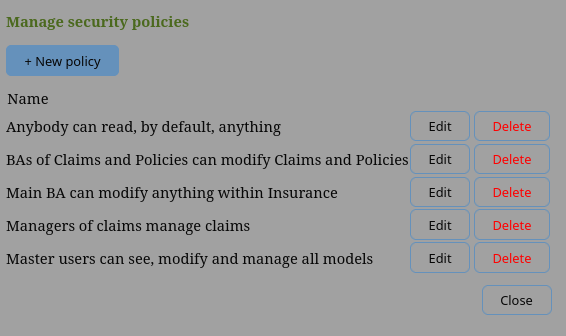
Selecting edit for an existing security policy opens the edit-policy dialog shown in Figure 23. Each security policy grants one or more permissions to those users who have the qroups assignments required by the policy granting a level of access rights to some domain.
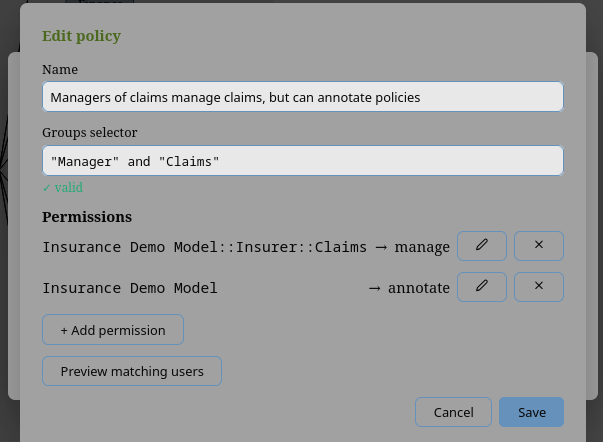
5.1.1. Groups selector
Policies are not specified for individual users but for all users whioc are assigned to certain groups.
|
Note
|
To this end one specifies a Groups selector which selects the set of users to which a policy applies by specifies the set of group(s) the users belong to or not belong to using a logical expression, i.e. using group names, the logic operators and, or and not and round brackets for grouping.
The table below lists a set Group selectors and explains the set of users which are selected, i.e. the set of users to which a policy applies:
Groups selector |
User selections |
|
All users who have been assigned to Group |
|
All users which have been assigned to either group |
|
All users whoc have been assigned to both groups, but not those who have been assigned to only group |
|
All users assigned to both, group |
Table 6 lists a set Groups selectors and explains the set of users which are selected, i.e.\ the set of users to which a policy applies.
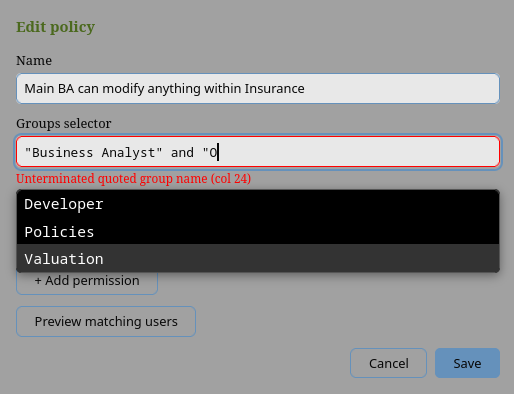
To simplify the specification of group selectors and to make the process less error prone, the application provides support for drop-down assisted auto-complete — see Figure 24.
The suggested group names, and the users a selector matches, come from the identity provider through the instance’s directory feed — see Section 7.5.4. Without one no names are suggested and no users are matched, and group names must be typed exactly as the identity provider spells them, including case.
5.1.2. Permissions
A permission grants a level of access to some domain.
Domains
The domain of a permission is either all models specified as *, a particular model specified as <modelName>
or a responsibility domain within a model.
Domain specifier |
Meaning |
|
All responsibility domains within all models |
|
All responsibility domains in |
|
Within the responsibility domain |
Table 7 lists some typical permission examples. Permissions are modified using the edit-permissions dialog shown in Figure 25.
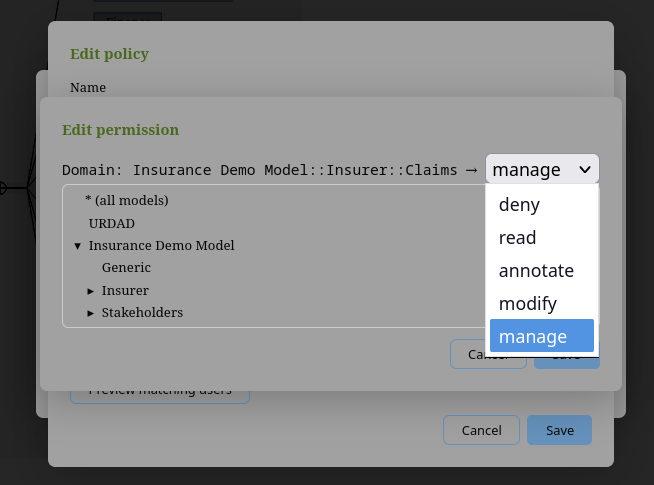
The edit-permission dialog shown in Figure 25 makes this convenient, allowing the administrator to select the domain from a models tree prefixed with a root * for all models. Each permission shows the domain of the permission as a fully-qualified path to the model or responsibility domain to which the permission applies.
|
Note
|
Internally the id of the responsibility domain, not the fully-qualified path are stored for the domain of a permission. This ensures that the permission survives renaming and moving of responsibility domains. When a responsibility domain is deleted, policies are pruned of any permissions for the deleted responsibility domain. Policies who have no other permissions are also pruned. |
Access rights
Table \ref{tab_accessRights} explains the access rights granted by a policy to users whose group assignment matches the group selector for the policy to the domain specified by the domain selector of the permission.
| Access | Description |
|---|---|
|
Users whose group assignments match the groups selector of the policy are not shown the responsibility domain or its content, and every change they attempt to it is refused. On a model as a whole, the model is withheld from them entirely. On a responsibility domain within a model, it is hidden, not withheld: see Section 5.1.2.2.2. |
|
Users whose group assignments match the group selector the policy can see the responsibility domain and its content, but cannot annotate or modify any of its elements. |
|
Users whose group assignments match the group selector the policy can see and annotate the responsibility domain and its content, but cannot modify any of the URDAD model elements. |
|
Users whose group assignments match the group selector the policy can see, annotate and modify the responsibility domain and its content. |
|
In addition to having modify rights for the domain, users with manage rights can manage the project life cycle and the project team membership. |
In particular, the manage} access level grants the permissions to
-
add, remove and upgrade team members for the project,
-
manage the project life cycle including
-
create projects assigned to the responsibility domain,
-
advancing or reverting a project phase,
-
rebasing a project to the current status of the main branch,
-
merging a project after sign-off into main,
-
archiving and de-archiving projects within that responsibility domain
-
Model and data
Every permission applies to the model, to the data, or to both. The Applies to field of the edit-permission dialog chooses which, and the policy’s list of permissions shows the choice beside the level whenever it is not both.
-
The model is the model’s content: what the modelling tool shows a user and lets them change. Everything the table above describes is about the model.
-
The data is what executing the model produces about real business: the events an execution environment records, the requests one of its processes makes, the tasks a person may claim.
A trader may be allowed to read the corporate finance team’s process design and still be walled off from its deals. That trader’s group is given a deny on the corporate finance domain that applies to the data only. They still see the domain in the modelling tool, and nothing the execution environment produces about it reaches them.
A permission that does not say otherwise applies to both, and every policy written before this choice existed does so. The aspect goes on a deny as well as on a grant, and has to: a deny cannot be lifted by any grant, and reading is the default, so a grant limited to the model would change nothing about the data.
For the data, only deny matters yet: any other level reads the same as read, and the dialog says so when such a level is chosen.
|
Important
|
The execution environment records the policies with each pin (The security policies a pin records) and so far acts on the data aspect in one place: an event-log sink receives a domain’s events only if its audience may read that domain’s data (Sinks and the security policies). It does not yet check requests that cross a deny, nor which Tasks a person may claim. For those, a deny applying to the data only has no effect yet.
|
What a deny protects
A deny protects a model’s integrity everywhere, but its confidentiality only where it applies to a whole model. This section is about a deny that applies to the model (Section 5.1.2.2.1); one applying to the data only hides nothing in the modelling tool.
-
A
denyon a model (a permission whose domain is<modelName>, or*) is enforced by the server. The model is not listed, cannot be opened on any branch, and none of its revisions can be read or exported. -
A
denyon a responsibility domain within a model (<modelName>::<domain>) hides that domain and its content in the model tree and in every view, and the server refuses every change to it. The content is not withheld, however. Opening a model sends the browser the whole model, together with the access each part of it has for the user, and it is the browser that hides what is denied. A user able to inspect what their browser received, for example with its developer tools, can read a denied domain’s content. The same holds for an export of the model, which contains every domain.
Content that must stay confidential from some users therefore belongs in a model of its own, with a deny on that model, not in a responsibility domain of a model they can open. This is the boundary Section 5.8.5 refers to as model visibility.
5.1.3. Examples
This section provides a few illustrative examples for specifying security policies
Complex groups selector for multiple domains
Field |
Value |
Name |
BAs of Claims and Policies can modify Claims and Policies |
Groups Selector |
"Business Analyst" and ("Claims" or "Policies") |
Domain-1 |
|
Domain |
|
Rights |
|
Domain-2 |
|
Domain |
|
Rights |
|
5.2. Team membership and access rights
A project branch can only be modified by project team members who have the right to modify the domain within which the element is hosted.
5.3. Separation of duties on checklist signatures
Approval applies separation of duties: whoever approves a project must not have authored a change on its branch since its last approval (or since it began, at the first approval). The tool knows who changed the branch from its record of change authors, kept by pseudonym (pseudonymisation), never from who happens to be on the team.
A checklist template may demand the same of whoever signs its items (Where it attaches and who may sign). Signing such an item is then refused to anyone the record shows authored a change since the last approval, with that reason, exactly as Approve would refuse them. A template may also name project roles, such as Compliance Officer and Approver, which the Project Manager assigns (Section 6.3): each then signs every item, each by a different person, the later ones as countersignatures, so naming two roles takes two people. Both rules are copied onto a checklist when it attaches, so editing the template later does not loosen them for a checklist already being signed.
With authentication off — a local evaluation — there are no signers to tell apart, and neither rule is applied.
5.4. What a dependency gives away
A model may depend on an element library or on another model, pinned to a published revision. A dependency grants read access to that revision.
Everyone who can see the depending model can read the depended-on library or model at the pinned commit, whether or not they could open it directly. This is intended, and it is the point: a dependency exists so that the depending model’s references resolve, and a reference that resolves is a reference whose target can be read.
Two limits keep that from being broader than it looks.
5.4.1. The grant is a snapshot, not a standing permission
It is read of that commit, and nothing else. Work done in the depended-on model afterwards is not covered, and neither is any other revision. A dependant who wants the newer content has to re-pin, deliberately, which is a change to the model recorded in its history like any other.
Nor does it grant anything but reading. Library and dependency content is read-only in the depending model — the server refuses any change addressed to an element it holds — so the grant cannot become an edit.
5.4.2. You can only pass on what you hold
Adding a dependency requires that you can already see what you are adding. The tool refuses otherwise, naming what it refused and why.
Without that rule the grant would be a way around every visibility policy on the instance: anyone able to manage a model of their own could read any model by depending on it, and the act would look like ordinary modelling. So the check covers the whole resolved set, not only what you picked — a library pulled in by something else is mounted too, and is just as readable.
An administrator is exempt, as everywhere else.
5.4.3. It is recorded
Changing a model’s dependencies is written to the project’s audit log as
DependenciesChanged, with the full resolved set: what each entry is pinned to,
and whether it was chosen or pulled in by something else.
It is recorded because it changes who can read what. That puts it in the same class as a sign-off or a phase transition rather than in the class of ordinary model edits, which are recorded in git and nowhere else.
5.4.4. What this means when you publish
Publishing a revision — tagging it, and letting activation merge it to main —
makes it available for anyone who can see your model to depend on, and through
that, readable by the people who can see theirs.
If a model holds content that must not travel, the control is the visibility policy on that model: someone who cannot see it cannot depend on it, and so cannot pass it on. Deciding that after the fact is harder — an existing dependency is not revoked by a later policy change, because the depending model’s history already records the pin.
5.5. The execution environment’s console
The console changes what runs in an environment, including production. This page states the controls on it, for anyone who must rely on them. How to use the console is in Section 8.12, and how to configure it in Section 7.4.3.4.
5.5.1. Nobody is anonymous who can change anything
Without authentication configured, the console changes nothing and answers only on a loopback address, so it is reachable only from the machine it runs on. It refuses to listen anywhere else, and refuses to start with authentication only partly configured.
With authentication configured, every request needs a caller the identity
provider vouches for, by the token described below, and every change needs the
operator role in the environment it changes (see
Section 8.12.1). Roles come from the person’s
identity-provider groups, granted per environment; an environment none of
their groups is granted is indistinguishable, to them, from one that does not
exist. Creating an environment needs membership of the admin group
(URDAD-Exec-Admin unless configured otherwise), which is not granted per
environment: operating every environment does not make someone an admin.
5.5.2. Signing in
The console signs people in as the modelling tool does: the browser application
uses the identity provider's authorization-code flow with PKCE (S256), and
sends the access token it is given with every request, in the
Authorization: Bearer header. The console checks it as the modelling server
checks its own:
-
The token’s signature is checked against the provider’s published keys, then its issuer, its audience (which must be the configured one, so a token issued for the modelling tool is refused), its expiry and its subject.
-
A request without a token, or with one that fails these checks, is refused. There is no other way in: the console has no sessions and no cookies.
-
The console keeps nothing: no session, and no copy of the token. A change needs no anti-forgery token, because a browser never attaches this header to a request another site makes.
-
The browser keeps the token in the tab’s session storage, renewed while the identity provider’s session lasts, so it does not outlive the tab. The modelling tool accepts the same exposure: script injected into the page could read the token. Neither application loads third-party script.
5.5.3. Every change is accountable
-
Every change requires a note, and is written to the environment’s append-only audit log with its actor, which is the person’s identity-provider subject: an opaque identifier, never a name or email address (see Section 5.8).
-
Each event also records the role the change was made under, decided by the check that permitted it at that moment, not by what the person holds later:
operator(a grant of the environment),compliance(a configuration change only Compliance may make, or one Compliance makes in an environment none of their groups operates),admin(a platform admin, including an admin starting or stopping what runs an environment they do not operate),taskClaimantortaskSupervisor(a claim given back in the task portal),system(the supervisor, the scheduler, a lapsed claim, theautomaticpolicy) orlocalOperator(theconsolecommand). Events recorded before roles were have none, and the console says so. -
The log never holds a name. The console shows a name for each actor by looking it up in the people directory when the log is read (see The people directory), which is why a person erased from the directory leaves their events complete and shown by subject alone. The console keeps the name each signed-in person’s token carries (
name, elsepreferred_username; never an email address) in that directory, as the gateway and the task service keep their callers'. An export of the log (JSON Lines) holds subjects only, never names. -
A promotion, rollback, configuration or policy change the console refuses is recorded too, with every reason. Other refused changes (creating an environment, starting a component, a modelling-server change) are refused with every reason and leave no record, since nothing changed.
-
Cancelling or terminating a running execution is an operator’s change like any other: it needs a reason and is recorded with the execution’s id.
-
Every change is decided the same whether it comes from the browser or from the
consolecommand: both call the one function that makes it, which checks everything the change needs and records it. What differs is only who may ask: the browser’s roles, or access to the console’s host for the command. -
Making a
productionenvironment promote automatically requires its name typed back, whether it is created that way or changed to it. -
A configuration is applied only against the revision it was edited from, so one operator cannot silently undo another’s change.
-
An environment always keeps at least one operator group.
-
Starting, stopping and restarting what runs an environment is its operators' and the admins', each with a reason, and recorded. What the console’s supervisor then does on its own (starting a process, noting that one exited, starting it again) is recorded as
system:supervisor. A process it runs inherits the console’s own settings, secrets included, and nothing about it is configured from the browser but its port and non-secret variables. -
Where environments read their models is an admin’s to change: registering a modelling server, changing or removing it, and assigning it to an environment each need a note, and are recorded in the platform’s audit log or the environment’s. A registration names its client secret and never holds it, so nothing the console records or returns contains a secret.
5.5.4. The runtime it promotes to
Every check described here is made by the gateway and the task service. The Temporal server behind them checks nothing: the components reach it unencrypted and unauthenticated, so whoever can reach Temporal itself can read and drive every execution, past every rule below. Keeping Temporal reachable by the execution environment alone is therefore part of securing it (The connection to Temporal is not secured).
The gateway and the task service of an environment authenticate their callers with the same identity provider, by its access tokens, and refuse to start without it (see Who calls an environment’s runtime). They never fall back to a list of registered tokens. What a caller may start, and which tasks it sees, follows from the environment’s claim bindings, which are part of the configuration an operator promotes and which the audit log records.
A request’s answer, and what Temporal reports of its execution, are given only
to the caller who made the request, and only when it asks through the same
client the request was made with (the azp of its token): the task portal's
own client for a person using the portal. Anyone else, a different client of
the same caller included, is told there is no such request. A caller cannot
acknowledge another’s answer. Each request is recorded in the environment’s own
store with the caller’s subject, the client, the contract and the pin, and is
kept after it is acknowledged (see How every request is answered).
The task portal signs people in through the identity provider as the console does: in the browser, by the authorization-code flow with PKCE, with a public client of its own whose tokens carry the runtime’s audience (see Section 7.4.3.9). The page keeps the token only for as long as the browser tab is open, and sends it with every request; the task service and the gateway check it as they check any caller’s. Each task service serves the portal itself, so the page and the tasks it shows come from one origin.
What the portal shows from the server, a contract’s name or a task’s request, is shown as text and never interpreted as markup.
5.5.5. What each database role may do
On PostgreSQL, the execution environment uses its database under roles that
divide the work, and the database, not only the execution environment’s own
code, refuses whatever a role is not granted. Every grant is visible in the
database’s own catalogue, where a database administrator or an auditor can
read it (\dp in psql). SQLite has no roles: there, only the execution
environment’s checks apply (Who may write or read an entity).
| Role | May |
|---|---|
|
Own every schema, table and view of the installation’s environments; make
the roles below; move an entity’s records to a new
owning domain at promotion; carry stored instances
to an entity’s new shape at promotion, each with an event in its history
(Migrating stored records). Used by |
|
Read every record. Change nothing. |
|
Read every record; erase personal data: change a stored instance and its personal values, and record the erasure in the instance’s history. It can neither make an instance nor change or delete a history. |
|
Read every environment’s reporting views, and nothing else (Reading the records from other systems). The role a reporting tool’s login joins. |
|
Read that environment’s reporting views, and nothing else. |
|
Nothing of its own but read where each entity’s records are. The group a service’s database login joins: through it a service may switch to the roles below, one at a time, and inherits none of them. |
|
The environment’s own records (request outcomes, the event outbox, verdicts, Tasks, request records) and those of entities outside every domain. |
|
Read every record of its environment, for the conditions, recipes and post-conditions the environment checks; record its verdicts and evidence. |
|
Its domain’s records; the environment’s records a request writes; of another domain’s records, only what that domain publishes to it, without personal data (Section 4.3.2.6), and of any other instance only that it exists. |
urdad is the installation’s name: <prefix>urdad with
URDAD_EXEC_DATABASE_SCHEMA_PREFIX set. No role, the owner’s included, may
change or delete an entity’s history: the grants give no one the right, and a
trigger refuses it to the tables' owner too. The one exception is a
promotion moving an entity’s records to its new owner, which copies each
event unchanged before removing it, in one transaction, so its hash chain
still verifies (An entity changing owner).
What this does not protect against. A service switches roles itself, so a role confines a defect in the service, a compiled implementation that reads or writes what its domain may not, for instance, but not whoever controls the service’s process: they could switch to any role the service may. A boundary between domains that holds against that needs a service, and a database login, per domain, which is not built (What the entity store does not do yet).
5.6. Reading a project before it is approved
The execution environment normally reads only what a model has published on
main (Section 7.4.3.2). A preview environment runs a
project’s branch instead, before the project is approved. Two rules keep a
project’s unapproved work from it, and both are relaxed only for a project
that has consented (Section 6.5).
5.6.1. Who may read: a preview reader
A preview reader is a service client the deployment lists in
URDAD_PREVIEW_READER_CLIENTS and also in URDAD_SERVICE_CLIENTS
(Section 7.4.3). Both, so that its reads are always
recorded as system:<client id>, never as a person. With none listed, no
project branch is read by a machine.
For a project that consents and is not archived, a preview reader may:
-
read the head of the project’s branch (
GET /api/models/{name}/head?branch=); -
read the model at a revision the branch holds, its tip or an earlier one (
GET /api/models/{name}/commits/{commit}/snapshot?project=). A revision the branch does not hold is refused exactly as one that does not exist is, so naming one project’s branch reaches nobody else’s work; -
list the consenting projects (
GET /api/previews), each with its branch, phase, owning domain (by name and by id, as a security policy selects it) and team.
It may also submit the project’s test reports, and read them back
(POST/GET /api/test-reports); what a report counts as is decided by its
signature, not by the reader that sent it (Trusted test report keys).
It may read nothing else of a project: not its audit log, not an export, not a checkout. A project that has not consented is read by the project’s own rules (Section 5.2), which a service never passes.
The capability is not the auditor role. The auditor role would also grant every audit log, and would make a machine look like an accountable person in the records.
5.6.2. What is recorded
-
Consent, its withdrawal and its automatic end are recorded in the project’s audit log (Preview consent events).
-
Every revision a preview reader reads is a
ModelSnapshotReadentry naming the branch, keyed on the project as well as the model, so it appears in the project’s audit log beside the consent it rests on. -
Reading the head, and listing the consenting projects, are not recorded: neither discloses model content, and a service asks both every few seconds.
5.6.3. What the execution environment does with it
The execution environment's console creates a preview environment for a consenting project only when an admin asks it to (Preview environments). A preview’s gateway and task service admit the project’s team alone, by username, less any member a security policy walls off from the owning domain, and refuse every system. When consent ends the preview is closed at its next poll, admitting nobody, and retired: its data, the team’s tasks among it, is deleted (Retiring a preview).
5.6.4. What the team list discloses
GET /api/previews names each consenting project’s team members by
username, with their project roles, so a preview can give the project’s human
tasks to its team and nobody else. Those usernames are the ones the project
record itself holds, and are the names people sign in to the task portal with.
Only a preview reader or an administrator may list them.
5.7. Trusted test report keys
A test report says what was tested and what came of it; reviewers sign off on it, and leaving Testing depends on it (Testing). So the tool must be able to say who produced one. It does so by signature, never by who sent the report: each execution environment signs its reports with an Ed25519 key of its own, and an administrator registers the public half of that key here, under a name, as trusted.
A signature covers the whole submission — summary, report and Markdown — as the environment sent it, and the server checks it against what it received, not against its own reading of it. So an execution environment and a modelling server of different versions agree on whether a report is genuine: a field one of them does not know is still covered, and changing it still breaks the signature.
Integration → Test report keys (administrators only) lists every key ever registered, with who added it and when, and a removed key as removed. To add one, give it a name — the environment it belongs to — and paste its public key in standard base64. The modelling server refuses a key already trusted, and anything that is not a 32-byte Ed25519 key.
What the server does with a report it is sent, by its signature:
| Signature | Accepted as |
|---|---|
By a trusted key |
Signed by the key’s name: produced by that execution environment. |
None |
Unsigned: nothing vouches for how it was produced, whoever submitted it — a person uploading a file, or a service without a registered key. The report shows who submitted it. The gate reads it all the same; the reviewers decide what it is worth, and the badge tells them which it is. |
By a key nobody registered, or one that does not verify |
Refused. Keeping it as unsigned would keep a file claiming a provenance it cannot show; a signature that does not verify means the report was changed after it was signed. |
The key’s name is stored with each report it signed, so renaming the
environment later, or removing its key, does not change what a reviewer read.
Removing a key stops new reports it signs from being accepted; reports already
accepted keep their provenance. Adding and removing a key are recorded on the
audit log as TestReportKeyAdded and TestReportKeyRemoved, with the key’s id
and name (Section 6.8.1). They concern the instance rather than any
project, so they appear in the instance’s log export.
Who may submit a report at all is a separate rule: a preview reader (Section 5.6) for a project that consents to a preview, or whoever may manage the project. A report is taken only while the project is in Testing or In Review, and only of the revision Testing froze or one after it on the branch.
5.8. Data protection and privacy
5.8.1. Overview
The URDAD Modeling Tool keeps a permanent, tamper-evident record of who changed a model, who reviewed it and who approved it. That record is what makes a signed-off project defensible to an auditor — and it is deliberately impossible to rewrite.
That creates a tension with data-protection law. Under the GDPR (and, similarly, under South Africa’s POPIA), a person may ask to have their personal data erased. If names and email addresses were written directly into that permanent record, honouring such an erasure request would mean destroying the audit trail itself.
The tool resolves this by never putting identifying data into the permanent record in the first place.
Instead, every durable record carries an opaque identifier — a random string
such as u_9f3c1a… that means nothing on its own. A single directory entry
links that identifier to a real person. Erasing someone deletes that one entry.
The history remains complete, internally consistent and verifiable; it simply no
longer says who the person was.
|
Note
|
This section describes what the software does. It is not legal advice. Deciding whether a particular deployment satisfies a particular regulation is a matter for your data-protection officer and legal counsel, who will also need to consider matters outside the software — data-processing agreements, records of processing, and where the system is hosted. |
5.8.2. What personal data is held
The tool holds very little personal data of its own. It does not manage passwords, and it never asks a user for personal details directly.
From the identity provider
When a user first connects, the tool reads three claims from the access token issued by your identity provider and stores them in a user directory entry:
| Field | Purpose |
|---|---|
Username |
The login name ( |
Display name |
Shown in the interface — in change history, review panels and notifications. |
Email address |
Used only as a fallback display name when no display name is available. |
The directory entry is refreshed on every connection, so a name change in the identity provider propagates automatically.
Where it appears afterwards
Two categories of record refer to a user, and they are treated very differently.
Live working state — project membership, assigned roles, pending sign-offs and notification routing — refers to people by username. This is current operational data: when someone leaves a project, they are removed from it, and the reference goes with them. A project that consents to a preview also lists its team, by username and role, to a configured preview reader, so a preview can give its human tasks to the team alone (Section 5.6).
Permanent records — the model’s version history, approval records, and the audit log — refer to people only by an opaque identifier. These are the records that must survive indefinitely and cannot be edited after the fact. The one exception is content brought in from outside: a comment imported from Confluence carries its author’s name and email address into the model itself (Section 5.8.5.8).
The next section explains how the second category works.
5.8.3. How pseudonymisation works
The technique is pseudonymisation: identifying data is replaced by a meaningless stand-in, and the link between the two is kept somewhere it can be destroyed on its own.
Every user is assigned an opaque identifier the first time they connect, or
first make an authenticated request to the server’s HTTP interface — a
random string such as u_9f3c1ab24e07d5…. It is generated randomly, not derived
from the username or any other detail, so it cannot be reversed by guessing.
Everything permanent records that identifier and nothing else:
-
every change committed to a model’s history;
-
the approval record attached to a signed-off project, including who approved it, who signed off and who signed each review-checklist item;
-
the project audit log;
-
the record of who authored changes, used to enforce separation of duties at approval time;
-
the policy audit log;
-
who submitted each test report (Test reports) — a person by this identifier, an execution environment as
system:<client id>; -
who accepted, and who countersigned, each item in the register of accepted residue (The register of accepted residue), which is kept for good and outlives the project.
Only one place links the identifier back to a person: the user directory entry described in the previous section.
What this looks like in practice
Nothing changes in the interface. Wherever the tool shows you a change history, an approval record or an audit entry, it resolves the identifier back to the person’s display name before showing it. You see names, as before.
The difference is visible in two places.
The first is the underlying repository, inspected directly — with the git
command line, for instance. There, a commit is attributed to u_9f3c1ab2…
rather than to a name, and the email address recorded alongside it is a
synthetic one that cannot reach anybody.
The second is an exported audit log. Unlike the panel it is taken from, the exported file carries the identifier and never resolves it to a name. This is the one route by which audit records leave the deployment as a file, and it is also the point at which resolving them stops being possible: the user directory that links identifiers to people does not travel with the export. An external audit report therefore cites identifiers, which is both the more reliable citation and the reason the file is not a directory of who works here. See Section 6.8.4.
Why the identifier, and not the username
A username such as jsmith still identifies a person, so recording it
permanently would leave exactly the problem this design exists to avoid.
The opaque identifier carries no information at all, which is what allows the
history to remain intact after the link to the person is destroyed.
For the same reason the identifier is random rather than calculated from the username. A calculated identifier would depend on a shared secret, and that secret could not be destroyed for one individual without invalidating everybody else’s history.
5.8.4. Erasing a user
Erasure is driven from your identity provider, which is where staff records are managed anyway.
Procedure
With a Section 7.5.4 live, the identity provider drives it:
-
Deactivate or delete the user in the identity provider. The tool revokes their access at once. A deactivated person is erased after the grace period (30 days unless configured otherwise), a deleted one within the hour — see Section 5.8.4.2. To honour an erasure request without waiting, delete them rather than deactivate them.
-
Remove the person from any projects they belong to. Open each project’s team management dialog and remove them from the member and role lists. This step is manual and is described in Section 5.2.
Without a feed, or for someone the feed does not describe:
-
Delete the user in the identity provider. Deactivating the account is not enough without a feed: a disabled user still exists there, and could sign in again.
-
Erase their directory entry in the tool. A member of
URDAD-Adminopens Settings → Manage users, chooses the person, and confirms by typing their username. Erasure cannot be undone, and an administrator cannot erase themselves. -
Remove the person from any projects they belong to, as above.
Erasing the directory entry is what de-identifies the permanent record. Deleting the user in the identity provider must come first: someone still known to it who signs in again is given a new, unrelated directory entry. Project membership needs its own step because it is live working state and still refers to the person by username — see Section 5.8.5.
What happens automatically
With a Section 7.5.4 live, the identity provider says who has left, and the tool acts on it:
-
Deactivated. The person loses access at once: every token naming them is refused and their open sessions are closed. Their directory entry is erased after the grace period,
URDAD_DIRECTORY_ERASURE_GRACE_DAYS(30). If the provider reactivates them in between, the erasure is cancelled and their access restored. -
Deleted. The same, except that the erasure follows within the hour.
That erasure is the whole of it. Because the directory entry was the only link between the person and their opaque identifier, removing it breaks the link everywhere at once — across every model repository, every approval record and every audit log, including backups and archived projects.
Every step is recorded in the instance audit log under the person’s
identifier, never their name: access revoked, erasure scheduled or cancelled,
and the erasure itself as UserErased with by: directory. See
the instance audit log.
|
Important
|
Three safeguards stand between a wrong answer from the identity provider and an irreversible erasure:
Without a feed nothing is erased automatically, and the administrator’s erasure in the procedure above is how an erasure request is honoured. Deleting the user in the identity provider alone does not de-identify the permanent record. |
What the record looks like afterwards
The history is unchanged in structure. Every commit, approval and audit entry is still present, still in order, still verifiable.
Where the person’s name used to be shown, the interface now displays the raw
identifier — u_9f3c1ab2…. This is intentional. It reads as "this happened,
and we no longer record who did it", which is both the honest rendering and the
one that keeps the audit trail complete.
Controls that depend on authorship keep working. In particular, the separation-of-duties rule — that nobody may approve a change they authored themselves — still applies to an erased user, because it compares identifiers rather than names.
Verified behaviour
This is not a design intention alone; it has been exercised against a running installation. A user signed in, edited a model, and the resulting commit was recorded against an opaque identifier and a synthetic address — no name, no mailbox — in both the git history and the change log. Their directory entry was then deleted, and the effect measured:
| Before | After | |
|---|---|---|
Identifier resolves to a person |
yes |
no |
Authorship records retained |
22 |
22 |
Audit-log entries retained |
14 |
14 |
Separation-of-duties check still recognises the author |
— |
yes |
Nothing was removed but the single directory entry. The model’s history — every commit, message and timestamp — was unchanged, and remains verifiable; it simply no longer says who made it.
The one thing erasure does not reach remains what it always was: history written before this mechanism existed. See Section 5.8.5.
5.8.5. What erasure does not reach
Several things fall outside the mechanism described above. Each needs a deliberate decision by whoever operates the deployment.
Live project state
Erasing someone de-identifies the permanent record, but it does not remove them from projects. Project membership, assigned roles and any pending sign-offs still refer to them by username until an administrator removes them from each project.
This is intentional: membership is current working state, not history, and it is erased by ordinary removal rather than by pseudonymisation. But it does mean erasure is a two-step operation, and skipping the second step leaves the username in place.
People no directory feed describes
The tool learns that someone has left from its Section 7.5.4. Without one,
nobody is erased automatically: an erasure happens only when an administrator
carries it out through Manage users, and the organisation’s leaver process
must include that step, or the permanent record stays linked to the person.
URDAD_DIRECTORY_INACTIVITY_DAYS lists people who have not signed in for a
while, as a prompt; it erases nobody.
The same holds, with a feed, for anyone who signs in but whom the feed does not describe — someone outside the users the provider was scoped to provision. Settings → Identity directory lists them.
Security events sent to the SIEM
When a deployment streams security events (Section 7.4.6), each names the person it concerns by username as well as by their opaque identifier, and a sign-in carries the address it came from. A security operations centre investigating an incident needs to know who; an identifier alone would send it to a tool administrator for every lookup.
This is a flow of personal data of its own, to the organisation’s SIEM, made for the security of the system: a legitimate interest under GDPR (recital 49) and POPIA. Record it as such. Two consequences:
-
An erasure does not reach the SIEM. What has been delivered stays there for as long as the SIEM’s own retention keeps it. An event delivered after the erasure carries the identifier only: the username is looked up when an event is sent, and an erased person no longer has one.
-
The tool keeps security events briefly. They are held until every sink receiving them has them, then seven days more, and are not part of the audit log.
A sink set to identity: "pseudonym" is sent identifiers only, and security
events then name nobody but by identifier, except a refused sign-in by
someone the tool does not know, which carries the name presented.
History created before this feature existed
Model repositories created before pseudonymisation was introduced contain commits and tags carrying real names and email addresses in their signatures. Those cannot be removed without rewriting the repository’s history — which would change every commit identifier and invalidate every approval record pinned to one.
For development and evaluation data this is normally accepted. Before a deployment holds real project data, start its models from fresh repositories rather than carrying older ones forward.
Data held outside the tool
The identity provider remains the authoritative store of names, email addresses and group memberships, and erasure there is governed by its own procedures. Server logs may also contain identifiers written while a user was active, and are subject to whatever retention policy applies to your infrastructure.
Model content sent to an LLM provider
An AI action sends the model to whichever LLM provider the instance has been configured with. What is sent is the serialised model tree together with the element’s informal requirements — the analysis and design content, not the identity of the person who asked. Once sent, it is held under that provider’s terms, and neither erasure nor any other mechanism in this tool reaches it.
Two consequences follow from the provider being an instance-level setting (Section 7.6) rather than a per-user one:
-
The deployment decides where model content may go, once, for everyone. An instance that must not send analysis content to a third party configures a provider it hosts itself — a local runtime or an internal gateway — or configures none at all, which disables the AI actions entirely.
-
The request is made by the server, so it leaves from the instance’s own network, under the instance’s credential, and is recorded. Each completion is an
AiCompletionRequestedentry in the audit log — the requesting user’s identifier, the provider and the model, how many bytes went and came back, and the model and branch it concerned — never the content (Section 6.8.1). Where the deployment streams its audit log to a SIEM, so is this.
Where an external provider is used, name it in your processing records: it is a recipient of whatever the models contain, and for a model describing a real business process that may not be limited to the technical.
Exported model files
Any user who can read a model can export it as a file (see Section 4.13). Once downloaded, the file is beyond this deployment: erasure, access rules and archival reach the model in the tool, not a copy on somebody’s laptop.
Three points follow.
-
The export itself discloses nothing new. It contains what the model contains, and everyone who can export it could already read all of it. The boundary that protects model content is model visibility, not the export action — restricting the action would merely divert people to the HTML publish, the artifact generators, or the browser’s own developer tools.
-
Every export is logged. A
ModelExportedentry names the user, the moment and the revision, so "which copies of this model exist outside the tool, and who made them?" has an answer — as far as the tool can give one. That record is the reason the action is worth auditing even though it grants no privilege. The same holds for a service reading a revision of a model, such as the execution environment running it or a delivery pipeline checking code against it, or a preview reading a project that consents to one (Section 5.6): each such read leaves aModelSnapshotReadentry naming the service. -
Model content is not usually personal data, but it can be. A URDAD model describes analysis and design. Where its annotations name individuals — a stakeholder, an interviewee quoted in an informal requirement — those names travel in the export. Pseudonymisation applies to the tool’s own records of who did what, never to content a modeller typed, so nothing strips them.
Where models describing real business processes may be exported, say so in your processing records, and treat the audit log as the register of when it happened.
Model content published to Confluence, and comments imported from it
The Confluence integration (Section 9.2) moves data across the deployment’s boundary in both directions.
Outward, a publish writes the model’s content — every page, with its
annotations — into a Confluence space, where the space’s own permissions
decide who reads it. Publishing is therefore a decision for a branch’s
managers, not for everyone who can read it — for a project branch whoever may
manage the project, otherwise a holder of Manage on the model
(Section 9.2.6) — and every publish is recorded in the
audit log with the space it went to (ConfluencePublished), so "where
has this model been published, and by whom?" has an answer. Nothing in this
tool reaches the pages once written, though: erasure, archival and model
visibility apply to the model, not to its pages. Unpublishing a branch deletes
them (Section 9.2.5).
Inward, each imported comment becomes an annotation carrying its author’s
Confluence display name and email address, or a placeholder address where the
author’s profile hides it. Unlike the tool’s own records of who did what, these
are not pseudonymised: they are model content, and
they enter the branch’s version history with the commit that imports them.
Erasing a user does not reach them, and neither does deleting the comment in
Confluence — the next import removes the annotation from the model, but the
commits that held it remain in the history. Comments are imported only into
branches that accept annotations, never directly into main
(Comments on read-only branches), but a project branch’s imported
comments become part of main when the project is activated.
Where models are published to Confluence, name Atlassian as a recipient in your processing records, and tell the people who comment on the pages that their name and email address are copied into the model.
Request data reaching external systems
A service contract realized external in an execution environment is answered
by another organisation’s or another team’s system (see
External systems). Whatever that system is given is
beyond this deployment: erasure, access rules and retention reach the
environment’s own records, never a copy the system keeps. There are two ways
it is given a request, and they disclose different things.
-
The system fetches its tasks through the task service, itself or through the adapter host. It reads what a person answering the task would read: the request’s payload (what the requesting step built from its request constraints), the contract’s request and response structures, and who asked, as the opaque subject the execution records and, where the people directory holds one, that person’s name (The people directory). Which systems can read which tasks is decided by the environment’s claim bindings, so a system’s client sees the tasks of the domains its claim values are bound to, and of every domain below them.
-
The worker calls the system at the address the environment’s provider registry gives. It sends the request’s payload and an opaque idempotency key made of the execution’s run, step and activity identifiers, and presents the deployment’s own secret for that system. It does not send who asked — the caller’s subject and name stay in the environment — unless the system’s registry entry asks to be told (
delegation, Telling a system whom a call is made for). Then every call to it also carries a signed assertion naming the caller’s opaque subject: the identity that began the execution, a person’s or a system’s, never a name or an email. A system that answers later is also given the address to answer at, which names the waiting request’s task, and its answer arrives signed at the task service. -
The worker publishes the request to a Kafka topic or an AMQP queue the provider registry names, for a system reached through a broker. It carries what a call carries — the payload, the idempotency key, the identifier of the waiting request — and not who asked, unless the system asks to be told, when the assertion naming the caller rides on the message as it does on a call. The broker is then a recipient too: whoever operates it, and whoever else may read the request topic or queue, can read the request, and the broker’s retention, set there and not by this deployment, decides how long it is kept. The reply topic or queue does the same for the answer, and an AMQP broker keeps a reply the task service refused in its dead-letter queue until someone removes it.
A system can also start requests through a broker, by the inbound bridge
(The inbound bridge). Then the answer is what leaves:
the bridge sends each started request’s response, or the exception it raised
with its values, to the reply topic or queue the message names, so the broker
and whoever may read that destination receive the answer, kept there as long as
the broker’s retention says. The bridge also keeps where each reply goes with
the request, as its reference, in the environment’s store; it is classified
as personal data, so an erasure request reaches it.
Either way, the request’s payload is the content that leaves, and it can be personal data: a step that asks a credit bureau about an applicant puts the applicant’s details in it. The system’s answer comes back into the execution’s history, as any request’s answer does.
Name each external system an environment answers contracts through in your
processing records, as a recipient of the request data of those contracts, and
of the caller’s name where it fetches its tasks. Name each system told whom a
call is made for as a recipient of the callers' identifiers as well — for
every contract it answers, on every call — and say what is sent: the opaque
subject the identity provider gave the caller, which that system may be able to
link to a person through its own records. Name the operator of each
Kafka or AMQP broker a provider uses as well, with the retention of its topics
or queues, dead-letter queues included. An environment’s configuration
says which contracts each system answers: its external realizations, with
their domains or their provider.
Hosting and responsibility
Where the tool is installed on your own infrastructure, you are the data controller and erasure requests are actioned entirely by your administrators.
Where it is operated on your behalf as a hosted service, the operator acts as a data processor, and erasure is carried out on your instruction. That arrangement needs a data-processing agreement, and the choice of hosting region determines whether personal data crosses a border — a question both the GDPR and POPIA constrain. Settle both before real data is loaded.
5.8.6. Personal data a deployed system holds
The chapters above describe what this tool holds about the people who use it — the modellers, reviewers and approvers working on a model. This chapter is about something different: what a system built from a model — a deployed execution environment realising the entities, contracts and processes a model describes — holds about the real people that system serves. The two are entirely separate concerns, protected by separate mechanisms, and this chapter does not revise anything the earlier ones say.
Model content is not usually personal data, but it can be
Section 5.8.5 already makes this distinction for exported model
content: pseudonymisation protects the tool’s own records of who did
what, never content a modeller typed. A Policy entity’s premium field,
an Underwriter’s `email field named in an analysis annotation — these are
business content, authored the way any other modelling decision is, and
nothing in this tool strips or protects them.
What this tool does offer is a way for a modeller to say, deliberately, that a field’s value is personal data a deployed system would hold about a real person — see Section 4.3.2.5. Marking a field this way changes nothing about how the modeling tool itself treats the field. It records a fact for whoever builds and operates the deployed system: this value needs handling under the erasure and retention rules below once the entity it belongs to is actually persisted somewhere.
The two categories, and what each implies for a deployment
Personal data on a field takes one of two values:
| Personal data | What a deployment does with it |
|---|---|
Standard |
Erasable on request. An operator satisfies an erasure request for this field with ordinary redaction — nothing else needs to happen first. |
Retention obligated |
Subject to a hold the deployment defines the length of, commonly a legal record-keeping obligation such as anti-money-laundering or know-your- customer rules. Not erasable until that hold lapses. |
How long a hold lasts is not modelled. The model states that a field is subject to some retention obligation, which is a fact worth a reviewer seeing; the specific duration is jurisdiction-dependent and belongs to the deployment’s own configuration, not the model — the same separation the tool already draws between a timing event’s default and a deployment’s override of it.
Why retention and erasure need to be told apart at all: some jurisdictions exempt data held under a legal retention obligation from an otherwise valid erasure request. A single, undifferentiated notion of "this person’s data" would either destroy records a regulator requires kept, or block erasure of everything else about that person while a retained field is protected. The two-category classification exists so a deployment can honour both obligations for the same person at once, field by field.
What this tool checks
The modelling tool does not erase or retain anything on a deployed system’s behalf — that happens in the execution environment a model is realised into, which provides the mechanics described under Section 5.8.6.4. What the tool does check is a modelling mistake that would make the classification meaningless before it ever reaches a deployment: a field marked personal data that is also marked Transient, meaning it is never persisted at all — see Section 4.18.11. There is nothing for a deployment’s erasure or retention handling to act on in that case, so the tool says so.
How a deployment erases and retains
The modelling tool itself still does none of this — marking a field changes nothing about how the tool treats it. What follows describes the execution environment, the separate deployable a model is realised into, which now provides these mechanics rather than leaving each deployment to invent them.
A deployment holding entity data keeps a mutable, current-state record per entity instance alongside an append-only history of how it got there.
Erasing a Standard field is an ordinary update to the current record, available on request with nothing standing in the way.
Erasing a Retention obligated field is the same update, gated on the hold the deployment configured for that field. Until the hold lapses the request is refused and nothing changes. Two details matter to anyone auditing this:
-
A field marked retention obligated that the deployment has configured no hold for is refused outright, not erased. The alternative — treating an unconfigured hold as no hold — would destroy records a regulator requires kept, silently, because nobody had said for how long.
-
The hold runs from when the value was recorded, not from the last time anything on that entity changed. An unrelated update elsewhere on the same record does not restart it.
A single erasure request covers both at once. It erases every field it may and retains every field it must, reporting which were which. A partial outcome is the normal one where retention obligations exist, not a failure: it is what lets one person’s erasure request be honoured for their contact details while their identity-verification record stays under the hold the law puts on it.
The history is never rewritten
The append-only history is not edited to erase anything. Instead it never receives a personal-data field’s actual value in the first place: at the moment a record is written, each classified field’s value is put into a separate subject store and an opaque reference is written into the history in its place. Business content — amounts, dates, statuses, references — is written to the history in full, as it always was.
Erasure therefore reaches the history without touching it. Deleting one subject row removes that instance’s personal data from every past entry that ever carried it, while the entries themselves stay complete and verifiable; each erased position reads back as explicitly erased, so an auditor can still tell "this was removed" from "this was never personal data". This is the same mechanism this tool already uses for its own identity records, where deleting one directory row satisfies an erasure request while version history and approvals stay intact — see Section 5.8 — applied to a second kind of durable record.
One consequence is worth stating plainly: a superseded personal value is not kept. The subject store holds only what is currently on file, together with the entry at which that value took effect. That is deliberate. A history of every value a field ever held would itself be personal data that no erasure could reach. What the history does keep is that the change happened, when, against which version of the model, which fields it changed (by name), and who made it under which request: the requester as an identity-provider subject, never a name (What an entity’s history records).
Reading the history back therefore never shows a value an entry did not record. An entry recorded from the moment the current value took effect shows that value. An entry recorded before it shows, at that position, that the value it recorded has since been superseded and is not kept. An erased value reads as erased at every position. So an old entry is never presented as having recorded today’s address.
Entries written before the store recorded when a value took effect show every personal value as superseded, because the store cannot vouch for when it took effect.
The same rule governs the execution environment's own checks. When a
post-condition reads the state before a service (@pre), that state is read
as it was when the service started. A personal value is part of it only if it
was already the value on file then. A value set later, or erased since, is
left out, and the clause reading it is undecided. No history of personal
values is kept to answer it instead.
Deleting an instance is not erasing it
A deployment’s implementation may delete an entity instance (What the entity store refuses): a closed account, a withdrawn application. That removes the instance’s current record and appends the deletion to its history; it does not erase the personal data the instance held.
The two are kept apart deliberately. A business record ending is not a person asking to be forgotten, and the records a retention obligation covers are very often exactly those of a relationship that has ended: deleting the personal data with the record would destroy what a regulator requires kept. So the instance’s personal values stay in the subject store after it is deleted, under the holds the deployment configured, and an erasure request for the person reaches them there as it would have before the deletion. The erasure is recorded in the deleted instance’s history like any other.
Deleting an instance never shortens its history either: every event it had stays, and the history still reads back as it did.
Requests and their answers
The execution environment keeps a record of every request made to a published contract, with the answer it was given, so that the requester can read it until they acknowledge it (see How every request is answered). The record is kept after acknowledgement. An answer carries whatever the model’s response or exception structure holds, which may be personal data, and no field classification says which; so the whole answer is treated as Standard personal data. It is held in the subject store and never written into the history, so the erasure mechanism described above removes it from the record and from every past entry at once. The messages a process sent its requester while it ran are kept on the same record and treated the same way, for the same reason: each carries whatever the model’s message structure holds. The environment offers an operator no command to erase a request record yet, as it offers none for entity data. The rest of the record is not personal data: the requester appears only as the identity provider’s opaque subject, as on a task.
Referrals
A person refused an answer may refer the task to a supervisor, with a reason (Referring a task). The referral keeps the reason, the answer refused, the refusal with the values its clauses read, a resolution’s note and any defect reports. Each is free text or request data, so each is treated as Standard personal data, held in the subject store and never written into the history: the erasure mechanism described above removes them and leaves the rest of the referral — who referred which task, for which pre-condition, how it was resolved, and how many defect reports it had. The audit log records only a referral’s id and outcome, never its reason.
What retiring a preview deletes
A preview environment runs a project before approval for the project’s team (Preview environments). When it is retired, because its project stopped consenting or an operator retired it, its entity store is deleted whole: its entities, its tasks (who claimed and answered them, and the answers), its request records and its referrals, personal data included (Retiring a preview). What remains is its record and its audit log, which name people only by the identity provider's opaque subject, as the audit log of any environment does.
Answers kept to recognise a retry
When an automated implementation writes the environment’s records, the answer it gave is kept beside them, under the request’s idempotency key, so that a retry of the same request is given that answer instead of being applied again (Retries and idempotency). An answer that wrote nothing is not kept.
Such an answer may hold personal data, and no field classification says which.
Unlike a request record, it is not held in the subject store, so the
erasure mechanism described above does not reach it. What limits it is
time: it is kept only as long as a retry can still arrive, 14 days by default
(URDAD_EXEC_DISPATCH_RETENTION_DAYS, which may not be set to seven days or
fewer). It is removed by the next writing request recorded after that time has
passed, so in an environment where nothing writes, an answer can outlast its
14 days until something does.
Names: the people directory
Everything the execution environment records about who did something (who
began an execution, who asked for or claimed a task, who made a change in
the console) records the identity provider's opaque subject, never a name
or an email address. A person working through the task portal needs to see
names, so the environment keeps one place that maps a subject to a name: the
people directory, a table in the environment database (people).
- What it holds
-
For each subject that has called the gateway or the task service, or signed in to the console, the name its token gave (the
nameclaim, elsepreferred_username), whether it is a person or a system calling with its own client credentials (kept by its client id), and when it was last seen. Never an email address, and nothing else from the token. - How it is kept
-
Written as tokens are seen, at most once a day for a name that has not changed. It is read only to show a name beside a subject, in the task portal and in the console’s audit logs; no decision is taken on it, and no name is ever copied out of it into a record or an export.
- Erasure
-
Deleting a subject’s row erases the person:
console people forget <subject>, or, for an admin in the console’s API,DELETE /api/people/<subject>. The erasure is recorded in the platform’s audit log aspersonForgottenwith the subject alone, and deliberately without a note, since the reason for an erasure is itself about the person. Afterwards the portal and the console’s audit logs show the subject as "someone not known here". Executions, tasks and audit entries keep the subject, which no longer resolves to anyone here; the identity provider’s own record of the person is the identity provider’s to erase. - Coming back
-
A person who signs in again after being forgotten is written into the directory again from their new token, as anyone is.
What is still the deployment’s own to decide
How long each hold lasts — the durations are configuration, supplied per deployment, and no default is assumed for any jurisdiction.
Who may request an erasure, and how a request is authenticated, which is an access-control question this manual covers separately under Section 5.8.
Whether two entity records describe the same person. Erasure operates per entity instance; a deployment whose records for one person span several entities issues the request for each. Nothing infers that two records are about the same person by comparing their contents, deliberately — that inference is exactly what this mechanism exists to avoid making.
6. Projects
All model modifications happen inside projects. A project is a git
branch of a model, driven by a defined team through a controlled
lifecycle from initial scoping to activation. The main branch of
every model is read-only for regular users; all editing, reviewing
and approving takes place on a project branch, and only work that
has cleared the project’s governance gates is merged back into
main.
Projects give the tool its governance backbone. They are how the system knows who is authoring what, who reviewed it, whether the right sign-offs were captured, and whether every mandatory checklist item on a compliance-relevant change has been ticked before the work goes live.
A single model may host many projects concurrently — one team can
work on a new feature in feature-payment-gateway while another
runs through review in q3-claims-refactor, both on the same model
without interfering with each other. Every project is a full branch
of the model, so changes on one are invisible to the others until
each project is activated and its content lands on main.
Every project is scoped to an owning domain: a responsibility domain within the model, or the model itself. The owning domain determines who can see the project (via the same policy layer that governs domain visibility) and constrains who can create it.
The model itself is a valid owner because of how a model begins. A newly created model — or element library — has no responsibility domains at all, so if only a responsibility domain could own a project then nothing could ever be authored in it. Where the model has no domains yet, it is preselected as the owner.
6.1. Creating a project
A project is a working branch of a model, scoped to one
responsibility domain, in which a team of authors, reviewers and
approvers make and review changes. The main branch of every model
is read-only for regular users — all editing happens inside a
project.
This section covers who may create a project, where the "Create project" action is surfaced in the tool, what information you need to provide, and what happens after the project comes into being.
6.1.1. Who may create a project
Project creation is gated on the manage access level on the
owning responsibility domain of the intended project. There is no
separate "project creator" role; the same policy that grants
management rights over a domain grants the ability to open a project
against it.
Practical implications:
-
If you can
managethe model root (for example, an administrator who has been granted policy manage rights at the model level), you can create a project scoped to any responsibility domain in the model. -
If you can
managea specific responsibility domain (sayInsurance::Claims), you can create a project scoped to that RD or any of its descendants — but not to a sibling likeInsurance::Underwriting. -
Members of the
URDAD-Admingroup get manage-level privileges application-wide by default and can therefore create projects anywhere. -
Auditors (
URDAD-Auditor) cannot create projects. Auditors have read-across visibility and author checklist templates, but do not drive project work.
The tool hides the "Create project" affordances when the current
user does not hold manage on the current model; if you cannot see
the menu item described below, check the policy grants on your
account with your administrator.
6.1.2. Entry points to the create flow
There are two entry points to the Create Project dialog, and they produce the same project — they differ only in how the owning responsibility domain is selected.
From the Model Actions dropdown
The most common entry point.
-
Check out the model you want the project to live inside using the model selector.
-
Click the model icon in the top-right header — this opens the Model actions dropdown.
-
Select "Create project branch".
-
The Create Project dialog opens with an empty Owning domain field. You will pick the RD as part of filling in the form.
From the model-tree "Create project here…" context menu
Use this when you already know which responsibility domain the project should be scoped to and want to save yourself the domain-picker step.
-
Open the Model tree tab in the left panel.
-
Right-click on the responsibility domain (or the model root) that the project should own.
-
Select "Create project here…" from the context menu.
-
The Create Project dialog opens with Owning domain already pinned to the RD you clicked on. The picker is hidden — the preset domain is shown, read-only, in monospace text.
6.1.3. What to fill in
The Create Project dialog asks for four things: a name, an owning responsibility domain, one or more project leads, and (optionally) additional project members.
The dialog does not ask about governance roles (Process Owner / Approver / Compliance Officer) or the governance profile (regulated flag, risk classification, etc.). Those are captured after the project is created — see the Initiation and Planning phase sections in the project-lifecycle documentation.
Project name
A short identifier, used as the git branch name and as a prefix in every phase / approval tag the project produces. Examples:
-
feature-payment-gateway -
q3-claims-refactor -
regulatory-updates-2026-h2
Keep it descriptive but reasonably short. The name is required.
The project name is used verbatim as the branch name in the model’s git repository, so it must be safe for use as a git ref. A valid name:
-
starts with a letter or a digit;
-
contains only letters, digits, dashes (
-), dots (.) and underscores (_) — no spaces; -
does not contain two dots in a row, and does not end with a dot or with
.lock.
The dialog checks the name as you type. An invalid name is reported directly beneath the field and Create stays disabled until you correct it; nothing is sent to the server. The server applies the same rule and refuses an invalid name from any other source.
Owning responsibility domain
The RD (or model root) whose work is being managed by this project. The owning domain determines two things:
-
Visibility: users who cannot see the owning domain — because a policy
denyshadows it for them — cannot see the project either, even if they are on the team. -
Creation authority: as noted in the "Who may create" section, you must hold
manageon the owning domain (or on an ancestor of it) to create the project.
If the panel was opened from the model-tree context menu, the owning domain is preset and cannot be changed in the dialog. Cancel and restart from a different entry if you need a different one.
If the panel was opened from the Model Actions menu, use the Owning domain selector to pick from the current model’s tree. The model itself is the top entry and is a valid choice: a project owned by the model is scoped to the model as a whole rather than to one part of it.
A model with no domains yet. A model or element library has no responsibility domains on the day it is created, so the model itself is the only possible owner. It is preselected in that case, and the project can be created without choosing anything — otherwise the first project on a new model could never be made, and the model could never be populated.
Once the model has responsibility domains nothing is preselected: which part of the business a project is scoped to is a real decision, and the dialog does not make it for you.
The model root also offers Create project here… in the model tree, which is the quickest way to start work on a model that is still empty.
Project leads
Every project needs at least one lead. Leads are the users who by default hold the Project Manager role — they can advance and revert phases, edit the governance profile in Planning, assign additional per-user roles once the team is stable, and drive the approval and activation gates.
The leads picker autocompletes against the list of users who have signed in to the tool at least once. Your own username is added to the leads list by default when the dialog opens; you can remove yourself if you’re setting up a project you won’t be running.
You may name multiple leads. Any lead can drive the project alone; having several is a good idea for continuity.
Additional members
Users added to the members list get the Author role by default (they can modify the model during the Development phase, subject to the usual responsibility-domain policy check for their assigned RDs).
Add every user who will contribute to the modelling work. You can adjust the team later — add and remove users, and assign the more specialised governance roles (Process Owner, Approver, Compliance Officer) — from the Manage project members dialog once the project exists.
6.1.4. What happens on submit
When you click Create:
-
The server verifies you hold
manageon the owning domain. If the check fails you see an error and no project is created. -
A new git branch is created off the current tip of
main, carrying the project’s name. -
A row is inserted in the projects table with:
-
The project name, model name, owning-domain element id, and parent branch (
main). -
The team you specified — every lead is stored with the
ProjectManager+Authorroles; every other member with theAuthorrole. Explicit governance-role assignments are added later via Manage project members. -
An empty governance profile — this is filled in during Planning.
-
Current phase set to Initiation.
-
-
Every team member receives an in-app notification informing them they were added to the new project.
-
Other users in the same model are told to refresh their project selectors so the new project appears in their pickers immediately. The refresh only adds to what the pickers offer: it never changes which model or project anyone has open, and the selectors go on naming what each of them is working on.
The dialog stays open, with Create and Cancel disabled, until the server answers. Once the project exists the dialog closes and you are automatically checked out on the new branch.
If the server refuses — you lack manage on the owning domain, or a
project or branch of that name already exists — no project is created
and the dialog stays open with the reason shown in it, so you can
correct the form and press Create again.
6.1.5. First steps after creation
A newly created project sits in the Initiation phase. During Initiation the model itself is locked — no structural edits are permitted — so the team can use this window to:
-
Adjust the team roster and assign governance roles via Manage project members (from the Model actions dropdown). Assign at least a Process Owner if you want to be explicit about who is accountable; otherwise the lead(s) will act as the implicit Process Owner at approval time.
-
Confirm the owning domain, project name and initial team look right.
To move on, advance the project to Planning using the Advance button in the lifecycle strip in the header. Only leads (Project Managers) can advance the phase. See the project-lifecycle documentation for the full sequence and what happens in each subsequent phase.
6.1.6. Choosing the right level of scope
Every project sits at exactly one owning responsibility domain. The level of scope you pick affects who can see the project, how much of the model can be edited by that team without cross-cutting other domains, and how the audit trail lines up when the work is later reviewed. Two rules of thumb:
-
Prefer the narrowest domain that fully contains the work you intend to do. A project owned by
Insurance::Claimsreads more clearly in the audit log ("this change was made under the Claims project") than one owned byInsurancefor the same set of changes. -
Widen when the work genuinely spans siblings. If a project will meaningfully touch both
ClaimsandUnderwriting, own it at the common ancestor (Insurance) so the team isn’t fighting policy every time they cross the boundary.
You cannot change the owning domain of a project after creation — if you get it wrong, the cleanest fix is to archive the project and create a new one at the right scope.
6.2. Project life-cycle
Every project moves through a fixed sequence of phases from creation to activation:
-
Initiation → Planning → Development → In Review → Approved → Active
A project whose model targets execution is also run before it is reviewed, in a seventh phase, Testing, between Development and In Review (Testing). Whether it does is fixed in Planning, so a project’s sequence cannot change once it is in Development.
Each phase constrains what the team is allowed to do: the model
itself is only editable during Development (Testing freezes it, as In Review
does); annotations are
accepted almost everywhere but Approved and Active; the governance
profile is captured in a dedicated form during Planning; sign-offs
and checklist signatures are collected in In Review. Approved
projects wait for their effective date; Active projects have been
merged into main and their work is now part of the live model.
Movement between phases is not automatic. Each transition — Advance, Revert, Approve, Activate — is deliberately triggered by a Project Manager (or, for Approve, a Project Manager and any additional mandatory signers), and each carries its own rules about who may drive it and what preconditions must be satisfied.
The current phase of a checked-out project is shown in the lifecycle strip in the application header, alongside buttons for the transitions currently available to the acting user. Every transition is recorded as a git tag on the project branch, an in-app notification to every team member, and a row in the per-project audit log.
6.2.1. The life cycle as an URDAD model
The project life cycle is itself specified in URDAD. The source
repository ships the model under models/urdadProjectLifeCycle/. To
explore it in the tool, import its .urdad.json file through Model
actions → Import model. The diagrams in this chapter, and in the
transition and sign-off sections that follow, are views of that
model. They are drawn by the same layout engine the tool uses for
its Section 4.1.2.
The model was written from this manual, not the other way round. The server enforces the rules the text describes, and where a diagram leaves a detail out (the git tag a transition writes, for example), the text is authoritative.
Who does what
The life cycle is two service contracts in a Project Delivery responsibility domain: one for a project that is not regulated, and one for a regulated project. Neither does any work itself. Each one orchestrates services that other domains provide:
-
Life-cycle Control moves a project between phases (Advance, Revert, Approve, Activate) and enforces each transition’s rules;
-
Project Administration opens a project and staffs it;
-
Project Governance holds the governance profile and the review checklists;
-
Project Team changes the model, reviews it and signs off;
-
Compliance Function reviews a regulated project against its compliance checklists.

Without compliance
Deliver project change takes a change from a new project to the live model. Initiation and Planning run once. Development, In Review and the Approve gate then repeat until the change is live:
-
entering In Review is refused while the model has blocking findings, and the project goes round again to resolve them;
-
a review that is not accepted returns the project to Development;
-
an Activate that cannot be reconciled with
mainreopens the approved project (see Reopening an approved project).
Sign-offs never carry from one round to the next.
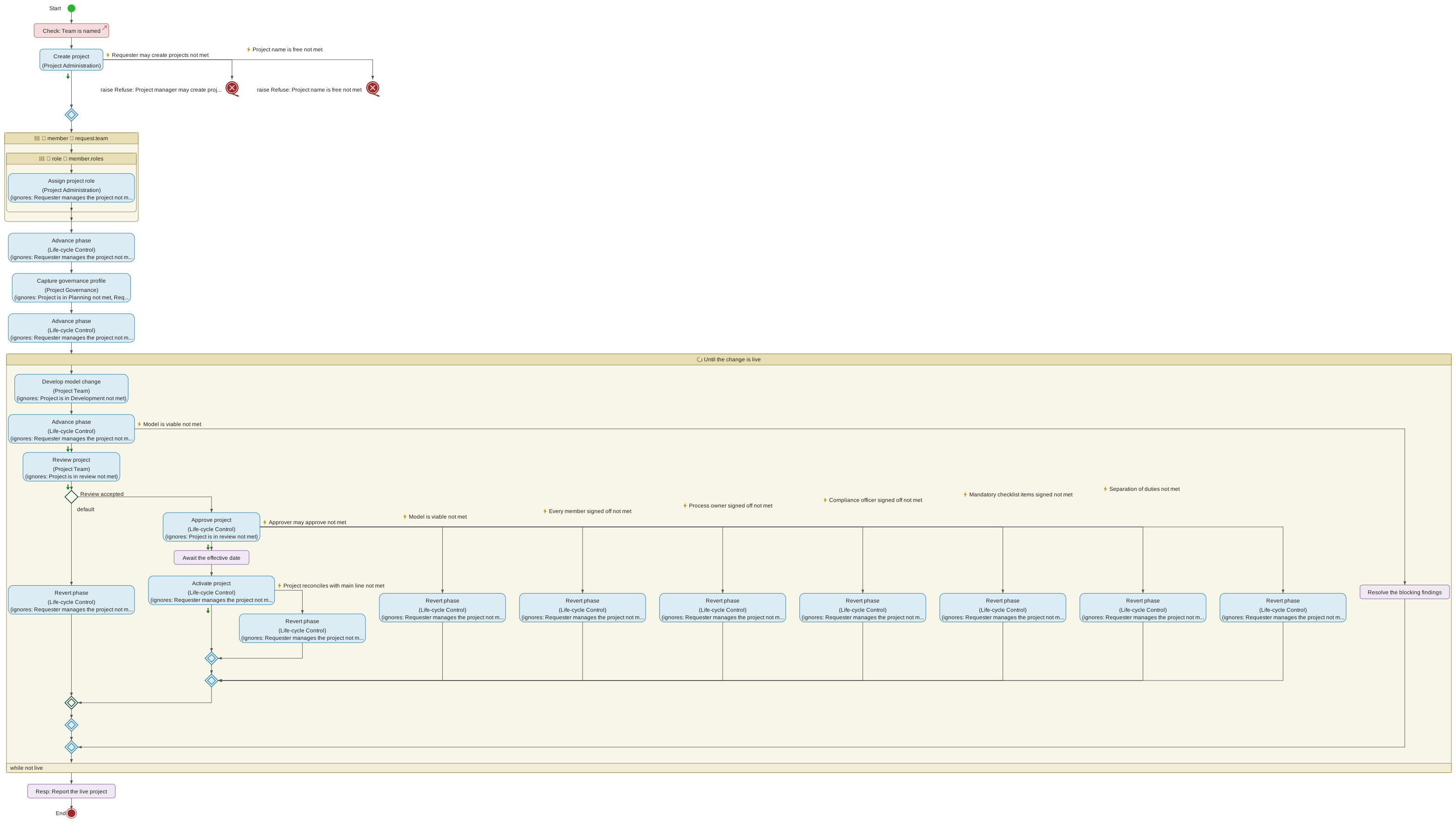
Each step names the service it requests and, in brackets, the domain that provides it. Back to Development and Reopen are both drawn as Revert phase, because that is the service each one requests. The lightning-bolt edges are the refusals a step handles — every one a requested service may raise, since each must be handled (Section 4.18.49). Three kinds appear. A refusal the delivery itself names is passed on: Create project refusing because the name is taken ends the delivery with its own Project name is free not met. A refusal that is a real outcome is acted on: the Approve gate refusing for a missing sign-off sends the round back to Development, and a main line that conflicts at Activate reopens the project. And a refusal that cannot happen where the delivery asks — Advance phase refusing a requester who created the project and so manages it — is ignored on purpose, its handler saying why. An ignored refusal draws no arm: each step names what it ignores in a row on its box, (ignores: …).
With compliance
Deliver regulated project change is a specialization of the first. It promises everything that one does and adds the compliance guarantees. Its process differs in four places:
-
the Compliance Officer is assigned at Initiation, alongside the team;
-
the governance profile is declared regulated in Planning;
-
entering In Review attaches the applicable compliance checklists;
-
the Compliance Officer’s review follows the team’s, and the project goes to Approve only when both are accepted. One after the other because the decision reads both answers, and a review that handles an exception has an answer only on its own success path — two reviews side by side could not both be read after they meet.
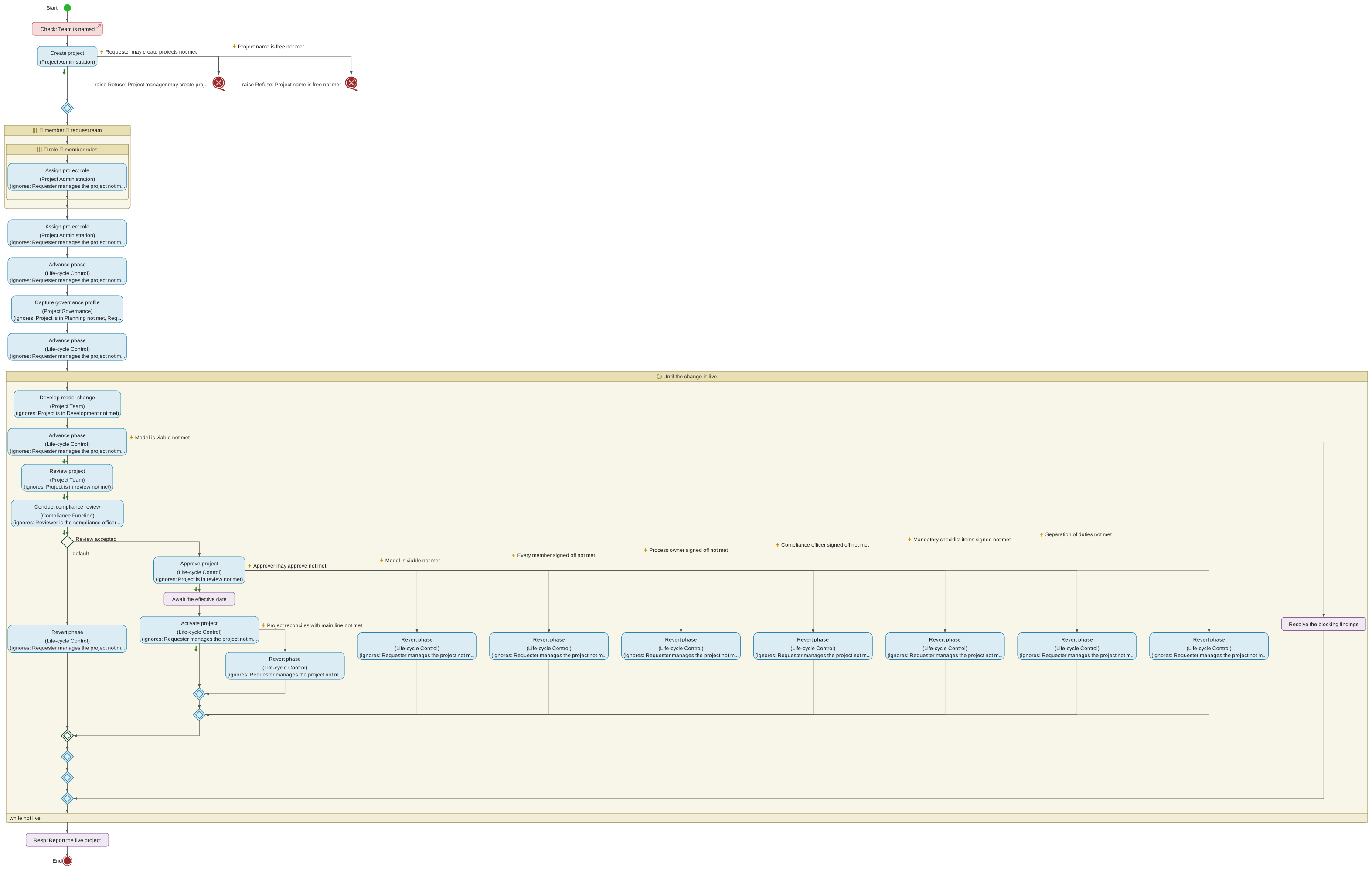
Where each guarantee is met
The regulated contract’s post-conditions are the claims a regulated project’s approval makes: every member signed off, a process owner signed off, the approver authored none of the change, every mandatory checklist item was signed, and so on. The responsibility allocation view shows which step of the process discharges each one. Dashed post-conditions are inherited from Deliver project change; solid ones are the regulated contract’s own.
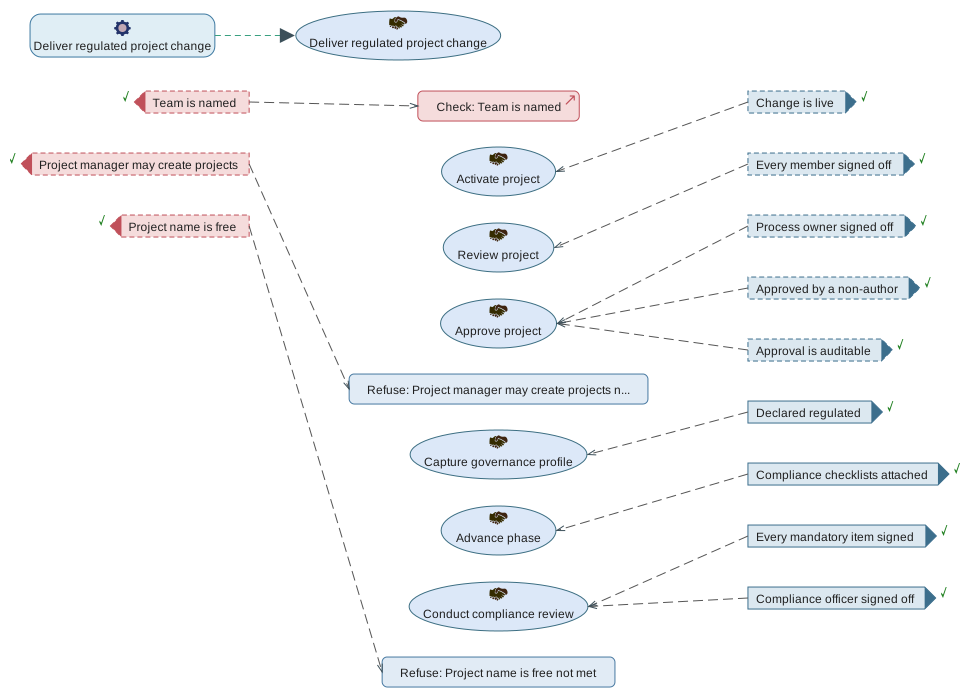
Of the contract’s three pre-conditions, Team is named is met by the check the process starts with. The other two, Project manager may create projects and Project name is free, are Create project's own refusals passed on: the delivery cannot start without the project, so it refuses for the same reasons, and each is met by the handler that raises it.
6.2.2. Phases
Each phase carries its own rules about what the team may do to the model and its annotations, whose approval is required to move on, and what evidence is captured on the project’s audit trail.
The rules are enforced by the server, not by the UI alone — an attempt to edit the model in a locked phase, or to sign off outside In Review, is refused with an explicit error even if the client were somehow to send the request.
Initiation
The initial phase of every project. The model is locked: no structural edits are permitted, and neither the governance profile nor the checklist workflow is available yet. Annotations, however, are accepted.
Initiation is intended as a team-setup and scoping window. The Project Manager typically uses it to:
-
Adjust the team roster and assign the more specialised governance roles (Process Owner, Approver, Compliance Officer, Reviewer) through the Manage project members dialog.
-
Confirm that the owning responsibility domain and initial team reflect the intended scope, and take annotations from stakeholders who are not yet team members.
Only the Project Manager can Advance the project out of Initiation. The next phase is Planning. Initiation is the entry phase and has no revert target — if the project was created against the wrong scope, archive it and create a new one at the correct scope rather than reverting.
Planning
The governance-gate phase. The model itself remains locked — the Development phase is where structural edits happen — but Planning introduces a dedicated write path: the governance profile form, editable by the Project Manager.
The governance profile is the metadata that gates the rest of the project’s lifecycle. It captures:
-
Whether the project is regulated. A regulated project must attach a Compliance checklist at In Review and cannot be Approved without a Compliance Officer's signature.
-
The project’s risk classification and data classification — informational for now, but visible on the audit trail.
-
A list of stakeholders — named individuals with a role descriptor and free-form notes.
-
A target activation date — the earliest date on which the project may be Activated after it has been Approved.
Annotations remain accepted, and the project team may already prepare informal notes on model elements ready to be formalised once Development opens.
Planning has no revert target. Advancing to Development is the only way forward from Planning; if the governance profile turns out to be wrong later, the project’s PM can no longer edit it once Development starts. Get it right here.
Only the Project Manager can Advance out of Planning. The next phase is Development.
Development
The only phase in which the model itself is fully editable. Authors on the project team may add, change and delete responsibility domains, service contracts, data structures, processes and every other model element, subject to their per-responsibility-domain policy grants.
Every change is auto-committed to the project’s git branch after a short idle window. Commits are broadcast to every other user on the same branch in real time, so a team can co-edit the model without merge tooling — the last successful patch is what everyone sees. Each commit records its author identity, a description drawn from the change-history stream, and the timestamp. The identity written into the commit is the author’s opaque identifier and a synthetic address that reaches nobody, never their name or email — the Change history panel still shows the real name, resolved as the history is displayed. See Section 5.8.
Author identity has a second use: the project’s change-authors log records, per-user, every patch that reaches this branch. That log is later consulted at the Approve gate to enforce separation of duties — the person who signs the project as its Approver may not also appear in the change-authors log for changes since the last approval.
The change-authors log is keyed on the same opaque identifier, which is what allows the separation-of-duties check to keep working after an erasure request: the comparison is between identifiers, so it still recognises a past author even once the tool can no longer say who they were.
Annotations are accepted throughout Development.
Development is the last phase in which the model can freely be altered. Once the Project Manager Advances to In Review, structural edits are locked. It is also the only phase that can be reverted to from later: In Review can be walked back to Development if issues are found during review.
Only the Project Manager can Advance out of Development. The next phase is In Review.
Testing
The phase in which a project whose model targets execution — its governance profile says so, fixed in Planning — is run, before anyone reviews it. Other projects go from Development straight to In Review and never pass through Testing.
Entering Testing does three things:
-
It freezes the model. Structural edits are locked, as in In Review: testing a revision that is still changing says nothing about any revision. Annotations are still accepted.
-
It tags the revision to test,
preview/<project>/<n>, numbering each freeze from 1. A test report attests to that revision, and the tag keeps it reachable for audit even after the branch is realigned. -
It lets the execution environment read the project — the consent a preview environment needs — without a separate step. The
PhaseAdvancedentry on the audit log records the consent and the tagged revision. This consent lasts until the project reverts to Development, is archived or is activated, so it also covers In Review and Approved, where a test run may be repeated. It cannot be withdrawn in Testing: to stop the read, revert the project to Development. Consent given explicitly in Development, if it was, stands after such a revert.
When main moves. The project branch is realigned onto main as at any time.
In Testing, a realignment that moves the branch freezes the new head as the
next tag, preview/<project>/<n+1>, and the audit log records it as
TestingRevisionFrozen. The project stays in Testing, but a test report on an
earlier revision no longer counts. A manual rebase in Testing instead returns
the project to Development, as it does from In Review.
Leaving Testing. Advance from Testing to In Review is mechanical: it reads the project’s latest test report (Test reports) and refuses unless
-
there is one,
-
it is current: of the frozen revision or a later commit on the branch,
-
the execution environment’s readiness gate admitted the revision,
-
no case failed — a regression contract’s included,
-
no contract the project changed has a tier-1 finding about the model, and
-
every mandatory item of a checklist attached in Testing is signed (Where it attaches and who may sign) — including the residue checklist, where a regime asks for residue to be accepted before review (The residue checklist).
Each refusal says which of these it is (Advance). A missing or stale report is cleared by running the suite again; a failure or a finding means the model must change, which means reverting to Development. Residue does not hold the project in Testing: it is for the reviewers to accept.
A report reaches the modelling server signed by an execution environment’s
trusted key (Trusted test report keys), or unsigned — uploaded by a Project
Manager, or sent by a service without a registered key. Either way
it is checked against the project — the phase, the revision, the model — and
recorded on the audit log as TestReportSubmitted.
Finding a defect. A test that finds a defect in the model sends the project back to Development (Revert), where the model can be changed. One that finds a problem with the preview environment's configuration is fixed in the execution environment, and the project stays in Testing.
In Review
The review-window phase. Structural edits are locked — the model snapshot is frozen for the duration of the review — but the phase is specifically designed to accept the two forms of feedback that matter here:
-
Annotations on any element, from any team member, remain accepted throughout In Review. This is where reviewers leave their comments, questions and correction requests.
-
Checklists are signed here. If the project’s governance profile marked it as regulated, the Compliance checklist has auto-attached as the phase opened, and any additional checklists the Project Manager attaches manually will also be visible. Team members work through the items, ticking each one to record their signature.
Two additional things happen at the start of In Review:
-
All existing sign-off state is cleared. In Review begins fresh — earlier partial sign-offs from a prior visit to this phase (before a revert) do not carry over.
-
Any checklist template flagged auto-attach for regulated projects is attached to this project if the governance profile has
regulated: true.
The Sign-off action captures each team member’s individual agreement that the project is ready to move on. When every member has signed off, the Approve button becomes visible to the Project Manager. Approval carries its own preconditions — described under the Approve transition — and is not triggered by the ordinary Advance button.
If issues are surfaced during review that require structural changes, the Project Manager can Revert the project to Development. Reverting discards every sign-off collected in this pass; the review process starts from scratch on the next advance to In Review.
The next phase is Approved, reachable only through the Approve gate.
Approved
The immutable phase. The project has cleared its Approve gate — all
mandatory signatures were captured, all mandatory checklist items
were signed, and separation of duties held — and now waits for its
effective date before being merged into main.
Both structural edits and annotations are locked in Approved. Nothing on the project changes: the audit trail is frozen so that the record accompanying the approval tag cannot be altered retrospectively.
If the reviewers missed something — or Activate reports a conflict
with main that has to be reconciled — the Project Manager
reopens the project, which returns it to Development and clears
the approval and every sign-off. The approval tag already written
is left alone; it records what was approved at the time. See
Reopening an approved project under the
Revert transition.
Approved carries three fields captured at the approve transition:
-
approved_at— the ISO timestamp of the approval. -
approved_by— the signature of the user who clicked Approve, along with the role they were acting in (Project Manager or, in later revisions, Approver). -
effective_date— the ISO date (YYYY-MM-DD) supplied at the approval, on or after which the project may be Activated.
The project branch is not deleted when the project moves to
Approved. The branch stays alive, holding the exact snapshot that
was signed off, until Activation merges it into main.
The next phase is Active, reachable through the Activate transition once the effective date has been reached.
Active
The terminal phase. When the Project Manager Activates the project,
the project’s branch is merged into main — the model’s live,
authoritative record — the project’s git branch is deleted, the
project record is removed from the projects table, and every team
member is notified that the work is now live.
In practice, therefore, Active is a transient state: the project
ceases to exist as an entity you can check out. Its content lives
on in the model’s main branch, tagged with the approval tag that
captured the sign-off record. Reviewers and auditors can inspect
the approved snapshot at any time by looking up the tag in the
model’s git history.
New work against the same responsibility domain is done by starting
a new project from the current tip of main — see
Creating a project.
6.2.3. Transitions
There are four ways to move a project between phases: Advance,
Revert, Approve, and Activate. Advance and Revert are the
generic step-forward and step-back controls; Approve and Activate
are dedicated flows that carry additional payload (approver
signatures and effective date, or the merge into main) and are
therefore not triggered by the Advance button.
Every transition is initiated by a user click on the lifecycle strip
in the header. The server verifies the acting user’s authority and
the preconditions relevant to the transition; on success it writes
a git tag on the branch that records the transition, updates the
project’s phase, broadcasts a phase_advanced or comparable event
to every other user checked out on the same branch, records a row
in the per-project audit log, and sends an in-app notification to
every team member. On failure it emits an explicit error message
naming what was missing.
The lifecycle strip only shows the buttons that are actually available to the acting user in the current phase. If you cannot see the button for a transition you expected to be able to trigger, either the preconditions are not yet met or your account does not hold the required role.
Advance
The generic step-forward control. Advance takes the project to the next phase in the sequence, provided the current phase supports it.
Only the Project Manager may Advance a project.
The Advance button is enabled in Initiation, Planning, Development and Testing. In each case the destination is fixed:
-
Initiation → Planning
-
Planning → Development
-
Development → In Review, or Development → Testing for a project whose model targets execution
-
Testing → In Review
Leaving Testing, Advance also reads the project’s latest test report and refuses with one of these reasons (Testing):
| Reason | Meaning |
|---|---|
|
No report has been submitted for the project. |
|
The latest report tested a revision from before the latest freeze: the model has changed since. Run the suite again. |
|
The execution environment's readiness gate refused the revision; the report lists why. |
|
A case failed; the contracts are listed, regression ones included. |
|
A contract the project changed has a tier-1 finding about the model. |
|
A checklist attached in Testing has mandatory items not yet satisfied; each is listed with why — not signed, rejected, or awaiting a signature for a role — and Open the test reports opens the dialog they are signed in. |
Advance is not the right control for two later transitions:
-
In Review → Approved is the Approve flow — it requires the full sign-off record and an effective-date payload that the generic Advance button cannot supply. Attempting to advance from In Review is refused with an explicit error pointing at the Approve button.
-
Approved → Active is the Activate flow.
On every successful Advance the server:
-
Creates an annotated git tag on the project branch, named
<projectName>_<newPhase>(for example,feature-payments_planning). Entering Testing also tags the revision to test,preview/<project>/<n>, and grants the execution environment its read (Testing). -
Clears the project’s sign-off state and every signature on its checklists — neither sign-offs nor checklist signatures from a previous In Review pass carry over to the next visit — except, leaving Testing, the signatures of the checklists attached in Testing.
-
Auto-attaches every "regulated" checklist template that attaches in the destination phase, if it is Testing or In Review and the project’s governance profile has the
regulatedflag set (Where it attaches and who may sign). -
Records a
PhaseAdvancedevent on the audit log capturing the old and new phase. -
Notifies every team member that the phase has changed.
The same sequence, as the life-cycle model specifies it (Section 6.2.1). Its three checks are Advance’s refusals: the requester must be the Project Manager, the current phase must be one Advance moves on from, and, when leaving Development, the model must pass the gate’s verification (Section 4.18.57). The process then reads the project as it stands and derives the phase it enters from the one it is in, so the regulated-checklist decision, the response and the team’s notification all state the same two phases. The notification carries both, so a team member learns where the project went without asking, even if it has moved on again since. The decision attaches the regulated checklists. The model records a milestone where the tool writes a git tag, because URDAD models are technology-neutral.
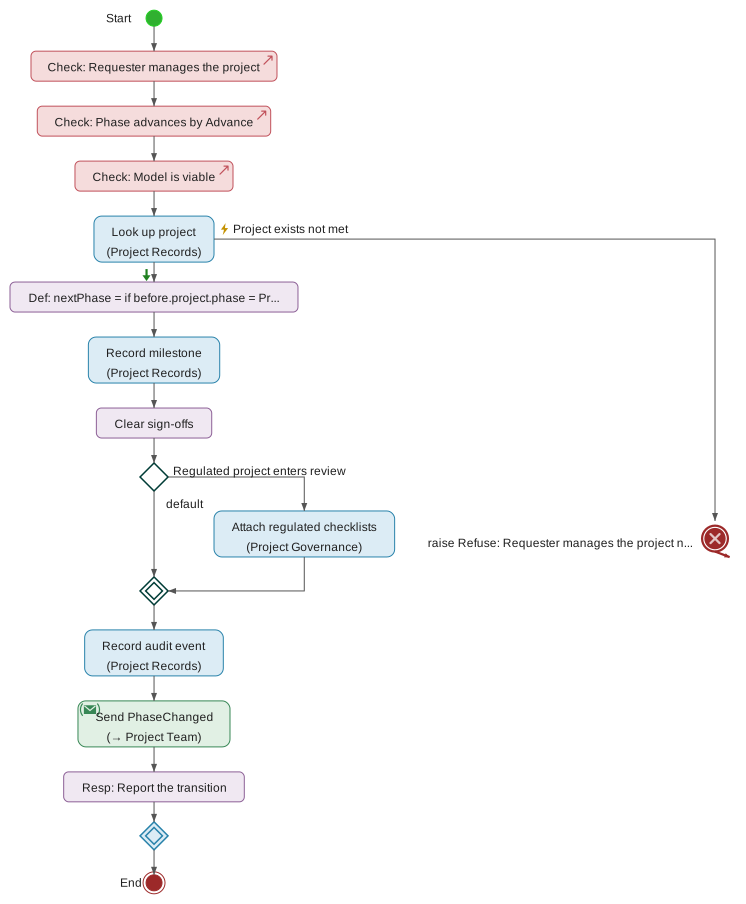
The life-cycle model shown here does not model Testing yet: its Advance process is the one every project follows, and Testing’s freeze and consent are described above.
Revert
The generic step-back control. Revert takes the project back to the previous phase in the sequence, provided the current phase supports it.
Only the Project Manager may Revert a project.
The Revert button is enabled in four places:
-
Development → Planning — use this when Planning-phase governance metadata turns out to have been wrong and needs correcting before development can safely continue.
-
Testing → Development — use this when a test finds a defect in the model. The consent Testing implied ends, so a preview of the project is retired unless consent was given explicitly in Development; test reports are kept as history.
-
In Review → Development — use this when reviewers surface issues requiring structural changes to the model. In Review never reverts to Testing: any change invalidates the test evidence anyway.
-
Approved → Development — see Reopening an approved project below. The button is labelled Reopen in this phase, because it discards an approval rather than stepping back through an ordinary gate.
Revert is not available from Initiation (which is the entry
phase), from Planning (Initiation is not a meaningful place to go
back to), or from Active (the project’s work is already in main
and its branch is gone, so there is nothing left to reopen).
Revert is also refused on an archived project: reopening one would hand back a writable phase on a branch that may not be written to.
On a successful Revert the server:
-
Sets the phase back to the previous one.
-
Clears every collected sign-off and every signature on the project’s checklists. Any signatures gathered on the next visit to In Review will start fresh; the checklists stay attached.
-
Records a
PhaseRevertedevent on the audit log capturing the old and new phase. -
Notifies every team member.
Reopening an approved project. Approved reverts straight to Development, skipping In Review. Reopening exists so that the model can be edited again, and Development is the only phase in which it can be — landing in In Review would return the project to a read-only phase against sign-offs the reopen has just cleared.
The case this serves is an Activate the merge with main refused:
the conflicting elements can only be reconciled on the project
branch, in a phase that permits structural edits. See "Merging at
Activate" under Rebasing and Conflict Resolution.
Because it discards a completed approval, the tool asks for confirmation before sending the request, and the audit entry records more than the two phase names:
-
voids_approval—truewhen the reverted phase was Approved. -
voided_effective_date— the effective date the discarded approval carried.
What a reopen does not do is rewrite history. The approval tag
written at the original Approve stays in the git repository: it is
the record of what was approved at the time, and an auditor must
still be able to read it. Approving the project again writes a
new tag. Where the second approval carries the same effective
date as the first, the new tag takes a round suffix —
approved/<project>_<date>_r2, then _r3 — so that each approval
points at the revision it actually attested to.
Reopening does not clear the project’s approved_at timestamp
either. The separation-of-duties check at the next Approve
measures authorship "since the last approval", so the person who
carries out the reconciliation cannot be the one who approves it.
Approve
The In Review → Approved gate. Approve is where every governance control the tool exposes is checked at once. When it succeeds, the project’s approval is a permanent record on the branch, in the audit log, and (via the annotated git tag body) in the model’s git history.
Approve is initiated by clicking the Approve button that appears in the lifecycle strip once every team member has signed off. A short prompt asks for the effective date — the ISO date on or after which the project may be Activated. The default is the Planning-phase target activation date, if the governance profile specified one; otherwise today.
Approve is available to the Project Manager and to any user holding the dedicated Approver role. The Approver need not be a lead — the role is enough on its own, and it confers no other lifecycle action: Advance, Revert and Activate stay with the Project Manager, so an Approver added as an ordinary team member is offered Approve and nothing else. See Approver under Project roles.
The server refuses the request if any of the following preconditions is not met:
-
The model passes the gate’s verification: no blocking finding, and every warning at the project’s verification level discharged in writing. This is the same verification Advance runs on leaving Development, repeated because an automatic realignment can change the model while it is In Review. See Section 4.18.57.
-
For a project whose model targets execution, its latest test report is still current: of the revision Testing froze or a later commit on the branch (Test reports). A realignment while In Review freezes the branch again and so makes it stale; the refusal is
stale_test_report, orno_test_reportfor a project that has none. Its verdict was checked on leaving Testing. Its residue checklist must be that report’s (residue_checklist_staleotherwise), and every item on it disposed of, none rejected (The residue checklist). -
Every member of the project team has signed off — leads and ordinary members alike.
-
A user with the Process Owner role has signed off. If no user is explicitly assigned Process Owner, any lead (Project Manager) counts as an implicit Process Owner, so the default team shape is not blocked by role paperwork.
-
If the governance profile marks the project as regulated, at least one user with the Compliance Officer role must be assigned to the project and must have signed off. There is no implicit fallback here — regulated projects require an explicit compliance signature.
-
Every mandatory item on every attached checklist has been signed, and no residue item has been rejected. Non-mandatory items are informational and never block approval.
-
Separation of duties: the user clicking Approve must not have authored any patch since the project’s last approval (or since the project was created, at the first approval). If you are the PM and also a hands-on author on this branch, arrange for a co-lead to click Approve.
If any of the checks fails, the refusal names exactly which requirement was missing — for example, "Compliance sign-off required for regulated project". Checklist items holding approval are shown in the blocked-transition dialog, as the gate out of Testing shows its own: each item with its checklist, why it holds the gate — not signed, a rejected residue item, or awaiting a signature for a role — and, for a residue item, a link to the element it concerns. Open the sign-off dialog goes to where they are signed.
On success:
-
An annotated git tag
approved/<projectName>_<effectiveDate>is created on the branch — or…_<effectiveDate>_r2,_r3where the project has already been approved once for that date, which happens when it was reopened and approved again. The tag’s body is a multi-line audit record naming the approver, every member’s sign-off, and the full item-by-item state of every attached checklist. This makes the approval an audit-native artefact of the model’s git history — reviewable directly throughgit show <tag>even without the tool. -
The project’s phase moves to Approved.
-
approved_at,approved_byandeffective_dateare recorded on the project row. -
A
ProjectApprovedevent lands on the audit log, capturing the approver, the effective date and the tag name. -
Every team member is notified that the project has been approved and will activate on the effective date.
The project branch stays alive — Approve does not merge to main.
That happens at Activate.
In the life-cycle model (Section 6.2.1), the gate is a check for each precondition, in the order above, followed by the records it writes and the notification it sends.
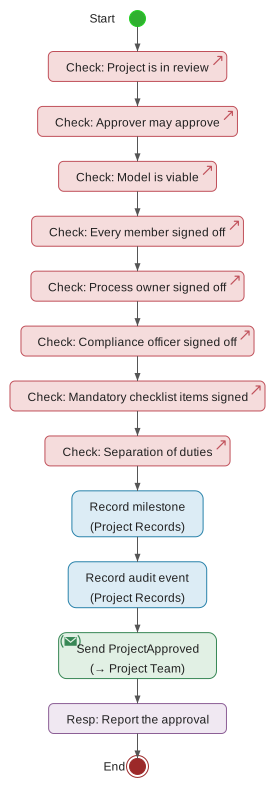
Activate
The Approved → Active gate. Activate is when the project’s work is
merged into the model’s main branch, becoming part of the
authoritative live model.
Activate is initiated by clicking the Activate button in the lifecycle strip. The button is disabled until today ≥ effective_date; a tooltip explains why it is not clickable, naming the target date.
Only the Project Manager may Activate a project. The tool leaves room for a future dedicated Release Manager role that owns the Activate transition separately from Approver — its own gate, enforced through the same "who can transition?" lookup on the server — but no such role is defined at v1, so the Project Manager holds this authority.
The server refuses the request if the effective date has not yet been reached, naming the target date in the error message.
It also refuses if the project’s work cannot be reconciled with
main. Activate merges the two models rather than overwriting
main with the project’s, so where main has advanced since the
project branched, those changes are carried into the result — and
where both sides changed the same element, the activation is
blocked with the conflict listed and nothing is written. The
project stays Approved. See "Merging at Activate" under Rebasing
and Conflict Resolution.
On success:
-
The project’s model is merged into
main— a three-way merge against the two branches' merge base. Wheremainhas not moved since Approve, the result is exactly the approved snapshot; where it has, the result is the approved snapshot combined with what has landed onmainin the meantime. -
A pre-merge tag is created on
main—pre merging project <projectName>— as a safe rollback point. It is written only once the merge is known to be clean, so a blocked Activate leaves no tag behind. -
mainis broadcast as a freshmodel_stateto every client currently checked out onmain, so their view refreshes without a manual reload. -
A
ProjectActivatedevent is written to the audit log. -
Every residue item the project accepted is added to the model’s register of accepted residue (The register of accepted residue), audited as
ResidueRegistered. The merge has happened by then, so if the register cannot be written the activation stands and the error is shown to whoever activated. -
The project branch is deleted from the git repository, and the project row is deleted from the projects table. The project is no longer checkable-out.
-
Every team member receives a "Project '…' has been activated" notification.
-
Every other project branch on the model is queued for automatic realignment onto the new
main. This happens in the background: the activation does not wait for it, and a sibling project whose merge conflicts cannot cause this activation to fail. See "Automatic realignment" under Rebasing and Conflict Resolution.
In the life-cycle model (Section 6.2.1), realigning the sibling projects is a background flow: it ends on its own and the activation’s response does not wait for it.
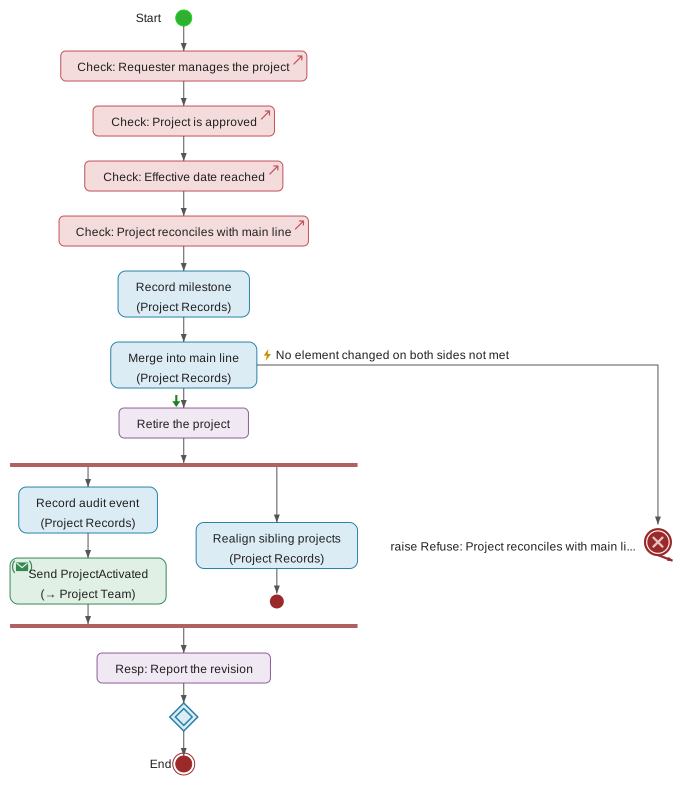
The approval tag survives on the git history and remains queryable
by tag name — an auditor asking "when was this activated?" walks
the tags on main and the approval tag it points at; the tag body
contains the full sign-off and checklist record captured at
Approve.
6.3. Project roles
Roles determine what a user may do on a project, whose signatures are required to move the project through its lifecycle gates, and where separation-of-duties constraints apply. They sit orthogonal to the responsibility-domain policy layer that grants domain-level access rights: policies say who may edit which parts of the model, while roles say who is responsible for signing off what, and who may drive which lifecycle transitions.
Roles come in two scopes:
Project-scoped roles are assigned per project through the Manage project members dialog and apply only to the project they were assigned on. A user may hold any combination of them, and the same user often holds several — for example, a Project Manager who is also an Author and a Reviewer. The project-scoped roles are Project Manager, Author, Reviewer, Process Owner, Approver and Compliance Officer.
Organisation-scoped roles are conferred by membership of an OIDC
group defined outside the tool. They apply across every model and
every project the user has access to. The two organisation-scoped
roles are URDAD-Admin and URDAD-Auditor.
Roles do not override the responsibility-domain policy layer. Holding the Author role on a project does not grant a user the ability to modify a responsibility domain their policy grants do not cover, and holding URDAD-Auditor does not grant write access to anything the auditor is not explicitly permitted to write. Roles gate transitions and signatures; policies gate element-level edits.
Where separation of duties requires it, the tool enforces role-combination rules at the transition gates. The author of a change cannot be the approver of that change; a regulated project cannot be approved without an explicit Compliance Officer signature. Those constraints are covered under Separation of duties.
6.3.1. Project-scoped roles
The six project-scoped roles fall into two groups:
-
Team-membership roles — Project Manager and Author — are conferred by putting a user on the project’s leads or members list at creation, and are visible in the audit trail on every change the user makes.
-
Governance roles — Reviewer, Process Owner, Approver and Compliance Officer — are assigned explicitly through the Manage project members dialog and gate specific sign-offs at the Approve transition. Approver is the only one of the four that also carries an action: its holder may click Approve, whether or not they are a lead. It carries no other lifecycle action.
A user may hold any combination of roles on a project. Adding a user as a lead automatically confers Project Manager and Author; adding a user as an ordinary member confers Author. Governance roles are additive to whichever team-membership role the user already carries.
Project Manager
The role of the Project Manager is to drive the project through its lifecycle. Every user added to the project’s leads list — at creation or through the Manage project members dialog — is assigned the Project Manager role automatically, in addition to the Author role that every team member holds.
A Project Manager can:
-
Advance and Revert phases through the lifecycle strip in the header — Initiation → Planning → Development → In Review, through Testing for a project whose model targets execution (Testing), and the four allowed reverts, one of which reopens an approved project into Development. Entering and leaving Testing, and reverting out of it, are the Project Manager’s alone.
-
Edit the governance profile during Planning: the regulated flag, risk and data classification, stakeholder register and target activation date.
-
Manage the team, including adding and removing members and assigning the four governance roles (Reviewer, Process Owner, Approver, Compliance Officer) through the Manage project members dialog.
-
Attach and detach checklists on the project — see the Governance section — through the picker in the Review Checklist panel.
-
Approve the project once the In Review sign-off gate’s preconditions have all been met, and Activate it once the effective date has been reached.
A Project Manager is a fully-authorised author on the project as well: every commit they make counts as authorship for the purpose of the Approve-time separation-of-duties check. This means a PM who has hands-on authored the project cannot themselves click Approve without another user acting as approver — see Separation of duties.
If no user has been explicitly assigned the Process Owner role, every Project Manager on the project counts as an implicit Process Owner at the Approve gate. This keeps small teams that have not assigned governance roles from being blocked at approval time purely for role-paperwork reasons.
A project must have at least one Project Manager at all times. The Manage project members dialog refuses to remove the last lead.
Author
The default role for every team member. Adding a user to a project — whether as a lead or an ordinary member — assigns them the Author role.
An Author may modify the model during the Development phase,
subject to the responsibility-domain policy grants on their
account. Being an Author on a project is not sufficient by itself
to edit any part of the model: the user must also hold modify (or
higher) on the specific responsibility domain the element they wish
to change belongs to.
During Development every change an Author makes is recorded in the project’s change-authors log along with the ISO timestamp. The log is later consulted at the Approve gate to enforce separation of duties: a user who appears in the log for any change since the project’s last approval — or since the project was created, at the first approval — cannot themselves click Approve.
Authors are not required to sign checklists — that is a separate per-user action available to any team member — but any team member is expected to sign off during In Review before the project can Approve.
Reviewer
An explicitly assigned governance role indicating that the user has been asked to participate in the In Review sign-off process on this project. Reviewer is set through the Manage project members dialog, on top of the Author role every team member already holds.
At this version of the tool the Reviewer role does not carry server-side privileges of its own — any team member on the project can leave annotations and sign checklist items, and any team member is required to sign off during In Review. Assigning Reviewer is therefore currently a semantic marker useful for:
-
Making explicit, in the team roster, which members are expected to contribute to review as opposed to being on the team purely for their authoring contribution.
-
Preparing for later versions of the tool that may enforce peer-review requirements (e.g. "at least one Reviewer must have signed off before Approve").
-
Making the audit log more informative — the role in which each signature is captured is stored alongside the signature record.
Users who are not team members are not eligible to become Reviewers. Add the user to the project first.
Process Owner
The user accountable for the business process the project models — the RACI-A, in RACI terms. Their sign-off is the substantive statement that the work reflects the process as it needs to be, and without it a project cannot be Approved.
Process Owner is assigned through the Manage project members dialog, on top of whatever team-membership role the user already holds. Typically one team member holds Process Owner, though the role is not restricted to a single user.
At the Approve gate the server requires that:
-
At least one user with the Process Owner role has been assigned to the project, or an implicit Process Owner is available.
-
That user has effectively signed off (via the ordinary sign-off action).
If no user is explicitly assigned Process Owner, every Project Manager on the project counts as an implicit Process Owner for the purposes of this gate. The intention of the fallback is not to make Process Owner optional in principle, but to keep small teams that have not yet had time to formalise governance-role paperwork from being blocked at approval time. On projects with a distinct business owner separate from the PM, explicitly assigning Process Owner is worth doing — it produces a clearer audit record and avoids ambiguity about who spoke for the business at approval.
Approver
The user who clicks Approve to move the project from In Review to Approved. Approver is assigned through the Manage project members dialog, on top of whatever team-membership role the user already holds.
The role stands on its own. A user added to the team as an ordinary member and given the Approver checkbox can approve the project without also being made a lead. This is the point of the role: approval is meant to be separable from running the project, and requiring the Approver to be a Project Manager as well would hand them the whole lifecycle in order to obtain one signature.
The Approver’s signature — captured automatically at the moment the Approve button is clicked — is one of the mandatory sign-offs on the approval tag written to the project branch’s git history and recorded in the audit log.
At the Approve gate the server requires that:
-
The user clicking Approve holds either the Approver role or the Project Manager role (or
managerights on the project’s owning responsibility domain, which is what makes someone a project manager by policy rather than by name). Either is accepted; in configurations where a formal Approver has been assigned the intention is that they, and not the PM, sign. -
The user clicking Approve is not recorded in the change-authors log as an author of any change since the project’s last approval. This is the separation-of-duties constraint — see Separation of duties.
What the Approver role does not confer. Approve — and the
delta approval that extends an approval already given, described
under Delta review — is the whole of it. Advancing or reverting a
phase, activating the project, forcing a member’s sign-off,
rebasing onto main, editing the governance profile and attaching
review checklists all remain with the Project Manager. An Approver
who is not also a lead sees the Approve button and the Sign-off
status list in the lifecycle strip, and no other lifecycle
control: the sign-off list is there so an Approver waiting on the
gate can see which member is still to sign, and forcing a sign-off
from inside it stays lead-only.
If a project’s approver has been hands-on authoring on the branch themselves and cannot pass the separation-of-duties check, arrange for a co-lead or another user holding Approver to click Approve instead. The tool does not offer a "sign as different user" flow — the signature is always the OIDC identity of the caller.
Compliance Officer
The user who represents the compliance function on the project. Compliance Officer is assigned through the Manage project members dialog, on top of whatever team-membership role the user already holds. Compliance Officer is mandatory for any project whose Planning-phase governance profile flags it as regulated.
At the Approve gate the server requires that, if
governance_profile.regulated == true:
-
At least one user with the Compliance Officer role has been assigned to the project.
-
That user has effectively signed off (via the ordinary sign-off action).
There is no implicit fallback for the Compliance Officer role — unlike Process Owner, no other role can stand in for it. A regulated project without an assigned and signed Compliance Officer cannot be Approved. The error message at the failed Approve names the missing sign-off explicitly.
If a Compliance Officer is assigned and signs off, their signature is captured on the approval tag body alongside every other signatory. The role is stored with the signature, so an auditor reading the tag can see immediately which of the signatories was speaking as compliance.
In the life-cycle model (Section 6.2.1), the Compliance Officer’s review follows the team’s. The Compliance Officer verifies each item on each attached checklist against the model and signs it, then signs off. If a mandatory item cannot be confirmed, the review reports the changes required instead.
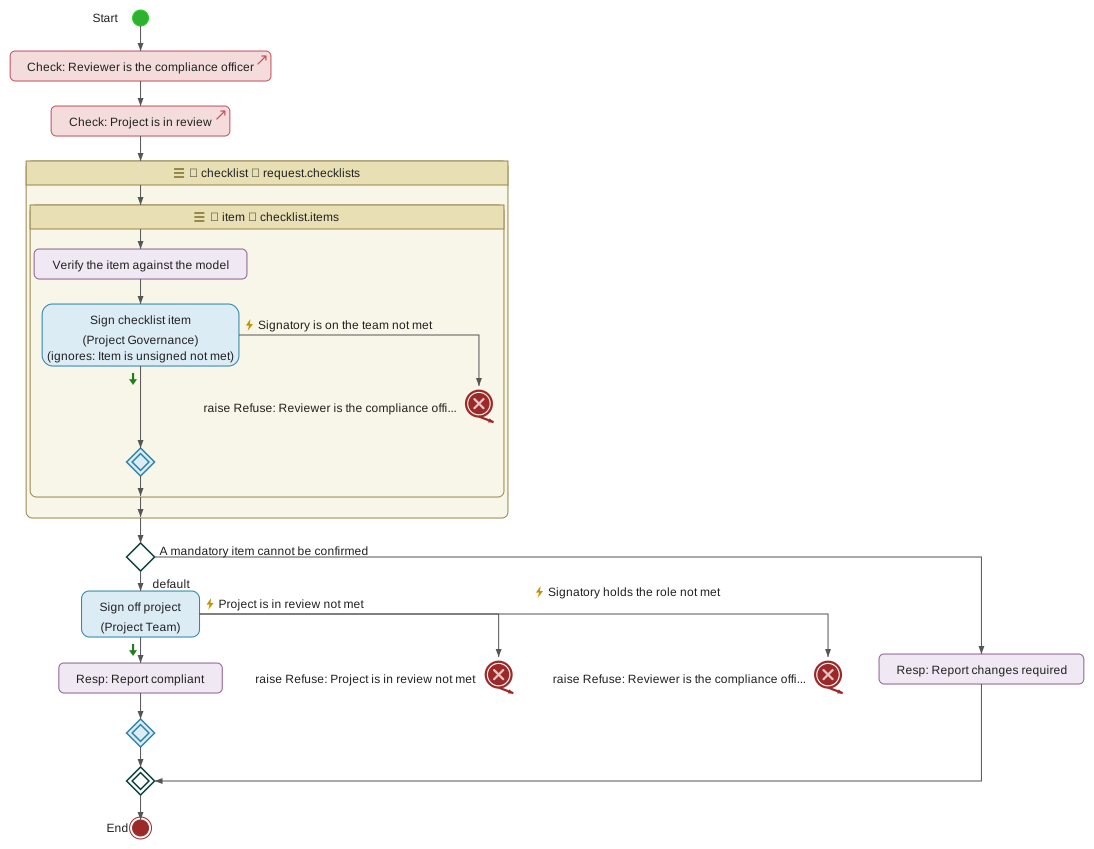
Non-regulated projects do not require a Compliance Officer. Assigning one on a non-regulated project has no effect on the Approve gate — the sign-off, if given, is captured on the audit trail as an ordinary team-member sign-off.
6.3.2. Organisation-scoped roles
Organisation-scoped roles are conferred by membership of an OIDC group configured in the identity provider outside the tool. They apply across every model and every project a user is otherwise authorised to see, and — unlike the project-scoped roles — they are not visible on the Manage project members dialog: the tool merely reads the user’s group set from the OIDC claim on each socket connection.
There are two organisation-scoped roles: URDAD-Admin and
URDAD-Auditor. The role names are the exact OIDC group names the
identity-provider administrator must configure.
URDAD-Admin
Membership of the OIDC group URDAD-Admin grants four privileges
outside the ordinary policy layer:
-
Model lifecycle management — create a new model, archive and unarchive existing models, delete models. Deletion is irreversible and takes the model’s projects and history with it; see Section 4.17.
-
Policy CRUD — add, edit and remove security policies through the Manage security policies dialog.
-
Unconditional read — view every model and every project, including those the user would not otherwise be able to see through policy grants.
-
Erasure — delete a person’s user-directory entry through the Manage users dialog, which de-identifies everything they left. It cannot be undone, and an administrator cannot erase themselves. See Section 5.8.
Membership does not automatically grant higher domain-scoped
access rights on any model. A URDAD-Admin who wants to modify
elements of a specific responsibility domain must still be granted
modify (or higher) on that domain by a policy, in the same way as
any other user. Membership also does not grant the ability to
create projects: project creation requires manage on the owning
responsibility domain, which is a policy-layer grant. In practice,
URDAD-Admin usually configures the initial policies of a new model
to grant themselves manage at the root, and can therefore
create projects everywhere; but the two authorisations are
separate.
URDAD-Admin does not carry the checklist-template CRUD privilege. That is deliberately with URDAD-Auditor instead: compliance content is authored by the audit function, not the technical administration function.
URDAD-Auditor
Membership of the OIDC group URDAD-Auditor confers the audit
function’s view of the tool:
-
Unconditional read across every model, every project (including archived projects), and every project’s audit log — irrespective of whether the auditor is on the project team or would otherwise have policy-layer read grants.
-
Write access to the checklist template catalog — the sole write endpoint exposed to auditors. Adding, editing and deleting templates through the Manage checklist templates dialog is gated on this role.
The rationale for the second privilege: checklist templates encode what "reviewed" means for a project. That is compliance content, naturally owned by the audit function rather than the technical administration function.
An auditor cannot create projects, cannot modify any model, cannot sign off on any project, and cannot approve or activate any project. The template-catalog write is a deliberate, scoped exception to the otherwise strictly read-only stance the role takes — every other invariant that "auditors do not influence the work under review" continues to hold.
6.3.3. Separation of duties
The tool permits, and often expects, a single user to hold several roles on a project simultaneously — Project Manager and Author is the default combination for every lead; Reviewer plus Author is a common addition. Separation of duties is not enforced by preventing role assignment; it is enforced at the transition gates, where the combination of roles a user holds is evaluated against the specific transition being attempted.
There are three separation-of-duties rules the server enforces today, all at the Approve gate:
Approver is not an author of the change. The user clicking Approve must not appear in the project’s change-authors log for any change since the project’s last Approve — or since the project was created, at the first Approve. This is the primary SoD constraint: the person who signs off on the work has not themselves produced it.
+
The change-authors log is maintained automatically. Every patch
recorded on the project’s branch during the Development phase
adds a row to the log with the OIDC username of the author and
an ISO timestamp. The Approve handler then queries the log for
distinct authors since the project’s approved_at timestamp
(empty at first approval, meaning "since project inception") and
refuses the approval if the user attempting it appears in the
result.
Process Owner sign-off is present. If a Process Owner has been explicitly assigned to the project, they must have signed off before Approve is allowed. If no Process Owner is explicitly assigned, any Project Manager on the project counts as an implicit Process Owner and their sign-off satisfies the requirement.
Compliance sign-off is present on regulated projects. If the Planning-phase governance profile marks the project as regulated, at least one user with the Compliance Officer role must have been assigned and must have signed off. There is no implicit fallback — regulated work requires an explicit compliance signature.
Where a role architecture leaves the Approve gate legitimately unpassable — for example, a two-person team in which both members have authored on the branch — the way out is to add a further team member who can act as approver without themselves being an author. The tool does not offer a "sign as different user" flow; the signature captured at Approve is always the OIDC identity of the caller.
Two additional constraints are anticipated but not yet enforced in the current tool version:
-
Approver is not the Release Manager (Activate). A future version of the tool will define a dedicated Release Manager role that owns the Activate transition, distinct from Approver. Until it does, Project Managers hold both authorities.
-
Peer-review requirements. A future version may require at least one Reviewer sign-off before Approve. Today the Reviewer role is a semantic marker and does not gate the transition.
6.3.4. Assigning roles
Project-scoped roles are assigned in two places, at two different times.
At project creation. The Create Project dialog captures the
leads and members lists — the team-membership dimension. Every
lead is stored with the roles ProjectManager and Author; every
ordinary member with the role Author. The four governance roles
— Reviewer, Process Owner, Approver, Compliance Officer — are not
captured at creation; the dialog deliberately keeps first-time
setup light.
After creation, via Manage project members. The dialog is opened
from the Model Actions dropdown → Manage project members while
the project is checked out. It requires the acting user to hold
manage on the model at the model-root level — in practice the
project’s Project Manager typically has this authority, along with
URDAD-Admin.
The dialog exposes:
-
Add / remove team members via an autocomplete picker over the set of users who have signed in to the tool.
-
Lead / member toggle for each team member. Toggling a user to Lead adds Project Manager to their role list; toggling back to Member removes it. Author is preserved either way.
-
Governance-role checkboxes per team member, for Process Owner, Approver and Compliance Officer. Reviewer is not surfaced as a checkbox at this version but can be assigned through the underlying wire protocol if needed.
Ticking Approver is sufficient on its own — the user does not also need to be toggled to Lead in order to approve, and toggling them to Lead in order to make Approve work would hand them every other phase transition as well. See Approver under Project roles.
Save is atomic: every field on the dialog is submitted as a single
update_project_members request. On success the server broadcasts
the new team-and-roles state to every user checked out on the
project so their client refreshes without a manual reload.
Reassigning after key transitions. Role assignments persist through phase transitions — moving from Planning to Development or Development to In Review does not clear roles. The one exception is the sign-off state: at every Advance and every Revert the server clears the sign-off record and every checklist signature so that the next visit to In Review begins with no accidental carry-over of stale signatures.
Organisation-scoped roles (URDAD-Admin and URDAD-Auditor) are
not assigned through the tool at all. They are conferred by
membership of the corresponding OIDC group in the identity
provider, and take effect the next time the user signs in.
6.4. Governance
Governance in the URDAD tool means the set of controls that decide whether a project may be Approved and Activated, on what evidence, and by whom. It rests on three artefacts that a project accumulates through its lifecycle:
-
The governance profile — captured during the Planning phase. The profile classifies the project (regulated / not regulated, risk level, data sensitivity), lists its stakeholders, and sets the target activation date. What it says about the project determines which additional sign-offs are mandatory at Approve.
-
The review checklists attached to the project — either auto-attached when the project enters In Review (regulated projects only) or attached manually by the Project Manager through the Review Checklist panel. Each checklist is an instance of a template from the org-level catalog, materialised with per-item sign-off state.
-
The sign-off record — captured during In Review, including the team-member sign-offs and, at Approve, the governance-role signatures (Process Owner, Compliance Officer, Approver) and the effective date. This record is written to the approval git tag’s body so that the model’s git history contains a self-contained audit artefact.
Two distinct groups of users interact with this section:
-
Auditors — members of the
URDAD-AuditorOIDC group — author the checklist template catalog. They decide what "reviewed" means for the organisation as a whole, and their edits to the catalog are the input to every project’s review process. -
Project Managers fill in the governance profile during Planning, decide which checklist templates apply to their project (auto-attach handles the regulated case; manual attach handles the rest), and drive the Approve gate.
The team as a whole participates by signing off during In Review and by ticking checklist items as they complete them.
6.4.1. Governance profile
The governance profile is a per-project metadata form filled in during the Planning phase. It captures how the project should be governed — regulatory scope, whether its processes will be executed, risk and data sensitivity, stakeholders and target activation date — and freezes that declaration for the rest of the project’s lifecycle.
The profile is edited through the Governance profile menu item on the Model Actions dropdown. The dialog is:
-
Read-only in every phase except Planning. Team members and auditors can open the dialog to inspect the captured profile at any time, but only during Planning does it show editable fields.
-
Editable only by the Project Manager. Other team members see the same read-only view even during Planning.
Once the project Advances from Planning to Development, the profile is frozen. There is no in-tool workflow to correct a mistaken profile after leaving Planning — an error discovered later requires either Reverting the project all the way back to Planning (from Development only) or archiving the project and starting fresh.
The rest of this subsection walks through what each field on the profile means and what its consequences are downstream.
Regulated
A single checkbox on the governance profile: is this project subject to compliance requirements — GDPR, Solvency II, MiFID II, PSD2, or similar sectoral regulation — such that its changes need explicit compliance sign-off before they may go live?
The regulated flag changes what the tool does downstream in two places (the regimes a project names narrow the first of them, and Section 6.4.1.3 separately decides what verification asks at the gate):
-
At the Development → In Review transition, the server auto-attaches every checklist template flagged "Auto-attach to regulated projects" from the catalog. On the default install this attaches a Compliance review checklist covering regulatory scope, personal-data handling and retention. Additional auto-attach templates authored by auditors are attached the same way.
-
At the In Review → Approved transition, the Approve gate requires that at least one user with the Compliance Officer role is assigned to the project and has signed off. There is no implicit fallback for this — see the Compliance Officer role and the Approve transition for the exact preconditions.
The default value is false. Leave it unchecked on non-regulated projects. Setting it on a project that does not actually need compliance sign-off does not break anything but it does force the team to work through the Compliance checklist and secure the Compliance Officer’s signature before Approve, which is friction for no gain.
Setting it on a project that is regulated but happens not to have a Compliance Officer assigned yet does not immediately fail — the check runs at Approve, not at Planning — so there is time to add a Compliance Officer during Development or In Review.
Regulatory regimes
Which regulatory regimes a project falls under — GDPR, DORA, POPIA or whatever else the organisation is subject to. A project may be under several at once, so this is a set of choices rather than one, and a cross-border project can legitimately name two or three.
Where Section 6.4.1.1 asks whether compliance sign-off is needed at all, regimes ask under what. Together they decide which checklists a project receives: on entering Testing or In Review, a checklist template attaches when the project is regulated and the template serves one of the project’s regimes (and attaches in that phase, Where it attaches and who may sign). A regime may also ask more of the residue a project’s test report leaves (The residue checklist): that it is accepted in Testing, by holders of one role, and that some causes may not be accepted at all.
A template that names no regime applies under all of them
That rule matters more than it looks. It means the default Compliance review checklist — which names no regime — keeps attaching to every regulated project exactly as it always has. Tagging a template with regimes narrows it; it never silently stops a checklist attaching that was attaching before.
So a project that selects no regimes still gets every regime-agnostic checklist. Selecting regimes only ever adds the checklists specific to them.
Tagging decides what attaches next, not what is already attached
Regimes are evaluated once per transition, on entering Testing or In Review. A checklist that is already attached to a project stays attached whatever happens to the template’s tags afterwards, and its mandatory items keep counting toward the Approve gate.
This cuts both ways, and neither direction is retrospective:
-
Narrowing a template — tagging one that previously named no regime — does not remove it from projects that already picked it up. If it was attached in error, correcting the tags is not enough; the checklist has to be taken off each affected project explicitly. See Section 6.4.3.3.
-
Broadening a template — clearing its tags so it applies under every regime again — does not attach it to projects already past the transition. They pick it up only if they return to Development and advance again.
The practical consequence is that a template’s tags describe what will happen, and a project’s Review Checklist panel is the only authority on what has happened. When the two disagree, the panel is right.
The catalogue is maintained by auditors
Regimes are not a fixed list built into the tool. Auditors maintain them alongside the checklist templates, in the same dialog — a new regime can be added without waiting for a release.
Both sides of the match pick from that one catalogue: the project selects
regimes from it, and a template is tagged from it. That is deliberate. If each
side typed a name freely, GDPR on one and gdpr on the other would never
match, and nothing would report an error — the project would simply reach
approval with a compliance checklist missing.
Regimes are retired, not deleted
A regime that no longer applies to new work is retired. It then disappears from the selection lists but remains on every project that already named it, and remains readable.
There is no delete, deliberately. A project approved under a regime is a regulatory record, and that record has to stay intelligible years later — a deleted regime would leave an approval referring to something the tool could no longer explain. Retiring can be reversed if a regime becomes relevant again.
What is not provided
The tool ships the regimes themselves but no checklist content for them.
That a regime exists is a matter of fact and safe to ship. What a review under it must cover is a professional judgement about a particular organisation’s scope, risk appetite and interpretation — and a checklist supplied by the tool would end up backing a real compliance assertion on an approved project. Writing that content is the auditor’s role, which is exactly why auditors own the template catalogue.
Processes will run on the execution environment
A single checkbox on the governance profile: will this project’s processes be deployed onto the execution environment, or are they informal descriptions of how the work is done?
It decides the verification level the project is held to — see Section 4.18.2:
-
Ticked — the executable level. Every request must say, in OCL, how the payload it sends is built; every response how it is populated; every provider selector must be a path the tool can follow. When the project advances out of Development you are asked to discharge every outstanding warning. Advancing into Development asks about none, so a project can always reach the phase where the model is fixed — see Which transitions check what. The Process View marks which steps are formalized enough to run (Section 4.1.2.2).
-
Clear — the functional level. Processes must still address their requirements and say what they do, but need not say how anything is built. The gate does not ask about the warnings that only execution needs.
Errors block a transition at either level: the level narrows which warnings you are asked about, never what blocks.
The default is clear, and a project created before the checkbox existed reads as clear. Like the rest of the profile it is set during Planning and frozen afterwards, so the level a project was advanced into review at is the level it is approved at.
The verification dialogs open at the level this checkbox chooses and let you look at the other, so a modeller on a functional project can see what would stand between the model and execution. Looking does not change the profile.
What test runs generate
For a project whose processes will run on the execution environment (Section 6.4.1.3), the governance profile also says what its test runs generate beyond the partitions every run makes (Unit test runs):
-
Boundary values — On and off the boundary (the default), On the boundary only, or None. For each comparison in a pre-condition, such as
request.excess >= 0, a case on the boundary with every pre-condition holding (excess = 0, a response owed) and, on and off, one unit outside it with only that clause failing (excess = -0.01, its exception owed). -
Collection sizes and enumeration literals — on by default: each collection of the request empty, with one element and full, and each field of an enumeration type at each of its literals, every pre-condition holding.
Like the rest of the profile these are set during Planning and frozen afterwards, so every run of the project generates the same kinds of case. The modelling server lists them with the project’s preview, and each test report states the settings it ran under. MC/DC is not set here: it is added where one of the project’s regulatory regimes requires it (The residue checklist), and the listing says so.
Risk classification
A single-choice field summarising the operational risk the project’s work carries. The dropdown offers four values:
-
Low
-
Medium
-
High
-
Critical
The tool stores the risk classification on the project row and surfaces it on the audit trail alongside every governance event. It is informational in the current version — the tool does not change any downstream behaviour based on it, and no gate is enforced from it.
Nonetheless the classification is useful:
-
An auditor scanning a set of activated projects can filter attention on High and Critical work.
-
An organisation may choose (outside the tool) to require additional review procedures for higher risk classifications — for example, a peer review or a security review — and rely on the captured classification as the trigger for those procedures.
-
Future versions of the tool may make the risk classification drive additional auto-attach checklists — for example, a Security review template that applies to "High or higher" projects — without further profile-schema changes.
Choose the classification that best summarises the project’s risk posture at Planning time. The value is stored verbatim; the suggestion list is not enforced server-side, so a pilot organisation that prefers a different scheme can extend or replace the options locally.
Data classification
A single-choice field summarising the highest sensitivity of data the modelled processes will handle. The dropdown offers four values:
-
Public
-
Internal
-
Confidential
-
Restricted
Like the risk classification, the data classification is informational in the current tool version. It is stored on the project row and captured on every governance-event audit entry, but the tool does not automatically change gate behaviour based on it.
It is nonetheless a genuinely useful capture: the auditor’s view of a project’s activation record includes the classification the team declared, and future versions of the tool may make it drive auto-attach behaviour in the same way the regulated flag does today.
Choose the highest sensitivity that any of the modelled processes' data flows will handle. If any part of the work touches Confidential data, the classification is Confidential — even if most of the work is Internal. The suggestion list is not enforced server-side, so a pilot organisation that prefers a different scheme can extend or replace the options locally.
Stakeholders
A repeating list of named individuals who have an interest in the project’s work but who are not necessarily members of the delivery team. Each stakeholder row captures three fields:
-
Name — the stakeholder’s human-readable name.
-
Role — free-form descriptor of what the stakeholder does in relation to the project, for example "Head of Claims" or "External auditor, PwC".
-
Notes — free-form additional context. Often used for the reason the stakeholder was engaged, or their communication channel, or an agreed cadence.
The stakeholder list is stored on the governance profile alongside the classifications and is captured on the audit trail whenever the profile is edited. It has no impact on any gate — the tool never notifies stakeholders or requires their sign-off.
Its purpose is to make the project’s stakeholder register discoverable in the project itself rather than living in a separate spreadsheet or wiki that the tool cannot correlate with the modelled work. An auditor reading a project’s approval record sees who was engaged; a Project Manager taking over an in-flight project sees whom to talk to.
Empty stakeholder rows are trimmed on save — the Manage governance profile dialog leaves the last row blank as a "click to add" affordance, and rows whose name, role and notes are all empty are dropped rather than persisted.
Target activation date
An ISO date (YYYY-MM-DD) declaring the date on which the project intends to go live. It is captured on the governance profile during Planning and used later, at the Approve prompt, as the suggested default value for the effective date — the date on or after which the project may actually be Activated.
The target activation date has two effects:
-
At Approve time, the effective-date prompt is pre-populated with the target activation date if the profile has one set. The Project Manager may accept it, choose a later date, or override with any other date; the value they submit is what will be recorded on the approval tag and used as the Activate gate.
-
On the audit trail, capturing the target date at Planning and the actual effective date at Approve gives an auditor visibility into whether the project delivered against its declared target.
The field is a plain date; there is no calendar validation beyond YYYY-MM-DD structure. A past date is permitted (the profile may be edited before Planning is complete, and the target may have been missed). A date far in the future is permitted too.
The target activation date is not the same as the effective date
recorded at Approve. The target lives on the governance profile as
a planning statement; the effective date lives on the project row
alongside approved_at and approved_by, captured at the moment
of approval. The two may disagree, and that disagreement is itself
a data point.
If the field is left empty, the Approve prompt pre-populates with today’s date as its default.
6.4.2. Checklist templates
Checklist templates are the org-level catalog of item sets a project may be reviewed against. Each template captures a set of things the organisation wants explicitly verified — regulatory scope, personal-data handling, security posture, retention rules, and so on — and can be attached to a project to require that each item is signed before the project may be Approved.
Templates are authored by auditors — members of the
URDAD-Auditor OIDC group. This is a deliberate design choice:
checklist content encodes what "reviewed" means for the
organisation, which is a compliance-function responsibility rather
than a technical-administration one. URDAD-Admin membership does
not grant the ability to author templates. See the Auditor role
under Organisation-scoped roles for the rationale.
Templates live in an org-level catalog visible to every user of the tool. Project Managers who need to attach a template to their project browse the catalog and pick one; they cannot alter its contents.
The template catalog is append-and-edit — auditors add new templates, edit existing ones, and mark them for auto-attach when the standing rule of "every regulated project must be reviewed against this checklist" applies. Attachments to projects reference templates by their stable ID, so editing a template’s items is reflected in already-attached projects at the next fetch: adding an item makes it visible on the attached checklists; removing an item retires it; renaming an item’s label updates it in place. Only the item ID itself is the stable address for a signature; edits that change ids abandon the signatures that referenced the old id.
Template structure
Every checklist template carries six things:
Template ID.
A stable identifier for the template, chosen at creation time and
never subsequently changed. Convention: lowercase alphanumeric
with dashes and a version suffix, for example
compliance-default-v1 or security-review-v2. The template ID
is what per-project attachments refer to; renaming a template’s
name is fine but changing its ID orphans every existing
attachment.
Name. The human-readable label of the template as it appears in the Manage checklist templates dialog, in the attach picker on projects, and on the audit trail. Free-form text.
"Auto-attach to regulated projects" flag.
If set, the tool automatically attaches this template to every
project that enters In Review whose governance profile has
regulated = true. If cleared, the template is a manually-attached
option — Project Managers who want to use it on their project pick
it explicitly from the Review Checklist panel’s attach dropdown.
Attaches in. The phase the checklist is attached and signed in: In Review, the default, or Testing. A checklist attached in Testing serves a regime that wants verification accepted before review starts: its unsigned mandatory items hold the gate out of Testing (Testing), and its signatures are kept when the project advances to In Review. For a project with no Testing phase — one whose model does not target execution — or one that has already left it, the checklist attaches in In Review instead. Each attached checklist keeps the phase it actually attached in, and the signer rules below, as they were when it attached: editing the template later changes neither.
Who may sign. By default any member of the project’s team. Two rules narrow it, each optional:
-
Not by an author of any change since the last approval — the separation-of-duties rule approval applies, checked against the same record of who changed the branch (Separation of duties on checklist signatures);
-
Signed by each of some project roles, such as Compliance Officer and Approver. Each role then signs every item, each by a different person: the first signer signs for one role they hold, and a holder of each remaining role countersigns. One person holding two of the roles covers only one of them. Until every role has signed, the item says which it awaits and holds the gate as an unsigned item does.
A signing refused by either is refused with the rule it broke.
Item list. The ordered list of individual things the reviewer is asked to verify. Each item is itself three fields:
-
Item ID — a stable identifier within the template (
regulatory-scope-confirmed,retention-and-audit, and so on). The item ID is the address at which per-user signatures are stored, so it must not change even if the item’s label is refined. Auditors editing a template can safely rename labels; changing an item ID abandons any signatures collected under the old ID. -
Label — the human-readable prompt shown to the reviewer. Free-form text; kept short enough to fit a single review row.
-
Mandatory flag — if set, the item blocks Approve until it has been signed by at least one team member. If cleared, the item is informational: reviewers may sign it as they work through, but its state has no effect on the Approve gate.
Mandatory items are the tool’s primary lever for compliance enforcement. A regulated project cannot be Approved with a mandatory item unsigned; the Approve error message names exactly which items are missing. Non-mandatory items exist for guidance and for the audit trail: reviewers can capture that they considered a topic even when the organisation has decided not to make it a hard gate.
The default Compliance review template
The tool ships with one seeded checklist template out of the box,
inserted into the catalog the first time the server starts against
a fresh database. It is named "Compliance review" and has the
stable ID compliance-default-v1.
Its purpose is to provide a working end-to-end compliance flow for regulated projects immediately after installation, without waiting for the organisation’s auditors to author their own catalog.
The seed template has "Auto-attach to regulated projects" set, so every regulated project the first time it enters In Review will have this checklist attached to it. It carries four items:
-
Regulatory scope from the governance profile is confirmed (mandatory).
-
Personal-data handling reviewed for GDPR / equivalent (mandatory).
-
Retention periods and audit trail are documented (mandatory).
-
Third-party dependencies are inventoried and risk-assessed (optional).
Once installed, the seed template is a normal catalog entry that auditors may edit, extend or delete like any other. The server’s seed-on-startup behaviour is insert-if-missing: subsequent restarts will not overwrite an edited or deleted seed template, so auditors are free to adapt it to their organisation without worrying about the changes being undone on the next upgrade.
The seed template is a starting point, not the recommended end-state. Most organisations will want to author additional templates targeting the specific regulatory frameworks that apply to them (Solvency II, MiFID II, PSD2, PCI-DSS, sector-specific audit expectations, and so on), and either replace the default compliance template or leave it alongside the specialised ones.
Managing the template catalog
Auditors create, edit and delete checklist templates through the
Manage checklist templates dialog, opened from the Model Actions
dropdown. The menu item is visible only to members of the
URDAD-Auditor OIDC group; other users do not see it, and the
underlying upsert_checklist_template and delete_checklist_template
socket handlers refuse requests from non-auditors.
The dialog opens with the full catalog listed as a set of collapsible rows, one per template, each showing the template’s name, an "auto" badge if the auto-attach flag is set, and the current item count. From here the auditor can:
Create a new template. Click "+ Add template" at the bottom of the dialog. Fill in a template ID and human name, optionally tick the auto-attach flag, tick any regulatory regimes the template serves (see Section 6.4.1.2), and click Create. The new template appears in the list immediately, empty. Expand it to add items.
Edit an existing template. Click a template’s row to expand it. The expanded editor exposes the name, the auto-attach flag and the regime tags as editable inputs, then a per-item list where each item’s ID, label and mandatory flag are editable inline, and where new items may be added or existing items removed. Click Save on the template row to commit every change made to that template as a single update; other users of the tool see the change on their next fetch.
Nothing in the expanded editor is stored until Save is clicked — a ticked checkbox is a pending edit, not a saved one. A row with unsaved edits carries an "unsaved" badge, and collapsing it or closing the dialog asks for confirmation before discarding them.
Delete a template. Click the trash icon in the template’s collapsed-row summary. The dialog asks for confirmation. Delete is refused if the template is currently attached to any project, with an error naming the count. Detach the template from those projects first (through the Project Manager's Review Checklist panel) and then retry.
Every write on the catalog broadcasts a fresh full listing to every open Manage checklist templates dialog in the tool, so concurrent authors of different templates see each other’s edits land in real time. Every create, edit and delete lands on the per-project audit log of every project the template is attached to as well as being visible in the server’s information log.
Editing a template affects already-attached projects immediately: the next fetch by a project’s Review Checklist panel materialises the checklist against the current template item list. Adding an item makes it appear; removing an item removes it from the visible list (but abandons any signatures that had been captured on it under the removed ID). Renaming a label updates it in place; renaming an item ID abandons the old signature record. As a rule of thumb: refine labels freely, add new items freely; only remove or re-ID items when the review process itself demands it.
6.4.3. Project checklists
Where checklist templates are the catalog of possible review item sets, a project checklist is one such template instantiated on a specific project — the running record of which items have been signed, by whom and when.
Project checklists are surfaced in the Review Checklist panel, on the Sign-off dialog’s Attached checklist template tab. During In Review the panel is where reviewers work through their items; in earlier phases the panel remains visible in read-only form so that the team can preview which templates are attached, and (if a Project Manager) attach or detach templates ahead of the review.
Two roles interact with project checklists:
-
Project Managers attach templates to the project (either automatically, as a side-effect of the Development → In Review transition on regulated projects, or manually through the attach picker in the Review Checklist panel) and detach templates that turn out not to be needed.
-
Every team member signs individual items. Signing is one-way in the current version — there is no unsign endpoint — so a reviewer should only tick an item they have actually verified. The signature captures the OIDC username of the signer, the ISO timestamp and the revision of the branch it attests to. It belongs to one review round: ending the round clears it, as it clears the sign-offs.
Every attach, every detach and every item signature is written to the project’s audit log so that the reconstructed review process is inspectable after the fact.
Attaching a checklist
There are two ways a checklist ends up attached to a project.
Automatic attach on entering Testing or In Review.
When a Project Manager advances a project into Testing or into In Review, the
server inspects the project’s governance profile. If
regulated == true, the server iterates the checklist template
catalog and attaches every template flagged
"Auto-attach to regulated projects" that serves one of the project’s
regimes and attaches in the phase being entered
(Where it attaches and who may sign). On a fresh install this
attaches the seeded Compliance review template; auditors can add
further auto-attach templates to the catalog, and they will be
attached the same way from that point on.
Automatic attach is silent from the Project Manager’s point of
view: the checklists appear in the Review Checklist panel the
first time the panel is opened in In Review, and every team member
sees the same list. The audit log records one
ChecklistTemplateAttached event per template, tagged with reason
auto:regulated_project_at_in_review or auto:regulated_project_at_testing
so that the trail distinguishes automatic from manual attach.
Manual attach by the Project Manager.
The Review Checklist panel exposes an attach picker to Project
Managers when the project is in any editable phase — Initiation,
Planning, Development, Testing or In Review. A manually attached checklist
attaches in the phase its template names, or in In Review where that is
Testing and the project has no Testing phase or has left it. The picker lists every template
in the catalog that is not already attached; the PM selects one
and clicks Attach. The server records a
ChecklistTemplateAttached audit event with reason manual and
broadcasts the updated checklist state to every team member.
Manual attach is refused in the Approved and Active phases — after Approve the checklist snapshot has already been written to the approval tag body, and altering the list would break the audit promise that says "these are the checklists as they stood at approval."
Attaching a template that is already attached changes nothing: its items and their signatures stay as they are. Re-attaching a template that had been detached starts it afresh, with no signatures, because detaching discards them (see Detaching).
Signing checklist items
Signing is the reviewer’s confirmation that a specific item on an attached checklist has been verified for this project.
The Review Checklist panel renders each attached template as its own section, with its item list below. Every item shows a checkbox, its label, and a mandatory-flag marker if the item is mandatory. Mandatory items are visually distinct — they carry a subtle left accent and a "\"* badge — so reviewers can see at a glance which items must be signed before Approve.
To sign an item, tick its checkbox. The server:
-
Records the signature — OIDC username of the signer, ISO timestamp, optional free-form note, and the revision of the project branch it was given against — against the item’s ID. Like a sign-off, a checklist signature attests to that revision and no other.
-
Broadcasts the updated checklist state to every team member, so peers who have the panel open see the tick appear live.
-
Writes a
ChecklistItemSignedevent to the project’s audit log with the template ID, the item ID and the phase it was signed in.
A checklist is signed in the phase it attached in — In Review, or Testing for
one attached there — and only by a signer its rules admit
(Where it attaches and who may sign). Where the rules name several roles, a signed
item shows who signed it for which role and which roles it still awaits, and
offers a holder of one of those who has not signed it Countersign, recorded
as ChecklistItemCountersigned. Each checklist says so under its name. In
Testing the checklists are in the Test reports dialog, beside the report
whose gate they share; in In Review they are in the Sign-off dialog.
The item’s row disables the checkbox once signed and shows the signer’s username and the sign date. A signature given against an earlier revision of the branch than the one now checked out — which happens when automatic realignment moves the branch during the review — is marked ⧗, as a stale sign-off is in the sign-off dialog, so a reviewer can see which ticks no longer attest to the tree they are looking at. Only project team members can sign items; the server refuses signing requests from anyone outside the leads-and-members list, and from anyone a checklist’s signer rules exclude.
Signing is one-way in the current version. There is no unsign endpoint, and clicking a signed checkbox has no effect. This is deliberate: the alternative would be a "withdraw signature" event that would itself have to land on the audit log with its own audit-friendly rationale, and that flow has not been designed for the current release. A reviewer who ticked an item in error can either add a compensating annotation on the affected model elements, or the Project Manager can Revert to Development (clearing every sign-off and every checklist signature), fix the model, and start In Review afresh with a clean checklist state.
A checklist signature belongs to one review round. Whatever ends the round — Advance, Revert, or a manual Rebase to main that resets In Review — clears every signature on every attached checklist, together with the sign-offs, with one exception: advancing out of Testing keeps the signatures of the checklists attached in Testing, which were that gate’s evidence and are snapshotted into the approval tag with the rest. The checklists stay attached, so the next round signs the same items again.
Signing an item is not the same as team-member sign-off. Every team member is separately required to sign off on the project overall before Approve; ticking checklist items is a per-item signature that lives on a specific checklist. Both are required at Approve.
Detaching a checklist
The Review Checklist panel shows a small "×" button in the header of each attached checklist. Clicking it detaches the checklist from the project.
Detach is a Project Manager action; the button is hidden from other team members. It is also refused in the Approved and Active phases, where the review record has already been baked into the approval tag and altering the attached list retrospectively would break audit integrity.
The dialog confirms the operation before it fires, with a warning that every signature captured on that checklist will be discarded. The warning is literal: detaching removes the checklist and its signatures together, and attaching the same template again starts it with none.
On confirmation the server:
-
Removes the checklist’s row from the project.
-
Broadcasts the updated (shorter) checklist list to every team member, so peers see the detached template disappear from their Review Checklist panel live.
-
Writes a
ChecklistTemplateAttachedaudit event withreason: manual-detach— reusing the attach event kind so attach and detach events share the same event type in the audit log, distinguished by their reason field. This makes filtering the log for "everything related to attachments and detachments" a single-query operation.
Detach does not delete the template itself from the catalog — the template remains available to attach to other projects, or to re-attach to this one, in the usual way.
Checklists at the Approve gate
Attached checklists participate in the Approve gate in two ways: they block Approve until every mandatory item on every attached checklist is signed, and their full state is written to the approval tag body when Approve succeeds.
The block.
When the Project Manager clicks Approve, the server iterates every
attached checklist and every mandatory item on each. If any
mandatory item lacks an effective signature — unsigned, a rejected
residue item, or still awaiting a signature for one of the roles its
rules name — Approve is refused in the blocked-transition dialog, which
lists each such item by its checklist name and item label with the reason,
links a residue item to its element, and opens the sign-off dialog where the
items are signed. The refusal is recorded on the audit log as
PhaseTransitionBlocked with reason checklist_unsigned.
The gate applies to mandatory items only. Non-mandatory items are informational — reviewers may sign them for the record, but their state has no effect on Approve. This lets the checklist capture ancillary review topics that the organisation cares about without holding the project hostage when they cannot be definitively concluded.
The snapshot.
On a successful Approve, the server writes an annotated git tag
approved/<projectName>_<effectiveDate> on the project branch.
Alongside the sign-off record, the tag’s body contains a full
snapshot of every attached checklist:
-
One block per attached checklist, headed by the template name.
-
Per item within the block: a
✓or·mark for whether it is signed, a*marker for mandatory, the item’s label, and — for signed items — the signer’s identifier and ISO timestamp. -
A signed item that does not attest to the approved revision is marked
[against <revision>], or[revision not recorded]for a signature that predates recording it — exactly as a sign-off given against an earlier revision is marked. Such signatures are counted, together with stale sign-offs, in the tag’sNOTE:line. As with sign-offs, a stale signature is shown, not refused.
Because the snapshot lives in the git tag itself, it survives
independently of the projects database. An auditor inspecting the
model’s git history months later can read git show approved/…
and reconstruct exactly which reviewers signed which items at the
moment the project was approved, without needing the projects
database, the tool’s audit log, or even the tool to be running.
This is the primary audit-native guarantee the checklist mechanism provides: the review record is inside the model’s git history, not merely alongside it.
6.5. Consenting to a preview
A project’s model can be run in the execution environment before it is
approved, in a preview environment: an environment that follows the
project’s branch rather than main, so the team can try its processes while
they are still being built. The execution environment may read a project’s
branch only when the project has consented to it. Nothing reads a project’s
unapproved work otherwise.
Consent does not create a preview: an admin of the execution environment does, from the projects awaiting one (Preview environments). Until then nothing reads the branch.
6.5.1. Consent Testing implies
A project whose model targets execution consents by entering Testing (Testing): nobody gives it separately, and the lifecycle control shows Preview allowed (Testing). It lasts until the project reverts to Development, is archived or is activated — through In Review and Approved too, where a test run may be repeated — and cannot be withdrawn: reverting to Development is how the read is stopped. Consent given explicitly in Development is separate, and stands after such a revert.
6.5.2. Giving and withdrawing consent
In the project’s lifecycle control, beside Advance, a project lead sees Allow preview while the project is in Development. It asks for confirmation, saying what it allows. Once given, everyone on the project sees Preview allowed, with the time it was given in its tooltip, and a lead sees Withdraw beside it.
-
Who. Whoever may drive the project’s workflow: a project lead, or a holder of
manageon the project’s owning domain, the rule that governs advancing a phase (Section 6.3). Not the execution environment's operator: an operator may retire a preview, but the read it rests on is the project’s to grant and to withdraw. -
When. Consent is given in Development only. A project still being planned has no model worth running. Once given, it stands as the project moves on into review, and may be withdrawn in any phase.
-
When it ends by itself. Consent ends when the project is archived or activated. Unarchiving a project does not restore it: it is given afresh.
-
What it allows. A service the deployment has configured as a preview reader may read the project’s branch: its head, and the model at any revision the branch holds (Section 5.6). Nothing else of the project: not its audit log, not an export, not a checkout.
-
What withdrawing does. The read stops at once, and the execution environment closes any preview of the project at its next poll, admitting nobody from then on, and retires it: its components are stopped, its executions cancelled and its data deleted (Retiring a preview).
Each act is recorded in the project’s audit log: PreviewConsentGiven and
PreviewConsentWithdrawn, the latter also when archiving or activating ended
it (Preview consent events). The project itself stores only whether
consent stands, the pseudonym of whoever gave it, and when.
The modelling tool shows whether a project consents, never whether a preview of it is running: that is the execution environment’s to show.
6.6. Project sign-off
Sign-off is the per-team-member declaration that a project’s In Review state is acceptable and that the project is ready to be Approved. Every user on the project team — leads and ordinary members alike — signs off separately, and every team member’s sign-off is required before the Project Manager may click Approve.
Sign-off is not the same as any of the following, though the names are similar and it is easy to confuse them:
-
Checklist item signing is per-item and per-checklist. A single reviewer typically signs many items on a checklist as they work through them. Item signatures live on the attached checklist instances and gate mandatory items at Approve. Sign-off, by contrast, is one signature per team member per In Review pass.
-
The Approver's signature is captured at the moment the Project Manager clicks Approve. It is a distinct record from the team-member sign-offs and lives in the
approved_bylist on the project, along with the role the approver was acting in. -
Process Owner sign-off and Compliance Officer sign-off at the Approve gate are simply the team-member sign-offs of users who happen to hold those roles. There is no separate action for a Process Owner to "sign as Process Owner" — the ordinary Sign-off action is what is being consulted, and the roles on the signing user’s record are what qualify the signature at Approve.
Sign-off is only meaningful during In Review. The Sign-off dialog is not available in any other phase, and every sign-off record is cleared whenever the project’s phase advances or reverts. See Clearing sign-offs for the exact points at which the state is reset.
The life-cycle model (Section 6.2.1) describes the team’s review this way. Reviewers record their findings as annotations. Findings that need a structural change send the project back to Development; otherwise every member signs off.
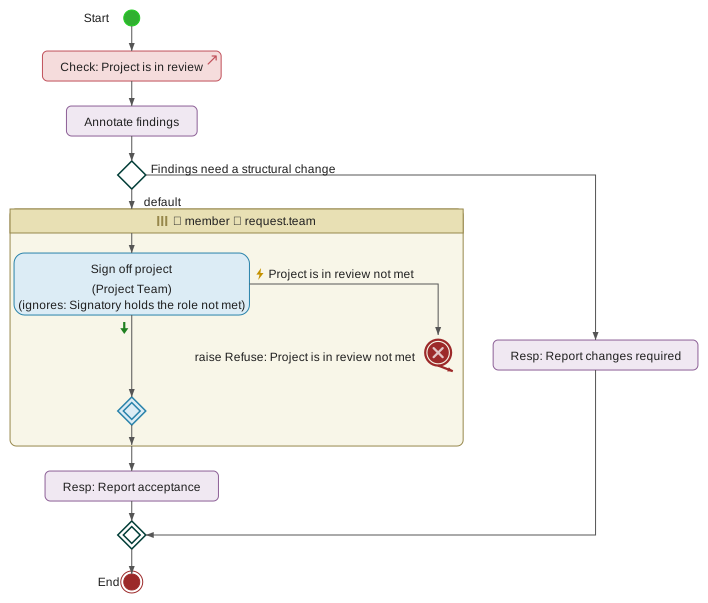
Every sign-off, rejection and forced sign-off is broadcast to every team member connected to the project’s branch so peers see the sign-off strip update live. Every sign-off event is also recorded on the per-project audit log.
6.6.1. Signing off
During In Review the lifecycle strip in the application header shows a Sign off button to every team member who has not yet signed. Clicking it opens the Sign-off dialog.
The Sign-off dialog is where a team member does the actual review. Its body is a tabbed pane with three tabs:
-
Model changes — a revision diff view of the model on the project branch against the project’s parent branch (typically
mainat the point the project was created), showing what has been added, changed, and removed by the project. Its model tree is filtered to the same diff; clicking any element in the tree opens the element details view beside it, showing the element’s old and new values. This tab is shown when the dialog opens. -
Attached checklist template — the Review Checklist panel, the same panel documented under Governance / Project checklists, so that ticking checklist items and reviewing the model can happen without leaving the dialog.
-
Annotations — the annotations of the element last selected on the Model changes tab, so the reviewer can leave notes as they work. Until an element is selected the tab says so. Annotations added here land on the model in exactly the same way as annotations added anywhere else, and are preserved through Advance and Revert.
Switching tabs loses nothing: the diff, the selected element and an annotation being written are all kept while another tab is shown.
Below the tabs, whichever one is shown, are two buttons: Sign off and Reject sign-off. The two actions are documented separately — this section covers the positive Sign off action.
Clicking Sign off:
-
Records the reviewer’s signature on the project — the OIDC username of the caller and an ISO timestamp of the click.
-
Broadcasts the updated sign-off state to every team member on the project so the lifecycle strip and the Sign-off status dialog refresh live.
-
Writes a
SignedOffevent to the per-project audit log naming the reviewer. -
Closes the Sign-off dialog.
A team member’s own Sign-off action is one-way from their side.
Once a member has clicked Sign off, the button becomes
non-actionable for them, and the underlying sign_off handler
refuses further Sign off or Reject requests from the same
user. This is deliberate: withdrawing a signature would be a
distinct audit-friendly event that the current version of the tool
does not model. If the reviewer needs to reverse their signature,
the Project Manager can Force sign-off (see Force sign-off) or
Revert the project to Development, which clears every sign-off.
Team members who are not on the project (through neither leads nor members) do not see the Sign off button — sign-off is a team-membership action.
6.6.2. Rejecting sign-off
The Sign-off dialog also carries a Reject sign-off button. Clicking it captures the reviewer’s negative verdict on the project: they have reviewed and they do not agree that the project is ready to be Approved.
A rejection records a distinct kind of sign-off entry: the
timestamp field is left empty, and a rejected_at timestamp is
set. Because the sign-off entry does not carry an effective
timestamp, it does not count as sign-off for the purposes of
either the "all team members have signed off" gate or the Approve
gate. A single rejection is sufficient to block Approve entirely
until the rejection is dealt with.
Rejection is one-way from the reviewer’s side in the same way
that positive sign-off is. Once a team member has clicked Reject
sign-off, the underlying reject_sign_off handler refuses further
requests from the same user — they cannot then change their mind
and click Sign off, nor can they clear their own rejection. The
only ways out are:
-
The Project Manager clicks Force sign-off for the rejecting user, which overrides the rejection. See Force sign-off. The rejection is preserved in the audit trail — the
rejected_attimestamp is not wiped — but the effective sign-off timestamp is populated and the user’s entry now counts. -
The Project Manager Reverts the project to Development. This clears every sign-off, positive and negative, on all team members, and the next visit to In Review starts fresh.
Rejection broadcasts to every team member on the project in the
same way that a positive sign-off does, and lands on the audit
log as a RejectedSignOff event naming the reviewer. The Sign-off
status dialog shows rejections distinctly from unsigned-yet rows,
so the Project Manager can see immediately who is blocking the
project.
Rejection is intended to be substantive. A reviewer clicking Reject is expected to have left annotations on the affected model elements explaining what needs to change, and often a project-wide annotation on the model root. The tool captures the annotations alongside the sign-off record and surfaces them in the Sign-off status dialog.
6.6.3. Forcing sign-off
Force sign-off is a Project Manager action that records a sign-off on behalf of another team member. It is the tool’s escape hatch for situations where an ordinary team member’s absence, rejection or refusal would otherwise block Approve indefinitely.
Force sign-off is initiated from the Sign-off status dialog (see Status dialog). Each team member’s row carries a small "Force" button when the acting user is a Project Manager, the target user has not effectively signed off, and the target user is not the acting user themselves — a PM cannot force-sign for themselves, by design.
When the PM clicks Force for a specific team member:
-
The tool records an effective sign-off entry for that member with the current ISO timestamp and with a
forced_byfield naming the PM who acted. -
If the target user had previously rejected (with a
rejected_attimestamp on their entry), therejected_atis preserved alongside the new effective timestamp. The audit record therefore reads "user X rejected at T1 and was forced by PM Y at T2" — the historical rejection is not erased by the override. -
The updated sign-off state broadcasts to every connected team member.
-
A
ForcedSignOffevent lands on the audit log, naming both the target user and the acting PM. -
The Sign-off status dialog marks the entry with a
✓ (F)indicator so a reviewer looking at the sign-off record can see immediately that the signature is a forced one.
The tag body written at Approve carries the same annotation. An auditor reading the approval record will see, for any team member whose signature was forced, the line "user X (forced by PM Y) at T2" — the fact of the override is on the record, not just in the audit log.
Force sign-off is a substantive action and should be used with
care. The forced_by marker on the resulting record is a
permanent audit artefact — an auditor scanning approved projects
can filter for forced signatures and can call for the underlying
reason. Common legitimate uses are:
-
A team member has left the organisation before signing off, and the delivery cannot wait.
-
A team member is unavailable (long leave, illness) and the project genuinely does not need their approval.
-
A rejection is judged by the team to be overreach or in bad faith, and the organisation’s process supports an override with documented reason.
Less legitimate uses — a PM force-signing all members' sign-offs to bypass review — leave the same audit trail; the tool does not prevent them but the trail makes the pattern visible.
6.6.4. Sign-off status dialog
The Sign-off status dialog is the Project Manager's dashboard for where the In Review sign-off process currently stands. It is opened from the lifecycle strip’s "Sign-off status" button, visible to leads whenever the project is in In Review.
The dialog lists every user on the project team — leads first, then ordinary members — with one row per user. Each row shows:
-
The user’s display name and OIDC username.
-
An indicator of the user’s current sign-off state:
-
No mark — the user has not yet acted (neither signed nor rejected). The row is called pending.
-
✓ — the user has signed off. The row is called signed.
-
✗ — the user has rejected sign-off. The row is called rejected.
-
✓ (F) — the user’s sign-off was forced by a Project Manager, with the forcing PM named. The row is called forced. A forced-signed row that was previously rejected also displays the historical ✗ marker so the audit trail of the override is legible at a glance.
-
-
The sign-off timestamp for signed and forced rows; the rejection timestamp for rejected rows.
-
An ⧗ marker on any signed row whose signature was given against an earlier revision of the branch. See the revision a signature attests to below.
-
A "Force" button on non-signed, non-forced rows, visible to Project Managers only, that triggers Force sign-off for that user. The button is hidden on the PM’s own row (a PM cannot force-sign themselves — see Force sign-off for rationale).
Below the per-user rows, the dialog also renders a review
annotations section that surfaces every annotation on the model
whose phase field is in-review — that is, every annotation
left during the current In Review pass. These are the substantive
review comments the team has produced, and grouping them into the
sign-off dashboard means the PM can see the connection between
"who signed / rejected" and "what they said" without navigating
away.
At the top of the dialog is an aggregate counter — "N of M members signed off" — that mirrors the sign-off strip in the header and gives the PM an immediate read on progress.
The revision a signature attests to.
Every sign-off records the branch revision it was given against.
This matters because main can move during a review: automatic
realignment rebases the project branch when a sibling project is
activated, and it deliberately does not clear the round (see
"Automatic realignment"). Without a record of what each person
signed, every signature would look equally current afterwards
even though some attest to a tree nobody is looking at any more.
Where a signature was given against an earlier revision, the dialog marks the row with ⧗ and states the total on a warning line beneath the table. Nothing is blocked — a stale signature still counts toward the "all members signed off" gate — but the Project Manager can see it before approving, and decide between accepting the incoming change or restarting the round (see "Delta re-review").
The same information reaches the permanent record. The approval
tag written at Approve marks each signature that was given
against a different revision, names the revision approved, and
carries a closing note counting them; the ProjectApproved audit
entry carries approved_revision and stale_signatures. An
auditor reading either can tell what each signatory actually saw
without reconstructing it from commit history.
Signatures recorded before this was introduced have no revision attached. Those are reported as not attesting to the current revision rather than being assumed current — an unknown attestation must never read as a confirmed one.
The dialog is available to project leads. Ordinary team members can see their own row’s state from the lifecycle strip; they do not need the status dialog to know whether they themselves have signed. Auditors, when they inspect a project through the audit log, see the same information without needing to open this dialog.
6.6.5. Test reports
A project whose model targets execution is run in Testing before anyone reviews it, and the run’s test report is what the review reads alongside the model (Testing). The Test reports button in the lifecycle strip opens them, in Testing, In Review and Approved.
The latest report comes first:
-
Provenance: Signed by the name of the execution environment whose trusted key signed it, or Unsigned for one no trusted key signed — a person uploaded it, or a service sent it without a registered key — so that nothing vouches for how it was produced (Trusted test report keys).
-
Submitted by: the person who uploaded it, or the service that sent it.
-
Current or Stale. A report is current while it tested the revision Testing froze,
preview/<project>/<n>, or a later commit on the branch — from Testing on only annotations can follow the freeze, so a reviewer’s comments do not make the evidence stale. A realignment freezes the branch again, and reports from before it are stale. When the server cannot read the model’s repository to tell, it says so — an error on the list, on a submission and on the transition asked for — rather than calling every report stale. -
Whether the execution environment’s readiness gate admitted the revision.
-
The totals — cases passed and failed, residue, findings — and, per contract and configuration, the cases and the coverage in its two tiers: tier 1 the elements the model states, tier 2 those derived from them. A contract outside the project’s impact set is marked regression: it must pass, and its residue and findings are not for acceptance.
-
The findings about the model, the residue with each item’s cause, and the referrals raised in the preview since the freeze.
-
The full report, as Markdown or as JSON, to download.
The same view, with the residue checklist beneath it, is the Sign-off dialog’s Test report tab, where reviewers and the approver read it beside the model’s changes (The residue checklist).
Earlier reports follow as history, each with its revision, provenance and totals. No report is ever replaced or deleted, including across a revert.
In Testing and In Review a Project Manager may also upload a report file:
the submission.json a test run writes (Submitting the report),
signed or not. The file must be for this project; the server then applies the
same checks as to a report an environment submits.
A deployment bounds what a project takes in (Section 7.4): a
submission larger than URDAD_TEST_REPORT_MAX_MB is refused, and so is one
beyond URDAD_TEST_REPORTS_PER_HOUR reports in the last hour. The upload says
which, and an execution environment’s run reports the refusal.
6.6.6. The residue checklist
Testing verifies that each realization honours its contract; what it could not cover is the residue — a partition the generator could not decide, a check that reached no verdict, a branch it cannot reach yet, and each service the integration run had to answer with a stand-in. Approving a project does not accept that residue as a side effect: every item of it is disposed of on its own, by a person, before approval (Test reports).
When a test report is accepted for a project, the tool builds the project’s Residue to accept checklist from it: one mandatory item per residue entry of the contracts the project changed, and one per substitution the integration run made. Each item shows the gap as the report states it, its cause, and the model element it concerns, as a link. The unit run’s stubs are not on it: they are how a unit run works, not a gap.
Accepting or rejecting an item
Each item needs a disposition:
-
Accept, with a rationale — why the gap is tolerable. The rationale is mandatory. A compensating measure may be added — covered by review, watched in operation by a contract check in monitoring mode, checked by exploratory testing in the preview, to be restated in a named later project — but is never required: a rationale that already explains why the gap is tolerable says enough.
-
Reject: the gap must be closed. Approval waits until it is, which means reverting to Development and changing the model.
A disposition records who gave it, when, and against which report and which
content of the element. It can be changed while the checklist is open for
signing; each change is recorded on the audit log as ResidueDisposed.
Who may dispose. Anyone on the team who has not authored a change since the project’s last approval — the separation-of-duties rule approval applies (Separation of duties on checklist signatures). A regime may name project roles that dispose of residue. Each of them then signs every item, each by a different person: the first to dispose of an item signs for one of the roles they hold, and holders of each remaining role countersign. A countersignature agrees with the disposition; to disagree, change the disposition, which replaces it and its countersignatures. Until every role has signed, the item says which it awaits and holds the gate as an item with no disposition does.
When. By default the checklist is signed in In Review, and approval is refused while any item has no disposition or one is rejected. A regime may ask for residue to be accepted before review starts: the checklist is then signed in Testing, in the Test reports dialog, and holds the gate out of Testing instead (Testing).
A disposition carries over while its element is unchanged
An item is the gap itself, not a line of one report: it is identified by the element it concerns, what it is of that element, and its cause. When a later report — after a realignment, a re-run, a rebase — contains the same item and the element’s content is unchanged, the disposition carries over, marked so. When the element has changed, it lapses, and the item needs a new disposition. What the item is of its element is stated in the model’s own terms — a field’s path, a pre-condition, a request step, an invariance — never in the report’s wording, so a newer test run that words the same gap differently, or a requested contract renamed, does not ask for it to be accepted again. Dispositions are not cleared when a review round ends; only a change to their element ends them.
Approval also checks that the residue checklist is the latest report’s: if the
latest report was stored but its checklist could not be built, approval is
refused (residue_checklist_stale) until the report is submitted again.
What approvers see
The Sign-off dialog’s Test report tab shows the latest report — its provenance, currency, totals and coverage by tier — and beneath it the residue checklist with every disposition: who accepted or rejected what, why, and with which compensating measure. The approval tag records each disposition, its rationale and its measure, with the rest of the checklists.
The register of accepted residue
When a project is activated, every residue item it accepted is added to its
model’s register of accepted residue: the gap, its cause, the element, who
accepted it and when, the rationale and measure, the project and the approval
tag it was recorded in. The register is history: nothing in it is changed or
removed, and the same gap accepted again by a later project is an entry of its
own. Registering is recorded on the audit log as ResidueRegistered.
A later project sees it. When a later project’s test report contains the same gap, its residue item shows the earlier acceptance — the project, the rationale, the measure — and whether the element is unchanged since. It still needs its own disposition: an earlier project’s judgement informs this one’s, and does not stand in for it.
Auditors read it whole under Model → Accepted residue: one place to see what was knowingly left uncovered, and why. Because it gathers the rationales of every project of the model, and projects are visible to their own teams, the register is open to auditors, administrators and the model’s managers (Manage on the model) only. A project’s reviewers still see, on each item of their own checklist, the earlier acceptance of that same gap.
What a regime may ask more
An auditor sets, on a regulatory regime (Section 6.4.1.2):
-
that residue is accepted in Testing, before review starts;
-
the project roles that dispose of residue, each by a different person;
-
causes that may not be accepted: an item of such a cause can only be rejected. A safety regime might forbid accepting any tool-limitation shortfall;
-
that test runs require MC/DC: each condition of every compound pre-condition and guard shown to decide it on its own (Unit test runs). Its pairs are then required items, a dead condition a finding, and a pair not found residue on this checklist.
A project under several regimes is held to the strictest: Testing if any asks for it, MC/DC if any requires it, every forbidden cause, and every signer role any of them names: each role signs, each by a different person.
6.6.7. Clearing sign-offs
Sign-off records are per-visit to In Review, not per-project. Every time the project’s phase advances or reverts, the server clears the sign-off record so that the next visit to In Review begins with no accumulated state from previous visits.
The clearing happens in four situations:
Advance out of In Review. When Approve moves the project from In Review to Approved, the sign-offs are captured on the approval tag body but the running record on the project is cleared. A project that is later reopened does not carry the approval-time sign-offs back into the next In Review pass.
Reopen from Approved. Reopening an approved project returns it to Development and discards the approval along with every sign-off, so the next In Review pass is collected from scratch. See Reopening an approved project.
Revert from In Review. When the Project Manager Reverts the project from In Review to Development, every sign-off — positive, negative and forced — is discarded. The next visit to In Review starts with every team member’s row in the pending state. This is the primary rationale for the clearing: reviewers signed the previous state of the model; after edits in Development the previous signatures no longer meaningfully attest to what the model has become.
Advance in earlier phases. Every Advance transition on the project — Initiation → Planning, Planning → Development, Development → In Review — also passes through the sign-off-clear step. In the earlier phases the sign-off record is normally empty already, so the clear is a no-op; but the code path is unconditional, so a project that somehow ended up with sign-off entries outside In Review would have them tidied up on the next Advance.
Every transition that clears the sign-offs also clears every signature on the project’s attached checklists, through the same step, so a checklist signature never outlives the review round it was given in. The checklists themselves stay attached. Auto-attach of checklist templates on the Development → In Review transition attaches what is missing and leaves an already-attached checklist as it is.
Annotations left on model elements during a previous In Review pass are not cleared. Annotations are a persistent record of the review discussion; they survive Advance and Revert alike, and are part of the model’s git history at every phase.
6.7. Rebasing and Conflict Resolution
Every project branch is cut from the tip of main at the moment
the project is created. From then on the project’s work proceeds in
isolation on its own branch — but main itself keeps moving, as
other projects on the same model are activated and their work
lands. If a project runs long enough that main has advanced since
the project began, the project’s branch is said to have gone
stale: it no longer reflects the current state of the model, and
merging it back into main at Activate time has to reconcile the
project’s work with what another team has since delivered.
The tool’s answer to this is a three-way merge over the model itself. Given the project’s model, `main’s model, and the model as it stood at the merge base — the most recent commit the two branches share — it combines the two sides element by element, matched on URDAD id, and field by field within each element. Changes made on only one side are carried through automatically. Changes made to the same thing on both sides are reported rather than resolved, because deciding whose intention survives is a modelling judgement the tool has no basis to make.
There are three places that merge runs:
-
Automatically, whenever
mainmoves. Every project branch on the model that has drifted is rebased onto the newmainby the server, with nobody clicking anything. This is the normal path, and it means a branch is usually already current by the time anyone looks at it. See "Automatic realignment". -
At Activate, which is the step that moves the project’s work into
main. A clean merge lands; a conflicting one refuses the activation without writing anything. See "Merging at Activate". -
On a manual Rebase to main, which a Project Manager can trigger at any point in the lifecycle. Now largely a fallback — for retrying after a conflict has been reconciled, or for deliberately resetting an In Review round. See "Rebasing manually".
A rebase additionally rewrites the branch’s git history: the merged model is written as a single new commit whose parent is `main’s HEAD, and every prior commit unique to the project branch is discarded. The project’s authorship history is preserved in the audit log and the change-authors log; only the git-level ancestry of the branch is compressed.
Beyond the mechanics of the rebase itself, the tool wraps three protective checks around the rebase machinery so that the risk of a signed-off project turning out to be unmergeable is caught early rather than at Activate:
-
Phase-gate freshness block. Attempting to advance Development → In Review or approve In Review → Approved on a stale branch is refused; the Project Manager must rebase (or intentionally defer) before the transition proceeds. Reviewers are then reviewing the project as it would actually land, not against a stale base. See "Phase-gate blocks" below.
-
Semantic viability check. Even when the branch is git-fresh, the tool cross-checks whether this project and
mainhave independently modified the same URDAD element since the merge base, and whether the project’s own model has any id references that no longer resolve. Either category also blocks the phase transition and requires reconciliation in the model, not just a rebase. See "Semantic conflicts". -
Nightly drift probe. Between transitions, a background job watches every active project branch and raises an alert the first time it detects drift. See "Nightly drift probe".
When an Approved project is rebased, its sign-off state is not immediately invalidated. The tool computes the delta between the approved snapshot and the post-rebase state and asks the PM to either affirm the delta on top of the existing approval or trigger a full re-review. See "Delta re-review".
Three things a rebase always does:
-
Flushes every pending patch on both the project branch and its parent branch before computing the merge, so the merge reads the actual latest state of both.
-
Refuses outright rather than writing a partial result, if the merge cannot be completed. The branch is left untouched.
-
Broadcasts the new project state — a fresh
model_stateand aproject_rebasedevent — to every user connected to the project’s branch, so their local view refreshes without a manual reload.
The rest of this section covers the fresh-vs-stale concept, the manual rebase path, automatic realignment and the merge at Activate in detail, the phase-reset rule that applies when a project is manually rebased while it is in In Review, the phase-gate blocks that enforce freshness and semantic viability up front, the semantic conflict check itself, the nightly drift probe, and the delta re-review flow.
6.7.1. Fresh and stale projects
The tool tracks a two-state summary of every project’s alignment with its parent branch:
Fresh.
The project’s merge base — the most recent commit that appears
in both the project branch’s history and the parent branch’s
history — is the same commit as the current HEAD of the parent.
In other words, main has not moved since the project was created
or since it was last rebased. A Rebase to main action from a Fresh
project would produce no visible change: with nothing on `main’s
side to merge, the three-way merge yields the project’s model
unaltered, so the branch is rewritten to a single commit holding
the same tree it already had.
Stale. The parent branch has advanced past the project’s merge base. Along with the Stale marker the tool captures three specific values:
-
Commits behind — how many commits are reachable from the parent branch’s HEAD but were not reachable from the project’s merge base. This is the "how far behind" number a Project Manager can look at to gauge urgency.
-
Main HEAD — the current commit hash of
main, i.e. the commit the project would rebase onto. -
Merge base — the commit at which the project last aligned with
main. Together with the count, this lets an auditor or PM see exactly which range ofmaincommits has landed while the project has been in flight.
The state is derived from the git repository each time it is queried; there is no cached state that can go out of date.
A project may be stale in any phase, but the tool’s response to staleness depends on the transition being attempted:
-
In Initiating, Planning and Development, staleness is informational — no transition is refused on the basis of the branch being behind
main. -
At Development → In Review and In Review → Approved, staleness is a hard block: the tool refuses the transition and offers Rebase now. Reviewers signing off must be signing off on what would actually land. See "Phase-gate blocks".
-
In Approved and Active, staleness is what gives Activate’s three-way merge something to reconcile (see "Merging at Activate"). If the branch has drifted since the sign-off, a rebase will also trigger the delta re-review flow (see "Delta re-review").
Stale does not mean broken. Staleness only becomes an obstacle where the two sides have changed the same element; where they have worked on different parts of the model, however far apart the branches have drifted, the merge combines them without asking.
In practice a project is now rarely stale for long. Automatic
realignment rebases every drifted branch within seconds of main
moving (see "Automatic realignment"), so a branch found Stale some
time after an activation is usually one whose realignment was
blocked by a conflict and is waiting on a human.
A Fresh branch, by contrast, cannot conflict at all: there is
nothing on main since the merge base for the project’s work to
disagree with.
6.7.2. Rebasing manually
The Rebase to main action is available to Project Managers from the Model Actions dropdown, on any project the PM manages that has not been archived.
Most of the time it is not needed. The tool realigns every drifted
project branch by itself whenever main moves (see "Automatic
realignment"), so a branch is normally already current. The manual
action remains for the cases automatic realignment does not cover:
picking up a change on main that landed some other way, retrying
after a conflict has been reconciled, or deliberately resetting an
In Review round — which, unlike an automatic realignment, this
action does (see "Phase reset when rebasing In Review").
A rebase merges `main’s content into the project. The tool computes a three-way merge between the project’s model, `main’s model, and the model as it stood at the merge base — the most recent commit the two branches have in common. Anything changed on only one side is carried into the result:
-
An element
mainchanged and the project did not keeps `main’s version. -
An element the project changed and
maindid not keeps the project’s version. -
An element added on either side is present afterwards.
-
An element removed on one side and untouched on the other is gone afterwards.
Elements are matched on their URDAD id rather than on position, so
reordering a collection on one side does not disturb the other.
The merge also works field by field within an element: if main
changed a service contract's description while the project renamed
it, the rebased model carries both changes.
Where the two sides changed the same thing, the rebase is refused. Nothing is written — the project branch is left exactly where it was — and the tool lists what it could not combine:
-
Changed on both sides. The same field of the same element was given a different value on each side. The row names the field and shows both candidate values.
-
Deleted on one side, changed on the other. One side removed an element the other side was still working on. The tool will neither discard the change nor resurrect the element on its own.
-
Reference broken by the merge. Each side is internally consistent but the combination is not — most often because
maindeleted a data type that this project’s new field points at.
Resolving these is a modelling decision, not a mechanical one: carry what the project needs across in its own model, then rebase again. See "Semantic conflicts" for how to approach the reconciliation.
Both entry points to the action describe what it will do before running it:
-
From the Model Actions dropdown, choosing Rebase to main opens a confirmation dialog; the rebase runs only when it is confirmed.
-
On the phase-gate block dialog, the Rebase now button — offered only for a staleness block — carries the same description.
Triggering Rebase to main:
-
The server refuses the request if the acting user is not a Project Manager on the target project, or if the project has been archived.
-
Any pending patches on the project branch and its parent branch are flushed to git, so the merge reads the current live model state on both branches. This is important — the tool runs an auto-commit debouncer for model changes, and without the flush the merge would read a stale intra-debounce snapshot. It matters on the parent side too: an unflushed change on
mainwould be invisible to the merge and would be lost by it. -
The three-way merge is computed from the two branch HEADs and their merge base. If it cannot be completed, the refusal described above is reported and nothing further happens.
-
The merged model is written into a new commit whose parent is the current HEAD of
main. -
The project branch reference is force-moved to that new commit. Every prior commit unique to the project branch is discarded from git-level history; a
Rebase project '<name>' onto maincommit message identifies the resulting commit as a rebase point. -
The tool broadcasts:
-
A
model_stateevent to every user on the project branch, carrying the rebased model, the new version and the new commit hash, so their local view reloads. -
A
project_rebasedevent with the new commit hash for UI affordances that care specifically about "the project just moved". -
A
phase_revertedevent if the phase reset described under Phase reset on rebase applied.
-
-
A user notification lands on every team member’s per-user channel — "Project '...' has been rebased onto main" — so co-editors who were not in the sign-off dialog at the time still see it happen.
The rebase preserves the content of both sides but discards the
project branch’s git-level history. Authorship of individual
patches is not lost — the per-project audit log and the
change-authors log both persist across the rebase — but the
git-level ancestry of the project branch after the rebase is a
single commit atop main.
If the pre-rebase flush fails on either branch, the tool logs a
warning and continues using whatever state was available. The
rebase itself may still fail for infrastructure reasons (main
cannot be located, or the writer identity cannot be constructed);
if it does, the tool emits an explicit error with the underlying
reason and the project branch is left unchanged.
6.7.3. Automatic realignment
When a project is activated its work lands on main, and at that moment every
other project branch on the same model is one commit behind. Rather than leave
each team to discover that at their next phase gate, the tool realigns them all
itself: as soon as main moves, every project branch that has drifted is
rebased onto it, server-side, with no one clicking anything.
This is only safe because a rebase merges `main’s content into the project rather than writing over it — see what the merge combines. Under the tool’s earlier semantics, automatic realignment would have made silent data loss the default.
What qualifies. Every project of that model whose branch still exists and has actually drifted. Concretely, a project is skipped when it is archived, when its branch is already gone (it has been activated and torn down), or when it is already Fresh. That last check is what keeps a pass proportional to the drift rather than to the number of projects: a model with twenty projects of which two have drifted does two merges, not twenty.
Phase is not a filter. A project is realigned in Initiating, Planning, Development, In Review and Approved alike. What differs is what the realignment does beyond moving the branch — see below.
What triggers it.
-
An activation. The project being activated is the one that moved
main, so its siblings are queued for realignment as the activation completes. -
An unarchive. An archived branch is the case furthest behind, so it is realigned as it comes back.
Realignment is always queued, never performed inline. The Project Manager who clicked Activate does not wait for other teams' branches to rebase, and — the important half — another project’s unreconciled conflict can never fail their activation. Several activations on one model in quick succession collapse into a single pass rather than one each.
What happens per phase.
In Initiating, Planning and Development the realignment simply moves the branch; there is no sign-off state to consider and the model is either read-only or fully editable, whichever it already was.
In In Review the round is not reset. This is the one place where an
automatic realignment behaves differently from a manual Rebase to main, which
does clear the round (see "Phase reset when rebasing In Review"). The reasoning
is practical: main moving changes the branch on essentially every activation,
so resetting the round each time would mean that on a busy model a review could
never close — collect three of five sign-offs, a sibling activates, back to
zero. Instead the sign-offs stand and the Project Manager is shown what came in,
with two choices: accept it and let the round continue against the branch as it
now stands, or restart the round so reviewers sign again from scratch. See
"Delta re-review".
Keeping the sign-offs has a cost, and the tool does not hide it: a signature given before the realignment attests to a tree that has since changed. Each sign-off therefore records the revision it was given against, so a signature that predates the realignment is marked as such in the sign-off status dialog and in the approval record rather than reading as current. See "the revision a signature attests to" under Sign-off.
In Approved the existing delta flow applies unchanged: the approval is not withdrawn, and the PM is asked to affirm the delta or send the project back for a full re-review.
When the merge conflicts. Nothing is written. The branch ref is left exactly where it was, the project stays Stale, and the team is told — a notification, an audit entry, and the same conflict dialog a manual rebase raises, listing what could not be combined. The project has to be reconciled by hand; the tool does not retry.
Two consequences follow from failure being local:
-
The activation or unarchive that triggered the pass is unaffected. A project archived long enough to be badly out of date can still always be unarchived.
-
A blocked branch keeps being reported by the nightly drift probe. Since drift is now normally corrected within seconds of
mainmoving, a probe alert means something stronger than it used to: automatic realignment tried and could not fix this one. See "Nightly drift probe".
What connected users see. A realigned branch reloads in place, with a notification naming the cause, so a model changing under someone who did not ask for it is never unexplained. The reload is only sent to branches somebody is actually looking at; anyone offline picks up the realigned model when they next check the branch out.
6.7.4. Merging at Activate
Activating a project is the merge — it is the step that moves
the project’s work into main and tears the project branch down.
Because main may have moved while the project was in flight, the
merge is the same three-way merge the manual Rebase action uses:
the project’s model, `main’s model, and the model as it stood at
the merge base are combined element by element and field by field.
See what the merge combines under
"Rebasing manually" for exactly what that combination does.
The sequence:
-
Pending patches are flushed to git on both the project branch and
main, so the merge reads the live state of each. The parent-side flush is not merely defensive — the merge diffs against `main’s git HEAD, so a change sitting unflushed there would be invisible to it. -
The three-way merge is computed.
-
If it is clean, a pre-merge tag is written on
mainas a rollback marker, the merged model is committed as the new HEAD ofmain, the project record is deleted, the project branch is removed, and everyone onmainreceives a freshmodel_state. AProjectActivatedentry lands on the audit log. -
If it conflicts, the activation is refused. Nothing is written — no tag, no commit, no phase change — and the Project Manager sees the list of what could not be combined, in the same block dialog the phase gates use. See "Phase-gate blocks".
Two consequences of this design worth stating plainly.
Work on main is no longer overwritten. Where two projects on
one model are activated in sequence, the second activation now
carries the first one’s changes forward rather than replacing
them. This was previously the tool’s most serious silent failure:
committing on top of a branch always succeeds in git, so an
activation against a moved main could not fail, and the
overwrite was reported nowhere.
A conflicting Activate leaves the project Approved. The approval is not withdrawn and no sign-off is discarded — the refusal is a statement about the merge, not about the review. However, the model is read-only in the Approved phase (see "Project lifecycle"), so the Project Manager cannot reconcile the conflict from where they are standing. The path forward, which the block dialog names, is:
-
Reopen the project from the lifecycle strip. It returns to Development, and the approval and sign-offs are discarded — the tool confirms before doing so. See Reopening an approved project.
-
Reconcile each listed element on the project branch. The block dialog shows `main’s value beside the project’s for every conflict, so the reconciliation is a matter of making the two sides agree: adopt `main’s value, or delete or restore the element to match. An element the two sides agree on is no longer a conflict and merges cleanly.
-
Take the project through In Review and Approve again, then Activate.
Reconciliation always happens on the project branch. main is
protected and cannot be edited directly, so "resolving in favour
of the project" means re-applying the project’s intent on top of
what main now holds — not editing main to match.
The effective-date gate is unchanged and is checked before any of
this: if today is before the project’s effective_date, Activate
is refused with "activation date has not yet been reached",
regardless of whether the merge would have succeeded.
If the commit to main fails after a clean merge, the cause is an
infrastructure fault — a missing reference, an unconstructible
writer identity, a refused object write. The tool removes the
pre-merge tag, reports the underlying reason, and leaves the
project Approved. It does not demote the project to Development:
discarding a completed review round because a repository write
failed would punish the team for a fault that has nothing to do
with their work.
6.7.5. Phase reset when rebasing In Review
There is one situation in which a rebase does more than reshape the content and git history of the project branch: when a Project Manager triggers Rebase to main on a project currently in the In Review phase, the rebase resets the phase back to Development and clears every sign-off and every checklist signature collected during the current In Review pass.
|
Important
|
This applies to the manual action only. An automatic
realignment of a project in In Review deliberately leaves the
round intact — resetting it every time |
The rationale is straightforward: the sign-offs collected during In Review are signatures on a specific snapshot of the model. Rebasing rewrites the branch to a new snapshot with a different tree. Even if the model content is textually similar to what reviewers had signed, the signatures no longer meaningfully attest to what the branch has become — reviewers agreed with a past state, not the current one.
The reset is comprehensive:
-
The
current_phaseon the project moves fromin-reviewback todevelopment. -
Every sign-off record on the project is discarded — positive, negative and forced alike. The next visit to In Review starts with every team member’s row in the pending state.
-
A
phase_revertedevent is broadcast to every user connected to the project’s branch, so the lifecycle strip in their header updates immediately from "In Review" to "Development". -
Every signature on the project’s attached checklists is cleared with the sign-offs, and the updated checklists are broadcast. The checklists themselves stay attached, so the next round signs the same items again.
The reset applies to a manual rebase triggered by the Project Manager during In Review only. A project rebased in Approved does not have its sign-off state wiped by the phase-reset rule. Instead, the tool computes the delta between the approved snapshot and the post-rebase state and asks the Project Manager to either affirm the delta on top of the existing approval or trigger a full re-review — the latter reopens the project into Development, from where it advances to In Review with member sign-offs collected again. See "Delta re-review".
Nothing else resets a project’s phase automatically. In
particular, a refused Activate — whether because the merge
conflicts or because the commit to main failed — leaves the
project Approved and its sign-offs intact; see "Merging at
Activate". Reopening into Development in order to reconcile a
conflict is a decision the Project Manager takes explicitly.
In earlier phases — Initiation, Planning and Development — a rebase does not touch the phase at all. There is no sign-off state to clear in those phases, and the model is either read-only or already in the fully-editable Development state, so the phase is what it needs to be to continue working.
Team members who signed off during the discarded In Review pass do
not receive a specific "your sign-off was cleared" notification.
The phase_reverted broadcast is the signal that everyone needs
to know their sign-off state is now empty — the sign-off strip in
their header will show them their row as pending again, and any
Sign-off status dialog they open will show the same. Annotations
left during the discarded pass are preserved and remain on the
model.
6.7.6. Phase-gate blocks
Two phase transitions are protected by a pre-flight check that can refuse the transition rather than let it proceed against a questionable base: Development → In Review (the Advance button) and In Review → Approved (the Approve button). Both gates run the same two checks in the same order, and both use the same block dialog on the client side. The earlier Advances run the first check only — see "Which transitions check what" below.
The same dialog also carries a third kind of refusal that does not come from a phase gate at all: a merge conflict reported by Activate or by a Rebase to main. That case is described under "Merge conflicts" at the end of this section.
Check 1: freshness.
The tool computes the merge base between the project branch and
main. If the merge base is the current HEAD of main, the
branch is Fresh and the check passes. Otherwise the branch is
Stale and the transition is refused. Refusing is a hard block —
there is no override — and the underlying reason recorded on the
audit trail (as a PhaseTransitionBlocked event) has
reason: "stale" and carries the count of commits main has
advanced by, together with the main_head and merge_base
commit hashes.
Check 2: semantic viability. Even when the branch is git-fresh, the tool cross-checks the model for conflicts git itself would never catch, and for statements the model itself makes that cannot hold. Twenty-one categories count as blockers. Where more than one applies at once, the dialog and the audit trail name a single headline reason — cause before symptom, in the order below — but every populated category is still listed in full; see "The block dialog" further down.
-
Unmet library requirement. The project declares a hard dependency — on another library, or on a minimum version of one — that its pinned associations do not satisfy. Named first when present, because it is usually the cause of any dangling references beside it: a branch that has lost a required library dangles every reference into it. See Section 4.18.6.
-
Semantic conflict. An element (a service contract, a data structure, an activity, an annotation — anything with a URDAD id) has been modified on both this project branch and on
mainsince the merge base. Such an element cannot be merged automatically, so the eventual Activate would be refused; blocking here forces the Project Manager to reconcile the divergence while the model is still editable, rather than discovering it after sign-off. -
Dangling reference. The project’s own model contains an id reference that no longer resolves — for example, a field that points to a
DataTypethat the project has since removed, or aformalizationOfthat names an annotation that no longer exists. This is an internal-integrity failure and is refused regardless of whatmainhas done. See Section 4.18.7. -
Unreadable specification. A specification body that says it is OCL and is not well-formed URDAD-OCL. Nothing downstream — not this tool, not a generator, not a reviewer — can read a constraint like this, so there is nothing for anyone to weigh up. See Section 4.18.27.
-
Unresolvable name. A name inside a constraint that does not resolve to anything the model has. The body parses, so the model is not silent — it states something about a value it does not have. See Section 4.18.28.
-
Ill-typed specification. A constraint that parses, whose every name resolves, and that still cannot hold because its types do not fit together — a date compared with a number, for example. See Section 4.18.29.
-
Broken purity. A process realizing a contract that declares itself a function does something a function cannot do. The contract and the process realizing it make contradictory claims, and two readers trust the contract’s own claim regardless — the constraint checker, and the OpenAPI generator’s
GETmapping. See Section 4.18.45. -
Specification cycle. Two or more specifications define each other in a circle, so none of them denotes anything: there is no order in which their clauses could be evaluated. See Section 4.18.30.
-
Concurrent exception. A
RaiseExceptionescaping aConcurrentFlowslane, or a parallel multi-instance request's own exception handling, without naming an exception the contract’s effective pre-conditions actually raise. Neither construct has a single point to resume from while something else may still be in flight. See Section 4.18.48. -
Unhandled exception. A request with no handler for an exception the service it asks may raise, or with a handler for one that service does not raise. The first states a process that can raise what its own contract never declared; the second, a handler that can never run. An empty handler nobody has decided about is a warning instead. See Section 4.18.49.
-
Raise outside the contract. A
RaiseException, outside concurrent work, naming an exception none of the contract’s effective pre-conditions raises — most often a handler throwing on the exception it caught. The process would refuse with an exception its contract never declared. See Section 4.18.50. -
Non-terminating loop. A
Whilewhose guard reads nothing the loop itself ever changes, so the guard can never stop holding. Unlike the unbounded loop warning beside it (see Section 4.18.19), which is the model saying nothing about a bound, this is the model asserting a loop that provably does not end. See Section 4.18.20. -
Parallel loop carrying state. A parallel for-each that carries variables or states an early exit: its lanes run at the same time, so there is no order to fold over and nothing left to stop. See Section 4.18.22.
-
Provider selector that does not read a service reference. A request’s provider selector can be followed, and arrives at a value that cannot denote a provider of the contract requested. A selector that cannot be followed at all is a warning instead. See Section 4.18.24.
-
Message correlation error. A wait for a message states half a correlation, reads a key that cannot be one, or reads it at a different path from the other waits for the same message. See Section 4.18.26.3.
-
Unkeyed send. A send to a party of a message whose waits are correlated does not give the message its key, so no instance can be told the message is theirs. See Section 4.18.26.5.
-
Specialization error. A contract specializing another declares a pre-condition of its own, waives one its base does not impose, or does not declare itself a function when its base is one. A waiver an ancestor already made is a warning instead. See Section 4.18.17 and Section 4.18.18.
-
Identifying field that does not hold. An entity view marks two fields Identifies, or marks one that is neither a plain attribute nor a structure it composes. See Section 4.18.10.
-
Process structure error. Concurrent flows with no unconditional flow, a join waiting for more flows than can arrive, an allocation naming another contract’s requirement, an exception or message handler naming nothing to handle, an Undo step in concurrent work, or a monitor naming no trigger. See Section 4.18.56 and Monitored activities.
-
Unaddressed requirement. A pre- or post-condition the realised contract imposes that nothing in the process claims to meet — no allocated step, and no check pre-condition step. Blocking by policy: a model whose requirements nobody has undertaken to meet is not one to sign off. A requirement addressed by two steps is a warning instead. See requirements addressed by nothing.
-
Decision error. A decision that cannot be asked, or that answers something its contract does not promise: it realizes no function, an output fills no field of the response, a rule has the wrong number of cells, and so on. Under UNIQUE, two rules applying to the same request is one too. A gap in a table is a warning instead. See Section 4.8.4.
Every one of the twenty-one records a PhaseTransitionBlocked audit
entry. reason names the headline cause — one of
library_requirements, semantic_conflicts, dangling_refs,
semantic_and_dangling, unparseable_specifications,
unresolvable_names, ill_typed_specifications,
impure_function_orchestration, specification_cycles,
concurrent_exceptions, exception_handling, raises_outside_contract,
non_terminating_loops,
parallel_loop_state, mistyped_provider_selectors,
message_correlation, unkeyed_sends, specialization,
identifying_fields, process_structure, unaddressed_requirements, or
decision_errors — and
details carries every populated category’s own findings, not
only the headline one’s, so nothing a reader needs is hidden
behind whichever reason happened to be named first. See "Semantic
conflicts" for what the semantic-conflict and dangling-reference
lists look like and how to reconcile them.
If these checks cannot be run at all, because the branch’s model
cannot be loaded or read, or because it cannot be compared with
main, the transition is refused, never passed unchecked. The
PhaseTransitionBlocked entry’s reason is then
verification_unavailable, and its details carry the cause as
verification_error. The same holds for Approve: a project is
only ever approved after its model has been verified.
Check 3: outstanding warnings. The Advance gate additionally refuses to move while a verification warning has not been acknowledged.
A warning is not a defect — it is the model leaving something unsaid, such as a while loop that states no maximum number of iterations (see Section 4.18.19). Nothing about it can be "repaired", so this block behaves unlike every other one on this page: it is cleared not by changing the model but by writing down why the model is acceptable as it stands.
Which warnings it asks about depends on the project’s verification level, fixed in Planning on its governance profile: a project whose processes will run on the execution environment is asked about every warning, and any other only about the functional ones — it is not asked how each request’s payload is built. See Section 4.18.2 and Section 6.4.1.3. Errors are never filtered by level.
The dialog lists each outstanding warning with the element it concerns, its path, what the warning says, and a box for your reason. The Record reasons and advance button stays disabled until every warning has one; a blank or whitespace-only reason is refused by the server as well, because a discharge with nothing written in it records that somebody clicked rather than that somebody decided.
Advancing then writes a VerificationWarningsDischarged entry to
the audit log carrying each warning and the reason given for it,
attributed to whoever advanced the phase. That entry is the whole
point of the exercise: without it, waiving a warning would leave no
trace at all, and the only evidence of the judgement would be the
absence of a block.
Two consequences worth knowing:
-
The reasons are not stored against the model. They belong to the transition, not to the element, so a warning that is still outstanding at the next transition is asked about again — and correctly so, since the model, the phase and the person may all have changed.
-
The button appears only when warnings are the last thing standing in the way. While a dangling reference, a semantic conflict, or any of the other blocking categories under Check 2 is also listed, fix that first: retrying would be refused for that reason, and the refusal would read as though your reasons had been rejected.
The Approve gate runs no equivalent check, and does not need to: In Review is reached through Advance, which has already required every warning to be discharged, and the model is read-only outside Development, so no new one can appear in between.
The block dialog.
When the server refuses a transition the client opens a modal
dialog on the acting user’s screen. It opens with a message
identifying the headline reason — staleness, or whichever of the
Check 2 categories came first — and for staleness includes the
number of commits main has moved. Every populated category from
Check 2 is rendered in the dialog, each under its own heading, not
only the headline one — so a report naming library_requirements
still shows every dangling reference or unresolvable name found
alongside it.
Dangling references and semantic conflicts are the two categories rendered as tables rather than as prose, and their rows are actionable. Both tables identify each element by name, its path in the model, and its type, all read from the live model where the element is present in the branch you have checked out. Clicking the name selects that element in the model tree and closes the dialog, so you can go straight to the thing that needs attention. Where an element cannot be found in the loaded model — which happens when you are not checked out on the branch the gate ran against — the row falls back to the values the server reported and is not clickable.
Beyond those three shared columns, each table adds what its category needs:
-
Dangling references name the field holding the broken reference alongside the element, as
<element>.<field>, and offer a Remove reference button that repairs the reference in place. This is the same repair described under "Unresolved references" in the Verifying a model section, including the one case that cannot be repaired automatically. Repaired rows disappear from the table as you go. -
Semantic conflicts add a Changed on column giving the change kind observed on each side (added, removed, renamed, attribute-changed), and a Show main’s version button. Expanding a row fetches
main’s model at the commit the gate ran against and shows that element as it stands on `main, so you can see what you would be overwriting without leaving the dialog or checking out another branch. If the element was deleted onmain, the row says so.
The other nine Check 2 categories — an unmet library requirement, and the eight the model decides entirely on its own (unreadable specification, unresolvable name, ill-typed specification, broken purity, specification cycle, concurrent exception, non-terminating loop, parallel loop carrying state) — are listed as plain findings rather than actionable tables: each names the affected element, or for a library requirement the unmet dependency itself, and states what is wrong with it, in the same terms as the corresponding section linked above. None of them offers a repair from inside this dialog — the model has to be corrected directly, or the dependency resolved under Library and model dependencies — so close the dialog, make the change, and request the transition again.
The dialog then offers:
-
A Cancel button that dismisses it. The transition remains refused; nothing has been changed on the server.
-
A Rebase now button, present only when the block reason is
stale, describing what rebasing will do (see "Rebasing manually"). Clicking it runs the standard manual-rebase path. No Rebase now button is offered for any Check 2 category or a merge conflict — rebasing resolves none of those, and on a semantic conflict it would simply come back refused with the same divergence.
Repairing dangling references from the dialog changes your local model; it does not retry the transition. Once the table is empty, close the dialog and request the transition again — the gate re-runs against the branch’s committed state.
That last point is why a repair has to be saved, not merely made. Rows leave the table as soon as your own model shows the reference gone, but the gate re-reads the branch, so a repair that never reached the server leaves the next attempt blocked on exactly the same references. If a write is refused — a read-only branch, a locked phase, an archived project, or a domain your permissions do not cover — the dialog says so on a warning line of its own:
⚠ Your last change was not saved: Branch 'main' is read-only
Where that line appears, retrying the transition is pointless until the underlying reason is dealt with. "Repairs that did not reach the server", under Verifying a model, covers each cause and its remedy.
Which transitions check what. A gate asks only for what the phase being left lets you fix. The model can be edited in Development alone, so:
| Transition | Freshness (Check 1) | The model’s content (Check 2, warnings) |
|---|---|---|
Initiation → Planning |
Yes |
No |
Planning → Development |
Yes |
No |
Development → In Review |
Yes |
Yes |
In Review → Approved |
Yes |
Yes |
Checking the model on the way into Development would refuse the one transition that leads to where its findings are fixed. A project reverted to Planning with an ill-typed constraint, or with execution-mapping warnings it has not yet discharged, could never leave it. Nothing is lost by not asking: every finding, and every warning at the project’s level, is asked about on leaving Development, before review and sign-off.
Freshness is different, because a stale branch is repaired by a rebase, and a rebase is possible in every phase.
Neither check runs on the phase revert path — reverting a phase is always the right move.
Merge conflicts.
Activate and Rebase to main both run a three-way merge, and both
refuse when it cannot be completed. The refusal reuses this same
dialog, with reason recorded as merge_conflicts on the audit
trail. Nothing was written on the server in either case — no
commit, no tag, no phase change.
Above the table the dialog gives the shape of the merge: how many elements would have been combined automatically, and how many need attention. A large first number against a small second one usually means the two projects were working in different areas and only brushed against each other.
The table names each element, its path and its type — with the name a link into the model tree where the element is present in the branch you have checked out — plus three columns specific to merging:
-
Conflict — which of the four situations this is: changed on both sides, deleted on
mainand changed here, changed onmainand deleted here, or a reference broken by the merge. -
Field — for a value disagreement, the field that disagrees; for a broken reference, the field holding it.
-
On main / In this project — the two candidate values. These come from the server, which held both trees at merge time, so unlike a semantic conflict there is nothing further to fetch.
Where the refusal came from Activate, the dialog adds a line noting that the model is read-only in the current phase and that the project must be reverted to Development before the conflict can be reconciled. That is a consequence of the lifecycle, not of the merge: Development is the only phase in which the model can be edited (see "Project lifecycle"). The approval itself is not withdrawn by the refusal — reverting the phase is a decision the Project Manager takes deliberately.
6.7.7. Semantic conflicts
Because the project branch’s model.json is rewritten as a single
new commit atop main, git itself will never report a text-level
merge conflict on a project branch. Conflicts are detected at the
level of the model instead: two projects working in parallel on
the same underlying business model can modify the same URDAD
element in incompatible ways, and it takes a URDAD-aware check to
notice.
The check described here runs at the phase gates, ahead of
review and approval. It answers "would this project be mergeable
if we tried?" — deliberately early, so a divergence surfaces
before reviewers sign off rather than at Activate. The merge
itself (see "Merging at Activate" and "Rebasing manually")
performs its own, finer-grained reconciliation at the moment it
runs; the two are complementary, and a project that passes this
gate can still hit a merge conflict later if main moves again in
the meantime.
The semantic viability check runs at both phase-transition gates (Development → In Review and In Review → Approved) — see "Phase-gate blocks" — and answers two questions.
Has an element been modified on both sides of the merge base?
The tool computes the merge base between the project branch and
main, then diffs the model.json at the base against both the
project’s model.json and `main’s. Any element id that appears
with a change (Added, Removed, Renamed, or AttributeChanged) in
both diffs is a semantic conflict.
What counts as a change to an element is its own content: its name, its attributes, and values it holds that are not elements of their own — a condition’s formal specification, a guard. An edited OCL body is therefore a change to its condition. Its child elements are not part of it: a changed field is a change to the field, not to its data structure, and adding, removing or reordering children changes only the children. So two branches that each add a field to one data structure do not conflict.
Typical patterns include:
-
Both branches renamed the same service contract to different names.
-
Both branches edited the formal specification of the same pre-condition.
-
This project modified an attribute of a data structure that
mainhas since removed. -
Both branches renamed a field of the same data structure to different names.
Worked example. Consider a shared Insurer model on main that
contains a service contract named IssuePolicy on the
Policies responsibility domain, with a pre-condition
Insured party identified and a request data structure holding a field
insuredParty of type Person.
Two projects branch from the same commit:
-
Project Motor Cover Launch renames the service contract to
IssueMotorPolicy, adds a fieldvehicleof typeVehicleto the request data structure, changesinsuredParty’s type to `IdentifiedPerson, and rewrites the pre-condition’s formal specification to require an identity number. -
Project Group Schemes renames
insuredPartytoprincipalInsured, changes its type toLegalPerson, and rewrites the same pre-condition to accept a registration number instead.
While Motor Cover Launch is still in Development, Group
Schemes completes review and its changes are merged to main.
When Motor Cover Launch now attempts the Development → In
Review transition, the semantic viability check computes the
merge base (the shared branch point), diffs each side against it,
and reports two conflicts:
-
PreConditionInsured party identified — AttributeChanged on both sides: each rewrote its formal specification. -
FieldinsuredParty— AttributeChanged on this branch (its type), Renamed onmain(toprincipalInsured, and retyped).
The contract’s rename and the new vehicle field are not conflicts: main
did not change the contract itself, and a field added on one side changes no
other element.
Both are hard blockers. The Project Manager needs to decide, per
element, whose intention survives — perhaps the motor project
adopts the principalInsured: LegalPerson shape from main, writes one
pre-condition accepting either number, and keeps its own rename to
IssueMotorPolicy on top — and reflect
that decision in the project model before re-attempting the
transition. The tool will not attempt to guess.
Each semantic conflict is reported with the element’s name, its
path in the model, its URDAD type, and the change kind observed on
each side. On the block dialog the name is a link that selects the
element in the model tree, and each row can be expanded to show
that element as it currently stands on main — the tool fetches
`main’s model at the commit the check ran against, so you can see
precisely what your version would overwrite without checking out
another branch. See "Phase-gate blocks" for the dialog itself.
Reconciliation is a modelling decision, not a mechanical one — the Project Manager needs to decide whose change wins, or merge the two intentions into a new one, and adjust the project model accordingly before re-attempting the transition. The tool offers no "take theirs" or "keep mine" action, and deliberately does not offer Rebase now on a semantic conflict. A rebase does merge `main’s content in — but merging is precisely what cannot be done automatically when both sides have changed the same element, so the rebase would come back refused with the same divergence.
Does the project’s own model contain any unresolved id references?
Every URDAD element that references another (a Field naming a
DataType, a RequestService naming its target service contract,
a PreCondition naming the contract it is addressed using, a
formalizationOf naming annotations, and so on) holds an id
that must resolve to an element still in the model. The dangling
reference walker enumerates every such reference in the project’s
model.json and reports any whose target id no longer exists.
Dangling references are usually the trailing edge of a deletion
— an element was removed but a reference to it survived.
Every id-valued field in the model is checked. At the time of
writing that is dataType, dataStructure, service,
serviceContract, base, entityRef, toAddress,
addressedBy, exception and recipient for single-valued
references, and formalizationOf, requiredBy and
provisionalStakeholders for collections. The
list is not maintained by hand: the model itself declares which of
its fields hold references, and a test asserts that the check
covers all of them, so a reference field added to the model in
future cannot quietly escape the gate.
Each dangling reference is reported with the source element, the field holding the reference, and the target id that failed to resolve. Fixing means either restoring the target element or removing the stray reference — and the block dialog can do the latter for you in place. See "Phase-gate blocks".
The same unresolved-reference check is available on demand from the model node’s context menu, so you can find and clear these before requesting a transition rather than discovering them in a refusal. See "Verifying a model" in the Modeling section.
Both categories are hard blockers per the tool’s design and both
appear together on the block dialog when both are present. The
audit trail carries a PhaseTransitionBlocked entry whose
reason is semantic_conflicts, dangling_refs, or
semantic_and_dangling as appropriate, with the full per-element
lists in details, so an auditor can reconstruct what was in play
at the time of the block even after the model has been changed.
6.7.8. Nightly drift probe
The phase-gate blocks catch staleness the moment someone tries
to advance or approve. Between those events a project can sit
Fresh for weeks, then drift Stale when a sibling project’s Activate
lands new commits on main. The tool runs a scheduled freshness
probe in the background so that drift is surfaced while the team
is off-shift, not the next time someone happens to click Advance.
|
Note
|
Since automatic realignment landed, drift is normally corrected
within seconds of |
What the probe does.
On each pass the probe walks every non-Approved, non-Active,
non-archived project in every model. For each such project it
computes the freshness of the project branch against main — the
same computation the phase-gate blocks use. If the project has
transitioned from Fresh to Stale since the previous pass, the
probe:
-
Writes a
ProjectDriftedFromMainentry to the project’s audit log, attributed to the literal actorsystem:freshness-probe. Details carry the count of commitsmainhas advanced by together with themain_headandmerge_basecommit hashes. -
Broadcasts a
project_drift_detectedsocket event into the project’s<model>:<branch>room. Any user currently connected to that room sees the alert live.
Deduplication is by state transition, not by pass: once a project has been reported as Stale, subsequent probe passes on that same project stay quiet until the project becomes Fresh again (typically via a Rebase to main). The dedupe state is in-memory and does not survive a server restart — after a restart the first post-restart pass re-establishes the baseline, and any project that was Stale before the restart and remains Stale will emit one alert on that first pass. That is a deliberate reminder, not a bug.
Projects in Approved or Active phase are excluded from the probe. For Active projects there is no branch left to be stale against. For Approved ones, drift is handled on the rebase event rather than on a schedule: automatic realignment rebases them like any other branch, and the delta re-review flow (see "Delta re-review") asks the Project Manager what to do about the result.
Note this exclusion applies to the probe only, not to automatic realignment, which covers every non-archived project in every phase.
Interval.
The probe interval is configured via the
URDAD_FRESHNESS_PROBE_SECS environment variable, in seconds.
The default is 86 400 (24 hours) — an actual nightly cadence.
Setting the variable to 0 disables the probe entirely; any
positive value overrides the default. The first pass runs
immediately when the server starts, so a freshly-booted server
picks up any pre-existing drift without waiting a full interval.
Where drift alerts surface. For an online user the event is delivered as a socket-level notification to the model’s UI, which can render an in-app hint against the project. For an offline user the alert is not delivered live; the record in the audit log is the durable record that the drift was detected and when, and any user with audit-log access (see "Who can view the audit log") can review it after the fact.
6.7.9. Delta re-review
An Approved project is by definition frozen against the snapshot
its reviewers signed off on. That snapshot is preserved as an
annotated git tag on the project branch —
approved/<project>_<YYYY-MM-DD> — and the sign-off record is
embedded in the tag body. Between Approve and Activate, however,
the Project Manager can still rebase it to pick up changes that
have landed on main (see "Rebasing manually"). Rebasing rewrites
the branch tree — it now merges `main’s content in — and the new
tree may not match what reviewers signed.
The tool does not automatically invalidate the sign-off when this happens. Instead it computes the delta — the per-element diff between the approved snapshot and the post-rebase state — and offers the Project Manager two paths:
-
Approve delta, keeping the existing approval in force and extending it to cover the delta. Appropriate for small, clearly-benign changes: a couple of extra annotations, a cosmetic rename, a stakeholder added on top of an already-signed contract.
-
Trigger full re-review, unwinding the approval. This reopens the project into Development — the phase in which the model is writable — from where it advances to In Review and member sign-offs are collected again. Appropriate whenever the change is substantive enough that reviewers should look at it again. See Reopening an approved project.
The choice is a governance decision, deliberately left to the Project Manager rather than automated by a size threshold.
The same flow applies during In Review. Automatic realignment deliberately does not clear a review round (see "Automatic realignment"), so a round can end up being collected against a branch that has moved since it started. Rather than silently letting reviewers sign something other than what they opened, the tool raises the same delta prompt one phase earlier. The wording differs because the actions mean different things:
-
In Approved, affirming extends an approval that already exists, and the alternative unwinds it back into In Review.
-
In In Review, affirming only re-baselines the round against the branch as it now stands — the sign-offs already collected are kept — and the alternative restarts the round from scratch.
Separation of duties is enforced on the Approved path but not on
the In Review one. The delta being affirmed there consists of
changes realignment pulled in from main, which by definition came
from other projects' activations — the project’s own model is
frozen while it is In Review — so a Project Manager affirming it is
never affirming their own work on this project.
How pending deltas are detected.
After every successful rebase of a project branch — manual or
automatic — the tool diffs the branch’s new model.json against the
snapshot the people responsible for it last agreed to, and writes a
DeltaApprovalRequested audit entry if the diff is non-empty. The
entry carries the baseline tag, the baseline commit hash, the
post-rebase commit hash, the phase, and the full per-element
changes list.
Which snapshot serves as the baseline depends on the phase:
-
Approved — the project’s most recent
approved/…tag. -
In Review — the review baseline, a movable
review-baseline/<project>tag marking the commit the current round is being collected against. It is written when the project enters In Review, moved when a Project Manager accepts a delta, and removed when the round ends.
Earlier phases have no baseline: nothing has been agreed yet, so there is nothing a delta could be measured against. No delta event fires there, nor when the post-rebase model happens to be identical to the baseline.
The pending-delta dialog. The client auto-fetches the pending delta for the current project the first time it observes the project in the Approved phase (deduplicated by project id and approval timestamp so successive edits do not re-fire the fetch). If a delta is pending, a dialog opens with:
-
A one-line summary of how many elements changed.
-
A per-element list of the changes (up to twenty, with a "… and N more" tail for larger deltas), each showing the change kind, the element type, and the element name. An element counts as changed as it does for a semantic conflict: an edited formal specification is a change to its condition, and a changed child is listed as itself, not as a change to its parent.
-
Three buttons: Later (dismiss the dialog; the delta remains pending and the dialog will re-open the next time the auto-fetch runs), Trigger full re-review (reopen into Development as described above), and Approve delta (fast-path affirmation).
What Approve delta does.
Approving a delta writes a new annotated tag on the branch —
approved/<project>_<iso-timestamp> — pointing at the branch’s
current HEAD. The tag body captures who approved the delta, when,
the prior approval tag, and a summary of the changes approved.
The project record’s approved_at timestamp is bumped and the
delta-approver’s signature is appended to the approved_by
list; the phase stays Approved and the original effective date
is unchanged. A DeltaApproved audit entry records the fact,
and a delta_approved broadcast plus a pending_delta: null
broadcast go out to every user in the project’s room so their UI
updates.
Who may approve a delta. The Project Manager or a user holding the Approver role — the same gate as the original Approve action, because a delta approval is that approval extended over changes made since. It carries the same separation-of-duties rule: the approver may not be an author of any change since the last approval, full or delta. Any team member may view the pending delta by fetching it, and the dialog opens for anyone in the project’s room, but only those two may approve; anyone else is refused by the server. Trigger full re-review is a phase revert and therefore lead-only, so an Approver judging a delta too substantial for the fast path should ask the Project Manager to reopen the project rather than clicking it. A full re-review reverts the phase to In Review, clears member sign-offs, and routes back through the standard sign-off flow.
Interaction with the In Review reset rule. The phase-reset-on-rebase rule (see "Phase reset when rebasing In Review") applies to In Review projects only; it fires when a rebase happens while the project is in the In Review phase and wipes the current In Review pass’s sign-offs. Approved projects never hit that reset — the delta flow is the softer alternative, and it is only through Trigger full re-review that an Approved project returns to In Review to re-collect sign-offs.
6.8. Audit log
The per-project audit log is an append-only stream of every governance-relevant event on a project. Its purpose is to give reviewers, auditors and administrators a reconstructable record of who did what and when, without having to piece the picture together from git commits, chat messages and file timestamps after the fact.
Every event on the log carries five fields:
-
An ID that increases monotonically as events are appended, so the log has a natural ordering even if two events have the same timestamp.
-
The project ID the event belongs to. Every log query is scoped to one project.
-
An ISO timestamp of when the event was recorded.
-
The actor — the user whose action caused the event, recorded as an opaque identifier rather than a name (see Section 5.8). The interface resolves it to the person’s display name when the log is viewed. An event the system caused on its own account names it as
system:<name>instead: the automatic realignment, the freshness probe, or a service the deployment has registered (seeURDAD_SERVICE_CLIENTSin Section 7.4.3). Actor is empty in auth-disabled dev mode. -
The event type (one of a fixed set — see Captured events) and an event-shaped details JSON blob that varies by type.
The log is written server-side by every handler that changes governance-relevant state — phase transitions, sign-offs, approvals, activations, role changes, governance-profile edits, checklist signatures and template attachments. Each such handler makes a single call to a shared audit helper, which writes the row on a blocking task off the async runtime.
The write is fire-and-forget. If the audit-log DB write fails for any reason, the tool logs a warning and continues; it does not roll back the user action that the audit event was meant to accompany. This is a deliberate choice: rolling back a user mutation because the audit trail wobbled would be a worse UX than a silently-missing row. On a healthy system the log is complete; on a wobble it may be one row short and the warning in the server log identifies which one.
Nothing on the log is ever updated or deleted by the tool. The log is strictly append-only: once written, a row lives for the lifetime of the projects database, and no supported tool operation edits it after the fact.
In particular, deleting rows is not how an erasure request is satisfied — doing so would damage the very record the log exists to provide. Because the actor is stored as an opaque identifier, erasing a user elsewhere de-identifies their entries here automatically while leaving them complete and in sequence. See Section 5.8.
6.8.1. Captured events
The audit log captures forty-one distinct event types. Each
corresponds one-for-one to a specific action (either a user action
or a specific background-task decision) having taken place. All but
three are emitted at exactly one place in the server code; the
exceptions say which place in their details: UserErased has two —
an administrator’s erasure and the identity directory’s —
ConfluencePublished two — a branch and one element’s page — and
PreviewConsentWithdrawn three — a withdrawal, an archive and an
activation.
Twenty-two of them record a governance action on a project, and are
keyed on the project they happened to. ModelExported,
ModelSnapshotRead, ArtefactGenerated, ConfluencePublished,
ConfluenceUnpublished and ModelImported record content crossing
the deployment’s boundary — out as a file, as a generated artefact,
to a service or to a Confluence space, or in as a file — and are keyed
on the model, because a model’s main branch
and an element library can be read or imported and neither belongs to
a project. UserErased
records an erasure, which concerns the instance rather than any
project or model, and so is keyed on neither: it is read in the
instance audit log, with the ten events of the identity directory,
from DirectoryAccessRevoked to UsernameReused. The last, AuditLogExported, records the
log’s own disclosure, and is keyed on whichever of the three the
exported log belonged to. "Viewing the log"
and "Who can view the log" below describe where each is read.
PhaseAdvanced.
The Project Manager clicked Advance and the transition succeeded.
Details include the from and to phases. Entering Testing adds
preview_consent: implied — the consent to a preview Testing grants, recorded
here rather than as an event of its own — and the frozen_revision, the
preview/<project>/<n> tag and its commit (Testing).
PhaseReverted.
The Project Manager clicked Revert — or, from Approved,
Reopen — and the transition succeeded. Details include the
from and to phases, plus voids_approval and, when that is
true, the voided_effective_date the discarded approval carried.
Reopening does not remove the approval tag already in the git
history; see Reopening an approved project.
Reverting out of Testing adds ends_implied_consent: true.
TestingRevisionFrozen.
While the project was in Testing, a realignment onto main moved its branch,
and the new head was frozen as the next revision to test. Details name the
tag, its commit and the cause, realigned. A test report on an earlier
revision no longer counts from this entry on.
TestReportSubmitted.
A test report was accepted for the project, from an execution environment or
uploaded by a Project Manager (Test reports). Details name the
report’s seq, the commit it tested, its provenance — signed with the
trusted key’s id and name, or unsigned (uploaded in entries written
before the rename) — the readiness verdict and the
totals. The actor of a submission from an execution environment is
system:<client id>.
TestReportKeyAdded and TestReportKeyRemoved.
An administrator trusted, or stopped trusting, a key to sign test reports
(Trusted test report keys). Details name the key_id and name. These concern the
instance rather than a project, so they are in the instance’s log, not a
project’s.
SignedOff.
A team member clicked Sign off in the Sign-off dialog. Details
are empty — the actor is the signer, and the timestamp is when.
RejectedSignOff.
A team member clicked Reject sign-off in the Sign-off dialog.
Details are empty.
ForcedSignOff.
A Project Manager overrode a team member’s absent or negative
sign-off through the Sign-off status dialog. Details name the
subject — the target user whose sign-off was forced — while the
actor is the PM who acted.
ProjectApproved.
The Project Manager clicked Approve and every precondition
passed. Details name the effective_date and the tag — the git
tag name written to the branch to record the approval.
ProjectActivated.
The Project Manager clicked Activate and the merge into main
succeeded. Details name merged_into: main.
ProjectRolesUpdated.
A user with manage on the model saved changes through the Manage
project members dialog. Details include the full leads,
members and roles state after the save, so an auditor can
reconstruct the team roster at any point in the project’s history
without needing to consult the projects-database row directly.
GovernanceProfileUpdated.
The Project Manager edited the governance profile during Planning.
Details include the full updated profile — regulated flag,
classifications, stakeholders and target activation date — so
successive edits produce a diffable stream on the log.
PreviewConsentGiven.
A project lead, or a holder of manage on the owning domain, let the
execution environment read the project’s branch, so a preview
environment can run it before approval (Section 6.5). Details
name the branch and the phase. Recorded because it changes who can
read what: from this moment a configured preview reader, a service, may
read the project’s unapproved work.
PreviewConsentWithdrawn.
The project’s consent to a preview ended. Withdrawn by whoever may
manage the project, or ended by the project itself ending: then details
carry the cause, archived or activated, and the actor is whoever
archived or activated it. Details also name the branch and the
phase. No entry is written when a project that had not consented is
archived or activated.
ChecklistItemSigned.
A team member ticked a checklist item in the Review Checklist
panel. Details name the template_id of the checklist, the
item_id of the item that was signed, and the phase it was signed in —
In Review, or Testing for a checklist attached there.
ChecklistItemCountersigned.
A holder of a further role a checklist’s rules name agreed with an item’s
signature (Where it attaches and who may sign, The residue checklist). Details name
the template_id, the item_id, the role the countersignature counts for,
and the phase. ChecklistItemSigned and ResidueDisposed likewise name the
role a signature counts for, where the rules name any.
ResidueDisposed.
A residue item was accepted or rejected (The residue checklist). Details name
the item, the disposition, the item’s cause and its element_id, and the
phase it was disposed of in. The rationale and measure are on the checklist,
and in the approval tag, not in the log entry.
ResidueRegistered.
On activation, the project’s accepted residue was added to its model’s register
of accepted residue (The register of accepted residue). Details give the count of items,
the project and the approval_tag. The actor is whoever activated the
project.
ChecklistTemplateAttached.
A checklist template was attached to the project — either
automatically on entering Testing or In Review (for
regulated projects; reason auto:regulated_project_at_testing or
auto:regulated_project_at_in_review) or manually by the Project Manager, or detached
by the Project Manager. Details name the template_id and a
reason string that distinguishes the cases:
auto:regulated_project_at_testing, auto:regulated_project_at_in_review,
manual and manual-detach.
PhaseTransitionBlocked.
The tool refused an action because the project’s branch could not
be reconciled with main. Details always name the attempted
from_phase and to_phase together with a reason string that
distinguishes the category.
Recorded when the Project Manager clicked Advance or Approve
(In Review → Approved) and a phase gate refused. stale can be
recorded on any Advance. Every other reason below is a finding about
the model’s content, and is recorded only on an Advance out of
Development and on Approve: advancing out of Initiation or Planning
does not check the model’s content, because the model cannot be
edited in either phase (see "Phase-gate blocks"). So an Advance out
of Planning with no such row says nothing about whether the model
then had findings.
-
stale— the branch is behindmain. Details also carrycommits_behind,main_headandmerge_base. -
checklist_unsigned— mandatory checklist items hold the gate: on Approve, of any attached checklist; leaving Testing, of one attached there. Details carryitems, each with itschecklist,label,item_id,template_id, astatus(unsigned,rejected, orawaitingwith theawaitingroles) and, for a residue item, itselement_id. -
semantic_conflicts— this project andmainhave both modified the same element since the merge base. -
dangling_refs— the project’s own model references an element that no longer exists. -
semantic_and_dangling— both of the above. The semantic categories carry the fullsemantic_conflictsanddangling_refslists. -
library_requirements— the project depends on a library or model it does not satisfy: one it uses requires something the project does not have, or has at too old a revision. Details carry alibrary_requirementslist naming, for each, what requires what and at which revision. This reason takes precedence over the two above when it applies, because it is usually their cause — a project that has lost a required library reports every reference into it as dangling as well. -
unparseable_specifications— a specification body claims a language (OCL) and is not well-formed URDAD-OCL. Details carry anunparseable_specificationslist naming, for each, the element and theslotits specification sits in, the offendingbody, and — where the parser could say more — amessageand anoffsetinto the body. See Section 4.18.27. -
unresolvable_names— a name inside a constraint that does not resolve to anything the model has; the body parses, so this is distinct from the reason above. Details carry anunresolvable_nameslist naming, for each, the element, theslotandbodythe name was read from, the unresolvednameitself, and what names wereavailableinstead. See Section 4.18.28. -
ill_typed_specifications— a constraint that parses, whose every name resolves, and that still cannot hold because its types do not fit together. Details carry anill_typed_specificationslist naming, for each, the element, theslotandbody, theoffsetof the mismatch, and theexpectedandfoundtypes. See Section 4.18.29. -
impure_function_orchestration— a process realizing a contract that declares itself a function does something a function cannot do. Details carry the list under the keyimpure_orchestration— the one category whose details key does not match itsreasonstring — naming, for each, the offending activity, theprocess_idandprocess_nameit belongs to, and thereasonit is impure (for example,sendMessage). See Section 4.18.45. -
specification_cycles— two or more specifications define each other in a circle, so none of them denotes anything. Details carry aspecification_cycleslist naming, for each, the element, theslotandbody, and thecycleitself as the sequence of ids it passes through. See Section 4.18.30. -
concurrent_exceptions— aRaiseExceptionescaping aConcurrentFlowslane, or a parallel multi-instance request's own exception handling, without naming an exception the contract’s effective pre-conditions actually raise. Details carry aconcurrent_exceptionslist naming, for each, the raising element, theprocess_idandprocess_nameit belongs to, theexception_id, and thecontextit escaped. See Section 4.18.48. -
exception_handling— a request with no handler for an exception the service it asks may raise, or with a handler for one that service does not raise. Details carry anexception_handlinglist naming, for each, itsproblem(unhandled, keyed on the request, orunraised, keyed on the handler), theelementId,elementNameandpath, theprocessIdandprocessNameit belongs to, and theexceptionIdsconcerned — forunhandledthose no handler names, forunraisedthe one the handler names. An empty handler nobody has decided about is a warning, recorded with the discharges rather than here. See Section 4.18.49. -
raises_outside_contract— aRaiseException, outside concurrent work, naming an exception none of its process’s contract’s effective pre-conditions raises. Details carry araises_outside_contractlist naming, for each, the raising step’selementId,elementNameandpath, theprocessIdandprocessNameit belongs to, and theexceptionIdit names. A raise inside concurrent work is recorded underconcurrent_exceptionsinstead, never under both. See Section 4.18.50. -
non_terminating_loops— aWhilewhose guard reads nothing the loop itself ever changes, so the guard can never stop holding. Details carry anon_terminating_loopslist naming, for each, the element, itsguard, what itreads, and what the loopcarries. See Section 4.18.20. -
parallel_loop_state— a parallel for-each that carries variables or states an early exit. Details carry aparallel_loop_statelist naming, for each, itsproblem(parallelCarriesorparallelEarlyExit), the loop’selementId,elementNameandpath. See Section 4.18.22. -
mistyped_provider_selectors— a request’s provider selector that can be followed and arrives at a value that is not a service reference for the contract requested. Details carry amistyped_provider_selectorslist naming, for each, the request’selementId,elementNameandpath, itsproblem(mistyped) and theselectoras written. An unreadable selector is a warning, recorded with the discharges rather than here. See Section 4.18.24. -
message_correlation— a wait for a message whose correlation is half stated, reads a key that cannot be one, or reads it at a different path from the other waits for the same message. Details carry amessage_correlationlist naming, for each, itsproblem(incomplete,mistypedKeyorinconsistentKey), the wait’selementId,elementNameandpath, themessageKeyas written and thestructureIdwaited for. An unreadable key and an uncorrelated wait are warnings, recorded with the discharges rather than here. See Section 4.18.26.3. -
unkeyed_sends— a send to a party of a correlated message that does not give the message its key. Details carry anunkeyed_sendslist naming, for each, the send’selementId,elementNameandpath, itsproblem(unkeyed), thekeyPathit must assign and themessageIdsent. See Section 4.18.26.5. -
specialization— a contract specializing another that declares a pre-condition of its own, waives one its base does not impose, or does not declare itself a function when its base is one. Details carry aspecializationlist naming, for each, the contract’selementId,elementNameandpath, and itsproblemwith the element concerned:declaresPreConditionwith thepreConditionId,waivesUninheritedwith thewaivedId, ordropsPuritywith theoriginIdof the contract the claim comes from. A waiver an ancestor already made is a warning, recorded with the discharges rather than here. See Section 4.18.17 and Section 4.18.18. -
identifying_fields— an entity view marking two fields Identifies, or one that is neither a plain attribute nor a structure the view composes. Details carry anidentifying_fieldslist naming, for each field concerned, itselementId,elementNameandpath, thestructureIdof the view, itsproblem(identifyingField) and thereason(multipleIdentifyingFieldsorinvalidIdentifyingFieldKind). The field walk’s other findings are warnings, recorded with the discharges rather than here. See Section 4.18.10. -
process_structure— a process whose own structure cannot hold: concurrent flows with no unconditional flow, a join waiting for more flows than can arrive, an allocation naming another contract’s requirement, an exception or message handler naming nothing to handle, an Undo step in concurrent work, or a monitor naming no trigger. Details carry aprocess_structurelist naming, for each, itsproblem(stalledConcurrentFlows,unreachableSynchronization,allocationOutsideContract,handlerWithoutException,messageHandlerWithoutMessage,undoInConcurrentWorkormonitorWithoutTrigger), the element’selementId,elementNameandpath, and theprocessIdandprocessNameit belongs to. The walk’s warnings are recorded with the discharges rather than here. See Section 4.18.56. -
unaddressed_requirements— a pre- or post-condition a process’s realised contract imposes that nothing in the process claims to meet. Details carry anunaddressed_requirementslist naming, for each, the requirement (element_id,element_name), theprocess_idandprocess_namethat falls short, and the process’spath. See requirements addressed by nothing. -
decision_errors— a decision that cannot be asked, or that answers what its contract does not promise, or, under UNIQUE, two of whose rules both apply to one request. Details carry adecision_errorslist naming, for each, itsproblemandseverity, thedecisionId,decisionNameandpath, theelementIdit concerns (a rule, an input, an output or the decision), theruleIdsinvolved and, for an overlap, anexampleof the inputs both rules match. See Section 4.8.4. -
undischarged_warnings— the model leaves something unsaid that nobody has yet given a reason for, such as a while loop with no maximum number of iterations. Details carry thelevelthe project is verified at (functionalorexecutable, from its governance profile — see Section 4.18.2) and awarningslist naming, for each, itscode, its ownlevel, theelement_idandelement_nameit concerns, and thepathat which it was found. Only warnings at or below the project’s level are listed. Recorded on Advance out of Development only; seeVerificationWarningsDischargedbelow for the entry written when the transition then succeeds. -
verification_unavailable— the model’s checks could not be run at all (its branch would not load or read, or could not be compared with main), so the transition was refused rather than passed unverified. Details carry the cause asverification_error. Recorded on Advance and Approve.
Also recorded when Activate or Rebase to main refused because the three-way merge could not be completed:
-
merge_conflicts— details carryparent_branch,main_head, amerge_previewgiving the counts of automatically-combined and conflicting elements, and amerge_conflictslist. Each entry names the element, itskind(attribute_conflict,delete_modify,modify_deleteordangling_after_merge), thefieldin question, and both candidate values. For a blocked Activate,to_phaseisactive; for a blocked rebase,from_phaseandto_phaseare both the project’s current phase, since a rebase does not move it.
In every case nothing was written: the refusal precedes any commit, tag or phase change. See "Phase-gate blocks", "Semantic conflicts" and "Merging at Activate" under Rebasing and Conflict Resolution.
VerificationWarningsDischarged.
A phase was advanced over one or more verification warnings, with
a written reason given for each. Recorded immediately before the
advance, so a transition that then fails for another cause still
leaves the judgement on record.
Details name the from_phase and to_phase, the verification
level the project was held to (functional or executable — see
Section 4.18.2), and carry a discharged list. Each entry
gives the warning’s code, its own level, the element_id and
element_name it concerns, and the note the acting user typed.
The actor is whoever advanced the phase.
The level says which bar was applied. A project verified at the
functional level is not asked about warnings that only execution
needs, so the absence of such a warning from the discharged list
of a functional project means it was not asked about, not that it
was absent from the model. Entries written before the level existed
carry no level field; they were asked about every warning the gate
then knew.
Written only when advancing out of Development. An Advance out of Initiation or Planning asks about no warning at all, so the absence of this entry there means nothing was asked, not that nothing was outstanding; every outstanding warning is asked about on leaving Development, before review.
This is the only record that a warning was waived. A warning does
not block a transition by itself — it is the model being silent
rather than wrong — so without this entry the transition would
simply have succeeded and the decision would be evidenced only by
the absence of a PhaseTransitionBlocked row. Notes are stored
verbatim as the user typed them.
The reasons are not retained against the model, only against this transition: a warning still outstanding at a later transition is asked about again and produces a second entry. See "Phase-gate blocks" under Rebasing and Conflict Resolution.
ProjectApproved carries, besides the effective date and approval
tag, the approved_revision — the branch commit that was approved —
and stale_signatures, a count of how many of the member signatures
counted toward the approval were given against an earlier revision
of the branch. Zero is the ordinary case. A non-zero value means
main moved during the review and the round was continued rather
than restarted; see "the revision a signature attests to" under
Sign-off. The same detail appears per-signature in the approval tag
body, so it survives loss of the database.
ProjectAutoRebased.
The automatic realignment worker rebased this project’s branch onto
its parent after main moved. The actor is the literal string
system:auto-realign — this event is never attributable to a
human. Details carry parent_branch, the resulting commit_hash,
and the phase the project was in at the time. See "Automatic
realignment" under Rebasing and Conflict Resolution.
ProjectAutoRebaseBlocked.
Automatic realignment could not complete, so the branch was left
untouched. Actor is again system:auto-realign. Two shapes,
distinguished by reason:
-
Absent
reason— the three-way merge conflicted. Details carry the samemerge_conflictslist andmerge_previewcounts as aPhaseTransitionBlockedentry with reasonmerge_conflicts. -
reason: "error"— an infrastructure fault, with the underlyingmessage. Recorded rather than merely logged, so a branch that quietly stopped realigning has a record of why.
Neither shape affects the activation or unarchive that triggered the pass.
ProjectDriftedFromMain.
The background nightly drift probe observed that a project
that had been Fresh on the previous pass is now Stale — main
has advanced since the project’s merge base. The actor is the
literal string system:freshness-probe (this event is never
attributable to a human). Details carry commits_behind,
main_head and merge_base. Fired at most once per
Fresh → Stale transition — successive probes on an already-Stale
project stay quiet until it becomes Fresh again (typically via a
rebase). See "Nightly drift probe".
DeltaApprovalRequested.
A project’s branch was rebased and the tool observed that the
post-rebase model differs from the snapshot the people responsible
for it last agreed to. Details name the phase, the
baseline_tag and baseline_commit_hash the comparison was made
against, the post-rebase current_commit_hash, the total
change_count, and the full per-element changes list. This is
the event the delta re-review UI reads to decide whether to show
its pending-delta banner.
The baseline depends on the phase: an approved/… tag for an
Approved project, the movable review-baseline/<project> tag for
one in In Review. Earlier phases have no baseline and never emit
this event. See "Delta re-review".
DeltaApproved.
The Project Manager affirmed a pending delta. Details always name
the phase and the change_count that was accepted, plus:
-
In Approved — the
prior_approval_tag, thenew_approval_tagthe tool wrote at the branch’s post-rebase HEAD, and theapproved_commit_hash/current_commit_hashthat were reconciled. -
In In Review — the
baseline_commit_hashandcurrent_commit_hash. No approval tag is written, because there is no approval yet; the review baseline is simply moved forward and the round continues with its existing sign-offs.
See "Delta re-review".
DeltaRequiresFullReview.
Reserved for a future distinct handler; not currently emitted.
The equivalent action today — Trigger full re-review — is
recorded as a normal PhaseReverted event carrying
voids_approval: true, which reopens the project into
Development, followed by the standard Advance and In Review
sign-off flow.
DependenciesChanged.
The set of element libraries or models this model depends on was
changed. Details carry the full resolved set — what each entry is
pinned to, whether it was asked for directly, and what requires it.
Recorded because a dependency grants read of the revision it pins:
everyone who can see this model can then read the depended-on one
at that commit, which makes it a change to who can see what. See
"Dependencies" under Security.
ModelExported.
A user downloaded a model or element library as a file. Details
name the branch, the ref that was asked for, the commit it
resolved to, the kind (model or library) and the size in
bytes.
This is one of four events that record a read rather than a change
— ModelSnapshotRead, ArtefactGenerated and AuditLogExported are
the others.
It is kept because an export is the point at which model content
leaves the deployment as a durable file that nothing here can
follow afterwards — who holds it, and for how long, stops being
answerable from the tool. It is not evidence of a privilege
being exceeded: an export discloses no more than opening the model
does, which is why it needs only read access. See "Exporting a
model" under Modeling.
An export taken on a project branch is keyed on both the project
and the model, so it appears in that project’s audit log as well.
One taken on main, on a tagged revision, or on an element
library is keyed on the model alone.
ModelSnapshotRead.
A model’s content at one revision was read through the server’s
snapshot interface. The reader is normally a service: the execution
environment fetching a revision of main to run, or a delivery
pipeline checking an implementation against the model (Section 9.1). Its actor is then system:<client id>
(see "Who can view the log"). Details name the commit, its status
— published (on main) or provisional (a project’s work in
progress) — the project it was read through, if any, the number of
element libraries whose content was delivered with it, the size in
bytes, and pipeline: where the reader said it was reading from, a
pipeline’s job address for instance. The reader states that last one
and nothing checks it, so it is a lead to follow, not evidence.
It is recorded for `ModelExported’s reason: the content leaves the deployment and is kept by something this tool cannot follow. A published revision belongs to no project, so its entry is keyed on the model alone. A provisional revision can be read only through its project’s branch, under that project’s rules — its team, and never once archived — or by a preview reader, for a project that consents to a preview (Section 5.6) — so its entry is keyed on the project as well and appears in the project’s own log beside its sign-offs and its consent. Checking which revision a branch is at is not recorded: it reveals no model content, and a service asks it every few seconds.
ArtefactGenerated.
Someone generated an artefact from a model — an interface
description, workflow code, documentation or a BPMN export (see
"Exporting to Camunda 8" under Modeling for one of them). Details name the generator,
the target element, the format, the branch, whether the content
came from the requester’s unsaved edits rather than the saved branch
(fromSnapshot), and the size in bytes.
It is recorded for `ModelExported’s reason: an artefact is the model’s content in another form, and it leaves the deployment as a file. Generating needs read access to the branch, exactly as opening it does, whichever of the two sources the content comes from. One generated on a project branch is keyed on both the project and the model, as an export is.
ConfluencePublished.
Someone published a branch to Confluence, or refreshed one element’s
page there (see Section 9.2). Details name the
branch, the scope (branch or element), the commit the pages
were generated from and the space they went to; a branch publish
adds how many element pages it wrote, how many it deleted and how
many it locked, an element publish the elementId.
It is recorded for ModelExported’s reason, and with more cause: the
content goes not to the person who asked but to everyone the
Confluence space admits, under the organisation’s Confluence account.
The `space is therefore the detail to read it for — it says who
could read what was published. Unlike an export, a publish is a
privilege being exercised: it needs more than read access — whoever
may manage the project, or Manage on the model for a branch outside
any project (Section 9.2.6). One on a project
branch is keyed on both the project and the model.
ConfluenceUnpublished.
Someone deleted a branch’s pages from Confluence. Details name the
branch, the space, and whether there was anything to delete
(deleted). It needs the same authority as publishing.
ModelImported.
A model or element library was created from an imported file.
Details name the kind it was created as, what the source called
it (sourceName), the revision it was taken at (sourceRef,
sourceCommit), how each dependency pin re-resolved against this
deployment (dependencies), and which of them could not be
(unsatisfied).
This entry is the imported model’s only record of where it came from. Its git history begins at the import — one commit holding everything — so nothing inside the repository can say that the content was authored elsewhere, by whom, or from which revision. An import also carries no sign-offs: those attest to revisions in the repository the file came from, which do not exist here. See "Importing a model" under Modeling.
A non-empty unsatisfied list means the importer proceeded past a
refusal, so the model was created with dependencies it cannot
resolve. That is a deliberate act and worth reading as one.
UserErased.
A person’s user-directory entry was deleted — an erasure, see
Section 5.8. Details carry erased_id, the erased person’s
identifier, and by: admin when an administrator erased them
through Manage users, whose identifier is then the actor, or
directory when the identity directory erased them on its schedule
(Section 5.8.4.2), with the actor system:directory. Entries
written before the identity directory may say idp-reconciliation,
with the actor system:idp-reconcile: the former Keycloak
reconciliation.
The entry never names the person. Naming them would put back into the log the very link the erasure removed. The identifier is safe to keep because, with the directory entry gone, nothing maps it to anyone any more. What it tells a reader is that every entry attributed to that identifier stopped being attributable at this moment, and by whose act.
The identity directory’s events.
Each names a person only by user_id, their identifier, and only if
they have ever signed in; the feed’s own acts have the actor
system:directory, an administrator’s their identifier
(Section 7.5.4).
-
DirectoryAccessRevoked— the feed deactivated (departure: deactivated) or deleted (deleted) the person, or an administrator confirmed a held change naming them. Their tokens are refused from here and their open sessions were closed. -
DirectoryAccessRestored— the person has access again: the feed reactivated them, or an administrator rejected the held change that had taken it. -
DirectoryErasureScheduled— the person’s erasure is due aterase_at;departuresays why. The erasure itself isUserErased. -
DirectoryErasureCancelled— the feed reactivated the person before their erasure. -
DirectoryChangeHeld— a burst of departures was held:hold_id, and thereasonan administrator was shown — how many people, out of how many, against which limit (Section 7.5.4.4).extendedwhen more departures joined a hold already open. -
DirectoryChangeConfirmed— an administrator confirmedhold_id, ofdeparturespeople. -
DirectoryChangeRejected— an administrator rejectedhold_id, giving thereasonrecorded here. -
DirectoryChangeWithdrawn— everyone inhold_idcame back before anyone decided it. -
DirectoryFeedLive— an administrator ended the feed’s dry run;already_gonepeople the feed already described as gone lost access then (Section 7.5.4.3). -
UsernameReused— a sign-in was refused because its username belongs to the entryformer_id, bound to a different identifier (Section 7.5.4.5).
AiCompletionRequested.
Model content was sent to an LLM provider by an AI action
(Section 5.8.5.6). Details carry the provider and model,
prompt_bytes and response_bytes, the outcome (answered, or why
not), duration_ms, and the branch when the action named one. The
entry is recorded against the model, and the project when the branch is
one’s, or in the instance log when no model was named. It never holds
what was sent or what came back.
AuditLogExported.
A project’s, a model’s or the instance’s audit log was downloaded as
a CSV file. Details name the scope (project, model or
instance), the number of
rows the file covered, the from and to timestamps bounding
that period, and the size in bytes.
The log records its own disclosure. The entry is written after the rows have been read, so an export never contains the record of itself — the next one does, which is what lets two consecutive exports account for every disclosure between them.
It is also the one control that survives an administrator having
filesystem access. Reading the projects database directly cannot be
prevented by any permission check; taking a copy through the tool
without leaving this entry cannot be done. Unlike ModelExported,
this event is worth reading as a privilege being exercised:
exporting the log is restricted more narrowly than reading it, so
the entry names someone who held one of a small set of roles. See
"Exporting the log".
This is the complete list of event kinds recorded in the current
tool version. Model-content edits — creating a responsibility
domain, adding a service contract, tweaking a data structure — do
not produce audit-log rows. Those edits are captured in the
model’s git history and in the per-branch change-authors log,
which together give a fine-grained "who changed what" answer. The
audit log is the coarser-grained "who did which governance action
when" complement to those model-level records — plus, in
ModelExported, ModelSnapshotRead, ArtefactGenerated,
ConfluencePublished, ConfluenceUnpublished and
ModelImported, a record of content crossing the deployment’s boundary in either direction, in
UserErased and the identity directory’s events, a record of who
lost access and of each erasure, and in AuditLogExported, a
record of the log itself being disclosed.
6.8.2. Viewing the log
The audit log for the currently checked-out project is surfaced in
a dedicated Audit log tab in the model tree panel, alongside the
Model tree, Change history and Model tags tabs. The tab is only
shown when a project is checked out; on the main branch the tab
is hidden because main is not a project and has no per-project
audit log.
Clicking the tab fetches the full history of the current project from the server and renders it as a chronological list, newest first. Each row shows:
-
The event type (the exact enum name —
PhaseAdvanced,SignedOff, and so on) in bold, so the row’s meaning is legible at a glance. -
The ISO timestamp, trimmed to
YYYY-MM-DD HH:MM:SSfor compactness. -
A pretty summary of the event, appropriate to its type. Phase transitions render as "planning → development"; approvals as "Project approved — effective 2026-10-01"; checklist item signatures as "Checklist item signed: compliance-default-v1/ regulatory-scope-confirmed". The summary strings are localised where a translation exists and fall back to the underlying event keyword otherwise, so a language pack that has not yet translated a given event still shows something meaningful.
-
The actor’s display name, prefixed with the localised "By" label. The log itself stores an opaque identifier, which the server resolves to a name as the rows are sent; a user who has since been erased shows as that raw identifier —
u_9f3c1ab2…— rather than a name (see Section 5.8). Actor is hidden on rows where the actor is empty (in auth-disabled dev mode).
The panel refreshes automatically when the current project changes — checking out a different project immediately reloads the log — so an auditor navigating between projects always sees the log for whichever project they are looking at.
Rows are read-only. There is no "edit event" affordance and no "delete row" affordance. Corrections to a mistaken action are made by taking another action (which itself lands on the log) — for example, a Force sign-off cancels a rejection, and both events remain visible in the history.
The panel does not support filtering or searching. It is intended as the casual review surface — a quick answer to "what has recently happened on this project?".
For work that needs more than that, the log can be exported as a CSV file and analysed in a spreadsheet or any other tool, which is described in Section 6.8.4. Exporting is restricted to auditors, administrators and the project’s own leads, and is itself recorded in the log.
6.8.3. Who can view the log
The project audit log is accessed through the server’s
get_project_audit_log endpoint, gated on the same visibility rule
as ordinary project access. In practice that means the log is
visible to three classes of user:
Project team members.
Any user on the project’s leads or members list can open the
Audit log tab and see the full history of the project — their own
actions and everyone else’s. The intent is that the tool is
transparent to its team: no team member should ever be surprised
by their own record.
Users with manage on the model’s owning domain.
Administrators who hold manage on the model root or on the
responsibility domain the project is scoped to see the log through
the same route. This lets them investigate incidents on projects
they were not directly working on, and to run comparative reviews
across multiple projects on the same model.
Auditors — members of URDAD-Auditor.
Auditors see the audit log of every project on every model
regardless of team membership, of policy grants, and of whether the
project is currently active or archived. See the Auditor role for
the general principle: the audit function’s read view is
unconditional.
Users outside those three classes are not shown the tab and are
refused if they attempt to fetch the log directly through the wire
protocol. A user who has no policy-level visibility on a project
(via team membership, manage on its owning domain, or auditor
role) cannot inspect its audit log either.
Viewing is not exporting. Everything in this section describes who may read the log in the panel. Taking it away as a file is governed by a narrower rule — a project member who is not a lead may read the whole log but may not export it. See Section 6.8.4.
The model audit log.
Events that concern a model rather than a project — ModelExported,
ModelSnapshotRead, ArtefactGenerated, ConfluencePublished,
ConfluenceUnpublished and ModelImported — are read through a second
endpoint, get_model_audit_log, keyed on the model name. There is no
project to scope it to: a model’s main branch and an element library
can both be exported or read, and an import creates a model that has
no project at all.
That endpoint is restricted to auditors and administrators, which is deliberately stricter than reading the model itself. Anyone who can check a model out can read its content; this log is about people — who took a copy of it, who brought one in, and when — and there is no project team whose transparency principle would justify wider access.
An export, a generated artefact, a provisional snapshot read or a Confluence publish or unpublish taken on a project branch is recorded against both the project and the model, so it also appears in that project’s Audit log tab under the ordinary project rule above. An import never is: the model it creates has no project yet.
The instance audit log.
Events that concern neither a project nor a model — today, erasures
(UserErased), the identity directory’s events and exports of this log
itself — make up a third log,
the instance audit log. Like the model log it is restricted to
auditors and administrators, for the same reason: there is no team
whose transparency would justify wider access. It is taken as a file
through Export instance audit log… in the settings menu; see
Section 6.8.4.
How an actor is identified. The actor stored on every log row is an opaque, randomly assigned user identifier — never a username, name or email address. That is what makes the log survive an erasure request under GDPR Article 17 intact: the person’s directory entry can be deleted without removing or altering a single audit row, which is the whole point of a record that exists to be undamaged. See Section 5.8.
When the log is displayed, those identifiers are resolved back to display names for readability. A user who has since been erased has no name to resolve to, and their rows show the raw identifier — which is the correct reading of "this happened, and we no longer know who did it".
An external audit report should quote the stored identifier rather than the displayed name: the identifier is stable and unique, while two users' display names can collide.
An actor of the form system:<name> is not a person and never
resolves to one: it is the tool acting on its own account (the
automatic realignment, the freshness probe), or a service client the
deployment registered by its client id. An action is recorded against
a service only when the deployment has listed its client, so such a
row always names a configured, identifiable system, never an
anonymous one.
6.8.4. Exporting the log
The Export… button at the top of the Audit log tab downloads the current project’s complete history as a CSV file, for an external audit report, a regulator’s request, or the evidence pack that accompanies a project to approval.
The button appears only for users permitted to export — see below. Everyone else sees the log without it.
Who may export
Exporting is deliberately narrower than viewing. Three classes of user may take the file:
Auditors — members of URDAD-Auditor.
On every project, on every model, archived or not, exactly as they
may view.
Administrators — members of URDAD-Admin.
A project’s own leads. On their own project only. A lead of one project has no more claim on another project’s log than any other outsider.
A project member who is not a lead may read the whole log in the panel but may not export it. That is not an oversight. Viewing is justified by the tool being transparent to its team — no member should be surprised by their own record — and that argument covers a panel on a screen. It does not cover producing a file of every colleague’s timestamped actions which then leaves this deployment entirely, beyond the reach of its access controls, its retention rules and any later erasure request. Anyone who needs the file for a legitimate reason can obtain it from a lead or an auditor.
The same rule is applied by the server, so it holds regardless of which client is used.
The model audit log
Events concerning a model rather than a project — who exported a model or element library, and who imported one — are exported through Export model audit log… in the model actions menu, and are restricted to auditors and administrators, matching the access rule for viewing them described in Section 6.8.3.
The instance audit log
The instance audit log — erasures, and exports of the instance log
itself — is exported through Export instance audit log… in the
settings menu. It too is restricted to auditors and administrators;
see the instance audit log. Its file has the same columns as any
other, with project_id and model_name empty.
What the file contains
One header row, then one row per event, newest first — the same order as the panel. The columns are:
| Column | Content |
|---|---|
|
The entry’s sequence number. Monotonic, so gaps are meaningful. |
|
|
|
The stored identifier of the person who acted. See below. |
|
The exact event name, as shown in bold in the panel. |
|
The project the event concerned; empty where there was none. |
|
The model or element library; empty on entries recorded before the log gained a model dimension. |
|
The event’s payload, verbatim, as JSON. |
The actor is an identifier, not a name
The panel shows display names. The exported file does not — it
carries the opaque identifier exactly as stored, such as
u_9f3c1ab2…, and never resolves it to a person’s name.
This is deliberate, and it matters in two directions.
For the reader of the report, the identifier is the more reliable citation: it is stable and unique, whereas two people’s display names can be identical and a display name changes whenever the identity provider's does. An external audit report should quote the identifier for this reason — and now can, because the file it is built from carries nothing else.
For the people in the log, it means the file that leaves this deployment is not a directory of who works here. Resolving the identifiers requires access to the user directory, which does not travel with the export. See Section 5.8.
To attribute rows to people, resolve the identifiers against the panel — which shows both — or ask an administrator.
The export is itself recorded
Every export writes an AuditLogExported entry into the log it
exported, recording who took the file, when, how many rows it
covered, and the period between its oldest and newest entry.
The entry is written after the rows have been read, so an export never contains the record of itself. The next one does. Two consecutive exports of the same log therefore account for every disclosure between them, which is what makes the series usable as evidence rather than merely as data.
This also holds where the export gate does not. An administrator with access to the server’s filesystem can read the projects database directly and no permission check can prevent it; what they cannot do is take a copy through the tool without leaving this entry behind.
Streamed to the SIEM as well
A deployment may also stream the log, every project’s, every model’s and the instance’s, to the organisation’s SIEM as each entry is written, together with policy changes and the security events the log does not hold — sign-ins, refused sign-ins, refused administrator actions (Section 7.4.6). The export described here is unaffected: it remains the way to take a period’s log as a file, and it records itself; streaming does not.
6.8.5. The audit log and the git tag record
The audit log is not the only audit-facing artefact the tool maintains. Several parts of a project’s history are also written to annotated git tags on the model’s git branches, and these two audit surfaces are intentionally redundant: they capture overlapping information through different mechanisms, so an auditor with access to either one can reconstruct enough of the project’s history to answer the questions they need to ask.
The audit log lives in the projects database. It is:
-
Structured — rows have a fixed schema, events are typed, and details are JSON blobs shaped by event kind. Fine-grained filtering, join queries and time-series analysis are natural to perform against it.
-
Complete to the granularity of governance events — every phase transition, every sign-off, every checklist item, everything the tool considers governance-relevant.
-
Contingent on the projects database being available. A total loss of that database loses the audit log.
The git-tag record lives in the model’s git repository, alongside the model’s own commits. Depending on the phase and event, the tags a project accumulates include:
-
<projectName>_<phase>on every Advance and Revert — one tag per phase transition on the project’s branch, so the branch’s tag list traces the project’s lifecycle path. -
approved/<projectName>_<effectiveDate>on every successful Approve. The tag is annotated; its body carries the sign-off record, the approver identity, the checklist snapshot and the effective date as a self-contained audit artefact. A project approved more than once for the same effective date — which is what happens when it is reopened and approved again — takes a round suffix on the later tags,…_<effectiveDate>_r2,_r3. Each tag stays where it was written, so every approval round remains readable against the revision it attested to. See Reopening an approved project. Every person named in that body — approver, signatories, checklist signers — appears as an opaque identifier rather than a name, so an auditor reading tag bodies directly withgit tag -n99sees identifiers and must resolve them through the tool. See Section 5.8. -
archived/<reason>(or the disambiguated form) on every Archive. -
pre merging project <projectName>on every Activate, as a safe rollback marker.
The git-tag record is:
-
Unstructured — tag bodies are free-form text, and querying them programmatically requires walking the tags in a git tool.
-
Partial — only the events with associated git operations create tags; intra-review checklist signatures and sign-offs do not by themselves produce tags. The signatures are captured in the approval tag body, but the individual sign-off events during In Review are not.
-
Durable — the git repository is the model’s authoritative store; a total loss of the projects database would leave the git tags on the model’s branches intact.
The two-surface design is a deliberate defence against single-point failure of the audit record. A determined auditor cross-checking a projects-database report against the model’s git history should find that the two agree; an auditor cross-checking a projects- database report against a colleague’s recollection of the review process might find they disagree, in which case the projects database and the git tags — being tool-generated at the moment of each event — are the tie-break.
The tool does not automatically diff the two audit surfaces against each other. That is a manual audit exercise; the tool merely captures both.
6.9. Archiving and de-archiving projects
Archiving is how the tool retires a project that is not going to be Activated but is also not going to be forgotten. It is a soft-hide, not a delete: the project’s git branch, its per-branch model history, its annotations, its checklist state, its audit log and its team roster all survive intact. What archiving does is remove the project from the day-to-day project selector so that it stops appearing in the lists that Project Managers and team members work through, while leaving it fully recoverable via Unarchive should the team decide to resume the work.
Every archive event captures a reason — a short human-readable
string explaining why the project was retired — and creates a git
tag on the project’s branch preserving the reason and the moment
of archiving. The tag is named archived/<reason> (or, if a
project with the same reason has already been archived, the
project name is appended to disambiguate: archived/<reason>
(<projectName>)), so the archive event survives even a
catastrophic loss of the projects database.
Archiving is available to users who hold manage on the model at
the model-root level. This is the same policy grant that permits
project creation, and it is not tied to team membership on the
project itself: an administrator with model-level manage can
archive any project on the model, whether or not they were on its
team.
Archiving does not replace delete. Deletion is a separate, admin-only, destructive operation that removes the project’s git branch and the project row from the projects database irreversibly. Delete is documented separately; archiving is the strongly-preferred option for any project that will not be Activated but whose history should be preserved.
Typical situations in which archiving is the right choice include:
-
A project that has been superseded by a newer piece of work on the same model.
-
A project that was created for exploration and turned out not to warrant activation.
-
A project the team started before organisational priorities shifted, and that no-one is going to pick up soon.
-
A project whose scope turned out to be wrong at Planning (see the advice in Creating a project / Choosing the right level of scope): archive it and create a new one at the correct scope.
6.9.1. Archiving a project
The Archive project menu item is available on the Model Actions
dropdown to users with manage on the model at the model-root
level. It archives the currently checked-out project.
Clicking Archive project opens a small dialog that captures a
single required field: the reason for archiving. The dialog will
refuse to submit an empty reason — a stated reason for retiring a
project is mandatory — and the field is sanitised for use in a git
tag name: the tool collapses any run of characters outside
[A-Za-z0-9.-] into a single underscore and trims leading and
trailing underscores. Human-readable phrasing is fine —
_"Superseded by the Q3 refactor", "Scope wrong, restart",
"On hold pending compliance ruling" — the sanitiser turns those
into git-ref-safe forms like Superseded_by_the_Q3_refactor
without the user needing to think about it.
On submit the server does the following, in order:
-
Re-verifies that the acting user still holds
manageon the model. This check protects against the case where policies were edited between opening the dialog and submitting it. -
Refuses if the project is already archived. An archived project must be Unarchived first before it can be archived again with a different reason.
-
Creates an annotated git tag on the project’s branch. The tag is named
archived/<sanitised-reason>. If a tag by that name already exists (a common situation when several projects have been archived for the same reason over time), the project name is appended so the tag is unique:archived/<sanitised-reason> (<projectName>). The tag preserves the reason and the moment of archiving on the model’s git history irrespective of the projects-database contents. -
Sets
archived = true,archive_reason = <sanitised-reason>andarchived_at = <ISO timestamp>on the project row, and ends the project’s consent to a preview, if it had given one (Section 6.5), recordingPreviewConsentWithdrawnwith the causearchived. -
Refreshes the socket cache for every user currently connected so their in-memory project cache picks up the archived flag without a reload.
-
Broadcasts a
project_archivedevent to every user connected to the project’s branch, so their client sees the project’s status change immediately. -
Rebuilds and broadcasts the
models_updatedpayload for every user, so the archived project’s branch stops appearing in everyone’s project selector (except auditors — see Visibility). -
Notifies every team member with an in-app notification — "Project '...' has been archived" — so members who were not connected to the branch at archive time still hear about it.
The project’s branch is not deleted from the git repository. Every commit that ever landed on the branch remains reachable through git tooling, and the branch itself remains a first-class git ref. What changes is the project’s visibility to regular users, documented under Visibility below.
An archived project’s branch cannot be edited: the tool refuses model updates, phase advances, sign-offs and rebase operations on archived projects with an explicit "Project is archived — editing is locked" error. To resume work on an archived project it must be Unarchived first.
6.9.2. Unarchiving a project
Unarchive returns a previously-archived project to active status.
The action is available from the Archived projects panel (see the
next subsection) to users who hold manage on the model at the
model-root level — the same permission required to archive.
On unarchive the server does the following, in order:
-
Re-verifies the acting user still holds
manageon the model. -
Refuses if the project is not currently archived. This is a safety net for the case where two administrators try to unarchive the same project simultaneously.
-
Deletes the archive git tag. Because the archive step may have used either of two tag-name formats (base
archived/<reason>or disambiguatedarchived/<reason> (<projectName>)), the unarchive step attempts to delete both forms; whichever exists is removed and the other is a no-op. This keeps the git-tag namespace clean. -
Clears
archived,archive_reasonandarchived_aton the project row. The project’s current phase — Development, In Review, or wherever it was when it was archived — is preserved. Its consent to a preview, which archiving ended, is not restored: it is given afresh (Section 6.5). -
Broadcasts a
project_unarchivedevent to the acting user’s socket so their UI sees the status change. -
Rebuilds and broadcasts the
models_updatedpayload for every user, so the project’s branch reappears in every eligible user’s project selector. -
Notifies every team member with an in-app notification — "Project '...' has been unarchived".
Unarchive restores the project to the same state it was in when archived, aside from the archive marker itself. Its phase, sign-off records, attached checklists and checklist signatures, governance profile, and team roster all come back exactly as they were.
The most common reasons for unarchiving are:
-
The situation that prompted the archive has changed — the compliance ruling came through, priorities shifted back, the superseding work turned out to have been a false start — and the team wants to pick up the original work rather than start over.
-
The project was archived by mistake.
An unarchived project may be worked on immediately: its branch is editable again if its phase supports it, its sign-off dialog opens again if it is in In Review, its Approve and Activate buttons come back into scope subject to the usual gates.
6.9.3. The Archived projects panel
The Archived projects panel is the tool’s browsing view of every
project that has ever been archived on the currently-checked-out
model. It is opened from the Model Actions dropdown → Archived
projects, and is available to users with manage on the model at
the model-root level.
The panel lists archived projects with the following per-row information:
-
The project name as it was at the time of archiving.
-
The reason for archiving as it was captured on the archive step. The reason is shown in its sanitised form — the exact string that lives in the git tag name and on the project row.
-
The archiving date and time — the ISO timestamp captured at archive.
-
The identity of the user who archived it, drawn from the archive audit event and the committer signature on the archive git tag.
The panel is sorted newest-first by default, so a recently-archived project is easy to find.
Unarchiving is triggered from this panel — see Unarchiving a project for the exact action semantics. In brief: right-click the row of the project you want to restore and select Unarchive project. The row disappears from the panel immediately, the project reappears in the ordinary project selector, and every team member gets a notification.
The panel is not a delete tool. A project’s presence in the Archived projects panel is not a step towards deletion; it is a long-term parking place. If a project genuinely needs to be permanently removed — for example, because it was a test-scaffold project and its content should not appear in the model’s git history — that is a separate admin-only Delete project operation, covered in its own section.
Auditors — members of the URDAD-Auditor OIDC group — see the
Archived projects panel populated with the same set of rows as an
administrator does, so a full historical review remains reachable
without needing model-level manage. Auditors cannot themselves
unarchive projects; the Unarchive action is gated on manage at
the model root and is not conferred by the auditor role.
6.9.4. Visibility of archived projects
Archiving affects the day-to-day discoverability of a project, not its existence. Different classes of user see archived projects differently.
Team members and other ordinary users.
An archived project’s branch is hidden from the project selector
and from every project-listing UI. The branch remains a first-class
git ref and its content is fully preserved, but the ordinary
project pickers filter it out. A team member who was working on
the project when it was archived will see it disappear from their
selector on the next models_updated broadcast — the tool’s way
of saying "this project is no longer part of your active
workload."
The team member can still be notified about archive-related events (the archive notification itself, an unarchive later) so the disappearance is not silent.
Users with manage on the model.
An administrator with manage on the model at the model-root
level sees archived projects filtered out of the ordinary project
selector in the same way as everyone else — the point of
archiving is to keep those projects out of the working set. What
they gain is the Archived projects panel documented above, which
lets them browse the archived set explicitly.
Auditors — members of URDAD-Auditor.
The audit function needs a complete view of every project the
organisation has ever worked on, regardless of whether the project
was archived, activated or is still in flight. Auditors therefore
see archived projects in both the ordinary project selector (so
they can check the project out and inspect it) and the Archived
projects panel (so the archival intent is clear).
An auditor who checks out an archived project sees the same read-only view the model was in when it was archived, and can inspect the audit log, the annotations, the sign-off record and the attached checklists exactly as they stood at archive. The project remains uneditable for auditors as for anyone else — see the Auditor role for the general principle that auditors have no write access anywhere except the checklist template catalog.
The model’s git history.
Regardless of who is looking, the archive event is always
visible on the model’s git tags. The archived/<reason> tag
survives on the branch and can be inspected with git tag --list
or any equivalent git tooling. This means the archive-and-reason
record is durable to a total loss of the projects database — a
disaster recovery scenario in which the projects table is
restored from empty can, in principle, reconstruct the set of
archived projects and their reasons directly from the git tags on
the model’s branches.
7. Deployment
7.1. Overview
An installation consists of two containers and one volume.
-
The server holds all state: the projects database, one git repository per model, and integration configuration. Everything it owns lives under a single data directory, so the volume holding that directory is the installation.
-
The client serves the browser application and also acts as the reverse proxy in front of the server.
Only the client is published. The server is reachable solely over the internal network, through the client. That gives one origin for both the application and its API, which removes cross-origin configuration entirely and means the API is never directly exposed.
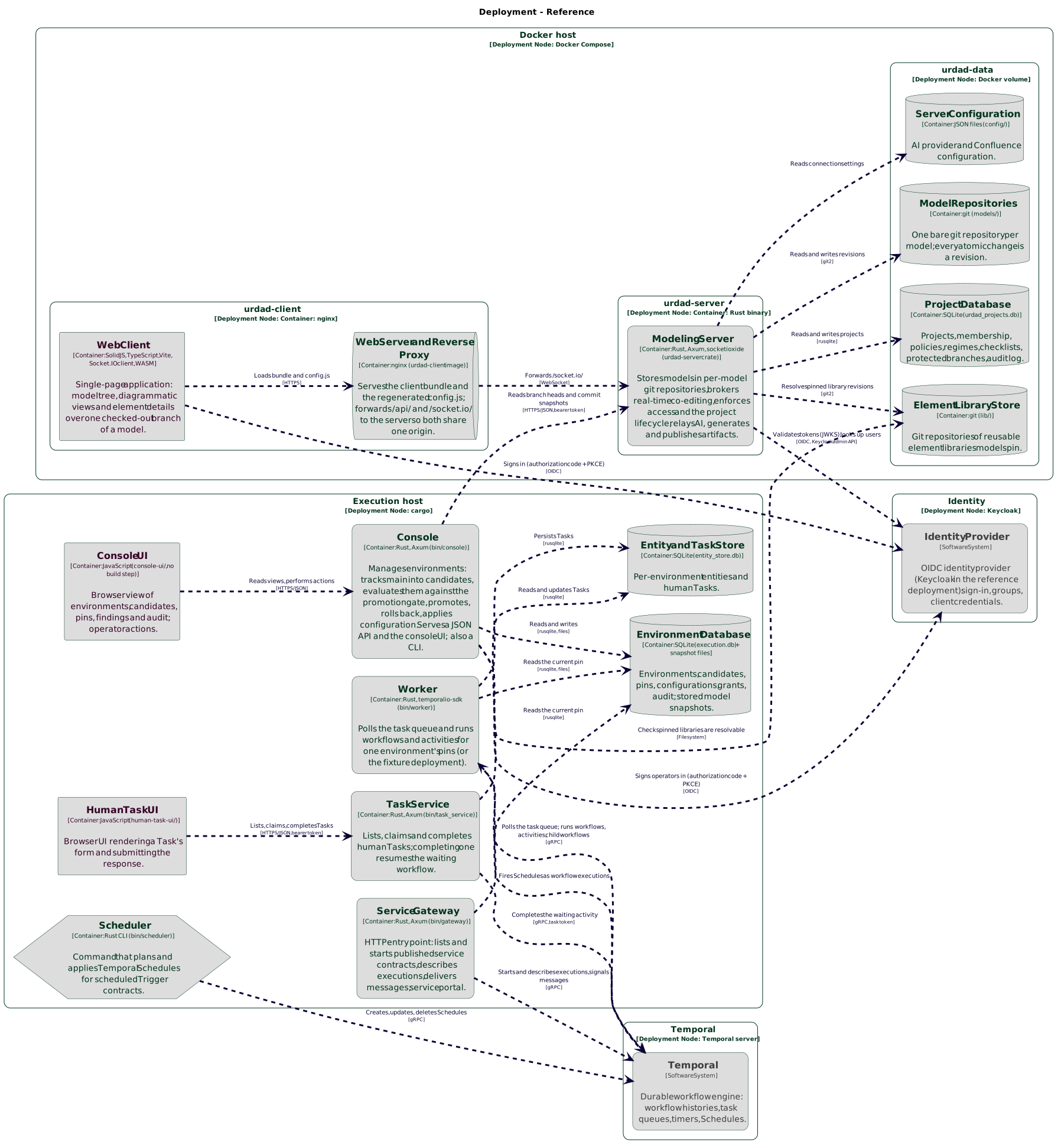
infra/deploy/docker-compose.yml defines itThe diagram also shows the optional execution environment. It is not part of the compose stack: it has no container image yet, so its programs are run directly on a host of their own, next to a Temporal server (see Chapter 8).
|
Note
|
The client image contains no customer-specific settings. The identity provider, the public URL and everything else that varies between installations are read at start-up from environment variables, so the same image is deployed everywhere. Nothing needs rebuilding to point an instance at a different identity provider. |
7.2. Deployment models
The tool is intended to run in three arrangements. They differ in who operates the instance and who is accountable for the data in it — not in the software, which is identical in all three.
7.2.1. On-premises, self-hosted
The organisation runs the instance on its own infrastructure, against its own identity provider. This is the expected arrangement for financial-services customers and the one the installation instructions describe.
The organisation is the data controller. It actions erasure requests itself, and its own backup and retention policies apply.
7.2.2. Hosted single-tenant
The instance runs on infrastructure operated on the customer’s behalf, but it is still one instance for one organisation — not a shared installation with customers partitioned inside it.
That is a deliberate architectural choice rather than a limitation. Isolation sits at the container and volume boundary, where it can be demonstrated in a security review, instead of depending on every database query being correctly scoped. It also means the hosted arrangement runs exactly the same software as the on-premises one, so the two cannot drift apart.
Here the operator is a data processor, acting on the customer’s instruction. That arrangement requires a data-processing agreement, and the hosting region determines whether personal data crosses a border — which both the GDPR and POPIA constrain. Settle both before loading real data.
7.2.3. Public playground
A shared instance for evaluation, holding no confidential material and no regulatory documents, and reset periodically.
|
Important
|
Running with authentication disabled means every permission check passes. That is acceptable on a laptop, but on any instance other people can reach it makes every visitor an administrator over everyone’s work. A public instance must have an identity provider configured. |
7.2.4. Multi-instance operation
Because a tenant is an instance rather than a partition, running several means running several stacks — each with its own volume, its own configuration and, where data residency requires it, its own region. A shared ingress routes each hostname to the appropriate stack.
7.3. Installing
Requires Docker with the Compose plugin and the Buildx plugin, which provides
BuildKit (on Arch, docker-buildx; Docker Desktop includes it). The images
build only with BuildKit. Without Buildx, Compose silently falls back to the
legacy builder, which leaves out files the images need: the build stops with
COPY failed: file not found in build context or excluded by .dockerignore.
Progress reported as Step 5/33 : … is the sign that the legacy builder is
running. docker buildx version shows whether the plugin is installed.
cd infra/deploy
cp .env.example .env
$EDITOR .env # at minimum set PUBLIC_URL and the identity provider
./up.sh # builds what the client image takes from this checkout, then docker compose up -d --buildThe client image serves this manual at PUBLIC_URL/manual/, built from the
same checkout, so up.sh also needs Asciidoctor and the asciidoctor-bibtex
gem. A plain docker compose up -d --build stops with no user manual in the
build context 'manual' until the manual has been built.
The application is then served at PUBLIC_URL (by default
http://localhost:8088).
The first start creates the data volume and initialises an empty projects database. Nothing else is required.
7.3.1. Pointing at existing model repositories
An installation that predates containerisation keeps its model repositories
wherever MODELS_BASE_PATH pointed. To carry them forward, either mount that
directory into the server container at /data/models, or copy its contents into
the data volume before the first start.
A bind-mounted directory brings its host ownership with it, and the server must
be able to write to it: every edit appends to the branch’s change log before
the edit is acknowledged, so read access alone leaves the application refusing
every change. Set URDAD_UID and URDAD_GID to the directory’s owner, and give
the data volume the same owner:
docker compose stop -t 60 urdad-server
docker run --rm -v deploy_urdad-data:/d alpine chown -R 1000:1000 /d # your uid
docker compose up -d urdad-serverBoth must change together. The server checks at start-up that it can write
everything it will need to — the data volume, the models and libraries
directories, every repository’s .git directory and the projects database —
and refuses to start if it cannot. The container then restarts repeatedly and
the client shows no models at all; docker compose logs urdad-server holds one
message that lists each location it cannot write with its owner, says which uid
and gid the server runs as, and gives the remedy:
The server cannot write its data directory, so it cannot start. It must write every location below:
/data/lib/StandardLib/.git — Permission denied (os error 13) (owned by 1000:1000)
The server runs as 10001:10001. Where the owner differs, either run the server as the files'
owner (URDAD_UID and URDAD_GID in the deployment's .env), or give the files to 10001:10001
(chown -R 10001:10001 over the data volume). …The usual cause is changing URDAD_UID — or removing the .env that set it —
over a volume an earlier run had already written: the files keep their old
owner, and the server now runs as someone else.
Matching the uid is the recommended approach, and sufficient on its own: git
then sees repositories owned by the user running it, so nothing has to be
trusted or disabled. URDAD_GIT_TRUST_MODELS_DIR exists only for installations
where the mounted directory’s ownership cannot be changed; it permits git to
open foreign-owned repositories but has no effect on whether the server can
write to them, so on its own it produces an instance that refuses to start.
|
Warning
|
Model repositories created before user identity was pseudonymised contain real names and email addresses in their commit history, which cannot be removed without rewriting that history and invalidating every approval record pinned to it. Start models for a new installation from fresh repositories rather than carrying old ones forward. See Section 5.8. |
7.3.2. Verifying the installation
-
docker compose ps— both services report as running. -
Open
PUBLIC_URL; the model tree loads. -
Choose User manual in the settings menu: this manual opens at
PUBLIC_URL/manual/. Every instance serves the manual of the version it runs, so what it describes is what that instance does — unlessMANUAL_URLnames another copy, which then opens instead. -
docker compose logs urdad-clientshows the resolved configuration, so a misconfigured identity provider is visible immediately. -
Make a change to a model and confirm it persists across
docker compose restart.
7.3.3. Behaviour when the server is unavailable
The client and the server start and restart independently. If the server is down, the client still serves the application; requests that need the server return an error until it returns, and recover on their own once it does — without restarting the client.
A misconfigured identity provider is reported at start-up instead of producing a broken page: if authentication is enabled but the issuer URL or redirect URI is missing, the client container refuses to start and says which value is absent.
7.3.4. Stopping
docker compose stop -t 60The server writes pending edits to git when it receives the stop signal. The grace period lets that finish; killing it outright leaves the most recent edits to be recovered from the change log at next start.
7.4. Configuration
All configuration is supplied through environment variables in .env. Nothing
deployment-specific is compiled into either image, so changing any of these
requires only a restart.
7.4.1. Instance identity
| Variable | Meaning | Default |
|---|---|---|
|
The address users type. Also serves as the OIDC redirect URI, which the identity provider matches literally — scheme, host and port must agree exactly. |
|
|
Host port the client is published on. |
|
|
A name for this deployment, written into the manifest of every exported model so that a file found weeks later says where it came from. Nothing branches on it. Left unset, the field is simply absent — a hostname read from the machine would name a container rather than a deployment, so nothing is guessed. |
unset |
7.4.2. Snapshot signing
Every model snapshot the server serves — what the execution environment and the
urdad command in a delivery pipeline read — is signed, so that one saved to a
file can still be trusted where the pipeline cannot reach the server
(Section 9.1.3).
| Variable | Meaning | Default |
|---|---|---|
|
An Ed25519 key in PKCS#8 to sign with, as a path inside the server’s
container — typically a mounted secret. Left empty, the server generates a
key on its first start as |
(empty) |
The generated key is part of the data volume and must be backed up with it. Losing it does not change any model, but pipelines must then be given the new key before they accept snapshots signed by it. The public key is not a secret: the server logs it at start-up, and administrators see it under Integration → Snapshot signing key, ready to copy.
7.4.3. Identity provider
What to register in the identity provider itself, and what its tokens must carry, is described in Section 7.5.
| Variable | Meaning | Default |
|---|---|---|
|
Enables authentication. When false, all permission checks pass — see the warning in Section 7.2. |
|
|
The provider’s issuer as the browser reaches it, e.g.
|
(empty) |
|
Scheme and host by which the server reaches the same provider, for its key
set and the directory client. Needed when the issuer’s host does not resolve
from inside the server’s container — there, |
(empty) |
|
The provider’s signing-key set. Leave empty: it is then read from the provider’s discovery document, which is the reliable choice. Set it only for a provider whose discovery document the server cannot use. |
(from discovery) |
|
A value every access token’s |
|
|
The public client the browser signs in as (Section 7.5.1). |
|
|
Dotted path to the group list in the token, e.g. |
|
|
The claim holding a person’s stable identifier (Section 7.5.2).
|
|
|
Which Section 7.5.4 tells the tool who has left: |
|
The secret |
The bearer token a provider presents to the SCIM endpoint (Section 7.5.4.1); resolved as every secret is (Section 7.4.5). |
— |
|
The |
(empty) |
|
Where the |
from the issuer |
|
How often the |
|
|
Days from a deactivation to the erasure; a reactivation in between cancels it (Section 5.8.4.2). |
|
|
Two or more departures within the window that exceed this share of the people the feed knows are held for an administrator (Section 7.5.4.4). |
|
|
People who have not signed in for this many days are listed for review under Settings → Identity directory — never revoked or erased. For an instance whose provider has no feed. |
(empty: never) |
|
Comma-separated client ids whose own client-credentials tokens act as a
service rather than a person — for instance the execution environment's.
A service is recorded in the audit log as |
(empty) |
|
Comma-separated client ids, each also listed in |
(empty) |
How long a session lasts
The tool sets no session lifetime of its own. It renews its access token from the identity provider as needed, and a session lasts for as long as the identity provider keeps renewing it — in Keycloak, the realm’s SSO Session Idle and SSO Session Max.
When the identity provider refuses to renew — typically because the tool was left idle for longer than SSO Session Idle — the tool replaces the workspace with the sign-in screen and a message saying the session has expired. This happens on the next request the tool makes, or as soon as the user returns to the tab, whichever comes first. Changes the server has already received are kept, since each edit is sent as it is made. To let users stay idle for longer, raise SSO Session Idle in the realm.
A client for the execution environment
The execution environment, the optional deployable that runs a model’s
processes, reads models from this server with its own identity. It uses the
client-credentials grant, not a person’s login. In the identity provider,
create a confidential client for it with a service account. Its access tokens
must carry this server’s audience (OIDC_AUDIENCE), which in Keycloak is an
audience mapper on that client. Then add the client id to
URDAD_SERVICE_CLIENTS, so that what it reads is recorded against it as a
service. The development identity provider in infra/mock-idp ships such a
client, urdad-execution-environment.
It reads only what the model has published on main, unless it is a preview
reader (below), and every read of a model’s content is recorded as a
ModelSnapshotRead audit entry. To let it also run a project before approval,
in a preview environment, list its client in URDAD_PREVIEW_READER_CLIENTS
too; it then reads the branch of a project that consents, and nothing of any
other (Section 5.6).
It also reads the security policies (GET /api/policies), which each of its
pins records (The security policies a pin records). Only an
administrator, an auditor or a client listed in URDAD_SERVICE_CLIENTS may read
them, since they say who is denied what. These reads are not audited: the
execution environment reads the policies every time it polls main, as it
reads the head of main, which is not audited either.
Clients for delivery pipelines
A delivery pipeline that checks code against a model (Section 9.1)
reads models from this server with an identity of its own, in the same way as
the execution environment: a confidential client with a service account, the
client-credentials grant, this server’s audience (OIDC_AUDIENCE) in its
tokens, and its client id added to URDAD_SERVICE_CLIENTS, so that its reads
are recorded against it as a service.
Create one client per team, not one for the organisation, and put each in the
groups that team’s security policies name. A pipeline then reads only the models
its team may read, and the audit log says which team’s pipeline read what. A
pipeline may also present a token obtained another way (URDAD_TOKEN), for an
organisation that issues pipeline identities itself; it must carry the same
audience and name a listed client.
A pipeline reads published revisions of main, and — when the team chooses —
commits of a project still in review, under that project’s own rules. Every
read is a ModelSnapshotRead audit entry. It cannot change anything.
Signing in to the execution environment’s console
The execution environment's console (see Section 8.12)
signs people in through the same identity provider, as the modelling tool does,
with a client of its own. Create a public client with the standard
(authorization code) flow, PKCE method S256, the console’s address as a
redirect URI and web origin, a mapper that puts the person’s groups in the
access token, and an audience mapper that puts the client’s own id in its
audience. The development identity provider ships one,
urdad-execution-console.
The console’s browser application is configured as the modelling client is,
by its config.js (oidcEnabled, oidcAuthority, oidcClientId,
oidcRedirectUri, oidcGroupsClaimPath).
These settings are read by console serve. With no issuer, the console is
read-only and loopback-only; with an issuer, the audience is needed too.
| Variable | Meaning | Default |
|---|---|---|
|
Realm URL, e.g. |
(none) |
|
The audience an access token must carry for the console to accept it, e.g.
|
(none) |
|
Dotted path to the group list in the token. |
|
|
The group whose members may create environments. |
|
The console once signed people in itself, with a confidential client, and let a
configurable group create environments. Their settings,
URDAD_EXEC_CONSOLE_CLIENT_ID, URDAD_EXEC_CONSOLE_CLIENT_SECRET,
URDAD_EXEC_CONSOLE_PUBLIC_URL and URDAD_EXEC_CONSOLE_CREATOR_GROUP, stop it
starting if any is still set, each saying what replaced it.
To poll main and create environments, the console reads modelling servers.
An environment reads the server an admin registered and assigned it (see
Section 8.3); one assigned none reads
URDAD_EXEC_MODEL_SERVER_URL, as the execution environment’s own client (see
Section 7.4.3.2). Without either, the console still reads,
promotes, rolls back and applies configurations. These settings are read once,
when console serve starts. With URDAD_EXEC_OIDC_ISSUER_URL set, the
console reads URDAD_EXEC_MODEL_SERVER_URL with a client-credentials token for
URDAD_EXEC_MODEL_CLIENT_ID and URDAD_EXEC_MODEL_CLIENT_SECRET, and refuses
to start, naming the missing setting, if either is unset. Without an issuer it
sends no token, which is what an auth-disabled modelling server expects.
| Variable | Meaning | Default |
|---|---|---|
|
Where |
the console binary’s directory |
|
The address a gateway or task service the console runs listens on. |
|
|
The ports given to the gateways and task services the console runs, as
|
|
|
How often |
|
|
How many preview environments may be open at once
(Preview environments). Each runs its own worker, gateway and
task service. |
|
|
A secret the execution environment’s configuration or a registered
modelling server names as |
(none) |
|
Where secrets are kept when in neither a variable nor a file: the
modelling server’s settings of the same names without |
|
Where the execution environment keeps its records
Read by the console and by every component it runs, which inherit them. See Section 8.2.1 for which database suits what.
| Variable | Meaning | Default |
|---|---|---|
|
The PostgreSQL database to keep every record in, as
|
(unset: SQLite) |
|
The most connections to it each process keeps open. |
|
|
What every schema’s name begins with, so that several installations can
share one database: lower-case letters, digits and |
(none) |
|
The database logins the workers, gateways and task services connect as,
comma-separated: |
(none) |
The gateway and task service of an environment
The gateway and the task service serve the environment URDAD_ENVIRONMENT
names, accept only the identity provider's access tokens (see
Who calls an environment’s runtime), and refuse to start without these
settings.
| Variable | Meaning | Default |
|---|---|---|
|
Realm URL of the identity provider callers' tokens come from. The service reads the provider’s discovery document from it, and refuses to start if the document names a different issuer. |
(none) |
|
The audience a token must carry, e.g. |
(none) |
|
Dotted path to the claim values in a token, which the environment’s claim bindings map to domains. |
|
|
The address the gateway, or the task service, listens on. |
|
URDAD_EXEC_API_TOKENS, which named a file of registered tokens, is no longer
read; set, it stops either service starting.
The worker of an environment
The worker serves the environment URDAD_ENVIRONMENT names, and reads one
setting of its own. It refuses to start when that setting is not a whole
number of days, or is seven days or fewer.
| Variable | Meaning | Default |
|---|---|---|
|
How long the answer of a request that wrote the environment’s records is kept, to give a retry of that request the same answer (see Retries and idempotency). It must be longer than the seven days one attempt of a request may run. The answer may hold personal data (Answers kept to recognise a retry). |
|
The adapter host
The adapter host (The adapter host) answers an environment’s external tasks for one system. It runs wherever suits the system, and reaches the environment only through its task service.
| Variable | Meaning | Default |
|---|---|---|
|
The environment’s task service. |
(required) |
|
The system’s client at the identity provider: the host signs in with client
credentials. Bind one of the client’s claim values to each domain the
contract’s |
(all three, or |
|
Where the issuer’s documents are fetched from, when that is not the issuer’s own host (a container). |
(none) |
|
A fixed token instead, for a demonstration deployment without an identity provider. |
(none) |
|
Comma-separated ids: answer only these contracts' tasks, and only those created for these domains. |
every task the system may claim |
|
The connector: |
(required) |
|
For |
(required), (none) |
|
The |
(required with |
|
How long the task service may hold the host’s request for work open while
there is none, answering as soon as a task appears; at most 30. |
|
|
How long to wait before looking again after giving a task back, or, without long-poll, when there was nothing to do. |
|
|
How long the connector may take before the task is given back. |
|
|
How many failures in a row stop it claiming, and for how long. |
|
A setting missing or given only in part stops it at start-up, naming the setting. It stops on SIGINT or SIGTERM, after the task it is working on.
The task portal
Each task service serves the task portal (see Section 8.10.1)
at its own address, and signs people in to it with a client of its own. Create
a public client with the standard flow and PKCE method S256, a mapper that
puts the person’s groups in the access token, and an audience mapper that puts
the runtime’s audience (URDAD_EXEC_RUNTIME_AUDIENCE) in it, so that the
token it gets is one the task service and the gateway accept. Its redirect
URIs and web origins are the task services' addresses. The development
identity provider ships one, urdad-task-portal.
| Variable | Meaning | Default |
|---|---|---|
|
The portal’s client. |
|
|
The gateway a task service passes the portal’s Start a request and My
open requests calls on to, as |
(the console’s) |
|
Where the built portal is. The execution environment's image carries it; without one, the task service’s address says the portal is not installed, and its API still serves. |
|
Settings every part reads
| Variable | Meaning | Default |
|---|---|---|
|
The Temporal server, for the console and everything it runs. |
|
|
The identity provider's address as the execution environment reaches it,
when it differs from the one browsers use: in a container, |
(none) |
7.4.4. AI
The LLM providers this instance may use are not environment variables. They
are configured in the running application by a member of URDAD-Admin and
stored in $URDAD_DATA_DIR/config/aiConfiguration.json — see
Section 7.6 for the procedure. Keeping them out of the
environment is what lets a provider be added, disabled or a key rotated without
redeploying, and it is why an API key never reaches a user’s browser.
Only these two settings are environment variables.
| Variable | Meaning | Default |
|---|---|---|
|
Site this instance names to OpenRouter, when an OpenRouter provider is
configured. It appears on OpenRouter’s activity dashboard and public app
rankings and has no other effect — routing, authorisation and model behaviour
are all unaffected. Leave empty to report the product’s own site. Set the
literal |
(empty) |
|
How long the server waits for a completion before abandoning it. A large model answering a large request can legitimately take a minute; raise this rather than leave users with a timeout they cannot act on. The default suits a hosted provider. A self-hosted model without a GPU needs far more — often 900 or beyond — because it spends minutes processing the prompt before producing its first token. |
|
|
Note
|
Both are settings of the server service. Earlier releases carried
|
|
Note
|
Do not set the attribution URL to a tenant's own hostname unless disclosing that tenant is intended: it would tell a third party which customer this instance serves, on every AI request. It governs only the label on the request — what is actually sent to a model is a separate matter, covered under Section 5.8. |
7.4.5. Secrets
Every credential the modelling server holds is named, never held, by its configuration: each is a secret reference, resolved when the credential is needed. No configuration file, API response or log line contains a credential’s value.
| Credential | Named by | Reference when typed in the UI |
|---|---|---|
An LLM provider’s API key |
the provider’s |
|
A Confluence model’s API token |
the model’s |
|
The |
the fixed reference |
— |
The SCIM endpoint’s bearer token |
the fixed reference |
— |
A reference is letters, digits, - and _. An LLM provider’s must begin with
ai- and a Confluence model’s with confluence-, so no entry can be pointed at
another integration’s credential; and a stored credential is only ever sent to
the endpoint it was given for.
Where a reference is looked for
In this order, the first that holds it winning:
-
the environment variable
URDAD_SECRET_<NAME>— the reference upper-cased,-read as_:directory-clientisURDAD_SECRET_DIRECTORY_CLIENT; -
the file
$URDAD_DATA_DIR/secrets/<name>, which must be readable by its owner only (mode0600) or is refused; -
the deployment’s secret store, when one is configured.
The first two are read afresh on every use, so a file that a vault agent or the Kubernetes Secrets Store CSI driver rotates takes effect at once.
Choosing a store
| Variable | Meaning | Default |
|---|---|---|
|
|
|
|
With a vault: |
|
|
Where in Vault: the reference |
—, |
|
How the server logs in to Vault: |
— |
|
Where in Key Vault: the reference |
—, |
|
How the server obtains its Entra ID token: |
— |
The settings carry URDAD_SECRETS_, the secrets' own variables
URDAD_SECRET_, so no setting is ever read as a secret named like it. A
credential the server needs in order to reach its store — vault-secret-id,
vault-token, azure-client-secret — is looked for in the first two places
only, never in the store it unlocks; with Kubernetes, workload or managed
identity there is none. The server needs read access to its secrets only.
Rotation and outages
A value read from the store is held for at most five minutes and refreshed in
the background before then, so a credential rotated in the vault takes effect
within that time — and at once when an LLM provider refuses the old one. If the
store cannot be reached, the value last read is used for up to an hour and the
outage is logged; after that the credential is refused. Every read from the
store is logged (target urdad::secrets) with the reference, the store and the
outcome — never the value.
Upgrading from a release that stored credentials in the configuration
On its first start, the server moves every API key in
aiConfiguration.json and every API token in confluenceConfiguration.json
into $URDAD_DATA_DIR/secrets/ under the references in the table above,
rewrites the files naming them, and logs what it moved. KEYCLOAK_ADMIN_CLIENT_SECRET
and the secret keycloak-admin-client are still read, with a warning, for one
release; keep the secret directory-client instead (Section 7.8.8).
Moving to a vault after a pilot
urdad-server secrets push-local writes every secret in
$URDAD_DATA_DIR/secrets/ to the configured vault, removing each locally once
it is there. Run it with your own credentials for the vault, which may write
— for example URDAD_SECRETS_VAULT_AUTH=token and URDAD_SECRET_VAULT_TOKEN set
for that one command — rather than the server’s, which need read access only:
docker compose exec -e URDAD_SECRETS_VAULT_AUTH=token -e URDAD_SECRET_VAULT_TOKEN=<your token> \
urdad-server urdad-server secrets push-localThe execution environment resolves its own secret references the same three
ways, under URDAD_EXEC_SECRET_<NAME> and $URDAD_EXEC_DATA_DIR/secrets/, with
its store chosen by the same settings prefixed URDAD_EXEC_SECRETS_; a secret
is read from the vault the first time a process needs it, then kept fresh.
console secrets push-local moves its local secrets into the vault.
7.4.6. Security event export
The tool can stream its security-relevant events to the organisation’s SIEM as they happen, so a security operations centre can alert on them and find them in an investigation:
-
every audit log event — project, model and instance (Section 6.8.1);
-
every change to a security policy;
-
security events the audit log does not hold: each sign-in, each refused sign-in with its reason (
invalid_token,revokedby the Section 7.5.4,username_reused), each administrator-only action refused to someone who is not an administrator, and each request to the SCIM endpoint with a wrong token.
Nothing is streamed until the deployment configures a sink, in the file
$URDAD_DATA_DIR/config/securityEventExport.json, which the server reads when
it starts. A file it cannot use stops the server, naming what is wrong.
{
"instance": "urdad.bank.example",
"sinks": [
{ "name": "soc", "kind": "syslog", "host": "siem.bank.example", "port": 6514,
"caFile": "/data/config/siem-ca.pem", "format": "cef" },
{ "name": "otel", "kind": "otlp", "url": "http://otel-collector:4318",
"secret": "siem-otel-token", "identity": "pseudonym" }
]
}instance names the instance in every event (default URDAD_DEPLOYMENT_ID,
else the host name). Each sink has a name of its own and a kind:
| Kind | Sends |
|---|---|
|
Syslog (RFC 5424) over TCP to |
|
One HTTP |
|
OpenTelemetry logs to the collector at |
A webhook or collector that needs a bearer token names it by secret reference
in secret, beginning siem- (Section 7.4.5). Each sink may also
say:
-
identity—username(the default) sends a person’s username beside their pseudonym;pseudonymsends the pseudonym only. See Section 5.8.5.3 before choosing. -
from—now(the default): a new sink receives what happens after the server starts with it;beginning: it first receives the whole history. -
sources— any ofaudit,policyandsecurity; all by default.
Every event is a CloudEvent: its id (audit:4182) is stable, so a consumer
recognises one delivered twice; its type is
org.urdad.modelling.audit.<event>, …policy.<action> or
…security.<kind>; its subject the project or model it concerns. A severity
of 0–10 is given with each: 3 for a sign-in or an ordinary governance act, 4–5
for a refused sign-in, an erasure or an export, 6 for a policy change or a
reused username, 7 for a held directory change. In CEF the person is suser
(username) and suid (pseudonym), the client’s address src, the project and
model cs1 and cs2, and the details msg.
Delivery is at least once. Each sink keeps its place in each table, and moves it only once the sink has a batch. A sink that is down falls behind and catches up when it is back, and nothing in the tool waits for it. Settings → Security event export shows administrators each sink’s last delivery, how many events wait, and why it is failing, if it is. Security events are kept only while a sink receives them, and deleted seven days after every such sink has them.
7.4.7. Storage and behaviour
| Variable | Meaning | Default |
|---|---|---|
|
Root of all durable state: projects database, model repositories,
integration config. Set to |
|
|
Overrides where model repositories live. Leave empty in normal use: they then sit inside the volume and are covered by the backup procedure. Set it only to carry forward repositories that already exist elsewhere, and bind-mount them into the container to match — repositories outside the volume are not backed up by the procedure in Section 7.10. An empty value is treated as unset. |
|
|
Address the server listens on. Must be |
|
|
The user the server runs as. Set both to the owner of a bind-mounted models directory, and chown the data volume to match — see Section 7.3.1. The server writes to the models directory on every edit, so read access is not enough. |
the image’s own unprivileged user |
|
Browser origins permitted to call the server directly. Normally left empty, because the server is unpublished and all traffic arrives through the client’s proxy on one origin. |
(empty) |
|
Where the modelling tool opens this manual: User manual in the settings
menu, and the link in the title of a dialog it explains. Empty, it is the
copy the client image serves at |
(empty) |
|
Element libraries this instance should offer, comma-separated —
|
|
|
Quiet period after which pending edits are committed to git. |
|
|
Maximum time a branch may hold uncommitted edits, so continuous editing still produces periodic checkpoints. |
|
|
The largest test report submission the server accepts, in MiB; a larger one is refused (413). Every accepted report is kept whole and forever. See Test reports. |
|
|
How many test reports one project accepts in an hour; the next is refused (429) until the oldest of them is an hour old. Counted from the reports kept, so a restart does not reset it, and counted as the report is stored, so two submitted at once cannot both take the last place. |
|
Both test report limits must be whole numbers. Unset or empty, each takes its
default; any other value — 8MB, -1 — stops the server at start-up, naming
the setting, rather than running on a default nobody chose.
The Confluence integration’s settings — its configuration file and how often comments are imported — are described with the integration, in Section 9.2.2.1 and Section 9.2.2.2.
7.5. Connecting the organisation’s identity provider
The tool has no user accounts or passwords of its own. People sign in through the organisation’s identity provider, which must support OpenID Connect (OIDC). The tool reads three things from it: who the person is, which groups they belong to, and whether their token is genuine. Everything a person may do follows from their groups — see Section 6.3 and the policies under Security.
Setting this up has two halves: registering the tool with the identity
provider (this section), and naming that provider in .env (the variables
are listed under Section 7.4.3). The development identity
provider in infra/mock-idp/realm-export.json is a complete, working Keycloak
example of everything below, and is the quickest thing to copy from.
|
Warning
|
Until |
7.5.1. The client the browser signs in with
Register one client for the web application. Its id is OIDC_CLIENT_ID
(default urdad-modeling-tool).
| Setting | Value |
|---|---|
Client type |
Public — no client secret. The browser cannot keep a secret. |
Flow |
Authorization code with PKCE, method |
Redirect URI |
|
Post-logout redirect URI |
|
Web origin (CORS) |
|
Scopes |
The tool asks for |
Refresh tokens |
Must be issued. The tool renews its access token with the refresh token, and the session ends when the provider refuses — see Section 7.4.3, "How long a session lasts". |
7.5.2. What the tokens must carry
The server checks every access token the browser sends. The browser itself reads the ID token to decide which controls to show. Both need the claims below; a claim present in only one of them produces a user who can see a control and then has its action refused, or the reverse.
| Claim | Token | Requirement |
|---|---|---|
|
access |
Required. Must equal |
|
access |
Required. Must contain |
|
access |
The person’s stable identifier: what their directory entry is bound to, and
what a directory feed names them by (Section 7.5.4). It must never
change for a person, nor pass to another. |
|
both |
The login name. Project membership, sign-offs and roles are recorded against
it; when the provider renames a person, the tool renames their entry and all
of these with it, by the identifier above. If it is absent the tool falls
back to |
|
both |
Shown in the interface. Optional; see Section 5.8 for what is stored. |
groups |
both |
The person’s group names, as an array of strings, at the dotted path
|
Tokens must be signed with RS256, RS384, RS512, ES256 or ES384. The server
takes the signing keys from the jwks_uri in the provider’s discovery document
(<issuer>/.well-known/openid-configuration), caches them, and fetches them
again when a token names a key it does not have, so key rotation needs no
action.
7.5.3. Groups
Two groups have a fixed meaning. Their names are exact:
URDAD-Admin-
administers the instance. See Section 6.3.
URDAD-Auditor-
reads every model, project and audit log, and changes no model. See Section 6.3.
Every other group is the organisation’s own. Policies select people by group
— Business Analyst and Claims, for instance — so create the groups the
organisation’s policies will name, and put people in them. A change of group
membership takes effect the next time the person signs in.
If the instance runs the execution environment's console, it reads the groups
URDAD-Exec-Viewer and URDAD-Exec-Operator as well; see
Section 7.4.3.4. URDAD-Exec-Compliance has a fixed meaning
there: its members own event logging’s locks (Compliance).
Keep its membership apart from the operators'.
7.5.4. The directory feed: who has left
Signing in tells the tool who someone is. It does not tell the tool when they leave: OpenID Connect has no way for an application to ask a provider whether a person still exists. A directory feed is how the identity provider tells it instead, and three things depend on one:
-
Leavers. A person the feed deactivates loses access at once, and is erased 30 days later unless reactivated in between; a person it deletes, within the hour. This is how an erasure request takes effect without anyone remembering to carry it out (Section 5.8).
-
Group suggestions in the policy editor’s groups selector.
-
Matching users: the list of people a groups selector currently selects.
URDAD_DIRECTORY_FEED chooses the feed:
| Value | The identity provider… |
|---|---|
|
…provisions people and groups to the tool over SCIM 2.0: Entra ID, Okta, Ping, OneLogin, and Keycloak with a SCIM extension. No code in the tool is specific to any of them (Section 7.5.4.1). |
|
…is Keycloak, and the server reads its users and groups every 15 minutes with a service account of its own (Section 7.5.4.2). |
|
…tells the tool nothing. Sign-in and every permission check work unchanged; nobody is revoked or erased automatically, an administrator erases a leaver through Settings → Manage users, and the policy editor suggests no group names. |
Whatever the feed, people are matched by the stable identifier their tokens
carry (OIDC_SUBJECT_CLAIM, Section 7.5.2), never by username: a
username the provider renames follows the person, and one it gives to someone
new is refused at sign-in until an administrator decides (Section 7.5.4.5).
The tool keeps of each person only what these three jobs need — the identifier, username, display name, whether they are active and since when, and their group names — and no email address.
Provisioning over SCIM
With URDAD_DIRECTORY_FEED=scim the server answers SCIM 2.0 at
<PUBLIC_URL>/api/scim/v2 — /Users, /Groups and the discovery endpoints.
The identity provider authenticates with a bearer token, the secret
directory-scim-token (Section 7.4.5): generate a long random
value, keep it there, and give the same value to the provider.
The provider must be able to reach that address. Where the instance is not reachable from the internet, route the provider’s requests through the organisation’s API gateway or provisioning agent.
Entra ID. In the tool’s enterprise application, under Provisioning, set the
mode to Automatic, the Tenant URL to the address above and the Secret
token to the token. Under Mappings → Provision Microsoft Entra ID Users, map
objectId to externalId — the tool requires externalId, and it must be
what the person’s tokens carry as oid, so set OIDC_SUBJECT_CLAIM=oid too.
Provision groups as well, if the policy editor is to suggest them; for a
suggestion to match, the groups claim must carry group names
(Section 7.5.2). Scope provisioning to the users and groups assigned
to the application: the tool needs no one else.
Okta. Add SCIM provisioning to the tool’s application with the SCIM
connector base URL above, Unique identifier field for users userName, and
HTTP Header authentication with the token. Okta sends its user id as
externalId and as sub, so OIDC_SUBJECT_CLAIM stays sub. Enable Push
Users, Push New Users, Push Profile Updates and Deactivate Users.
A user the provider sends without externalId is refused, naming what to map.
A deactivation in a held change (Section 7.5.4.4) is accepted, so the
provider does not retry it.
Reading Keycloak
Keycloak does not push SCIM without an extension, so with
URDAD_DIRECTORY_FEED=keycloak the server reads the realm itself, through
Keycloak’s admin API, every URDAD_DIRECTORY_SYNC_MINUTES (15). A person
absent from a complete listing has been deleted; a disabled one, deactivated.
A listing that fails, or names nobody, changes nothing.
-
Create a confidential client —
urdad-serverin the development realm — with Service accounts enabled and every login flow disabled. -
On its Service account roles tab, assign the
realm-managementclient roleview-users. -
Put its id in
URDAD_DIRECTORY_KEYCLOAK_CLIENT_ID, and its secret where the secretdirectory-clientis looked for:URDAD_SECRET_DIRECTORY_CLIENT, the file$URDAD_DATA_DIR/secrets/directory-client, or the deployment’s vault (Section 7.4.5).
The server reaches Keycloak at the base of OIDC_INTERNAL_BASE_URL, else of
OIDC_ISSUER_URL, and reads the realm named there; set
URDAD_DIRECTORY_KEYCLOAK_URL and URDAD_DIRECTORY_KEYCLOAK_REALM when the
issuer is not of the form <base>/realms/<realm>. Keycloak’s sub is the
user’s id, so OIDC_SUBJECT_CLAIM stays sub.
Turning the feed live
A new feed starts as a dry run. It fills the tool’s copy of the directory and
reports what it would do — who would lose access, who would be scheduled for
erasure, and who signs in here but is unknown to the feed — and does none of
it. A member of URDAD-Admin reads that report under Settings → Identity
directory and, when it is right, chooses Turn live. Whoever the report
listed then loses access and is scheduled for erasure, and from then on the
feed takes effect as it speaks.
The report is the check that the feed is the organisation’s real directory, correctly scoped. A feed pointed at the wrong realm, or scoped to too few people, shows here as a long list of people who would lose access.
People who sign in but are unknown to the feed are never erased automatically: silence is not a departure. They stay listed for an administrator, who erases anyone among them who has left through Settings → Manage users.
Held changes
A misconfigured feed can say that everyone has left. So a burst of
departures is held rather than applied: one departure never is, but two or
more within an hour are held when they are more than 5% of the people the
feed knows (URDAD_DIRECTORY_BURST_PERCENT, URDAD_DIRECTORY_BURST_WINDOW_MINUTES).
| People known | Applied at once | Held |
|---|---|---|
4 |
1 |
2 or more |
120 |
up to 6 |
7 or more |
1,000 |
up to 50 |
51 or more |
A held change revokes nothing and schedules nothing. Connected administrators are told at once, and Settings → Identity directory shows why it is held — "Held: 14 people would leave out of 120 (11.7%), above the 5% limit" — and who is in it. An administrator then:
-
confirms it: everyone in it loses access, a deactivated person is scheduled for erasure after the grace period and a deleted one erased at once; or
-
rejects it, giving a reason the audit log keeps: anyone in it who had already lost access has it back, and the feed repeating the same departures is ignored until it says something else of those people.
Departures that took effect earlier in the same hour join the hold when it opens: their access stays revoked, but none of them is erased unless the hold is confirmed. A person reactivated while held leaves the hold; when everyone has, the hold is withdrawn.
A reused username
The tool binds a person’s directory entry to the identifier their tokens
carry the first time they sign in. If someone later signs in with the same
username but a different identifier, the sign-in is refused, and the instance
audit log records UsernameReused. Either:
-
it is a different person — a former employee’s name given to someone new: erase the former person’s entry (Settings → Manage users → Erase…), and the new person gets an entry of their own when they next sign in; or
-
it is the same person, re-created in the identity provider: choose Rebind for that username, and their next sign-in claims the entry.
A person the provider renames keeps their entry: it follows the identifier, and their project roles and sign-offs follow it.
7.5.5. Clients for the execution environment
The execution environment, if deployed, needs two more clients in the same provider: a service client that reads models (Section 7.4.3.2) and a client for its console (Section 7.4.3.4).
7.5.6. Example: Keycloak
For a realm urdad at https://id.example.org and an instance at
https://urdad.example.org:
-
Create the realm
urdad, and in it the groupsURDAD-AdminandURDAD-Auditor, plus the organisation’s own. -
Create the client
urdad-modeling-tool: Client authentication off, Standard flow on, Direct access grants off. Valid redirect URIshttps://urdad.example.org/, valid post-logout redirect URIs and web originshttps://urdad.example.org. Under *Advanced, set Proof Key for Code Exchange Code Challenge Method toS256. -
In the client’s dedicated scope, add two mappers:
-
Group Membership, token claim name
groups, Full group path off, added to the ID token, the access token and userinfo. -
Audience, Included Client Audience
urdad-modeling-tool, added to the access token.
-
-
Optionally create
urdad-serveras described under Section 7.5.4.2. -
In
.env:PUBLIC_URL=https://urdad.example.org OIDC_ENABLED=true OIDC_ISSUER_URL=https://id.example.org/realms/urdad OIDC_AUDIENCE=urdad-modeling-tool OIDC_CLIENT_ID=urdad-modeling-tool OIDC_GROUPS_CLAIM_PATH=groups URDAD_DIRECTORY_FEED=keycloak URDAD_DIRECTORY_KEYCLOAK_CLIENT_ID=urdad-server URDAD_SECRET_DIRECTORY_CLIENT=<secret>
7.5.7. Other providers
Any provider meeting Section 7.5.1 and Section 7.5.2 will do; nothing in the tool is specific to Keycloak but one of its directory feeds, and any provider that provisions over SCIM tells the tool who has left (Section 7.5.4.1). What usually needs attention:
-
OIDC_ISSUER_URLmust be the provider’sissuerexactly as its discovery document states it. -
The access token’s audience. Providers that issue access tokens for their own APIs by default need the tool registered as an API (or resource) whose identifier is
OIDC_AUDIENCE, and the client must request it. -
The groups claim: its path, whether it carries names or ids, and whether it reaches both tokens.
-
The stable identifier:
OIDC_SUBJECT_CLAIMnames the claim. Entra ID’ssubdiffers per application, so set it tooidthere. -
Refresh tokens, which some providers issue only on request.
-
If the server cannot use the discovery document, set
OIDC_JWKS_URIto the provider’s key-set address.
7.5.8. Verifying the connection
-
docker compose up -d. If authentication is enabled andOIDC_ISSUER_URLis empty, the client container refuses to start and says so. The server refuses to start if it cannot read the provider’s discovery document;docker compose logs urdad-servershows why. -
Open
PUBLIC_URLand sign in as a member ofURDAD-Admin. The administration controls should be visible. -
Sign in as a person in neither fixed group and confirm they see only what the organisation’s policies grant them.
When signing in fails:
| Symptom | Usual cause |
|---|---|
The provider reports an invalid redirect URI |
|
Signed in, but the tool returns to the sign-in screen with an issuer or audience error |
|
Signed in, but nothing is permitted |
The groups are not in the access token, are at another path than
|
Controls are shown whose actions are then refused (or the reverse) |
The groups reach one token but not the other. |
The server cannot fetch keys, though the browser reaches the provider |
The server’s container cannot resolve the issuer’s host. Set
|
7.6. AI providers
The instance calls an LLM on a user’s behalf; the user’s browser never does. Which LLMs it may call is therefore a deployment decision, taken once by an administrator, and the credentials belong to the instance rather than to the people using it.
Three things follow, and they are the reasons for the arrangement:
-
An endpoint that allows no browser origin still works. A provider only has to be reachable from the server. Most inference APIs, including OpenAI’s own, refuse a call made directly from a web page.
-
No API key reaches a browser. A provider names its key by secret reference, resolved by the server from its environment, its data volume or the organisation’s vault (Section 7.4.5); no response the client receives carries the key — including the administrator’s own.
-
Users get the LLM the organisation approved, rather than whichever one each of them happened to configure.
7.6.1. Configuring a provider
Requires membership of URDAD-Admin. Open Integration → AI configuration
(server) in the application header.
| Field | Meaning |
|---|---|
Name |
How the provider appears to users. Unique within the instance; make it
readable — |
Type |
|
Base URL |
The endpoint root, without |
Authentication |
How the server proves itself to the endpoint: a bearer key (the default),
a key in a named header (Azure OpenAI’s |
API key, header value or client secret: secret name |
The secret reference the provider’s credential is
kept under — named after what the chosen authentication sends — and beside
it whether the server can read it. Absent for Azure identity. May be left
empty with a bearer key, for a keyless local runtime such as Ollama, in
which case no authorisation header is sent at all. Name a secret already in the
deployment’s vault (it must begin with |
Query parameters |
|
Models |
One model id per line. This is an allowlist: a request naming anything else is refused, so a user cannot spend the instance’s account on a model nobody approved. A provider with no models offers nothing. |
Default model |
Pre-selected for users who express no preference. |
Structured output |
How this endpoint is asked for machine-readable answers, and therefore how reliably it can be used to formalise a requirement. See Section 7.6.5.1. Defaults to Ask for nothing, which is what every endpoint understands. |
Reasoning effort |
Sent to the provider verbatim when set, and omitted entirely when left blank.
The accepted values are the endpoint’s own — |
Available to users |
Clear it to retire a provider without losing its settings. A disabled provider disappears from every user’s choices and is refused even if named explicitly. |
Default provider for this deployment names the provider used when a user has expressed no preference. It must name a provider that exists — an instance whose default was deleted refuses to save rather than quietly routing everyone somewhere else.
Test connection sends a one-word completion using the entry as currently typed, saved or not, and reports what came back. Use it before saving: a wrong base URL or an expired key is otherwise first discovered by a user in the middle of formalising a requirement.
|
Important
|
The base URL is resolved from the server, not from your browser. A locally
running Ollama is |
7.6.2. Azure OpenAI, gateways, Bedrock and Vertex
Every provider is reached with the same OpenAI chat-completions request; what differs is how the server authenticates, which the provider’s Authentication says.
Azure OpenAI. Prefer the resource’s /openai/v1 endpoint, which is
OpenAI-shaped: base URL https://<resource>.openai.azure.com/openai/v1, the
deployment’s name as the model. Then either
-
Azure workload or managed identity (a workload identity), with scope
https://cognitiveservices.azure.com/.default, and give the identity the Cognitive Services OpenAI User role on the resource. No key exists to leak or rotate. Managed identity asks the host’s metadata service; a user-assigned identity is chosen by its client id. Workload identity, on AKS, readsAZURE_TENANT_ID,AZURE_CLIENT_IDandAZURE_FEDERATED_TOKEN_FILE, which the pod’s service account sets; or -
Key in a named header, header
api-key, with the resource’s key as the secret.
A classic deployment endpoint,
https://<resource>.openai.azure.com/openai/deployments/<deployment>;, works
the same way with the query parameter api-version (for example
2024-10-21).
A gateway behind OAuth. An organisation’s own LLM gateway that issues tokens by the client-credentials grant: OAuth client credentials, its token URL (https), the client id it registered for this instance, the scope it expects, and the client secret as the credential.
AWS Bedrock and Google Vertex AI sign requests their own way, so the tool reaches them through an OpenAI-compatible gateway the organisation runs — LiteLLM, or its own — configured here as an OpenAI-compatible endpoint. The gateway holds the cloud credentials; the tool holds only what reaches the gateway.
Each completion is recorded in the audit log, whichever provider answers it (Section 5.8.5.6).
7.6.3. Where it is stored
$URDAD_DATA_DIR/config/aiConfiguration.json, inside the data volume alongside
the projects database and the model repositories — so it is covered by the
backup procedure in Section 7.10 and by the same access controls. It holds no
API key: each provider names its key’s secret
reference (Section 7.4.5). A key typed in the dialog is kept in
$URDAD_DATA_DIR/secrets/, owner-only, in the same volume — which is why the
volume is still treated as a secret in its entirety unless the deployment keeps
its secrets in a vault.
AI_CONFIG_PATH moves the file elsewhere; there is normally no reason to.
7.6.4. What users can do with it
A user chooses among the configured providers and models under Integration → AI Settings. The choice is a preference stored in their own browser; it carries no credential. Users cannot add a provider, see a key, or see a provider’s endpoint URL — the list they are served carries names and model ids only.
Where no provider is configured, the AI actions report that none is available and name the administrator as the person to ask. Nothing is sent anywhere.
7.6.5. Running a model on your own hardware
Any runtime that speaks the OpenAI chat-completions API is configured as an
openAiCompatible provider — Ollama, llama.cpp’s llama-server, vLLM, LM
Studio, TGI. Point baseUrl at it, leave apiKeySecret empty for a keyless local
runtime (no Authorization header is then sent), and list the model ids in
models, which remains an enforced allowlist.
This keeps model content on hardware you control, which may be what a client’s confidentiality terms require. Four settings decide whether it is usable in practice — two on the runtime, and two on the provider entry.
- Give the model a large enough context window
-
An AI request carries the modelling guidelines, the relevant part of the URDAD schema and the target element — several thousand tokens, and more for an operation invoked high in the model tree. Runtimes default to a small window (Ollama’s is 4,096 tokens) and silently truncate anything longer. Nothing reports an error; the model simply answers having seen a fraction of what it was sent, and the result looks like poor model quality rather than a setting. Raise it to at least 16,384 —
OLLAMA_CONTEXT_LENGTHfor Ollama,--ctx-sizeforllama-server. - Raise the request timeout, and keep the model resident
-
Set
AI_REQUEST_TIMEOUT_SECSwell above its 120 s default — see Section 7.4. Without a GPU, a model spends minutes processing the prompt before its first token, and completions are not streamed, so nothing returns until the whole answer is finished. Keeping the model loaded between requests (OLLAMA_KEEP_ALIVE=-1) matters as much: unloading discards the cached prompt prefix, so every request pays the full processing cost again rather than only the first.
Structured output
Formalising and augmenting an element expect a single JSON object back. A large commercial model does that reliably when asked in the prompt; a small local one often does not — it wraps the object in prose, or in markdown fences, or stops mid-structure. Structured output asks the endpoint to enforce the shape instead of trusting the model to honour an instruction.
- Ask for nothing (default)
-
The prompt says "return only JSON" and nothing enforces it. Correct for any endpoint, and the only safe choice for one whose capabilities you do not know.
- Valid JSON (no schema)
-
Asks for
json_object: the answer is guaranteed to parse, though not to have the right shape. Widely supported. - JSON matching the element’s schema
-
Sends the schema of the element being formalised. Where the endpoint compiles it to a grammar — llama.cpp and Ollama both do — the model becomes structurally incapable of emitting anything else. This is usually what turns a small local model from unusable into usable, and it is worth choosing whenever the endpoint supports it.
The setting is a ceiling, applied by the server. Asking for a schema against a provider marked Valid JSON sends the weaker form rather than a request the endpoint would refuse, and a provider marked Ask for nothing is sent no such request at all. Raising it is therefore safe to try: what it cannot do is make an endpoint support something it does not, so if a provider begins refusing requests after you raise this, lower it again.
Reasoning effort
A reasoning model spends a budget thinking before it answers. On a local CPU
that is the dominant cost of the whole request: on Qwen3-4B, the same
formalisation took 2.6 seconds with reasoning off and 205 seconds with
it on. Setting Reasoning effort to none for such a model is the difference
between an action that feels immediate and one that exceeds the request
timeout.
The value is passed to the provider unchanged, because the vocabulary is the
endpoint’s rather than this tool’s — none for Ollama, low, medium or
high for OpenAI’s reasoning models. Leave it blank for a model that is not a
reasoning model: a value such an endpoint does not recognise is refused by the
provider, and Test connection is the quickest way to find out, since it sends
the effort exactly as a real request would.
|
Tip
|
A failed AI action names which of three things happened, and they point in different directions. Did not respond in time means the provider was reached and was still working — check the settings above, or choose a faster model. Could not be reached points at the endpoint URL, the port or a firewall. Refused the request means it answered and declined, and its own explanation is shown in brackets: that is where a mistyped model id, an exhausted quota, or a reasoning effort the endpoint does not accept appears. Formalising at the narrowest element that carries the requirement also helps: the request then carries only the part of the schema that element can use, which for a service contract or a data structure is a fraction of the whole. |
7.6.6. Upgrading from a release with browser-side keys
Before this change, each user held their own API key in their browser and the server made no AI calls. On upgrade:
-
Any key left in a user’s browser storage is deleted the first time they load the application. Nothing carries it forward — a key that is no longer read is still a credential sitting in a browser profile.
-
AI is unavailable to everyone until an administrator configures a provider.
-
AI_ATTRIBUTION_URLmoves from the client service to the server service; see Section 7.4.4.
There is no migration of a per-user key into the server configuration, and none is intended: a personal key is not the instance’s to adopt.
7.7. Ingress for hosted deployments
Deployments the operator hosts — hosted single-tenant instances and the public playground, both described in Section 7.2 — sit behind a shared Traefik ingress that terminates TLS and routes each hostname to the right stack. On-premises deployments do not use it at all.
7.7.1. On-premises is unchanged, deliberately
docker-compose.yml on its own remains the complete on-premises unit: it
publishes a port, and the organisation terminates TLS at whatever load balancer
or reverse proxy it already operates. Hosted deployments add
docker-compose.hosted.yml on top of it.
The split is not merely tidiness. An on-premises customer reads that compose file in a security review, and a proxy layer they neither run nor benefit from is a component they must ask about. Keeping the base file free of it also means the two arrangements cannot drift apart — the hosted stack is the same file plus routing, never a fork of it.
7.7.2. Running a hosted stack
Traefik runs as its own compose project, so restarting one customer’s stack never disturbs the proxy fronting the others:
docker network create traefik-public
cd infra/traefik && cp .env.example .env # set ACME_EMAIL
docker compose up -dEach tenant is then a separate compose project:
cd infra/deploy
docker compose -p acme --env-file acme.env \
-f docker-compose.yml -f docker-compose.hosted.yml up -d|
Important
|
Passing explicit |
The project name is the tenant boundary. It namespaces the data volume
(acme_urdad-data), so isolation stays at the volume boundary exactly as
Section 7.2 describes, and it namespaces container names, from which
Traefik derives its router names — so two tenants cannot collide provided their
project names differ.
7.7.3. What each tenant configures
One routing value: PUBLIC_HOST, the hostname without scheme or port. The
overlay builds the HTTPS URLs and the OIDC redirect URI from it, and Traefik
turns it into the route.
Certificates need no per-tenant configuration. Traefik requests them from Let’s Encrypt on first request for a hostname and renews them automatically; the HTTPS entrypoint applies TLS to every route on it, so a stack cannot be published over plain HTTP by forgetting a setting.
|
Note
|
While bringing a new hostname up, point Traefik at the Let’s Encrypt staging
service first (the commented line in |
7.7.4. The playground
docker-compose.playground.yml layers onto the hosted overlay. It differs from
a customer instance in what it promises rather than what it runs: anyone may
sign in, nothing in it is confidential, and it is reset on a schedule.
Resetting means destroying the data volume, because that volume is the state — the projects database, every model repository and the integration config. Publish the schedule on the landing page: a visitor who loses an afternoon’s modelling to an unannounced wipe does not return.
|
Warning
|
The playground must run with an identity provider configured. With authentication disabled every permission check passes, which on a public instance makes each visitor an administrator over everyone else’s work — able to delete models, approve projects and read every audit log. See Section 7.2. |
|
Warning
|
Do not configure an LLM provider on a playground instance unless you intend every visitor to spend against it. The instance now holds one shared credential for all of them (Section 7.6), so a visitor’s AI request is billed to the operator and sends the playground model to whichever provider was configured. Leaving the AI configuration empty is the setting that prevents it: the AI actions then report that no provider is available and make no outbound request. Earlier releases had the opposite exposure — each visitor supplied their own key from their own browser, so nothing was billed to the operator but nothing constrained where models were sent either. If you are upgrading a playground, the risk has moved rather than gone. |
7.8. Upgrading
|
Important
|
Back up the data volume before starting a new version. The projects database migrates itself on first start of a newer server. Those migrations are forward-only and some of them drop columns — there is no downgrade path, and no way to recover the previous shape once a migration has run. The backup is the only way back. |
7.8.1. Procedure
-
Stop the stack cleanly so pending edits reach git:
docker compose stop -t 60 -
Back up the volume — see Section 7.10.
-
Pull or rebuild, then start.
up.shrebuilds what the client image takes from the checkout — the layout engine and this manual — so the instance’s manual is that of its new version:./up.sh -
Check the server log for migration errors before letting users back in:
docker compose logs urdad-server | head -50
7.8.2. What a migration may change
Migrations are not limited to adding columns. One recent migration removed the stored user names from audit and authorship records, replacing them with opaque identifiers, and deleted the columns that had held them. Data that a migration deliberately discards is gone from the upgraded database by design.
This is also why the backup matters more than for a typical schema change: it is not there to guard against a failed migration so much as to preserve the earlier state should a question arise about it afterwards.
7.8.3. Projects record their consent to a preview
The projects database gains three columns on each project: whether it
consents to a preview, who gave consent (an opaque identifier), and when
(Section 6.5). Every existing project reads as not consenting, so
nothing is read that nobody agreed to. No action is needed; to let the
execution environment read consenting projects, list its client in
URDAD_PREVIEW_READER_CLIENTS (Section 5.6).
7.8.4. Providers enforce their own pre-conditions
The execution environment no longer checks a contract’s pre-conditions before
it hands a request on: not at the gateway, not before a child process starts
or a task is opened, not before an external system is called, and not around
an automated implementation (Who enforces a pre-condition).
Where it is the provider itself — specified, stub and decision — it
still enforces them. There is no compatibility path:
-
A process must refuse through its own Check or Raise steps. Promotion refuses a process that can never raise one of its contract’s pre-conditions' exceptions (
preConditionUnenforced); the modelling tool warns of the same at the executable level (Section 4.18.51). Re-promote each environment after upgrading, so the gate looks at what it deploys. -
An automated implementation must check and refuse in its own code, through
RequestContext::refusal. One that answers although a pre-condition did not hold is now a contract violation. -
A request whose entry contract’s pre-condition is not met is no longer answered at once by the gateway: it starts, and its process’s refusal is the answer, read from the open responses as any other.
The engine’s revision is now 5. Keep a worker of the previous build running until the executions it started have finished (Section 8.9.10).
7.8.5. The execution environment’s entity stores record who wrote what
Each environment’s entity store now records, on every entry it writes, which
write left it, so the state before a service can be read as it was. On SQLite
a store takes the new format itself the first time it is opened. On
PostgreSQL, run console db migrate after installing the new version, as for
every version (see Section 8.2.1). Nothing is rewritten: entries
written before the upgrade carry no record of their write, and are read as
already there before any service that starts after it.
7.8.6. The execution environment checks what a process’s raise left behind
Each entity store now records which execution wrote each entry, and where a
process’s check step read when it refused. On SQLite a store takes the new
format (6) itself the first time it is opened. On PostgreSQL, run console db
migrate. Entries written before the upgrade belong to no execution, so the
check that a process raising its contract’s exception left no net effect does
not count them (A process’s raise).
The engine’s revision is now 4. Executions already running carry on with the engine build they started on, so keep a worker of the previous build running until they have finished (Section 8.9.10). A process that lets an exception its contract does not raise pass through unhandled now ends in a contract violation where the contract is enforced.
7.8.7. The execution environment’s entity stores keep what contract checks found
Each environment’s entity store now also keeps the contract violations its
checks found, and counts every check that could not decide
(Section 8.9.4). The tables are new, so nothing
is rewritten. On SQLite a store takes the new format (5) itself the first time
it is opened; on PostgreSQL, run console db migrate, as for every version.
A configuration needs no change: without a verification section every
contract is enforced, as before, except one answered by an external system in
a production environment, which is now only monitored. To keep enforcing such
a contract, configure it as enforcing
(verification).
7.8.8. The directory feed replaces the Keycloak directory client
Earlier releases erased a person when the user list was refreshed and Keycloak no longer knew them, through a directory client only Keycloak could serve. The identity directory replaces it (Section 7.5.4).
-
A deployment that set
KEYCLOAK_ADMIN_CLIENT_IDgets thekeycloakfeed, with a deprecation warning, and its secretkeycloak-admin-clientorKEYCLOAK_ADMIN_CLIENT_SECRETis still read. The feed starts as a dry run: nobody is revoked or erased automatically until an administrator turns it live under Settings → Identity directory (Section 7.5.4.3). SetURDAD_DIRECTORY_FEED=keycloak,URDAD_DIRECTORY_KEYCLOAK_CLIENT_IDand the secretdirectory-clientbefore the next release drops the old names. -
Directory entries are bound to an identifier. The schema migration adds it empty; each entry binds to the identifier of the next person to sign in under its username. With Entra ID set
OIDC_SUBJECT_CLAIM=oidbefore anyone signs in after the upgrade, or entries bind to the per-applicationsuband must be rebound. -
Matching users in the policy editor no longer shows email addresses: the tool no longer keeps them for people who have not signed in.
7.8.9. Security events can be streamed to a SIEM
The schema migration adds the table the security events are kept in and each
sink’s place in what it streams. Nothing is streamed, and no security event
recorded, until config/securityEventExport.json is written
(Section 7.4.6). A sink added to an instance that has run for a
while receives what happens from then on, unless it says
from: "beginning".
7.8.10. Access tokens must name the tool as their audience
The server now refuses an access token that has no aud claim, or no iss
claim. Earlier releases checked each only when the token carried it, so a
token without an audience was accepted — including one the same realm had
issued to an unrelated application.
If your identity provider's access tokens for the tool carry no audience,
nobody can sign in after the upgrade, and the server log reports
"Token has no aud claim". Before upgrading, add OIDC_AUDIENCE (default
urdad-modeling-tool) to the access tokens of the web client — in Keycloak,
an Audience mapper on the client, as described in Section 7.5.6.
Instances created from the evaluation realm template need the same mapper
added to their existing realm; new ones have it.
To check beforehand, sign in, copy the access token from the browser’s
session storage and decode it: its aud must contain OIDC_AUDIENCE.
7.8.11. Model format changes
A version may also change the format of the model itself — the JSON each model repository stores. Unlike the projects database, models are not migrated on start-up. A change is handled one of two ways.
Where the old form can be rewritten into the new one without changing what the model says, the server rewrites it as it reads it — on checkout, on verification, when generating a document, and when reading an older revision for a comparison. The stored revision itself is not altered; the next commit on a branch stores the new form. The rewrite is deterministic, so reading the same old revision twice gives the same result and a comparison between two old revisions shows only what their authors changed.
Where it cannot — where the old form means something the new one would state differently — the construct is refused rather than guessed at, and the release notes say what has to be done by hand. Such changes are taken deliberately rather than papered over with a compatibility alias, because an alias between two spellings that mean different things reads a model back as something other than what was drawn.
Service requirements become requests
A process could once declare a service requirement — "this process needs service S to meet requirement R" — separately from the steps that call services. That declaration has been removed; what a process depends on is now read from its request service steps (see Section 4.18.56). It is rewritten as it is read:
-
a declaration whose contract the process already requests, and whose requirement is already allocated to such a request, is dropped — it says nothing the model does not;
-
otherwise the first request of that contract is allocated to the requirement, or, when the process requests the contract nowhere, a new request of it is created under Activities to place in the Process View and allocated.
No claim is discarded. A requirement that ends up addressed by two steps — the converted request and a step allocated to it earlier — keeps both, and verification reports it for you to decide between.
One specification language
Formal specifications could once be written in JavaScript, as a regular expression, or as prose. URDAD-OCL is now the only specification language. A body in any other is rewritten as it is read: it becomes an informal requirement annotation on the element that held it, and the specification is removed — or, for a request or response constraint, whose body is mandatory, emptied. Nothing is lost; see Section 4.18.31 for the details.
One thing can change at a phase gate. A request or response that was described only in prose now says nothing in URDAD-OCL, so it raises the Section 4.18.35 or Section 4.18.43 warning, and a gate holds on it until it is formalised or discharged in writing.
The StandardLib and FinanceLib releases shipped with this change carry the same rewrite, under new versions; a model pinned to an older version is rewritten as it is read like any other.
For-each continuation conditions
A for-each’s early exit was terminationCriterion, the
condition under which the loop stopped. It is now continueWhile, the
condition under which the loop carries on — the same polarity as a
while-loop’s guard. A model committed by an older client will not load, and its
condition cannot be renamed mechanically: the stored expression states the
opposite of what the field now means and has to be inverted by whoever wrote it.
7.8.12. Rolling back
Restore the backed-up volume and start the previous image. A newer database cannot be served by an older binary, so the volume and the image version must be rolled back together.
7.9. Per-evaluator instances
An evaluation is a complete single-tenant stack, behind the shared ingress
described in Section 7.7, with its own Keycloak realm — separate compose
project, data volume, realm and credentials. infra/evaluation/evaluation.sh
provisions and retires them.
cd infra/evaluation && cp .env.example .env # Keycloak URL + admin credentials
./evaluation.sh up acme urdad-acme.example.com --days 14
./evaluation.sh list
./evaluation.sh down acme
./evaluation.sh sweep # retire everything past its expiryup prints the instance URL, the expiry date and a generated password shared by
the whole demo cast. DNS for the hostname must point at the ingress host before
a certificate can be issued.
7.9.1. Why an instance rather than accounts on a shared one
Membership of URDAD-Admin grants read across every model in an installation,
and creating a model requires it. So on a shared instance, any evaluator able to
create a model can also read — and delete — every other evaluator’s work. There
is no per-user partition to fall back on, by design: isolation lives at the
container and volume boundary.
Giving each prospect their own stack therefore costs nothing in complexity that was avoidable, and demonstrates the architecture they would actually buy.
7.9.2. What the evaluator gets
The realm is cloned from infra/evaluation/realm-template.json and arrives
populated:
| Account | Group |
|---|---|
|
|
|
|
|
|
|
|
Several accounts rather than one, deliberately: separation of duties cannot be demonstrated from a single login, because the Approve gate exists precisely to stop one person signing off their own work. They share one password per instance — different passwords would make role-switching tedious without making anything safer, since every account lives in the same disposable realm.
That template is kept separate from the development realm in
infra/mock-idp/. The development one changes to suit whatever is being tested
locally; this one faces prospects, and must not quietly acquire a test account
or lose a group.
|
Important
|
|
|
Note
|
The |
7.9.3. Managing users during an evaluation
The admin account also holds the realm-admin role in its own realm, so the
same credentials open the Keycloak admin console at
https://<idp-host>/admin/eval-<slug>/console/. The evaluator can add their own
colleagues, create groups and assign membership without the operator being
involved.
An evaluation’s instance reads its realm through the keycloak directory
feed, which starts as a dry run: a user the evaluator disables or deletes keeps
access until an administrator turns the feed live under Settings → Identity
directory (Section 7.5.4.3).
A new account is only useful once it is in a group. Group membership is the
entire authority model: URDAD-Admin and URDAD-Auditor are read from the
token directly, and the remaining groups are the subjects that access policies
grant rights to. An account created with no groups can sign in and do nothing at
all — it cannot create a model, and it cannot create a project.
|
Warning
|
|
7.9.4. Expiry
up --days N records an expiry date in the instance’s environment file;
sweep retires everything past it and is intended for a daily timer. Retiring
removes the stack, deletes the data volume and deletes the realm.
The volume deletion is deliberate, and is the opposite of the advice for a customer deployment in Section 7.10. An evaluation’s data is disposable by definition, and keeping it would accumulate prospects' models on the host indefinitely after the evaluation ended — material that was never covered by a data-processing agreement.
sweep is idempotent: a realm that has already been removed is reported and
skipped rather than failing, so one half-retired instance cannot block the
timer for the rest.
7.10. Backups
Everything the installation owns lives in one volume, so backing it up is a single operation. That is the whole reason state was consolidated under one data directory.
The volume contains:
-
urdad_projects.db— projects, team membership and roles, the user directory, the audit log, review checklists and access policies; -
models/— one git repository per model, holding every revision, tag and approval record; -
config/— integration configuration, and the key model snapshots are signed with (snapshot-signing.pk8, unless one is supplied — Section 7.4.2). Restoring it keeps pipelines trusting the snapshots the instance serves; losing it means giving them a new key.
7.10.1. Backing up
Stop the stack first, or at least accept that a running snapshot may miss the last few seconds of edits:
docker compose stop -t 60
docker run --rm \
-v deploy_urdad-data:/data:ro \
-v "$PWD":/backup \
alpine tar czf /backup/urdad-$(date +%Y%m%d).tar.gz -C /data .
docker compose startAdjust the volume name to match docker volume ls; Compose prefixes it with the
project directory.
7.10.2. Restoring
docker compose down
docker volume rm deploy_urdad-data
docker volume create deploy_urdad-data
docker run --rm -v deploy_urdad-data:/data -v "$PWD":/backup \
alpine tar xzf /backup/urdad-20261101.tar.gz -C /data
docker compose up -d7.10.3. What must be backed up together
The database and the model repositories are one unit. The database records which git commit a project was approved at; the repositories hold those commits. Restoring one without the other produces an installation whose approval records point at revisions that are absent or different — the audit trail becomes unverifiable without anything appearing to be wrong.
Always snapshot the whole volume at one moment. Never back up the database and the repositories on separate schedules.
7.10.4. Retention
Approved projects are regulatory records, and the retention period that applies to them is a matter for the organisation’s own policy rather than something the tool imposes. Note that backups also contain personal data: erasing a user from a live installation does not reach copies held in older backups, which stay subject to whatever retention period was set for them.
7.11. The execution environment
The execution environment, which runs a model’s processes for real, is an
optional deployable of its own. The deployment’s compose file installs it
beside the modelling tool, in its execution profile, and nothing in the
modelling tool depends on it. Installing, operating and securing it are
described in their own chapter, Chapter 8, starting
at Section 8.2; its settings are listed with the
modelling tool’s in Section 7.4.
8. Running models: the execution environment
The execution environment is the optional deployable that runs a model’s processes for real, on Temporal. It is installed and operated separately from the modelling tool. It reads models from the modelling server with its own identity (see Section 7.4.3.2), and nothing in the modelling tool depends on it.
This chapter describes how it behaves. How it is built, and how to run it from source, is in the developer manual.
Which parts you need depends on what you do with it:
| You … | Read |
|---|---|
install and operate it |
Section 8.1, Section 8.2, then environments, their promotion gate and configuration (Section 8.6, Section 8.7), Section 8.12 and Known limitations |
answer the tasks a process gives people |
|
connect a system that answers requests, or starts them |
|
want to know what a running process does with a request |
|
audit what happened |
Section 8.13, and how the console and the runtime are secured, Section 5.5 |
8.1. Environments
An environment follows one model’s main branch, or, for a preview, one
project’s branch (Preview environments). It has:
-
a kind:
development,test,productionorpreview; -
a promotion policy:
automatic,manualorfrozen(see Section 8.8); -
a configuration, which says who answers each service contract the model’s processes request (see Section 8.7);
-
a current pin: the model commit and configuration revision its new executions run on.
An environment other than a preview never runs anything that is not on
main. Because main moves only when a project is activated, every revision
it can run is one the project team approved.
8.2. Installing it
The deployment’s compose file installs it beside the modelling tool, in its
execution profile:
cd infra/deploy && docker compose --profile execution up -d --buildIts images need BuildKit, like the modelling tool’s (see
Section 7.3). Without it they fail with COPY failed: file not
found in build context.
This adds three services to the modelling tool’s two:
-
Temporal, a single-node server that keeps its state in a volume of its own. Its web UI answers on
127.0.0.1:8233. To use a Temporal cluster instead, setURDAD_EXEC_TEMPORAL_ADDRESSand leave this service out. -
The console (
urdad-exec-console). It holds the environments, serves the console’s API and runs each environment’s worker, gateway and task service inside its own container (see Section 8.2.3). Those listen on ports 3100 to 3119, which are published on the host’s loopback address by default (URDAD_EXEC_PUBLISH_ADDRESS). People’s browsers need to reach only a task service; a gateway’s port is for the systems that call it. Everything it keeps is in its volume. -
The console client (
urdad-exec-console-client), the browser application, atURDAD_EXEC_CONSOLE_PUBLIC_URL(defaulthttp://localhost:8090). Its links into this manual open the published one,https://docs.urdad.org/manual/, since its image carries none;URDAD_EXEC_CONSOLE_MANUAL_URLnames another copy — a mirror, for a network that cannot reach urdad.org, or the modelling tool’s own (PUBLIC_URL/manual/), which describes the version running.
Sign-in is required: set the identity provider (OIDC_ISSUER_URL, and
OIDC_INTERNAL_BASE_URL when the containers reach it by another name), and
create its clients (see Section 7.4.3.4 and
Section 7.4.3.9). Every setting is listed in
infra/deploy/.env.example.
8.2.1. Choosing a database
The execution environment keeps its records — the environments, their configurations, candidates, pins and audit log, and each environment’s entities, Tasks and request records — in one of two databases.
| Database | Supported for | Set by |
|---|---|---|
SQLite files in the console's volume |
Development, tests, demonstrations and installations on a single host. |
Nothing: the default. |
A PostgreSQL database (version 16 or later) |
Anything several hosts serve, anything that must stay available when a host fails, and anything a regulator or auditor inspects. |
|
With PostgreSQL, the environment records are in a schema named urdad, each
environment’s own records in a schema of their own (env_<name>), and each of
its domains' entities in a schema of the domain’s (env_<name>__<domain>,
Each domain’s records in a schema of its own). Test data therefore never mixes with
production data, as with SQLite. Optional settings:
-
URDAD_EXEC_DATABASE_SCHEMA_PREFIXputs a prefix before every schema name, so several installations can share one database. -
URDAD_EXEC_DATABASE_POOL_SIZEbounds the connections each process keeps (default 16). -
URDAD_EXEC_DATABASE_SERVICE_LOGINSnames, comma-separated, the database logins the workers, gateways and task services connect as.
Which login is which. The execution environment works under database roles
of its own, which console db migrate makes (What each database role may do),
and needs PostgreSQL 16 or later for them. Give it two logins:
-
the console’s, which
console db
  migrate
and every promotion use. Runconsole db migratethe first time as a login that may make roles (CREATEROLE) and owns the schemas, a superuser on a fresh database; it makesurdad_migratorand makes itself a member. Afterwards the console’s login needs only membership ofurdad_migrator(GRANT urdad_migrator TO <console login>). -
a reporting tool’s, if one reads the records: grant it
urdad_reporting(GRANT urdad_reporting TO <login>), which reads every environment’s reporting views and nothing else (Reading the records from other systems); -
the services', listed in
URDAD_EXEC_DATABASE_SERVICE_LOGINS, whichconsole db migratemakes members ofurdad_service. The login itself needs no other privilege: a service switches, for each piece of work, to the role it acts as.
The compose file’s PostgreSQL container runs everything as one superuser, which is enough for trying it out and is not a separation of duties.
The connection does not use TLS yet, so keep the database on a private network.
No service changes a PostgreSQL schema. Make and upgrade them with:
docker compose exec urdad-exec-console /opt/urdad/bin/console db migrate
Run this before starting a new installation, and after installing a new version. Running it again changes nothing. Until it has run, every component refuses to open the database and says so. Creating an environment makes that environment’s schema.
Upgrading to PostgreSQL entity migration 9 adds what the reporting views
read a stored field as; console db migrate then makes each pinned
environment’s reporting views. Nothing stored changes.
Upgrading to PostgreSQL entity migration 8 gives each environment’s domains
a schema and a role of their own. console db migrate makes them, makes the
migrator the owner of what an earlier version made, and, for each
environment with a pin, moves each owned entity’s records out of
env_<name> into its owner’s schema, history unchanged, printing what it
moved. Run it before starting the new version’s services: until it has run,
they refuse to open the database. SQLite is unchanged.
Upgrading to entity store format 7 (PostgreSQL migration 7; SQLite upgrades
itself on opening) adds each event’s audit record and its hash chain
(What an entity’s history records). Events already stored gain neither, and
console entities verify reports them as unchained. The same version starts
refusing writes that do not conform to an entity’s shape
(What the entity store refuses), so after upgrading run console entities
check <env> for each environment and correct what it lists: until then, a
write to one of those instances is refused.
Upgrading the environment database to SQLite schema version 11 (PostgreSQL environment migration 5) records, in each worker’s heartbeat, what its implementations declare they write, which the promotion gate checks against each entity’s owning domain (Another domain’s entities). Until every worker runs this build, the gate cannot know what an older worker’s implementations write, and says nothing of them; the worker still refuses every write it makes to another domain’s entity (Who may write or read an entity).
The compose file runs a PostgreSQL container for trying this out, and runs the
migration before the console starts. Set URDAD_EXEC_DATABASE_URL and
URDAD_EXEC_POSTGRES_PASSWORD as infra/deploy/.env.example shows, then:
cd infra/deploy && docker compose --profile execution --profile execution-postgres up -d --buildThat container is not a production database. In production, point
URDAD_EXEC_DATABASE_URL at a managed or replicated one, and leave the
container out.
On PostgreSQL, two requests that check a condition over the same entities and then both write are never both committed when together they would break it. The database refuses one, and Temporal tries that request again (see Retries and idempotency).
8.2.2. Backing up and restoring
With PostgreSQL, everything the execution environment keeps is in the
database, model snapshots included. Back it up with the database’s own tooling:
pg_dump for a copy, or continuous archiving for a point-in-time restore.
console backup refuses, saying so. Back Temporal’s database up at the same
time. The rest of this section is about SQLite.
The console's volume holds the environment database, each environment’s entity store (its entities, Tasks and request records) and the model snapshots pins name. Keep it on a local filesystem: the databases are shared between processes through memory the filesystem provides, which a network filesystem (NFS, SMB) does not, and on one they can be damaged.
Take a backup while everything runs:
docker compose exec urdad-exec-console /opt/urdad/bin/console backup --to /data/backups/<date>
It copies the environment database, every entity store and the snapshot
files into the directory named, which must not exist or be empty. Each
database is copied consistently while the environment keeps running, and each
copy is checked to be whole; manifest.json records what it holds, and the
audit log records the backup (backupTaken). Copy the directory off the host
afterwards: a backup on the volume it backs up is not a backup.
It does not copy secrets (secrets/): keep those in your secret store and
provide them again on restore. Nor does it copy Temporal’s database, which
holds the executions themselves: back Temporal’s up at the same time, as
Temporal’s own documentation says.
To restore: stop the console (which stops every environment’s components),
replace execution.db, environments/ and snapshots/ on the volume with the
backup’s, provide the secrets, restore Temporal’s database from the same
time, and start.
8.2.3. Keeping an environment running
An environment is run by three kinds of process: its worker, its gateway
and its task service. Each, once it serves, writes a heartbeat to the
environment database every 30 seconds: which build it is, where it listens,
and for a worker the implementations it offers automated realizations. An
instance not heard from for 90 seconds is stale. The console shows each
instance and whether it is online, and an environment with a pin and no
online worker is in the state no worker: nothing it runs can progress until
a worker polls again.
The console can also run them. An operator of the environment, or an admin,
starts or stops a component, giving a reason; console serve then keeps
it running on the console’s host:
-
A gateway or task service is given a port from
URDAD_EXEC_PORT_RANGEthe first time it is started, and keeps it. -
A component that exits is started again, after 1 second, then 2, 4 and so on up to a minute while it keeps exiting; one that ran for five minutes before exiting starts the count again. A component that cannot be started at all is reported once, with why, and tried again on the same schedule.
-
Restart stops it and starts it again at once.
-
Its output is kept: the last 500 lines in the console, all of it in
logs/<environment>/<component>.login the console’s data directory. -
It runs with the console’s own settings and secrets, and is told its environment, the data directory and, for a gateway or task service, its listen address.
-
When the console stops, so does everything it runs, on the record. If the console is killed outright, the operating system stops them (on Linux). The console started again starts again what should run. Executions do not stop with them: they wait in Temporal for a worker.
Running a component any other way (by hand, under systemd or on a container platform) works the same: it beats and is shown the same. The console shows the exact command it would start each component with, to use instead.
Starting and stopping is done in the console, on an environment’s What runs
it tab, which also shows each component’s output and the commands to run it
yourself, or with the console component commands.
8.3. Where an environment reads its model
An environment reads main from a modelling server. While console serve
runs, it reads every environment’s model every URDAD_EXEC_POLL_SECS seconds
(default 30): a new head becomes a candidate, and the environment’s promotion
policy decides what becomes of it, so an automatic environment follows
main by itself and a manual one shows the candidate waiting. A modelling
server that cannot be read is recorded on the environment and the others are
read all the same. With URDAD_EXEC_POLL_SECS=0 nothing is read on its own,
and Poll main now or console poll reads. Admins register the modelling
servers the console may read, and assign each environment one:
-
A registration names the server’s URL and, unless the server has authentication disabled, the identity provider, the service client’s id, and the name of its client secret. The secret itself is never stored anywhere the console keeps records: the name
Xis resolved when the server is read, from the variableURDAD_EXEC_SECRET_X(upper-cased, with-read as_), else from the filesecrets/Xin the console’s data directory, which must be readable by its owner only, else from the deployment’s vault when one is configured. -
Testing a registration reads the list of models the service client may read, which shows that the URL, the identity provider and the secret all work. Creating an environment offers that list as a choice, leaving out each model that already has an environment of the kind being created on that server, so a model can have one development, one test and one production environment without its name being typed. When the list cannot be read, the form says why and asks for the model’s name instead; the environment is still created, and its first read of
mainfails until the server answers. The default server’s models (see below) are offered the same way. -
The form names each required field left empty (the name, the model, the note, and for an automatic production environment its name typed back) beside that field, and sends nothing until they are filled in.
-
An environment assigned no server reads the one the console’s own settings name (
URDAD_EXEC_MODEL_SERVER_URL, see Section 7.4.3.2), as every environment did before servers could be registered. Existing environments keep doing so until an admin assigns them one. -
A server that an environment reads cannot be removed; assign the environment another first.
8.4. Preview environments
A preview environment runs a project’s model before the project is approved,
so the team can start its processes, work its human tasks and see the
promotion gate's findings while the model is still being built. It reads the
project’s branch rather than main, and only of a project that consents to it
in the modelling tool (Section 6.5), through a modelling server that
lists this console's service client as a preview reader (Section 5.6).
A project in Testing consents by being there, and the server lists the
revision Testing froze with it (testingRevision, Testing):
the revision a formal test run attests to.
Creating one. The environments page shows an admin the projects awaiting a
preview: each one every modelling server the console reads lists as
consenting, that has no preview yet. Each row proposes a base, the
development environment of the same model on the same server, else another
environment of it; it can be changed. A preview is named preview-<project>
unless the admin names it, and creating one needs a note. The preview:
-
is of kind
preview, and its promotion policy is alwaysautomatic: nobody is on hand to acknowledge its candidates, and what it runs is thrown away; -
reads the modelling server its base reads;
-
starts from the base’s configuration, the one its current pin runs (else its newest), and the base’s grants;
-
runs its own worker, gateway and task service, which the console starts at once (Section 8.2.3), as it runs any environment’s;
-
is polled at once, as a new environment is.
The console refuses, saying every reason at once, when the project does not
consent, the base runs another model or reads another server or is itself a
preview, the project already has a preview, as many previews are open as
URDAD_EXEC_PREVIEW_LIMIT allows (default 3), or fewer than two ports of
URDAD_EXEC_PORT_RANGE are free for its gateway and task service. Each preview
costs three processes, so the limit is what keeps their number in hand; raise
it, or widen the port range, deliberately.
What it runs. At every poll the preview first asks whether the project still
consents, and brings its team up to date (previewTeamChanged). It then reads
the branch’s head and, for a new head, the model at that commit, and evaluates
the candidate as for any environment. A preview’s candidates are often
blocked while the model is being built: that is the gate’s finding arriving
early, which is the preview’s point. Its contracts' checks are always
enforcing, as in a test environment: what a preview runs is evidence about
the model (Verification modes).
Whom it admits. The preview’s gateway and task service admit only the
project’s team, by username, and refuse everyone else with 403, before any
route is reached:
-
a person not on the team;
-
a team member walled off from the project’s owning domain by the security policies the preview last read (an information barrier, The security policies a pin records);
-
every system: a preview calls no external system into existence and takes no system’s requests, since it must never touch real data or real people’s work.
The grants copied from the base still decide which domains a team member acts for, and so which tasks they see and which processes they may start.
Retiring a preview. A preview is retired in one of two ways:
-
Its consent ends. When the project stops being listed, because consent was withdrawn or the project was archived or activated, the next poll closes the preview (
previewClosed) and retires it (previewRetired, causeconsentEnded). From the close it admits nobody and reads nothing. -
An operator retires it, at any time, with a reason, from its overview (Retire preview) or with
console preview retire <env> --reason <why>. The operator may also say the project is not offered again: it no longer appears among the projects awaiting a preview, and a preview of it is refused, until an admin offers it again with a note (previewOfferedAgain, orconsole preview offer-again). That never touches the project’s consent, which is the modelling tool’s.
Retiring is recorded at once and finished by the console at its polls, step by step, each step recorded so that a retirement interrupted, by a restart or by Temporal being unreachable, carries on where it stopped:
-
its worker, gateway and task service are stopped, and the console waits until none still runs;
-
every open execution is cancelled, until none is running;
-
its schedules are removed;
-
its entity store is deleted: its entities, tasks, request records and referrals (on PostgreSQL, its schema);
-
the model snapshots only it read are deleted; a commit another environment also read is kept.
Then it is retired (previewRetirementCompleted). Its record, candidates,
pins, configuration revisions and audit log are kept, and it stays in the list,
last, marked retired. Nothing more is polled, promoted, configured or started
in it. A retired preview does not count against URDAD_EXEC_PREVIEW_LIMIT. If
the project consents again, or still does after an operator retired its
preview without declining it, it is offered again; its next preview is named
preview-<project>-2, and so on, since the retired one keeps its name.
A component started outside this console is not stopped by it: whoever runs it stops it before the store is deleted.
Every read of main also reads the modelling server’s security policies
(Security policies), whether or not main has moved, and keeps the
environment’s latest copy. Each candidate records the security policies its
environment had last read, and promoting it records them with the pin, so a pin
can always be checked against the policies it was promoted under. A change of
the security policies alone makes no candidate and changes nothing that runs:
the environment’s overview marks its current pin Policies changed, the pin
keeps running under the policies it was promoted with, and the next promotion
records the new ones. Beside the mark, the overview says whether the pin still
complies with the new policies, or lists what promoting it again would be
refused for. A pin promoted before pins recorded the security policies says so
instead.
The execution environment acts on the security policies in one place so far: which event-log sinks may receive a domain’s events (Sinks and the security policies), checked at the promotion gate and applied as events are recorded, under the policies the pin recorded. It does not yet check which requests cross a deny, nor whether a claim binding lets a person claim a Task in a domain they are denied.
Registering, changing, testing and removing a server, and assigning one to an
environment, are an admin’s, each with a note (see
Section 8.12.1): in the console, under Modelling servers and
on an environment’s overview, or with the console server and console env
server commands.
8.5. Unit test runs
A unit test run runs an environment’s processes — a project’s preview, typically (Preview environments) — against cases generated wholly from the model, and reports what each came to: each process on its own, with what it requests stubbed, and then all of them together, in the integration run. Nobody writes a test, a stub or a data set; the contracts' own conditions are the oracle, checked by the same contract verification every running execution has (Section 8.9.8).
urdad-test-run --data-dir <console data dir> --environment preview-motor-claims \
--report ./test-report [--seed 7] [--contract <contract id>]... \
[--test-server <path>] [--configuration unit|integration|both] [--submit]It writes report.json (the evidence) and report.md (for people) under
--report — and, for a project’s preview, submission.json, the report as
the modelling server takes it (Submitting the report). It
exits 0 when no case failed, 1 when one did, and 2 when the run could
not be made or its submission was refused. Residue never fails a run: it is for a sign-off to
accept. --configuration chooses the unit run, the integration run, or both,
which is the default.
What it needs. Temporal’s time-skipping test server, temporal-test-server
from the Temporal Java SDK's releases, named by --test-server or by
URDAD_TEST_SERVER. The run starts it, runs a worker of its own beside it,
and stops it after; nothing of the environment’s own deployment is touched —
the run works on a copy of its current pin, in a store of the run’s own. A
worker that cannot start, or stops part way, ends the run at once with exit
2 and its reason, rather than leaving every remaining case to time out as
residue. So does anything the run cannot read back — which branches a case
reached, a blocked revision’s evaluation — rather than reporting it as
nothing.
8.5.1. What a case is
For each contract a process of the environment realizes, the run finds a witness for each of its partitions: every pre-condition holding, each one failing alone, and each clause of a pre-condition of several failing alone. A witness is a request, the caller who sends it, the instant it is sent and the records the provider holds — found so that it lies in its partition, and confirmed by the model’s own evaluator. Each case then runs one witness through its process:
-
in the unit configuration: every service the process requests is answered by a generated stub — what the service’s post-conditions determine, or, where they leave the answer open, an answer solved to satisfy them;
-
on a store emptied and filled with the witness’s records;
-
as a synthetic caller, named
urdad-test-caller-…, never a person; -
on the witness’s clock:
now()reads the instant the witness was found for, and moves on only by the time the process’s own deadlines and timers skip — a deadline of a month passes in a moment; -
with a seed of its own, so a case re-run draws exactly as it did.
Beyond the partitions, the run adds:
-
a case for each branch of the process — each lane of a decision point and its default, each conditional parallel lane, a loop running no times, once and more than once, each deadline that can win a race, and each exception a requested service may raise with the handler that catches it. The run works out what the request, the records and every earlier answer must be for the process to go that way, and pins each requested service’s answer to the one that path needs. Where the request the process actually sends does not fit its pinned answer, the service answers as its contract allows instead, and the case says which requests did — "1 of 2 answers as the path needs" — so its evidence never claims a path it left. A branch an earlier case already went down is not run again;
-
a case for each optional field a pre-condition reads, left out — where the pre-conditions allow it;
-
on the witness of every pre-condition holding, a case for each value of a yes/no or listed field of a requested service’s answer that its post-conditions allow — once each, every other service answering by default;
-
a case for each rule of a decision table that realizes a contract: a request on which that rule answers. A decision changes nothing, so its cases are evaluated in the run itself, by the same function and the same contract checks that answer it in a running process.
Boundary values and extremes, as the project’s governance profile asks (What test runs generate):
-
for each comparison in a pre-condition’s clause —
request.excess >= 0,request.incidentAt ⇐ now()— a case on its boundary with every pre-condition holding, and a case one unit outside it with that clause failing alone, owed its exception. A unit is a hundredth for a decimal, one for a whole number (tried in that order, so an integer field still gets its edge) and a second for an instant. A boundary the pre-conditions make unreachable is left out, as the model’s statement; a comparison inside a quantifier (forAll(p | p.startsAt ⇐ …)) has no single value to put on its edge, and is residue of cause tool limitation; -
each collection of the request empty, with one element and full, and each field of an enumeration type at each literal, every pre-condition holding. An extreme the pre-conditions rule out is left out;
-
each multi-instance request that asks every provider of its contract, reached along the process’s paths, with as few providers configured as its Number of providers allows, with one, and with many (three, or its most). The number of providers is the deployment’s to say, so such a case runs under a configuration naming that many generated providers — or none, where the multiplicity allows it. A parallel request asks every one of them; a sequential one asks them in turn only while its
continueWhilelets it go on, so a case states how many were configured, not how many were asked. On the motor insurer, Offer repair (1..*) runs with one repairer configured and with three.
MC/DC, where one of the project’s regulatory regimes requires it
(The residue checklist): for every compound decision — a pre-condition, or the
guard of an alternate lane, a conditional lane or a while loop — each of its
conditions is shown to decide it on its own. A condition is a part of the
decision that is not and, or, xor, implies or not: a comparison, a
boolean field, a quantifier taken whole. For each condition the run finds two
inputs, one with the condition true and one with it false, each where the
other conditions leave this one to decide (masking MC/DC); a guard’s pair is
reached along the process’s paths, its answers pinned as a branch’s are. A
condition that no input lets decide on its own is dead logic, a finding
about the model. Because a regime requires them, MC/DC cases count in tier 1:
a dead condition holds the gate out of Testing, and a pair the generator could
not find is residue to accept. A decision of one condition needs nothing
more: its own partitions or branches already show it deciding.
They are solved apart from every other case, each in a solver of its own, so adding them changes no other case’s witness. They run in the unit configuration only: they are a contract’s own inputs, and the integration run is for interactions.
A stub never raises an exception because it was told to. A requested service raises when the request the process sends it fails one of its pre-conditions — checked before any answer is asked for, as any provider’s are — so a handler is reached only by a case whose request really does.
8.5.2. The integration run
The integration run runs the environment’s own realizations together: a
process that requests a contract another process realizes starts that
process, a decision answers as it would in production. What a test run
cannot wait for or reach is answered by a generated stub instead — a person,
a system that claims its tasks, an implementation the run’s worker does not
offer — and listed among the substitutions. What is kept is listed too: a
system the worker calls, which in a preview is a demonstration system (as
under demos/), and a fixed stub, which answers alike whatever it is asked.
Each process’s cases run again this way, and the run adds pairs: for each request to a contract another process realizes, a case per partition of that contract — every pre-condition holding, each failing alone — that the process can send it in. A pair is also counted as covered when the requested process’s own record shows any case asked it so. A pair no input makes the process ask is the pairing’s limit, stated as residue of that cause, never a finding: what the requested contract’s partitions need is its own to say.
The integration run finds what the unit run cannot: a process whose own answer breaks its contract only once what it requests answers for real. The motor insurer example keeps one such defect on purpose: a negative excess lets Assess and settle claim pay past its cover (A defect it keeps on purpose).
8.5.3. Scope: the project’s impact set
When the environment is a project’s preview, coverage is measured over the project’s impact set: the contracts the project changed since its branch left its parent, the contracts whose process, decision or data it changed, and every contract whose process requests one of those, directly or not. The report lists each with why. Every other contract runs as regression: it must pass — a failure fails the run — but its residue is counted, not put up for acceptance. Outside a preview, or where the modelling server named no merge base, the whole model is in scope, and the report says why.
8.5.4. Reading the report
A case passes when its process ends as its partition is owed — a response, or the exception of the pre-condition its witness breaks — and no contract check found a violation. It fails on a contract violation, or on any other outcome — among them a process that, with every pre-condition of its own holding, sends a request its provider refuses and passes the provider’s exception on: its pre-conditions promise less than it relies on. It is residue, with its cause, when it could not be judged: a stub could not answer; a check came out not verified; or the process ended otherwise than running to its end.
Each contract’s table of cases is followed by its branches: each with the first case that went down it, or why none did. A branch is:
-
reached, by the case named;
-
excluded, where the process’s own pre-conditions rule out an exception a requested service could raise. The handler verification requires for it can never run, and the model is right as it stands, so it is neither a finding nor residue;
-
a finding about the model, where no input can reach it at all — a lane whose condition the pre-conditions already settle, a loop that can never run no times;
-
residue, otherwise: the generator could not decide it, cannot read a condition on the way, or the branch needs something a test run does not provide yet — a message from another party, a race against the clock. A branch analysed inside a loop is analysed on the loop’s first time round only, so one found unreachable there is residue too. And a branch a case was aimed at but did not reach is residue the tool owes an explanation for.
The report shows the residue first: every case of residue, every partition the run could make no case of and why (a condition the generator does not translate, one it could not decide, one that reads another service’s answer), every place a model fixes the caller rather than leaving it synthetic, and every substitution — each service a stub answered instead of its realization, and each entity whose keys a sequence made instead of UUIDs — and every branch that is residue. A kind of case the generator could not produce for a contract at all — its boundary values, its MC/DC pairs, its provider counts — is residue too, with the reason, and the contract’s other cases are run all the same. Findings about the model follow: an answer no post-condition allows for any request, a partition proven never reachable alone, a branch or a decision rule no input can reach.
8.5.5. Coverage
The report measures coverage per contract, in two tiers, and never as a percentage: every item is covered, left out of what is counted with its reason, or a shortfall with its cause.
-
Tier 1, modelled elements — each pre-condition's exception, and each branch of the process (or each rule of the decision) that realizes the contract; and, where a regime requires MC/DC, each condition’s pair. Every one of them is to be covered: a modeller put it there. A branch no input can reach is a finding, and blocks the gate as any finding does; an excluded handler is left out of the count.
-
Tier 2, derived items — each clause of a pre-condition failing alone, every pre-condition holding, each optional field left out, each categorical answer of a requested service, each boundary value and each extreme, multi-instance cardinality among them (below).
-
Oracle coverage — how many of the contract checks the cases' answers met reached a verdict, kept or broken, of all checks made. A case whose checks all came out not verified ran, but proved nothing.
A shortfall is counted by its cause:
| Cause | Means |
|---|---|
Undecidable |
the generator could neither find an input nor prove there is none — restate the condition |
Tool limitation |
a construct the generator does not translate or run yet, a stub that could not answer, a case that did not reach the branch it was aimed at |
Deliberate limit |
a branch inside a loop, analysed on the loop’s first time round only |
Oracle undecided |
the case ran, and a check of its result reached no verdict |
The Coverage table near the top gives each contract’s counts and the run’s together; each contract’s section repeats its own, in words.
The report names the environment, the commit and configuration revision tested, the generator’s version, the seed and the generation settings: the run is a function of these, and the same five give the same report.
8.5.6. Submitting the report
A project in Testing leaves it on the evidence of its test report (Testing), so the report of a preview’s run is made to reach the modelling server.
submission.json. For a project’s preview the run also writes the report
as the modelling server’s evidence interface takes it: a summary — the
project, the commit tested, the generator and seed, the totals, each
contract’s cases and coverage in both tiers, the findings, the residue of the
contracts the project changed with each item’s cause and the model element it
concerns — what its acceptance is kept against (The residue checklist) — and
the substitutions —
beside report.json and report.md. Two things in the summary are not in the
report:
-
readiness: whether the environment’s readiness gate admitted the revision. The run tests the environment’s pin, which the gate admitted; when a newer revision of the branch has since been refused, the summary says so, with the gate’s errors, and the modelling server keeps the project in Testing;
-
referrals: those made in the preview since its revision was frozen for Testing, each by its id, the pre-condition that refused the task, when, its outcome and how many model defects were reported on it. What is personal in a referral — its reason, the defects' descriptions, who made it — stays in the environment, where it can be erased: a test report is kept for good.
Signing it. The file is signed with the console's own key, where there is one, so the modelling server can tell it was produced by this execution environment and not by hand (Trusted test report keys). Make the key once:
console report-keyIt writes keys/test-report-signing.pk8 under the console’s data directory
(URDAD_EXEC_DATA_DIR), readable by its owner only, and prints the key’s id
and its public half. Give the public key to an administrator of the modelling
tool, who registers it under Integration → Test report keys, named for this
environment. Running the command again prints the same key. The key is a
secret: console backup does not copy it, and a lost one is replaced by
making and registering a new one — reports the old one signed keep their
provenance.
--submit posts the signed submission to the environment’s modelling
server, with the credentials the console reads it with
(Section 8.3), and prints the server’s answer: the
report’s number, its provenance, and what the gate out of Testing would say
of it now. It needs the key — without one the run stops before it starts, and
says to run console report-key — and a project’s preview. A refusal — the
project is not in Testing or In Review, the commit is not the revision
Testing froze or a later one, the key is not registered — is printed, and the
run exits 2. Without --submit, a Project Manager can upload
submission.json from the modelling tool instead (Test reports);
signed, it keeps its provenance there too.
8.6. Candidates and the promotion gate
Each time main moves, the environment makes a candidate of the new commit
under its current configuration, and evaluates it before it can be promoted.
Applying a new configuration does the same, over the same commit.
Evaluation produces findings, each an error, a warning or information, in these categories:
| Category | What it reports |
|---|---|
Source |
a library the model needs cannot be resolved, or a reference dangles |
Cannot run |
a process uses a construct that cannot be executed, or a deployed condition or expression could never be evaluated |
Unrealized |
a deployed service contract that nothing answers, or that its configured answer cannot serve |
Access |
a published contract whose callers could not reach it, or a human or external task no claim reaches |
Timing |
a scheduled trigger or timing override that cannot be honoured |
Data |
how persisted entity data changes under this candidate |
Scope |
parts of the model no entry point reaches, which are therefore not deployed |
Logging |
event-logging rules that apply to nothing, or would send data where it may not go |
Verification |
how strictly contracts are verified, and pre-conditions nothing enforces |
Every finding has an identifier, <code>/<element id>, by which a warning is
acknowledged. Every code is listed, with what to do about it, in
Findings reference.
Every condition and expression the candidate deploys is checked the way the
modelling tool’s verification checks it, this time with the model’s libraries
present: the pre- and post-conditions of every deployed service contract,
including inherited ones, and every specification inside a deployed process.
An expression that compares or combines types that do not go together (a
LocalDateTime compared with now(), which is a DateTime) is the error
illTypedExpression/<element id>. One that names something that does not
exist, or reads a name nothing binds at the point it is evaluated, is
unresolvableName/<element id>. Either would make every execution that
reaches it fail, so the candidate is blocked instead. A process nothing
deploys is not checked. The values a raise gives its exception
(Section 4.5.6) are checked like any other expression, and so are those
a deployed contract’s pre-conditions give theirs.
An exception carries the values its raise stated wherever it is raised: by a
Raise exception or Check pre-condition step, by the execution
environment’s own check of a pre-condition around a request, by a stub, or by
a person or an external system answering a task (see
Raising an exception from a task). An exception handler that catches it reads
them as exception, whoever raised it.
A value the environment cannot evaluate when a pre-condition fails is left
empty and named in the failure’s message; the exception the pre-condition
models is still the one raised.
A field the candidate makes Unique (Section 4.3.2.4), on an entity the environment stores, is checked against the instances already stored, because the store refuses every write of that entity while two of them share a value there:
-
uniqueClash/<field id>, an error, when stored instances already share a value. It says how many values are shared, never which: a unique field is often personal data. Correct the stored instances, or drop the mark, before promoting. -
uniqueGained/<field id>, information, when none do. -
uniqueUnchecked/<field id>, a warning, when the store could not be read.
A field already unique under the current pin is not checked again: the store has enforced it since. On an environment’s first promotion every unique field is checked, and a store not yet created holds nothing to clash.
Every entity whose shape the candidate changes is checked against the instances already stored, because the store refuses a write that does not conform to the entity’s shape (What the entity store refuses): a stored instance with a value of the wrong type, a mandatory field empty, or an association naming an instance no longer stored would have every write to it refused once the candidate is promoted. Any change counts, a field becoming mandatory or unique included. An entity whose shape does not change is not read again: every write of it was checked against that same shape. On a first promotion, or when the current pin’s model cannot be read, every entity is checked, and so is one the current pin does not store.
-
nonconformingInstances/<entity id>, a warning, says how many stored instances of the entity do not conform, never which: an identity may be personal data.console entities check <env>lists them, with what is wrong by field, for an operator to correct before or after promoting. Only writes to those instances are refused, so it does not block. -
nonconformingUnchecked/<entity id>, a warning, when the stored instances could not be read.
Where the environment’s store cannot be read at all (a candidate evaluated away from it), nothing is said.
Every realization that writes, and every body that reads stored records, is checked against each entity’s owning domain (Who may write or read an entity, Who may read an entity):
-
foreignEntityWrite/<contract id>, an error, when aspecifiedrealization’s post-conditions write another domain’s entity, or when the compiled implementation a contract is bound to declares that it writes one. Move the write into a contract of the owning domain, and have this contract request it. -
unknownEntityWrite/<contract id>, an error, when the implementation declares that it writes an entity the model does not have, or a name two of its entities share. -
foreignEntityRead/<element id>, an error in every environment, when a pre-condition, a recipe, a derived write’s lookup by a field that does not identify, an invariance or a process step reads another domain’s records — its population, or a field beyond an association’s identity — and the entity is not in that domain’s published read model. Apply the owner’s query service instead. -
unanswerableFunction/<contract id>, a warning, when a condition applies a function whose own recipes do not determine its answer. The environment answers an applied function from its specification, so such a condition is never decided, and never refuses.
An implementation’s declaration is read from the environment’s live workers. While none is online, or one runs a build from before declarations, nothing is said of it here; the worker still refuses each write it is not entitled to.
Every contract that changes a stored instance is checked for the version its change is decided on (Changes decided on a version):
-
unversionedUpdate/<element id>, an error in every environment, when a contract changes an existing instance — an update, an increment from its state before, or a field set on each instance of a selection — and no pre-condition of it reads the entity’s version field; when the entity has no version field; when the contract declares that its change applies to the current state without saying why; or when an entity’s version field is not anInteger, or it has several. A contract a process realizes is not checked: the services the process requests make its changes, and each is checked itself. -
appliesToCurrentState/<contract id>, information, for each contract that declares its change applies to the current state, with its reason, so that review sees every exemption.
In a production environment every entity a candidate adds — every entity,
on a first pin — and every entity whose shape it grows is accepted by its
owning domain’s data owner before the candidate is
promoted (docs/design/domainOwnedEntityData.md P4):
-
entityAdded/<entity id>, a warning, for an entity the current pin does not persist; -
entityShapeGrows/<entity id>, a warning, for an entity whose shape grows, listing what it gains. Stored data still reads; what changes is what the domain keeps about everyone it holds a record of. -
entityMigration/<entity id>, a warning, for an entity whose stored instances the promotion migrates (Migrating stored records).
Neither is the promoting operator’s to acknowledge. An admin names each
domain’s data owners in the environment, as identity-provider groups, on
its overview or with console env data-owners; a member of one of them
reads the candidate, sees the entity’s changes and its
data dictionary, and accepts each with a note, in
the signed-in console. An entity outside every domain is accepted by
Compliance. The acceptance is recorded (shapeAccepted), and so is an
attempt by anyone else (acceptanceRefused). Until each is accepted the
promotion is refused, naming the entity and who may accept it — or that the
domain has no data owner yet. The automatic policy does not promote past a
missing acceptance. Elsewhere than production a growing shape is
information (entityShape), and a new entity is said nothing of.
A change to an entity’s shape that stored data could no longer be read under
— a field removed, an option of an enumeration removed, a field’s type
changed — is an error (entityShape) until the configuration declares the
steps that carry the stored instances across (entityMigrations,
Section 8.7). This is an
entity migration; the gate then checks it in
four ways:
-
each step must act on exactly what changes: a rename from a field only the current pin’s shape has to one only the candidate’s has, a drop of a field the candidate removes, a default for a field it adds, a mapping of options it removes to options it keeps, a conversion to a field’s new type. A step that does not fit is
entityMigrationInvalid, an error — which a step left from an earlier promotion is, so no step ever runs twice; -
every breaking change must be carried by a step. What none carries stays
entityShape, naming it. Which field identifies an instance, a field’s multiplicity, the entity an association refers to, and anything inside a value object are never carried; -
the steps are run, without writing, over every stored instance, and each result checked against the candidate’s shape. Any that would not conform is
entityMigrationFails, an error, with how many and what is wrong, by field — never a value or an identity. A store that cannot be read isentityMigrationUnchecked, a warning; -
what passes is a warning,
entityMigration, naming the steps and how many instances they rewrite. In production the entity’s owning domain’s data owner accepts it (Accepting a change to an entity’s shape); elsewhere the promoting operator acknowledges it.
Steps listed for an entity whose shape the candidate does not change are
spent: entityMigrationSpent, information, asking for their removal.
Promoting applies them before the new pin is served, as the database’s
migrator role: each instance the steps change is written again, validated
against the new shape, with an urdad.instanceMigrated event in its history
that names the promoting operator and the candidate’s model commit
(What an entity’s history records), so its hash chain carries on. All the
instances of all the entities are migrated in one transaction: one that
fails leaves every instance as it was, and the promotion is refused. The
migration is audited (entitiesMigrated). An execution still running on
the pin replaced, writing an instance migrated under it, may be refused,
since what it writes is the old shape.
An environment’s configuration may list entities as
high-volume (highVolume). For each, every
condition, recipe and function the candidate states is checked for how it
reads the entity’s population: a read narrowed by an equality on a stored
field, or by a date-time window, reads only the instances it can depend on
(Section 8.9.8); any other reads every instance,
each time it is evaluated.
-
highVolumeUnnarrowed/<element id>, an error, names the condition and the text that reads a high-volume entity whole. Narrow the text — compare a stored field with a request value, or bound a date-time — or, if reading every instance is meant, take the entity out ofhighVolumehere. -
highVolumeEntity/<id>, an error, whenhighVolumenames no entity of the model.
An entity whose view states what its key looks like — an invariance reading
only the identifying field, such as self.clientNumber.matches('CL-[0-9]{4,}')
— has its configured generator (keys, or a UUID) checked against it. The
invariance is evaluated over keys the generator makes: the first, and for a
sequence the first past its width, so a format that allows only four digits is
caught before the ten-thousandth record rather than at it.
-
keyFormat/<invariance id>, an error, when a key is refused. It names the generator and the key, and every new instance would fail the invariance, so configure a generator whose keys it allows. -
keyFormatUnchecked/<invariance id>, a warning, when it cannot be decided. -
keysEntity/<entity id>, an error, whenkeysnames an entity the model does not have.
Values obtained in the lanes of a concurrent flow are available after the join exactly as verification says: what a lane that always runs obtained can be read after the flow, and what a conditional lane obtained cannot.
A candidate with an error cannot be promoted. A warning must be acknowledged by its identifier when promoting; the acknowledgement and a note are recorded. Only the newest candidate can be promoted, and only if it was evaluated against the environment’s current pin and configuration.
What is deployed is decided from the model: every service contract published to a responsibility domain or started on a schedule, and everything the processes realizing them request, transitively. A process nothing reaches is reported, not deployed.
8.6.1. Findings reference
Every code the promotion gate reports, by category. A finding’s identifier is
<code>/<element id>: the element is the contract, process, field, provider
or rule the finding is about. An error blocks promotion; a warning must be
acknowledged by its identifier; information asks nothing of you.
A test in the execution environment holds this list to the codes the gate can report, so a code missing here, or listed here and no longer reported, fails its build.
Source
| Code | Severity | Means | What to do |
|---|---|---|---|
|
error |
The candidate’s model could not be read from the modelling server at all. Nothing else is evaluated. |
Check the environment’s modelling server (Section 8.3) and evaluate again. |
|
error |
A library the model is pinned to could not be resolved at the pinned revision. |
Make the library revision available on the modelling server the environment reads. |
|
error |
An element refers to another that does not exist: a dangling reference. |
Repair the model, through a project; verification reports the same (Section 4.18.7). |
|
warning |
The current pin’s model could not be read, so nothing was compared with it: what changes for stored data is unknown. |
Acknowledge if the reason is understood, or restore access and evaluate again. |
Cannot run
| Code | Severity | Means | What to do |
|---|---|---|---|
|
error |
A process holds a construct the environment does not run, or its plan is too large to travel through Temporal; the message names the construct and why (Process shapes an environment does not run). |
Change the process, through a project. |
|
error |
A process’s plan uses a construct this engine build does not interpret. No construct is reported so today. |
Run a worker build that interprets it, or change the process. |
|
warning |
A process’s plan is over 256 KiB, and every execution records it in its history. |
Acknowledge, or split the process. |
|
error |
A deployed condition or expression combines types that do not go together, so it can never be evaluated. |
Correct the expression, through a project. |
|
error |
A deployed condition or expression names something that does not exist, or reads a name nothing binds when it runs. |
Correct the expression, through a project. |
|
error |
A step commits a change before its process may raise one of its own pre-condition exceptions, or undo what it committed with an Undo step (the Undo step), and nothing undoes it. After a raise the exception would say nothing happened while the change stands (a pre-condition exception has no net effect); after an Undo step the change would outlive the undo. Refused whatever the project’s verification level; the element is the committing step. |
State a compensation, give its contract an Undone by, or say why the step needs none (compensations), through a project. |
|
error |
An Undo step stands in concurrent work: a concurrent lane, a background flow, a message handler, a non-interrupting monitor, a parallel request’s exception handling or a parallel for-each body. While other work may still be committing, what it would undo is undefined. The element is the Undo step. |
Move the Undo step after the join, or out of the parallel construct, through a project. |
|
error |
A directed or multi-instance request's undo goes to the provider that answered it, and a provider of the compensated contract does not also realize the undoing contract. The element is the compensation. |
Configure that provider for the undoing contract too, or change the compensation. |
Unrealized
| Code | Severity | Means | What to do |
|---|---|---|---|
|
error |
A deployed contract nothing answers, or one whose configured realization names a process the model lacks or one realizing another contract. |
Add or correct its entry under |
|
error |
A contract is answered by a decision the model lacks, one that realizes another contract, or one with errors. |
Name the right decision, or repair it (Section 4.8.4). |
|
error |
A contract is answered by its own specification, but its post-conditions do not determine its write or the rest of its response. |
Complete the post-conditions, or choose another realization. |
|
error |
A contract is answered by people in a domain the model does not have. |
Name a domain of the model. |
|
error |
A contract is answered by an external system in a domain the model does not have. |
Name a domain of the model. |
|
error |
A contract is bound to a compiled implementation no live worker of the environment offers. |
Run a worker whose build offers it, or choose another realization. |
|
warning |
The same binding cannot be confirmed: no live worker has said what it offers. |
Start the worker (Section 8.2.3) and evaluate again, or acknowledge. |
|
error |
A contract is answered by a generated stub, which only a unit test run's own configuration holds. |
Choose a real realization; a unit test run makes its own. |
|
error |
A contract is answered by a stub in a |
Choose a real realization. |
|
information |
A contract is answered by a stub. |
Nothing, outside production. |
|
error |
A stub raises an exception the model does not declare. |
Name a declared exception. |
|
error |
A request’s stated number of providers does not match how many providers the configuration names for its contract. |
Configure as many providers as the model asks for under |
|
error |
A contract is answered by calling a provider the provider registry does not hold. |
Add the provider to |
|
warning |
The provider registry holds a provider no realization calls. |
Remove it, or acknowledge. |
|
error |
A provider that answers later by calling back has no |
Set |
|
warning |
A condition or recipe applies a function whose own specification does not determine its answer, so the environment cannot answer it: the condition is never decided, and never refuses. |
Make its recipes determine every field of its response, or state the condition without it. |
|
error |
A secret the configuration names — a provider’s, a broker’s or an event-log sink’s, or the pseudonym secret — cannot be read. |
Set |
|
warning |
A secret the configuration names cannot be confirmed readable where the gate runs. |
Make sure the worker can read it, then acknowledge. |
|
error |
A provider is to be told whom each call is made for, and the configuration gives no |
Configure |
|
error |
A delegation signing key cannot be used. |
Correct the key or its secret. |
|
warning |
A delegation signing key cannot be confirmed usable where the gate runs. |
Make sure the worker can read it, then acknowledge. |
Access
| Code | Severity | Means | What to do |
|---|---|---|---|
|
warning |
A contract is published, and no claim binding reaches its domain: no caller can start it. |
Add a claim binding ( |
|
error |
A contract is published to a domain this deployment realizes as internal, and no process of that domain requests it, so nothing can reach it. |
Realize the domain as human or external ( |
|
error |
A published contract has named providers, and a caller’s request names none: it would be ambiguous. |
Give the contract one provider, or have callers name one. |
|
error |
A contract is scheduled, and the configuration names no |
Set |
|
warning |
People in the named domains answer a contract, and no claim binding reaches any of them: its tasks will escalate up the domain tree. |
Add a claim binding, or acknowledge the escalation. |
|
error |
An external system in the named domains answers a contract, and no claim binding reaches any of them: no system could claim its tasks. |
Add a claim binding for the system’s client. |
Timing
| Code | Severity | Means | What to do |
|---|---|---|---|
|
error |
A scheduled contract’s trigger cannot become a Schedule: its cron expression or time zone is missing or malformed. |
Correct the trigger, through a project, or its override. |
|
error |
The configuration overrides a duration or schedule the model does not mark as deployment-overridable, or names an event the model does not have. |
Remove the override, or have the model allow it. |
Data
| Code | Severity | Means | What to do |
|---|---|---|---|
|
error |
An entity’s persisted shape changes in a way stored data could no longer be read, and no migration step carries the change. |
Declare the steps in |
|
information |
Elsewhere than production, an entity’s persisted shape grows; stored data still reads. |
Nothing. |
|
warning |
In a production environment, an entity’s persisted shape grows: stored data still reads, and its owning domain's data owner accepts the change before it is promoted. |
|
|
warning |
In a production environment, an entity is persisted from this candidate on — every entity, on a first pin — and its owning domain’s data owner accepts its shape before it is promoted. |
|
|
warning |
Promoting migrates an entity’s stored instances to its new shape. In a production environment its owning domain’s data owner accepts the migration before it is promoted; elsewhere the promoting operator acknowledges it. |
|
|
error |
A migration step does not fit the change to the entity’s shape, or |
Correct or remove the step. |
|
error |
Stored instances would not conform to the entity’s new shape once migrated. |
Change the steps, or correct the instances first ( |
|
warning |
The stored instances could not be dry-run through the migration steps. |
Acknowledge once you know they migrate; one that does not refuses the promotion when it runs. |
|
information |
|
Remove them. |
|
warning |
An entity persisted under the current pin is no longer persisted: what is stored stays, unread. |
Acknowledge if intended. |
|
error |
A field becomes unique, and stored instances already share values there. |
|
|
information |
A field becomes unique, and no stored instances share a value. |
Nothing. |
|
warning |
A field becomes unique, and the stored instances could not be checked. |
Acknowledge once you know they differ. |
|
warning |
Stored instances of an entity do not conform to its shape in the candidate, so writes to them would be refused. |
|
|
warning |
The stored instances of an entity could not be checked against its shape. |
Acknowledge once you have run |
|
error |
A realization writes an entity another responsibility domain owns: by its specification, or as its implementation declares. |
|
|
error |
A condition, a recipe, an invariance or a process step reads another responsibility domain’s stored records directly. |
|
|
error |
A contract changes a stored instance without a pre-condition reading the version it was decided on, or declares that its change applies to the current state without saying why; or an entity’s version field is unusable. |
|
|
information |
A contract changes stored instances as they are, not as its requester read them, for the reason it gives. |
Review the reason. |
|
warning |
An entity moves to another owning domain: promoting moves its stored records to the new owner, and the database then refuses a write of them by the old owner, an execution still running on the current pin included. |
|
|
error |
An implementation declares that it writes an entity the model does not have, or a name several of its entities share. |
Correct the implementation’s declaration, or the model. |
|
error |
A condition, recipe or function reads every instance of an entity the configuration lists as high-volume. |
See High-volume entities. |
|
error |
|
Correct the entity id. |
|
error |
A key generator makes keys the entity’s key format refuses. |
|
|
warning |
Whether the key format allows the generator’s keys could not be decided. |
Acknowledge once you have checked. |
|
error |
|
Correct the entity id. |
Scope
| Code | Severity | Means | What to do |
|---|---|---|---|
|
information |
Parts of the model no entry point reaches, which are therefore not deployed. |
Nothing, unless one of them should be reachable. |
Logging
| Code | Severity | Means | What to do |
|---|---|---|---|
|
information |
No rule logs any category: nothing is logged. |
Nothing, unless events should be logged (Event logs). |
|
warning |
A rule names a domain the model does not have, so it applies to nothing. |
Correct the rule. |
|
warning |
A rule names an element its domain does not hold, so it applies to nothing. |
Correct the rule. |
|
error |
A rule sends personal data in full to a sink that cannot erase it. |
Allow personal data only to erasure-capable sinks. |
|
warning |
A sink declares no audience, so the security policies cannot keep from it what its readers may not see. |
Declare the sink’s audience. |
|
information |
The security policies are not known here, so no sink’s audience is checked against them. |
Nothing; they are checked where they are known. |
|
error |
A rule sends a domain’s events to a sink whose audience may not read that domain’s data. |
Change the rule or the sink’s audience. |
|
warning |
A sink stops at a domain its audience may not read: it receives none of its events. |
Acknowledge if intended. |
|
error |
A rule changes what another rule locked for a domain; the change is ignored. |
Remove the change, or ask Compliance to change the lock. |
Verification
| Code | Severity | Means | What to do |
|---|---|---|---|
|
error |
A process can never refuse for its contract’s pre-condition: no step checks it, none raises its exception, and nothing checks it for the process. |
Check the pre-condition in the process, or have the provider enforce it (Who enforces a pre-condition). |
|
error |
The configuration says how a contract, or a provider’s answers, are verified, and the model has no such contract or provider. |
Correct the configuration. |
|
error |
A |
Remove the relaxation. |
|
information |
A contract is only monitored, or not verified at all, as the configuration says. |
Nothing; it is recorded. |
8.7. Configuring an environment
The configuration is a JSON document applied as a new, immutable revision with a note. It holds no credentials.
realizations-
Who answers each contract:
process(a process of the model),decision(a decision of the model, bydecisionId: its table is evaluated for each request, as Try it does, and a request it cannot answer fails, naming the rules concerned; see Section 4.8),human(a person in one of the named responsibility domains, through a task),specified(the contract’s own post-conditions determine its whole response and, when they state a create or an update of an entity’s record, that write too, which is then made with no code: in the same transaction, with the same conditions checked and the same retry handling as an implementation’s, the new record’s key made askeyssays, and the event named after the contract; see Section 4.18.33. A recipe may also read stored records, such asresponse.claims = Claim.allInstances()→select(…). It is then evaluated in the request’s transaction, against the records its conditions see and after its own write, reading only the records it can depend on, as a condition check does (Section 8.9.8). A request that only reads is read again when retried. The promotion gate refusesspecifiedon a contract whose post-conditions do not determine its write, or the rest of its response — a create answers its own key — or whose recipe looks a record up withanywithout a pre-condition requiring it to exist (Section 4.18.34)),automated(an implementation a worker offers; the promotion gate refuses one that no live worker of the environment offers, and warns while no worker has said what it offers),stub(a fixed answer,response, or a named exception,raises, optionally with the values it carries asexception— an object of its fields; never in production),generated(a generated stub, which a unit test run sets in its own copy of the configuration and answers for each test case; the promotion gate refuses it in any configuration you apply) orexternal: an external system, either in one of the named responsibility domains (domains), claiming the request as a task through the task service and answering it as a person would, or named by the provider registry (provider), which the worker calls with the request (see External systems). A contract that exactly one process or decision realizes needs no entry: that one answers it by default. A contract with two realizations, of either kind, needs one. The promotion gate refuses adecisionnaming a decision the model does not have, one of another contract, or one with errors (Section 4.8.4). providers-
For a contract several providers answer, such as a panel a multi-instance request asks: each provider by name, with its own realization. A contract has
realizationsorproviders, never both, and a published contract cannot have named providers. providerRegistry-
The external systems the worker calls, by name: each with its
connector(urdad-json-http,urdad-json-http-callbackfor a system that answers later,kafka-request-replyfor one reached through Kafka, oramqp-request-replyfor one reached through an AMQP 1.0 broker), itsbaseUrl(or itskafkaoramqpblock), the name of thesecretpresented to it (never the secret itself; it is read fromURDAD_EXEC_SECRET_<NAME>, the filesecrets/<name>in the data directory or the deployment’s vault, as a modelling server’s client secret is, and every secret the configuration names must be readable before a candidate can be promoted), and optionallycallTimeoutSeconds(30),breaker({ "failures": 5, "openSeconds": 60 }) anddelegation({ "audience": "…" }, for a system told whom each call is made for, Telling a system whom a call is made for). A Kafka provider’skafkablock gives itsbootstrapServers,requestTopicandreplyTopic, and optionallysecurityProtocol(plaintext,ssl,sasl_plaintextorsasl_ssl),saslMechanism(PLAIN,SCRAM-SHA-256orSCRAM-SHA-512),saslUsernameandsaslPasswordSecret, the name of the secret holding the password. An AMQP provider’samqpblock gives itsurl(amqp://host:port, oramqps://host:portover TLS),requestAddressandreplyAddress, and optionallysaslUsernameandsaslPasswordSecret(SASL PLAIN; without them, ANONYMOUS). The console's editor chooses a provider for a contract, and edits the entries in its External systems section. callbackBaseUrl-
The task service’s address as external systems reach it, which a system answering later calls back at
<callbackBaseUrl>/callbacks/…; required as soon as aurdad-json-http-callbackprovider is called. domainKinds-
How each domain a contract is published to is realized:
human,internalorexternal; a domain not listed is internal. Only a domain realized as human or external is a way in: a contract published only to internal domains is not an entry point, and is deployed only if an entry point reaches it. An internal domain whose processes request the contract is a consumer and needs nothing here. An internal domain that does not request it was most likely meant to call it from outside, and blocks promotion until it is realized as human or external (publishedInternalRealization). claimBindings-
Which identity-provider claim reaches which domain, which decides who may start a published contract and who may see and claim a human or external task (see Who calls an environment’s runtime).
timingOverrides-
A different interval or schedule for a timing event the model marks as overridable. An override for any other event is refused.
scheduleCaller-
The identity scheduled starts run as.
claimExpiry-
How long a person or system may hold a claim on a task before it lapses, as
{ "seconds": 172800 }; at least 60 seconds. It runs from when the task was claimed, or from when its holder last renewed the claim (Keep it in the portal,POST /tasks/{id}/renewfor a system). When a claim is held longer, the task service lets it lapse within a minute, and the task is available to everyone who may claim it again (see Section 8.10.1). Unset, claims never lapse. The current pin’s configuration decides for every open claim, old ones included, so promoting one that sets it frees claims already held too long. evaluation-
How the environment’s executions evaluate their expressions:
inline(the default when unset) has the execution evaluate an expression that reads only its own data itself, which is faster and lighter on Temporal, and hands anything else, or anything too costly, to the activity;activitymakes every expression that is not a literal a step of its own in the execution’s history. What each records is in Section 8.12.5.1. An execution keeps the mode it started with, and so do the processes it asks; promoting a change reaches only executions started after it. keys-
How each entity’s new keys are made, by entity id:
{ "generator": "sequence", "pattern": "CL-{seq:4}" }counts per entity, zero-padding the number to at least four digits (CL-0001, …,CL-10000), and{ "generator": "uuidv7" }makes a version 7 UUID. An entity not listed gets a UUID. The store counts a sequence in the same transaction as the request that takes a number, so two requests never take one, and a request that fails gives its number back. A sequence’s first number follows the highest key already stored that its pattern could have made. What a key looks like is the model’s to say, as an invariance on the entity’s identifying field, and promotion checks the generator against it (see A key generator against the model’s format). highVolume-
The entities, by id, this environment holds too many instances of to read whole:
["e-claim"]. A condition, a recipe or a function that reads one of their populations without an equality or a date-time window to narrow it by is refused at promotion (High-volume entities). Listing an entity changes nothing that runs; it is what the gate holds the model to here. entityMigrations-
The steps that carry an entity’s stored instances across a change to its shape, by entity id, applied in order when a promotion changes that shape (Migrating stored records):
"entityMigrations": { "e-claim": [ { "rename": { "from": "reg", "to": "registration" } }, { "drop": "notes" }, { "default": { "field": "channel", "value": "branch" } }, { "mapOptions": { "field": "status", "map": { "open": "lodged" } } }, { "convert": { "field": "excess", "to": "decimal" } } ] }renamemoves a value to a field of another name;dropremoves a field;defaultsets a value where the field is absent or empty;mapOptionsreplaces each option named of an enumeration;convertreads the value asstring,integer,decimal,realorboolean. Steps name top-level fields only. They are edited in the configuration’s JSON section; remove them once the promotion that ran them is done. eventLogging-
What the environment’s executions log, per responsibility domain, and where it goes: see Event logs.
verification-
How strictly each contract is checked, by contract id:
{ "mode": "monitoring", "reason": "…" }, optionally narrowed for one of its named providers underproviders({ "<provider>": { "mode": "off", "reason": "…" } }), which wins over the contract’s own. A mode isenforcing,monitoringoroff(Verification modes);offis refused without areason, and a contract not listed takes the default. Promotion refuses an entry naming a contract the model does not have or a provider the contract has none of (verificationUnknown), and, in a test environment, any mode butenforcing(verificationLocked); it lists every contract monitored or off (verificationRelaxed), so whoever promotes sees what is checked less.
8.7.1. Event logs
An environment can hand an event stream of what its executions did to the
tools that run on such streams: business analytics and process mining,
security monitoring (a SIEM), and operational monitoring. Which events, in how
much detail, and to which destinations is stated per responsibility domain in
the configuration’s eventLogging section, so the same model logs differently
in a test environment and in production.
"eventLogging": {
"pseudonymSecret": "event-pseudonyms",
"sinks": {
"siem": { "kind": "webhook", "url": "https://siem.example/urdad", "secret": "siem-token" },
"mining": { "kind": "kafka", "kafka": { "bootstrapServers": "kafka:9092", "topic": "urdad.events" } },
"ops": { "kind": "otlp", "url": "https://otel-collector.example" },
"soc": { "kind": "syslog", "syslog": { "host": "siem.example", "caSecret": "siem-ca" } }
},
"rules": [
{ "domain": "<the root domain's id>",
"set": { "categories": { "access": "all", "process": "lifecycle" }, "sinks": ["siem", "ops"] },
"locked": ["categories.access", "sinks.siem"] },
{ "domain": "<a domain's id>",
"set": { "categories": { "process": "steps" }, "sinks": { "add": ["mining"] } } },
{ "domain": "<that domain's id>", "contract": "<a contract's id>",
"set": { "payload": "summary" } }
]
}sinks-
Where events may go, by name. A
webhookreceives each batch of events as one HTTP POST of CloudEvents' batched JSON (application/cloudevents-batch+json).kafkaandamqppublish each event as one message, in CloudEvents' structured mode (content-type: application/cloudevents+json), to a topic or address through a broker connection given as for a provider (Systems the worker calls); a Kafka record is keyed by its execution, so one execution’s events stay in order, and an AMQP message’smessage-idis the event’s id.otlpsends OpenTelemetry logs to<url>/v1/logs, one log record per event, by OpenTelemetry’s conventions for CloudEvents. A webhook or collector that names asecretis sent it as a bearer token. Asyslogsink sends each event as a syslog message (RFC 5424) over TCP tohostandport, octet-counted: over TLS unlesstlsisfalse(port 6514, else 601), trusting the system’s roots and the PEM certificate the secretcaSecretnames, if any. Each message carries the event as CEF (format: "cef", the default; a refused access at severity 5, every other event 3) or as JSON ("json"); the facility isfacility, 10 by default. Syslog acknowledges nothing, so a message counts as delivered once written to an open connection. A secret is named, never given, and resolved as every secret is.audiencestates who reads what reaches the sink, anderasureCapablewhether it can erase what it holds about a person. rules-
Each names a
domainby id, and optionally onecontractorprocessof it and one eventcategory, and sets some properties:-
categories: per category (process,constraint,task,entity,messaging,access,schedule), how much is logged:off,lifecycle(starts and ends),steps(each step), orall. -
payload: how much of a request, response or entity an event carries:none,identifiers(element ids and entity keys, the default),summary(identifiers and the top-level scalar fields), orfull. -
sinks: a list replaces the sinks,{ "add": […], "remove": […] }changes them. -
sampling: the share of executions logged, from 0 to 1, decided per execution so an execution is logged whole or not at all. -
onSinkFailure:buffer(the default: kept and delivered once the sink takes it) ordrop(given up when the sink does not take it). -
allowPersonalData: whether personal data may be sent, at payloadfull, to sinks that can erase it.
Every property also takes
inherit(the value the domain inherits) andinitial(the default). -
pseudonymSecret-
The secret callers are pseudonymised under before an event leaves. Required as soon as there is a sink.
How a rule applies. A rule reaches its domain and every domain inside it. For one event the domains are taken from the root of the tree down to the event’s own, each overriding what it inherits, property by property. At one domain, its rules for every element and category apply first, then those for one category, then for one element, then for one element and one category; within each, in the order they are written. With nothing set, nothing is logged.
Locks. A rule may lock properties (categories.access, payload, sinks,
sinks.<name> so that sink stays, sampling, onSinkFailure,
allowPersonalData) for its whole reach. A rule that tries to change a locked
property further down is an error at the promotion gate, and its change is
ignored. This is how security logging is made impossible to switch off below
the domain that requires it.
Sinks and the security policies. A sink’s audience names who reads it, as
plain groups joined by AND (Markets AND Analysts: every reader holds at
least these). Events from a domain go to a sink only if those groups may read
that domain’s data under the security policies (the data aspect,
Section 5.1.2.2.1), asked without the URDAD-Admin exception. So the two
sides of a Chinese wall cannot share an ordinary sink, and a surveillance sink
is simply one whose audience (say Compliance) is denied nothing.
-
At the promotion gate, under Logging: a rule at a domain that sends that domain’s events to a sink whose audience may not read them is an error. A sink inherited from a domain further up stops at the first domain its audience may not read, and the gate warns where, so nobody loses their analytics without being told. A sink in use that declares no audience is a warning: nothing can be checked of it. An audience using
NOT,ORor*is refused, since its readers' groups cannot all be known. -
As events are recorded, the same rule applies, under the policies the pin was promoted with: a sink never receives what its audience may not read. An event between two domains, such as a request across a wall through a published contract, reaches a sink whose audience may read one side and not the other with identifiers only.
-
Pseudonyms per audience. Each audience receives callers (
p_…) and every identifying value, entity keys included (k_…), as pseudonyms of its own. Sinks with the same audience can join their events on them; sinks on opposite sides of a wall cannot. A sink that declares no audience receives entity keys as they are, as before. -
In the console, the In effect view shows, beside each category’s sinks, those a barrier withholds there, under the policies the environment last read.
Two limits remain. An audience is its groups: a reader who also holds another group that the policies deny cannot be told apart from the others. And the check is only as current as the policies the pin was promoted under: a later change of the policies is shown on the overview, and applies from the next promotion.
Personal data is protected by default. Callers are always pseudonymised. Fields the model classifies as personal data are left out of every payload unless a rule allows them, and sending them in full to a sink that cannot erase them is an error at the gate. A retention-obligated value is never sent, whatever a rule allows. A field the model does not declare is never sent either, since nothing can say whether it is personal.
The events. Each is a CloudEvent whose type names it. Its category’s level
decides whether it is logged: a category at lifecycle logs the events marked
L, at steps also those marked S, and at all every one.
| Category | Event (type) |
Level | Attributed to |
|---|---|---|---|
process |
execution started, execution ended ( |
L |
the process’s domain; a request to the contract’s domain, with the requesting process’s domain as its other side |
request answered, request failed for good ( |
S |
||
schedule |
fired ( |
L |
the scheduled contract’s domain |
task |
created, completed, withdrawn ( |
L |
the domain of the contract the Task answers, with the requesting process’s domain as its other side |
claimed, released ( |
S |
||
claim renewed ( |
|
||
entity |
created ( |
L |
the domain owning the entity, with the domain of the contract that wrote it as its other side |
updated ( |
S |
||
deleted ( |
L |
||
messaging |
published by key, delivered to an execution or taken by its wait ( |
S |
the domain owning the message’s structure |
access |
refused ( |
L |
the domain owning the contract or structure asked for; one naming nothing the pin holds, each top-level domain |
allowed ( |
|
An event concerning two domains (a request, a Task, an entity written by another domain’s contract) is logged if either domain’s policy logs it. It goes to every sink either names and carries what the stricter of the two allows: the smaller payload, the lower sampling, and personal data only if both allow it.
Each event is recorded in the environment’s entity store when it happens: an
entity’s change and a Task’s change in the same transaction as the change, so
neither happens without its event. An event recorded twice, because a step was
retried, is recorded once. A call the gateway would allow is refused
(503) when the policy logs it and its event cannot be recorded, before
anything is started or sent. A refusal is refused whether or not its event
could be recorded.
An execution’s end is recorded shortly after it closes (within about ten
seconds), with how it ended (completed, exception, error, timedOut,
terminated or canceled, as the console names them) and, when it completed,
its response. Ends before the first worker of this release are not recorded
after the fact. A message a process sends or takes is recorded for executions
whose step was started by this release or later.
Not yet recorded: a refused condition, and a deleted entity.
Delivery. Every worker of an environment can deliver its events, and one at
a time does: the others take over within half a minute if it stops. Each sink
receives its events oldest first, in batches of up to a hundred, at least
once: a sink may receive an event again (after a worker stopped mid-batch,
for instance), so a consumer de-duplicates on the CloudEvent’s id, which
stays the same.
When a sink does not take a batch (no answer within ten seconds, or anything
but a 2xx from a webhook or collector), events under buffer are kept and
the sink is tried again after a pause that doubles from one second up to five
minutes. The business never waits for a sink. Events under drop are given
up and counted. An event two domains' policies send to the same sink is given
up only if both say drop.
A sink is reached as the environment’s current configuration defines it, so
correcting its address or rotating its secret also reaches the events still
waiting for it. A sink removed from the configuration still receives the
events recorded for it, as the configuration they were recorded under
defined it. An event is kept, once delivered everywhere, for as long as
URDAD_EXEC_DISPATCH_RETENTION_DAYS (14 days by default), and then forgotten.
Each sink’s health (last delivery, failures in a row, the last error, how many
were delivered and dropped) is recorded for the console, and every failure is
written to the worker’s log.
In the console. The configuration page has an Event logging section beside the others. It edits the sinks, the pseudonym secret and the rules (each rule’s domain, the one contract or process and the one category it narrows to, what it sets, and its locks), in the same draft as the rest of the configuration, checked as you type. A lock, and what a locked rule sets on what it locks, can be changed only by Compliance (Compliance); others see them and cannot change them, and a draft that changes them says so before it is applied. In effect shows, for any domain and any of its contracts or processes, what applies to each category of event (logged at which level, payload, sinks, sampling, failure behaviour, personal data) and which rule, at which domain, each value comes from. This is the view an auditor reads. Delivery shows which worker delivers, and for each sink how many events wait and since when, when it last took some, how many failures in a row, the last error, and how many were delivered and dropped, including sinks the configuration no longer names that still have events to receive.
At the promotion gate, under the category Logging: an error for a locked property changed and for personal data sent to a sink that cannot erase it; a warning for a rule naming a domain, contract or process the model does not have (the model moved under the rule); and information when nothing is logged at all.
8.8. Promotion, policies and rollback
Promoting a candidate makes it the environment’s current pin. New executions start on it; executions already running finish on the pin they started on.
-
Under
automatic(the default fordevelopment), a candidate that has no errors and no warnings is promoted without anyone acting, except an environment’s first pin, which a person always promotes. -
Under
manual(the default fortestandproduction), a person promotes. -
Under
frozen, candidates are still evaluated, so you can see what is coming, but nothing is promoted until the policy changes.
Making a production environment automatic requires its name to be typed
back as a confirmation, because from then on an approved project changes
production behaviour with no further step.
Rollback promotes an earlier pin’s commit and configuration through the same gate, against the environment as it is now. A rollback across a change to persisted data is evaluated in that direction, so what was an additive change going forward is reported as the breaking change it is going back.
An environment’s scheduled triggers follow its current pin. While the console
is serving, it notices a promotion or rollback within seconds and makes the
Temporal server hold exactly the Schedules the new pin’s model gives its
deployed contracts: it creates those that are new, updates the rest, and
removes those the pin no longer schedules. Each firing starts the contract’s
process on the pin as the configuration’s scheduleCaller, and appears among
the environment’s executions like any other. A scheduled contract with no
scheduleCaller configured, or whose schedule cannot be read, is an error
that blocks promotion. The scheduler command, with URDAD_ENVIRONMENT set,
applies an environment’s Schedules on demand (plan shows them and changes
nothing). The Schedules are Temporal’s: they fire whether or not the console
is running, and a worker of the environment must be running to carry a
firing out.
8.9. Running an environment
The worker, the gateway and the task service each serve one environment,
named by URDAD_ENVIRONMENT; none of them starts without it.
-
The gateway starts a published contract’s process on the environment’s current pin, for a caller the contract is published to through a domain realized as human or external (see
domainKindsin Section 8.7). It also delivers a message to a running execution (POST /executions/{workflowId}/messages), when the execution’s process is published to the caller and waits for that message. A caller that does not know the execution publishes the message by key instead (POST /messages,{ "structureId", "payload", "timeToLiveSeconds" }): the key is read from the payload where the model’s waits for that structure say it is (which instance a message is for), and the message reaches every process with a wait for that key, each process’s longest-waiting instance. A message for a wait that has not opened yet is kept fortimeToLiveSeconds(default none). The answer lists the executions it reached and whether it was kept; one that reached nobody and was not kept is refused409rather than accepted and lost. A payload without its key is refused422. A request that does not fit the contract’s request structure is refused before anything starts (422), with every problem listed by field inproblems, each{ "path": …, "message": … }: the field’s dotted path (location.geographicCoordinates.degreesLattitude,[i]for a list’s item, empty for the whole request) and what is wrong with it. The problems are a required field missing, a value of the wrong kind, a date or time not in its type’s format (a date-time needs its offset, as in2026-10-05T12:00:00+02:00), or a field the structure does not have. Before this versionproblemswas a list of"path: message"strings; a system that reads it must read the two fields instead. A start with no request at all is allowed, since a model may say what it does then. The contract’s pre-conditions are not checked here: its provider enforces them (Who enforces a pre-condition), and a refusal is the execution’s answer; see How every request is answered for how every request is then answered. Asked about an execution it started for the caller (GET /executions/{workflowId}), it reports Temporal’s view of it: the response of one that completed, or the exception one ended by raising,raisedException, with itsexceptionId, itsnameand thefieldsits raise stated. Anyone else is told there is no such execution. -
The task service shows each human or external task with the forms of the model its execution runs on, decides who may claim it from that pin’s claim bindings, and checks the answer against that model’s postconditions.
-
Each environment has its own task and data store, so test data never mixes with production data.
The worker and the gateway use Temporal’s custom search attributes
UrdadEnvironment, UrdadPin, UrdadProcessId and UrdadContractId, which
label every execution so the console can find it. They register them on the
namespace when they start, if missing; nothing needs to be set up by hand.
8.9.1. Every request is answered, where it was made
Every request to a published contract is answered once, with exactly one of:
-
its response, when the service completed;
-
the exception it raised: one a pre-condition of the contract raises when it is not met, or one the process raises;
-
cancelled, when it was cancelled before it was answered, by its requester (below) or by an operator from the console: what its process had done was undone (How a refusal undoes what was committed), so the request had no effect;
-
an error, when the system failed it rather than the service: the execution failed with no modelled exception, timed out, was terminated, or ended so long ago that Temporal no longer holds it.
The answer is given only to the requester (the token’s subject) and only
through the client the request was made with (the token’s azp). A person who
starts a request in the task portal reads its answer there, under My open
requests; a system calling the gateway reads it from the gateway. The same
person asking through another client does not see it.
Before its answer, a request may also carry messages: what the process sent
its requester while it ran — a send naming no recipient
(Section 4.3.1). They are kept on the request, in the order sent,
in its messages (each with its structureId, payload and sentAtMs), and
the task portal shows them beside the answer. Like the answer, they are the
model’s own data and are classified as personal data in the store.
The gateway records each request before it starts it, in the environment’s own store, and keeps it in the requester’s open responses until the requester acknowledges the answer:
| Route | What |
|---|---|
|
|
|
The requester’s open responses: the requests still waiting, and those
answered and not yet acknowledged, oldest first, each with its |
|
One of the requester’s requests, acknowledged or not. |
|
The requester has the answer; the request leaves the open responses. A
request with no answer yet cannot be acknowledged ( |
|
The requester no longer wants the answer. |
|
The same, for the requester’s request to that contract made under the
|
Only a request for a contract marked Cancellable
(cancellable, a contract’s own claim or one it inherits
from a contract it specializes) may be cancelled by its requester, and only by
the requester and client that made it: anyone else’s is 404, as for every
route here. Whether a request is cancellable is fixed when it is made, from the
deployment it is served from, and shown on it as cancellable. Cancelling is
not instant: work in flight is waited for, not abandoned — a task somebody
holds until its holder answers or gives it back — and the request is answered
only once the undo has run. An undo that fails ends the execution failed, and
the request is answered with that error instead.
A request to POST /services/{contractId} may carry two headers:
-
Idempotency-Key: <key>(at most 255 characters) names the request, so that posting it again — after a lost answer, or because a broker delivered the message behind it twice — is the same request, never a second one (Retries and idempotency). The request’srequestIdis derived from the key, the caller and the client it asks through, so two callers cannot meet on one key. A repeat is answered with the response headerIdempotent-Replayed: true: by the request’s answer when it has one (200, the request as recorded), and otherwise202, its execution — the same one, started now only if the first start never took, as after a502. What a repeat submits is not compared with the first: one key is one request, so a key must not be reused for a different one. -
X-Urdad-Reference: <text>(at most 2048 characters) is kept with the request and handed back with it, as itsreference, in the open responses. The environment does nothing with it; the inbound bridge (The inbound bridge) keeps where an answer must go in it. It is stored as personal data like the answer, so an erasure request reaches it.
POST /messages takes an Idempotency-Key too: a repeat is answered with
what the first publication reached, and reaches nobody again, for as long as
the message’s correlation is still open — while some instance still waits
for, or keeps, messages of that key. After it has closed, the same key is
published as a new message.
An outcome is {"type": "response", "value": …},
{"type": "exception", "exceptionId", "name", "fields"},
{"type": "cancelled", "reason"} or
{"type": "error", "kind", "detail"}, with kind one of failed,
timedOut, terminated and historyUnavailable. A request recorded as
answered before cancellation undid its work keeps the error canceled it was
answered with then. A request whose
execution failed because a request or a child process inside it ran out of
time is answered timedOut, not failed.
The gateway records an answer when the requester reads its responses, and every 15 seconds for every request still waiting, so an answer is kept even if nobody reads it before Temporal discards the execution’s history. An acknowledged request is kept as the record that it was made and answered.
Requests started by a schedule have no requester to answer, and are not recorded.
8.9.2. Retries and idempotency
Inside an execution, a request to a service can run more than once. Temporal runs each request at least once, not exactly once: when a worker stops or a request runs out of time, Temporal tries it again, and a provider may already have acted on the first attempt. The environment deals with this in five ways.
-
A modelled exception is never retried. A pre-condition that is not met, or an exception the provider raises, is the request’s answer the first time. Only a failure of the system, such as a stopped worker or a task store that cannot be written, is retried.
-
A person’s request is answered once. Each request a person answers is one task. A retry takes up the same task and keeps whoever has claimed it. If a person has already answered, the retry gets that answer and nobody is asked again. A second pass of a loop, or a second concurrent lane, is a new request and gets a task of its own.
-
Every request carries an idempotency key. The key is made of the execution’s run, the requesting step and the request itself. A retry carries the key its first attempt did. The next pass of a loop, or the same step in another lane, carries a new one.
-
A request that writes the environment’s records is applied once. An automated implementation runs in one transaction with its request’s checks: it reads, decides — refusing for any pre-condition that fails — and writes, then what it answered is checked against the data it decided on and the post-conditions against what it wrote, and all of it is committed together, with the response kept under the request’s key. A retry finds the key and gets that response. It is not checked or applied again, so a pre-condition such as Identity not yet registered does not refuse the retry of the request that registered the identity. If anything fails — a refusal, an exception the implementation raises, or a broken contract — nothing it wrote is kept. With SQLite, while one request’s transaction is open, another request writing the same environment waits for it. With PostgreSQL both run at once. When what one read and wrote, together with what the other did, would break a condition either checked, the database refuses one. Its attempt is undone and Temporal tries it again, as it does when a store is too busy to answer.
A side effect outside the environment’s records, such as a payment made through another system, is not covered: a provider like that must record the key itself and, when it sees the key again, return its earlier answer. The key is sent to an external system as its
Idempotency-Key(External systems).A response is kept 14 days by default (
URDAD_EXEC_DISPATCH_RETENTION_DAYS), longer than the seven days one attempt of a request may run before Temporal retries it. A response can hold personal data, so it is not kept longer than a retry needs (Answers kept to recognise a retry).
Two cases fall outside this:
-
A request posted to the gateway twice without an
Idempotency-Keyis two requests. Each suchPOST /services/{contractId}starts its own execution, so a client that posts again after a lost response starts a second execution, not a retry of the first. A client that must not do that sends the header (How every request is answered), and the repeat is answered as the first. -
Resetting an execution in Temporal starts a new run, and requests made after the reset point carry new keys. A provider cannot recognise them as repeats.
8.9.3. How the console shows an execution ended
The console's Executions tab, and console exec list, say how each execution
ended in the same terms a requester is answered in, and can be filtered by it:
| Ended | When |
|---|---|
running |
It has not ended yet. |
completed |
Its process completed with its response. |
raised an exception |
It ended by raising a modelled exception, named in the list: one its process raises, or one it was answered with by a service it asked for and did not handle — a pre-condition of that service not being met, for example. |
timed out |
Temporal timed it out, or it failed because a request or a child process inside it ran out of time. |
error |
It failed with no modelled exception: a fault of the deployment or of
the worker, a broken contract (see Section 8.9.4),
or an undo that failed after a refusal, which leaves changes for a person to
resolve ( |
canceled |
An operator or a supervisor cancelled it. What it committed was undone first (A cancelled execution). |
terminated |
An operator stopped it where it was. Nothing was undone. |
No execution is shown as refused. A request whose pre-condition is not met is refused before anything starts: from outside, the requester is answered with the pre-condition’s exception (see How every request is answered); inside a process, the asking execution’s timeline shows the failed pre-condition check, and no child process is started.
Temporal itself only knows these as failed. The console therefore reads the failure of each failed execution it lists, and a filter by raised an exception, timed out or error is applied to the newest 200 executions that failed or timed out. A failed execution whose failure could not be read is shown as failed.
8.9.4. When a contract is broken
The environment checks that every answer a service gives honours its contract, and names the party at fault when one does not:
| Found | At fault |
|---|---|
A request does not fit its contract’s request structure |
The caller |
A response was given although a pre-condition did not hold |
The provider |
A post-condition does not hold of the response — for a post-condition qualified by a condition, only where that condition holds |
The provider |
A response does not fit its contract’s response structure |
The provider |
An exception was raised that the contract does not raise |
The provider |
An exception was raised although the pre-condition that raises it held |
The provider |
A process raised one of its contract’s exceptions after changing data |
The provider |
Where the contract is enforced, any of these ends the execution with a
contract violation (urdad.contractViolation): an error, which no exception
handler in the model can catch, so a process behaves the same whether or not
anything checks it. Its message names the check, the party at fault, the
contract and the clause, and its details carry them, with the pin, the
execution and the provider. What the service wrote is rolled back, as for any
failure.
Each contract is checked in one of three modes, set in the environment’s configuration (verification):
| Mode | What a violation does |
|---|---|
enforcing |
Ends the execution with a contract violation, as above, and is recorded. |
monitoring |
Is recorded, and the answer — or the exception raised — goes on unchanged, as if nothing had checked it. For watching a system run by others honour its contract without its lapses stopping the business. |
off |
Nothing is checked, so nothing is found or recorded. For a contract whose correctness has been accepted, when checking costs too much; it must say why. |
Where the configuration says nothing, a contract is enforced, except one answered by an external system in a production environment, which is monitored. A test environment always enforces, whatever its configuration says: it is where evidence that the model holds is gathered, and a check that lets violations through gives none. Its gate refuses a configuration saying otherwise.
Every violation found, in either mode, is counted and kept with its particulars for fourteen days; so is every check that could not decide (Section 8.9.8). The console shows both (Section 8.12.4). A violation found inside a service’s transaction is recorded after it rolls back, so the record survives it.
A raise is checked against the data its pre-condition reads, as it stood when the provider decided. An implementation decides within one transaction, so that is the data as it stood when the request reached it. A system called directly may decide at any point while it is called, so its raise is checked against the data both before and after: if the pre-condition held before and fails after, the data changed while it decided, and the raise is let through, since nothing says which the system saw. A stub stands in for a provider in a test, and may raise any exception its contract raises without the data giving cause: only that the contract raises it is checked.
A process that realizes a contract is checked the same way when its raise reaches the process that asked for it. When it raised from a check step that read stored data, that step left where it read as evidence, and the raise is checked against the data exactly as the step saw it. Otherwise it is checked against the data as it stood when the process started and as it stands now, as a system called directly is. An exception the contract does not raise is a violation here too, including one the process let through unhandled from a service it asked for itself: handle it, or let the contract raise it.
A process commits each step’s writes as it goes. Raising one of its contract’s exceptions promises that the service had no net effect, so a raise of a pre-condition exception first undoes what the model says how to undo (How a refusal undoes what was committed), and the environment then compares everything the process, and every process it asked in turn, wrote since it started with what was there before. What an undo countered is not counted. Anything that differs is a violation naming each changed record by entity and key, never its values. Writes by anyone else in the meantime are not counted. Records written before this check existed, or outside any execution, belong to no process. What a system run by others changes is outside the environment, so the check is counted as not verified for its raises.
A response is checked in the same way for whether it had leave: every pre-condition must have held where the provider decided. An implementation decides inside its transaction, on the data as it stood there; a process or a system called directly somewhere between its start and its answer, so a pre-condition failing at both is a violation, and at only one is undecided.
An answer given through a task — a person’s, or a system’s that answers later — is checked the same way, between when the task was opened and when the answer arrived. A system’s answer that broke its contract, where the contract is enforced, completes the task with the system’s contract violation, which ends the execution. A task opened before the environment’s store held anything has no start to read, so there a pre-condition failing now is undecided rather than a violation; an exception the contract does not raise is a violation all the same. A person is held to the contract before this, when they answer (A person is held to the contract).
8.9.5. How a refusal undoes what was committed
A process commits each step’s changes as it goes. When it then raises one of its own contract’s pre-condition exceptions, that exception tells the requester the service had no net effect (a pre-condition exception has no net effect). It may raise one from a check step or from a raise step, and a raise step in a request’s exception handler counts as well: a handler that passes on a requested service’s refusal in this service’s own terms (Section 4.18.49) refuses for this service, so what this service committed is undone exactly as for any other raise. The service’s boundary is the transaction’s (the service is the transaction scope). So before the exception leaves the process, the environment undoes what the process committed, as the model says (compensations):
-
Each request or send that completed, and that a compensation covers, left its undo behind as it completed. The undo’s request was built there and then: a step’s own compensation from what the process held at the step, its answer included; a contract’s Undone by from the request the step sent and the answer it got.
-
On the raise, those undos run newest first, each as an ordinary request of the undoing contract. A directed or multi-instance request is undone at the provider that answered it, once for each provider that answered.
-
When all succeed, the process raises its exception unchanged, and the execution ends as raised an exception (How an execution ended).
A cancelled execution undoes the same way before it ends (A cancelled execution). Nothing is undone for any other ending: a fault, a timeout, a termination, or an exception that escapes a request with no handler for it and so leaves the process as the requested service raised it. A verified model has no such request: every exception a requested service may raise must be handled, and one left unhandled is an error that blocks a phase transition (Section 4.18.49). A step that says it needs no compensation is left as it is. The execution’s timeline shows each undo as a step of its own, under the compensation’s id.
Work still under way when its lane stops
When one lane of concurrent work raises, the work still under way on the others is stopped before the exception leaves, and so is everything an execution is doing when it is cancelled. Stopping it must not lose a change that has already been made, or the undo would miss it. So each step still under way is settled by what is answering it:
-
a wait — for a message, a duration, a clock — is cancelled at once: it changed nothing;
-
a task nobody has claimed is withdrawn at once (Withdrawn tasks);
-
a task somebody holds is waited for: its holder may already be acting on it. It is withdrawn once its holder gives it back or the claim lapses; an answer given meanwhile is taken;
-
a request answered by a system — coded, called, a stub — is waited for: it may already have acted, and cannot be told to stop;
-
a request answered by a process of the model is cancelled when its contract is cancellable (Section 4.3.1): the child undoes what it committed and ends cancelled. Otherwise it is waited for.
An answer that arrives while a step is being settled is kept, and what it committed is undone with the rest. So when the undo runs, every request that was made either changed nothing or is undone. How long a system is waited for is its request’s own timeout.
A cancelled execution
An execution cancelled from the console (Section 8.12),
or by a supervisor in the task portal, settles what it is doing, then undoes
what it committed, newest first, and ends canceled: the request it answered
had no net effect. It is so whether the cancellation arrives while a step is
under way or while the last one is being waited out. An undo that fails ends
it as described below, with the reason given for the cancellation in its
details (cancelled). Terminate undoes nothing.
An Undo step
An Undo step (the Undo step) runs the same undo without raising: everything the process has committed so far, newest first, each as an ordinary request of the undoing contract, exactly as above. Then the process carries on from the step after it. What was undone leaves the stack, so a later raise, or a second Undo step, undoes only what was committed after this one. An Undo step with nothing to undo does nothing. The timeline shows each undo as a step of its own under the compensation’s id, after the Undo step’s own.
When an undo fails
The first undo that fails stops the rest, since what a later undo depends on
may be exactly what the failed one was to restore. The execution then ends in
the fault urdad.compensationFailed, shown as error. Its details name the
compensation that failed and why, the compensations not run, and what started
the undo: the exception being raised (raised), the Undo step (undo), or the
cancellation, with its reason (cancelled). Some changes are still in place, and nothing in the
environment will undo them: a person has to resolve them, starting from the
failed compensation, then the ones not run, in that order.
How the no-net-effect check reads an undone change
An undo often counters a change rather than erasing it. Reverse transfer moves the money back with two new ledger entries; it does not delete the first two. So when a process’s raise is checked for net effect (A process’s raise), a record written only by a step a compensation covers, by its compensation, or by a step that needs none, counts as countered and is not reported. A record any other step wrote, even alongside one of those, still must be unchanged. Each request’s writes are known by the step that made them.
The promotion gate refuses a process with a change nothing undoes
(uncompensatedEffect), and an undo the answering provider could not be
asked for (compensationProvider); see Findings reference.
8.9.6. How monitored activities run
A block of monitored activities runs its activities while its monitors listen. Each monitor starts listening as the block is entered:
-
a duration counts from entering the block, and fires once;
-
a clock fires at every match of its schedule, in its time zone. A strike that comes while the activities its last strike started are still running is skipped, as a scheduled trigger's is;
-
a message is correlated as any wait is (which instance a message is for), and fires each time one arrives. One that arrived before the block was entered, and waited, fires its monitor as the block is entered — so a withdrawal sent before the order reached the block still withdraws it.
All of them stop listening when the activities complete. A message that arrives after that waits like any message nothing is waiting for.
A non-interrupting monitor runs its activities beside the monitored ones, each time it fires, and they carry on. Its activities see what was named before the block. One still running when the monitored activities complete runs to its own end: the process carries on after the block meanwhile, and completes only when every such lane has.
An interrupting monitor stops the monitored activities, and any non-interrupting lanes still running, the way concurrent work is stopped (Work still under way): waits and tasks nobody holds are withdrawn at once, and work a person or a system may already be acting on is waited for and its answer kept. Only then do its own activities run; the process then continues after the block. Nothing is undone unless an Undo step among its activities says so — and that Undo step undoes everything the process committed, the stopped work’s included. If two monitors fire at once, the one first in the block wins, the same way every time.
If the monitored activities raise an exception, the non-interrupting lanes still running are stopped the same way before the exception leaves the block.
The execution’s timeline shows each firing as the monitor’s step, and its activities under it.
8.9.7. Who enforces a pre-condition
The provider of a service enforces its contract’s pre-conditions, at its own decision point; nothing checks them for it before it is asked, and nothing refuses on its behalf. A check made before asking would race whatever changes the data in between, could not reach what only the provider can see, and would let a provider rely on a caller it should not trust.
| Provider | How it refuses |
|---|---|
A process |
Through its own steps: a Check step for the pre-condition, or a Raise of its exception, after asking a lower-level service, say. Promotion refuses to deploy a process that can never raise one of its contract’s pre-conditions' exceptions ( |
An automated implementation |
In its own code, inside its transaction, by returning the pre-condition’s exception: |
A person |
By raising the exception from the task (Raising an exception from a task). The task service holds them to it when they answer (A person is held to the contract). |
An external system |
Through its own logic, answering with the exception. |
|
The environment, which is the provider here: the first pre-condition that fails is the answer, before anything runs. |
Whether a provider honoured that is the contract checks' to say: a response given although a pre-condition did not hold is the provider’s violation (Section 8.9.4).
8.9.8. What the checks cannot decide
A contract’s pre-conditions are checked where its provider decides, and where
the environment checks that a response had leave; its post-conditions when it
answers. The request is bound in both. An entity
population a condition names, such as Account.allInstances(), is read from
the environment’s own entity store, the one its implementations write to, as
it stands at that moment (for a post-condition, after the service’s own
write). A store nothing has written to yet holds no instances.
A function a condition applies, such as getPolicy(Tuple{policyNumber =
request.policyNumber}), is answered first, from the populations its own
specification names, as if it were asked: where one of its pre-conditions
fails it denotes null, and otherwise what its recipes say. A function whose
recipes do not determine its answer is not answered, and a clause applying it
is undecided. The function’s populations are read the same way as the
condition’s own.
On PostgreSQL each domain’s records are kept apart (Each domain’s records in a schema of its own), but a check reads them all as the environment, not as the request’s domain, and inside the request’s own transaction. A condition reading one domain’s records and applying another domain’s function therefore reads one consistent state of both, and the request’s write is checked against that same state.
An association between two entities is read as the instance it denotes. The
store keeps a policy’s owner as the client’s identity, and a condition
reading p.owner.login reads the client’s login. An association to an
identity no stored instance has is left as the identity, so a clause
navigating it is undecided.
A population is read only as far as a condition can depend on it. Where a condition picks instances by an equality whose value is known before anything is read, only those instances are read:
-
Policy.allInstances()→exists(p | p.policyNumber = request.policyNumber and …)reads the one policy with that number, by its identity; -
Client.allInstances()→forAll(c | c.idNumber <> request.idNumber)reads only the clients holding that identity number, since no other client can make it false; -
Claim.allInstances()→select(c | c.policy.policyNumber = request.policyNumber and …)reads only the claims against that policy.
The same holds for select, exists, any and one with an equality among
the parts joined by and. It holds for forAll and reject with an
inequality among the parts joined by or, or an equality in the condition of
an implies. The field must hold one value. It must be the entity’s own
field, or an association followed by the target’s identifying field. It must
not be a date, time or amount of time. An instance with nothing at the field
is read too.
A date-time compared with a bound is read in order the same way:
c.incidentAt >= request.from and c.incidentAt ⇐ request.to reads only the
claims whose incident falls in the period, give or take a day, and
now() - c.lodgedAt > request.openFor only those lodged long enough ago.
Where a population is picked by an equality on one field and a range on a
date-time field, both are used together: Find claims reads only the
policy’s claims in the period. A record with no readable instant there is
read too. A condition check has no clock, so a bound reading now() narrows
only a recipe, which has the request’s.
Every other population is read whole, for example:
-
one counted with
size(); -
one picked by a value that reads the instance being iterated over (
c.claimNumber = s.claimNumberinsideresponse.claims→forAll(s | …)); -
one picked by a field of a value object, a number compared with a bound, or an inequality such as
c.status <> ClaimStatus::settled.
Reading less never changes what a condition comes to, with one exception: a stored value that is not what its field says. An association naming an instance that is not stored leaves a selection of claims by policy undecided when read whole, and the selection is let through; read by policy, that claim is not read, and the selection is decided on the claims that remain. Likewise a date-time field holding text the condition cannot read as one, such as a bare date, more than a day outside the period. The environment indexes every field, date-time and pair of the two its pinned model’s conditions pick instances by.
A process’s Check pre-condition step is checked the same way when its condition reads a population: against the environment’s store, as the environment checks the contract when it is requested. Any other check step the process evaluates itself.
A clause the check cannot decide is let through rather than reported as a failure, so it is not enforced. That happens where a clause needs something the environment does not hold:
-
now()andtoday(), since no clock reading is sent with a request, and a random draw; -
a date moved by
addPeriodorsubtractPeriodunder any business-day convention butunadjusted, since a business calendar is only a name; -
@pre, in two cases only. The environment records where its entity store stood when each service started — before an implementation writes, when a person’s task is opened, before a child process starts — and reads the state before the service as of then, however long the service takes; so@preis enforced (see Section 4.6.13). It is undecided where there is no state before to read: before the environment’s store has been created, and in the generated deployment its tests use. And a personal-data field that changed while the service ran is left out of the state before, because the store keeps no superseded personal value (see Section 5.8.6), so a clause comparing it with its value before is undecided too. A clause such asaddress = request.newAddresssays the same and needs no state before.
Each of these is checked at design time, in the model, and can be tried on an example (Section 4.18.5).
8.9.9. What the entity store refuses
An environment’s entity store holds each entity instance in
the entity’s persisted shape: the fields its views mark as identifying or
stating it. It refuses a write that does not conform to that shape, whoever
makes it (a compiled implementation, a specified realization, or a test
case’s seeding), and nothing of the refused write is stored:
-
a field the shape does not have, or a mandatory one missing. A field that may be empty may also be absent, and reads as empty: an instance stored before an optional field was added to the entity stays writable;
-
a value not of its field’s type: a field typed by a primitive holds a value of that primitive’s basic type, as the gateway checks a request (Section 8.9); one typed by an enumeration holds one of its options;
-
a mandatory field holding nothing. A field is mandatory when its multiplicity’s lower bound, in the first view that declares it, is at least one; a list holds at least as many values as that bound, and no more than its upper one. A field marked as personal data is never mandatory here, because an erasure may empty it at any time the law allows (Section 5.8.6.4), and the instance must stay writable afterwards. Its type is still checked whenever it holds a value;
-
an association naming an instance of its target entity that is not stored: never written, or deleted. An instance written earlier in the same request may be named.
The refusal names the field by its path and what was expected, never the
value, because the value may be personal data and the refusal reaches the
worker’s log and Temporal. For a request it is the deployment fault
urdad.entityAccessFailed, which no modelled handler catches.
A decimal is stored as text in plain decimal notation, its wire form, however
it was written: 120.5 is stored as "120.5". A field therefore holds one
form of a decimal in every instance, and a condition, a recipe or a response
reading it reads it exactly.
An implementation may delete an instance. Its current state goes; its history
stays, and records the deletion (What an entity’s history records). A later write
naming it as an association’s target is refused. Its identity may be written
again, as a new instance. What a deletion means for personal data is in
Deleting an instance is not erasing it. A specified realization does not delete.
Instances stored before this check existed may not conform. A write to one is
refused until it is corrected. The promotion gate counts them
(Stored instances that do not conform), and console entities
check <env> lists them, each with what is wrong by field.
Who may write or read an entity
Each responsibility domain keeps its own data: an entity is owned by the domain that directly contains it, its owning domain, and only a realization of one of that domain’s own service contracts may write or delete its instances. Another domain that needs an instance changed asks for it through one of the owning domain’s contracts. A domain nested inside the owning one does not own its entities, nor does the domain enclosing it: each entity has exactly one owner.
The environment enforces this on every request, whoever answers it:
-
a
specifiedrealization writes the entity its post-conditions determine; -
a compiled implementation declares, when its worker starts, the entities it writes, and may write only those.
A write or deletion of an entity the contract’s domain does not own, or that
the implementation did not declare, is refused before anything is stored, as
the deployment fault urdad.entityAccessFailed, which no modelled handler
catches; the request’s other writes are rolled back with it. The refusal
names the contract, the entity and both domains.
The promotion gate refuses the same before anything runs: a specified
realization whose write is another domain’s, and an implementation whose live
workers declare that they write another domain’s entity
(Another domain’s entities).
On PostgreSQL the database refuses the same, whatever the environment’s own checks let through: each domain’s records are in a schema of its own, which only that domain’s requests may write (Each domain’s records in a schema of its own).
A test case’s seeded populations are the environment’s own and are not confined.
Who may read an entity
Reading follows the same owner. A pre-condition, a recipe, an invariance or a
process step of one domain does not read another domain’s records: it applies
the owning domain’s query service, which the
environment answers from the owner’s records with the owner’s own
specification. getPolicy(Tuple{policyNumber = request.policyNumber}) is
answered as Get policy's recipes say, and where Get policy's own
pre-condition fails — there is no such policy — it denotes null, so a
condition says <> null to require an answer (Section 4.4.5).
A compiled implementation asks the same way: through its EntityAccess, it
asks the owner’s function, which the environment answers exactly as it
answers one a condition applies, null where there is no answer, and it may
ask whether an instance of another domain exists by its identity.
Two reads stay allowed without asking. An association across domains holds the
target’s identity, and comparing or storing that identity reads nothing of the
other domain’s (c.policy.policyNumber is fine; c.policy.sumInsured is not).
And an owner may list, per entity, domains that may read it directly — its
published read model (Section 4.3.2.6).
The rule is checked before anything runs, by verification at the executable level (Section 4.18.13) and by the promotion gate (Another domain’s entities), in every environment. While a request runs, on PostgreSQL, the database refuses a compiled implementation a read of another domain’s records that are not published to it, and reads it only the published fields of those that are (Each domain’s records in a schema of its own). On SQLite nothing confines that read (What the entity store does not do yet).
Each domain’s records in a schema of its own
On PostgreSQL the database itself keeps each responsibility domain's records apart, so that who may change what can be read from the database’s own grants, not only from the execution environment's code (Who may write or read an entity).
-
A schema per domain. Each domain of the pinned model has a domain schema,
env_<environment>__<domain>, named after the domain when it is first made and kept if the domain is renamed. An owned entity’s records, its current state, its history, its personal values and its key sequence, are in its owning domain's schema. The environment’s own records (request outcomes, the event outbox, verdicts, Tasks, request records) and those of entities outside every domain stay inenv_<environment>. -
A role per domain. A request runs as the role of its contract’s domain: it may write that domain’s records and no other’s, read another domain’s records only as that domain publishes them (Section 4.3.2.6), without their personal data, and of any other domain’s instance see only that it exists, which is what an association to it needs. Anything else is refused by the database, as the deployment fault
urdad.entityAccessFailed, and the request’s writes are rolled back with it (What each database role may do). -
The environment’s checks still read in one state. A pre-condition, a recipe, the answer of another domain’s query function and a post-condition are the environment’s to check, not the implementation’s: they are read under the environment’s checking role, inside the request’s one transaction, so a check reading several domains reads one consistent state of all of them, as before.
-
Indexes are made at promotion. No service may change a table, so a promotion, and
console db migrate, make the indexes a pin’s requests read through before the pin is served; a service finding one missing is refused, and says which command makes it.
SQLite keeps an environment’s records in one file, with no roles: there, the execution environment’s own checks are all that apply.
An entity changing owner
A model may move an entity into another domain. The promotion gate then warns
(entityOwnerChanged), naming both domains, and promoting moves the entity’s
records to its new owner’s schema in one transaction: its current state, its
personal values and its history, each event copied unchanged, so
console entities verify still finds its chain whole. The move is recorded in
the environment’s audit log (entityRecordsRelocated), with how many events
moved.
From then on the database refuses a write of those records by the old owner, including by an execution still running on the pin the promotion replaces. Acknowledge the warning once nothing still running writes the entity as its old owner, or let those executions finish first.
Reading the records from other systems
A bank’s other systems — reporting, a data platform, a regulator’s extract —
read an environment’s records through three supported doors, never its write
tables (docs/design/domainOwnedEntityData.md P8).
-
Reporting views (PostgreSQL). Each environment has a reporting schema,
env_<environment>__reporting, holding one reporting view per entity,<domain>_<entity>(claims_claim): the instance’s identity and version, and one column per top-level stored field that is not personal data, typed as the field is — an integer asbigint, a decimal asnumeric, a date asdate, a date-time astimestamptz, an association as the target’s identity, a value object or a list asjsonb, anything else astext. A value an older version stored that does not read as its type reads asNULL, so a report never fails on it. The views are made again at every promotion, so they follow the model. The roleenv_<environment>_reportreads them and nothing else, andurdad_reportingreads every environment’s: grant it to the reporting tool’s database login (Which login is which). -
The published schema. Each pin’s entities have a JSON Schema of their stored records — the data contract a consumer binds to — served by the console at
GET /api/environments/<env>/pins/<pin>/entity-schemasand…/entity-schemas/<entity>. It leaves personal data out and names what it leaves out. The modelling tool generates the same schema: the OpenAPI generator, applied to an entity. -
The change feed. Every instance a request creates, changes or deletes is an event the environment’s event logging delivers, in the same transaction as the change, to the sinks configured for it (Event logs).
Each entity’s data dictionary, in the generated documentation, says what every column means and which services write it. SQLite has no reporting views.
Changes decided on a version
Every stored instance is at a numbered version: its
first write makes version 1, and each change the next. Where the entity
declares a version field, every read fills it — a condition’s, a recipe’s
and a compiled implementation’s alike — and a write never stores it. The
version an instance had before a service is not read: x.version@pre is
undecided.
A contract’s pre-condition comparing the version with a request field is checked inside the request’s own transaction, the same one the change is made in, so a request decided on a version the instance has left is refused by that pre-condition’s exception and changes nothing (Section 3.2.2).
The store also refuses, whoever writes:
-
a change naming a version the instance is no longer at, as
urdad.staleWrite; -
a whole state written over a stored instance, or a deletion naming no version, by a contract that does not declare that its change applies to the current state, as
urdad.unversionedWrite.
Both are deployment faults, rolled back with the request’s other writes, and
no modelled handler catches them: they mean a realization did not do what its
contract says, since the contract’s own pre-condition should have refused the
request first. A compiled implementation changes an instance by the fields it
sets, against the version it was asked to decide on; a specified realization
does so by itself. A test case’s seeded populations are the environment’s own,
and are not refused.
The promotion gate refuses a contract that changes a stored instance without deciding on a version, and lists each declaration with its reason (Changes decided on a version).
8.9.10. Engine builds
The code that runs a model’s processes is the engine, and each version of
it is a build, named engine-<n>-eval-<m>: the engine’s revision, and the
revision of the expression evaluator it runs. Every execution stays on the
build it started on until it ends, so changing the engine, or changing what
an expression evaluates to, never changes an execution already running.
When a worker starts, it makes its build the one new executions start on
(the current build), unless URDAD_ENGINE_SET_CURRENT is false. To
deploy a new engine build, start its worker beside the old one. The old
worker must keep running while executions remain on its build: the console's
Engine builds panel shows how many, and marks a build that is no longer
current and has none left as safe to retire. Retiring a build’s worker does
not retire its console image: a console reconstructs the inline evaluations
only of executions its own build ran
(Section 8.12.5.1). Stopping an old worker too
soon leaves its executions waiting until a worker of that build polls again.
Restarting or rebuilding a worker without an engine change is not a new build, and needs none of this.
Callers of the gateway and the task service authenticate with the identity provider: each request carries an access token, which must be signed by the provider, unexpired, and issued for the runtime’s audience (see Section 7.4.3.6). A person gets one by signing in; a system gets one with its own client credentials.
-
Who the caller is is the token’s subject, an opaque identifier. It is written into every execution the caller starts and every task those create, and nothing else about the caller is: never a name or an email address (see Section 5.8). The name their token gives is kept apart, in the one place that can be erased, so the task portal can show it (see The people directory).
-
What the caller may do comes from the claim values the token carries (its groups, by default) and the environment’s claim bindings. A caller may start a published contract when one of its claim values is bound to a domain the contract is published to and which is realized as human or external, or to a domain containing it; and it sees the tasks of the domains its claim values are bound to. The bindings are read from the environment’s current pin, so changing them takes effect with the configuration’s promotion.
-
A published contract that no binding reaches can be started by nobody but its schedule. The promotion gate reports it as the warning
uncallableEntryPoint.
Run the gateway and the task service of one environment with the same audience, so that a person’s one token works for both.
8.10. Human tasks
A contract an environment realizes as human is answered by a person: each
request becomes a task, which someone in one of the contract’s responsibility
domains claims and completes in the task portal, with the
contract’s response or, where the contract allows it, one of its exceptions.
This part is for the people who do that work, and for whoever supervises them.
8.10.1. The task portal
The people who carry out human tasks use the task portal. Each task service serves it at its own address, for its environment. A person signs in through the identity provider (see Section 7.4.3.9) and sees three views:
-
Tasks: the tasks of the domains their claim values are bound to, and of every domain below those in the model’s domain tree, by what they can do with each: Your tasks (claimed by them), then Available to claim, each with a Claim button, then, folded away, Claimed by others. A task of a domain below theirs, which they supervise, they may see and release but not claim; claiming stays with the people of the task’s own domains. The list looks again by itself every 30 seconds while the page is shown. Each row names the task, the service it is part of (the request at the top of the execution it came from, which a person asked for), the step that asked, who asked for it, and how long it has waited, with the full date and time on hover. Completed tasks are a folded list of their own at the bottom, read only when it is opened, 25 at a time, newest first, with Older and Newer to page back through them. A task nobody waits for any more is withdrawn and listed there too, completed by nobody and marked Withdrawn, with the reason on hover (see Withdrawn tasks). A search box finds tasks by their name, their step’s, their service’s, or the name of who asked for them or holds them, ignoring case; request contents are not searched. A Service list narrows them to one service, offering every service the person’s open tasks are part of, with how many. Both apply to the open and the completed tasks alike, are kept in the page’s address, so a reload or a link keeps them, and Clear removes them. A long section shows its first ten tasks, with Show all; Your tasks is never shortened. When the environment’s configuration sets
claimExpiry, the holder’s own tasks say when the claim lapses, in red in its last hour, with a reminder to keep it or give the task back if they won’t finish in time. Keep it renews the claim, which then lapsesclaimExpiryfrom then. Working on the answer renews it too, once less than half its time is left: a person filling in the form does not lose the task, while a task left open in a forgotten tab still lapses. A claim that lapses makes the task available to others again; completing it afterwards is refused, even by the same person after claiming it again in another tab, and the portal says the claim was released and to claim it again. Choosing a row opens the task above the lists, and its address names it, so it can be linked to and survives a reload; Close returns to the list. A task’s state is said in words: waiting to be claimed, claimed by you or by whom, completed. A claim can be given back, and the task is then available to everyone who may claim it again: by the person holding it (Give back), by someone who supervises the task (Release …'s claim), for a claim whose holder has left or is away, and by an environment operator in the console (see Section 8.12.3). Each release is in the environment’s audit log. What the holder had entered in the form is not kept. A task shows its request, and the person claims it and then completes it by filling in a form built from the contract’s response structure. A date or a time has a Today or Now button beside it, which fills in the current value. A date-time that is an instant (aDateTime) says under it the offset it will be sent with, the person’s own for the date entered (your time · UTC+02:00). A standard libraryTimeZoneis picked from every zone the browser knows, each shown with its current offset, and starts on the person’s own zone; aZonedDateTimeis drawn as one value, its date-time and its zone side by side, and its Now is the time in the zone chosen there. The services check a zone name against the time-zone database, so a zone that does not exist is refused at its field. A field that holds a list (multiplicity0..or1..), of values or of structures, is drawn as its items, each with Remove, and Add after them; a list that needs at least one item starts with one and cannot be emptied, and one that may be empty starts empty. A decimal — an amount — is sent as the text typed, so it reaches the process exactly as entered. A form is checked as it is submitted, in the browser: text where a number belongs, a required field left empty, a list item left empty or a value of the wrong kind is said at the field or the item, and nothing is sent until it is put right. The service checks again, and is the final word: the gateway checks a request against the contract’s request structure, and the task service an answer against its response structure, and what either finds wrong is shown at its field the same way, with anything no field shows said beside the form. Editing a field clears what was said of it. The answer is then checked against the contract’s postcondition before anything is completed; an answer that fails it is refused, and the task stays theirs to correct. A field the form cannot supply a value for is named, and the task cannot be completed from the portal. A contract with no response structure takes its answer as JSON. Instead of answering, a person may raise an exception, when the contract raises any (see Raising an exception from a task): they choose the exception and fill in a form built from its values, and Raise and complete task completes the task with it. An answer, or a raise, that the contract’s pre-conditions do not allow at that moment is refused (A person is held to the contract): the task shows why, each clause with what it came to and the values it read, keeps what was entered, and offers Re-evaluate, which sends the same answer again once the data has been put right, and Refer to a supervisor, with a reason (Referring a task). A task with an open referral is marked referred in the lists, and its page lists its referrals, each with its reason, the refusal, how it was resolved and its defect reports; its referrer may add a defect report there. The Referred to me view lists the open referrals of the tasks a person supervises, and those they made, each with Cancel execution (with a reason, for a supervisor) and Add defect report. A completed task shows the response submitted, or the exception raised and its values. A completed answer is kept, and passed on to the process waiting for it. When that cannot be done at once, the task says the answer is recorded and on its way, and it is passed on as soon as it can be; when the process no longer waits for it (it ended, or was cancelled), the task says so. Each time a process reaches a step that asks a person, for example on each turn of a loop, it makes a task of its own. -
Start a request: the contracts they may start, grouped by the domains they are published to, each with a form built from its request structure. It reaches the environment’s gateway through the task service that serves the portal, so there is no gateway address to set or enter. When the environment runs no gateway, the view says so; when its gateway does not answer, the view names the address that was tried. Once a request is submitted, the view offers the way to My open requests, where its answer will be. A request whose pre-condition is not met is started like any other: the exception its provider raises is its answer.
-
My open requests: every request the person started in the portal and has not yet acknowledged. The answered ones come first, the latest answer on top, then those still being worked on, the longest waiting first. Each request says what was asked, whether it is waiting, answered, raised an exception, was cancelled or was not served, and when it was submitted and answered (hovering gives the date and time). An answer shows its response, the exception it raised and its values, or the error the system failed it with (see How every request is answered), each value under a label made from its field’s name, and its JSON on request. What the process sent the person while it ran is folded beneath, open while the request is still waiting. The person acknowledges an answer to remove it from the list, or acknowledges every answer at once. A request still waiting, for a contract whose requesters may cancel it, offers Cancel request: after the person confirms, it shows Cancelling… until its process has undone what it did, and is then answered Cancelled (see Cancelling a request). The view’s tab counts the answers waiting to be acknowledged, whichever view is shown, and the list refreshes itself without closing what the person opened.
The portal shows contracts, domains and the step a task came from by name. Hovering over one shows its fully-qualified name, written as in the console (see Section 8.12.2): the domains it sits in from the model’s top down, colon-separated, and for a step the process it is in. A task is named from the model its execution runs on, so a task created before a promotion keeps the names it was created under. The service a task is part of is recorded on the task when it is created. A task created before that was recorded has it read from Temporal instead; when its execution is no longer known to Temporal, the execution’s id is shown, and hovering says why.
People are shown as you, by the name the people directory holds for them
(see The people directory), as system: <client> for a system calling
with its own credentials, or as "someone not known here", with their subject on
hover, when the directory has no name for them: someone who has never signed in
to this environment, a schedule’s caller, or someone forgotten.
The portal follows the person’s system preference for a light or a dark
scheme. The deployment can brand it with a colour, a logo and a font
(URDAD_PORTAL_BRAND_COLOR, URDAD_PORTAL_LOGO_URL,
URDAD_PORTAL_FONT_FAMILY, set where the task service runs); the brand colour
fills the primary buttons and the active tab, with white text, in either scheme.
The URDAD logo always leads the header; a deployment’s logo is shown after it.
8.10.2. Raising an exception from a task
A task is answered with a response or, when the request cannot be served, by raising one of the contract’s exceptions instead. The exceptions that may be raised are those of the contract’s pre-conditions, the ones it inherits included and the ones it waives not: raising one says that the condition it stands for does not hold. The values given with it are checked against the exception’s own structure, field by field, as a response is checked against the response structure; there is no postcondition to check, since no response is given. Any other exception, or values that do not fit, are refused and the task stays claimed.
The raise reaches the process that asked exactly as a stub’s would: the step’s
handler for that exception runs, and reads the values as exception. A model
that passed its phase gates has a handler for every exception a request may
meet (Section 4.18.49). Should a process run without one anyway — one
deployed from a revision that never went through a gate — it ends by raising
the exception, as for any other request.
A person is held to the contract
A person answering a task enforces the contract’s pre-conditions as any provider does, and the task service holds them to it when they submit, against the environment’s data as it is at that moment:
-
an answer given although one of the pre-conditions does not hold is refused: the request cannot be served, so the pre-condition’s exception must be raised instead;
-
raising an exception whose pre-condition holds is refused: the condition it stands for is met, so it does not apply.
The refusal says why, naming the pre-condition, each of its clauses, what it
came to, and the values it read — for example "'Sufficient funds' does not
hold: request.amount ⇐ account.balance came to false, where request.amount
is 800 and account.balance is 1200". Nothing is completed and the task stays
the person’s. A pre-condition that cannot be decided — one stated only
informally, or one reading what is not known — refuses nothing.
This is the person’s own enforcement, as a process’s Check steps are its own:
it holds whatever the contract’s verification mode, off included. There is
no override. If the data is wrong, correct it through the service that owns
it and answer again; if the pre-condition is stated wrongly, that is a defect
in the model, which the next project corrects. The contract checks still judge
the accepted answer independently
(Section 8.9.4).
A person refused may also refer the task to a supervisor — anyone holding a domain above the task’s — with a reason. The refusal is checked again when they do, so only one that still stands is referred. A referral is a record of its own: the task is unchanged and the person keeps the claim, and may still answer once the data is put right. A task may be referred more than once. A supervisor sees it under Referred to me in the task portal and may take the task over: they release its claim and, while a referral is open, may claim it although it is not one of their domains. A referral is resolved within the contract the execution runs on:
-
answered — completing the task, by whoever completes it, resolves its open referrals so;
-
cancelled — a supervisor finds no answer within the contract acceptable and cancels the task’s execution, with a reason. Cancelling gives back whoever’s claim the task is under, so it is withdrawn as any task nobody waits for is; the execution undoes what it committed and ends canceled (A cancelled execution), and a process that asked for it ends too.
The referrer or a supervisor may add model defect reports to a referral at
any time, open or resolved, so a later project can correct the model; a report
never resolves a referral. A referral does not stop the clock: a deadline in
the model still applies. The reason, the refused answer, a resolution’s note
and defect reports may hold personal data, and are kept in the referral, where
erasure reaches them (Referrals); the audit log records only the
referral’s id and outcome (taskReferred, referralResolved). The console
reports referrals and defect reports per pre-condition
(Referrals and model defects in the console).
8.11. External systems answering requests
A contract realized external is answered by another system, not by this
environment and not by a person. Its request becomes a task for the named
domains, exactly as a human task does, and the system answers it through the
task service's API: it signs in with its own client credentials, lists the
tasks it may claim (GET /tasks?state=claimable, narrowed to its contracts with
&contract=<ids> or its domains with &domain=<ids>, each comma-separated;
with &wait=<seconds>, up to 30, the request is held open until a task
appears, so the system learns of new work at once without asking every few
seconds), claims one (POST /tasks/{id}/claim),
reads its request (GET /tasks/{id}), and completes it with the response
(POST /tasks/{id}/complete with {"response": …}). The response is checked
against the contract as a person’s is. A system that cannot serve the request
completes the task by raising one of the contract’s exceptions instead
({"raises": "<exception id>", "exception": {…}}; see
Raising an exception from a task). A system that gives up hands the task back
(POST /tasks/{id}/release), and claimExpiry lets a claim lapse when a
system stops without doing so; a system still working keeps its claim by
renewing it (POST /tasks/{id}/renew) before it lapses.
Every claim has a generation, claimGeneration, which the claim answers with
and which the holder presents in the body of a renewal, a completion and a
give-back ({"claimGeneration": n, …}). Several instances of one system sign
in as the same client, so this is what tells them apart: when one instance’s
claim has lapsed and another has claimed the task since, the first is refused
(409) instead of acting on the second’s claim.
A system whose completion was recorded but whose answer to it was lost (a
timeout, a dropped connection) sends the same completion again: from the same
holder, under the same claimGeneration, with the same response or the same
exception and values, it is answered as the first was, and nothing changes.
Any other completion of a completed task is refused (409). So is any
action on a withdrawn task (Withdrawn tasks): a system
working on one should stop.
8.11.1. Systems the worker calls
A system that will not fetch its tasks is called instead: realize the
contract {"kind": "external", "provider": "<name>"}, and describe the system
under that name in the configuration’s providerRegistry. The worker then
sends each request to it, after the contract’s pre-conditions hold, and
checks what it answers against the contract as it checks a person’s answer.
With the urdad-json-http connector the system implements one convention:
-
the request arrives as
POST <baseUrl>/<contract id>with its payload as the JSON body, anIdempotency-Keyheader the system de-duplicates against (the same on every retry of one request), andAuthorization: Bearer <secret>when the entry names a secret; -
a value typed
decimaltravels as text in decimal notation,"23.34", both ways, so an amount is never a floating-point number on the wire; a decimal the system answers as a JSON number is accepted too; -
it answers
200with the contract’s response, or422with{"raises": "<exception id>", "exception": {…}}for one of the contract’s exceptions, which the requesting step’s handler then catches; -
a
408,429or5xx, a timeout or a broken connection is tried again later, with the same key, until the system answers; any other status, an exception the contract does not raise, or an answer that does not fit the contract fails the request.
A system that answers later — overnight, after its own people decide, after
a batch run — uses the urdad-json-http-callback connector instead. The worker
sends the request as above, with one more header, X-Urdad-Callback: <url>,
naming where the answer goes; the system accepts it at once (202, or 200,
201 or 204), or refuses it as above. The request then waits, up to seven
days, and nobody can see or claim it in the task portal. When the system has
its answer it sends POST <url> with {"response": …} or {"raises": "<exception
id>", "exception": {…}}, signed: the header X-Urdad-Signature:
sha256=<hex> carries the HMAC-SHA256 of the exact body under the provider’s
secret, which the entry must name. The task service checks the signature
(401 without a good one), checks the answer as it checks anyone’s (422
when it does not fit, by field), and passes it on (200, or 202 while it is
being passed on). The same answer sent again is answered as the first; a
request that was cancelled meanwhile is refused (409). The task service’s
/callbacks/… must therefore be reachable from the system, at the address
callbackBaseUrl gives; the promotion gate refuses a callback provider while
it is unset (noCallbackBase).
A system reached through Kafka uses the kafka-request-reply connector. It
answers later too, through its own topics instead of the task service’s
address, so callbackBaseUrl is not needed. The worker publishes each request
to the entry’s requestTopic, keyed by the request’s idempotency key, with the
payload as the JSON value ({} when there is none) and four headers:
correlation-id, naming the waiting request; idempotency-key;
reply-topic, the entry’s replyTopic; and contract-id. The system
de-duplicates by the key, as over HTTP. When it has its answer it produces
{"response": …} or {"raises": "<exception id>", "exception": {…}} to the
reply topic, with the correlation-id it received and an x-urdad-signature:
sha256=<hex> header signed exactly as a callback is. The task service reads
the reply topic of each Kafka provider the environment’s pin names (as the
consumer group urdad-<environment>-<provider>), checks each reply as it
checks a callback, and passes it on. A reply it refuses — unsigned, for no
waiting request, or not fitting the contract — is logged and skipped. A reply
is marked read only once it has been taken or refused, so a task service
stopped midway reads it again, and the same reply twice is answered as the
first. The request waits up to seven days, as a callback’s does, and is invisible in the
task portal. A worker or task service built without Kafka support refuses a
Kafka provider and says so.
A system reached through an AMQP 1.0 broker — IBM MQ through its AMQP
channel, Azure Service Bus, ActiveMQ Artemis, Solace, RabbitMQ 4 — uses the
amqp-request-reply connector, which works as the Kafka one does with the
broker’s own message fields. The worker sends each request to the entry’s
requestAddress with the request’s idempotency key as its message-id (which
the broker’s duplicate detection can use), the waiting request as its
correlation-id, the entry’s replyAddress as its reply-to, content-type
application/json, the application properties idempotency-key and
contract-id, and the payload’s JSON as its body. A request the broker
refuses fails; one it does not take, or cannot be reached for, is tried again
later under the same key. The system sends its answer to the reply address,
with the correlation-id it received and the application property
x-urdad-signature: sha256=<hex>, signed as a callback is, its body the JSON
as binary data or as a string (what a JMS TextMessage becomes). The task
service receives from the reply address of each AMQP provider the
environment’s pin names; several task services can share one reply queue.
Unlike Kafka, the broker learns what became of each reply: one taken is
accepted, one refused — unsigned, for no waiting request, or not fitting the
contract — is rejected, which a broker such as Artemis or Service Bus
moves to its dead-letter queue for an operator to inspect. Both addresses must exist on the
broker, or the broker must create them on first use as queues. For Azure
Service Bus, the URL is amqps://<namespace>.servicebus.windows.net, the
saslUsername a shared access policy’s name and the secret its key. A worker
or task service built without AMQP support refuses an AMQP provider and says
so.
Over either broker, no reply is lost while the task service cannot take it — while the environment database cannot be read, for instance. The reply is held and tried again every ten seconds until it can be taken, and the replies behind it wait for it; the task service’s log says once that it is holding a reply, and again when the reply goes through. Nothing needs doing: once the database can be read, the replies are taken in order.
The task service listens for a provider’s replies for as long as any request waits for them, not only while the current pin names the provider. Promote a pin that moves a provider’s replies to another topic or queue, or stops calling the provider at all, and the requests made before still get their answers from the old topic or queue; the log says which pins' requests it is listening for, and when it stops because none waits any more. Keep the old topic or queue, and the system’s access to it, until then.
While a system keeps failing, the worker stops calling it for a while (the
entry’s breaker) and the requests waiting on it are tried again once it may.
The promotion gate refuses a provider the registry does not hold
(unknownProvider) and a secret the console cannot read (unresolvedSecret),
and warns about an entry nothing calls (unusedProvider). A worker run by hand
must be given the same secrets as the console. What the worker sends is set out
in Section 5.8.5.9.
Telling a system whom a call is made for
The secret an entry names proves only that a call comes from this deployment.
A system whose own decision depends on who is asking — a reinsurer that
quotes a broker’s own clients and nobody else’s, a bank that applies a
customer’s own limits — needs to know that as well. Give its entry
"delegation": {"audience": "<its name for itself>"}, and the worker sends
every call to it with an assertion of whom the call is made for. The
deployment’s own credential still goes as before; the assertion goes beside
it, never instead of it.
The assertion names the execution’s caller: whoever began the execution, as the
gateway authenticated them, a person or a system alike; for a scheduled run,
the configuration’s scheduleCaller. Every execution has one, so a delegating
call always has someone to name. It is the caller’s opaque subject, the same
identifier the execution records, never a name or an email.
The configuration says who signs the assertions:
"delegation": {
  "issuer": "https://gateway.example.com",
  "signingKeys": [ { "keyId": "2026-10", "secret": "delegation-2026-10" } ],
  "lifetimeSeconds": 300
}
Each key is a P-256 private key in PKCS#8 PEM, held as a secret by name like
any other (openssl genpkey -algorithm EC -pkeyopt ec_paramgen_curve:P-256
makes one). The first key signs; every key listed is published. An assertion
is a JWT, signed ES256, good for lifetimeSeconds (300 unless set, between
30 and 3600), and carries:
| Claim | What it says |
|---|---|
|
the configuration’s |
|
the caller |
|
the entry’s |
|
when it was signed, and until when it holds |
|
its own random identifier |
|
|
|
the contract requested |
|
the request it was signed for, the same as the request’s |
Over HTTP it travels in the header X-Urdad-Delegation. Over Kafka it is the
record header x-urdad-delegation; over AMQP, the application property of
that name. A system checks the signature against the deployment’s public keys,
by the assertion’s kid; then iss, its own aud and exp; and, to be sure
the assertion was not lifted from another request, that
urdad_idempotency_key is the request’s key.
The public keys are published when a pin is promoted: the console reads each
key, derives its public half, and stores the set with the pin. The gateway
serves that set at <issuer>/.well-known/jwks.json, so an issuer naming the
gateway’s public address lets a system fetch it itself; the gateway never reads
a signing key, so it needs none of their secrets. To hand the keys over as a
file instead, download Delegation keys (JWKS) from the External systems
section of the environment’s configuration page, or run console delegation keys <environment>: the same
set the gateway serves.
To replace a key, add the new one first in signingKeys, keep the old one
listed, and promote: the new pin publishes both. Remove the old one only once no
system can still be holding an assertion it signed: the lifetime, plus however
long a request may wait in a broker’s queue. Each attempt at a call is signed
afresh, so a retry never carries an expired assertion. Never change a key’s
content in place under the same keyId: the pin would go on publishing the old
public key, and every provider would refuse what the new one signs. The worker
checks for this before it sends anything, and fails the request with "…is not
the one pin N published… Promote again to publish it, or restore the key",
shown in the execution’s timeline in the console; promoting again publishes
the new key.
The configuration is refused when a delegating entry has no delegation to
sign with, and the promotion gate refuses the pin while it has none
(delegationUnconfigured) or while any listed key cannot be read or is not a
P-256 private key (delegationKey, naming the key, its secret, and the
command that makes one). A promotion whose keys cannot be read at that moment
is refused too, saying so. A pin promoted before keys were published with pins
publishes none: the gateway answers 404 saying to promote again, and a
delegated call on it fails saying the same. If the worker cannot read its key
when it calls, the request fails as any fault does; every message names the
key and its secret but never their content. A system that refuses the
assertion answers as it would refuse any request, and the request fails. Telling a system who asked is a disclosure of personal data;
see Section 5.8.5.9.
8.11.2. The adapter host
A system need not implement the task service's API itself. The execution
environment ships an adapter host, adapter_host, which does everything the
API asks of a system: it signs in with the system’s client credentials, finds
the tasks the system may claim, claims one, keeps the claim while working,
completes it with a response or one of the contract’s exceptions, sends a
completion again when its answer is lost, and gives the task back when the
system fails, so another attempt, or a person supervising the domain, can take
it. While the system keeps failing it stops claiming for a while (a circuit
breaker), rather than claiming tasks only to give them back. What is left to
write for a particular system is its connector: the translation of one
request into the system’s terms and back. Its settings are in
Section 7.4.3.8.
The host ships with one connector, test, which answers each contract’s
requests from a file: a response, one of its exceptions, or a failure. It lets
a contract realized external be tried end to end, and a process’s handling
of an external system’s exceptions be exercised, before any real system is
connected. Never point it at a production environment: the host cannot see
which environment it answers for, so nothing stops it there.
8.11.3. Systems that start services through a broker
A system that speaks only through a broker can still start a published
contract, or advance a waiting process: it puts a message on a Kafka topic or
an AMQP 1.0 queue, and the execution environment's inbound
bridge, inbound_bridge, takes it to the environment’s gateway. The bridge is a
caller like any other. It signs in with a client of its own at the identity
provider, and what it may start or publish is what the environment’s claim
bindings give that client, through the contracts' publishedTo; nothing in
the bridge widens that. Give it a client of its own: it treats every answered
request of its client that it started as one to reply to.
Its configuration (URDAD_BRIDGE_CONFIG, a JSON file) names the gateway and
its sources, each a topic or queue and what its messages do:
{ "gatewayUrl": "https://gateway.example",
  "replyPollSeconds": 5,
  "sources": [
    { "name": "loan-applications",
      "kafka": { "bootstrapServers": "broker:9092", "topic": "loans.apply" },
      "start": "sc-apply-for-loan",
      "replyTo": "loans.decisions" },
    { "name": "payments",
      "amqp": { "url": "amqps://bank.servicebus.windows.net", "address": "payments-in",
                "saslUsername": "bridge", "saslPasswordEnv": "PAYMENTS_SAS_KEY" },
      "publish": "ds-payment-received" },
    { "name": "loan-withdrawals",
      "kafka": { "bootstrapServers": "broker:9092", "topic": "loans.withdraw" },
"cancel": "loan-applications" } ] }-
A
startsource requests the contract it names with each message’s JSON as the request (POST /services/{contractId}); apublishsource publishes each message by key as the message structure it names (POST /messages); acancelsource cancels requests thestartsource it names made (Cancelling a request), each message{"cancels": "<id>", "reason": "…"}, the reason optional. -
A Kafka source may give
securityProtocol,saslMechanism,saslUsernameandsaslPasswordEnv; an AMQP sourcesaslUsernameandsaslPasswordEnv. They are checked exactly as a provider’skafkaandamqpblocks are: the same security protocols and SASL mechanisms, asasl_protocol with all three SASL settings and no SASL settings without one. A password is read from the environment variablesaslPasswordEnvnames, never written in the file. Where a provider names a secret (saslPasswordSecret), the bridge names an environment variable because it runs beside the system, not in this deployment: it has no data directory, and takes every secret it needs from its environment. The bridge signs in to the identity provider withURDAD_BRIDGE_ISSUER_URL,URDAD_BRIDGE_CLIENT_IDandURDAD_BRIDGE_CLIENT_SECRET(or a fixedURDAD_BRIDGE_TOKENfor a fixture deployment).
Each message is one request, however often it is delivered. Brokers deliver
at least once, so the bridge names each message to the gateway by an
Idempotency-Key: <source>:<id>, where the id is the message’s own
idempotency-key header (Kafka) or application property (AMQP), else its AMQP
message-id, else, on Kafka, where the record is in its topic. An AMQP
message with neither is refused, since it could not be recognised when it came
again.
Answers go back through the broker. A started request’s answer is sent where
the message asks — Kafka’s reply-topic header, AMQP’s reply-to — or else to
the source’s replyTo, on the same broker; with neither, no reply is sent and
the answer stays in the gateway’s open responses. The reply carries the
message’s correlation-id (else its message id, else its idempotency key)
and the request’s request-id, and its body is {"response": …},
{"raises": "<exception id>", "name", "exception": {…}},
{"cancelled": {"reason"}} or {"error": {"kind", "detail"}}. The bridge asks the gateway for answers every
replyPollSeconds (5), sends each, and then acknowledges it, so an answer is
sent at least once: a bridge stopped between the two sends it again, under the
same correlation id, for the system to recognise.
A request is cancelled by naming the message that started it. A cancel
message’s cancels is the id the start message was known by — its
idempotency-key, else its message-id, else where its Kafka record is — so
the bridge asks the gateway to cancel the request made under that message’s
idempotency key (POST /services/{contractId}/cancel). Only a request for a
contract its requesters may cancel, still waiting, is cancelled. The
cancellation has no reply of its own: once the request’s process has undone
what it did, its answer, {"cancelled": …}, is the start message’s reply like
any other. A cancellation delivered twice cancels once. One that comes too late
(409), names a message the bridge never started a request for (404), or
asks a contract that may not be cancelled (409) is refused for good, as
below. A cancellation is sent on a topic or queue of its own, so it may reach
the bridge before its start message does; a system must send it only once its
start message has been taken, or it is refused (404).
A message the gateway refuses is refused for good — one that is not JSON,
does not fit the contract’s request structure (422), names nothing the
bridge’s client may start or publish (403, 404), or reached nobody (409).
Where a reply is due, it is {"refused": {"detail": …}} with the gateway’s
reasons. An AMQP message is then rejected, which a broker such as Artemis or
Service Bus moves to its dead-letter queue; a Kafka record is logged and
passed. A gateway that cannot be reached, is not ready, or refuses the
bridge’s token is tried again: a Kafka record in place, its partition waiting
(1 s, doubling, at most 30 s), and an AMQP message released after 5 seconds
for the broker to deliver again.
8.11.4. What to hand whoever runs the system
Each of these conventions can be had as a document to hand to the party that
builds or runs the other side: an OpenAPI 3.1 document for a system called
over HTTP (urdad-json-http, and urdad-json-http-callback with its signed
callback), an AsyncAPI 3.0 document for one reached through Kafka or an AMQP
1.0 broker, and one for a system that starts contracts through the inbound
bridge. Each carries the contracts' request and response structures and the
exceptions each may raise, as JSON Schema, with the headers, the signature and
the idempotency key the convention asks for. It is the authoritative statement
of the convention: the execution environment's own tests check what it sends
against these documents.
-
From the console, for a provider of an environment: the configuration page’s External systems section lists the providers of the environment’s current pin — not of a configuration applied and not yet promoted — each with a button for its interface, or the reason there is none (no contract of the pin calls it, for instance), and
console provider interface <environment> <provider> [--format yaml|json]prints it. The document covers the contracts the current pin realizes by calling that provider, at the provider’s own base URL, broker, topics or queues. For a provider told whom each call is made for, it also describes the assertion — its header, its claims, where its keys are — and the page offers Delegation keys (JWKS), or says why the pin publishes none (Telling a system whom a call is made for). -
From the modelling tool, for a contract, a process or a domain: right-click it in the model tree and choose Generate… → External system interface, then the convention. Addresses are placeholders there, for the reader to fill in, and the assertion is not described: whether a system is told whom a call is made for is the environment’s choice, not the model’s.
The bridge’s document describes sources that start a contract; a source that publishes a message structure is not described yet.
8.11.5. Withdrawn tasks
A task can lose the request it answers before anyone answers it: the request is cancelled because a step running beside it failed, or another branch of a race won, or its whole execution ends, completed, cancelled from the console, terminated or timed out. Nobody would then receive an answer. The task service checks every minute, with Temporal, whether each open task is still waited for; one that is not is withdrawn. It is closed without an answer, its claim is gone, it is listed with the completed tasks, and anyone acting on it is refused, told that nobody waits for it any more. For a cancelled request the task service also tells Temporal the request is cancelled, so it is not held open until its timeout. Each withdrawal is recorded in the environment’s audit log.
A task somebody holds is not withdrawn because its request was cancelled: its holder, a person or a system, may already be acting on it, so it is waited for (Work still under way). It is withdrawn once the claim is given back or lapses; an answer given meanwhile is taken, and undone with the rest of what the process committed.
In this way the environment never calls the system; the system fetches the
request. What it can read is set out in Section 5.8.5.9. Which system may claim the tasks of a domain is decided by the claim
bindings, so bind one of the system’s claim values to each domain an
external realization names. The promotion gate refuses an external
realization whose domains no claim binding reaches (externalDomainUnbound),
since no system could claim its tasks, and one naming a domain the model does
not have (externalDomain). A task nobody claims escalates up the domain tree
as a human one does, so a person supervising its domain can see it and
release it.
8.12. The console
console is the command that creates environments, polls main, applies
configurations, promotes and rolls back. console serve serves the same work
as an API, and the console is the browser application over it: the
environments and their state, each one’s current pin and what is pending,
candidates with their findings and what they change, pins, the configuration,
what runs each environment, its executions, and the audit logs.
People sign in to the console through the identity provider, as they sign in to the modelling tool (see Section 7.4.3.4), and see only the environments their groups are granted. An operator of an environment changes it; a viewer only reads it.
User manual, in the header, opens this section of this manual. A candidate’s findings link to their entries in the findings reference (Findings reference), each category to its own table, and the pins to Section 8.8. Which copy of the manual opens is the deployment’s choice (Section 8.2).
Without sign-in configured, console serve is read-only, and it answers only
on the machine it runs on (a loopback address); it refuses any other address,
because nothing identifies who is asking. Changes are then made with the
console command.
8.12.1. Roles
Each environment grants roles to identity-provider groups:
| Role | May |
|---|---|
viewer |
read the environment: its state, candidates, pins, configuration and audit log |
operator |
also poll |
A new environment grants URDAD-Exec-Viewer the viewer role and
URDAD-Exec-Operator the operator role. An operator can change that on the
environment’s overview, with a note; an environment always keeps at least one
operator group. Members of URDAD-Auditor read every environment and change
none. An environment none of a person’s groups is granted does not appear for
them at all; asking for it directly answers as if it did not exist.
Members of URDAD-Exec-Compliance read every environment and own what
keeps event logging from being switched off: they alone add or remove a lock,
change the value a locking rule sets on what it locks, and redefine or remove
a sink a lock keeps (Event logs). They edit an
environment’s event logging, and nothing else of its configuration. An
operator edits everything else, event logging included, except what is
Compliance’s. So separation of duties holds both ways: whoever runs an
environment cannot switch off what Compliance requires to be logged, and
Compliance cannot change how the environment runs. Someone in both groups
may change both; otherwise a change needing both is applied in two steps. The
console refuses a change that oversteps (403, naming each part), and says so
before it is applied. The console command, run on the host by whoever runs
the installation, is not bound by this.
An environment also names, per responsibility domain, the groups whose members are its data owners. In a production environment a data owner accepts each change to the shape of an entity their domain owns before it is promoted (Accepting a change to an entity’s shape); Compliance accepts an entity outside every domain. A data owner reads the environment, as a viewer does, and accepts nothing of another domain’s. The admin group names the data owners, never an operator, so that whoever promotes a change cannot make themselves the person who signs off what it stores.
Members of the admin group (URDAD-Exec-Admin unless configured
otherwise) may create environments from the browser, and register the
modelling servers environments read (see
Section 8.3). Being an operator of environments
does not make someone an admin. The new environment
evaluates its first candidate straight away; its first promotion is always a
person’s.
8.12.2. Changing an environment from the browser
Each change asks for a note or a reason, which is recorded with it.
- Promote
-
Offered on a candidate that is ready. Each warning has a checkbox, and Promote stays disabled until every warning is acknowledged and the note is given. The gate decides again when you press it, so a refusal lists every reason. Re-evaluate evaluates the candidate again, for instance after the current pin changed.
- Roll back
-
Offered on each earlier pin. Before sending it, the console repeats the two caveats of a rollback and asks you to confirm (see Section 8.8). The rollback is evaluated when you confirm; if it finds warnings, they are listed for you to acknowledge and confirm again.
- Poll and policy
-
Poll main now reads
mainat once instead of waiting for the next poll, everyURDAD_EXEC_POLL_SECS. Making aproductionenvironmentautomaticasks for its name to be typed back. - Configuration
-
Edited as a draft, kept by the console until it is applied or discarded, and saved over the version you read: if someone else saved the draft since, your save is refused, naming who, and you reload.
A bar at the top of the editor stays in view as you scroll. Its first line says where the editing stands: the applied revision, the draft’s version, whether you have unsaved changes, the candidate whose model the draft is checked against, and what the checks find, ✓ checks pass or ⚠ n problems. Hovering shows who applied or saved what, and when; details shows it in full. The problems are listed only when you open them, each a link to where it is fixed: a contract’s problem to its row, any other to its section. Only what changes what the page can be trusted for takes a line of its own: no model to edit against yet, a model that could not be read, checks that could not run, or a draft made over a revision that has since been superseded. Below it are the actions on the draft as a whole: Save draft, Undo unsaved changes, Discard draft (asked to confirm), Ask the gate, Import…, Download, and the note with Apply, beside how many changes applying makes.
The document is edited in sections, one shown at a time. Each section’s tab shows how many changes the draft makes in it and how many problems the checks find there, and the problems are listed at the top of the section:
- Contracts & domains
-
Who answers each contract, each domain’s kind and its claim bindings, browsed by domain (below).
- External systems
-
The provider registry, an entry per system the worker calls, with the fields its connector needs (a base URL, or a Kafka or AMQP block), the name of its secret, its timeout, breaker and delegation audience; the callback address; delegation signing, with its issuer, its keys (the first signs) and the assertions' lifetime; and what the current pin hands to whoever runs each system. Renaming a provider renames it in every realization that calls it; removing one that is called asks first.
- Runtime
-
The schedule caller; claim expiry, as an amount in minutes, hours or days; evaluation; a timing override for each event the model marks as overridable, beside the model’s own value; and how each entity’s keys are made. Overrides and generators set for an event or entity the model no longer has are listed apart, to be removed.
- Event logging
-
As described in Event logs.
- Review
-
What applying the draft changes against the applied revision, in words and by section (
provide temperature: Process: Forecast → Human: Sensors,claim expiry: never → 2 days), what of it only Compliance may change, and what the gate said when you last asked it. - JSON
-
The whole document, as JSON: everything the forms edit and anything they do not. Typed text that is not a JSON object is shown with why, and the document keeps its last good value.
Import…, or dropping a
.jsonfile on the JSON section, reads a configuration document from a file (at most 1 MB) into the editor as unsaved changes, replacing what it held, and opens Review on what the file changes; Undo the import puts back what was there. Nothing is saved until you save the draft or apply. A file that is not a JSON object is refused, and the editor keeps what it had; one with an unknown field or another problem is read, and the checks name what is wrong. Download saves the document as the editor holds it, named for the environment, the revision and the draft (dev-configuration-r2-draft-v3.json, with-unsavedwhen it holds unsaved changes); the JSON section also downloads the applied revision.Leaving the configuration with unsaved changes, for another page of the console or by reloading or closing the browser’s tab, asks first. Choosing another domain does not leave it.
The Contracts & domains section is browsed by responsibility domain. On the left is the model’s domain tree, read-only, with each deployed contract under the domain that owns it (once, whether it is published, scheduled or only requested by a process); a library’s domains follow the model’s own. Each domain shows how many deployed contracts it and the domains inside it hold, how many of those need attention, and its kind when it is not internal. The tree is cut down by a filter, needs attention (a contract the checks flag, or one nothing answers), changed in this draft, set explicitly or all, and by a search on domain and contract names; a domain whose name matches keeps everything inside it. It opens on needs attention when anything does, with the first such domain chosen. Under all every one of the model’s own domains is listed, so any can be given a kind or a claim binding.
Choosing a domain shows, on the right, how it is realized (internal, human or external), the claim values that act for it, and who answers each deployed contract it owns, those needing attention first, each with why it needs it (nothing answers it, or it is bound to a process the model does not have, or to one realizing a different contract) and with where it is published. The filter narrows the tree only: a contract you fix stays in view. The chosen domain is kept in the page’s address (
#/env/<environment>/configuration/<domain id>), so it can be linked to, and choosing another one keeps the unsaved draft. A contract the model does not place, or every one while the model cannot be read, is listed apart and still editable.Choosing who answers a contract offers only the realization kinds that can apply, and says why each other one cannot (no process realizes the contract, its post-conditions do not determine its response, no live worker offers an implementation, a stub in production). People answering it are picked from the domain tree, with a search; each domain is chosen on its own, since a person acting for a domain is not thereby eligible for the tasks of the domains inside it. A contract that is not published may instead be answered by several named providers, each with its own id and realization, as a multi-instance request asks; choosing one realization again removes them, since a contract has one or the other. Contracts, processes, domains and exceptions are shown by name; hovering over one shows its fully-qualified name, the domains it sits in from the model’s top down, colon-separated (
Weather service:Forecast), and a library’s prefixed by the library’s name (StandardLib::Shared:provide temperature). A process the configuration names but the model does not have is shown by its id, since it has no name. A candidate’s page names them the same way. The editor checks the draft as you type, with the promotion gate's own rules; Ask the gate runs the gate itself on it, recording nothing. Applying needs a note, and the draft must still be over the current revision: a draft made before someone else applied one is refused, so nobody silently undoes another’s change. - Grants
-
Which groups have which role, as above.
- What runs it
-
Starting, stopping and restarting its worker, gateway and task service, with a reason (see Section 8.2.3). An admin may do this in any environment.
- Tasks
-
Releasing a claim on a task, a person’s or a system’s, with a reason (see Section 8.12.3). An admin may do this in any environment.
8.12.3. Tasks in the console
The Tasks tab lists the environment’s tasks still to be done — those for
people in the task portal and those for external systems answering through
the task service's API (External systems): claimed
ones first, the longest held first, each with who asked for it, who holds it
and since when, and when its claim lapses if the configuration sets
claimExpiry; then those waiting to be claimed. Anyone who may read the
environment sees it. An operator, or an admin, may release a claim, with a
reason: the task becomes available to everyone who may claim it again. It is
the way out for a claim whose holder has left or is away when no one in the
model’s domain tree above the task’s can release it from the portal (see
Section 8.10.1), and for a system’s claim that is stuck
before claimExpiry would let it lapse. The release is in the audit log as
taskReleased, with the claim’s holder and the reason.
A request waiting on a system that answers later is listed too, claimed by
provider:<name>; it cannot be released, since nobody else could answer it,
and it is closed by the system’s callback, or withdrawn when nobody waits.
8.12.4. How its contracts are honoured
The Contracts honoured tab shows what the environment’s checks found (Section 8.9.4). Anyone who may read the environment sees it. Its first table counts, per contract and provider, the violations, the checks that could not decide, and the answers not verified, most recently found first; counts are kept for good. Below it, the recent violations, newest first and kept for fourteen days, each with the check that failed, the party at fault, the clause, whether it was enforced or only monitored and let through, and the execution it was found in, linked to its page. A contract whose checks are off finds nothing, and so shows nothing here.
Below them, Referrals and model defects, by pre-condition reports the tasks
people referred to a supervisor after the contract refused their answer
(Referring a task), grouped by pre-condition and by the pin
the task ran under, the most referred first. Each pre-condition is named as the
modelling tool names it, Domain:Contract:Pre-condition, with its id and a
button to copy it, so it can be found in the model; each shows how many of its
referrals are open, answered and cancelled, when it was last referred, and the
model defect reports made on them. A cluster points at the model: take its
defect reports into a project, which corrects the model for later pins. A
referral’s reason is not shown here: it stays with whoever may see its task in
the task portal. A defect report whose text was erased is counted, not shown.
8.12.5. What an environment runs
The Executions tab lists the environment’s executions, newest first, each with how it ended (see How an execution ended), filtered by that, process and pin. A running one says which step it is at, and whether that step is waiting for a message or a timer. A child process is listed with its parent.
A process is picked by name, never typed. any process opens the model’s responsibility domains with the processes in them, as the model was at the pin in the pin field, or at the current pin when that is empty; a search box narrows them to the processes and domains whose names contain what you type. Clicking a process in the list filters on it as well. Hovering over a process in the list shows its fully-qualified name, the domains it sits in from the outermost in, as the model was at that execution’s pin. The chosen process is shown with the domains it sits in, and ✕ clears it.
The filter matches the process’s element id, which does not change when the process is renamed or moved, so it also finds the process’s executions on earlier pins. A process that has since been removed from the model is not in the current pin’s tree: enter a pin it was still in.
An execution’s page shows:
-
its process diagram, as the model was at the execution’s pin, with each step marked done, current, waiting or failed, and the steps not reached faded;
-
its timeline: each request, child process, timer and message, when it happened and how it ended, and for a request, who answers it on that pin; for an execution that evaluates expressions inline, each expression it evaluated too (see Section 8.12.5.1);
-
the request it was started with, and how it ended.
What an execution’s record says about its expressions
An execution’s record is its history in Temporal: every request, child process, timer and message, with what each was given and what it answered. How its expressions (conditions, variable initialisers, a loop’s collection) appear in it depends on how the execution evaluates them:
-
By activity: each expression is a step of its own in the history, with its source, the values it read and its value, read back from the history as it was recorded.
-
Inline: an expression that reads nothing but the execution’s own data is evaluated by the execution itself, with the same evaluator, and is not recorded in the history; only the decisions it led to are. The console shows it all the same, reconstructed: it replays the history with the engine that ran it, which reaches exactly the decisions the execution reached, and marks each evaluation
reconstructed. An expression too costly to evaluate inline, or one the evaluator cannot complete, is handed to the activity: it shows asfell back, followed by its activity.
A reconstruction needs the engine build that ran the execution (Section 8.9.10): a console shows the evaluations of executions its own build ran, and for any other says which build ran it and shows everything else. If you must be able to show an execution’s evaluations for as long as you keep its history, keep that build’s console image for as long too.
An operator can end a running execution, giving a reason:
- Cancel
-
asks the process to stop. What it is doing is settled, what it committed is undone, and it ends canceled (A cancelled execution). It takes as long as the work under way takes to settle: a task somebody holds is waited for until it is answered or given back.
- Terminate
-
stops it where it is. Nothing of it runs again and nothing is undone, so the console asks you to confirm that first.
Both are recorded in the audit log under your subject. The same is available
from the command line: console exec list|show|cancel|terminate and
console builds.
These pages read from Temporal. While it cannot be reached they say so, and the rest of the console works as before.
8.12.6. The console command
Everything the console's browser application does can also be done with the
console command, on the host that holds the environment database
(URDAD_EXEC_DATA_DIR). The command and the browser call the same functions,
so they cannot accept different things: a change the browser would refuse,
the command refuses too, printing every reason.
Three things differ:
-
It names nobody. The command cannot tell who ran it, so every change it makes is recorded as
local-operator, and asks why instead: a change requires--note(or--reason). An operating-system account name would be personal data in an append-only log, so it is not recorded either. -
It checks no role. Whoever can run it on that host can do everything. Keep the host, and the data directory, to the people who operate the environments.
-
Exit status:
0done,1refused (every reason printed, and recorded in the audit log),2not understood.
Run as console <command>; from source, cargo run --bin console — <command>.
Environments
| Command | Does |
|---|---|
|
Creates an environment following the model’s |
|
Lists the environments. |
|
Shows one environment. |
|
Changes the promotion policy (Section 8.8); |
|
Names the groups owning a domain’s data in the environment, or with no |
|
Chooses which registered modelling server the environment reads (Section 8.3). |
|
Lists the registered modelling servers. |
|
Registers a modelling server. The secret itself is |
|
Retires a preview environment (Preview environments); |
|
Offers a declined project’s preview again. |
Candidates, configuration and promotion
| Command | Does |
|---|---|
|
Reads each environment’s model and makes a candidate of a new head (Section 8.6); every environment when none is named. Safe to repeat. |
|
Lists the environment’s candidates. |
|
Shows a candidate’s findings (Findings reference) and what it changes. |
|
Evaluates it again, against the current pin and configuration. |
|
Promotes it. Each warning is acknowledged by its identifier with |
|
Lists the environment’s pins. |
|
Promotes an earlier pin’s commit and configuration again, through the same gate. |
|
Prints the current configuration. |
|
Applies a configuration as a new revision, which makes a candidate (Section 8.7). |
|
Prints the OpenAPI or AsyncAPI document a provider’s system implements (Interfaces for external systems). |
|
Prints the key set a provider checks the worker’s assertions against (Telling a system whom a call is made for). |
|
Makes the key test reports are signed with, if there is none, and prints its id and public half, for the modelling tool’s administrator to register (Submitting the report). |
What runs, and what it runs
| Command | Does |
|---|---|
|
Serves the console's API and browser application, supervises the components operators enabled, polls every environment and keeps each environment’s Schedules on its current pin. Read-only and on loopback only unless sign-in is configured (Section 7.4.3.4). |
|
What should run for the environment, and what each running instance last reported (Section 8.2.3). |
|
Has |
|
Lists executions, from Temporal (Section 8.12.5). |
|
One execution: where it is, and its timeline. |
|
Ends an execution. |
|
The environment’s engine builds, and what still runs on each (Section 8.9.10). |
|
Creates the demonstration environments, one per example process. For trying the environment out, not for production. |
Records and maintenance
| Command | Does |
|---|---|
|
Prints the environment’s audit log, or the platform’s, with each actor’s role (Section 8.13). |
|
Lists every stored entity instance that does not conform to its entity’s shape under the current pin, with what is wrong by field, never by value: the instances a write to would be refused (What the entity store refuses). Reads only. |
|
Verifies every instance’s history chain and lists each event at which it is broken; exits non-zero if any is (Each instance’s history is chained). Reads only, so it is not audited. |
|
Erases a person’s name from the people directory (The people directory). It takes no note: the reason would be about them. |
|
Backs up the environment database, every entity store and the snapshots, consistently, while everything runs; never secrets (Section 8.2.2). Back Temporal up alongside. |
|
PostgreSQL only: creates and upgrades every schema (Section 8.2.1). SQLite migrates itself on opening. |
|
Writes every secret in the data directory’s |
8.13. What is recorded
Every action on an environment is written to its append-only audit log, which can be exported as JSON Lines. Nothing in it is updated or deleted.
| Event | When |
|---|---|
|
an environment is created |
|
an admin created a preview of a project: the project, its branch, the base it was copied from, and the note (Preview environments) |
|
the modelling server listed a different team for a preview’s project, recorded as |
|
a preview’s project stopped consenting, recorded as |
|
a preview’s retirement was decided: its cause ( |
|
the console finished retiring a preview: the steps done |
|
an admin offered a declined project for a preview again, with the note |
|
its promotion policy changes |
|
a configuration revision is applied |
|
a candidate is made, from a new commit, a configuration or a rollback |
|
a candidate is evaluated, with its error and warning counts |
|
a promotion moved the records of entities whose owning domain changed to their new owners' schemas: each entity, the schemas it moved between and how many events moved (An entity changing owner) |
|
a promotion migrated stored instances to their entities' new shapes: each entity, its steps and how many instances were rewritten (Migrating stored records) |
|
a pin becomes current: from which pin, by whom, with which acknowledgements and note |
|
the console put a pin’s Schedules on the Temporal server, recorded as |
|
the groups granted a role in it change |
|
an admin named, or changed, the groups owning a domain’s data in it: before and after, and the note (Data owners) |
|
a data owner, or Compliance, accepted a candidate’s change to an entity’s shape: the candidate, the entity, the domain and the note (Accepting a change to an entity’s shape) |
|
someone who is not that domain’s data owner tried to accept a change to its entity’s shape, with the reason |
|
an admin assigned the modelling server it reads, with the note |
|
a component was started or stopped, with the reason |
|
a component was restarted, with the reason |
|
what the console’s supervisor did on its own, recorded as |
|
an operator ended an execution, with the reason |
|
a claim on a human task was given back: the task, whose claim it was, and as what the release was made ( |
|
a task nobody waits for any more was closed without an answer, recorded as |
|
a refused person referred a task to a supervisor: the task and the referral’s id, never the reason |
|
a referral was resolved: its id and outcome, |
|
an action was refused, with every reason |
What concerns no one environment is written to the platform’s audit log, which admins and auditors read:
| Event | When |
|---|---|
|
a modelling server was registered: its URL, identity provider, client id and the name of its secret, never the secret |
|
a registration changed: before and after, and the note |
|
a registration was removed, with the note |
|
a subject was erased from the people directory, by subject alone (The people directory) |
|
the console took a backup, and where to (Section 8.2.2) |
A change made in the signed-in console records the person by their
identity-provider subject (the sub claim), an opaque identifier, never by
name or email address. Actions taken with the console command are recorded
as local-operator, with the note the command requires, because the command
cannot tell who ran it; recording an operating-system account name instead
would put personal data in a log that is never edited. Promotions the
automatic policy makes are recorded as system:automatic-policy.
Each event also records the role its actor acted in, as the console decided
it when it permitted the change: operator, compliance, admin,
taskClaimant, taskSupervisor, system or localOperator. It is the
authority the change was made under at the time, so a person’s role changing
later does not change what the log says. Events recorded before roles were
have none. How each role is decided is in Section 5.5.
8.13.1. Reading an audit log
An environment’s Audit tab, and the Platform audit page for admins and auditors, show the log newest first, a hundred events at a time, under a row for each day; Load older reads the next hundred.
-
Who acted is shown by name: the console looks each subject up in the people directory as the log is read (The people directory). The signed-in person is you; a system is
system: <client>; theconsolecommand is local operator (CLI); anyone the directory does not name (never signed in here, or forgotten) is someone not known here. Hovering over an actor shows the role they acted in and their subject. -
What changed is one line per event (for a promotion, the pin it went from and to; for a released claim, the task and whose claim it was), with the note or reason given, and a link to the candidate or execution it concerns. The arrow beside it unfolds everything that was recorded.
-
Filter narrows the log by any of: kinds of event (chosen from those the log holds, grouped), who acted, the days it falls between (both included, in your own time zone), and text the change contains. Clicking an actor or a kind in a row narrows the log to it. The filter is part of the page’s address, so a filtered log can be bookmarked or sent to someone, and the browser’s back button undoes a filter.
-
Export saves every event the filter selects as JSON Lines, newest first, by subject and role: an export never contains a name.
The console’s API takes the same filter
(GET /api/environments/<env>/audit?kind=a,b&actor=<subject>&from=&to=&q=&before=<id>&limit=,
from and to a date or an RFC 3339 time, &format=jsonl to export), and so
does the platform’s (GET /api/audit). console audit [<env>] prints every
event, with its role.
8.13.2. What an entity’s history records
Beside the audit log of what is done to an environment, its entity store keeps, for every entity instance, an append-only history of what was done to the instance’s data: one event per write, redaction or deletion. Each event says by itself:
| Recorded | What it is |
|---|---|
type |
the contract’s name for an ordinary write; |
when, and model commit |
the moment it was recorded, and the commit of the model it was written under |
version |
the version of the instance it made |
state |
the instance’s state after it, with every personal-data value replaced by an opaque reference (Section 5.8.6.4); nothing for a deletion; the erased paths for a redaction |
changed |
the paths of the fields whose value it changed, by name, never by value |
actor |
for a write a request made, the identity-provider subject of the request’s caller (the |
contract, request |
the contract whose request wrote it, the execution and step it was made in, and the request’s idempotency key, which names one dispatch of one step |
place in the chain |
the hash of the instance’s event before it, and its own (below) |
An event written without a request (the console seeding a test case, say) names no actor, contract or request; that is recorded as absent, never filled in. The role an actor acted in is recorded for the audit log’s events, not for an entity’s: a request’s caller has no role of the console’s kind.
Events written before this record existed (before entity store format 7, or PostgreSQL migration 7) have only the type, time, commit and state.
Each instance’s history is chained
Each event carries a hash chain link: the SHA-256 of
everything it records, and the hash of the instance’s event before it.
console entities verify <env> recomputes every instance’s chain, deleted
instances' included, and reports each event at which it breaks:
-
an event whose content was altered after it was written;
-
an event missing between two others, added, or moved;
-
an event without a hash after its instance’s chain began.
It exits non-zero when any chain is broken. Events from before the chain are reported as unchained — counted, not judged — because nothing was recorded that could vouch for them.
Erasing a person’s data does not break a chain: an event never holds a personal value, so erasure changes no event (Section 5.8.6.4).
What it cannot detect, stated so that nobody relies on it for this: the newest events of an instance removed together leave a shorter chain that still verifies, and so do all of an instance’s events removed. Detecting those needs each chain’s last hash kept where the database’s own administrators cannot change it, which the environment does not do yet. The chain proves that what is there has not been altered or interleaved, not that nothing has been taken from the end.
8.14. Known limitations
What follows is not built yet. It is listed so that nobody operating an environment, or relying on this chapter, assumes otherwise.
8.14.1. The connection to Temporal is not secured
Every component reaches Temporal at
URDAD_EXEC_TEMPORAL_ADDRESS over an unencrypted connection, without
authenticating itself, and always in Temporal’s namespace default. None of
the three can be configured. Anyone who can reach Temporal can therefore read
every execution’s history — the requests, the answers and the values passed
between steps — and start, signal or cancel executions, bypassing the
gateway’s checks and the environment’s audit log. Temporal’s web UI shows the
same, to anyone who can open it.
So keep Temporal where only the execution environment's own components reach
it. The deployment’s compose file does: Temporal’s port is on the compose
network alone, and its web UI is published on the host’s loopback address only
(Section 8.2). Do not point the execution environment
at a Temporal cluster other applications share: with every installation in
the namespace default, nothing separates their executions from these.
8.14.2. What a unit test run does not do yet
A unit test run (Unit test runs) does not yet:
-
send a message, or race a deadline against the clock: a branch reached only that way — a reaction to a message, what follows waiting for one, a monitor firing (monitored activities) — is residue;
-
analyse a loop past its first time round: a branch inside a loop found unreachable there is residue, not a finding;
-
read
@preof a record’s own fields (a.balance@pre), nor a tuple: a branch past a condition with one is residue; -
answer a stub for a service that writes records and leaves part of its answer open, or give a categorical answer for one that writes;
-
put a comparison inside a quantifier on its boundary, nor generate boundary values for invariances of the request’s structures;
-
vary how many providers a multi-instance request asks where it names them with a provider selector, nor make a sequential one’s answers lead it to ask past the first provider: the providers configured are varied, what each answers is the stub’s;
-
pair a request with a requested contract’s clause partitions by what the requested process records — only its every-pre-condition and each-pre-condition-failing partitions are observed so.
8.14.3. Schedules follow Temporal’s defaults
A scheduled trigger becomes a Temporal Schedule (Scheduled triggers), and three questions a Schedule answers are left to Temporal’s defaults, because the model says nothing about them and choosing here would be inventing what the model means:
-
A firing due while the previous run is still going is skipped, not queued and not run beside it.
-
Firings missed while Temporal was down are caught up as Temporal’s default catch-up window allows.
-
A run that fails does not pause the Schedule; the next firing runs as usual.
8.14.4. Process shapes an environment does not run
Three shapes cannot be executed, because each would need lanes already started
to be cancelled or ordered. The promotion gate reports a process holding one as
the error plan, under Cannot run, naming the construct and the reason, so
a candidate with one cannot
be promoted:
-
a parallel multi-instance request that names a provider selector;
-
a parallel multi-instance request with a continue while condition;
-
a parallel
ForEachwith a continue while condition or carried variables. Model verification already reports this one while the model is written (Section 4.18.22).
The sequential form of each runs.
An Undo step in concurrent work is refused as well, as undoInConcurrentWork
(Undo steps in concurrent work): what it would undo is undefined while other
lanes may still commit.
8.14.5. What an undo cannot reach
A process undoes every request and send that completed before it raised, including one still under way on another lane, which is waited for first (Work still under way). What it cannot see is a change made by a system run by others: it does not count for the net-effect check. Let such a provider’s own pre-condition decide.
8.14.6. What the entity store does not do yet
-
No chain head is kept out of the database’s reach. An instance’s newest events removed together, or all of them, go unnoticed by
console entities verify(Each instance’s history is chained). Anyone who can write the database directly can do that. -
A
specifiedrealization does not delete. Only a compiled implementation deletes an instance; aspecifiedone never does, whatever its contract’s post-conditions say. -
On SQLite, reads are confined when the model is checked, not while it runs. A request may write only its own domain’s entities, and is refused at run time if it tries (Who may write or read an entity). Reading another domain’s records is refused by verification and by the promotion gate (Who may read an entity), and on PostgreSQL by the database while a request runs (Each domain’s records in a schema of its own); on SQLite a compiled implementation can still read any entity’s instances.
-
Domains share a service, and the database roles it switches between. A domain’s database role confines a defect in a service, not whoever controls its process, who can switch to any role the service may (What each database role may do). A service, and a database login, per domain is not built.
-
A view field is stored under its own name. Two views' fields of one name are one attribute; a field cannot name an attribute of another name. The data dictionary shows each merge, and verification warns where the merged fields are described differently (Fields of one name stored as one attribute).
-
SQLite has no reporting views. Other systems read an SQLite environment’s records through the change feed and the published schema only (Reading the records from other systems).
-
A migration reaches only top-level fields, as declared steps. A change inside a value object, to a field’s multiplicity or to which field identifies an instance cannot be migrated, nor can anything a step cannot say; such a change still blocks (Migrating stored records). The instances are migrated in one transaction, which a very large entity makes long. A rollback across a migration needs steps back, which the pin rolled back to does not have, so it is refused.
-
The version before a service is not read. A post-condition reading
x.version@preis undecided, which never fails it (Changes decided on a version).
8.14.7. External systems
-
A provider the worker calls is authenticated with a static secret, sent as a bearer token (Systems the worker calls). OAuth client credentials towards a provider are not supported.
-
The console does not run an adapter host (The adapter host) or an inbound bridge (The inbound bridge). It starts and keeps running an environment’s worker, gateway and task service only (Section 8.2.3); run the others yourself, under systemd or a container platform.
-
An adapter host works one task at a time. Run several hosts for a system that must answer faster.
-
A broker source that publishes messages has no interface document to hand over (Interfaces for external systems); only the contracts a system answers, and the sources that start services, do.
9. Integration
The organisations the tool is built for already run tools for planning work, building and releasing software, approving changes and recording compliance evidence, and no two run the same set. The tool therefore integrates with responsibilities, not products: for each responsibility — gating a delivery pipeline, say — there is one way of working that does not depend on a vendor, and each product is reached through an adapter for it. Choosing GitLab or Azure DevOps, or moving from one to the other, changes the adapter and nothing else.
This chapter describes the integrations that ship: delivery pipelines checked against the model (Section 9.1), and a model’s documentation published to Confluence for review (Section 9.2). Sign-in through an organisation’s identity provider is described under Deployment (Section 7.5), and so are the language models that assist modelling (Section 7.6).
9.1. CI/CD pipelines
An implementation’s own delivery pipeline can refuse code that no longer
matches the URDAD model it implements. The urdad command, run in the
pipeline, answers three questions about the repository:
- Provenance
-
Is the model revision the code claims to implement one it may rely on — published on
mainand, ideally, an approved project’s activation? - Verification
-
Is that revision sound? The same checks the phase gate runs before a project may advance, so a pipeline never passes a model the tool itself would refuse.
- Drift
-
Do the files the team committed from the model — interface descriptions, workflow code — still match what that revision generates?
Any error fails the pipeline. What was checked, against which revision, under which policy, is kept as an evidence record.
The pipeline runs the command in the image built from
code/urdad-server/Dockerfile.cli. Templates for GitLab CI and Azure Pipelines
are in code/integrations/cicd/; another CI system needs only a step that runs
the image and keeps what it writes.
9.1.1. Setting it up
-
Give the pipeline its own identity. An administrator creates a service client for the team in the identity provider (Section 7.4.3.3).
-
Pin the model. In the implementation’s repository,
urdad init --model
<name>
writes a commentedurdad.toml. Describe each committed file generated from the model as an, then runurdad pin --latest, which pins the newest published revision and records each artefact’s target element by its id:[model] name = "motorClaim" commit = "4f1c…" [[artefact]] generator = "system-interface" format = "json" target = { kind = "ServiceContract", path = "Claims::Assess claim" } path = "api/assess-claim.json" options = { convention = "urdad-json-http" }urdad pin --listlists every element each generator can target. Akindtells apart a contract and the process realising it when they share a name;optionsare the generator’s own, as the generate dialog sets them.The documentation and the Camunda export are archives, and are compared file by file rather than as one blob. Commit one either as its zip — a
pathending in.zip— or unpacked into a directory, which is what a reviewer can read and what a deployment picks the BPMN and DMN files up from:[[artefact]] generator = "camunda" format = "zip" target = { kind = "ResponsibilityDomain", path = "Claims" } path = "deploy/camunda"That directory belongs to the artefact.
urdad generateempties it before writing, and the check reports any file in it the export does not hold — so a process removed from the model cannot leave its BPMN behind to be deployed. Keep files you write yourself elsewhere.urdad generateleaves a file named.urdad-artefactin the directory to mark it as the artefact’s; commit it with the rest. It empties only a directory that is new, empty or marked, and refuses one that holds files and no marker — so a mistypedpaththat names your own code deletes nothing. The check ignores the marker, and compares a symbolic link in the directory as a link, never following it. -
Commit the generated files.
urdad generatewrites each artefact as the pinned revision generates it. -
Add the check to the pipeline. Include the GitLab component or the Azure Pipelines template, pointing it at the image by digest, and set the server and the credentials as protected variables:
URDAD_SERVER_URL, and eitherURDAD_ISSUER_URL,URDAD_CLIENT_IDandURDAD_CLIENT_SECRET, or a token obtained some other way inURDAD_TOKEN.
urdad.toml states only what the code implements. How it is checked — which
server, as whom, what is accepted — is the pipeline’s to set, and the command
refuses a urdad.toml that tries: the file is changed by the very change being
checked, so it could otherwise relax its own gate.
Pinning the image by digest makes a new version of the command a deliberate change to the pipeline: a newer version may know a check the older did not, and refuse code the older passed.
9.1.2. Published and provisional revisions
A release pipeline accepts only a published revision, a commit on main. One
that records a project’s activation is reported as approved, with its approval
tag. The warnings a published revision carries were discharged in writing when
its project was approved, so they are reported as information only.
While a model change is still in review, the code implementing it is often
built at the same time. A merge-request pipeline may therefore accept a
provisional revision: urdad pin --commit <sha> --project <branch> pins a
commit of a project branch, which is read under that project’s own rules — its
team, and never once archived. Its warnings are still open, and fail the check
as they would block the project’s approval. Both templates accept provisional
revisions in merge requests and published ones otherwise; --accept (or
URDAD_ACCEPT) sets it explicitly.
When the project is activated its branch is deleted, and its commits never
become part of main. A pipeline still pinned to one is told which commit the
project became; urdad pin --latest moves the pin.
9.1.3. Where the pipeline cannot reach the server
urdad fetch --out <file> saves the pinned revision with its libraries;
urdad check --snapshot-file <file> checks against it. A model export is
refused: it leaves out its libraries' content, so whatever a library defines
could not be checked.
The server signs every snapshot it serves, and the saved file keeps the
signature. A pipeline that trusts the server’s key judges the file as it would
the server’s own answer: a published revision passes, and a provisional one
needs provisional, exactly as online. To trust the key, copy it from
Integration → Snapshot signing key (administrators,
Section 7.4.2) into the pipeline variable
URDAD_SNAPSHOT_KEYS; the dialog can copy the whole URDAD_SNAPSHOT_KEYS=…
line. During a change of key, list both keys, separated by a space or a comma,
so files signed by either are accepted.
urdad fetch says, as it saves the file, whether an offline check will trust
it: signed by a key URDAD_SNAPSHOT_KEYS lists, signed by one it does not, or
unsigned. Set the same URDAD_SNAPSHOT_KEYS on the job that fetches, and a
missing or mistyped key shows up there, while the server is still in reach.
-
A file whose signature does not match its content was changed after the server signed it. That is refused as
snapshotSignatureInvalid, whatever the pipeline accepts. -
A file signed by a key the pipeline does not list, or not signed at all, is provenance unverified: an error unless the pipeline accepts
unverified. The finding names the key, so you can tell a missing setting from a stranger’s file.
Like every other setting about trust, URDAD_SNAPSHOT_KEYS is the pipeline’s,
never urdad.toml’s, which the change being checked can edit. The evidence
records the key a file was verified under (`signedBy).
9.1.4. Comments and status checks
On a merge or pull request, the templates also post the verdict where the change is reviewed: one comment stating it and listing the errors and warnings, each on the file or model element it concerns. Every later run of the check updates that comment rather than adding another, so it always shows the current verdict, and a repository checking two models keeps one comment for each. Its heading counts the errors and warnings and names what the pipeline accepted, and it links to the job. Posting never changes the verdict: a comment that cannot be posted is reported in the job’s log, and the check stands.
A check that stops before reaching a verdict — the server unreachable, the
configuration not understood, access denied — leaves no evidence, and the
comment then says the check did not complete, rather than going on showing
what an earlier run decided. On Azure DevOps the status becomes error. The
job’s log says why. (The check removes its earlier reports before it starts, so
a report left in the workspace by a previous run is never taken for this
run’s.)
-
GitLab. The job token cannot comment, so comments need a project access token with the Reporter role and the
apiscope, as a masked CI/CD variable namedURDAD_GITLAB_TOKEN. Without it there is no comment, and the log says so. The job’s own result is the merge check: require it with Pipelines must succeed. -
Azure DevOps. The pipeline’s own access token is used, so the project’s build service needs Contribute to pull requests on the repository. Besides the comment — its thread resolved once the check passes — the pull request gets the status
urdad/check, which a branch policy can require.
9.1.5. Reading the results
The command prints each finding, then PASSED or REFUSED. It writes the
reports it is asked for (--report <format>=<path>): json, the evidence
record; junit, a test case per question and per artefact, which every CI
system displays; codequality, which GitLab shows in the merge request; and
sarif, the static-analysis format Azure DevOps' Scans tab (the SARIF SAST
Scans Tab extension), GitHub code scanning and editors read, each finding
shown against the file it is about; and markdown, the text of the review
comment (Section 9.1.4), which a job summary can show too. The Azure Pipelines template publishes it
as the CodeAnalysisLogs artifact, the name that tab reads. urdad test takes
the same formats: a failed contract case is a result there.
| Finding | Meaning |
|---|---|
|
The revision is not one the pipeline accepts. |
|
The revision is not sound: the same errors the verification dialog and the phase gate report. |
|
A committed file differs from what the revision generates — for an archive,
one of its files, each reported on its own. The difference is shown.
Regenerate it with |
|
A configured file is not in the repository — for an archive, the whole archive or one of its files. |
|
A file in an unpacked archive’s directory that the archive does not hold.
Remove it, or regenerate with |
|
A target element was renamed; it is still found by its id. |
|
Information only: |
The exit code says what kind of outcome it was, so a pipeline retries only what a retry can change:
| Exit | Meaning |
|---|---|
0 |
Passed. |
1 |
Refused: at least one error finding. |
2 |
Not understood: |
3 |
Could not check: the server is unreachable or failing, or a library could not be resolved. Retried by the templates. |
4 |
Denied: the credentials were refused, or the revision does not exist or may not be read. |
9.1.6. Contract tests
urdad check shows the code’s interfaces match the model. urdad test checks
its behaviour: it calls a running test instance of the implementation with
requests generated from each contract it provides, and judges every answer
against the contract with the very checks the execution environment applies
to every answer it is given.
For each contract it makes one case where every pre-condition holds — a response is owed, and it must satisfy the post-conditions — and one per pre-condition that it alone violates — that pre-condition’s exception is owed, with the values its exception constraints give. Nobody writes these cases: they are generated from the model each time, from a seed, so the same pinned revision and seed always send the same requests.
Declare what the code provides in urdad.toml, and pin it as the artefacts
are:
[[service]]
contract = { path = "Claims::Assess claim" }
The pipeline starts a test instance of the implementation beside the job and
says where it answers, in URDAD_IMPLEMENTATION_URL (with
URDAD_IMPLEMENTATION_TOKEN if it wants one). urdad.toml cannot say where:
the requests may change the implementation’s data, so point it at a test
instance only. The urdad-test templates in code/integrations/cicd/ do
this for GitLab and Azure Pipelines. urdad test --dry-run generates and lists
the cases without calling anything.
Each case comes out one of four ways:
| Outcome | Meaning |
|---|---|
passed |
Every check the test can make was verified. |
failed |
A check was violated — a response where an exception was owed, a post-condition broken, the wrong exception or wrong exception values, an answer that breaks the calling convention. The run fails. |
not verified |
Something the test cannot decide, with the reason. Listed for the sign-off, never failing the run. |
inconclusive |
The time moved across a condition that reads it between asking and answering. Listed, not failing. |
A pipeline sees only the requests it sends and the answers it gets. A
pre-condition or post-condition that reads the implementation’s own data — an
account’s balance, say — cannot be decided from outside, so its cases are
reported not verified: reads the provider’s state. They are never counted as
passed. On the shipped example models, that is about two-thirds of the
pre-conditions; a later version will let an implementation expose its test data
to the test, so these become real cases (docs/design/contractTests.md).
The JUnit report shows the not-verified cases as skipped, with their reason; the evidence record lists every case with its request, answer and outcome, the seed, and the coverage per contract.
9.1.7. What a pipeline can read, and what is recorded
A pipeline reads the whole of the model it is pinned to, with the libraries it uses, and its reports name the model’s elements; a contract-test report also holds the requests sent and the answers received. Security policies decide which models its client may read; they do not yet narrow what it sees within a model. Give each team its own client and groups, so a pipeline reads only the models its team may, and keep its reports where only that team can read them.
Every read is recorded in the model’s audit log as ModelSnapshotRead, against
the pipeline’s client, with the revision, whether it was published or
provisional, and where the pipeline said it ran (Section 6.8.1).
A provisional read appears in the project’s audit log as well.
9.2. Confluence
Most of the people who need to read a model — sponsors, business stakeholders, the teams that will build or operate what it describes — do not use the modelling tool. The Confluence integration takes the model to where they already read: it publishes a branch of a model as a tree of pages in a Confluence space, brings that tree back in step with the model each time it is republished, and imports the comments readers leave on those pages into the model as annotations, so review feedback lands on the element it is about.
Confluence is reached only by the server, never by a user’s browser, using one Atlassian account per model that an administrator configures. The integration uses Confluence Cloud’s REST API; Confluence Data Center and Server are not supported.
9.2.1. What is published
What is published is the model’s generated documentation (Section 4.12) — the same text, rendered by the same Asciidoctor, as the HTML and PDF downloads — cut into a tree of pages nested as the model is:
<space homepage>
└── <model name>                              model root page
    └── <branch>                              branch root page
        └── <branch> / Claims                 a responsibility domain
            ├── <branch> / Claims:Assess claim (Service Contract)
            ├── <branch> / Claims:Claim (Entity)
            └── <branch> / Claims:Fraud       a nested domain, and so on
Every responsibility domain gets a page, nested under its owning domain's page, and under it a page for each service and entity the domain directly owns. A domain’s page holds its scope, the introductions and lists of its services and entities, its dependencies and the list of its lower-level domains. A service’s page holds everything about the service: its requirements, exceptions and data structures, and the responsibility allocation and business process of each process providing it — or the business rules of the decision that does. An entity’s page holds how it is populated and its structure. Processes and decisions therefore have no pages of their own; a publish removes any left from earlier versions of the tool.
Page titles are composed as <branch> / <qualified name>, with the kind in
brackets for a service or an entity. Confluence requires titles to be unique
within a space, and the three parts are what make them so: the branch prefix
lets several branches of one model sit in the same space, the qualified name
tells apart same-named elements in different domains, and the kind tells apart
a service from an entity of the same name.
Every page ends with a footer naming the branch, its latest commit and the moment of publication:
Generated from URDAD branchmainat commit4f1c2a9eon2026-10-15T09:12:44Z.
Diagrams are attached to the page as images, and a reference to another element links to the page describing it.
Rendering needs Asciidoctor on the server, which the shipped server image includes. Every page of a publish is rendered before anything is written to Confluence, so a publish that cannot render changes nothing in the space.
The tool recognises the pages it manages by a page property, urdadElementId,
which holds the identifier of the element the page documents. That is how a
later publish finds a page again after its element has been renamed or moved.
Do not remove the property, and do not create pages of your own under the
branch root page: a page there whose element no longer exists is deleted by
the next publish.
9.2.2. Setting it up
Each model is configured on its own, and needs four things from Confluence.
-
A system account. Create an Atlassian account for the integration rather than using a person’s: every page the tool writes is written as this account, and if pages are locked only it can edit them. Create an API token for it in the Atlassian account settings.
-
A space with a homepage. The model root page is created under the space’s homepage, so a publish into a space without one is refused. Several models may share a space; each gets its own model root page.
-
Space permissions for the system account: view the space, add pages, delete pages (a publish deletes the pages of elements that no longer exist), add attachments (the diagrams), and — only if pages are to be locked — restrict pages.
-
The space key, shown in the space’s settings and in its URL.
Then, in the tool, as a holder of URDAD-Admin — the
configuration is an administrator’s alone, and nobody else is offered it:
-
Check out the model whose pages you are configuring. The configuration dialog edits that model’s entry, and is unavailable until a model is checked out.
-
Open Integration → Confluence configuration (server).
-
Fill in:
Field What to enter Confluence Base URL
The site’s base URL including
/wiki, e.g.https://acme.atlassian.net/wiki.Email
The system account’s email address.
API Token: secret name
The secret reference the system account’s API token is kept under, and beside it whether the server can read it. The token itself is never sent back to a browser. Name a secret already in the deployment’s vault (it must begin with
confluence-), or type a token in New API Token — offered unless the deployment keeps its secrets in a vault only — and it is kept under the name given, orconfluence-<model>-api-token(Section 7.4.5). Leaving both as they are keeps the stored token. The stored token is only ever sent to the site, as the account, it was given for, so a save or test that changes the base URL or the email without a new token is refused.Space Key
The key of the space that holds the model’s pages.
Lock pages
Whether published pages are locked to the system account — see Section 9.2.2.3.
-
Test connection checks what is typed, before it is saved, by fetching the space as the system account. It reports the space’s name when it succeeds and Confluence’s own error when it does not.
-
Save.
Saving the first configuration of a deployment also starts the comment import; the server need not be restarted. Saving also changes what everyone working on the model is offered: the Confluence actions appear only on a model that has a space (Section 9.2.6).
The configuration file
The dialog writes $URDAD_DATA_DIR/config/confluenceConfiguration.json — one
entry per model, keyed by the model’s name exactly as the tool shows it. An
operator may write the file directly instead, for instance to provision an
instance:
{
  "models": [
    {
      "modelName": "Motor insurer",
      "confluenceBaseUrl": "https://acme.atlassian.net/wiki",
      "email": "urdad-publisher@acme.example",
      "apiTokenSecret": "confluence-motor-insurer-api-token",
      "spaceKey": "CLAIMS",
      "lockPages": false
    }
  ]
}
Every field but lockPages (default false) is required and must not be
empty, and no model may appear twice; a file that breaks either rule is
refused as a whole. The server reads the file on every Confluence request, so
an edit takes effect without a restart — except that a deployment which
started with no models configured starts importing comments only when a
configuration is saved through the dialog, or at its next start.
The file holds no token: apiTokenSecret is the
secret reference the token is resolved by — from
URDAD_SECRET_<NAME>, the file $URDAD_DATA_DIR/secrets/<name>, or the
deployment’s vault (Section 7.4.5). Its name must begin with
confluence-. A token typed into the dialog is kept in
$URDAD_DATA_DIR/secrets/, owner-only, which is in every backup of the data
volume (Section 7.10); protect both accordingly, and prefer a system account
whose permissions are limited to the spaces the tool publishes to.
Settings
| Variable | Meaning | Default |
|---|---|---|
|
How often the server imports comments from Confluence, in seconds. |
|
|
Where the configuration file is read from and written to. Leave it unset in a container, so the file stays in the data volume. |
|
Locking published pages
A published page is generated: any edit made to it in Confluence is overwritten by the next publish. With Lock pages on, every page the tool publishes — the model and branch root pages included — is restricted so that only the system account can edit or delete it. Everyone who can view the space can still read and comment.
Locking needs the system account to hold the space’s restrict pages permission, which Confluence does not grant by default; that is why it is off unless chosen. Without the permission, a publish with locking on writes the pages and then fails, reporting Confluence’s refusal.
9.2.3. Publishing a branch
Right-click the root of the model tree and choose Publish branch to Confluence — offered on a model that has a space configured. The dialog names the checked-out model and branch, and offers three actions, each enabled only for those who may take it (Section 9.2.6):
- Publish branch
-
Brings the whole page tree into step with the branch.
- Import comments
-
Imports the comments on the branch’s pages now, rather than at the next automatic import (Section 9.2.4).
- Unpublish branch
-
Deletes the branch’s pages (Section 9.2.5).
A publish brings Confluence into line with the branch as it is now:
-
a page is created for every element that needs one and has none;
-
an existing page is rewritten with the element’s current content — and renamed and moved, keeping its comments and history, when its element has been renamed or moved in the model;
-
a page whose element no longer exists is deleted;
-
with locking on, every page is locked to the system account.
When it finishes the dialog reports the space, how many element pages were written, how many were deleted, and how many were locked.
Publishing is never automatic. The pages show the branch as it was at the last publish, as their footer says, until someone publishes again. Publish after a change your readers need to see — before a review meeting, or when a project’s model is ready for comment.
Each branch is published separately, so a project’s branch and main can sit
side by side in one space; their page titles are kept apart by the branch
prefix.
Publishing one element
To refresh a single page after editing its element, use the Confluence action in the element details view’s action bar, or right-click the element in the model tree and choose Generate → Confluence documentation. Both appear on responsibility domains, service contracts, processes and entities. A process is described on the page of the service it provides, so publishing a process refreshes that page; a decision’s is refreshed by publishing its service or the branch.
The page is generated from the server’s copy of the branch — what every other reader is told the model says — so an edit you made a moment ago is first sent and acknowledged, and then published. If the server has not accepted it (the branch refused the edit, or the connection is slow), the page is published without it and the result says so; publish again once the edit is saved. Only that page is written; other pages, including those of elements the edit affected, change at the next publish of the branch.
A page can be published on its own only into a tree that already exists, so a branch must have been published in full at least once. It is also refused when an ancestor of the element has been renamed, moved or restructured since the last full publish, because the page would have nowhere correct to go. Publish the branch, then try again.
9.2.4. Comments from Confluence
Readers comment on the published pages as they would on any other: page comments, and replies to them. Every few minutes (Section 9.2.2.2), and whenever someone chooses Import comments, the server reads the comments on each published branch of each configured model and writes them into the model:
-
each comment becomes an annotation of purpose
commenton the element the page documents, and each reply an annotation nested under the one it replies to; -
the annotation is named after its author (Comment: <name>) and shows the author’s name and email address — or a placeholder address, where the author’s Confluence profile hides it;
-
the comment’s text keeps its formatting, and is shown rendered.
Comments on the model and branch root pages have no element to belong to, and are not imported.
Confluence is the record of these annotations, not the model. Each import replaces an element’s Confluence annotations with the page’s comments as they are at that moment. A comment deleted or edited in Confluence is deleted or changed in the model at the next import; an imported annotation deleted or edited in the tool comes back unchanged. To answer a comment, reply in Confluence; to act on one, change the model and resolve the comment where it was made. Annotations written in the tool are never touched by an import.
An import that changes anything is committed to the branch like any other change, as Import Confluence comments as annotations by the server, and everyone working on the branch sees the comments appear without reloading. An import that finds nothing new commits nothing. A branch that has never been published has no pages, and is skipped.
Comments are never imported into a branch that accepts no annotations:
main, an archive/… branch, the branch of an archived project, or a shipped
element library this deployment keeps read-only. Those branches change only
through a project’s activation; an import into main would create a published
revision — one a delivery pipeline accepts (Section 9.1.2) —
that no project approved. Comments on their pages stay in Confluence. To bring
review comments into the model, publish a project branch and let reviewers
comment there.
When an element is deleted from the model, its imported annotations go with it, and the next publish deletes its page — together with that page’s comments, in Confluence.
An imported comment carries a person’s name and email address into the model and its history; see Section 5.8.5.8.
9.2.5. Removing a branch’s pages
Unpublish branch, after confirming, deletes the branch root page and every page beneath it, comments included. The model root page stays, so the model’s other branches are unaffected, and publishing the branch again puts its tree back beneath it. Unpublishing a branch that has no pages does nothing, and says so.
A project’s branch is not unpublished when the project is activated or archived; do it before then if its pages should not outlive it.
9.2.6. Who may do what
Every action starts from being able to read the branch — the model visible to you, and on a project branch the project’s own rules, as for opening it. Who cannot read a branch is told nothing about its pages, not even whether there are any. Beyond that, two decisions are told apart:
-
Publishing — a branch, one element’s page, or unpublishing — decides who outside the tool sees the model: everyone the space admits, under the organisation’s account. That is the branch’s managers' decision, not every reader’s.
-
Importing comments writes annotations into the branch, so it needs what writing them by hand would.
| Action | Who |
|---|---|
Configure Confluence for a model, test a connection |
|
Publish a project’s branch or one of its pages, unpublish it |
Whoever may manage the project: a project lead, or a holder of |
Publish any other branch ( |
A holder of |
Import comments now |
A holder of at least |
What you are offered follows the same answers, which the client asks the server for rather than working out itself, so it never offers what the server would refuse:
-
on a model with no Confluence space configured — or a branch you cannot read — no Confluence action appears at all: not the root’s Publish branch to Confluence, not the element’s Confluence button, not Generate → Confluence documentation;
-
on a model that has one, the actions appear for everyone who can read the branch, and those you may not take are disabled, saying why — so a reviewer can see that the branch has pages, and whom to ask to publish it.
Every publish and unpublish is recorded in the audit log, with the space it went to (ConfluencePublished).
Whoever may read a space may read every page published to it: Confluence’s own permissions govern the pages, not the tool’s. Choose the space for a model with that in mind — a project branch of a model with restricted visibility should not be published to a space the whole organisation can read.
9.2.7. When it fails
| Message | What to do |
|---|---|
|
The model has no entry, or its entry’s model name differs from the model’s. Configure it from the dialog, which fills the name in. |
Test connection fails with an authentication error |
The email and API token do not belong together, or the token has been revoked. Enter a new token. |
|
The space key is wrong, or the system account cannot view the space. |
|
Give the space a homepage. |
|
A page with the title the tool needs already sits in that place and documents another element — usually a page copied by hand inside the tree. Rename or delete it. |
A publish fails after writing pages, with locking on |
The system account lacks the restrict pages permission. Grant it, or turn Lock pages off. |
An element cannot be published on its own |
Publish the branch first (Section 9.2.3.1). |
|
Comments can only be imported from a published branch. |
|
|
|
The configuration names a model that does not exist — mistyped in the file, or the model was since deleted or renamed. Correct or remove its entry. The model is never created to match. |
|
The base URL or email changed; type the token for the new site or account. |
|
The secret named belongs to another integration. Name one under
|
|
The secret the model names is not where it is looked for, or the vault refused or could not be reached — the rest of the message says which (Section 7.4.5). |
An action is disabled, or missing |
Disabled: hover over it for the rule you do not meet. Missing: the model has no Confluence space, or you cannot read the branch. |
The server’s log records each publish, each import that changed the model, and every failure with Confluence’s own response.
Appendix A: URDAD versus BPMN
Anyone modelling business processes today is likely to have met BPMN, the process notation of the OMG [1], and will want to know why an organisation would model in URDAD instead, and what it gives up by doing so. This section answers both questions. It tries to be fair to both: each was designed for a different job, each does its own job well, and each has limitations that matter in practice.
The choice is also not exclusive. The tool exports a model’s processes and decisions to BPMN and DMN for Camunda 8 (Section 4.14) and imports them from it (Section 4.15), so an organisation can use both.
A.1. Two different starting questions
The two differ less in their symbols than in the question each asks first.
BPMN asks what happens, in which order, and who does it. Its primary element is the flow: activities, events and gateways joined by sequence flows, optionally sorted into pools and lanes. It is a notation, not a method — it says how to draw a process, not how to arrive at a good one.
URDAD asks what service is required, under which conditions it may be refused, what must be true once it has been provided, and who is responsible for providing it. Its primary element is the service contract. A process comes later, as one way of realizing a contract, and is checked against it. URDAD is a method as well as a language: the steps of Section 4.2 take the modeller from a contract to its process and recursively down to the lower-level services the process requests [2].
This difference in scope is deliberate on both sides. The BPMN specification explicitly leaves organisational structures, functional breakdowns, data and information models and business rules out of its scope [1]; they are left to other languages, such as DMN for decisions or UML for data. URDAD holds all of them in one model. Much of what follows — on both sides of the ledger — is a consequence of that one trade-off: a family of separately standardised notations versus one integrated model.
A.2. At a glance
| Concern | BPMN | URDAD |
|---|---|---|
What it is |
A standard notation for processes |
A method, and a language for one requirements-and-design model, potentially of a whole organisation |
Primary element |
The process flow |
The service contract, with a systematic method for designing the processes that realize it |
Requirements |
Not modelled: a process says what happens, not what it must achieve |
Pre-conditions and post-conditions on every service contract |
Data |
Optional data objects; types, where given, defined outside BPMN |
Typed data structures — entities and value objects with their invariants — defined once and shared by the whole model |
Who is responsible |
Pools and lanes; the meaning of a lane is left to the modeller |
Responsibility domains, which own and publish services |
Decomposition and reuse |
Sub-processes and call activities, bound to a particular process |
Requests for a service contract, independent of who realizes it, so a journey is read either level by level or end to end |
Business rules |
A separate standard, DMN |
Section 4.8 in the same model, aligned with DMN |
Expressions |
XPath by default; engine-specific in practice |
URDAD-OCL (Section 4.6), readable and writable as URDAD-FEEL (Section 4.7) |
Checking a model |
Well-formedness, by whichever tool is used |
Model verification of each process against its contract’s requirements (Section 4.18) |
Standardisation |
OMG standard, also ISO/IEC 19510; many tools and engines |
An open specification, not standardised by any standards body; one tool (Section A.7) |
Testing |
Each test written by hand, stating itself what the process should achieve |
The contracts' pre- and post-conditions are the test oracle, so tests can be derived from the model rather than written |
The table compares the two as languages and methods. What the URDAD tools offer around the language — documentation, testing, governance, security, integration and execution — is summarised in Section 1.3.2.1 and Section 1.3.3.1.
A.3. Construct by construct
How each BPMN process construct is expressed in URDAD. Comparison says whether the two are equivalent, and otherwise which language has the advantage and why. A construct with no URDAD counterpart is marked none.
| BPMN | URDAD | Comparison |
|---|---|---|
Service task, send task |
A service request, naming a service contract |
Advantage URDAD: it requires a contract, not an implementation, and every refusal the contract declares must be handled |
User task |
A service request answered by a person, a human task in the task portal |
Advantage URDAD: whether a person or a system answers is decided where the model is deployed, not by redrawing the process |
Call activity |
A service request to a contract that a process realizes |
Advantage URDAD: the client binds to the contract, so the realizing process can be replaced without touching it; the Process View can still draw the request expanded into that process, read-only (Section 4.1.2.17) |
Business rule task with a DMN decision |
A service request to a contract that a decision realizes |
Fully equivalent |
Script task |
A step defining a variable, or populating the response, by a typed expression |
Advantage URDAD: expressions are typed and checked; a script is code the model cannot see into |
Manual or plain task |
A raw activity |
Fully equivalent |
Embedded sub-process |
An activity sequence, or a service of its own when it is reused |
Fully equivalent |
Exclusive gateway |
Fully equivalent |
|
Parallel gateway |
Fully equivalent |
|
Inclusive gateway |
Concurrent flows with conditional lanes: every lane whose condition holds runs, and the join waits for those |
Advantage URDAD: block structure keeps the join local and always well defined. Advantage BPMN: a default flow taken only when no condition holds |
Complex gateway |
Concurrent flows joining on a count (a join waiting for some of its flows), such as "two of three"; for several providers, a parallel multi-instance request with a continue while |
Advantage URDAD: the flows left running are stopped by defined rules, and what they committed is kept for an undo. Advantage BPMN: a join condition over what the arrived flows produced |
Event-based gateway |
Event-triggered flows: a message, a duration or a clock |
Fully equivalent |
None start event |
A request for the service, from a person, a system or another process |
Advantage URDAD: a process starts only through a published contract, whose responsibility domain decides who may request it |
Timer start event |
A scheduled trigger on the service contract |
Fully equivalent |
Message start event |
A message source configured to start the service |
Fully equivalent |
Message intermediate throw event |
Send message, as a work item or a notification |
Advantage URDAD: the message is a typed data structure, and whether exactly one party must act on it is stated |
Message intermediate catch event, receive task |
Await message, correlated by a key |
Fully equivalent |
Timer intermediate catch event |
Event-triggered flows with a duration reaction |
Fully equivalent |
Error end event |
Raise exception, naming one of the contract’s own pre-condition exceptions |
Advantage URDAD: every exception is part of the contract, so a client knows each way the service can refuse |
Error boundary event |
An exception handler on the service request |
Advantage URDAD: every exception the requested service may raise must be handled, and verification checks it |
Escalation event |
A message the requested contract declares it sends, handled by the client’s message handler |
Advantage URDAD: what a service may escalate is declared on its contract, not discovered in its process |
Signal event |
A notification message, received by uncorrelated waits |
Fully equivalent |
Conditional event |
None: the responsibility domain owning the data notifies those waiting for it |
Advantage BPMN: a process can wait for a data condition directly |
Link event |
None: diagrams are generated, and a long flow becomes services of its own |
Advantage URDAD: nothing to jump between, since no flow is drawn by hand |
Compensation boundary event and compensation activity |
A step’s compensation, or its contract’s Undone by |
Advantage URDAD: an undo stated once on the contract is inherited by every request, and a change nothing undoes is reported |
Compensation throw event |
An Undo step |
Advantage URDAD: every change committed before it must say how it is undone. Advantage BPMN: one activity can be compensated on its own |
Transaction sub-process, cancel end and boundary events |
A service of its own: refusing undoes what it committed, and its client handles the refusal |
Advantage URDAD: the transaction has a name, a contract and its own requirements |
Terminate end event |
Monitored activities (monitored activities): the background work becomes non-interrupting monitors of the main work, and stops when it completes |
Advantage URDAD: work is stopped by the block that states it, never by an end elsewhere that its author did not connect to it |
Non-interrupting boundary event |
A non-interrupting monitor of monitored activities whose body is the step; for messages from the requested provider, a message handler |
Fully equivalent |
Event sub-process |
Monitored activities, with interrupting and non-interrupting monitors; exported to and imported from Camunda 8 as an embedded sub-process with boundary events, and an event sub-process imported too |
Advantage URDAD: what an interruption does to work already under way is defined — waits and unclaimed tasks withdrawn, work that may have acted waited for — and what is undone is stated with an Undo step |
Ad-hoc sub-process |
None: a request to a person who does the work in any order |
Advantage BPMN: discretionary, unordered work within a process |
Multi-instance activity |
For each over a collection, or a multi-instance request over several providers |
Advantage URDAD: iterating over data and asking several providers are separate constructs, each checked for what it is |
Standard loop |
While, with a maximum number of iterations |
Advantage URDAD: a loop with no bound is reported |
Data object, data input and output |
Typed data structures: the request, the response, process variables |
Advantage URDAD: data is typed and defined once for the whole model |
Pool, lane |
Responsibility domain |
Advantage URDAD: a domain owns and publishes services and decides who may see and change them |
Message flow between participants |
A service request to a published contract, and the messages a contract declares |
Advantage URDAD: interaction goes through contracts, so either side can change without the other |
A.4. Where BPMN is stronger
- It is an open, widely adopted standard
-
BPMN is maintained by the OMG and published as an international standard (ISO/IEC 19510). Dozens of modelling tools and several execution engines support it, and its file format carries both the model and its diagram layout, so a diagram drawn in one tool can be opened in another. An organisation adopting BPMN is not dependent on any one vendor’s survival, and some regulators, partners and outsourcing contracts ask for it by name. URDAD has none of this (see Section A.7).
- Many people already know it
-
Business analysts are commonly trained in BPMN, certification schemes and a large body of literature exist, and its basic shapes — a box for a task, a diamond for a decision, a circle for an event — are readable with little introduction. Hiring for BPMN skills, or training for them, is easy.
- It is quick to start with
-
A useful BPMN diagram can be drawn in minutes, with nothing more than a handful of tasks and gateways. It does not ask for data types, requirements or responsibilities first. For documenting an existing ("as-is") process, running a workshop, or sketching an idea to be discarded afterwards, this low entry cost is a real advantage.
- It can draw almost any process as it is
-
BPMN allows arbitrary flow graphs: a branch may jump into another, a loop may be left from the middle, flows need not rejoin where they split. Real processes, especially undocumented ones that have grown over years, often have exactly this shape, and BPMN can record them faithfully before anyone decides whether to improve them.
- Its vocabulary is rich
-
BPMN offers constructs URDAD has no counterpart for: conditional events and ad-hoc sub-processes, and a complex gateway’s condition over the flows that arrived. Others URDAD expresses by other means — a complex gateway’s "n of m" as concurrent flows joining on a count, an inclusive gateway as concurrent flows with conditional lanes, a signal as a notification, an escalation as a message the contract declares, a transaction sub-process as a service of its own, an event sub-process and boundary events as monitored activities, and a terminate end as monitors that stop with the work they watch (Section A.3). Choreography and conversation diagrams describe interactions between participants without describing any one participant’s internal process. Where a process genuinely needs one of these, BPMN states it directly.
- A collaboration between peers is one diagram
-
A BPMN collaboration diagram shows an entire customer journey as a conversation — every participant side by side in its own pool, every hand-over and every message between them — on a single page, and that page is itself the model. URDAD can show a journey end to end too, by expanding the services a process requests into the processes realizing them (Section 4.1.2.17), but what that shows is one client’s flow descending into its providers, level by level. It is a reader’s view of the model rather than a diagram of its own: it cannot be edited as a whole, and it is not what the documentation or an export to BPMN draws.
- Its execution and operations tooling is mature
-
Established BPMN engines have been in production for many years and come with operational tooling — monitoring, incident handling, dashboards — and with ecosystems for simulation and process mining that read and write BPMN. The URDAD execution environment is young by comparison; its known gaps are listed in Known limitations.
A.5. Where BPMN falls short
- It says what happens, not what must be achieved
-
A BPMN process has no requirements attached to it: no statement of when the process may refuse to act, and none of what must hold when it has finished. Whether a process is correct can therefore only be judged by people reading it, and judged again after every change. Nothing in the notation ties a task back to the requirement it exists to meet, so when requirements change it is hard to tell which parts of which diagrams are affected.
- Data is an afterthought
-
Data objects are optional, are usually left untyped, and where they are typed the types are defined outside BPMN, in a separate schema language. Most executable BPMN processes declare no data at all and read and write variables by name. The import from Camunda 8 must therefore guess field types from how the process uses them (Section 4.15.6).
- Responsibility is drawn, not modelled
-
Pools and lanes group activities visually, but the specification leaves the meaning of a lane to the modeller. There is no notion of a participant publishing a service that others depend on: one process reuses another by calling that process, which binds the caller to one particular realization. Replacing an in-house process by an external provider therefore means changing every caller.
- Executable models are less portable than the diagrams
-
The standard’s default expression language is XPath, which hardly any engine uses; engines use their own, together with vendor-specific extension attributes for job types, variable mappings and the like. A diagram moves between tools far more easily than an executable model moves between engines.
- The business and the executable model drift apart
-
Making a business-level diagram executable adds technical detail — scripts, mappings, job types, error codes — that business readers do not follow. In practice organisations often end up with two diagrams of each process, one for business and one for execution, which diverge over time. Business then loses ownership of the process that actually runs (see Section 1.1.4).
- Models do not scale into an organisation-wide model
-
BPMN describes processes one at a time. Large collections of diagrams tend to repeat the same sub-flows, disagree about the same data, and have no single place in which a shared concept is defined. Very large individual diagrams become hard to read. Keeping hundreds of diagrams consistent with each other is left to discipline and tooling outside the standard.
- The notation is large, and mostly unused
-
BPMN 2.0 has a large number of element types and variants. Empirical studies have found that most practitioners use only a small core of them [3]; the rarer elements are often misread, and different people use different subsets. The richness listed among BPMN’s strengths is thus also a source of ambiguity.
- Errors need not be handled
-
A process may throw an error that its callers do not catch. Nothing obliges a caller to state what it does when a called process fails, so unhandled failure paths are found in testing or production rather than while modelling.
A.6. Where URDAD is stronger
- Requirements are part of the model, and processes are checked against them
-
Every service contract states its pre-conditions (the grounds for refusing the service) and its post-conditions (what must hold afterwards). During responsibility allocation each requirement is assigned the activity that addresses it, so every step of a process can be traced back to why it is there. Model verification (Section 4.18) then checks, deterministically and on demand, that each process addresses its contract’s requirements.
- Formality can be added incrementally
-
A requirement can start as prose — an informal requirement — and be formalised later as a formal specification, written in URDAD-OCL (Section 4.6) or, equivalently, in the business-friendlier URDAD-FEEL (Section 4.7). The same model serves a business reader early on and an executable process later, without being redrawn in between.
- Services are reused through contracts, not implementations
-
A process requests a service contract, never a particular provider. Who answers it — another process, a decision, a person, coded software, an external system or a stub — is decided where the model is deployed. Changing provider, or sourcing a service externally, does not change any caller.
- Responsibility is explicit and mirrors the organisation
-
Responsibility domains own the services, data and processes of an organisational unit or an external party, and say to which other domains each service is published. The same domains decide who may see and change which part of the model, and who answers which human tasks when a process runs.
- Each level can be read on its own, and every level at once
-
A process shows one level of granularity: what this service does, step by step, with each lower-level service it needs named by a single request. That is the level at which a process is discussed, verified, changed and owned, and it stays small however deep the services beneath it go — a reader is never made to wade through how a payment is taken in order to review how a claim is handled. When the whole journey is wanted instead, any requested service can be expanded in place into the process realizing it, and so on downwards (Section 4.1.2.17). Both readings come from the one model, so the overview cannot drift from the levels it is assembled from — where a flattened BPMN diagram, drawn once for the overview, is a second copy of each lower-level process that has to be kept in step by hand.
- Data is modelled once and shared
-
Typed data structures, entities and value objects, with their invariants, define the organisation’s ubiquitous language. Every request, response, exception and message is described by one, so processes cannot disagree about what a "claim" or an "account" is.
- One model, many views, no drift
-
The model is the only persistent artifact. Every diagram is regenerated from it, so a diagram cannot contradict the model or another diagram. Documentation, an execution in the execution environment, and an export to BPMN and DMN are all produced from the same source.
- Failure paths must be stated
-
Every exception a requested service may raise must be handled by its client (an exception handler), and verification reports a step that changes something before a pre-condition exception is raised unless it is undone by a compensation (compensations). Unhandled failures are found while modelling.
- The service is the transaction
-
BPMN marks out a transaction as a sub-process with a double border, inside which a cancel undoes what was completed. URDAD needs no such construct, because a service’s boundary is its transaction’s (the service is the transaction scope). A service either delivers what its contract promises or refuses with a pre-condition exception and has no net effect, and on a refusal the execution environment undoes what the service’s process committed, newest first, by the compensations the model states. This holds however the refusal arises — a check, a raise, or a handler passing on a requested service’s refusal — and it nests: a service realized by a process is undone as a whole. Part of a process that must succeed or have no effect as a whole becomes a service of its own, with a name, a contract and clients that handle its refusal, where BPMN’s transaction is an unnamed region. Like BPMN’s, it is a long-running business transaction made good by compensations, not an atomic one. And where a process must take back what it did without refusing — a customer withdrawing an accepted order — an Undo step (the Undo step) runs the same compensations and carries on, as BPMN’s compensation throw event does, with every committing step before it required to say how it is undone.
- Processes are block-structured
-
Every branch rejoins where it split, and every loop is left from its start or its end. This rules out some shapes (see below), but processes of this shape are easier to read, to verify and to change, and they map cleanly onto structured code and onto BPMN.
- Rules and processes live in one model
-
Section 4.8 follow DMN’s decision tables and FEEL expressions, but a decision realizes a function service's contract like any process could, so a decision can replace a process (or the reverse) without its clients noticing.
A.7. Where URDAD falls short
- It is not a standard, and has one tool
-
URDAD is not standardised by any standards body, and this tool is the only one that supports it. Its model format is this tool’s own. An organisation adopting URDAD depends on the tool’s continued development, and cannot hand a URDAD model to a partner and expect it to be opened elsewhere. The export to BPMN and DMN mitigates this for processes and decisions, but not for contracts, requirements or responsibility domains, which BPMN cannot represent.
- Few people know it
-
There are few trained URDAD practitioners, little literature beyond its own, and no certification. Business analysts familiar with BPMN have to learn a method, not merely a different set of shapes, and someone has to learn URDAD-OCL or URDAD-FEEL before requirements can be formalised. Budget for that training.
- It asks for more thought up front
-
Starting from a contract — what is required, when it is refused, what must hold afterwards, who is responsible — is more demanding than drawing a flow. The effort pays off for models that are maintained, reused, verified or executed over years. For a one-off record of an as-is process, a workshop sketch, or a process nobody intends to change, it may not.
- Some processes cannot be expressed as they are
-
URDAD processes are block-structured, and URDAD has no complex gateway beyond a join on a count, no conditional or link events and no ad-hoc sub-processes; an inclusive split has no default lane taken only when no condition holds (Section A.3). An existing process using these must be restructured before it can be modelled, and the import from Camunda 8 refuses such a process rather than approximate it (Section 4.15.4). Most restructurings are straightforward, but some are awkward or impossible to express: a join deciding on what the arrived flows produced rather than on how many arrived, and loosely structured, case-like work. Measured against the workflow patterns [4], URDAD deliberately supports fewer control-flow patterns than BPMN; that is the price of verifiability.
- The end-to-end view is assembled, not authored
-
Because each service is realized by its own process, a long customer journey is modelled as several levels of services. The Process View can put it back together on one page, by expanding requested services in place (Section 4.1.2.17), but the result is a view, not a diagram anyone maintains: it is read-only, it is each reader’s own and is not saved, it shows one realization of a service at a time, and the generated documentation and the exports still show each process at its own level. Stakeholders who want a single, curated end-to-end picture to sign off or to hang on a wall still have to compose one from those views.
- Its execution and interoperability are young
-
The execution environment is newer than established BPMN engines, has a smaller operations ecosystem, and has known limitations (Known limitations). There is no third-party simulation or process-mining tooling for URDAD. The export to Camunda 8 is faithful but not complete: a process holding a background flow, a message handler, a step stated only in prose, or a reaction to a schedule is left out, compensations are not exported, and Camunda does not check post-conditions (Section 4.14.3).
A.8. Choosing, and using both
Neither language is the better choice everywhere. As a rule of thumb:
-
Prefer BPMN to document an as-is process quickly, to communicate with people who already read BPMN, when a partner, regulator or contract asks for BPMN, when a process is irreducibly unstructured, or when processes are owned and run one at a time on an existing BPMN engine.
-
Prefer URDAD when the model is meant to last and to be shared across the organisation, when requirements must be traceable and verifiable — as in regulated environments, where an auditor asks why a step exists — when services are reused across domains or may move between internal and external providers, and when the same model should drive documentation, tests and execution without being redrawn.
The two can also be used together:
-
Start from existing BPMN. Import an organisation’s Camunda 8 processes and decisions (Section 4.15). The import report says what could not be imported and what remains to be completed — typically contracts, data types and requirements, which BPMN did not hold.
-
Run on an existing BPMN engine. Model in URDAD and export processes and decisions to Camunda 8 (Section 4.14), keeping the URDAD model as the source from which the BPMN is regenerated, rather than editing the exported BPMN by hand.
Acronyms and glossary
- A&D
-
Analysis and Design - the process for determining the stakeholder requirements and designing a solution fulfilling those requirements referring to BR.
- access right
-
the level of access a security policy grants on a responsibility domain or a whole model. In increasing order: `deny` (the domain is hidden), `read`, `annotate`, `modify` and `manage` (which additionally permits driving the project life cycle and managing project teams).
- ACL
-
Access Control List - a list attached to a resource, such as a file, naming which users or groups may access it and how, in addition to or in place of the resource’s basic permission bits.
- Activate
-
the last transition of the project life cycle, which merges an approved project’s branch into the main branch once its effective date has arrived, making its work part of the live model.
- activity
-
a step in a process: a service request, a message send or wait, a variable definition, or a construct grouping further activities such as alternate flows or concurrent flows.
- adapter
-
the thin, product-specific part of an integration with an external tool: it realises a bridge's contract for one product — GitLab, Azure DevOps, HashiCorp Vault, Kafka — by mapping the contract’s requests and results to that product’s API, and holds no logic that another product would also need.
- Advance
-
the generic step-forward transition of the project life cycle, moving a project to its next phase; its counterpart is Revert.
- AI
-
Artificial Intelligence - the field of computer science building systems that perform tasks normally requiring human intelligence. In the tool it means the optional assistance an LLM provides, for instance formalising informal requirements.
- AKS
-
Azure Kubernetes Service - Microsoft Azure’s managed Kubernetes platform, on which containers such as an instance’s images can be run.
- alternate flows
-
a branch in a process of which exactly one flow is taken: the first conditional flow whose condition holds, or the default flow when none does. All flows rejoin at a merge.
- AMQP
-
Advanced Message Queuing Protocol - an open wire-level protocol for message-oriented middleware, used by message brokers such as RabbitMQ to pass messages between systems.
- ANF
-
Administrative Normal Form - an intermediate form of a program in which every argument of an operation is a variable or a constant, each intermediate result being bound to a name of its own.
- annotation
-
free text attached to a model element and stored with it. Each annotation has a purpose (short or detailed description, informal requirement, comment, concern, question, response or error) and a markup type.
- anonymisation
-
an irreversible processing of personal data that completely prevents the identification of an individual by any means using any of the stored information. Unlike pseudonymised data, anonymised data is no longer subject to data protection regulations like GDPR.
- API
-
Application Programming Interface - a set of rules or protocols that enables software applications to communicate with each other to exchange data and functionality.
- applies to the current state
-
what a service contract declares, with its reason, when its change to a stored entity instance applies to the instance as it is rather than to an entity version its requester read: an increment computed from the stored value inside the change’s own transaction, or a change meant to win.
- Approve
-
the transition from In Review to Approved. It records the approver’s signature and the effective date, and is refused unless every team member has signed off, every mandatory checklist item is signed and the separation-of-duties rules hold.
- ASCII
-
American Standard Code for Information Interchange - the 7-bit character encoding of the basic Latin letters, digits and punctuation, of which UTF-8 is a superset.
- AsciiDoc
-
a plain-text markup language for documents, readable as written and rendered by Asciidoctor to HTML, PDF and other formats. The tool writes a model’s generated documentation in it; both manuals are written in it too.
- AST
-
Abstract Syntax Tree - the tree a parser builds from source text, each node standing for one construct of the language, with the punctuation of the concrete syntax dropped.
- audit log
-
the append-only, per-project record of every governance-relevant event — phase transitions, sign-offs, approvals, role changes and the like. Rows are never updated or deleted; the actor is recorded as an opaque identifier.
- await message
-
an activity that stops a process until a message of a named data structure arrives.
- AWS
-
Amazon Web Services - Amazon’s cloud platform, offering hosted compute, storage and LLM endpoints among other services.
- BA
-
Business Analyst - a person who elicits, analyses and documents the requirements of a business and its stakeholders, typically one of the modellers of a URDAD model.
- background flow
-
a flow of concurrent flows that runs on independently and ends in a flow end of its own instead of arriving at the join.
- BPMN
-
Business Process Model and Notation - a public standard of the OMG for documenting and diagrammatically representing business processes.
- BR
-
Business Rule - a precise declarative statement that defines or constrains some aspect of an organization’s operations, behaviour or structure. It asserts business knowledge or intent, independent of the systems or manual processes used to implement it.
- bridge
-
the tool-neutral component through which the tool integrates with one responsibility domain it relies on outside itself — CI/CD gating, secrets, an identity directory, messages from a broker. It holds everything that does not depend on a product, and delegates the rest, through a logic-free contract, to one adapter per product.
- BRMS
-
Business Rule Management System - a repository and execution environment for hosting and executing business rules (BRs).
- C4 model
-
a notation for software architecture that describes a system at four levels of zoom: its context, its containers, their components and their code.
- CA
-
Certificate Authority - an entity that issues the digital certificates with which TLS and similar protocols establish the identity of a server or client.
- CAB
-
Change Advisory Board - the body which, in an ITSM change process, assesses, prioritises and approves or rejects a proposed change to a production service.
- cancellable
-
said of a service contract whose requesters may cancel a request before it is answered. A cancelled request has no net effect: the process realizing it undoes what it committed. A request for a service that is not cancellable is waited for when its requester is interrupted, and then undone through its contract’s compensation.
- candidate
-
a model commit, under an environment's current configuration, that the environment has evaluated and that may be promoted to become its pin.
- CDN
-
Content Delivery Network - a geographically distributed network of servers that caches and serves a site’s static content from a location close to each visitor.
- CEF
-
Common Event Format - ArcSight’s Common Event Format: one line per event, a fixed header of vendor, product, event type, name and severity, then `key=value` extensions. Most SIEMs read it from syslog.
- CI
-
Continuous Integration - the practice of building and testing every change automatically as it is integrated; also the pipeline that does so. See CI/CD.
- CI/CD
-
Continuous Integration / Continuous Delivery - the practice of building and testing every change automatically as it is integrated (CI), and of delivering or deploying what passes automatically (CD).
- CJS
-
CommonJS - the module format Node.js used before standard JavaScript modules, loading a module with `require` and exporting through `module.exports`.
- CLI
-
Command-Line Interface - a program operated by typing commands and arguments in a terminal rather than through a graphical UI.
- client
-
the party that requests a service: the one the service is offered to, and the one its response is for. A service contract's _Published to_ list names the responsibility domains that may be its clients from outside its own domain. A client need not be a stakeholder, nor a stakeholder a client. The client of one particular request is its _requester_; once a model runs, the identity a request is made as is its _caller_. Not to be confused with a software client, such as the web client or an OIDC client.
- compensation
-
the request that undoes a change a step of a process committed, stated on the step or, as its _Undone by_, on the requested service contract. It runs when the process refuses after the change was made, so that the refusal has no net effect.
- Compliance Officer
-
the project role representing the compliance function on the project; mandatory for a regulated project.
:def-concurrent_flows:a construct of a process whose flows all start together at a fork. Unconditional flows and conditional flows whose condition holds arrive at a join, which waits for all of them; background flows run on independently.
- concurrent flows
-
{def-concurrent_flows}
- condition
-
a named boolean predicate, optionally with a formal specification.
- console
-
the execution environment's operating tool: the `console` command, which creates environments, applies configurations, promotes and rolls back, and the browser application over the API that `console serve` provides.
- CORS
-
Cross-Origin Resource Sharing - the browser mechanism by which a server permits a web page from another origin to call it; a request a server does not so permit is blocked by the browser.
- CPU
-
Central Processing Unit - the processor of a computer that executes a program’s instructions.
- CRUD
-
Create, Read, Update, Delete - the four basic operations on stored records.
- CSI
-
Container Storage Interface - the standard interface through which a container orchestrator such as Kubernetes mounts storage — and, through the Secrets Store CSI driver, secrets — into a container.
- CSV
-
Comma-Separated Values - a plain-text tabular format with one record per line and its fields separated by commas.
- CVI
-
Contract Verifying Interceptor - the component of an execution environment that judges each answer to a service request against the service contract it was made under — its pre-conditions, post-conditions and data constraints.
- dangling reference
-
an id held by one model element that does not or no longer resolves to any element in the model.
- data controller
-
the party that decides why and how personal data is processed.
- data dictionary
-
what an entity stores, attribute by attribute: each attribute’s type, role, multiplicity, uniqueness and personal data, the views whose fields of its name are stored in it, and the services that write it and the elements that read it — the entity’s lineage. Generated documentation carries one for every entity.
- data owner
-
whoever is accountable for the data a responsibility domain keeps: in an execution environment, the members of the identity-provider groups named for the domain, who accept each change to the shape of an entity it owns before it is promoted into production.
- data processor
-
a party that processes personal data.
- data structure
-
a structured data type with typed fields. It may specialize another data structure and may carry invariance constraints; a request, a response, an exception and a message are each described by one.
- DB
-
Database - an organised, persistent store of data and the software managing it.
- DDAD
-
Domain-Driven Analysis and Design - an analysis and design method where requirements and design is specified in terms of domain (business) concepts instead of technical concepts.
- decision
-
a model element that works out a response from a request by rules, as a decision table or a single literal expression. A decision changes nothing, so it is a way of realizing a function service.
- decision table
-
a decision made of inputs, outputs and rules, one rule per row; its hit policy says which applicable rules answer.
- DFS
-
Depth-First Search - a graph traversal that follows each path as far as it leads before backtracking; with three node colours it detects cycles.
- DI
-
Diagram Interchange - the part of the BPMN standard that records the layout of a process’s diagram — each shape’s bounds and each edge’s waypoints — alongside its semantics.
- directory feed
-
how the organisation’s identity provider tells the tool who has left: over SCIM, or by the tool reading the provider’s directory. A person the feed deactivates or deletes loses access and is later erased; the feed also supplies group names to the policy editor.
- DNS
-
Domain Name System - the Internet’s directory, which resolves a host name to the network address of the machine serving it.
- domain schema
-
the PostgreSQL schema in which an execution environment keeps the records of the entities one responsibility domain owns, written only by that domain’s own database role, so that the database itself keeps each domain’s records apart.
- DORA
-
Digital Operational Resilience Act - an EU regulation which stipulates standards for managing ICT risks, third-party provider oversight, sharing of ICT incidents and for testing and auditing ICT processes.
- DSD
-
Data Structure Diagram - the diagram of a URDAD model showing a data structure: its fields and its relationships to other data structures.
- EA
-
Enterprise Architect - a person responsible for the structure of an organisation’s business, information and technology landscape as a whole, and for keeping individual solutions consistent with it.
- element library
-
a model whose purpose is to hold definitions shared by several models. A model associates with a fixed published revision of a library and may reference its elements, but never change them.
- EMF
-
Eclipse Modeling Framework - an Eclipse framework and code-generation facility for building tools from a model expressed in EMOF (Ecore).
- entity
-
a data object with identity used to store data which is typically persisted in a database.
- entity migration
-
the declared steps that carry an entity's stored instances across a change to its shape, which a promotion applies to every instance, each rewrite recorded in the instance’s history.
- entity version
-
which version of a stored entity instance was read. The store numbers each instance’s versions and fills an entity’s *version* field on every read; a change to the instance names the version it was decided on, and is refused once the instance has moved past it.
- environment
-
in the execution environment, one running deployment of a model — of kind `development`, `test`, `production` or `preview` — with a configuration saying who answers each service contract, a promotion policy and a current pin.
- erasure
-
the deletion of all personal data - a right provided by data protection regulations like GDPR.
- event-triggered flows
-
a branch in a process whose flow is chosen by an event occurring — a message arriving, a duration elapsing or a clock striking — rather than by a condition being tested.
- exception
-
a named data structure raised to tell a service’s client that a pre-condition was violated and the service has been refused.
- exception handler
-
the part of a service request that says what the calling process does when the requested service raises a particular exception. Every exception the requested service may raise must be handled.
- execution environment
-
the optional deployable that runs a model’s processes for real, on Temporal. It is installed and operated separately from the modelling tool, which does not depend on it.
- expanded service request
-
a service request drawn, in a Process View, as the process that realizes the requested service rather than as a box naming it. Expansion is a viewer’s choice of what to see, not part of the model, and what an expanded request shows is read-only.
- expression
-
a pure expression is a mapping of variables onto some value.
- FEEL
-
Friendly Enough Expression Language - the expression language of DMN, written to read like business prose. URDAD-FEEL, a profile of it, is one of the two notations in which a formal specification may be read and written.
- FFI
-
Foreign Function Interface - the mechanism by which code in one programming language calls functions written in another.
- finding
-
one result of model verification or of evaluating a candidate, carrying a severity.
- formal specification
-
a condition, constraint or expression written in a formal language — URDAD-OCL, or equivalently URDAD-FEEL — so that the tool can check and evaluate it. The model stores every formal specification in URDAD-OCL.
- function service
-
a service whose contract declares it pure: requesting it yields an answer and changes nothing. A process realizing it may only orchestrate other functions.
- functional requirement
-
a requirement a service contract places on the service it specifies — one of its pre-conditions or post-conditions — which a realizing process allocates to the activities that address it.
- FX
-
Foreign Exchange - the exchange of one currency for another, and the market in which it takes place.
- gateway
-
the component of an environment through which external systems request the model’s published services.
- GCC
-
GNU Compiler Collection - the GNU project’s compilers for C, C++ and other languages.
- GDPR
-
General Data Protection Regulation - the European Union regulation governing the processing of personal data.
- governance profile
-
per-project metadata captured during Planning and frozen afterwards: whether the project is regulated, its regulatory regimes, risk and data classification, stakeholders, whether its processes will be executed, and its target activation date.
- GPU
-
Graphics Processing Unit - a massively parallel processor, originally for rendering graphics, on which LLMs are run efficiently.
- GRC
-
Governance, Risk and Compliance - the coordinated management of an organisation’s governance, its risks and its compliance with laws, regulations and internal policies; also the class of tools that record its controls and the evidence that each is met.
- hash chain
-
a sequence of records each of which carries a cryptographic hash of its own content and the hash of the record before it, so that altering, removing or reordering a record already written is detected by recomputing the hashes.
- HEAD
-
in git, the commit a branch currently points to — its latest commit; the HEAD of `main` is the current state of the main branch.
- high-volume entity
-
an entity an execution environment's configuration lists as holding too many instances to read whole: a condition reading its population there must be narrowed, by an equality on a stored field or a date-time window, or the promotion is refused.
- hit policy
-
the rule of a decision table saying which of the rules that apply give its answer — for instance `UNIQUE`, `FIRST` or `ANY`.
- HMAC
-
Hash-based Message Authentication Code - a code computed from a message and a secret key with a cryptographic hash function, with which a receiver holding the key verifies that the message is authentic and unaltered.
- HSTS
-
HTTP Strict Transport Security - a response header by which a site instructs browsers to reach it only over HTTPS from then on.
- HTML
-
Hypertext Markup Language - the markup language of web pages.
- HTTP
-
Hypertext Transfer Protocol - the request/response protocol of the web, used by browsers and by systems calling each other’s APIs.
- human task
-
a request for a service that a person answers. The execution environment offers it to the people of the responsible responsibility domain in the task portal, where one of them claims and completes it.
- IANA
-
Internet Assigned Numbers Authority - the body coordinating the Internet’s global identifiers — among them media types, port numbers and, through the time-zone database, the IANA time zones.
- IANA time zone
-
a time zone named by its identifier in the time zone database maintained by the Internet Assigned Numbers Authority, such as `Africa/Johannesburg`. It, unlike a fixed offset, accounts for daylight-saving rules.
- ICT
-
Information and Communication Technology - encompasses all communication technologies, media, and infrastructure used to capture, process, store, transmit, and display information.
- ID
-
Identifier - a value that names one thing uniquely within some scope, such as a template’s or an event’s ID.
- identity provider
-
the organisation’s sign-in service, which authenticates people and services and states which groups they belong to. The tool holds no passwords of its own and relies on one speaking OIDC.
- informal requirement
-
a requirement as originally stated, in prose, before it has been formalised into model elements. It is held as an annotation.
- integration run
-
the part of a unit test run in which all of an environment’s processes run together, so that their interactions are tested.
- invariance constraint
-
a constraint which must always hold true, a state where an invariance constraint is not met should not be observable.
- invariant
- IP
-
Internet Protocol - the protocol addressing and routing packets between hosts on the Internet; an IP address identifies one host or network interface.
- IR
-
Intermediate Representation - a data structure a compiler or engine translates its input into before producing its output, so that several front ends can share one back end.
- ISO
-
International Organization for Standardization - the international body that develops and publishes standards such as ISO 8601 and ISO/IEC/IEEE 42010.
- ISO 8601
-
ISO 8601 Date and time — Representations for information interchange - the international standard for writing dates, times and amounts of time, such as `2026-10-15T09:30:00+02:00` or the duration `PT72H`.
- ISO/IEC/IEEE 42010
-
ISO/IEC/IEEE 42010:2022 Software, systems and enterprise — Architecture description - the international standard for describing the architecture of software, systems and enterprises. It requires a rationale to be recorded for architectural decisions.
- IT
-
Information Technology - the computer systems, networks and software through which an organisation stores, processes and communicates information, and the function that runs them.
- ITSM
-
IT Service Management - the discipline by which an organisation designs, delivers, operates and changes the IT services it offers, including the requesting, approval and recording of each change to them; also the class of tools, such as ServiceNow, that support it.
- JMS
-
Jakarta Messaging (formerly Java Message Service) - the Java API for sending and receiving messages through message-oriented middleware.
- JS
-
JavaScript - the programming language of the web browser, also run on servers by Node.js.
- JSON
-
JavaScript Object Notation - a lightweight, text-based format for structured data. Models, exports and configurations are stored and exchanged in it.
- JWKS
-
JSON Web Key Set - a JSON document, published by an identity provider, holding the public keys with which the signatures of the tokens it issues are verified.
- JWT
-
JSON Web Token - a compact, signed JSON token carrying claims about a subject, such as the access and ID tokens an OIDC identity provider issues.
- KV
-
Key-Value - a store or cache addressing each value by a key. An LLM runtime’s KV cache holds the attention keys and values computed for a prompt prefix, so a repeated prefix is not recomputed.
- KYC
-
Know Your Customer - the regulatory obligation on financial institutions to verify the identity of their customers and assess their risk, with records they must retain. Compare AML.
- lane
-
one of the flows into which a construct branches a process: a flow of concurrent flows or alternate flows, one outcome of a service request, or one parallel instance of a multi-instance request.
- layout engine
-
the tool’s component, written in Rust, that lays out and draws every diagram of a model — in the browser as WASM, and on the server for generated documentation and the manuals.
- LLM
-
Large Language Model - a machine-learning model trained on large amounts of text, able to read and produce natural language. The tool calls one, through providers an administrator configures, for its AI assistance.
- MC/DC
-
Modified Condition/Decision Coverage - a test-coverage criterion requiring that every condition in a decision be shown, by a pair of tests differing in that condition alone, to affect the decision’s outcome independently; required by some regulatory regimes.
- merge base
-
the most recent commit that a project's branch and the main branch have in common; the common ancestor of a three-way merge.
- message correlation
-
the statement, on a wait for a message, of which running instance of a process the message is for: a key read from the message and the value that key must match.
- message handler
-
the part of a service request that says what the caller does with a message the requested service declares it may send. It runs as a background flow.
- MiFID II
-
Markets in Financial Instruments Directive II - an EU directive that, together with Regulation (EU) No 600/2014, provides a legal framework for securities markets, investment intermediaries and trading venues.
- MIME type
-
Multipurpose Internet Mail Extensions - the type label of a file or message body, such as `text/html` or `application/json` (also called a media type), registered with IANA.
- model root
-
the top-level element of a URDAD model, which contains its responsibility domains; an access right granted on it applies to the whole model.
- model tree
-
the modelling tool’s panel showing a model’s elements as a tree of responsibility domains and their contents, from which an element is selected, opened or acted on.
- model verification
-
the tool’s on-demand, deterministic check of whether a model is internally consistent — that its references resolve and its processes discharge what their contracts require. It reports findings at a chosen verification level.
- monitor
-
one watcher of a stretch of monitored activities: a triggering event — a message, a duration or a clock — and the activities run when it fires, either *interrupting* the monitored activities or running beside them.
- multi-instance request
-
a service request asking one service of several providers, either in parallel or in sequence.
- NFS
-
Network File System - a protocol through which a host mounts a file system served by another over the network.
- notification
-
a message announcing that something has happened. Any number of parties may react to it, and none is obliged to. Compare work item.
- OCL
-
Object Constraint Language - a standard of the OMG for writing precise constraints and queries over a model. URDAD-OCL, a profile of it, is the language in which the model stores every formal specification.
- OIDC
-
OpenID Connect - an identity layer on top of OAuth 2.0 through which an application lets an identity provider authenticate its users and learns who they are and which groups they belong to.
- opaque identifier
-
a random identifier, such as `u_9f3c1a…`, that stands for a user in every permanent record. Only the user directory links it to a person, so deleting that one entry de-identifies the person everywhere; see pseudonymisation.
- OS
-
Operating System - the software managing a computer’s hardware and providing common services to the programs running on it.
- OTLP
-
OpenTelemetry Protocol - the vendor-neutral protocol by which OpenTelemetry exports logs, traces and metrics to a collector or observability back end.
- owning domain
-
the responsibility domain that directly contains an entity. In an execution environment only a realization of a service contract of that same domain may write or delete the entity’s instances; another domain asks for a change through one of the owning domain’s contracts.
-
Portable Document Format - a fixed-layout document format that renders the same on any device or printer.
- PEM
-
Privacy-Enhanced Mail - the text encoding of keys and certificates as Base64 between `-----BEGIN …-----` and `-----END …-----` lines.
- personal data
-
any information that can identify a specific person, such as names, addresses, email addresses, and even IP addresses.
- phase
-
one of the six stages a project moves through: Initiation, Planning, Development, In Review, Approved and Active. Each phase constrains what the team may do.
- phase gate
-
the checks the server runs before a transition into In Review or Approved — among them that the branch is not stale, that no semantic conflict exists and that no reference dangles.
- PII
-
Personally Identifiable Information - see personal data.
- pin
-
the model commit and configuration revision on which an environment starts new executions.
- PKCE
-
Proof Key for Code Exchange - an extension of the OAuth 2.0 authorization-code flow that protects the code from interception, allowing a browser application, which cannot keep a secret, to sign in safely.
- PKCS
-
Public-Key Cryptography Standards - a family of standards for public-key cryptography; PKCS #8, for instance, is a format for private keys.
- PNG
-
Portable Network Graphics - a lossless raster image format.
- POPIA
-
Protection of Personal Information Act - South Africa’s data-protection legislation similar to Europe’s GDPR.
- POSIX
-
Portable Operating System Interface - the IEEE family of standards for Unix-like operating systems, which also fixes the syntax of `cron` schedules and of time-zone strings.
- post-condition
-
a condition which must hold true after the service has been provided. A post-condition typically specifies a required result of some of the activities performed in a process realizing the service contract.
- pre-condition
-
a condition which must hold true for the service to be provided. If a pre-condition does not hold true, the service is to be refused.
- predicate
-
an expression which returns true or false.
- preview environment
-
an environment that runs a project's branch rather than the main branch, so the team can try its processes before approval. It may exist only for a project that has consented to it.
- process
-
the business process realizing a service contract: the activities it carries out, and the control flow connecting them.
- project
-
the unit in which a model is changed. A project works on its own branch of the model, cut from the main branch, and moves through a fixed sequence of phases until it is activated or archived.
- Project Manager
-
the project role that drives the project through its life cycle, held automatically by every user on the project’s leads list.
- promotion
-
making a candidate an environment's current pin, automatically or by a person according to the environment’s promotion policy.
- promotion gate
-
the evaluation an environment makes of each candidate before it can be promoted, producing findings.
- provider selector
-
a path over the data a service request can reach, saying which provider of the requested contract is asked. Left empty, whoever provides the contract is asked.
- pseudonymisation
-
the process of replacing direct identifiers in a dataset with artificial codes or references, such that the data can no longer be attributed to a specific individual without access to a separately held “key” or mapping table. This is less rigid than anonymisation and data protection regulations like GDPR still apply to pseudonymised data.
- PSD2
-
Payment Services Directive 2 - an EU directive that aims to enhance the safety and security of payment services and promote innovation and competition in the market. It covers topics such as authorisation, supervision, information, rights and obligations, and access to accounts and payment systems.
- published read model
-
the entities an owning domain lets other named responsibility domains read directly, entity by entity (an entity’s *Readable by*). A domain listed may read the entity’s stored fields that are not personal data; every other domain asks the owner’s query services.
- published to
-
the set of responsibility domains that may request a service contract. An empty set means the service is internal to its own domain.
- query service
-
a service contract declared a function that answers what an owning domain keeps about one instance of its entity: *get<Entity>* by its identifying field, and *find<Entity>By<Field>* by each field marked unique. The modelling tool generates them from the entity’s view, and another domain’s condition applies one rather than reading the owner’s records.
- RACI
-
Responsible, Accountable, Consulted, Informed - a matrix assigning, for each task or decision, who does it, who answers for it, who is consulted and who is kept informed.
- RD
-
Responsibility Domain - short for responsibility domain.
- realization
-
how a service contract is met. In the model, by a process or a decision; in an environment, by whatever its configuration names — a process, a decision, a person, a coded implementation, an external system or a stub.
- rebase
-
bringing a project's branch up to date with the main branch by a three-way merge, written as a single new commit on top of main. The server does this automatically whenever main moves.
- regulated project
-
a project whose governance profile marks it as subject to compliance requirements. It receives the compliance checklists and cannot be approved without a Compliance Officer’s sign-off.
- regulatory regime
-
a body of regulation a project falls under, such as GDPR or DORA. Regimes are maintained by auditors and decide which checklist templates attach to a regulated project.
- reporting view
-
a typed SQL view of one entity's current records, which an execution environment on PostgreSQL makes at each promotion for other systems to read: one column per stored field that is not personal data, read by a reporting role that can read nothing else.
- residue
-
what testing a project could not cover — a partition the generator could not decide, a check that reached no verdict, an unreachable branch, a service the integration run answered with a stand-in; each item must be disposed of on the residue checklist before the project is approved.
- RFC
-
Request for Comments - a document in the series through which the Internet Engineering Task Force publishes Internet standards, such as RFC 7636, which defines PKCE.
- SARIF
-
Static Analysis Results Interchange Format - an OASIS standard JSON format in which static-analysis and security-scanning tools report their findings.
- SASL
-
Simple Authentication and Security Layer - a framework by which connection-oriented protocols such as AMQP and Kafka’s negotiate an authentication mechanism, for instance `PLAIN` or `SCRAM`.
- SAST
-
Static Application Security Testing - the analysis of an application’s source code, without running it, for security vulnerabilities.
- SCSS
-
Sassy CSS - the syntax of the Sass style-sheet language, a superset of CSS adding variables, nesting and mixins, compiled to CSS at build time.
- SDK
-
Software Development Kit - a set of libraries and tools for building software against a particular platform or service, such as Temporal’s SDK for writing workers.
- service request
-
the activity at which a process requests a service, naming the service contract it requires rather than a particular provider.
- responsibility domain
-
the packaging unit of a URDAD model, mirroring an organisational unit or an external party. It owns service contracts, data types, processes and nested responsibility domains, and is what security policies grant access to.
- Revert
-
the generic step-back transition of the project life cycle, returning a project to an earlier phase.
- scheduled trigger
-
the statement on a service contract that its service runs on the calendar’s initiative: a cron expression and the IANA time zone it is read against.
- SCIM
-
System for Cross-domain Identity Management - an open standard (RFC 7643, 7644) by which an identity provider provisions people and groups to an application — creating, updating, deactivating and deleting them — rather than the application asking. The tool’s directory feed may take this form.
- secret reference
-
the name a configuration gives a credential instead of the credential itself — `ai-gateway-api-key`, `directory-client`. The tool resolves it, when the credential is needed, from an environment variable, an owner-only file or the deployment’s secret store, so no configuration file, response or log line holds the value.
- secret store
-
where a deployment keeps the credentials its secret references name: the organisation’s vault (HashiCorp Vault, Azure Key Vault), or the tool’s own local store of owner-only files when it has none.
- security policy
-
an administrator-defined rule granting users whose identity-provider groups match its selector an access right on a responsibility domain or a whole model.
- semantic conflict
-
the case in which a project and the main branch have both changed the same model element since their merge base. The tool reports it for a person to reconcile rather than choosing a side.
- separation of duties
-
SoD - the principle that no one person both produces a change and approves it. The tool enforces it at the Approve gate.
- service contract
-
the specification of a service’s functional requirements: its request and response data structures, pre-conditions, post-conditions and the stakeholders requiring them. It is offered to its clients. A contract may specialize another.
- severity
-
how a finding is to be read. An error says the model states something that cannot hold; a warning, that the model is silent where it could speak; information, that a default applies.
- SIEM
-
Security Information and Event Management - the system in which an organisation’s security operations centre collects, correlates and searches security events from its applications and infrastructure, and raises alerts on them. The tool streams its own to one (security event export).
- SLA
-
Service-Level Agreement - an agreement between a service’s provider and its consumer on the service’s measurable qualities, such as its availability and response time.
- SMB
-
Server Message Block - the network file-sharing protocol of Windows, also served by Samba.
- SMTP
-
Simple Mail Transfer Protocol - the protocol by which e-mail is sent and relayed between mail servers.
- Solvency II
-
an EU directive that codifies and harmonises the EU insurance regulations covering aspects like the capital that an insurance company must hold to prevent insolvency.
- specialization
-
the relation in which one service contract or data structure extends another, its base. A specializing contract inherits its base’s requirements, may add post-conditions and may waive, but never add, pre-conditions.
- SQL
-
Structured Query Language - the standard language for defining, querying and changing data in a relational database.
- SSH
-
Secure Shell - a protocol for authenticated, encrypted remote login and command execution, also used to authenticate git over the network.
- SSO
-
Single Sign-On - an arrangement in which a user signs in once with an identity provider and is then signed in to several applications.
- stakeholder
-
a party with an interest in a service, and hence one that may place requirements on it — among them the business itself, a regulator, legislation on behalf of the population as a whole, and even a service provider that needs something in order to provide the service. In a model, a service contract's stakeholders are the parties, usually responsibility domains, that its pre-conditions and post-conditions name as requiring them. A stakeholder need not be a client. A project's governance profile lists the stakeholders of what the project delivers.
- stale
-
the state of a project whose merge base is no longer the head of the main branch because main has moved since; the opposite is fresh.
- SVG
-
Scalable Vector Graphics - the XML-based vector image format of the web, in which the tool renders its diagrams.
- syslog
-
the standard way (RFC 5424) of sending log messages over the network to a collector; the transport most SIEMs accept, usually carrying CEF.
- task portal
-
the web page on which people claim and complete the human tasks of their responsibility domains. Each task service serves it for its environment.
- task service
-
the component of an environment that holds its human tasks and the tasks external systems claim, and serves the task portal.
- TCK
-
Technology Compatibility Kit - a suite of tests published alongside a specification to check that an implementation conforms to it, such as the DMN TCK.
- Temporal
-
an open-source durable-execution platform that keeps the state of long-running workflows so they survive restarts and failures. The execution environment runs a model’s processes on it.
- tenant
-
one instance of the modelling tool, serving one organisation; tenants are separate instances rather than partitions of one.
- three-way merge
-
combining two versions of a model using the version they share, their merge base, element by element and field by field. A change made on one side only is carried through; one made on both sides is a conflict.
- TLS
-
Transport Layer Security - the cryptographic protocol securing network connections, such as HTTP as HTTPS.
- ubiquitous language
-
a shared language with defined concepts which is understood across business and technical role players as well as across responsibility domains. Terms map directly onto responsibility domains, data types and entities, and onto services and operations.
- UI
-
User Interface - the part of a system through which a person operates it, such as the modelling tool’s browser client.
- UML
-
Unified Modeling Language - the OMG's general-purpose graphical language for specifying, visualising and documenting software and business systems.
- UMT
-
URDAD Modeling Tool - a tool enabling cross-functional teams across the organization to collaboratively develop and maintain an URDAD business model.
- Undo step
-
a step that undoes everything its process has committed so far, by the same compensations a refusal runs, and then carries on. It is how a process takes back what it did when the outcome is not a refusal, such as a withdrawal after acceptance.
- unit test run
-
a run of an environment's processes — typically a project’s preview — against cases generated wholly from the model: each process on its own with what it requests stubbed, then all of them together in the integration run.
- URDAD
-
Use-Case/Responsibility Driven Analysis & Design - a systematic Domain-Driven Analysis and Design method used to develop and maintain an organization-wide business model containing service contracts, business process specifications across levels of granularity and domains of responsibility.
- URDAD-Admin
-
the organisation-scoped role, conferred by membership of an identity-provider group, of administering the tool: creating models and libraries, defining security policies and configuring the instance.
- URDAD-Auditor
-
the organisation-scoped role, conferred by membership of an identity-provider group, of auditing: reading every audit log and maintaining the checklist templates and regulatory regimes.
- URDAD-FEEL
-
the profile of FEEL in which a formal specification may be read and written instead of URDAD-OCL.
- URDAD-OCL
-
the profile of OCL in which the model stores every formal specification: pre- and post-conditions, invariances, flow conditions and loop continuation conditions.
- URL
-
Uniform Resource Locator - the address of a resource on the web, such as `https://urdad.example.org`.
- use case
-
a service a stakeholder requires, specified in URDAD by a service contract and realized by a process.
- UTC
-
Coordinated Universal Time - the world’s primary time standard, against which every time-zone offset is stated.
- UUID
-
Universally Unique Identifier - a 128-bit identifier generated so that it is, for practical purposes, unique without any central coordination.
- UX
-
User Experience - the overall experience of a person using a product, including how easy and pleasant it is to use.
- value object
-
a data object used to exchange information.
- verification level
-
what model verification asks of a model, depending on what it is for: _functional_ — does each process address its contract’s requirements — or _executable_ — is each process formal enough to run in the execution environment.
- VM
-
Virtual Machine - a computer emulated in software on a physical host, running its own operating system.
- waived pre-condition
-
a pre-condition inherited from a base contract that a specializing service contract does not impose, so that the specialization accepts requests its base would refuse.
- WAL
-
Write-Ahead Log - a database’s log of changes, written before the changes themselves are applied, from which it recovers after a crash and through which a replica or backup is kept up to date.
- WASM
-
WebAssembly - a portable binary instruction format that browsers execute at near-native speed; the tool’s diagram layout engine, written in Rust, runs in the browser as WASM.
- work item
-
a message dispatching a unit of work that exactly one consumer must discharge, however many are listening. Compare notification.
- worker
-
the component of an environment that executes its processes, polling Temporal for work, and offers the coded implementations of `automated` realizations.
- workload identity
-
an identity a cloud platform gives a running workload — an Azure managed identity for a host, a workload identity for a Kubernetes pod — with which it obtains tokens for other services without holding any key or secret of its own.
- XML
-
Extensible Markup Language - a markup language for structured documents and data, nesting named elements carrying attributes.
- YAML
-
YAML Ain’t Markup Language - a human-readable data-serialisation format, a superset of JSON, used chiefly for configuration files.
References
[1] Object Management Group, Business Process Model and Notation (BPMN), Version 2.0.2. Object Management Group, 2014.
[2] F. Solms, “Technology Neutral Business Process Design using URDAD,” in Proceeding of the 2007 conference on New Trends in Software Methodologies, Tools and Techniques: Proceedings of the sixth SoMeT\-07, Amsterdam, The Netherlands, The Netherlands, 2007, pp. 52–70, [Online]. Available: http://portal.acm.org/citation.cfm?id=1566971.1566976.